Problems? See this thread at archive.org.
That's what I did with my ACER Aspire One D150 netbook with XP. I used the free copy of Acornis, I think there is a thread on here about it actually.
Not sure if the recovery partition was backed up, I expect it would be. Anyway, you will still have the original disc that you can pop back in anytime and boot up from.
I think you will have room for Office; myself, all I'm running is a charting package that connects with the the 3G built in modem for real time data, no need for other programs, works fine for - boots fast
-
-
question:
What cluster size do you use, 4K or 64K and why?
(I have tested both sizes and I need more opinions on this matter) -
Thanks for the reply, good idea with the cds, I guess Ill do some digging and see if i can get my self an external dvd drive
-
NO, NO, not CD's - I meant that you will still have the original Hard Disk Drive there with you. If the SSD doesn't work out or the recovery program doesn't work, then you can always swap the drives back.
Acronis was real easy to use, worked first time for me. The way I connected was, I had an external drive, took that apart and plugged the SATA adaptor on to the SSD and ran the program sweet
How To Clone Hard DriveLast edited by a moderator: May 8, 2015 -
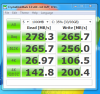
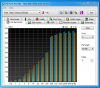
Single 100gb Vertex LE CDM benchmark 0xff file (easily compressable). Ordered a second LE to run in RAID 0, should be here by the middle of the week.
Attached Files:
-
-
There is the problem... a compressible file... incompressible files will be much slower.
The other thing... didn't a few LE Vertex drives fail when the owners let their laptop hibernate? Or was it random dying??
Yes I know I'm being mean... -
I have 2X256RAID0 in my M17X and use 64K stripes. I tried 128, 64 and 32.
I chose 64 because it was with this one I got the best performance across the board.
4K would really slows everything as there would be so many reads and writes from and to the INDEX that would just bottleneck everything. I don't think we can pinpoint a stripe size that would fit and fit the best for everyone with every rig, however, this is my experience so far.
Hope it helps ! -
unzipping already compressed files is slower and yes there were some compatability issues with drives dying on certain systems when resuming from sleep and hibernation but Sandforce has since corrected those issues with firmware upgrades.
As far as dealing with compressed data, I noticed yesterday when unzipping some 100+ mb files from Asus for my mobo that it seemed slow compared to my Intel and Samsung SSD's. Other than that, the drive seems quite fast -- just wouldn't recommend it to anyone who needs to transfer alot of compressed files regularly.
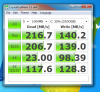
Heres a CDM with default random file selectedAttached Files:
-
-
The other thing is data security what happens if the controller dies? Is there a chance of data loss during compression... I'd not trust it...
But if you like it. Enjoy. -
Anyone with mission critical requirements would be a fool to trust any single drive including Intels and thank you, I am enjoying the drive.
-
Even as a regular consumer, you want a drive known for reliability and not all laptops have space for 2 drives.
External backup yes - you should do it, but then you still need the OS. -
If you are so genuinely concerned about reliability then you should be using a Samsung If you read customer reviews at online retailers you will find instances of dead Intel SSD's.
-
Dead on with this...Samsung has been the most reliable by far but we must also factor in the sales influx since the Intel has been released.
Intel has also gone the extra mile to ensure the drive was updated to a newer version as soon as they could include TRIM compatibility.
Having said that, if we go back far enough I was a huge anti-Intel ssd person at first only to end up with the Intel...
With respect to reliability amongst all ssds, Ide say that Intel and Sammy are the top two right now. -
I think the same as with Intel/Samsung/OCZ....
-
Well, the thing is, if the data isn't compressed you just need to pull it off the flash chips - same as you can pull data of the platters on a HDD.
If the data is compressed you need to know how to decompress it... -
Q: So how will You do it with uncompressed data?
A: By putting another controller.
Q: And how will You do it with compressed data?
Q: By putting another controller.
If another controller is able to fine data on SSD with uncompressed data (because of wear leveling, TRIM, GC...), then why You think another controller on SSD with compressed data con't do it?
I think that new controller just needs to know algorithm for compressing data and that wear leveling, TRIM... is more complex then compressing data. -
Thanks for the input. I was actually referring to a single drive and not to a RAID setup, so no stripe size here.
Windows by default for the NTFS format the disk with 4K cluster size and I was asking if people have tried a different size in order to achieve better performance.
For HDDs that would indeed give better results but I am not sure if there will be a significant gain with SSDs.
*EDIT*
These are the results from another thread and particularly from those posts 1 2
I am referring to them since I don't want to crosspost and I would rather continue the conversation here which seems to me as a better thead for this matter. -
My OCZ vertex 250 GB died the other day so now I'm going to send it back to OCZ as a RMA. I went ahead and put my 256 GB reliable Samsung drive back in and even though it not as fast as the OCZ, I would rather have a reliable drive than a faster one. This is the second OCZ that has failed on me.
-
I would like some news about how reliable the new WD SSD's are. Hard to tell if no one buys them
But if they did err on the side of reliability/compatibility, then maybe they are not so crazy after all. They have a pretty serious reputation to keep up with storage devices, especially as they sell at retail more than most. Dave -
This is weird. When using Winrar to unzip several large archives, my Crucial will "disconnect". I can refind it using Computer Management -> Disk Management, but three times already I've tried and the drive just suddenly drops from my internal SATA connection. Weird, huh.
-
Not a good sign. Please keep us updated.
-
Hmm. I recopied the series of rars from the source--my external--and unzipped them again. They ran through with no error whatsoever.
I also did two different rar groups, and they did it fine, too. -
Can anyone confirm or deny this?
thanks -
Trebor, yes they are. They're rebrands.
-
@ trebormint: When You go to Kingston site and click on "Tech Specs" tab for M Series SSD it opens this, so I would say they are the same
-
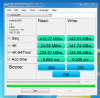
Got my second 100gb Vertex LE today and created an array.
Attached Files:
-
-
The least I can say, it's impressive
-
@ sgilmore62: Nice, nice!
Can't understand why 4K reads are that low, not just on Your drives. -
4k reads don't seem to scale with these drives in RAID 0 for some reason. I've seen a number of other 2x100gb LE's with similar benchmarks.
-
impressive! U need to update ur sig to show ur super config
-
The LE's are in my desktop sig, The Qosmio still has the 80gb Intel and 60gb Summit. Toshiba doesn't include RAID options in their BIOS.
-
@ sgilmore62: WOW, those are some very VERY impressive numbers.
-
Anyone with that much cash to blow on 100GB SSD's needs to find a new hobby
But, I digress. Great numbers, FWIW.
lol -
I have the Intel G2 160 running in my Hp Laptop. I've just bought a new Sony F11 and want to put the Intel SSD in my new laptop. Is it necessary to do a secure erase or will a format suffice? If I need to secure erase, can I put the ssd in an external inclosure and do it from there and if so how? I plan on doing a fresh install. Thank you for your help.
-
You don't even HAVE to do a secure erase but yes, a format will suffice.
-
Thank you for your reply. I kinda figured that but wanted to get a second opinion.
Regards
JJ -
Even 4 KB random writes are lower then for single drive, but what I meant was that new controllers have high 4K random writes and much lower reads.
-
Yes, I have noticed that in some areas the single drive is faster and that may get worse with the lack of TRIM in the RAID configuration. Those benchmarks were done without updating any drivers other than what came with Windows. I also did not use HDDErase on the original drive and that may be contributing to lesser benchmarks than what you see from other new 2x100gb Vertex LE setups.
Was going to use HDDerase on the older drive before installing RAID but the program said the drive was in a frozen status and I didn't want to screw around with unplugging and plugging signal cable to bypass it.
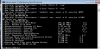
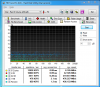
What I would do is plug the Intel G2 into the Sony as a spare if it has a second HDD slot then do a quick format and run the SSD toolbox on it. That should be as good as a secure erase if you verify with an HDTune graph that shows a straight line at original specifications. If it shows dips on the graph, there is still data on it.Attached Files:
-
-
Ok, think I got it straightened out now...
![[IMG]](images/storyImages/cdm.png)
-
And still low 4 KB random reads, that's what is strange to me, and I think that You can't do anything about it. Seen it on Intels too, single and in RAID arrays.
-
That is simply amazing! Would I like to play with that!
-
Looks like Anand is using Sandforce drives...
OCZ's Vertex 2, Special Sauce SF-1200 Reviewed - AnandTech :: Your Source for Hardware Analysis and News -
An interesting read....I was surprised as heck that the drive actually has 28% of the NAND allocated as reserve space vice 7-8% as expected. Do you think they wanted to ensure there was no problems with performance degradation as the ssd was close to full?
-
Hella overprovisioning was in the drives from the beginning with the 50gb's being 64gb actual, the 100's are 128gb and the 200's are 256mb. Sandforce is expecting to reduce the overprovisioning to 7-8% with improved firmwares to reduce costs.
-
Hey Les, congrats on setting up 35 people with SSD's WOW, what an accomplishment. I do not even KNOW 35 people, and I do not even know ONE who wants an SSD. I know lots of CHEAP people
PS I think mine is slowing down a bit, but cannot prove it. And I promised NO BENCHMARKS on this puppy. Just enjoyment! Oh well. -
Dude, that's sad.
I kid, I kid.
Do it. You know you want to.
But seriously, if you think you're losing performance, run a quick benchmark. If the numbers look normal, it's just you. If the numbers are off, optimize it. -
I managed to fix my vertex by flashing it back to version 1.10 than I flashed it to 1.50 so hopefully this fixed it. Anyway my Intel 160 GB comes in the mail tomorrow so I'll try that one out and decide if I want to keep my Vertex or not.
-
If I run an IOMeter 4k random read test I get better numbers. The CDM 4k random read data must be more difficult for the controllers to handle. Supposedly most typical OS and application 4k random read and write data is highly compressable so I think the IOMeter results may be more indicative than the CDM 4k random reads.
This IOMeter 4k random read result is not aligned on 4k boundries.
![[IMG]](images/storyImages/4kreads.png)
-
Got in a hurry to install to the new array didn't secure erase the original drive that had on OS on it -- just plugged in the new drive, setup the array and installed to it.
Went ahead and secure erased both drives and re-imaged the OS back on to the array and getting a little better results with as ssd bench.
![[IMG]](images/storyImages/84605980.png)
-
Would it hurt so much if I defrag SSD firts time round after fresh install of win7?
SSD Thread (Benchmarks, Brands, News, and Advice)
Discussion in 'Hardware Components and Aftermarket Upgrades' started by Greg, Oct 29, 2009.