 Problems? See this thread at archive.org.
The CPU load that RM Clock is measuring is not the same as the load that Task Manager reports so the two will not report the same thing, especially at idle. When Core 2 CPUs are idle, cores start to go to sleep and their internal timers stop so this number does not represent the load that task manager shows. There's no fix for this.
You actually want this number to go higher at idle. I think this shows that your CPU is spending a bigger percentage of time in the deeper sleep states and the cores are going to sleep which is a good thing for reduced power consumption.
Edit: I think the OS Load number in RM Clock is the same number that the Task Manager reports. RMC only shows one core at a time though so that might be a little misleading at times.
-
-
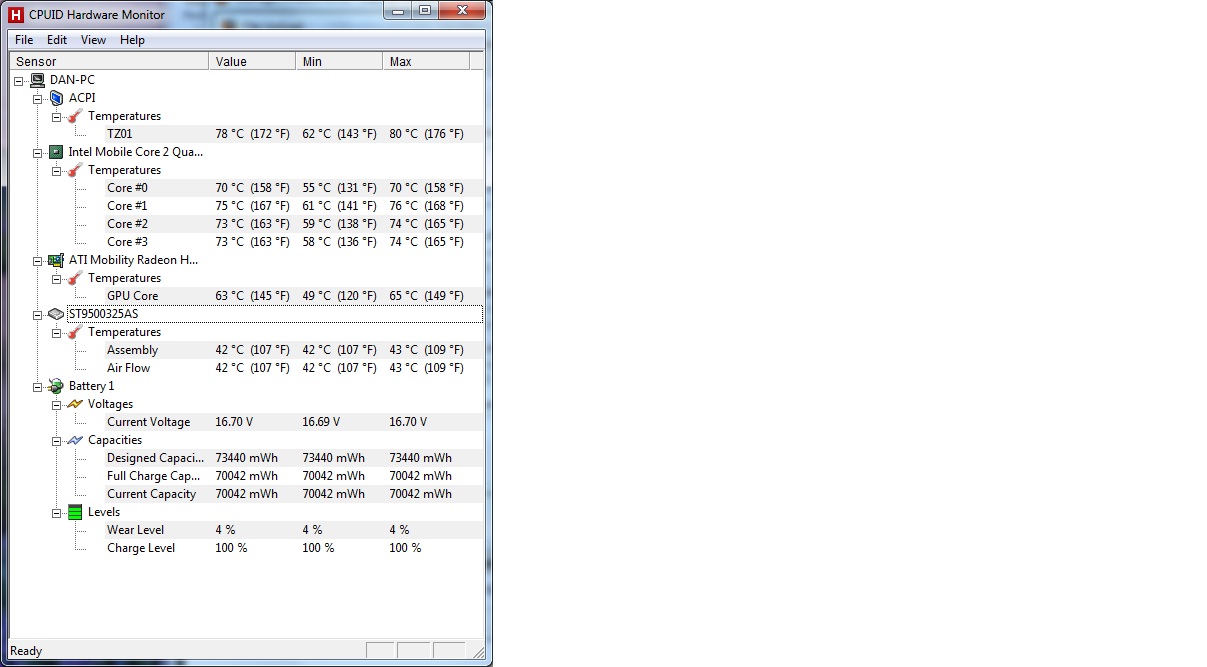
After making changes to HWMonitor setup file, now temp are close to RMclock temps(off by 5c). Idle temps are dropped below 40c on HWMonitor.
Do i need to select Mobile radio button in RMClock as mentioned by OP to get the correct values. Uploading screen shot for workload difference.
http://i814.photobucket.com/albums/zz63/ritholtz/dv6-1353cl/RMclock-TaskMgr.jpg -
In the old days, TJMax was believed to be either 85C or 100C. It looks like RMClock is using 85C for your CPU which is 5C less than Intel recommends and results in your CPU core temperatures being reported 5C less. Most programs let you set TJMax manually these days but that's a newer feature and might not be possible in RMClock.
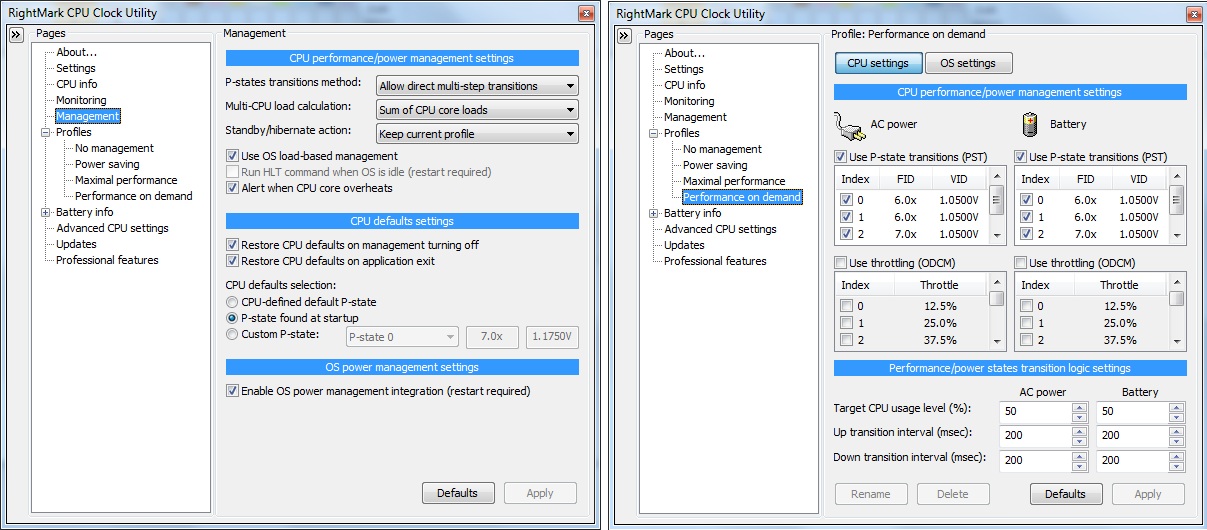
You need to select mobile CPU so RM Clock can use the correct formula for converting VID to voltage.
The CPU load can change very rapidly so at idle it's not uncommon for two different programs to report slightly different numbers. I checked the OS load in RM Clock today and it looked very close with the task manager when I was locking the load to a single core. If you don't do that the load will be bouncing back and forth between cores very rapidly and two different programs will never agree.
Your screen shot of RMClock is showing the results for Core 0 so you can't compare that to Task Manager which is showing the load for both cores combined. The Task Manager is not 100% accurate so keep that in mind too when comparing. -
To make my CPU enter one of the sleep states (C-states?) should i tick "C States"?
-
Hi, I'm back again. After weeks of using this I have reinstalled Windows (not because of this I might add!).
The problem is I keep getting BSOD when I go back to my original settings. Nothing has changed, every program I had installed is back on my XPS so I can't understand why this is happening?
Can anyone shed some light on this? -
Ok im a complete newbie when it comes to overclock/undervolting....
anyways i followed the guide to undervolting my 6920g, and my voltages dont change when i do the stress test after lowering my max multiplier voltage (10x)....
i duno what im doing wrong xD
another thing....
after i stop the stress test (ORTHOS) the clocks and voltages are still at maximum for over 5 mins. Temperature of CPU drops (to like... 0 degrees lol)
but voltages stay at maximum (~1.375v) for a while....is it supposed to be like that? or something wrong here....
Cheers -
It usually doesn't matter but whether you should have this enabled or disabled depends on the motherboard and CPU you are using. It's easy to toggle this and see if it makes any difference. It's an adjustment that some CPUs will ignore.
BSODs can happen for a variety of reasons. If your CPU is not stable at default settings then I would suggest doing some testing with Prime95, LinX and perhaps MemTest86+. Many random BSOD issues are caused by memory that is failing.
kickazgi: You need to be more thorough with the information you're providing. Post some screen shots of how you have RM Clock set up if you are using that program. Tell us what CPU you are using too and what operating system and anything else you can think of. It's impossible to solve a problem when readers have to guess what you are doing wrong. Make sure you have thoroughly read the first post. -
Processor still runs at base multiplier (6x) all along. Looks like task manager showing the correct values.
-
My Bad
CPU: Intel Core 2 Duo T8100 (2.1ghz, 800mhz FSB, 3MB L2 cache)
RAM:4gb
GPU: NVIDIA Geforce 9500M GS
OS: Win 7 Ultimate 64x
Anyways...
i tried it again this morning... and it seemed like if worked!! how random coz all i did was change the values in the profile tab
However... i have attached screenshots, and my CPU temp looks freakishly low. Is my CPU throttling? Throttling clock and CPU load values arent at 100% coz it was last night when i first tried it, but now its 95%
Sorry if i missed anything out.
CheersAttached Files:
-
-
Some of the sensors that Intel uses on their 45nm CPUs like your T8100 are not very good at reporting accurate temperatures, especially when lightly loaded or when idle. RM Clock by default uses a value of TJMax=100 so it will report your core temperatures 5C lower because the actual TJMax for a T8100 is 105C.
Keep in mind that these sensors were only designed to be used for thermal throttling and thermal shutdown control. For those two purposes they usually work fine.
RM Clock does not correctly support 45nm CPUs that use 0.5 multipliers like your T8100 has. This can result in weird things being reported like the 95% numbers that you're talking about. 10.0/10.5 exactly equals the 95.24% number that you are seeing. RM Clock not being able to read the multipliers correctly screws things up.
Why are you not using IDA mode? You are losing performance when you don't use the IDA multiplier. RM Clock does not correctly report IDA mode in its graphs so you don't realize what you're missing out on.
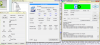
Luckily I also have a T8100 and here's an example of what ThrottleStop lets you do.
![[IMG]](images/storyImages/t8100example.th.png)
With both cores fully loaded running Prime95, this exact same CPU runs significantly faster with the help of ThrottleStop while needing less voltage than you're using. 2300 MHz on both cores vs 2000 MHz is a free 15% boost in performance while only needing 1.050 volts. You can't do that in RM Clock no matter how you have it set up.
-
mmm....
how does it get up to IDA multiplier?
i ticked the box but when i run Orthos it still only goes up to 10x....
I have throttlestop also... but havent been using it (well.. havent got around to using it "yet") -
The Dual IDA trick is a ThrottleStop feature that works on many Dell laptops and a few others. You can read about it here.
http://forum.notebookreview.com/win...cceleration-ida-both-cores-core-2-duo-12.html
Here's the correct way to fix RM Clock so it better supports your half multipliers. The example uses my T8100 so it should be easy to figure out.
http://forum.notebookreview.com/6130270-post4855.html
After the fix you can run ThrottleStop in monitoring mode and then run a single thread of Prime95 and go into the task manager and use the Set Affinity... option to lock Prime95 to a single core. It will be very easy to see the increased multiplier on the core doing the work while the second core is mostly asleep. That's how IDA is designed to work. The graphs in RM Clock are not accurate at reporting this. -
lol looks like i cant activate the IDA on my laptop...
since stupid Acer locked it from the bios menu...
i looked around and i dont think there are other ways of disabling EIST on the 6920g... -
You can still use regular IDA, just not Dual IDA. That's better than nothing.
You should still edit the registry to get RM Clock to use the 10.5 HFM multiplier and the 11.5 IDA multiplier. A lot of apps don't fully utilize both cores at the same time so you will get the 11.5 multiplier quite often. -
Ohhhh
xD ok i see.. i can get the 10.5 Multiplier but i cant get it to run at 11.5x...
do i need to tweak some registry settings before so?
because when i tick the IDA boxes in RMClock it still only goes to 10.x (or 10.5) and if i use Throttlestop and tick the "set Multiplier" box it still only goes to 10x.... -
Hey guys, so some others on the forum told me that I can use a program called throttlestop to enable an IDA multiplier?
I have a few questions
1) Do I have the IDA multiplier, because I have never seen it
I have a P8400
2)I used the reg hack and have the highest RMClock multiplier at 9 so my CPU runs at 8.5x
Can I still use RMClock and have it run at 9
That would mean my CPU runs at 2.4GHz
Also, how would I go about doing this
Thanks -
i have an AMD sempron and it's not support by neither rmclock nor throttlestop, what can i do? it keeps throttling.
-
kickazgi: If you have edited both values in the RMClock registry then your CPU should be using the IDA multiplier. The only problem is that RM Clock does not accurately report when IDA mode is being used. IDA mode can only be used when one core is awake and the other core is in the C3/C6 sleep state. If you are testing with two threads of Prime95 or similar then you will not get any Intel Dynamic Acceleration (IDA). Both cores will be awake 100% of the time so both cores will be locked at the default multiplier which is 10.5 for the T8100.
To test if IDA mode is working correctly, run ThrottleStop in monitoring mode. Run a single thread of Prime95 and then go into the task manager and use Set Affinity to lock Prime95 to a single core. ThrottleStop should clearly report one core mostly using the 11.5 multiplier while the other core is mostly asleep and is mostly using the 10.5 multiplier. RM Clock isn't very good at showing this. You can also run two instances of CPU-Z and set each instance to monitor a different core. It should be able to show you if IDA is working correctly.
You will never get the full 11.5 multiplier for an entire one second sampling period so the average might be 11.40 or so if not too much background activity is waking up the second core. As soon as it wakes up, the multiplier for both cores drops down to 10.5. When the second core goes back to sleep, the first core can resume using the 11.5 multiplier.
RaYYaN: Same as above. If you have modified the RM Clock registry then you an continue to use that program and IDA mode should work fine. Your laptop does not support Dual IDA to the best of my knowledge. All you need to do is monitor with ThrottleStop. I'll try to post a pic or two in a moment from my laptop to show this.
Sir Punk: If you have a laptop that keeps throttling and it is not supported then all you can do is take it back or sell it.
Edit: Here's my T8100 running a single thread of Prime95 with it locked to core 0. By looking at the average multiplier in ThrottleStop, itt is very easy to see that the CPU is using the IDA multiplier the majority of the time while core 1 is mostly asleep and using the default 10.5 multiplier.
![[IMG]](images/storyImages/ida1.th.png)
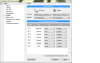
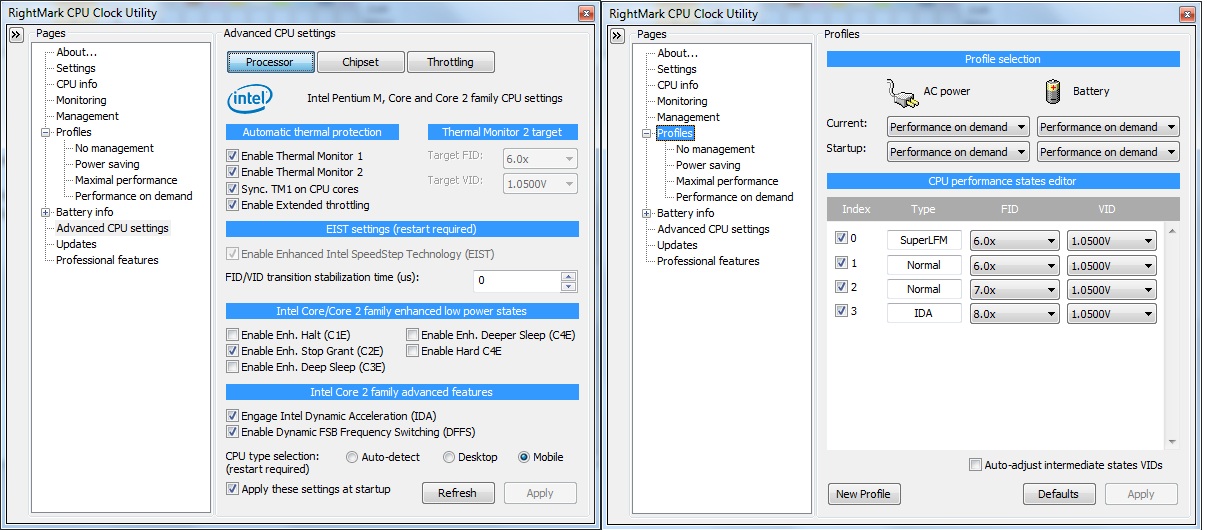
Here is how I have RM Clock set up.
![[IMG]](images/storyImages/t8100rmc.th.png)
When the RM Clock registry is correctly modified, this screen in RMC should look kind of weird.
4A is the value that should be entered in the registry for the 10.5 HFM multiplier and 4B is used for the 11.5 multiplier.
The 4 is code that the Intel CPU understands and it means to use the 0.5 half multiplier. A in hex is 10 so when you combine them you get the 10.5 multiplier and B hex converted to decimal is 11 so you get the 11.5 multiplier. If RM Clock does not show that for your T8100 then you don't have the registry edited correctly.
To get the 8.5 multiplier you should be using 48 in the registry.
RMC will show the 10.5 multiplier in the FID column as 74. This is because 4A hex does not get interpreted properly because RMC does not correctly support half multipliers. 4A hex is 74 decimal and 4B hex for the 11.5 multiplier is 75 decimal so that's why RMC looks a little funny.
The graphs in RM Clock show a lot of errors when using 0.5 multipliers. The CPU core clock and throttle numbers are not very accurate, the 108% CPU load is definitely not accurate, the 10.0 FID info is not accurate and the reported core temperature is not accurate because it uses the wrong TJMax value for this CPU. Other than that, I guess it's all good. -
I think I set my RMClock up differently to you. I did it a while ago so I don't remember exactly what I did.
Basically, I have a 9x multiplier which locks the core to 8.5x when under load.
Also, I don't see IDA there, but I did see it once when one core was at 94C and the other at 45C
Any ideas where I should go from here?
Sorry, this isn't my strong point
![[IMG]](images/storyImages/pstatesdata.png)
![[IMG]](images/storyImages/rmclock.jpg)
-
Just run the test that I did on the previous page. Run a single thread of Prime95, use the Task Manager -> Set Affinity... to lock Prime95 to a single core and then run ThrottleStop in monitoring mode. It should clearly show one core using the default multiplier while the second core should be using the IDA multiplier.
The way you have RM Clock setup might not be 100% correct but as long as it works and does what you want it to do and as long as it uses your IDA multiplier during that test then it really doesn't matter how it's setup.
If one core reported 94C and the other core reported 45C then I'm about 99.9% sure that was monitoring error. These 2 cores are about 1 cm apart. When one core gets that hot, it automatically transfers heat to the second core so they will both heat up. If the sensors are working correctly then the difference between cores is rarely more than 5C. Anything greater than that is usually sensor error.
If you ever want to start with a clean sheet of paper then there is a registry file called RMClock_WipeOut.reg in the RMClock folder. Stop RM Clock and run that file and it will clear out all your old RMClock settings that have been saved to the registry. When you restart RMClock it should find your SLFM and IDA multipliers. Then you can enter your voltages and do the proper half multiplier fix if you're interested in that. -
hello
I have underclocked my laptop for many months with no problem, but the latest weeks I experience BSOD with 0x0000000A errors (I think these are indicative of CPU problem)
how can this happen, since with the same undervolt settings I didn't get BSOD?
maybe because it's summer here and the temperature is high?
maybe because the fan got dust?
should I increase voltage?
any advice?
thanks -
Heat plays a big part in stability and CPUs don't always stay the same. The amount of voltage it takes to be stable one month might go up 6 months later. Memory issues are the biggest problem. Memory can slowly fail over time and start giving you random BSOD issues. You need to do some stress testing with Prime95 Small FFTs and the Blend option and maybe some MemTest86+ testing to see if your memory has any issues.
Do what you can to keep it cool. That always helps and yes, your CPUs voltage requirement might have gone up slightly over time. That's not unusual. -
to do these tests I need bootable CDs?
also, how can CPU need more voltage over time? does it get "old"? -
You can download Prime95 here:
Free Software - GIMPS
A bootable CD can be used for MemTest86+ or maybe a bootable memory stick. If you don't have one of these then run Prime95 Blend. It's a very good memory tester.
What sort of testing did you do when you originally decided on a core voltage? Maybe your original voltage was not enough.
Intel 45nm Core 2 CPUs can degrade over time and a little bit of extra voltage can make the difference between stable and not stable. Here's a very good article over at AnandTech that explains this.
Intel's 45nm Dual-Core E8500: The Best Just Got Better - AnandTech :: Your Source for Hardware Analysis and News
I've found that memory tends to degrade more often than Intel CPUs do. -
As you said, I ran a single thread of Prime95, with the affinity set to one core, but throttlestop still showed both cores at 8.5
Does this mean I have no IDA?
![[IMG]](images/storyImages/thrttle.jpg)
-
You have Disable Turbo checked which disables Intel Dynamic Acceleration (IDA). Some laptops and bios versions have this permanently disabled so you can't use this featue of your processor. That wouldn't be good.
If you can get that unchecked then the top core in your picture should be able to run at 9.0 most of the time. If you click on the Disable Turbo check mark and ThrottleStop does not let you uncheck this then your bios has locked you out of this feature or your CPU doesn't support it. A P8400 supports IDA so that would mean it must be your bios. -
Unfortunately I can't
Guess it means my BIOS has locked me out of my IDA mode
That's probably why it never showed up in RMClock ever
-
how much time do I need to run the test? does it test memory as well or only CPUs?
thanks -
I like the Prime95 Blend test or you can use the Custom test and get Prime95 to use up the majority of your memory so it will test both your CPU and memory at the same time.
If I was having random BSOD issues, I'd try to test for at least an hour. If you want a quicker test for stability the one I also use is LinX.
LinX - A simple Linpack interface - XtremeSystems Forums
It's a very demanding test, especially for laptops so keep an eye on your core temperature when you are running it. LinX runs the Intel Linpack test and it will create more heat than any other program. A stable, properly functioning computer should be able to run either of these tests without any errors. In LinX you can increase the amount of memory it uses which will create more heat and work more of your computer harder.
RaYYaN: Did you reboot and not run RM Clock at all when testing? The way RM Clock is set up, it could be the cause of IDA mode being blocked so I just wanted you to eliminate RMC as the possible cause for no IDA mode.
I'm assuming that you are running the latest bios for your laptop. IDA does not make a huge difference on a P8400 since it is only a multiplier boost of 0.5 but any boost is better than no boost. -
I am having issues with the fan running at a high RPM However, the temperature of the processors remain at around 36 degrees.
Could undervolting help and keep the fans running at a lower RPM?
I have a Sony computer. The BIOS is set up in a way that Speedstep is disabled. Is this ok? -
What CPU do you have? Is SpeedStep enabled and locked or is it completely disabled and what program is showing you that. The bios SpeedStep/EIST setting and what the CPU is actually doing are not always the same.
If SpeedStep is disabled then usually these CPUs get locked at the lowest multiplier which is 6.0 for most Core 2 CPUs. 36C is very cool. Run a load on your computer and see what CPU-Z or ThrottleStop is reporting. What voltage does CPU-Z show at idle and at full load?
If there is an issue with your bios then you might not be able to do anything by under volting your CPU. -
Dual Core E5300
When I go into the BIOS, there is no option to enable SpeedStep.
How do I "run a load"? (Is that taking a dump on my computer? I feel like doing that.)
I know. That is why I have no idea why the RPMS go all the way up to 3,800 on both fans.
http://forum.notebookreview.com/har...82-fan-sounds-like-commercial-jet-engine.html -
Hey all,
I'm new to undervolting, but I am happy to say that I was successfully able to shave several degrees off my laptop.
I have an HP DV7-2185dx, which has a quad core running at 2.0 GhZ. The cores used to get to around 76 once in a while... now, they don't even get to 70, and my idling temps jumped way way down as well.
Even movie-viewing would get my temps to about 72 - now, movie viewing maxes out at 60 but usually, it's even lower than that!
I have a question, though. My setup allows for a SuperLFM, 2 FID/VID settings, and an IDA.
I'm not interested in the SuperLFM or IDA. Both of my FID/VID settings are at the bare minimum - 6.0x @ 1.05V, and 7.0x @ 1.05V. The system is stable at this setting, but that is the floor setting.
I see that there is a "custom p-state" option, and I'm wondering, can I get these settings even lower? I know for sure I could get the 6.0x setting lower, because the 7.0x @ 1.05V is completely stable. But, by setting that custom P-state, is it worth experimenting to maybe shave another 0.1 volts or so off the 7.0x?
What's the worst that can happen? -
In RMClock go to the Advance CPU settings and Enable Dynamic FSB Frequency Switching (DFFS). Even if you don't intend to use that feature, you have to enable that to get access to the lowest SLFM voltages. You can then use those voltages with your higher multipliers.
I have no problem running the 6.0X and 7.0X multipliers with 0.9500 volts so I'm sure you'll have no problem too. What model number and stepping is your CPU? You might even be able to go lower than that reliably with one of the newer steppings. Post a CPU-Z screen shot if you want more info.
Edit: I had a look and found out that you probably have a Q9000 which is an E0 stepping. They tend to be very stable when running at low voltage. Why are you not interested in IDA mode? You get a 14% increase in CPU performance with an 8.0 multiplier compared to a 7.0. If you can keep the voltage down then the increase in heat or power consumption will be minimal for some free performance.
kevinla: The bios in your computer is either very poorly designed or has a big bug in it. The fan control is way too aggressive so without a bios fix or a third party program that can control your fan speed, there's not much you're going to be able to do. -
Thanks, this is great info!
When I get home from work, I'll do as you suggest and put DFFS mode on. You are correct, I do have the Q9000.
I should re-think the IDA issue. When I followed the guide, I noted that the author found that mode buggy with negligable effects, but maybe it has been improved upon since the guide was written. Also, the author was speaking of a dual-core setup, whereas the IDA may be a bit more beneficial in a quad setting...
I'm not quite sure how to test the voltage of the IDA, however. I'm using OCCT to test, because the recommended app (I'm sorry, I've forgotten the name), only tests on 2 of the cores... Anyway, it seems like when IDA is on, it doesn't actually test at that multiplier, but it maxes out all 4 cores at the 7.0x. Should I uncheck the 6x and 7x to force the IDA? I never did that, because I felt like it might be dangerous somehow to the hardware.
Thank you for the wealth of information on this forum! I can't wait to check the DFFS box and get some even lower temps for my base multipliers. -
The problem with IDA mode is that it is misunderstood. RM Clock and many other monitoring programs have never been able to report this accurately so users came to the conclusion that it was useless.
A Core 2 CPU is only designed to give you an IDA multiplier boost on one core if the second core is in the C3/C6 sleep state. On a Quad CPU, they call this Dual Dynamic Acceleration. A Quad CPU internally consists of two separate Dual Core CPUs so each one is capable of accelerating one core while the other core is asleep. This should give you two cores that can be using the IDA multiplier while the other two cores are asleep. Many tasks you run don't need more than 2 cores, the majority of the time, so it's worth turning this on as you will frequently be benefiting from IDA.
When all 4 cores are at full load, you don't get any boost from IDA so you will be running at the default multiplier on all cores.
I had a look for some Intel documentation last night but the Q9000 is missing so I don't know for sure what the IDA multiplier is. The Q9100 gets a multiplier boost of +1.0 but many other dual core CPUs only get a boost of 0.5. Your default multiplier is 7.5 so your IDA multiplier is either 8.0 or maybe 8.5. Try downloading ThrottleStop and see how high you can adjust the maximum multiplier. It should be either 8.0 or 8.5.
RM Clock does not support half multipliers so it won't report your CPU or IDA mode correctly.
I tried using RM Clock on my Quad core desktop CPU but found some major bugs. It was locking two of my cores at the minimum 6.0 multiplier even when fully loaded which killed performance and even after I exited RM Clock, it still left two cores locked at 6.0. If you want to test for this then you can either run ThrottleStop in monitoring mode or you can try running i7 Turbo GT which is another monitoring utility that can accurately monitor the multiplier on each core of your CPU. It works correctly on both Core 2 and the newer Core i CPUs.
i7 Turbo GT
Step 1 is make sure RM Clock works correctly on your Quad. No use wasting time setting it up if it has some bugs on your Quad. If it does work correctly then you can check off the 6, 7 and 8 IDA multiplier. Once you see what the maximum multiplier is for your CPU, I'll show you how to edit the registry if you need to. You can also change the default 7 multiplier up to the correct 7.5 multiplier with a simple RM Clock registry modification.
Edit: Here's a post I did about the RM Clock quad core bug that you need to test for.
http://forum.notebookreview.com/6255038-post868.html -
Wow, this is so helpful, and I can see that i have my work cut out for me.
Since it seems that ThrottleStop does support half-multipliers, am I correct in assuming that I can completely replace RMClock with Throttlestop for all of my undervolting needs?
Can I also replace my temp-monitoring software (which of course, I have forgotten the name of)? I can't use that software anyway when using OCCT.
And finally, one more question, if the answers to the above are "Yes", then where can I download ThrottleStop, and how much does it cost?
Thanks!
Dan -
ThrottleStop only lets you use the SLFM voltage when you are also using the SLFM multiplier. I plan to fix that in the near future but at the moment, you will need to use RM Clock to do that, as long as it works correctly with your quad without any issues.
ThrottleStop can also monitor your temps. I just added a feature last night so this will be easier to figure out but I haven't uploaded it yet. Download version 2.74 in my signature and to add temperature monitoring to ThrottleStop just add this to the ThrottleStop.ini configuration file:
TJMax=100
Version 2.75 will do this automatically for you but other than that, either version should work the same.
Almost forgot. ThrottleStop costs this much, $0.00. Can't beat that.
RM Clock gives you more control over your CPU but it has some issues that you will have to work around since it was programmed before the newer 45mm CPUs and their half multipliers existed. -
Perfect - thank you so much for your help. I now have an arsenal of information that I can't wait to apply
Dan -
Ok, so I do have just one more question it would seem.
I downloaded CPU-Z to check if my half-multipliers were indeed being used, and it turns out they are. While RMClock puts me at 7.0x, CPU-Z is showing a 7.5x at a true 2.0 GhZ.
EDIT: Okay, actually, I am still confused.. Because now I've seen my states at 6.0x, 7.0x, 7.5x, 8.0x, and 8.5x which seems impossible based on the loads I was giving it... plus, there are only 4 selectable values for multipliers, not 5. Very confusing as it turns out.
I think I may give up, and just be happy that I can run at 2.0 GhZ on a full load
But, my only question before giving up is this:
I am already running on DFFS, yet 1.05V is my lowest selectable values. I'm wondering, is it safe to throw a 0.95V into the custom p-state? (I am currently p-state on startup).
And I promise - that's my last question! And thank you so much for you help. I think in a week or two I may really dive in and wrack my brain around whats going on with these readings. -
Try that i7 Turbo GT program I posted or ThrottleStop. CPU-Z may be the industry standard but it can be misleading, especially at idle, when it comes to reporting the true multiplier your CPU is running at. Run a single thread of Prime95 for testing purposes and go into the Task Manager and use Set Affinity... to lock Prime95 to a single core. That makes it easier to see how the IDA multiplier is working. Post a screen shot of ThrottleStop or i7 Turbo so I can see what your CPU is really up to.
SLFM stands for Super Low Frequency Mode. At idle, your multiplier will stay the same at 6.0 but your bus speed will drop in half from 266 MHz down to 133 MHz so your CPU will be running half as fast. CPU-Z reports this differently.
Actual: 6.0 x 133 MHz
CPU-Z: 3.0 X 266 MHz
CPU-Z drops the multiplier in half. The 3 multiplier doesn't exist in the Core 2 design but as long as you understand what it is showing you then your fine. You end up at 798 MHz either way. You may or may not need this lower speed to use the lowest possible voltage.
For the Q9100, it shows that it supports voltages down to 0.8500 volts but your Q9000 might be different. The Intel docs show one CPU model but not the other. ThrottleStop and RM Clock should be able to show you what your CPU supports for the lower limit.
If you can, post a few screen shots of how you have RM Clock set up when you are done. That way it's easier to see what you're doing and what could use an adjustment. Just upload them to www.imageshack.us or similar.
Without editing the registry, I don't think RM Clock will let you use the full 8.5 IDA multiplier or the full 7.5 default multiplier. Run 4 threads of Prime95 and you will see your default multiplier.
I don't have any documentation for a Q9000 so I'm learning by helping you. I don't mind questions so ask away. -
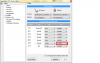
Here's an example of my T8100 doing some testing with the 9.0 multiplier while running Prime at 1800 MHz with 0.95 volts.
![[IMG]](images/storyImages/t8100rmc095.th.png)
Your quad would need to run at 7.0 x 266 = 1862 MHz. It might be OK at 0.9500 volts. When I'm using the default or IDA multiplier, I need some extra voltage to be stable. When you correctly modify the RM Clock registry, RMC will show the half multipliers kind of funny. You need to subtract 63.5 from those last two multipliers so 74.0 - 63.5 = 10.5 and 75.0 - 63.5 = 11.5
I believe RM Clock will need a similar tweak for your 7.5 and 8.5 multipliers to be used correctly. -
Okay, here are some shots... I should mention that the single-threaded test fluctuated quite a bit - I grabbed the highest frequency I could get.
Thanks for all of your help. I am sure my computer is running way more efficiently than it was before I did anything... and I'm learning so much about it. I have a degree in Physics, but didn't study computers too closely - not everything is over my head, but much of it is. So I definitely appreciate all your help.Attached Files:
-
-
Can you post a CPU-Z screen shot of your CPU? I don't think ThrottleStop is recognizing your CPU correctly as a mobile CPU that supports SLFM mode so I'd like to fix that.
Can you try the single thread of Prime95 test again and lock that to a single core. Just open up the task manager, find Prime95 in the Processes list, right click on it and select Set Affinity... and then uncheck 3 cores so it is only running on one core. If you do this, ThrottleStop should report the multiplier a lot more consistently because this task won't be bouncing back and forth between cores. The next test is to use Set Affinity again and move the Prime95 task to each of your 4 cores, one core at a time. Make sure the multiplier on the core you move it to increases properly. I don't think you have the RMC Quad bug that I mentioned earlier but this will help test for it.
Once you show me a CPU-Z screen shot I'll send you an updated version of ThrottleStop to make sure there aren't any lower voltages hiding in that CPU. Maybe 1.05 volts is as low as it can go. -
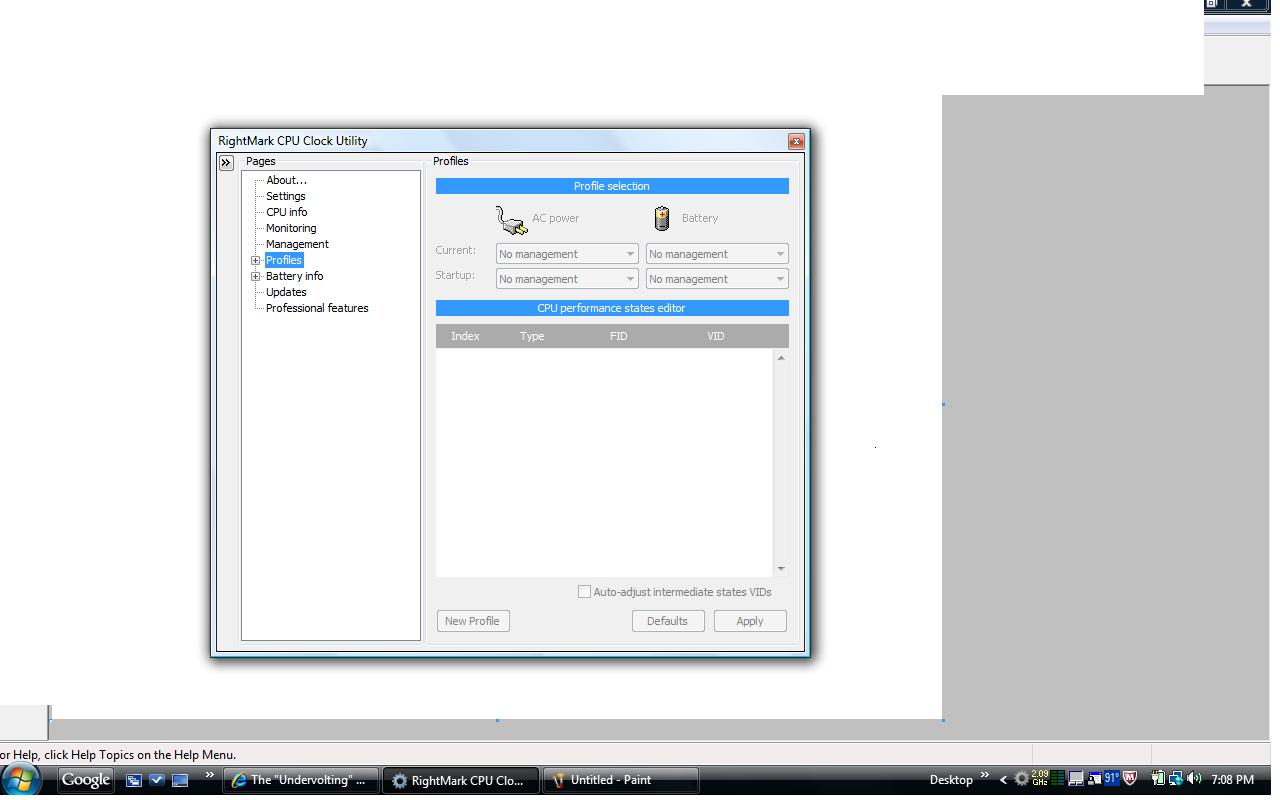
Running on 64 bit vista, dled rmclock and the driver but when i opened rmclock it didnt have either tab for advanced CPU settings or professionals sub tab for "performance on demand" any suggestions would be greatly appreciated, im using a hp's dv4 and my temps are at 105 celsius, i really think i'd benefit from undervolting. Thanks
-
KiloNimbus: What CPU do you have? RM Clock might not support your CPU. Post a CPU-Z screen shot.
-
Ok, Here is a shot of CPU-Z while running a single threaded process with affinity on Core #0. This data did skip around from 7.5x to 8.0x, so I grabbed the highest frequency screenshot I could grab.
Also, each of the Throttle screenshots for each affinity, about 10 seconds after setting it. I didn't re-run the test, just let it keep on going.
EDIT - Should I set my Target CPU use to something other than 50%?Attached Files:
-
-
Im working on a friends computer, so im not sure what exact model but its an Hp dv4, hopefully this helps...
Attached Files:
-
-
Just out of curiosity, 12 minutes into a full stress test on all 4 cores, are any of these temps anything to be concerned about? Usually, the highest I get temps to is 68 when I'm gaming. I've seen the GPU get to around 75 I think...
Attached Files:
-
-
DanSpree: Your testing shows that you are getting the 8.0 IDA multiplier. If you edit the registry for RMClock, you should be able to get your CPU to use the 8.5 multiplier.
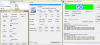
Here's what you need to do in the registry if you want to use the 8.5 IDA multiplier. Make sure RM Clock is not running when you edit this.
![[IMG]](images/storyImages/rmclock45nm.th.png)
Prime95 is a good stress test that works the cores harder than the vast majority of real world applications will ever run your CPU. Your temperatures are fine when running this and will be even better when gaming. CPU's are quite happy up to 100C to 105C so no worries. The Intel shut down temperature is typically 125C to 130C so you have lots of room.
If you're not sure what needs to be changed in the PStates value then post a screen shot of what the registry shows for that. There will be a value of 08 that you will have to change to 48. This data is organized in here in groups of 4 so the first digit in the last group of 4 should contain the 08 that needs to be changed. By changing that to a 4, that tells the CPU to use the half multiplier on top of the 8 multiplier for a total of 8.5. Your single thread of Prime95 testing should show an improvement. An 8.5 multiplier instead of the 7.0 multiplier is a 21% improvement in performance. That's not bad for a day of work.
KiloNimbus: Download CPU-Z and run that. Your screen shot doesn't show me any information about the CPU in that computer.
The "Undervolting" Guide
Discussion in 'Hardware Components and Aftermarket Upgrades' started by flipfire, Apr 1, 2008.


![[IMG]](http://img46.imageshack.us/i/t8100example.png/)


![[IMG]](http://img190.imageshack.us/i/ida1.png/)
![[IMG]](http://img801.imageshack.us/i/t8100rmc.png/)


![[IMG]](http://img202.imageshack.us/i/t8100rmc095.png/)

![[IMG]](http://img36.imageshack.us/i/rmclock45nm.png/)