Problems? See this thread at archive.org.
Very nice!! Thank you!
I set it to 48, and it's showing me 72x - since 48 is hex for 72, I know this seems correct.
Doing a Prime single-core test, I'm running around 8.40x - 8.45x or so, and in this mode I'm getting 2240 MhZ.
This is where RMClock breaks down. My cPU is at 111% load! But I know all is good from the Throttlestop window.
In RMClock, I set the voltage for IDA at 1.075, just to be safe... Since this is pretty much untested. I may run the single-core test at 1.05 for an hour or so, just to see how it does.
I really can't thank you enough!
-
I just uploaded ThrottleStop 2.75 so hopefully that correctly recognizes your Q9000 as a mobile CPU so the VID voltage will work correctly. Is the minimum the ThrottleStop VID adjuster can go only 1.05 volts?
When using half multipliers, RMClock gets a little confused. You can trust the multiplier that ThrottleStop is showing you.
You will never get the full 8.5 multiplier because there are always some background tasks that need to be processed. As soon as a task wakes up the second core, the maximum multiplier drops down to 7.5 for both cores on the same die. When the task is finished, that core goes back to sleep and the multiplier goes back up to 8.5. This happens hundreds of times a second. There are two dual core dies within your quad. That's why the average multiplier is reported slightly less than the full 8.5.
Another interesting test would be to run two threads of Prime95. You could then do the same with SetAffinity... and lock them to different sets of cores. That might be interesting. If you did it right, you should be able to see Dual Dynamic Acceleration in action with two cores close to 8.5. If you put both tasks on the same die, the multiplier should be at only 7.5. Hopefully the OS and CPU are smart enough to schedule tasks appropriately to maximize performance.
Thanks for your feedback. I finally had the chance to learn about the Q9000. The Intel docs and the internet are short on information about this CPU. -
yes. for quad cores the minimun voltage is 1.05 volts, i don't know if there is a way to undervolt to 0.95v
-
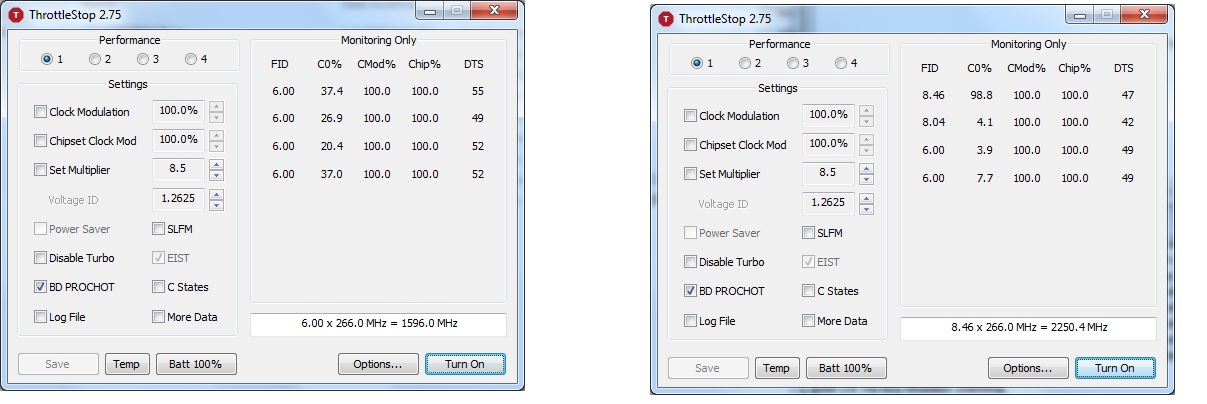
It is showing a different voltage, and I think a couple checkboxes that were selectable before are now not... so it appears to have recognized something - Here are the screenshots (1st on Idle, 2nd at single-core test on Core-0.)
Attached Files:
-
-
Ah, thanks. Well, I'm satisfied. All this work has paid off completely.
-
The voltage formula is different for Core 2 mobile CPUs and the SLFM box is now unlocked in version 2.75 like I think it should be. When your CPU is idle, does having SLFM checked drop the bus speed or total MHz?
Is the lowest voltage 1.05 volts in ThrottleStop 2.75 now? That info is being read from the CPU so if that's as low as it goes then that's as low as it goes. There won't be any software that can make it go lower than that minimum.
Almost forgot. The new Temp button should convert the DTS data column to the core temperature. -
Hmmm, no... Is Voltage ID what I'm looking at? It's 1.2625 regardless of if SLFM is checked or not (even after hitting "Save"). Could this be a problem with RMClock? Maybe your voltage is correct, and RMClock failed somehow?
On a side-note, now that I know about the task-manager way to have a program use a certain core, would it actually improve performance to force a game onto one of the back-end cores? Or movies that are sometimes choppy, if I can put it on Core 2 or Core 3, I wonder if it would force an IDA state.
I bet the CPU does that anyway, but next time I have a choppy movie I'm going to try that out. -
Wait a sec, I see what you mean - Bus speed... Using OCCT, on idle, my bus speed is 266. It stays at that value during Idle when I check SLFM
-
With the adjuster in ThrottleStop, you should be able to adjust the VID voltage up and down. Just click on those little up and down arrows to the right of the 1.2625 number to play with it and to see how low it goes.
Do some Prime95 testing where you start two threads of Prime95 and then lock it to any two cores. You should see what two cores is going to end up with the highest multiplier. You could try running a game locked to those two cores then but it might not get you any significant difference.
To test SLFM you would need to turn off RM Clock and then you would need to turn on ThrottleStop with the Turn On button so it shows that it is enabled. You would also have to check the Set Multiplier box and the Power Saver box. With your CPU idle, that will show if the bus speed drops down or not. I'm going to check the Q9100 docs to see if this is supported.
Edit: Now it makes sense. The Q9100 does not support SLFM mode so that also explains why the lowest voltage is probably 1.05 volts. The lower voltages like 0.85 volts and 0.95 volts were only used on CPUs that support SLFM. -
EDIT -
Okay - so I performed those tasks - I turned off RMClock, Turned on ThrottleStop, Checked the Set Multiplier and brought everything down to min (6.0x @ 1.05 V). Bus speed remained a constant 266 MhZ throughout, regardless of the SLFM checkbox, so it may not be supported, or I might be doing something incorrectly. -
I found that when a CPU is idle, it mostly ignores the FID/VID settings in RM Clock or ThrottleStop and uses some lower values that neither program can control. At idle you will be able to see if this is true. I found when my T8100 was idle, I could have the FID/VID at their highest values or their lowest values and it didn't make 1 watt difference to power consumption and idle temperatures were identical. It will be interesting to see if it makes any difference for you. At full load, dropping the voltage makes a huge difference but not so much at idle with the 45nm CPUs.
ThrottleStop is too simple. To use it all you need to do is click on the Turn On button, put a check mark in the Set Multiplier box and adjust that to 8.5, set your VID voltage to 1.0500 and you're done. You can click on the Power Saver box for a lower multiplier at idle but I've measured and didn't see any significant savings by doing that.
You've got RM Clock correctly set up now so you can stick with that. ThrottleStop is for people that are scared of editing the registry. Try doing an idle temperature test someday with Power Saver off and then with it On. Probably no significant difference at idle. -
In all honesty, I do love the nuts and bolts even if I do have to stumble through them the first time. Without your help, I would be shorting myself 133 MhZ of speed, and wouldn't have a clue about how any of it works at all.
But ThrottleStop is awesome. Simple is good. And I definitely will be using it any time I want to check my values, and I may even start using that instead after a bit more testing.
I have a Watt meter at work that I'm going to bring home tomorrow, and do some more testing. If the math works out that I'm only saving 2 minutes of battery life with RMClock, I'd rather use the simple route.
Thanks again -
I like RM Clock and still recommend it for users as long as they are willing to get their hands a little dirty and get it set up correctly. After doing some power consumption testing with a Kill-a-Watt meter, I found out that the extra complexity wasn't needed anymore with the newer 45nm CPUs. They work quite differently at idle compared to the original 65nm Core 2 CPUs.
![[IMG]](images/storyImages/lowfidvid.th.png)
![[IMG]](images/storyImages/highfidvid.th.png)
The graphs show power consumption in watts DC and the average difference was well within the margin of error.
The Kill-a-Watt showed no measurable difference between these two totally different settings and the Performance Monitor confirmed that at idle, there isn't any significant difference. I'm pretty sure most of these CPUs automatically enter the C3/C4 power saving state regardless of any of your settings so the actual VID voltage is lower than what you can set with RMC or TS. I'm looking forward to your results. Time for a break. It was a good session today. We both learned a lot.
Edit: The Intel docs for the similar Q9100 shows this for voltage when in the C4 sleep state.
VID=0.65-0.85[C4] -
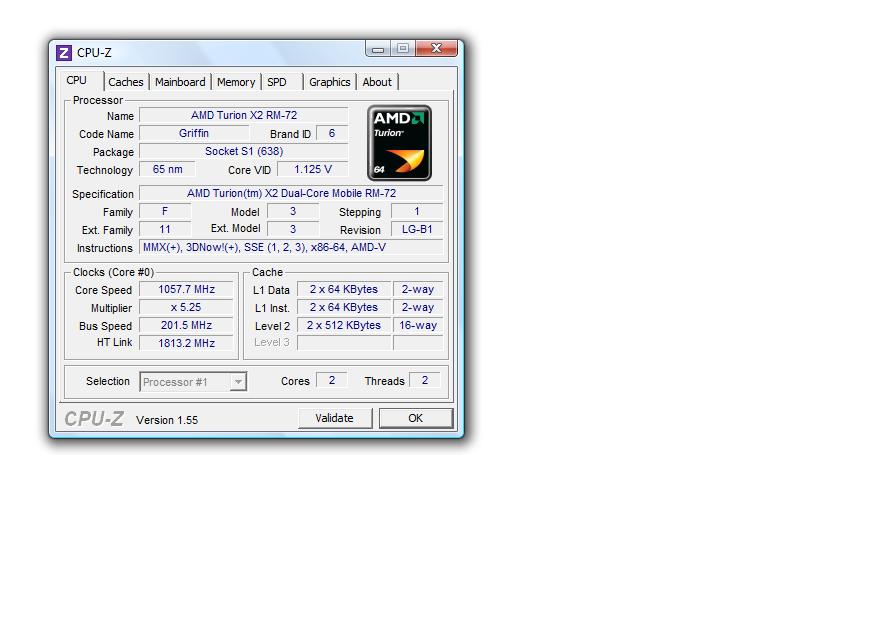
hopefully this will help you, tell me if you need more information besides the cpu from cpu-z
Attached Files:
-
-
The first time I undervolted my T9600 with RMClock, I was able to get the voltage below 1.0 v (from 1.15 stock to 0.975). Now I can't get it below 1.0 v.
Does anyone know why I was able to get it below 1.0v the first time, and now I can't? -
Maybe you could try ThrottleStop without RMClock running, and see what it recognizes as your voltages... I'm pretty new at all of this, but ThrottleStop is a bit easier to learn. You just hit Turn On, hit "Select Multiplier", then you can lower the voltage and raise the multiplier, and that's your undervolt and performance.
For me, both TS and RM have the same range of voltages. At least then, you can determine if it's your computer or the app.
I am having a new problem with RMClock, where when it boots, my options aren't saved. My IDA and SLFM are both clicked off, and the voltage on my IDA is incorrect. So I manually have to click them on, go to the profile page and click them on there too, then lower the voltage on the IDA.
Not sure what happened there, i haven't really messed with it since I got the thing working... it's a minor hassle. Once my computer is on, it stays on for about 10 hours, so I really only have to do it once an afternoon. Any thoughts on that? -
ok trying to read all 500+ pages of info here!! lol sooo much to lean and I want to thank you all. But I have some issues with my two computers. Asus G72Gx, and an Asus ux50v.
The 72 i can get down stable to 1.050, on both 6.0x, and 7.0x those are the only options and that is the lowest voltage setting. I cant seem to have otheros tax more than just 2 cores at a time.....
Now the 50v I have tons of power setting as options (down to.650) Again only for 6.0x, and 7.0x...... Now the odd part neither of these will go below .900 even if I select a lower option in the drop down tab and apply it, but they run VERY stable at .900 was 1.123 This comp wa always cool but now it is soooo cool no heat detectable on the bottom AT ALL!!! Even in front of the exhaust vent you only feel slightly warm air!!!
I LOVE THIS GUYS !!KUDOS!! to all who have shared! -
Yeah, I agree. This forum has helped me so much, especially UncleWebb - saved me a 133 MhZ loss I was getting before from my previous settings.
In terms of testing, though, I used to use Orthos but I had that same problem. Prime95 lets you do as many cores as you want... but you have to fiddle in the task manager if you want to test a single core. I'd say drop Orthos, go for Prime, then at least you can tax all your cores at once.
Those are some great voltages! My minimum is 1.05, unfortunately. I think the CPU could handle a lower voltage, but it's way better than the 1.3 or so it was set at in the beginning! -
Thanks for the superb ThrottleStop, unclewebb! It was the only program that allowed me to undervolt the SU7300 CPU in my ASUS UL30vt.
There is one feature I would really like to see added to ThrottleStop, and I suppose this is not any difficult to implement.
For each profile I would like to see the fields:
Run (the following program) BEFORE setting profile
(And a ticker for) Wait for process to terminate before setting profile.
and
Run (the following program) AFTER setting profile
The commands would be started whenever the user invokes a profile change or when they are changed in response to an event.
I would also like the ability to select profiles from command line:
-p1-4 for profiles, -pd for default profile (depends on AC, battery, or temp), -off to turn off ThrottleStop actions.
Thank you again very much for your hard work! -
Thanks for some great ideas ZORAX. Unfortunately, I don't think I'll have any time in the near future to add more features and work on ThrottleStop.
KiloNimbus: RM Clock development ended over 2 years ago and I don't think it supports the AMD Turion RM-72.
ic33y: CPUs can degrade a little over time, especially the 45nm Core 2 CPUs. It's not unusual that you will need slightly more voltage to be 100% stable over time. Something as simple as an increase in your room temperature can change the stability of a CPU. A setting that works great in the middle of winter might not be stable during a hot summer day. -
I just want to thank unclewebb for the neat little program. I used to work with RMClock until I upgraded to Windows 7 64-bit just recently in which I discovered that it no longer works properly with it and then I found this program here in this thread. After some playing around, I have to say that I've never seen my M1530 works at such a low temperature before.
![[IMG]](images/storyImages/tempfd.png)
Thanks once again.
-
RMClock doesn't seem to be working..
-
Throttlestop is telling me that my CPU isn't supported.
..Any other undervolting programs? -
Bump.
I seriously need to undervolt here. RMClock doesn't work on 64bit windows 7, and ThrottleStop doesn't support my CPU. -
RM Clock works in Windows 7 x64 as long as you use a signed driver.
Head to the bottom of the first post in this thread and download the 64 bit driver. RM Clock might not support your CPU either but at least it should start up with this driver. Post what CPU model you have.
Izlude99: If you would like ThrottleStop to monitor and log your Nvidia GPU temperature just add this to the ThrottleStop.ini configuration file:
GPU=1
ATI users can try
GPU=2 -
I'm using an AMD Turion II Dual-Core Mobile Processor P520. Performance on demand and advance settings aren't showing up..
-
Okay, no management with RMClock, and throttlestop doesn't recognize my CPU.
Am I out of luck here? -
ThrottleStop is Intel only and RM Clock is not being updated. I don't know of any programs that support your CPU but if I ever find one, I'll post it here and send you a PM.
-
Thanks for offering help, but I found something to undervolt AMD CPUs.
Undervolting AMD laptops (Turion + Athlon X2) & overclocking w/ CnQ - Hardware Canucks -
Thanks for writing throttlestop, unclewebb. RMclock simply would not work with my laptop in windows 7. Thank you.
-
Alright, my load dropped from 73C to 68C. Idle is now 53-55C.
Can anyone verify if this is a good range or not? -
Already did that, thanks.
I have just one thing to ask, is it necessary to drop the numbers in the Set Multiplier lower? I understand this will lower the performance? -
I just hit 48C at idle, and am still there.
Looks like it took a while for the undervolting to kick in. I hit 59C in gamin, instead of my normal 65C+
I love this thread. -
I'm at 41C, and I've been there for 20min+
But that's on my lap -
I LOVE this thread I would like to Give a huge Thanks to Flipfire and uncle web
and also many of the other posters here. I was able to successfully undervolt (accidently wrote underclock) both my G72Gx and my Ux50v, with excellent results! both are running cooler (besides my heatsink issue on my gtx 260m card) I seriously recommend Throttlestop to less experienced users because of its overall simplicity!
Thanks to all!
thomas -
I'm not sure what you are trying to do. If you are creating a special low MHz profile you could decrease the number in the Set Multiplier box but other than that, there is no reason to do this. Usually you set that to the maximum supported value that it allows. If you want a lower multiplier at idle just use the Power Saver option.
My goal for ThrottleStop was to be a very simplified version of RM Clock made for people that don't have all day or the knowledge to set RM Clock up and to support the newer Intel CPUs that RMC doesn't fully support. Some users like the fine control that RM Clock offers and other users like myself have found that with the newer 45nm CPUs, you really don't have to get too technical with them to decrease the maximum core temperature. Adjusting the maximum voltage is enough to take care of the majority of the heat problems. Glad to hear that you guys that have given it a try are getting good results from it. -
Ok havent been here in a long time...
laptop went haywire but its fine now...
anyways.. I was doing a single thread stress test with prime95 while i took this screenshot...
Im confused for what to put for the PstateData values to make it into 10.5x...
i changed it before.. to 0A 25 but it didnt work lol so i changed it back and screenshot it...Attached Files:
-
-
So I've been trying to undervolt my P7550 unsuccessfully.
It seems with mobile on RMClock the lowest that shows up is 1.000 VID.
Also when using ThrottleStop, it shows the lowest at 0.875. It I set it at that, CPU-Z 1.55 shows that it is still 1.000 VID.
Am I just locked out of lower voltages or is there anything I can do? Going down only .0625 VID sucks. -
Again, I can't thank this thread enough with my results. I've managed to go down even further, and ran ORTHOS for on hour straight.
![[IMG]](images/storyImages/2e2drus.png)
Edit:The 63C was during gaming, Garry's Mod. -
The more I read about ThrottleStop, the more I get Intel envy.
-
TisIte: Did you try checking the SLFM box in ThrottleStop? You have to enable that or Dynamic FSB Frequency Switching in RM Clock so the CPU can access the lower voltages. When you do that, the lower voltages should appear in CPU-Z. If you still can't get below 1.00 volts then I'll have to assume that your CPU or motherboard doesn't support this feature.
The Intel publicly available documentation for some of the newer Core 2 mobile CPUs is non-existent. They stopped releasing an updated list so the only info I have is from April 2009. That shows the P7350 and P7450 but not your P7550. For those other two, SLFM voltage is listed as 0.75 - 0.95 so I'm pretty sure your CPU supports this lower voltage when TS or RMC are setup correctly.
kickazgi: In an Intel CPU, 0A stands for the 10 multiplier and 0B is the 11 multiplier. To convert those to 10.5 and 11.5 you need to change the 0 to a 4 so it would become 4A and 4B. You need to edit both the default multiplier and the IDA multiplier in the registry so they both work correctly. Do this while RM Clock isn't running. -
It just seems weird. The day I got it, I was able to lower it until I got to 0.975 in RMC. Then the next day I couldn't get it below 1.000 =(. It's not a huge deal, since 0.150v drop is pretty significant already.
I'm using TS right now and it's so much easier to use than RMC, but I may give RMC another shot since I don't think I edited the registry correctly to get the half multiplier. -
Hey thanks!
It works and shows that voltage in CPU-Z now.
But actually since I first started trying to undervolt, for RMClock the options for IDA and DFFS are grayed out for me. Any clue why?
Also for the intel page, there is this -
Does the multiplier adjuster go higher than 8.5 for your P7550. If it does then that means it supports Intel Dynamic Acceleration (IDA). If it doesn't then that would make sense why RM Clock has this option grayed out. The Intel documentation I have shows that the P7350 and P7450 do not support IDA mode so I'm assuming that your P7550 also does not support IDA. That document shows that both of those CPUs support DFFS so it makes sense that SLFM mode and the lower voltages work correctly for you.
The P7550 came out in Q3 2009 and RM Clock development ended in Q1 2008 so that would explain why RMC may not get some details about your CPU correct.
Intel used to release a document called Specifications Update once every quarter which contained a list of their Core 2 CPUs and showed what CPUs supported IDA and what CPUs supported SLFM and a few other details like that.
http://download.intel.com/design/mobile/specupdt/320121.pdf
Very handy for programmers and users but the last document like this that Intel released was April 2009 which is before your CPU was released. Sometimes I have to do some guessing and find similar CPUs to try and find out what your CPU supports and doesn't support. -
Yeah I think your right, no IDA. I guess that affects the DFFS?
For your program I can't disable Turbo and EIST is grayed out too so that is locked.
I ran Prime95 for about 2hrs+ stable, but it overheated and shut down.
I think I'll keep it at the lower voltage cause it of course ran at a (default) higher voltage fine. Although I should probably clean out my laptop some day soon. -
In ThrottleStop if you click on Disable Turbo and you can't clear that check mark, that means either your CPU doesn't support IDA / turbo mode or else your bios has blocked this feature.
The Dell laptops are pretty good and give you an option to toggle EIST in the bios but most other laptops enable EIST in the bios and then lock it so you can't play with it so ThrottleStop shows that as grayed out. -
Hi all. This undervolting business rocks!
Is there any way to lower the voltages offered in the dropdown. For some reason the lowest i can choose is 1.1v which my system runs fine on even on the highest mutiplier (10x), so i want to lower it more.
![[IMG]](images/storyImages/SS.png)
Cheers, Rasmus. -
The T5500 is an older CPU that does not support super low frequency mode (SLFM) and the lower voltages that are used with that mode. If RMC only goes down to 1.100 volts then that is as low as your CPU allows.
-
So I guess the reason I couldn't set the VID below 1.00v was because SLFM wasn't enabled at the time. I enabled it in ThrottleStop and my settings stuck. I'm going to test it out later to see what I can get it stable at. Awesome tool unclewebb. Thanks for everything.
-
I was starting to get worried about my laptop because it reached 80+ degrees while I tested it a few days back.
I asked a few questions on a norwegian forum and was redirected to this page.
Using the Orthos CPU-stress I noticed the CPU reaching 92 degrees which I think is way too much.
I've never had problems with my computer, I just didnt like the number I was reading.
Using undervolting I reduced the temperature by 20 degrees.
Went down from 1.2500V to 1.000V and it's running stable so far.
![[IMG]](images/storyImages/Utennavn-2.jpg)
My only two questions:
1. Could this harm my laptop in any way at all?
2. What should I put the lower multipliers at?
![[IMG]](images/storyImages/Utennavn2.jpg)
Thanks for the nice guide!
The "Undervolting" Guide
Discussion in 'Hardware Components and Aftermarket Upgrades' started by flipfire, Apr 1, 2008.


![[IMG]](http://img844.imageshack.us/i/lowfidvid.png/)
![[IMG]](http://img517.imageshack.us/i/highfidvid.png/)



![[IMG]](http://img833.imageshack.us/i/tempfd.png/)