Problems? See this thread at archive.org.
Thanks again Unclewebb
-
I just replaced my thermal grease (for the first time, 2.5 years of use).
Results with Prime95 :
Before
CPU 78ºC GPU 76ºC (With Dual IDA) and Undervolt
After
CPU 70ºC GPU 67ºC
If I didn't use Dual IDA it would be even lower.
With Undervolting it already dropped a lot but... if you have temperature problems CHANGE YOUR THERMAL GREASE. -
Hi!
Is there a way to undervolt chipset, or mobile gpu like ION / 9400m which don't have BIOS (nibitor and gpu-z won't help)? -
Just downloaded 2.81, i previosuly had 2.77. Nice addition with the GPU temp. I wonder how come the Cpu temp displayed by throttlestop is about 4-5 degrees higher than the one showed by HW monitor? Nvidia system monitor shows exactly the same temp as throttlestop, but RMClock agrees with HW monitor. What's with this difference and where is it coming from?
-
Reported Temperature = TJMax - Digital Thermal Sensor Reading
All software is reading the exact same digital sensors. The problem is that Intel has not properly documented TJMax for many Core 2 CPUs and even when they have documented this number, some software is not using the correct value. When you don't know or use the correct TJMax value, you can see that you won't get the correct temperature.
You can go to the Intel site and enter your CPU model number to try to find out some more info or post your model number here and I'll see what programs are using the correct TJMax value.
ARK | Your source for information on Intel products
For most 45nm Core 2 mobile CPUs, the correct TJMax value is 105C. For my T8100, HWMonitor and RMClock use the default value of 100C which is wrong and results in the temperature being reported 5C too low. RMClock can be forgiven since it came out before the mobile 45nm CPUs were released. -
Aaaaaand deleting HW Monitor. Thx. Will use the log file from now on.
-
If you like HWMonitor, I don't mind.

Just go into the hwmonitorw.ini configuration file and set the TJMax to 105 if that is what your CPU is listed as.
CPU_0_TJMAX=105.0
With the Core i CPUs, Intel finally started writing TJMax into each core of each CPU so at least now software doesn't have to take wild guesses at TJMax. -
Can anyone help me out with this?
I did the cpugenie optimalization wizard and got some nice results, did some prime95 testing right after it and the cpugenie program crashed, while prime 95 continued. When I restarted the program (I did not reboot) the program said the cpu had changed and whether the settings should be set to deafult. I click to keep settings, but it seems it still has lost the results of the test I did minutes ago.... Anybody know if the program saves the result of the optimalization wizzard somewhere I dont wanna do the 15 hours test again...
Hopefully anyone can help..
Also tip for everyone: Use the free time on cpugenie to do the optimization wizard and fill the results in rmclock, which is free, Just thought of that should be working though..
-
After using throttlestop for a while to undervolt from 1.0625 to 0.9000, I've been noticing a lot of actual throttling in the Chip%. This probably happened before using throttlestop.
Sometimes it get as low as 37.5% and really kills any speed I have. (Usually when doing anything graphic intensive - games mostly, HQ videos less % loss)
I don't think I actually got much temperature difference undervolting when it runs at max (gets up to 82C), and while I would stop throttling (keeping Chip% at 100%) my laptop would overheat.
Any tips on what to do?
Btw the chip is Core2 Duo P7550. Comp is HP dv7-2170. -
In reply to meself. There is a cpu stress test log in mydocuments with the final result. You can add those again yourself!
-
TisIte: I haven't worked with many HP owners. The first thing I would do is pull your laptop apart and clean the dust bunnies out of it. Personally, I'd also redo the heatsink thermal paste.
Your HP might have an inadequate heatsink on it so even if you clean it up, it still might not be able to run your laptop at full speed for any length of time. I have no idea why manufacturers design stuff like this but they do.
After the clean up, you might have to use ThrottleStop to lower your maximum multiplier. Also continue to use it to lower your voltage. Do whatever you can to reduce power consumption and heat and to avoid chipset clock modulation from being triggered. Running your laptop at a reduced multiplier is better than chipset clock modulation being turned on and really killing performance. Post some screen shots so I can have a look. -
Yeah I've been planning to do that, just the dv7 is a complete pain to get access to the fan/heatsink. Basically have to pull everything apart, although I figure it will help a lot, including new thermal paste.
Anyways for the tests, it went to 62.5% and basically stayed there. It would sometimes go up to 75% real quick, then just go down to 50%.
At around length of 14K, it would dip into 50% more frequently. Although the second screenshot is basically what it was at the whole time. For the third it just snapped a pic when it was 50%, but it just jumped back to 62.5%.
Anyways I just shut off the tests and started up a game. I think with the heat from the GPU (85C to 88C - I think the highest I've seen is like 91-92C) and CPU, it quickly started modulating, usually stays around 62.5%. Then it might go to 50% for a extended period of time, and then also 37.5% for a small bit. Those are screens 4 and 5.
I'll probably get some AS5 thermal paste and hope I don't break my laptop cleaning it out and putting it back together. Thanks for your help, and if you have any more ideas, I'd like to hear them.
Screenshots: 1 2 3 4 5 -
Can you try running CPU-Z while testing. Does it show the 0.9000 VID voltage that you have selected in ThrottleStop? Some bios versions can ignore the requested voltage that ThrottleStop lets you adjust.
Not much you can do until you find a way to make your CPU run cooler.
Here's how my Dell D830 with a T8100 does when fully loaded with Prime95 and Furmark at the same time for a half hour torture test.
![[IMG]](images/storyImages/furprimetest.th.png)
The MHz is slightly less than what you are running but the core voltage is way higher. CPU core temperatures are great. There's no reason why your CPU should be running so hot unless the heatsink is poorly attached or it's filthy inside or HP did a horrible job selecting an appropriate heatsink for your laptop. Sometimes you have to go in and re-engineer how the heatsink is attached to force firmer contact between it and the CPU. -
Yeah, CPU-z reports the .9000.
Actually you helped me on that before, and I had to enable SLFM for it to work (wouldn't go below 1.000).
Stumbled across undervolting recently and decided to try it out.
Wasn't until then that I started paying attention to my temps.
I think I always had some random slowdowns in the past, but I just messed with drivers mostly.
I'll probably dissect my laptop tomorrow and see how it goes.
I've had it for about a year, and I don't remember it ever running that cool (always was hot on the lap).
Thanks for the help so far. -
can't seem to find anyone who undervolts an i7 proc? can it be done with the i7?
-
If it's possible to under volt a Core i7 CPU, no one knows what the magic trick is yet. When switching from Core 2 to Core i7, Intel changed the VID register so that information no longer exists where it used to within the CPU. I haven't heard of any software that can under volt a Core i7 yet. If someone buys me a new system, I'll get to work on this problem. I promise.
-
Too bad Intel changed the VID register... Cause i7 mobile CPUs could use a good undervolting...
-
!! Look at what hp did to my laptop (sry for crappy pic, but I was scared ****less that I'd mess something up - didn't even want to take an 'after' pic) My heatsink and fan were totally fine, no gunk or anything, just a bit of dust on the fan blades.
Anyways I cleaned it up, and applied a thin layer of thermal compound. Also I exchanged a thermal pad for the compound too (hopefully this won't screw me over later, but I read it can be done).
Seems like I dropped about 10C (was at DTS 20-22 before it hit 12K length), and I hope it stays that way. Maybe it'll even go down more after the 'break-in' period that AS5 has.
Only one problem was a bug or something.. Whenever the login screen is supposed to show after the windows 7 logo, the screen fades to grey and stays that way. I just hit the power button -> sleep, and then back on again as a random workaround I tried and I can login. Searched it up, but couldn't find my specific problem. Some sites say it could be software related, and to do a system restore. I'm skeptical, as I just messed with my computer, but I might try a system restore anyways.
Thanks for your help again unclewebb. -
Ahhhh I remember back in the day when we were just stumbling around trying out everything we could on this...
Good to see someone has made an official undervolting guide, #1 on the web. Great job OP! -
I'm just returning to this thread after reading bits and pieces about Throttlestop here and there. I currently undervolt my P8600 with RM Clock. Does Throttlestop undervolt as well? I don't know much about the program but if it is designed for newer systems, I'd be interested in the switch.
-
ThrottleStop can be used to under volt your CPU but it is a simplified version of RM Clock. If you already have that program set up and working well for you, there's not too much reason to switch.
One interesting thing ThrottleStop can do on Dell laptops is a trick called Dual IDA mode. That lets both cores run at 2.53 GHz instead of 2.40 GHz. Not a huge difference.
http://forum.notebookreview.com/win...c-acceleration-ida-both-cores-core-2-duo.html
If you only need a simple under volting tool then check out ThrottleStop but if you like having more control of your CPU then go with RM Clock. You should do a RMC registry modification so it will be able to access the 9.5 IDA multiplier that your P8600 is capable of.
ThrottleStop is always a work in progress so check back next month and maybe it will have a few more useful features so it is more competitive with RM Clock. -
Thanks for the response. I'll definitely look more into Throttlestop. I don't think I use most of what RM Clock is capable of, I just followed the undervolting guide and while I understand what I'm doing, I haven't ventured much outside those guidelines.
Also because of the undervolting thread, I have never used the 9.0x IDA, it's always been unchecked. I just checked it now and set it to .950v. I'll see if I notice anything.
Is Throttlestop capable of lowering voltages on an i3 370? I'm buying an Asus soon with one of those and I'm all about lowering heat and battery consumption. -
There is no software available yet to adjust voltage on the Core i CPUs.
The P8600 uses an IDA multiplier of 9.5 but by default, RM Clock does not support the newer Core 2 CPUs that have 0.5 multipliers so it won't give you access to it and will show it as 9.0 instead. Some of the data it reports in its monitoring area will also not be 100% accurate when using RMC on CPUs that have half multipliers.
I've found with the newer 45nm Core 2 mobile CPUs, there's no need to get too technical with perfect FID/VID settings. At idle, the VID setting is ignored because the CPU will automatically go into the deeper C3/C4/C6 sleep states and use a lower VID that the user can't control with RMC or ThrottleStop. -
RM Clock is what...3,4 years old? It seems like Throttlestop is a simpler, more up to date program with the same base purpose; to manipulate processor voltage. I've also read a lot on how RM Clock isn't accurate in its readings. Just on my computer it differs, sometimes greatly from Windows Task Manager...or is it WTM that differs from RMC??
Either way, when I've got more time to sit down with Throttlestop and see how it integrates, I'll know which one to hang on to for sure. I'm all for a streamlined, light app that does only what I need it to. -
Ok i did everything,
But after installing RMCLock,
When I pepned it..
The advance Cpu settings on step 1 wasn't even there..
I have An HP Dv7-3165dx btw, with AMD turion...... -
Anyone undervolted an hp dv7, or the processor AMD Turion ultra dual core??
And for RMCLOCk, I dont have any accesss to the Advance CPU settings at all,Its not even there.....
Also, on HWMonitor[cpuid] it says my voltage is 16.65v...[current]
Whats the minimum I can likely achieve?...
And do you neeed speedfan and rmclock to be running for it to change??Like if you close the app, does the settings go back to normal until you open the app again?? -
hi, sorry but can u show me hoe to do the rmc registry modification? i've always used rmclock, but i ticked the ida multiplier, but thats just 1 core on 2.53 ghz right?
thanks
-
http://forum.notebookreview.com/6130270-post4855.html
If you are using RM Clock, you can't use Dual IDA mode. You will only get a single core running the IDA multiplier when the second core is asleep.
A P8700 should use the 10.0 multiplier for IDA mode. RMC should let you select that. You might want to try changing the 9.0 default multiplier to 9.5 with the registry edit mentioned above but you might not have to do that if you have selected the 10.0 IDA multiplier.
RM Clock does not correctly report IDA mode so this might already be working correctly on your computer but you just don't know it yet. To test you will need to monitor with something else. You can try RealTemp.
RealTemp 3.59.5
http://www.fileden.com/files/2008/3/3/1794507/RealTempBeta.zip
Run a single thread of Prime95 or SuperPI and then use the Task Manager Set Affinity... option and lock that task to either core. RealTemp should report an average multiplier very close to 10.0. You might hit 9.9 if you don't have too many background tasks running. RM Clock will likely only show 9.5 on each core.
Also try this test but run two threads of Prime95. If your CPU is only using the 9.0 multiplier then you will need to edit the registry.
With an Intel laptop, you should consider using ThrottleStop instead of RM Clock and then you can run IDA on both cores so both cores can run at 10.0. Read the last couple of posts in that thread. It shows that doing this does not hurt power consumption and you can also under volt at the same time. -
help me with my problem too,:3
Just scroll up. -
thanks so much unclewebb! +rep for you
.
i take it its much easier to undervolt with half multipliers with throttle stop? i downloaded it but havnt had time to test it out yet
edit: uhh actually how to i enlarge the screenshot u posted? sorry lol -
You should be able to click on that screen shot to make it bigger.
Try this link for the screen shot to setup RM Clock for 45nm CPUs that use half multipliers.
http://img89.imageshack.us/img89/6684/rmclock45nm.png
hyun18: RM Clock is no longer developed so it sounds like it doesn't support your CPU. There's nothing I can do about that. I don't have any AMD hardware to program on so ThrottleStop is only for Intel CPUs.
Sorry about that. -
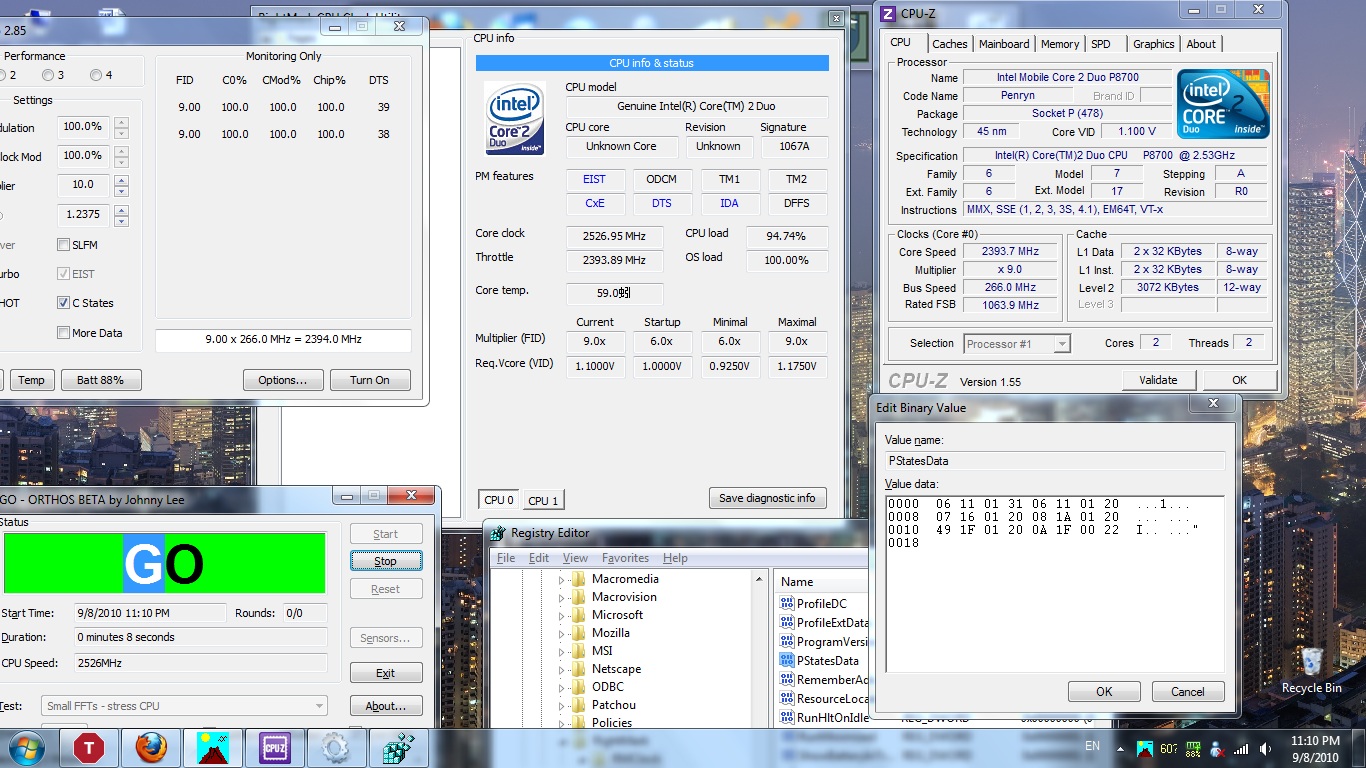
hey unclewebb, sorry again, but last time i trouble u for your help. I just want to make sure i do it right..
my registry values look like this:
0000 06 11 01 31 06 11 01 20 ...1...
0008 07 16 01 20 08 1A 01 20 ... ...
0010 09 1F 01 20 0A 1F 01 22 ... ..."
0018
so all i change is the 0A to a 4A? -
chaugh: For your CPU you might not need to change anything.
A P8700 has a default multiplier of 9.5 and an IDA multiplier of 10.0.Code:0010 [B][COLOR="Red"]09[/COLOR][/B] 1F 01 20 [B][COLOR="Red"]0A[/COLOR][/B] 1F 01 22 ... ..."
Your IDA multiplier is already set to 10.0. 0A hexadecimal is equivalent to 10.0 decimal.
RMClock has set your default multiplier to 9.0. To convert this to 9.5 you would need to change that first value from 09 to 49. The 4 represents the half multiplier so when combined with 9 you end up with the 9.5 multiplier.
I've seen some screen shots where this change isn't necessary. If you are using the IDA multiplier then that might get your CPU to use the correct 9.5 default multiplier automatically. Before you edit the registry you can test for this. Just run 2 threads of Prime95 and see what multiplier is reported by CPU-Z. It might have both threads running at 9.5 so you don't need to change this. If CPU-Z is only showing 9.0 then you need to edit the registry as shown above.
When you run 1 thread of Prime95 and use the Task Manager Set Affinity... function to lock it to one core, it should be easy to see that core using IDA mode while the second core is using the default multiplier. You can also run ThrottleStop in monitoring mode and it should show you exactly what your average multiplier is on each core. Post some pics if you're not sure. -
Thanks so much for this guide!
My laptop is running only a bit cooler now but the fans are noticeably quieter
-
OK.. i dont have prime95 and im not really bothered to get it, but i used ORTHOS cpu loader instead, hope that will do.
I ran it both before and after i did the registry hack, and both gives the same results. throttle stops says both FID is 9.0, same as cpuid, at 2.4 mhz,
but rmclock says my cpu clock is at 2.53ghz. The same thing happens regardless if i have IDA ticked or not in rmclock.
So am i doing something wrong? all i did was change the 09 to a 49.
see my screenshot.Attached Files:
-
-
Did you add SkipCPUIDCheck and set it to 1 in the RM Clock registry? Some settings in RM Clock can reset this registry mod and take you back to default values.
You need to modify the registry while RM Clock is not running and then save the registry and then start up RM Clock to see these changes. After you do that, post a picture of the Profiles tab.
The half multiplier trick worked for my T8100. It uses a 10.5 default multiplier and an 11.5 IDA multiplier and both worked correctly after that hack.
Post a picture of the Profiles page in RM Clock so I can see what settings you are using.
If you don't want to download Prime95 then go into the task manager and use Set Affinity... to lock Orthos to a single core. That program might complain when you do that. ThrottleStop in monitoring mode should show use of the IDA multiplier on one core when you do this.
If you really, really want half multipliers and IDA mode to work correctly then why not just run ThrottleStop. This program correctly reports and uses the half multipliers and takes about a minute to set up. No screwing around for days trying to get RM Clock to do something that it wasn't designed to do. Many of RM Clocks nice graphs aren't even accurate on these newer 45nm CPUs. -
So i downloaded RMclock and i don't see the advanced CPU settings tab, anyone have the same problem?
-
The most recent version of RM Clock is now two and a half years old. It has no idea what a Core i7 CPU is so it is not going to provide you with any way to adjust it.
There is no software available that lets you change the core voltage on these CPUs the way you could with the previous Core 2 CPUs. If anyone finds some software like that, I'm sure it will be shared here very quickly. -
Hello!
First of all, thanks for the amazing idiot-proof guide! I have a Dell Studio XPS 13 which is notorious for overheating. They even cancelled this model after being in production for only a year. That said I must be really lucky because I never had any problems, although I do tend to clean out the dust fairly often. My CPU topped at 73 C before undervolting and reached 67 C after. I dont think rmclock is working correctly because I can take down the voltage to the possible minimum (0.8750V) and have the CPU run at 100% by Orthos overnight and it still wont BSOD on me or give any errors. I think the lower temp comes from disabling IDA.
Now onto my main problem, I found your guide while looking for ways to increase battery life. So far Ive been using my laptop to take notes at uni and was contempt with the 3,5 h battery life I could squeeze out, with everything /including aero, gadgets, Wi-Fi, Bluetooth etc./ off and only OneNote running. I switch to paper based note taking in classes where I need to jot down formulas. But this semester I have 2 days on my schedule where I have 1 too many classes where I could just type away. Now the problem is after I undervolted every multiplier it didnt help the battery life. Tried throttling the CPU to 1GHz, didnt help. Disabled all the multipliers except SLFM, didnt help. I guess the CPU is already in SLFM while under such a low load, and I dont get the option to lower SuperLFM voltages in rmclock, its already in the lowest possible. Im only looking to stretch my battery for another 10-15% (20-30 mins) so I can make it to the end of the last class.
Is there any way to do this? Increasing battery life under minimal load?
Please dont tell me to get a battery upgrade because I checked and it costs the equivalent of nearly 250 USD over here, thats just way too much for me
BTW is it normal that I only have 0-5 levels of multipliers? The guides image has 0-7
Dell Studio XPS 13
Core2Duo P8600 @ 2.4 GHz
Windows 7 Ultimate 64 bit
Thanks for reading -
Update: I checked the real time CPU voltage on rmclock's cpu info tab and cpu-z as well. It never seems to go below 1.0000V even in SuperLFM where the factory settings are 0.8750V.
-
In the Advanced CPU Settings of RM Clock there is an option called Enable Dynamic FSB Frequency Switching (DFFS). You need to have that checked to access voltages lower than 1.0000V.
Before you think you have discovered the way to significantly increase battery life, have a look at this post:
http://forum.notebookreview.com/6369641-post5060.html
At idle, the newer 45nm CPUs tend to go into a low power state regardless of FID/VID settings so getting your VID voltage lower will make a difference at full load but will make virtually no difference when these CPUs are idle. Just an observation so do your own testing to confirm this. -
That fixed the undervolting problem, thank you very much! The most awesome thing is how much quiter the laptop got when under full load.
So I guess there isn't any way to extend the battery, miight have to start savnig up
Anyway, thank you very much for you'r help! -
@unclewebb - i am using throttlestop 2.85 and i have set cpu voltage to 0.9500v. but when i checked cpu-z and hwinfo32 voltage is 1.0000v.
laptop is a lenovo T400 with an intel P8600. -
You have to use the SLFM option in ThrottleStop to access the SLFM voltages. This is the same problem as above. In RM Clock you need to have DFFS checked to access any voltages lower than your default voltage which is usually 1.000V for your CPU.
-
i see... actually it was reading botika's post that made me check my setup. i'm glad its sorted out now.
thank you.
-
Hi. Please help me.
I downloaded RMClock 2.350 from Everywhere, several times, but I can't see the Advanced CPU Settings in the list.
How can I see ? Please help.
Thanks. -
Your CPU is probably not supported. At least list a few details like that when asking for help. RMC hasn't been updated in two and a half years so if you have a CPU newer than that, you might be out of luck.
-
I have the same problem as the person above. Is there another program I could use to undervolt?
-
How can anyone help you guys if you don't even mention what CPU you are using?
If you have an AMD CPU you might want to try K10Stat.
http://forum.notebookreview.com/har...iffin-cpu-undervolting-guide-ql-rm-si-zm.html
If you have an Intel Core i CPU then I don't know of any software that lets you under volt anymore the way RM Clock lets you do on the Core 2 CPUs. -
Hi. Thanks for Your answer. But I don't think so.
Cause I open to RMC and I click Profiles from the left side and in the profile selection, all options like Index TYPE FID and VID is disable. Actually not disable. Passive...
And at the downside of program have a NEW PROFiLE button. And I click the NEW PROFiLE button for activate options, program is asking me purchase details or activation code. So program is working like a shareware not Full access working. But in your computer RMClock is Full working. Like purchased.
I'm living in Turkey. I don't working in somewhere. I mean I can't purchase this. I have no money.
So I mean how can I activate this product ?
Thanks.
![[IMG]](images/storyImages/rmclock.jpg)
The "Undervolting" Guide
Discussion in 'Hardware Components and Aftermarket Upgrades' started by flipfire, Apr 1, 2008.


![[IMG]](http://img37.imageshack.us/i/furprimetest.png/)