Problems? See this thread at archive.org.
Bjohansen: The early 65nm CPUs really benefit from under volting. A 20C drop in core temperature is definitely something you will notice while using your laptop on your lap.
If your CPU is 100% stable at 12.0x with 1.0000 volts then you might as well set the rest of the multipliers to that same voltage. For 6.0x, use 0.9500 volts. The minimum and the maximum voltages are the important ones.
-
-
I've set 7.0-11.0x at the same volt as 12.0x leaving 6.0x at 0.9500.
I really like the dynamic clock-speed.
45 degrees while browsing the internet at 6.0x (1ghz) and about 70 degrees while at 100% load at 12.0x (2ghz).
The fan doesn't speed up until it reaches 83 degrees, so now I'm having a very silent laptop
-
Well i have T7500 and have sucessfully undervolted it to [email protected] i wud also like to undervolt IDA mode(similar to turbo boost)
Cud u tell me how to stress cpu such that it uses only IDA mode so that i can test its stability during uv'ing -
unclewebb thanks again for making the program. throttlestop and rmclock have made my laptop a lot cooler and battery life is a lot better. Quick question I have a T9300 with SLFM and I use .95v for every multiplier and everything is stable. Is there anyway I can go lower in voltage?
-
Bedis: The best way to test IDA mode is to run a single thread of Prime95 and then go into the task manager and use Set Affinity.... to lock Prime95 to a single core. That will force that core to use the IDA multiplier the majority of the time. Start by first locking it to core 0 for a test and then try locking Prime95 to core 1. Sometimes individual cores need slightly different voltage so you want to make sure that each core can run reliably at the IDA voltage that you are testing at.
jedisurfer1: Every CPU has a minimum voltage set at the factory by Intel. If 0.95 volts is the minimum for your T9300 then that's as low as you can go. The good news is that these CPUs will drop down to the C4/C6 state at idle where they will use a lower voltage automatically. The VID setting in RM Clock or ThrottleStop is rarely used when these new 45nm CPUs are idle. On my T8100, the RMC / TS VID is used less than 1% of the time at idle so it doesn't matter what I set it to.
Here's the test I did that shows that trying to come up with the perfect VID setting at idle has become pointless. The CPU rarely uses that setting.
http://forum.notebookreview.com/6534670-post5215.html -
Hi. I have a question. I have a HP DV4-1225ee laptop with Intel P7540 processor. Using RMclock, I get FIDs 6x, 7x, and 8x. Default voltage is 1,138V. The lowest voltage possible in RMclock for this processor is 1.000V. I can set it to 1.000V on all three FIDs and have a perfectly stable laptop. What I'm wondering is, given the fact that all three FIDs are running on the same voltage (1,000V), does that render selecting FIDs unnecessary? In other words, is the battery life the same no matter at what FID I run the processor?
-
@uncleweb
i tried ,but its using 11x multiplier but with the voltage of 12X(IDA) mode.I dont understand -
Bedis: Can you post a ThrottleStop screen shot while you have a single thread of Prime95 running and it is locked to either core 0 or core 1 using the task manager, set affinity... function? Use ImageShack® - Online Media Hosting or a similar site and then post a link here. It's hard for me to comment on something I can't see. Some software is not accurate at reporting when a CPU is using the IDA multiplier.
NazgulRR: I couldn't find any details on the Intel site about a P7540. It might be a model that was specific to HP so I'm not sure what features that CPU has. Power consumption at full load is proportional to the speed of your CPU. My theory is to run your CPU as fast as possible at any given voltage so it can get its work done as fast as possible and then return to the low power C3/C4/C6 sleep state where it is less power hungry. Other users like a slow running CPU which they believe is the best way to save power. You'll have to do some battery life testing while running applications that are important to you but you probably won't see a huge difference one way or the other. -
Thank you for your answer unclewebb
.
This is the processor: Intel® Core?2 Duo Processor P7450 (3M Cache, 2.13 MHz, 1066 MHz FSB) with SPEC Code(s) SLB54, SLB56
Even if the voltage is the same at all CPU speeds?
FYI, I downloaded ThrottleSpeed. If I check the SLFM option, I can get voltage as low as 0,9250V (if SLFM is not checked I can get only to 1.000V - same as in RMClock).
I ran Prime95 blend test, both cores, 8x266mhz @ 0,9250V for 90minutes. No problems. I confirmed the voltage with CPU-Z.
Cool, with your program, I managed to shove off addition 0,075V.
BTW, I'm not really sure what "C states" option does. It's not in the ThrottleStopDocs.html. Should I check it, or leave it un-checked?
Thanks. -
A P7450 makes more sense than a P7540.
Now I know what CPU you have.
It will probably be a few days so remind me if I forget but I'll try to do some testing with my T8100 at full Prime95 load to see how power consumption compares to CPU speed. It's a similar CPU to your P7450.
C States is a fairly useless option on many processors. I leave it unchecked. It changes similar registers in the CPU as does the C1, C2, C3, etc. options do in RM Clock but usually doesn't make any significant difference to power consumption.
Checking the Dynamic FSB Frequency Switching option in RM Clock will let you access voltages less than 1.000 volts. This option might not be available for you if your CPU or motherboard is not recognized correctly. -
@unclewebb
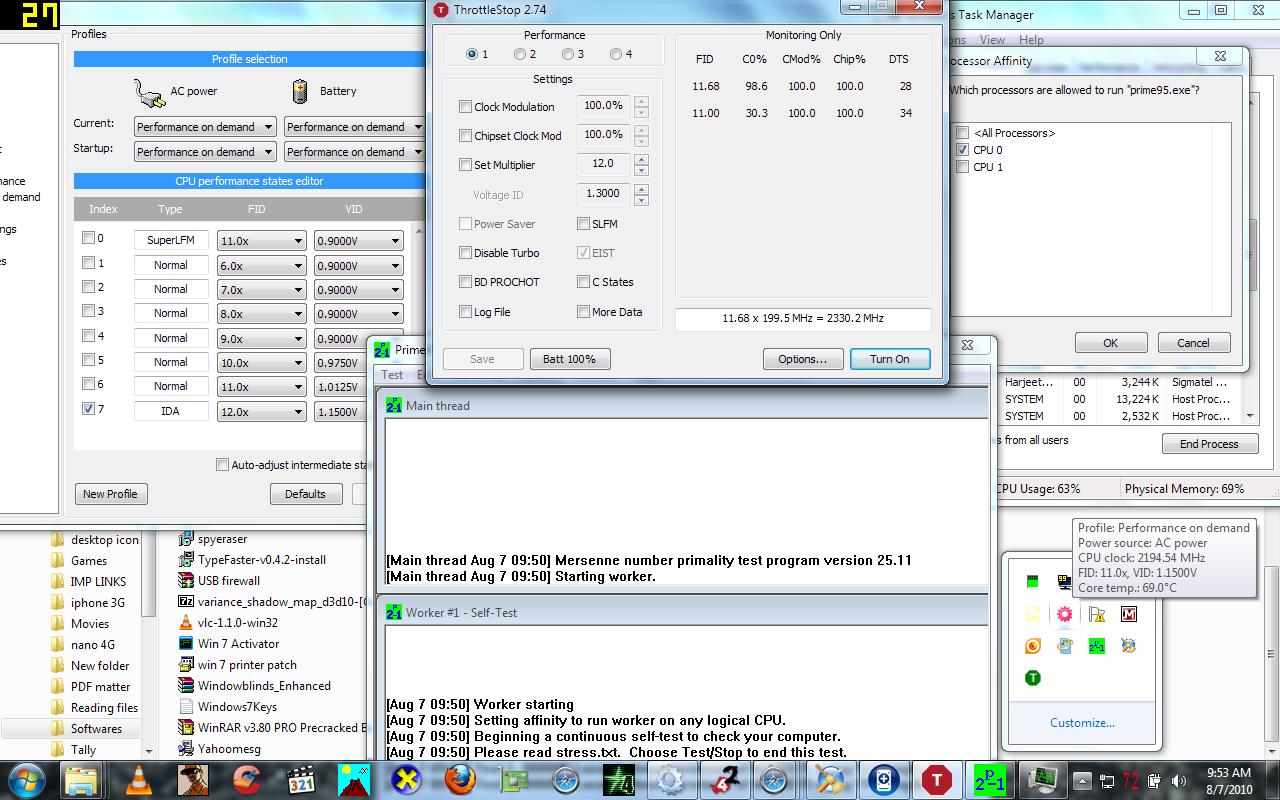
Heres a screenshot-see bottom right corner(12x(ida) voltage but a 11x multiplier.BTW can u explain me how to use throttle stop.I have no idea how to use itAttached Files:
-
-
BTW i dont understand why the hell does my proc usage jumps to mid 95's % when i open throttle stop,when i close it -cpu restores to 10-15%
-
As mentioned before, RM Clock is not accurate at reporting when the CPU is using IDA mode. By comparison, ThrottleStop is extremely accurate because it is using a method recommended and fully documented by Intel.
In the monitoring area of ThrottleStop, the first row shows a FID of 11.68. This number represents the average multiplier used during the previous one second monitoring period. To average this value, that means this core was using the IDA multiplier (12) for 68% of the time and the default (11) multiplier for the other 32% of the time. In order for this core to use the IDA multiplier a higher percentage of time, you will need to reduce the amount of background activity on your computer. Every time a background task needs to be processed, it will wake up the other core. This immediately drops the multiplier for both cores down to a maximum of 11. When the background task is processed, the second core can go back to sleep which lets the first core go back to using the 12 (IDA) multiplier again. This transitioning back and forth between 11 and 12 is happening hundreds of times a second. If you look at the graph in RM Clock you will see a nice almost perfectly flat line at 11 which is wrong. Core 0 is constantly bouncing back and forth between 11 and 12.
A computer without a lot of background junk running can use the IDA multiplier about 95% of the time during the above test.
On the second row of ThrottleStop you see that the average multiplier for that core is 11.00. That means that core is not using IDA at all. The first core is fully loaded with Prime95. If the second core is asleep, it is using the 11 multiplier and if it wakes up, both cores are limited to a maximum multiplier of 11 so there is never a time when it can use IDA mode.
If you didn't use SetAffinity... to lock Prime95 to a single core then usually both cores will alternate and both cores will get a chance to use the IDA multiplier.
If you open up the Task Manager, you will find that the CPU Usage due to ThrottleStop is less than 1%. Way less than 1%. When minimized to the system tray, I can run ThrottleStop for hours and it might consume 2 or 3 seconds of CPU time so its actual CPU Usage is less than 0.05%.
What software are you using to measure that? Post a picture of the Task Manager - Processes tab so I can have a look.
Edit: Here's an example of IDA mode running 94% of the time. This is a T8100 so the default multiplier is 10.5 and the IDA multiplier is 11.5. You can right click on CPU-Z and get it to report each individual core. Top is core 0, bottom is core 1.
![[IMG]](images/storyImages/idaexample.th.png)
-
My bad,actually it was fraps video recording that was comsuming my cpu,btw i didnt use ny software for cpu usage,its inbuilt gadget in win 7
-
Well thnx for an excellent elaborate explanation .Do u think IDA is worth the trouble.I mean,if 60-90% of times IDA is used,then how can i check its voltage stability.i want to uv IDA mode just like any other modes,but if u r sayin it will b used only 94% of times,(switching to basic 11x mul) then,i will not be able to uv my ida mode.So i decided not to use ida mode,do u recommend to just leave ida.
-
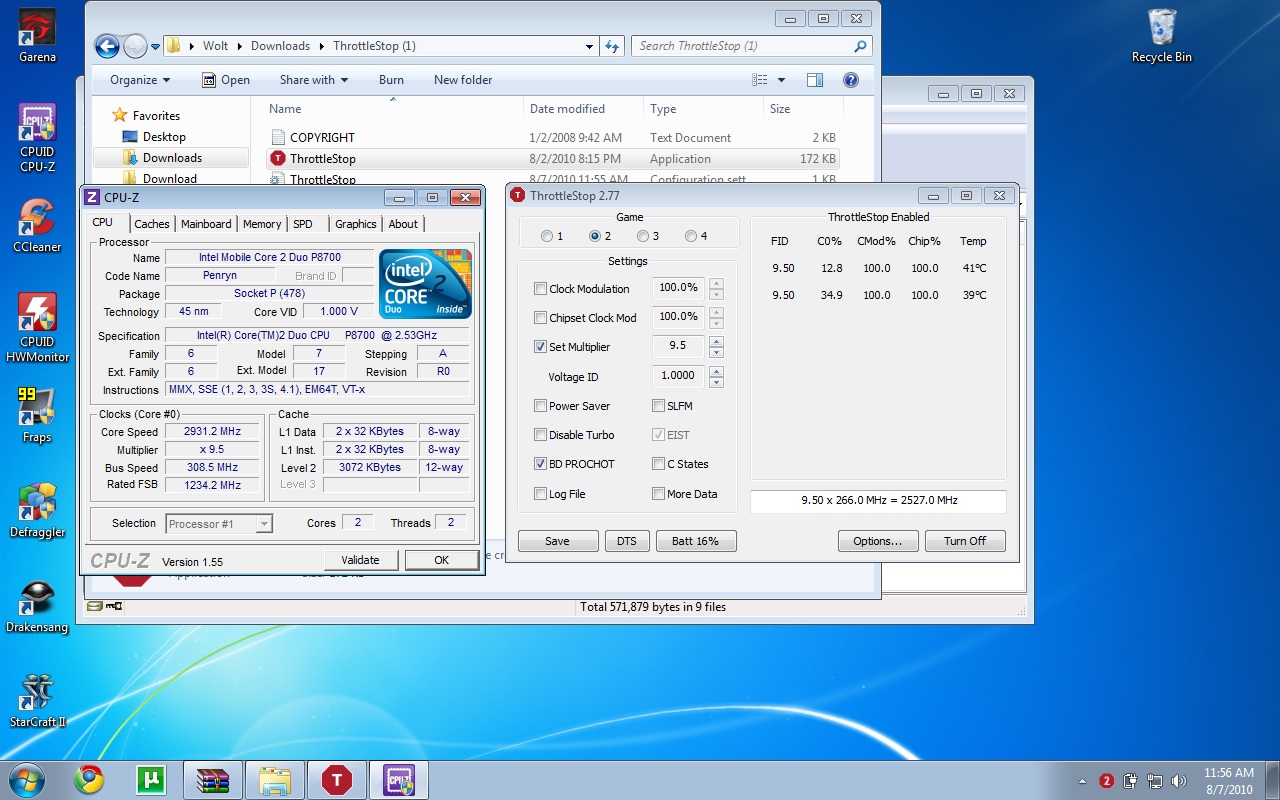
Hey man great software. First of all with RmClock i wasn't able to go below 1.000 V on my P8700 although i tweaked the registry to use the 9.5 multiplier.
With throttlestop i am stable at 0.975V. Though here is the funny thing with 0.975 V playing starcraft my CPU would go to about 72-73 degrees on both cores, while with 1.000 V it doesn't go above 70-71. Maybe it has something to do with the cooler not kicking in properly below the minimum voltage set by Intel so i just keep it at 1.000V. Another thing i took an SS; i have a Msi Gt628 which has a turbo button which overclocks the FSB to about 308 Mhz. However with Throttlestop enabled it still reads 9.5 x 266 Mhz and i thought that the software overrides my turbo button. But when i checked with CPUz it showed that the CPU actually overclocked no prob.
And another thing, when i just surf i use the internet profile set at the minimum 6.0 multiplier. My question is when using the CPU lightly do you recomend using throttlestop or just turning it off. I read above all this about IDA and i thought maybe the CPU manages itself better when used lightly.Attached Files:
-
-
Oh, sorry for the typo, my bad.
And yeah, DFSB option in RM Clock is not available. Thanks for the ThrottleStop.
I'll remind you on the CPU power consumption test in few days. Do you run your T8100 on the same voltage at all speeds as well?
-
Bedis: What I'm saying is that if you don't have so much background junk running on your computer, the 12 (IDA) multiplier will be used over 90% of the time. It will use the 11 multiplier the other 5% or 10% of the time. I like free performance so why would you want to turn Intel Dynamic Acceleration (IDA) off?
wolt87: ThrottleStop does not report the correct bus speed when using a program like SetFSB or other program that lets you overclock in Windows. After you overclock, you can try right clicking on ThrottleStop and then select the Update BCLK feature. That might recalculate the bus speed correctly.
If that doesn't work then I guess you will have to rely on CPU-Z.
The reason ThrottleStop does not constantly recalculate the bus speed is because to do that accurately, you have to constantly load the CPU with short bursts of activity. ThrottleStop is a laptop utility and my goal was for it to do its thing without putting any significant load on the CPU which would only shorten battery life. A good test is to start up CPU-Z and ThrottleStop at the same time and then minimize them both. Wait a couple of hours and then open up the Task Manager and see how much CPU Time each program has consumed. That's a lot of wasted CPU cycles. I prefer to keep ThrottleStop as lean as possible even if that means if is not 100% accurate when using programs like SetFSB.
My opinion is that running a CPU slow when lightly loaded does not save you any power. It actually does the opposite and consumes more power. When you run a CPU slowly with the 6.0 multiplier while surfing the internet, the CPU must spend more time in the active C0 state. When running slow, it takes longer for the CPU to do anything. The best way to save power is to get the CPU back into the C3/C4/C6 sleep state as soon as possible. To accomplish that, you need the CPU to run really fast so it can get its work done and then quickly get back to a deep sleep state where the real power savings are. The VID voltage used in these deep sleep states is well below what RM Clock or ThrottleStop lets you access. Slowing your CPU down only makes it less efficient.
NazgulRR: I keep my T8100 locked in Dual IDA mode with both cores at 2300 MHz at 1.05 volts. At idle, regardless of how I have ThrottleStop set up, it uses the deeper sleep states and lower voltages automatically. Here is what the Intel specs list for VID for a T8100:
VID=0.650-0.859 [C4]
VID=0.600-0.850 [DC4]
VID=0.350-0.700 [C6]
Obviously I want my laptop using those lower voltages as much as possible. Having a fast CPU will enable it to spend a bigger percentage of time in the deeper sleep states and will save power. -
So i should run the Cpu with the max multiplier and enable the power saver and the C states options? When i did this the multiplier is constanlty shooting up and down (with more data enabled), or is that to be expected?
Or just shut the soft down?
Oh and btw, whenever i shut throttlestop down and try to switch back to balanced power profile under win 7 the CPU still runs full speed alternating between 9.5 and the IDA 10x, like in High Performance. -
You'll have to do your own testing to see what works best for your laptop. For my T8100, none of the settings make any difference at idle. I can set them low or high and power consumption is the same.
The Power Saver and C States option make the multiplier jump up and down but really don't save anything on some CPUs. On the older CPUs this stuff might make a difference but on the newer 45nm Core 2 CPUs, I don't see much difference in power consumption.
There's no need to have the More Data option enabled unless you are logging and trying to understand a throttling problem better. When you minimize ThrottleStop to the system tray, the multiplier should settle down.
Have a look at your settings for your balanced profile. If you want a low multiplier at idle then make sure the Minimum processor state is set to a low number like 5%.
Here's the testing I did a few pages ago.
http://forum.notebookreview.com/6534670-post5215.html
If you want to learn more about power consumption and what programs and options change or don't change power consumption then do your own testing with the Windows Performance Monitor software that is built into your computer. -
between using 'maximum performance with locked max multiplier" and "performance on demand" are there any differences in temperature and fan usage?
thanks -
Hello I undervolt at 0.9500 with a T9300 on a Dell M1530.
After 37 min of Orthos this happened.
2:Test 3, 560000 Lucas-Lehmer iterations of M208897 using 10K FFT length.
2:FATAL ERROR: Rounding was 0.5, expected less than 0.4
2:Hardware failure detected, consult stress.txt file.
2:Torture Test ran 37 minutes 39 seconds - 1 errors, 0 warnings.
2:Execution halted.
1:Torture Test ran 37 minutes 39 seconds - 0 errors, 0 warnings.
1:Execution halted.
What does that mean? Thanks
EDIT: By the way, what's throttle stop? This guide hasn't been updated in a while and it seems this is a new software? -
That error usually means you have lowered your voltage too much and your CPU is not 100% stable. If it is not stable, when it does a calculation, it might result in the wrong answer which of course isn't a good thing.
I use 1.0500 volts for my T8100. Maybe you should try testing again at 1.0000 volts. LinX might be a quicker test to narrow down what an appropriate minimum voltage should be. Keep a close eye on your core temperature when running LinX.
LinX - A simple Linpack interface - XtremeSystems Forums
If you are interested in maximum performance, most Dell laptops support Dual IDA mode.
http://forum.notebookreview.com/win...c-acceleration-ida-both-cores-core-2-duo.html -
Thanks for the reply. I changed the voltages and testing now.
So ThrottleStop is for enabling IDA? I still doesn't get what IDA does.
Will it lower the temperatures even more?
Will it provide more performance for games for example?
I also saw an option in RMClock for IDA but the guide suggested leaving it off.
Thanks for your help. -
IDA stands for Intel Dynamic Acceleration. It makes your CPU run faster but RM Clock does not accurately report when a CPU is using IDA so some users thought it would be a good idea to turn it off.
Dual IDA that ThrottleStop lets you access will overclock both cores of your T9300 from 2500 MHz to 2700 MHz. No other software, including RM Clock, lets you do this. -
I will give it a try, thanks.
I'm now stress testing with Lynx (Dual IDA off now).
With higher voltages I also get higher temperatures (max cpu 76ºC instead of 69ºC with 0,950 but... it wasn't stable).
As I asked earlier. What else can I use ThrottleStop for? I'm curious
-
ThrottleStop was originally designed to help counter act the thermal throttling schemes that Dell has been using in a variety of their laptops, and likely your laptop, during the last 2 years. It's a good monitoring tool for this purpose. When you run Furmark + Prime95 at the same time, many Dell laptops will slow down to a crawl and will start to use clock modulation which can slow a CPU down internally without giving you any warning. This can also happen when gaming so run ThrottleStop in logging mode to test for this.
In a day or two, you will be able to display your CPU and GPU temperature in the system tray as well as keep track of the minimum and maximum temperatures.
![[IMG]](images/storyImages/taskbarf.png)
If you ever upgrade to an X9000, you can use ThrottleStop to unlock it and overclock it by increasing the CPU multiplier to whatever you like. 3.6 GHz is not uncommon for 24/7 use.
For this thread, it's a fairly simple tool to lower your Intel Core 2 CPU voltage. -
So this program can be used to undervolt too. Where can I find a guide about doing so? Thanks
-
No guide is necessary. With ThrottleStop just click on Set Multiplier, lower your maximum core voltage, click on Save and you're done.
I like the simple approach to reducing core voltage, heat and power consumption.
-
Interesting, so if I use ThrottleStop to undervolt (just setting the max volt) I would be able to also use Dual IDA?
Besides IDA. Which are the main differences between undervolting with both programs? I'm a noob in these topics.
Also, when I use ThrottleStop the Set Multiplier option in set to 13,5 but in RMClock it said 12... Who is right? I should lower it to 12?
EDIT: Ok I assumed I had to put 12,5 (my "default" multiplier).
I undervolted and also clicked Power Saver and SLFM. After that I was going to give Dual IDA a try but, it I disable EIST in Bios it just stays at 6x multiplier (so I guess ThrottleStop doesn't function). Anyone if I then go "Dual IDA" it will always be at 13.5X
In that case... should I use Dual IDA only in certain scenarios? (gaming?) If I tick EIST in the program it goes back at 12,5 for example (so I assume it works again).
As you can see I'm totally lost. Should I just put 13,5 and use Dual IDA without power saver and slfm (they are not compatible?) ad¡nd just let the computer go always at 13,5? (it still undervolts? reduces heat and battery?)
I'd appreciate some help
EDIT 2: Needing help again:
I have both RMClock and ThrottleStop in my system (never used both at the same time).
After a full restart, without any program my multiplier will be stuck at 12.5 - 13 (around my max)
If I start RMClock it goes down at 6x (remember it's in idle)
If I close RMCLock and start Throttlestop it does the same as without programs, it goes at 12.5 - 13 (Only Set Multiplier option checked.
If I use Throttlestop WITH Power saver, "one core" (I assume) goes at 6x while the other remains at around 12x (it jumps from 6 to 12 in both throttlestop and Cpu-Z).
Why is that? I remember before it only went to 12.5 - 13 on full load, right?
This is driving me crazy and no, I'm still not using Dual IDA.
Thanks for your help! Hope you understand my messy statements.
EDIT 3. Now I installed HwInfo32 and instead of 1 core being 6x (or 4x with SLFM) it seems that BOTH cores switch between 4x and 13,5 each second... is it normal? -
Why not just use Dual IDA mode for maximum performance?
http://forum.notebookreview.com/6534670-post5215.html
As shown in the above post, the 45nm CPUs mostly ignore the RM Clock or ThrottleStop FID/VID settings at idle. They automatically enter a lower power state where RM Clock and ThrottleStop have no control. You can run your CPU with both FID and VID maxed out and there is no power consumption difference at idle. You are making things way more complicated than they need to be.
There is an INI file option called DualIDA=1 which you can set so every time ThrottleStop starts, it will kick your CPU into Dual IDA mode. If you don't want to use Dual IDA, enable EIST in the bios and then use ThrottleStop and set the multiplier to its maximum and set your core voltage to the lowest possible value that lets you maintain full stability.
If you want to use RM Clock you will lose performance unless you are prepared to edit the registry so RM Clock can access your half multipliers.
Download a benchmarking program like wPrime and then run it while using ThrottleStop in DualIDA mode and then reboot and run RM Clock and run the same benchmark again. I think you will see a difference in performance.
After that, do some power consumption testing with the program that I mentioned in the above post or go and buy a $15 Kill-a-Watt meter. This should give you some more info on what program works best for you and if the increase in performance using Dual IDA is worth it or not.
Edit: Here's the post where it explains what you have to do to RM Clock to get it to use your half multipliers.
http://forum.notebookreview.com/6534263-post5202.html -
I switched to ThrottleStop and testing DualIDA just now.
If I understand correctly, using dual IDA I no longer need Power Saver or SLFM (actually they "won't work") so I just leave it that way.
Am I correct? I only have the Set Multiplier option ticked now.
It now seems a bit clearer
Thanks for your help! -
Dual IDA locks both cores of your CPU at a fixed multiplier and voltage so after you do that, none of the adjusters will work and Power Saver and SLFM won't do anything either. As shown before, these two don't save you anything anyhow on a 45nm mobile CPU.
With my T8100, this doesn't create any extra heat at idle so I can still use my laptop comfortably on my lap and when needed, it runs at full speed. I have a theory that when lightly loaded, Dual IDA might let your CPU spend more time in the low power idle states because it is able to get its work done quicker than a CPU running at a 6.0X multiplier. That's the key to saving power. Let your CPU spend as much time as possible in the C3/C4/C6 low power states. These CPUs do this automatically regardless of your ThrottleStop or RM Clock settings.
Another testing program you might want to try is HyperPI.
Hyper Pi - The Super Pi Front-End
You can run two threads of that to work both of your cores. You should see better performance when using Dual IDA mode. When saving power, I prefer to keep things as simple as possible. That's what ThrottleStop is all about. Have you downloaded the latest version? Do the system tray temperature icons work? Does it report your CPU and GPU? Any feedback is always appreciated. I wish I had access to 1001 different computers for testing purposes but I don't.
With Dual IDA, just tick Set Multiplier, max that out, set your max voltage, right click on ThrottleStop and select the Start Dual IDA menu and you're done. -
I am using ThrottleStop last version and now I get it.
Yes I tried monitoring the temperature and it works on the system tray, but by default the fonts are too big. It works great as for now, with Dual IDA.
I am yet to test it in benchmarks.
Thanks! +rep -
Thanks for reminding me of that. I made a few changes but forgot to reset the default system tray font. It's probably huge.
I'll get that fixed up in the next release. -
Damn, I just had 2 BSOD with Dual IDA enabled (undervolting too).
I was just surfing the web, only firefox opened.
Without Dual IDA this had never happened to me... I guess I will have to switch back to undervolting without dual IDA... :/ -
Dual IDA means your CPU is running faster. It sounds like it needs some more voltage. If you don't want to give your CPU the needed voltage then I guess you can't use Dual IDA. I use 1.050 volts and since your CPU is faster, you will probably need at least this much voltage.
-
I still don't know how to find the appropiate voltage setting in a quick way.
I mean, I read in another thread to opem Prime95 and lower the voltage in TS while running the test, but if I change the voltage it automatically gives me a BSOD.
How can I find my Dual IDA voltage? I have Lynx, Hyper Pi, Prime95... how long should I run them? (and which one?) and how would be the procedure?
Thanks -
How much core voltage were you using? 1.00 volts is not going to be enough to run stable at 2.7 GHz. Start with too much voltage and slowly work your way down. Try running 5 or 10 minutes of LinX at 1.15 volts and then slowly work your way down to 1.10 and then 1.05 if you can. Your 100% stable voltage might be between those two numbers. Once you get a better idea of what works and what doesn't, then you can run some of your other stability tests for longer periods of time.
When you have Dual IDA enabled, the VID setting in ThrottleStop does not work. In this mode the CPU is locked. You will need to enable EIST manually, set a new core voltage, and then go back into Dual IDA to test again. If you are having BSOD problems then that is a good sign that your voltage is too low. I've been running my T8100 for months in Dual IDA at 2.3 GHz with 1.05 volts without a single BSOD or problem of any kind. At 2.7 GHz, you might need as much as 1.10 volts. -
Nice, I tested with 1,05 on Lynx (10min) and Prime95 (1hour) with Dual IDA and it doesn't seem to be buggy. I also checked for temperatures and it's around the same (a bit higher) than without Dual IDA and lower voltage.
Thanks for your help! I also downloaded the new version, nice addition the Dual IDA on start button. -
I am trying to install the RMClock, but my computer won't let me since I dont have the supported drivers first. I have downloaded the 64 bit driver signed driver located on the bottom of the guide, but I am not sure how to get it installed onto my computer. They are showing up as a system file, anybody have any help for me? Thank you
-
Copy it in the RMClock Folder, located at C:\Program Files (x86)\RMClock
-
It worked! And so simple....thank you!
edit: Next problem is that there is no "Advanced CPU" option that I can find, it just goes from "Battery" to the update section, maybe god does not want me to do this... -
Why don't you try ThrottleStop instead of RMClock? It works like a charm for me. You can find a link in unclewebb's signature
Just select Set Multiplier to your highest setting, select the highest voltage and any other options you'd like (Power Saver, SFLM for example) and click Save and Turn On. -
Hello all,
First of all I just stumbled upon this guide today as I've noticed EXTREMELy hot temperatures from my computer these last few weeks. I'm using an XPS m1530 with a T7500 running windows 7 32bit. I've searched the thread, but havent found a problem similar to mine.
The first time I ran the stress test after changing the voltage, my computer just straight shut down. No BSOD, just an overheat and immediate shutdown. That's the first problem, the second being that the voltages seem funny int eh drop down menu, my increments move in increments of .125 instead of the advised .025. I'm confused as to why I cant see the more detailed options? Any help would be appreciated.
Oh, and my cpu runs extremely hot at a temperature of 80C doing normal work things, and I cant imagine what it's like when im running a game. When i ran the original stress test, the temps moved up to a max of 97C.
THe notebook is a little old as I must have bought it some...2-3 years ago? I plan on cleanign the fans out tonight when I get home from work. But am still confused as to why I cant move the voltages in smaller increments. thanks!
Edit: I'm also noticing that the "whine" has become apparent ever since I tinkered with the undervolting. Perhaps I shouldnt have tried anything at all :[ -
@HPeezy: You've already said it, but CLEAN THE FAN! Sorry to yell
But you'll be amazed at how much cooler it runs when you do.
-
But be careful when you clean it because I just cleaned my fan for the first time and my temperature raised from 71 to 86 in full stress.
I guess that's because I didn't change the thermal grease?
EDIT: Nevermind... Before cleaning I used a notebook cooler and the 9-cell battery (more air ventilation) and after that I used the 6 cell batery and no notebook cooler. No surprise it was higher...
Well, for me cleaning the vents after 2,5 years of use didn't change a thing. -
That's excellent. My Dell M1330 with the same CPU, I can't get anywhere near that low! I'm unstable below 1.1000 for Dual IDA and 1.0875 for x11
BTW: Unclewebb the new version with CPU and GPU temps in the tray is awesome. I can get rid of CoreTemp now. Can you explain what the Quality options change/affect? -
Really? Was there any fluff in there? I guess it depends on the environment. I lived in a very, very dusty house and I was having random shutdowns and problems after a year with my m1330. Fed up oneday I opened it up to see if I could figure out what might be the cause. When I saw the cover over the vents and realised it was fluff it all fell into the place. The on-all-the-time fan, the shutdowns, the too-hot-to-keep-on-lap etc.
I saw temps fall because they were way higher than they should have been. Now with ThrottleStop they average around 50c which is just amazing compared. I've also done the coppermod now though, that helped a lot. -
This refers to the new system tray font quality. 0 is a non-antialiased font, 1 is for an antialiased font and 2 is for a clear type font.
Some fonts don't support these options and even when a font does support this option, the difference can be quite subtle or barely noticeable. Vista can butcher some fonts when changing the quality setting but these options work correctly in Windows 7. It just gives users a little more flexibility in how their system tray font appears. I'm happy to hear you like this new feature.
The "Undervolting" Guide
Discussion in 'Hardware Components and Aftermarket Upgrades' started by flipfire, Apr 1, 2008.


![[IMG]](http://img217.imageshack.us/i/idaexample.png/)