Problems? See this thread at archive.org.
Hello guys, i did undervolted my Core 2 Duo and, i kinda get successful to undervolt a lot o.o still, my temperatures ar the same, no changes at all :/ Its Acer Aspire 5738G.
Here is the default voltages:
![[IMG]](images/storyImages/25s3lno.jpg)
Here is my stable undervolted settings:
![[IMG]](images/storyImages/161g7pf.jpg)
But however - temperatures dint changed at all.
Here is temps after undervolting on IDE:
![[IMG]](images/storyImages/qsjtpg.jpg)
Temps on stress test:
![[IMG]](images/storyImages/2lxafr.png)
Any advise? i was at first like: oh maybe this thing even dint worked, then i set lowest possible voltage on x11 multiplier and i got instantly BSDO.
So.. y my temperatures dint got any lower?
-
@BoxCat Try Running Othros for 10 minutes when you've rebooted and haven't run RMClock (also, use Throttlestop instead
 )
)
See what your highest temp is.
Then try the same test with RMClock enabled.
You'll probably find it runs a lot cooler under load. -
UPDATE: My BSOD problem goes away now if I turn off RMclock before running the stability test. Any possible explanations? It's not as if I made any changes to my maximum voltage on RMclock before; I just simply had it running.
Hi all. I found this thread after looking around for ways to reduce the heat from my laptop. I have been following the OP's guide to undervolting but I have come across a possible problem from running stability tests on the ORTHOS CPU Loader.
I own a Dell Inspiron 1525 with a 1.73 GHz Intel Core 2 Duo. Even when I run a stability test at maximum voltage (1.25V) for my highest multiplier (13x), I receive a BSOD after about 3 minutes or so.
By "BSOD," I mean that after 3 minutes of running a stability test on the CPU Loader, RMclock displays a message from my tray telling me that my system is overheated at around 97 degrees C, followed by my laptop abruptly shutting itself down.
Does this mean that even the maximum voltage on my CPU is not enough to stabilize it when it's carrying a full load? -
Andvekur: You are running your CPU way too hot. Not all laptops are up to a full load stress test. The problem is usually a heatsink that is full of dust or simply not making firm contact with your CPU. If my laptop was running that hot I'd pull it apart, clean it up and re-engineer the heatsink if I had to. Do what you can to tighten it up.
A properly designed laptop should be able to run a full load stress test without crapping out. Here's an example of a Latitude D830 with a T8100 running at full load for half an hour without throttling or over heating.
http://forum.notebookreview.com/6382811-post552.html -
Thanks unclewebb for bringing possible cleaning and placement issues with the heatsink to my attention. But even so, is there a reason why the stress test works fine when RMclock is turned off? When I ran the test with RMclock turned on, I left the voltage levels at the maximum (1.25V) for all multipliers, so it doesn't seem to me like it would make a difference whether RMclock is running or not.
-
Well I've been undervolting for a while on my C2D and I knew that my temps were almost too good to be true, but I recently picked up a Killawatt meter and I was shocked. Idling my laptop was pulling close to 90watts, but with my tuned (IDA disabled, powersaver, SLFM) Throttlestop (Version 2.54) it was averaging around 30. Thank you so much unclewebb. I was wondering however if the new version had any additional features worth the upgrade to the latest version?
-
Has anyone in this forum tried CPUGenie?
GreenVantage LLC
I was curious about undervolting and looks like CPUGenie is an update of RMClock. -
nikeseven: I'll admit that many of the changes to ThrottleStop since version 2.54 are for better support of the newer Core i CPUs. I did a major re-write of some code a while ago so the new versions are similar on the outside but are much more efficient than the early versions. It's free to upgrade so give it a try and keep v.2.54 handy in case you don't like it.
lm75093: I'll admit that I am very biased. I tried CPUGenie a while ago but I wasn't impressed. The problem I had was that it didn't let the CPU get back up to full speed quick enough which killed performance. Saving power is great but it shouldn't significantly decrease performance. Maybe it has been updated since I last tried it so give it a try. I think it has a free 30 day trial.
You didn't mention what CPU you are trying to under volt. The newer Core i CPUs aren't supported by any software.
Edit: CPU Genie blocks access to the 11.5 IDA multiplier on my T8100 so since installing that, every single threaded task runs 10% slower. Time to delete it. -
I just came across the following post by a director of some online computer retail site when someone was asking in their forums about undervolting:
I was wondering if anyone has any comments on the above? The reason I decided to undervolt my cpu was partly to lower temps and also because I've noticed the battery life has been lengthened. Not sure if it's due to lowered cpu voltage or that the fans are spinning a lot less than before when it was running quite hot.
Incidentally, I've been using XTU to undervolt. -
That is one person's opinion about under volting. Unless he can back that opinion up with some long term test data based on hundreds of CPUs, I would take that opinion with a grain of salt.
As long as you don't get carried away and lower the core voltage too much, there will be no difference to stability. That's the secret. Lower your core voltage but don't go too far. At full load, lowering the core voltage can make a significant difference to heat and power consumption and it can increase battery life like you've found. Less fan noise is another bonus. Your reduced power consumption is due to reduced CPU power consumption as well as not having to run the fans as much or as fast.
Does XTU let you increase your CPU multiplier? Probably not. If you ever need a significantly more powerful laptop, download ThrottleStop and head over to this thread for more info.
http://forum.notebookreview.com/har...unlock-core-2-extreme-multiplier-windows.html -
The higher the voltage the faster a transistor can switch.
If the voltage is above the threshold needed for the slowest transistor on your CPU under all conditions then its stable.
As for undervolting prolonging CPU life I am going to trust Intel's results that show both temperature and voltage have a dramatic effect on the life of a CPU. -
Thanks for the posts. I'm glad to say that XTU does let you alter the cpu multipliers in 0.5 increments upto 13.5 in the case of the QX9300 (from 9.5x) and down to 6.
However I intend to try clocking the FSB instead since I just installed some 1333mhz ram, however due to the M17 motherboard, this is automatically downclocked to 1067mhz with CL7 to match the FSB of the CPU. I did up my voltage to 1.05V recently since the specs Intel published for the CPU show this as being the lower side of it's range. Still better than the stock 1.2V, so I'm still seeing temp and battery life improvements.
I hadn't seen this. Can I assume it showed the correlation that less voltage = lower temps = increased lifespan for the CPU due to both factors?
This would be good to know since I need my M17 to last me till 2013/14 whilst still being fairly good for gaming. However I will be upping the FSB and hence clockspeed of CPU and RAM so I can enjoy gaming (in particular, not having to wait an eternity inbetween turns whilst playing Civ5 on a gigantic map with lots of AI players). I will be trying to emulate others here and OC without resorting to increased voltage (and instead undervolting it). -
Has anyone had success undervolting an e8235 or other e series?
I tried rmclock and it didn't really do anything. I'm sure if this even supports eist
-
I used this guide, got my Core2Duo T8100 from 90+ on load to 62 on load (@0.9500v) however when I restart intel speedstep or whatever turns back on ><
-
Hi there, well ive been trying to undervolt my acer 5740DG with RMclock however the program does not seem to allow do so and only a few options are available. Please see link before, thanks
![[IMG]](images/storyImages/shHna.png)
-
Awesome thread, thanks Flipfire!
I've got a Dell Studio 14z with a T6600 (Win7 64bit) and was able to put all multipliers at 0.9250V. Really helped with load temperatures to the tune of about 15 degrees C.
But, didn't do squat to idle temps (~55 degrees C). I read through a bunch of this thread and found it is because at idle, my processor is dropping into C3 90%+ of the time (verified with Win7 performance monitor). Soooo, in the quest to get the fan to quiet down/shut off, I'm wondering if a processor upgrade is in order.
My goal is purely to lower idle temps and possibly increase battery life.
Somewhere in this thread, I read that for these goals, I should look at the fastest processor possible so that it would get the work done super fast and drop into deep sleep more often.
Should I be looking at the P9700? Or should I stick with something like a P8800? Other suggestions?
I also plan to replace the crappy Dell thermal interface with something better at time of processor upgrade. -
Do the sidenotes only apply to the processors mentioned or to every processor? I saw that it stated the in order for the laptop to undervolted, you would need to have RM Clock on at all times. Does that apply to all processors or just those with the half-multipliers e.g. T9300?
-
Guys, I've seen some people complaining about the undervolting, but I'm not certain if I'll undervolt my CPU yet. I game a lot, would undervolt be good, since now and then I am playing some games, requiring a lot from the CPU?
About those saying that undervolting is not a good thing to do, what do you guys think?
Also, I saw that we can only undervolt using a Windows program, but can we modify the voltage permanently? Without the need of a program?
Thanks! -
Well, from my understanding, undervolting doesn't really hurt your laptops performance since each CPU itself has a minimum voltage that allows it to run to it's limit. Intel places a standard voltage for all CPU's to function and this standard is actually really high. My current processor, the Intel Core 2 Duo T5250 (1.5GHz/2MB/667MHz) was given the standard at the time, which was 1.2500 volts.
After undervolting my laptop, I am able to run at 0.9500 volts without any problems. I performed the Orthos CPU Stress Tests (which allows my CPU to run at it's fastest performance available) overnight to see if I got errors and none came up. I was able to extend my battery time significantly and by that I mean it's the first time I've seen 4 hours of time remaining on a full charge... -
That's for sure really nice to see, but I got worried about that post saying that undervolting, although it really drop the temps, in fact it force the CPU to work on a voltage not recommended. I don't want to bring this discussion again, as this topic is enormous and I can't read every post again, but I just wanted to see some feedback about that, or any mentions from engineers themselves.
About the program, we can't undervolt by the bios, can we?
Thanks -
I'm not sure about the bios method, there many methods to undervolting that I don't know about. I was able to discover this one and it works for me. The errors you would ever run into are just the blue screen of death which just means the voltage you are using is too low for your CPU. Raising it another voltage tier or two would prevent that from happening again and that's generally all that it means. You won't be doing any serious damage to the motherboard or anything of that nature by performing this modification.
-
Is there any chance find new version this wonderful utility? Latest version is from 29/02/2008 RMClock Utility 2.35 :-(
The old version doesn't recognize my new system. -
hey guys, is there any tool to undervolt the i3/i5/i7? it's the only thing hampered me of buying new laptop
-
Unfortunately, no. I asked a few pages back trying to undervolt a i3-370M but I was told that Core i(3-5-7) Processors are unable to be undervolted properly, at least with software manipulations as Core 2 Duo were able to.
-
Not yet so far, I'm afraid.
-
Thank you for a great guide!
I can't believe I haven't done this before, was looking at doing this one year ago but couldn't be bothered, would I have known it would make such an impact I'd have done it right away...
Max temp on CPU dropped 12C and it lowered temp on my GPU also!
The laptop is a XPS m1330 with a Core 2 Duo T5750 2GHz and the dreaded 6400M GS chip.
Motherboard has already been replaced once and this chip is getting warmer, preparing to finally do the copper mod! It's getting way to hot just watching movies... Hopefully this will improve things a bit.
Before:
![[IMG]](images/storyImages/5646d1127137936.jpg)
After:
![[IMG]](images/storyImages/012283127137935.jpg)
Lowered VID to 1.00V for FID 12.0x, got errors from ORTHOS at 0.975V
might try 0.9875V but will do that later if I do, so far no BSOD
atm I'm using "Auto-adjust intermediate states VIDs" and haven't touched anything else then the biggest FID.
have anyone made any tests between the auto method and manually adjusting every FID. Also I got the impression someone is only using two active FIDs the biggest and the lowest, is this really useful? -
Does any one undervolt the GPU?
I have a T61 with Nvídia NVS 140M, looking on T61's schematics I saw that the GPU power supply chip ADP3209 has 5 VID pins used for determining GPU voltage. Want to play with them. -
hi guys,
can this be done to my processor chip?
P8700 (see signature) -
You should be able to undervolt that. You need to actually try to know for sure.
-
You can.
Just did it with my P8700 (gateway notebook)... I gained an average 15 degrees less in temp, running at 9.5x (using CPUgenie x64) and 0.9125 volts (original @9.5x was 1.1125 - a 0.200v decrease)... did a 10 hour test using orthos, and no problems...
I also configured the 6.0x state (not the super low frequency, the normal 6.0x one) to run at the same voltage (0.875v) as the SLFM... couldn't set anything lower than that, so I guess I'll stop playing around with voltages and just put this to run at startup.
Screenshot
![[IMG]](images/storyImages/undervolt.th.png)
-
Managed to reduce the high temp of an Acer Aspire 9300 running an AMD Turion 64 x 2 TL-60 from 66 C to 58 C (1.1250v down to 0.9250v).
Very pleased, many thanks for the tutorial. -
Man, you do not know how thankful I am for the knowledge you and everyone here has shared.
Below is a reprint w/links to my post on this issue as well as some pics so you can see what you have done for me.
M17 R1 before and after undervolting the X9100
http://forum.notebookreview.com/ali...4-m17-r1-before-after-undervolting-x9100.html
These are the results of undervolting my X9100 before and after. If you look at the right side of the attached picture in the red box, you will see my temps skyrocketed after only 1 minute and 20 seconds of stress testing. (Undervolt test pic)
If you look at the left side of the picture in the green box, you will see my temps dropped 10 C across the board and remained stable after 7 minutes and 8 seconds of testing.
This was a definite improvement.
To see more about my heat issue, check out my recent thread. If you can find what the normal temps for an X9100 should be, let me know.
Default Re: M17 R1 before and after undervolting the X9100
These are the temps after playing Rainbow Six Vegas 2 for an hour. I could probably undervolt a little more as everything is stable and cool. (Undervolt test 2 pic)
M17 R1 overheating. What are the normal temps supposed to be?
http://forum.notebookreview.com/ali...1-overheating-what-normal-temps-supposed.html -
Hi,
I have very big problem with the temperature and my CPU is max at 86c.
It gets my Lenovo Laptop to slow down and more frequently as the summer comes back.
However for some reason I can't do the undervolting as here described.
Can somebody help please?
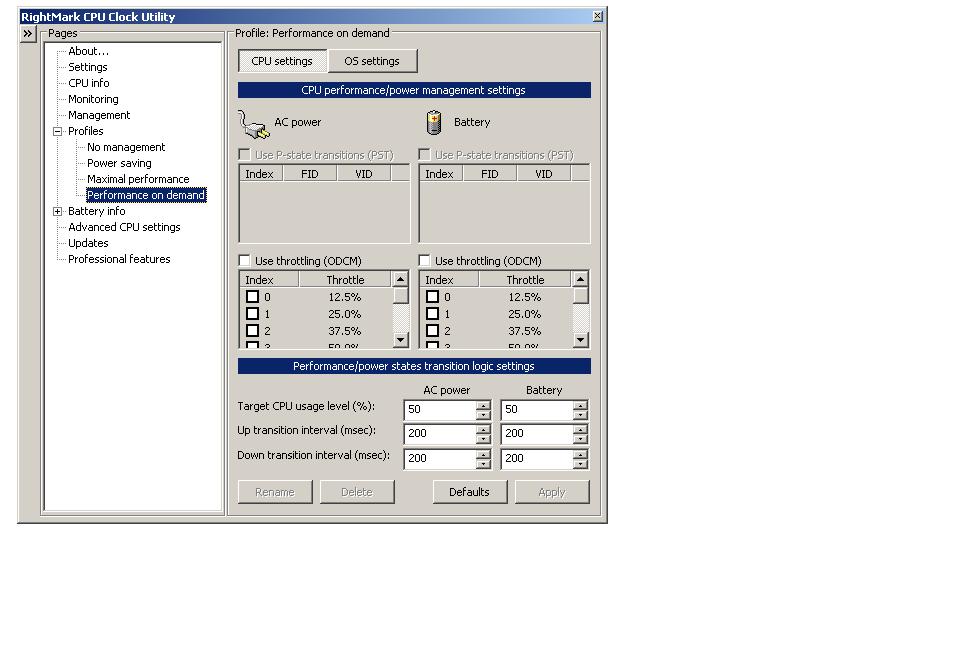
What happened was, I followed the instructions until the part of setting up the RightMark Utility.
At first I could do the settings on The "Profile Tab"/"Performance on demand".
I ticked "Use P-state..." for both AC Power & Battery.
However already then I noticed that I could not change the VID. When clicking the arrow down menu for VID of the various FIDs, It would not give any other options.
After that when starting the RightMark utility again, the option on ""Profile Tab"/"Performance on demand" ticking "Use P-state..." was totally gone.
It is now grey and no settings can be made.
I attach a screen print.
Can somebody please tell me what is wrong with my laptop and how I can proceed with the undervolting. This is very important so I can work with my laptop again, it is now much too hot.
My CPU is: Intel Celeron M [email protected]
Many Thanks in Advance.
Cheers,
JensAttached Files:
-
-
excellent thread, very nice, I never realize we can reduce the temperature, i am using AMD and so hot
![[IMG]](images/storyImages/grey.png)
-
To be honest though Sandy Bridge is already insanely efficient. I have an i7-2720qm (quad core) that idles at right under 9.5W for the entire system. It can even play 1080p videos under 17 watts.
-
After successfully undervolting and experiencing no blue screens, I've noticed I get minor but regular graphics issues. They're not too noticeable and I could happily live with them but I wondered if there was anything that can be done with the RM Utility settings maybe?
I get random horizontal flashes of white bars down the right hand side of my screen, approx 1 inch in length. They flash on the screen for literally only a second or so, then disappear. This happens mainly when refreshing web pages - various browsers.
Thanks in advance.
Acer Aspire 9300
AMD Turion 64 X2 Mobile TL-60
4.0GB Dual-Channel DDR2 @ 251MHz (4-4-4-12)
nVidia GeForce GO 6100
MS Windows Vista Home Premium 32-bit SP2 -
Can someone help me? I'm try to dl RMClock but i keep getting an error that says "Cannot install or load RTCORE64 Driver. Make sure your loading this application from a read-only medium and/or network drive, and that your logged in with administrative rights." I'm loading this with administrative rights, but it still isn't working. What should i do?
-
First, keep reading.
Above quote from first post in this thread.
Will also work with Win7x64. -
Thats what I did. I have installed it but nothing worked.
-
Is your cpu/platform supported?
Keep reading.
-
Is there a full guide similar to that on the first post but for Throttlestop instead of RMClock? I have a i7-740qm and RMClock doesn't support it.
-
-
I went through the guide and it did not mention anything about undervolting i core cpu. It mentioned that setting multiplier will undervolt core 2 based. There's no option to change the VID on my i7 cpu.
Edit : Fount this in the documentation. " Software adjustable core voltage is no longer available on the newer Core i7/i5/i3 processors. " -
As I understand it is still impossible to undervolt these CPU's? (I'm interested in i7-720).
And is it a matter of current software or it won't be possible with hardware because of its conctruction? -
I believe there is a restriction on the Core i3/5/7 series (specifically, the Arrandale processors) that prevents current software from reading the voltages. If I remember correctly, Sandy Bridge can be read, but not manipulated.
It could just be a software limitation (meaning it might be overcome someday), but it could also be a flat-out hardware limitation. With Sandy Bridge already out, I'm not sure if there will be too many efforts to brute-force voltage unlocks on Arrandales.
Really sucks, since I have an i5-460M that runs at 77-80 degrees Celsius while gaming or at full load D: We can only hope. -
Thanks..
You say that i5-460M runs at almost 80 degrees? That's suprising. Mine i7-72-QM has similar temperatures and I thought that it's because i7 are so hot. I would expect i5 to run noticable cooler.
Or maybe HP Pavilion has even worse cooling system then DELL XPS 16.. -
I have a dell xps m1530 with T9300 cpu. Without using Rmclock all games in my laptop were slow and lagging, even low graphic games with low detail.At first i thought this is because of my graphic card but after reading this thread and using Rmclock the game doesn't lag anymore(nfs:hot pursuit) but after several minute it suddenly shuts down.i have tesed the rmclock voltages with orhos for 3 and more hours and it was fine but in game it shuts down.
after trying diffrent voltages i understood that i don't need to change the voltages,i just need to tick p-state transitions and its indices without changing any voltages and game runs smoothly, but again it shuts down.Even if I don't change aything and just tick PST nad its indices it shuts down IN GAME.
What is my problem?
What can I do? -
Thank you for this guide! I look forward to undervolting when I get my xps15 L502x that is still 'in production'.
-
How do I determine the lowest amt of voltage to my T9900 on battery power? I want to make my battery life last longer...whats the best thing to do?
-
Can You tell me the optimal settings in the Advanced CPU settings tab (the aim is to reduce as more ad possiblethe cpu temp and improve at the same the cpu performance) ?
The "Undervolting" Guide
Discussion in 'Hardware Components and Aftermarket Upgrades' started by flipfire, Apr 1, 2008.


![[IMG]](http://img714.imageshack.us/i/undervolt.png/)