Problems? See this thread at archive.org.
Anyone tried undervolting the Atom N550?
-
-
Has anyone experienced their computer simply turning off during the Orthos test? Not going to BSOD, but simply turning itself off?
I have a Gateway P-7805, running Windows 7 x64 on the 640gb HDD, which I just added, and 7 x32 on the 500gb HDD, which used to be my larger HDD. I recently added Service Pack 1 (I hadn't added any updates previously), and now I can't undervolt at all, it seems, without the computer simply turning itself off less than ten minutes into stability testing. And the computer is definitely running hotter, even with the Zalman running at about 50%. -
It is very common for Core 2 Duo based computers to randomly reboot at full load when they get too hot. What temperature are your cores hitting when this happens?
RealTemp 3.67
http://www.mediafire.com/?jibd769x6z7n0c8
If you have a poorly cooled chip then the amount you can under volt might be limited. -
It was up to 88C... I was testing it at 1.1125V. "Normal" seems to be 1.1250v, which is a bit higher than it was before I added the new hard drive. Then again, the range of available voltages go up to 1.2000v, so maybe I shouldn't be concerned.
Before adding the 640gb, I'd gotten down to 1.1000v and was considering testing in the .900-range. the core seems to normally hang out at about 42C-44C, if I'm just surfing a bit or playing Solitaire. Since I just reloaded the OS and am still setting up, I've yet to play with any video-intensive games (the NFS racing series is about as intensive as I get--otherwise, it's just a couple of versions of Yatzee, games like Quest of Saqqarah, and the like).
I downloaded RealTemp earlier, but frankly, I'm a bit green at this and didn't know what the hell I was reading. Any guidance there would be welcome. I'm getting my temps from HWMonitor and RightMark at the moment. -
Is it a big deal to just set the max voltage at 1.1 volts (that's the lowest it will go, with a max of 1.25 volts) and forget about it.
I have this cpu...
I set it at the voltage, then just forgot about it. If it ever blue screens on me, then I will know to increase the voltage. -
If you're not doing anything terribly important, I'd say go for it. You can't physically damage anything with a BSOD, the only thing you risk losing is your work.
I find the best way to test an overclock is the same method - Prime95 it for an hour or so to make sure there are no huge issues and other than that, just run with it until it crashes, if it does. -
could someone help me out ? i dont have the "advanced cpu settings" in my list on rmclock.. and when i go to update it asks for activation code..
-
Hi,
I was wondering if anyone could help with undervolting my laptop. I have Toshiba Portege, I3-380M, Intel HD Graphics, Win 7 Business 64bit..
I dont know if anyone have the same problem, but I can hear very high pitched noise coming out from my laptop. Its very irritating and I cant basically work with it. I tried to service it, but they send me it back with explanation that this is normal and they cant do anything for me. Allegedly, the reason of this noise is the way I-cores are manufactured and each I-processor makes it.
I read many forums and the only solution seems to be some undervolting tool which works on I-cores and which can stop my cpu falling into idle states that are reason for this annoying sound.
Do you have any idea what could I do?
I will be gradeful for any help.
Sobi -
To WICKED STUNTS:
The reason that u dont have "advanced cpu settings" on rmclock is that u have I-core, havent u? RMClock doesnt work on I-cores. Its because it wasnt updated for a while.. Unfortunately I havent find any substitution yet.. -
oh thank you
 that really sucks as this chip gets super hot! i wish they'd up the support
-
anybody successfully undervolted the new SB mobile cpus?
-
no undervolt on the sb cpus. download hwinfo and watch the voltages as your cores do their thing. turboboost is really dynamic and seems to work really well.
-
hi guys!
im using an MSI EX460 notebook. i had it undervolted for a year now but suddenly it starts getting BSOD when on battery (Performance on Demand), although AC works fine. if i don't run RMCLock no BSOD happens so i'm quite sure it's from the undervolting.
do you think there's a problem with my battery or is there something i can do to prevent this? hope you guys can help. thanks! -
probably not. battery changes the dynamics of everything. especially gpu's. you might be able to tweak differently for your battery, but probably not.
-
Same thing here - undervolting with RMClock works perfectly with my C2D P8700, but when on battery I get instantaneous BSOD. Had to set the battery profile to No Management so can't take advantage of one of the main purposes of undervolting - longer battery life.
-
Note: After your done, make sure you re-tick the multiplier boxes in the "Main Profile" page then "Performance on Demand" sub-profile page, If you dont your CPU will be majorly handicapped
does this mean that I have to untick the ticks earlier done?
EDIT:
My try icon wheel stays red(locked), but I have unlocked it as per instructions in the guide, I have included some screen shots.
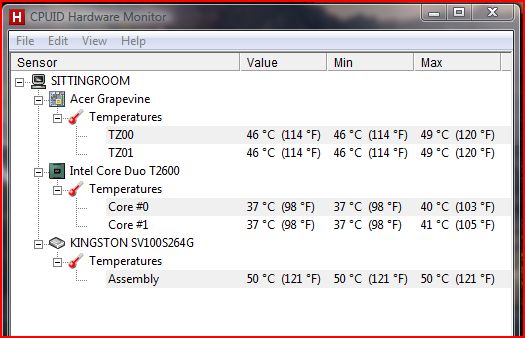
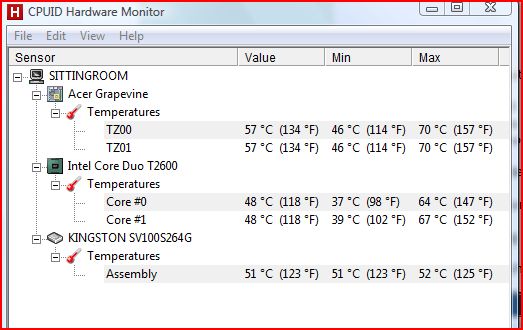
my maximum temps have gone down considerably:
TZ00 70 to 54
TZ01 70 to 54
Core0 62 to44
Core1 67 to 50 -
Sorry I missed the attachments:
Attached Files:
-
-
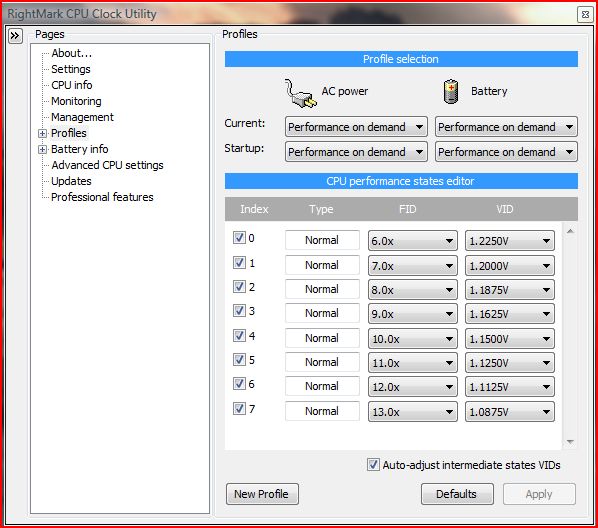
I think I have managed to undervolt slightly, from 1.2250 to 1.1250v just to be on the safe side, Thanks to flipfire for this post.
Attached Files:
-
-
you're probably right. anyway, after a week my laptop now can't even boot while on battery. sometimes i get as far as welcome to windows then just hangs, sometimes power button goes on but nothing happens.
i guess i really have a dead battery here. bummer!! -
so I've just upgraded my laptop to windows 7. Is it possible to just copy over the the folder from previously and retain all the same settings or will I need to redo the testing process? thanks
-
Highly recommend to 're-do'.
It may not even work at all... -
anyone managed to run on full multiplier with less than 1.0000 V?
i cant believe i am achieving 10 degree C+ difference -
Lucky you! My X3380 requires somewhere between 1.1 - 1.15V haven't done fine testing, Q9650 required 1.0375V.
-
Does RMClock need to be on before undervolting can take place? or once I set up and I can close it without opening it again.
-
More info flappy? What cpu you running?
Short answer if you read the first post of the thread it shows exactly how to set RMclock up to run at startup and also how to set it up. -
You need the RM Clock on if you are going to undervolt, when you switch off,the original voltage take effect(it means no undervolting).
-
Hello,
I undervolted my laptop a year ago and now I must do so again due to a pretty bad crash where I wiped everything.
However, I saved the voltage numbers for my old undervoltage settings but noticed today that RMClock is telling me I have different default voltages now (they're all higher).
Is there any reason for this?
Also, the "Auto-Adjust intermediate states VIDS" does not work for me anymore (I used this a year ago with wondrous results). I first click default, then lower the second to lowest index and then tick the checkbox for auto-adjust, yet the other indexes do not change accordingly.
Any help is much appreciated. -
I'm trying to install RMClock on my Windows 7 notebook on an SSD. I've downloaded the signed 64 driver, and am running as an administrator, but I get the error message "Cannot install or load RTCore64 driver." My cpu is an Intel Core2 Duo T9300, so it should be supported. Any help would be appreciated.
-
Undervolt is compatible with i5 2520 (sandy bridge) ??
Because the soft don't work on my dell xps l702x.
Thanks -
anyone got this working with the stock 2010 MBP 13" w/ Boot Camp-ed 64-bit Windows 7?
my settings don't seem to survive after a restart. -
I have p7350, and i only see two multipliers 6x and 7x. This cant be right? I undervolted 7 x to min 1.0 it seems to work fine, but 6x doesnt go below 1 either so i hve both set to 1.
Is this ok? I believe rmclock doesnt recognize my proc. -
Just to point out..
Trying with a Studio 1555 using a P8600 @ 2.4GHz.. (Soon I will try with a Latitude E4300 with a P9400)..
Maximum Multiplier 11 @ 1.100ViD..
Dropped the ViD to 1.0625 and it`s ok so far, I`m still stressing with orthors looking forward to decrease more the ViD..
Temperatures at full load and stock ViD was about 68 degrees, and now @ 1.050 is 59 degrees, LOOOOOOL..
EDIT
1.0375 @ 56 degrees..
EDIT
0.9250 @ 46 degrees..
I`m amazed! -
My old XPS 1210 is my "couch computer" Has always run way hot esp when the bottom cooling vent is partially blocked when on my lap.
The CPU is old C2D T5600 stock the peak temp was 81 C when stressed with Ortho.
I managed to undervolt all the way down to .9500 V on all the multipliers. Ran ortho for 12 hrs and my highest temp was 69 C. The system has been stable for 2 weeks with average temps running around 47 C. All programs run great. The fan never runs above the lowest speed and rarely runs when I'm just cruising the net.
All in all just a fantastic improvement. Thanks to all who developed this. -
i attempted this with an acer aspire 5251, and for some reason the application looks completley different from yours, as well as i have no "advanced CPU settings" tab, and under profiles, all i have is "no management". most of the boxes and buttons are grayed out anyway, so there isn't a whole lot i can change. i have searched around on the internet for a while trying to find out what was the problem. so far i have uninstalled and reinstalled the program 8 times trying to get something to work, trying every possibility to get this to work. my laptop idles at 74C, and peaks at 76C, so its ALWAYS been extremley hot. any ideas on what i could do to fix the issue with RMCLOCK?
-
Undervolted successfully a DV6-1154TX which was idling over 60* and loading at 90*C (prime95 15min)...!
Proc is P8600, stock volts were 1.0625V. After undervolting, got it down to a flat 0.9V on the highest 9x multiplier.
Undervolted first with the prescribed method, then changed to throttlestop with fixed 9x mult and 0.9V as I had same volts for all mults.
New temps are around 75*C which is a mind-boggling 15*c drop...! Brilliant
Win7 x64
Also tested for 6hr+ prime95 torture test of small FFTs, no errors or warnings! Rock Solid I guess!
Thanks a lot for this wonderful resource.
EDIT : ThrottleStop wasn't working for me at all, so went back to RMClock. Working great now... -
undervolted my t8300 default 2,4Ghz from 1.138V to 0,98
Or it does even better with dual ida @ 2.6Ghz and 1.00v
MAX temp is 57C
Also for those that have to much heat on CPU ... Replace thermal grease !
On my i use zalman stg-1
For now i use ThrottleStop 3.0 as its working better for dual ida mod -
hi! i have bought my laptop from greece which is called here "Turbo X Maestro" but its the clevo w170hn with these spesifications:
17,3" monitor (1600x900)
intel core i7
6gb ram
NVIDIA GeForce GT 540M (1024 MB)
Intel(R) HD Graphics Family (2905176 KB)
Can i undervolt this?? please help! -
I am having that problem also. I just reinstalled 7 and cannot get Rmclock to work, same error. But then again, while I do have a sleep button, it is greyed out and doesn't work, so there is something more going on that I haven't figured out. I appreciate any suggestions. It sounds like my computer is going to take off with the way the fan is spinning.
-
Hi,
Did enyone tried this with Asus K50ID? It has Core 2 Duo T6570, did all the steps, and it turns out that it's maximum is 10x - 1500. On this it goes in 3 minutes to 96 C and turns off, laptop shuts down. Lowered it to 1250, turns off in 5 minutes, on 1000 in 10 minutes and so on. I don't know if it is a good idea, but i put on every FID the minimun, now all my 6x, 7x ,8x, 9x and 10x are at 0.9750V. And Orthos is running for 30 minutes; the cores are at 86/88 since it is on. Can this eventualy damage my laptop? Any piece of advice is quite helpful.
Thanks.
PS sorry for my bad english
later edit: even though the cooler is cleaned and the 10x is at the minimum of 0.9750 I have a big overheating problem, as a fact, in Fifa 11, after 2-3 matches played, the notebook is shuting down. Could be the win7 64x the problem? I really don't know what I could be doing, giving the fact that the notebook is not that old... -
how do i undervolt the l502x i7-2530qm with throttlestop?
downloaded throttlestop 3.4, havent been able to find guide for it.
Rmclock doesnt work with 2530qm
-
CAn You tell me which are the "enhanced low power states" to be checked for an intel core 2 duo T7250 ?
-
did you get the x64 drivers if you're running the x64 version?
-
Will there ever be a undervolting guide for SB CPU's?
-
Hello,
First of all, thanks for this wonderful guide. I would love to underclock my laptop, but I have trouble following all the steps, in that:
- I don't have "Advanced CPU Settings" tab in RMclock.
- Under the "Performance on demand" tab, the option "Use PST" is grayed out and there is nothing in the box beneath it (no index, FID & VID).
- My CPU Info tab shows that RMclock doesn't recognize my CPU...
I may be a little bit stupid here, perhaps my question has already been answered pages ago, but could this problem be linked to the fact that I have a quadri-core and not a dual-core? -
Which CPU do you have? give more details of your system and OS.
-
Looks like I should have posted this here: http://forum.notebookreview.com/har...rades/614579-amazing-results-temperature.html
-
Hi; I'm trying to do this on my desktop at the moment. RMclock doesn't seem to recognise my CPU though.
It's an AMD Athlon II X3 3.0 ghz. Is there any way to undervolt this machine? Given it's on most of the day it seems like a waste not to. -
No, you will never be able to undervolt the newer CPUs with this software. Whether or not other software will support it in the future is still uncertain but most likely also no.
What is your CPU? -
Have you clicked the radio button for "Mobile" at the bottom right?
-
What should I do If I need to have multiple users connected at the same time?
When I hit "Switch user" and log on with another one It tells me that the program is already running.
This should not be a problem (RMClock already runs in background), but IF I log off the user that has RMClock running, no instance of this application will run.
So... what should I do? Can i register it to run globally? As a service?
The "Undervolting" Guide
Discussion in 'Hardware Components and Aftermarket Upgrades' started by flipfire, Apr 1, 2008.