 Problems? See this thread at archive.org.
You can't undervolt anything newer than the core 2 duos like sgogeta4 said above
-
-
Hi! I was wondering if it is normal behaviour that the processor "burns in" or something... I have a HP NC8430 with T7200 2 GHz processor that I successfully undervolted a few years ago, and I remember getting the voltage a few ticks down from the default 1.0875 V or something at 2 GHz (and quite linearly from there to 0.950 V at 1 GHz).
Since then I have mainly used it in power saving mode, thus no need for undervolting, and recently I reinstalled Windows XP on it, decided to undervolt and tried to find the old voltage settings from my archives in order not to have to go through the Orthos process with each voltage. But I didn't find them so I had to. Well, when I was getting close to 1.0 V at 2 GHz, I thought that what if the docking station was giving too much juice and switched to the regular power unit. But no, to my surpriseh I got to 0.975 V at 2 GHz, and 0.950 at all the other frequencies! What I remember for sure that a few years ago I couldn't get this low.
So, is this a good or a bad thing? I mean, does it tell something about the (remaining) lifetime of my processor, or should I just be happy that it will now work on low voltages for many more years to come?
I'm sorry if this is discussed already, I don't have time to go through all 566 pages and I really didn't know what to search.
Best regards,
piete -
Hello
I have notebook Asus k50ab (AMD processor RM-74 dual core or some kind of that)and i try to undervolt it because temperatures are going sky high values so it is necessary but the RMclock program says nothing about recognition of processor, so my question is - Is that because the last release of RMclock is 2008 and my PC is made in 2009 so it is uknown to the program or i have tiny knowledge about this?? and if the first opinion is correct could somebody give me some guide to undervolt new PCs like mine because playing mass effect 3 with 104 degrees of celsius is not very comfortable thx
thx
-
I've just had an alert about this: Tell us about your CPUs - RightMark Forums . It seems that RMClock may be trying to wake from its slumbers.
"we are interesting in snooping some bits on Intel Nehalem+, AMD K10+ cores, Extreme, ULV editions".
John -
Rather than undervolting (For a Dell E4300 it seems not to be a real need) I' d like to know which is the better way to manage the fan speed.
Currently I'm using HwInfo32 but I don't know there are other applications more reliable for how concern the sensors and the fan speed management. -
I don't recall a recent program that works to control Dell fans in the way that I8kFanGUI used to. In which case undervolting is your only alternative. It certainly worked well when I had an E4300. It was almost inaudible even when under load. IIRC, 1.05V at full speed worked for me but each CPU is different.
John -
The problem comes out particularly when I have many open tabs and silverlight/flash plugins on.
Watching video o listen audio streaming seems to be cpu hungry, the temperature grows and the fan becomes more and more audibile.
Just when the teperature reaches a temperature around 50 C.
Now, for example, the temperature is at 42 C. for both cores and the fan is running at 3820 rpm being only a little audible.
But when the temperature increases the fan become more audibile and a rather noisy.
For now I have followed this guide and finally I can just start/stop the fan like I want.
Now the better thing could be have an application that can manage directly the fan speed in function of the cpu temperature (SpeedFan seems to me cannot do this thing but hwinfo32 and similar could do that) -
Can RMClock run on Windows 7? I can not get it to run.
I am getting this error message.
"Cannot install or load RTCore64 driver. Make sure you're loading this application from nat a read-only medium and/or a network drive, and that you're logged on with Administrators rights."
Edit :
I found the answer. The 64 bit drivers need to be downloaded which can be found in the first post in this thread. -
My experience:
T3200 2ghz, 667
0,9v - 0,96v
(auto VID) first/last "x"
Pentium M Dothan 1,6ghz oc to 2,13 400->533 bus
0,7v - 1,12v
(auto VID) IMO PM will be run under 0,7v manual edit (in REG ?) value. But i didn't tray this.
Dothan 1,7 -> 2,25
circa: 0,732 - 1,2v
(auto VID) Another 1,7 dothan will not start in OC. For 0,7v I have BSOD.
PS. I suggest Prime95 and LargeFFT its quick'er and steadier than Small FFT or Blend (in Orthos). Some times windows7 have problems with Blend. -
Hi guys
I have a acer laptop with i3-370M cpu. I tried to undervolted it but i have a problem. I used crystal cpuid because rmclock does not work on my cpu. In the multiplier management section the maximum multiplier seems to be 15.5. But when i stress my cpu with prime or oprthos the maximum multiplier in which my cpu is working is 18. I saw this from cpu-z. Any ideas about what to do to undervolt?
Thanks -
For what its worth my proc was able to go down .250 in every level.
-
So it's impossinle to undervolt an i7 ? CrystalCPUID seems to be able to give you the option, but not throttlestop?
-
I haven't been able to under voltage my i7 but throttle stop has helped. I can scale it from multiplier and it is behaving much better. the fan is running quite, most of the time. Btw I have the first generation i7 Dell 1645 laptop.
Sent from my Nexus 7 using Tapatalk 2 -
I seem to be having a problem with RM CPU clock utility. I don't know if I did something wrong or not
because as I was about to do "iii)" under "2) ***Installing and setting up RMclock***" but when I looked below the battery tab it only shows "Updates" and "Professional features." I couldn't see "Advanced CPU settings." Could anyone please help?
I use a SAMSUNG LAPTOP model:R440 (NP-R440-JU03PH)
SPECS:
CPU: Intel® Core
i3 Processor 380M (2.53GHz, 3MB)
Color: Silver
Display: 14.0″ LED HD (1,366 x 768) 16:9 Gloss
Memory: 2GB DDR3
OS: Windows 7 Home Basic (32bit)
Graphics: 512MB Gfx ATI
Hard Disk: 500 GB
Disk Drive: Built in DVD -
It doesn't work with core i series processors. I had to figure that out on my own with my i7 because it's not listed in the OP.
It only works on Core 2 Duo and older.
Sent from my SAMSUNG-SGH-I727 using Tapatalk 2 -
Thank you so much for the reply. Saved me a lot of worrying.
Does anyone mind if they could give me some advice in undervolting my laptop? My brother mainly use it for gaming and after a couple of hours playing, it shutsdown. I looked through the internet and overheating probably be the cause. I recently found a thread about Throttlestop, but I'm clearly inexperienced to understand some of the words being used. My brother's birthday is coming up and I wanted to hand him my laptop as a gift before I leave for Australia. If anyone could give me a step by step guide to undervolt my Samsung R440 it would be a great help. -
Guys, this is what CPU-Z shows for my processor:
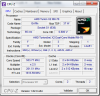
It is a dual core processor and everything, and it is even on the compatibility list for RMclock...
But When I open it, is shows this: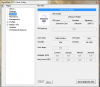
WAT. What is this? How can I get it to stop saying that it is "Unknown?" -
can you help me here please ?
http://forum.notebookreview.com/hp-...clock-doesnt-have-advanced-settings-page.html -
Trying to undervolt a Samsung Series 3 Laptop with an AMD A8 Quad Core CPU. RMclock doesn't recognise it.
What can I do? -
Try K10stat, I know nothing about this program, google for more info and hope this helps.
Undervolting AMD laptops (Turion + Athlon X2) & overclocking w/ CnQ - Hardware Canucks -
I, too, am having the issue where RMclock doesn't have the "advanced cpu settings" tab.
I'm not too savvy with windows computers, so I'll just copy what it says my processor is: AMD Phenom II N660 Dual-Core.
I'm running windows 7 64 on an hp laptop, if that helps. -
RMClock AFAIK only works up to Penryn Core 2 Duo processors, I don't think newer* AMD is even supported..
-
The temperature of my laptop is.... now 80 C (176 F) is too much, and with the air conditioner on at 24 degrees in my place!!
Is a Toshiba A505-S6005 and I replaced the motherboard for a new ago 5 month.... -
You may have to re-paste and make sure the heat sink screws are hand tight, also try only the highest multiplier voltage with Auto selected for the intermediate multipliers.
-
Last AMD/NVIDIA GPUs still compatible with undervolt via BIOS?
-
I don't have "Advanced CPU Settings" tab in RMclock
My cpu interl core i3-2350m -
RM Clock won't work with Core ix- CPUs, try Throttlestop.
-
Dont know how to set thease settings on Throttlestop
-
Post your questions in this thread, uncleweb or someone else will help you.
http://forum.notebookreview.com/har...arket-upgrades/531329-throttlestop-guide.html -
Very useful guide! I could cut about 0.2V off on avarage for each multiplier.
However if you're planning to adjust the voltage for each freq I suggest to start with the lowes MP first. That way you don't have to test how low you can go for each one individually. You always know that you can never go lower than the voltage of the previous one. So test each MP with the stable value of the previous one, and if the test fails increase it by 0.0025. Sometimes it will run stable with the voltage of the previous MP cause 0.0025 diff might be quiet a lot... for marginal freq increasements. -
I have read the full original post. How do you save setting in this? Every restart I have to adjust everything, so far I found.
-
You need to click "Apply" button when you adjust the settings, when you achieve the correct settings, you need to tick the box " Run at windows start up".

-
Thanks,
It's helpful. -
atleast 10 characters
-
Excuse me?
I was under the impression that Intel i core series could not be undervolted.
People tried, but apparently failed. -
Would this work for:
Asus N55S
Intel Core i7 2670QM
NVIDIA GeForce GT 555M
? -
No, you may try Throttlestop.
-
Hello!
I'm wondering if anyone found out any software, that supports Intel 4th gen CPUs? Since I've tried to use RMclock software, but apparently it does not recognise my CPU - I don't have advanced CPU settings tab, nor is there any information about CPU under CPU info tab.
Why I want to undervolt it though is due to temp being around 80 degrees while playing games and I would love to extend computers life
Thanks and enjoy,
Fleshcrawl -
Hello,
Just to give a reference, because there is not much on this particular CPU.
I just successfully undervolted a T7300 in ThinkPad T61. After servicing the fan (including bending the heatsink to increase clearance and applying some fine oil) and using TP FanControl I was getting 85-90C under full load with Orthos despite the fan being forced to 4500RPM.
The system is now perfectly stable at 10x = 0.9625V, 8x = 9.500, 6x = 9.000V and the temperatures are 65-72. Tested for hours, great results.
Many thanks for the guide, totally worth it! -
Is there a definitive way to use half multipliers now? I see there are a lot of different methods in this thread but dont know what works best. Thanks!
-
"based on how electricity works, if you undervolt, the CPU will draw more amps. So less volts, but they move through it faster" This is what a friend told me. Is it accurate? And is it a possible danger to the CPU?
-
V=IR
where V is voltage, I is current, and R is resistance.
afaik, steady state resistance of the cpu should be equal no matter the voltage, so using less voltage will also reduce the current (e.g. amps).
you won't physically damage the CPU by undervolting, but you do run the risk of crashing and/or data corruption if you undervolt too much. -
Would you undervolt an otherwise "low powered" machine? Eg. older ThinkPads with an "s" in the end of the model number, Core (2) Duo Low Voltage processor.
-
I probably would if I can find the lowest stable voltage.
To undervolt is good.
It not only reduces the amount of power being used, but you also reduce system temperatures without reducing performance. -
Is there any alternative to RMClock? It doesn't seem to recognize my CPU (E8335 SLGEB). ThrottleStop works, but unless I'm missing the obvious, there seems to be no way to specify VID/FID pairs to use - I can only set the voltage manually.
I found CPUgenie, and that would be perfect. It works well, and it's actually a pretty nice program. I'd be happy to buy it if I could, but it seems the company behind it doesn't exist any more. At least their website has been down for months. I found a crack for the 32bit version, but I can't install that on x64. Unfortunately, my reversing skills are a bit too rusty, it seems to be protected somehow and I gave up after a few hours.
Are there any alternatives I missed, or do I have to give up on undervolting? Would be a pity! -
ThrottleStop is better and modern.
Besides, the situations where you will notice most improvement from undervolting is at maximum frequencies when your laptop is working under full load.
The main point is to lower the temperatures at full load without sacrificing performance while also lowering the power draw.
I didn't see much point in undervolting the CPU at lower clocks... too much hassle. Its already designed to go to lowest sustainable speed and voltage when in idle mode (yes, manufacturers often overshot these estimates for stability, but there's little point in messing with the settings at such low levels).
Other than that... there's no reason to give up undervolting, because (as I already said) you will benefit most at maximum clocks.
So, fire up ThrottleStop, set multiplier to produce your stock speeds and lower the voltage on that multiplier the lowest it will go.
Another alternative option you could try would be CrystalCPU... but that thing is outdated and has no clear instruction manual.
I remember barely getting it to work on my P7350 CPU when I had it, but I forgot about the program ever since I started using ThrottleStop because all I did was undervolt the CPU at stock maximum clocks (full load) by about 10 degrees Celsius, and that was enough for me.
What you could also try is undervolt the gpu (if you can).
If its possible for you to UV your GPU, then you could conceivably lower your temperatures further down by another 5 to 10 degrees Celsius (depending how low you can go with the UV) -
I know it's most useful at high frequencies. But if I set it to the lowest voltage at which the highest frequency is stable, it uses that voltage for ALL frequencies, so I waste power when I'm not doing much. What I can do is to set the highest FID that will work with the lowest possible voltage, and when I need more power, I can switch to another profile. But I'd prefer that to be automatic.
Undervolting at lower frequencies used to be useful until Intel disabled going lower than the lowest stock VID. I used to have a Pentium M laptop where I could reduce the voltage from IIRC 0.950V to 0.725V or something like that at 600 MHz, and as long as I stayed at that FID/VID combination, the fan never turned on even with extended 100% CPU load.
I'll try CrystalCPU once more, I didn't have much luck with it the last time but maybe I did something wrong. And I'l look into GPU undervolting. -
Actually, I think that in ThrottleStop, you simply need to check the 'Power Saver' field so that the CPU will downclock and undervolt when not in use.
That way, only your maximum frequency/state will be affected by the voltage modification.
I have that and 'Disable Turbo' checked - everything else is unchecked (except for EIST which seems greyed out), and I noticed via CPU-Z that my cpu seems to downclock and undervolt automatically when not in use.
Try it (unless you already have). -
I've tried the Power Saver option before, and I could have sworn it didn't change the voltage. But it does. It only changes between the FID/VID I set and the lowest for both, but that's fine. And since on my specific CPU I only have 3 frequencies that aren't stable with the minimum voltage and ThrottleStop supports 4 profiles, I created one for each:
11x - 1.1875V
10.5x - 1.1375V
10x - 1.0875V
9.5x - 1.0500V
I guess I'll mostly stay on th 9.5x profile, because I think the lower voltage should mean lower overall energy use for the same task, even if it takes slightly longer. I haven't actually measured this though. When I really want it to be as fast as possible with no regard for power, I'll switch to 11x. I probably won't use the others much, but it's good to know I an quickly access them without manually configuring anything if I want them for some reason. -
Are there recommended changes in the BIOS or should it be left at default? - http://forum.notebookreview.com/har...ile-tweaks-performance-battery-life-heat.html
The "Undervolting" Guide
Discussion in 'Hardware Components and Aftermarket Upgrades' started by flipfire, Apr 1, 2008.


