Problems? See this thread at archive.org.
The throttling I have left alone, I'm not entirely sure what benefit there is to playing around with it.
-
-
In Step 2, what do you exactly mean by "top two boxes" ?
-
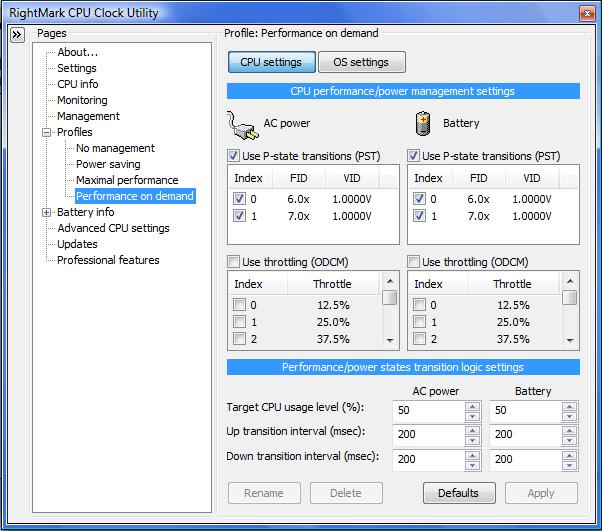
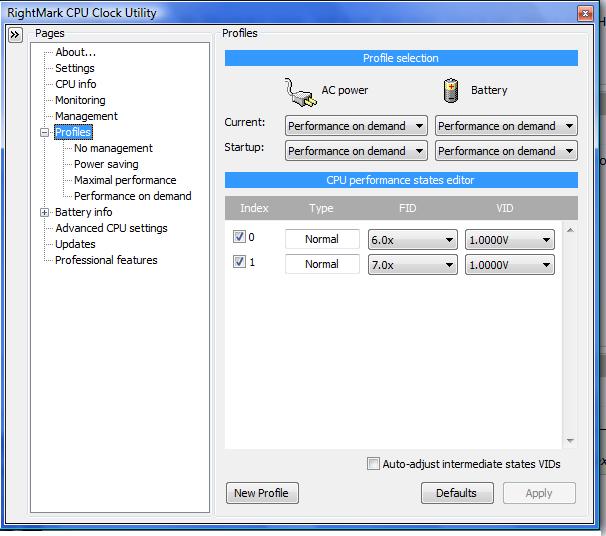
Top two drop down boxes in which you select your power profile
-
Gotcha. I'm also wondering why my 10x state type is Normal instead of IDA which we are expecting it to be? This is confirmed by the Profile page.
-
I don't know the answer to this one either, I just know that if you try to set the 10x multiplier your machine will reboot as it tries to set both cores to 10x multiplier. If you download everest (or if you already have it), and watch on the overclock screen, you can see your processor click into the 10x multiplier.
-
Ok. Another weird problem:
I set my highest multiplier (9.5x) to 0.975V which is 0.100V less than the default 1.075V.
If I test it thru CPU Genie and ran CPU Genie's Power Monitor at the same time, the voltage indeed is 0.975.
The problem is when I use Orthos and again ran CPU Genie's Power Monitor, the voltage goes up to the default 1.075V. What's wrong?
Uhm, should CPU POWER MANAGEMENT in CPUGenie be disabled?
Also, why are the temps different when using CPUGenie's Power Monitor vs. HWMonitor? Is it normal? The readings by CPUGenie is the same as Everest's -
Oops, yes you should turn on CPU power management, forgot to mention that.....
As for the temps difference, I believe HWMonitor is the more accurate, but not sure. -
Well, I got a stable 0.975V VID when CPU power management is turned OFF, can you confirm?
Also, I just deducted 0.100 V from the default and ran Orthos for about 20 minutes and it gave me an error, why is that? -
Well, the problem i have is that i don't really know how to get the voltages for rm clock. Somemore T9400 has half multipliers (max one is 9.5) and from what i read , it casued a guy with a P something which also had same multipliers to underclock. So i really need help in getting voltages and verifying the issue of underclocking.
-
Throttling in the CPU business means slow down only. The opposite of cars. Best not to use it. It's an emergency further slowdown of an overheating CPU already slowed down by speedswitching. I can't fathom any need for it except on a malfunctioning Mars Rover

-
Fragilexx: Don't be "hogging" all the easy inquiries for yourself. Shame on you
-
Transistors, all 400 million of them on your CPU chip, need a certain minimum voltage to operate. They don't just dim down like a light bulb. They just quit working.
-
Well, it's just weird that they guide say that most people start off by subtracting 0.1V from the original.
-
C'mon, Kev
If this was an exact procedue for every make and model, we wouldn't have a 322 page sandbox to play in -
Sure, I realise that is what it does - I've just yet to fathom a reason to play with it. If your CPU is overheating after undervolting, then I'd give your machine a good clean and check the fan is actually working...
Whaddya mean, hogging the easy ones
-
Lets say I undervolt and everything goes fine, I apply the changes and all. But then I get a BSOD, how would I get off that? Because every time the S.O restarts it'd start with the new voltages isn't it?
-
Yeah, it's a pain. That's why you need to test before installing that voltage for startup. However, I recall doing the same thing myself. What I did was to start up in Safe Mode and use a utility that manages your startup programs to either remove or disable the RMC or CPUGenie launcher and reboot in normal mode. Then, start up the program, fix your voltage and leave the program in a "don't start with Windows" state until you're darn sure you've fixed it. Then, go back to autostart.
-
Sorry if it's been answered before...it's just that 322 pages is kind of a lot
Is there a max temperature below which there really is no point to undervolting? Or is it all relative (i.e., the lower, the better).
I'm all for learning new things, but after my initial Orthos results, I'm not sure it's even worth doing...
-
Turion 64 Chips here
-
Why, what temperature did you hit?
Undervolting is never a bad thing, it reduces heat and none of the inners of your laptop particularly like heat; but I understand where you are coming from. My p8600 didn't really get warm in the first place. -
Cut off the Orthos test at 11 minutes, with core temps at 43/44. Temperature peaked around 5 minutes and then went down slightly over the next 5 minutes or so, so I figured there wasn't much use letting it go on.
Min: 36/37
Max: 44/45
Kind of seems like it wouldn't be worth the bother.
edit: or maybe orthos just didn't work as advertised? I left the temp monitor running, and it recorded a high of 60. Must've been about an hour later... -
People with the P9500, how low did your 9.5x multiplier go before having BSODs?
-
Ive been having a problem with the profile thing. The profile selection where it says current and startup management keeps reseting to no management and i have to keep changing them back to performance on demand.
-
Great guide guys, and whoever it was that tricked half multipliers it works.
Q9000 lowered temps by 10-20C depending on the situation, i had to use prime95 instead of orthos because it only used two threads.
Northbridge took a huge temp drop also, 10-20C, now im going to try beat the OCCT test
-
I am running X9100 on default clock (3.06Ghz) and when I tried to undervolt it with RMClock I got this:
![[IMG]](images/storyImages/rmclock_www.kepfeltoltes.hu_.png)
Did I do something wrong or x9100 can't be undervolted?
(p.s.: I ofcourse set it to "mobile") -
your current profile is "no managment", maybe change that.
-
rmclock is refusing to detect the amd neo in my hp dv2 and the advanced cpu settings screen in rm clock looks quite different than the one in the op. is rmclock not compatible with the neo?
-
I'm not really sure why is this happenning, but when windows starts RMClock is not opening up, I have to open it manually. I already ticked the options in settings.
-
did you try to change "via registry key" to "via startup folder" in the settings?
-
Yeah was just about to do it. Will try and hopefully it'll work.
-
It's the same at all other profiles too.
-
When i select mobile RMClock doesnt restart etc etc, so i have to manually edit everything from boot, i think i will really use RMClock under long ops and benches hehe.
-
How did you do the trick? Are you referring to the regedit of the pFstates key?
How did you go about it? I really can't make it work.. -
I'm interested in this as well. Really want to do this, but dont want to waste any speed (however minimal it may be).
-
Yeah
I heard there was a way to enable the half multiplier as that will give me back my 100MHz
How is this done???
Cheers
-
This thread: http://forum.notebookreview.com/showthread.php?t=346084 explains the process but as I've posted in that thread setting my highest multiplier's (9.5x which is 10x in RMClock) VID at 0.975V (0.100V less than its default 1.075V), I already get BSODs.
So I was thinking that RMClock doesn't really "trick" the system by using this tweak. I don't know but I don't think I should get any BSOD with just 0.100V less than the default.
I may be wrong, I'm open to your suggestions guys
-
The trick I found months ago, but couldn't remember then, is really simple. If RMC offers an FID multiplier higher than your CPU really has, check it, even if it's an IDA one. My T8100 is a 10.5X, but RMC offers a box for 11X (IDA). I checked it !
Then, I unchecked the "use dynamic acceleration" box in Adv. CPU, because I don't want RMC to use dynamic acceleration to reach for the top frequency, just to do it even if it doesn't have a convenient label for it. It works. At least for Santa Rosa and above.
I don't know how you guys are tangling up voltages with CPU frequency. The hard and fast rule, which has never changed, is this. You run at the lowest voltage you can RELIABLY run at for each separate frequency. That's why you test. Rule number two: The higher the CPU speed (frequency, FID, multiplier), the higher the voltage has to be. The laws of chemistry and physics ain't negotiable....... -
i have a p7350 processor, is it normal for RighMark to only show two indexes for undervolting?
Attached Files:
-
-
How many showing under profiles ? Anyway fast and slow is enough.
-
two indexes are showing there aswell...
anyone have any ideas?Attached Files:
-
-
I know about the rules, but it's just weird that using CPU Genie's voltage optimization wizard yielded a 0.975V for my 9.5x multiplier. But when I use CPU Genie and run Orthos, it seems not to follow the undervolting and still goes up to 1.075.
This is why I switched to RMClock and did the trick and set it also to 0.975V, and the problem is BSOD. Hence, it's weird they don't give me the same results.
ALSO, the problem with my P9500 is that RMC doesn't show me an IDA index, why is that? -
i really wish they would have just added half multipliers in. i have a p9500 too...seems like such a PITA to get this working properly.
-
P9500 much need too much juice to keep it running if its bsoddling like that.
We need to look for a registry key prehaps for RMCLOCK to trick it further. -
With RMClock, are you seeing an IDA index on yours?
-
Your particular CPU model only comes with a two speed transmission. Be happy. It's one speed more than you really need.
I just can't figure out how the computing world survived for 25 years with one speed CPUs
-
The Russian team behind RMC got tired of working for free about 2 years ago. They quit.
See thumbnail. Looks to me like the P9500 has evolved beyond IDA technology.
I suggest you just use the top speed and undervolt it to safe, reliable voltage
-
Use CPUgenie for half multipliers. I used it for my T9400 and everything works.
-
Hey,
I've just undervolted my T7300:
HP dv6510,
CPU: as mentioned Intel T7300 core 2 due 2ghz
RAM: 2GB 667mhz
OS: Windows 7
x6 : .9000v
x7 : .9250v
x8 : .9500v
x9 : .9750v
x10: .9875v
super LFM decreased to x6
Temprature dropped from 79c at 2ghz to 59c
and when idle from 54c to 42c
checked it for 3 hours and it's stable so far,
tomorrow I'll check the battery life -
Small neat utility to watch your temps in the tray while you work. Adj. fonts too
Real Temp 3.0
http://www.techpowerup.com/realtemp/ -
do CPUgenie and RMclock work the same way?
edit: nm, cpugenie is not free.
The "Undervolting" Guide
Discussion in 'Hardware Components and Aftermarket Upgrades' started by flipfire, Apr 1, 2008.


![[IMG]](http://kepfeltoltes.hu/090702/rmclock_www.kepfeltoltes.hu_.png)