Problems? See this thread at archive.org.
Every processor model comes with its own built-in set of multipliers. You get what you get. No add-ons.
-
-
That's what I figured. Thank you sir! I'm currently down to 1.0875 on my 9 times multiplier which started out at 1.1375. It seems to be stable. Orthos has been running for a full 17 minutes on this config.
-
So, with the T7500 is it possible to undervolt more than the poster has?
Alex. -
@scott.ager
When RMClock is running according to the guide in this thread, are the Windows Vista power plans still effective as is? -
You can undervolt until you reach the lowest voltage allowed by your model of CPU or until you get a BSOD. Whichever comes first.
-
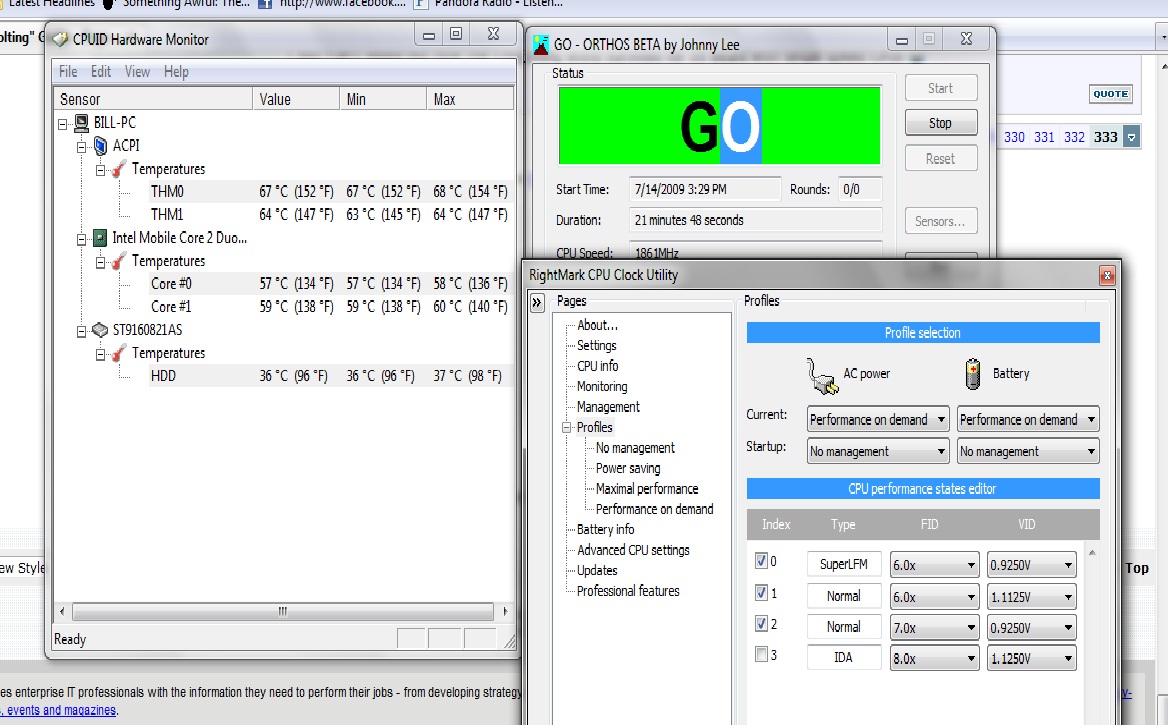
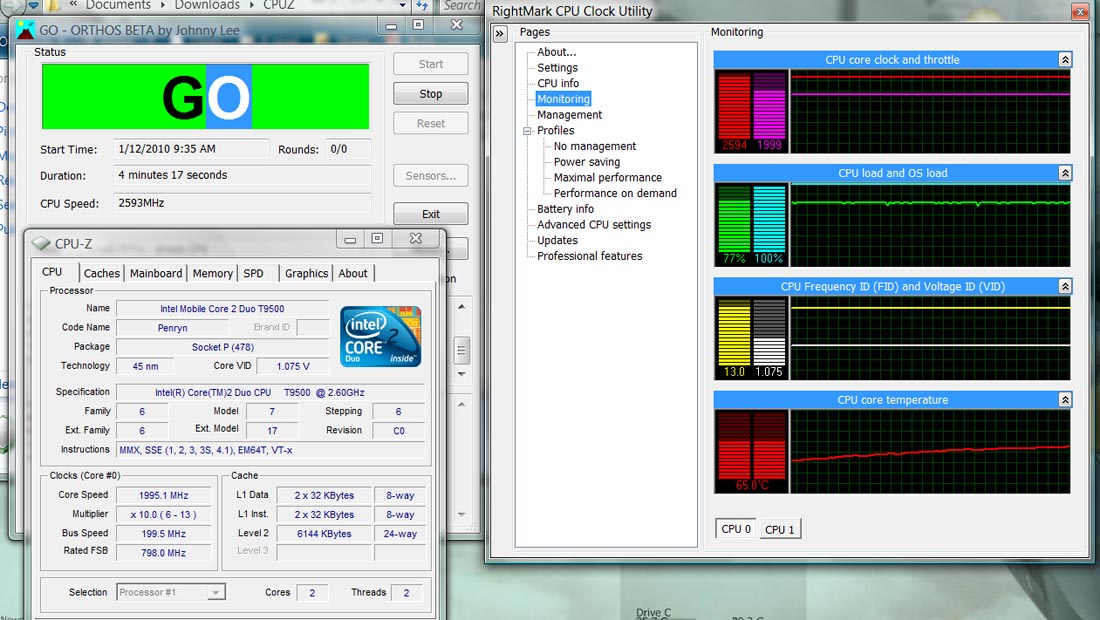
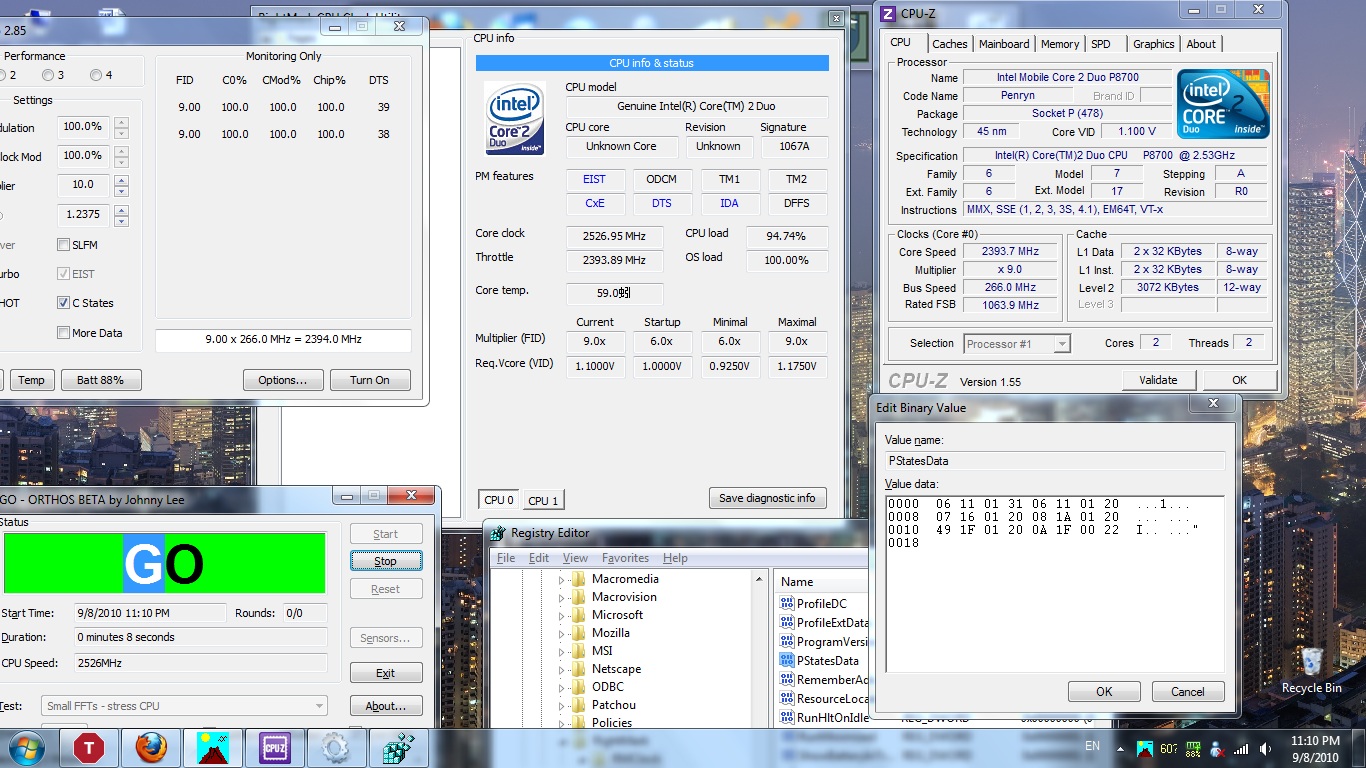
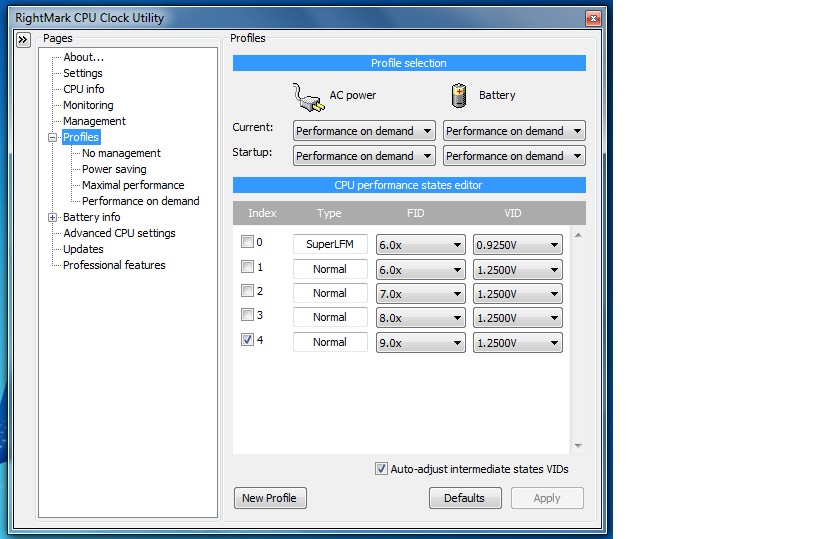
I think so if you neglect to pick RMClock as your default plan. One of the nice things that RMC does is that it allows the user to define a complete power plan from the ground up. You get to define CPU speed, voltage, FID transition points based on load level, screen blanking, HDD power-off, and standby. No vague terminology like "Presentation" or "Maximum Battery". You get to define all the parameters (see thumbnails). In XP anyway, the final step is to go to Power Plans in Control Panel and select RMClock as your plan. Now you are in the drivers seat for everything. In short, why would anyone want to use the "stock" plans when you can build a better one on your own.
-
I shortened the process by just making all of the multipliers to the lowest voltage available
.9500v
I did a stability test for about half an hour until my patience ran out, and it only went up to like 65C on a flat surface and 93C on a soft couch will ALL the vents covered up and no BSOD either way!
That's down from 84C on a flat surface
Any other things I can "undervolt" or something similar other than the CPU? -
You have Core 2 Duo first generation, don't you?
-
Ok. Is there a CPU overclocking guide in this forum?
-
A little problem here guys. I have undervolted my T9500 successfully to 1.0125v @ 13x multiplier and now it's running 24/7 @ 1.0250v. The problem is with the rest of the multipliers, no matter what voltage I'll choose it refuses to run at anything bellow 1.0000v. For example I choose 0.9750v for 12x, but in the CPU Info tab it still shows that it's running at 1.0000v
Same goes for the rest. I did a little Google-ing, but I didn't found the answer on my question, so your input would be greatly appreciated
-
I've got a problem with RMClock. My Q9000's max multiplier is 7.5x (which is the one which takes it to 2.0GHz.) however RMClock sees the max multiplier as 7.0x. This means that if I use it to undervolt, I'm limiting my CPU multiplier to 7.0x and hence underclocking my CPU as well as undervolting it.
Is there any way to make RMClock see my max multiplier as 7.5x? -
Nope.
RMClock is old and it's makers decided they didn't want to mess around with it anymore, so the version you are presently using cannot recognize half-multipliers, so undervolting your cpu would actually result in reducing the speed on which the cores operate (by about 133MhZ ... and since I'm personally not inclined to tolerate such a nuisance, even though it's small, I'd opt for a different solution).
I recommend you utilize CrystalCPUID instead.
It is capable of recognizing half-multipliers and you can undervolt without issues for the most part.
I did it on my P7350 which has a max. multiplier of 7.5x and was able to reduce my temps by 10 degrees ... if not a bit more. -
Okay, it works fine with CrystalCPUID, HOWEVER I can't get it to work in such a way that the multiplier will change up or down with changes in load, as would normally happen. (Usually my processor would have a 6.0x multiplier when idle and would step up to 7.5x when loaded) Is there any way to set it so that it can still change multiplier like this automatically while keeping it undervolted?
-
The lower voltage limit is locked by Intel. They should know.
-
Yes.
Don't use 'Intel Enhanced SpeedStep Control' option which forces usage of just 1 multiplier and voltage. Instead, go to 'File', then 'Multiplier Management Setting' and manipulate the 3 multipliers voltages from there ... click 'Apply' and 'Ok' when you find suitable voltages.
Leave CrystalCPUID running throughout your use.
When resetting the computer, activate CrystalCPUID manually and press F3 (or click on 'Function' and 'Multiplier Management') to activate the voltages on those 3 multipliers.
Btw ... EviLCorsaiR
By how much did you lower your temps?
Just curious here. -
Running on my 7.5x multiplier with 1.163v instead of 1.275v lowered my temps by an incredible 12C-15C under load! I really like it
Multiplier Management Setting doesn't work at ALL for me unfortunately. It doesn't set the voltage at all. I've already tried it. Am I doing something wrong or is it just CrystalCPUID? -
You have to click on 'Enable Voltages' in 'Multiplier Management Setting', then mess around with the voltages for each of the multipliers and click 'apply' (try multiple times), then 'ok'
Use CPU-Z to check if the new voltages were applied to the multipliers (give it a few seconds to show up).
And as I said, CrystalCPUID's main window has to remain open.
In 'Function', make sure that 'Multiplier Management' is ticked.
Run Orthos to test out your CPU and stability at new voltages.
It should work. -
Thanks, I thought so. My T5750 undervolts all the way down to 0.9500v for all of the multipliers excluding the max one. It would be nice if T9500 does the same, since I already have a little improvement in the battery life, I guess it could be even better. Not to mention that T9500 runs 10-12ºC cooler than T5750
-
I just did a reformat of Vista Ultimate x64 on my laptop and now as I soon as I enable P-State Transitions in the Performance on Demand profile and change the management to Performance on Demand and click Apply, my system freezes.
I had it working prior to the re-format and I have no idea why it keeps locking up. I can't move my mouse and I can't use my keyboard. I don't even think it's related to the actual undervolting because enabling the settings at the default (1.0875V) causes the system to lock up as well.
Edit: I looked in Event Viewer and I get a WMI Error Event 10 every time I try this. The MS solution only wiped the errors from the log, but everytime I use P-State Transitions and set management to Performance on Demand, it still freezes. -
In crystalcpuid, what are the three important FIDs to use in the multiplier management settings?
-
Its really your choice. Probably just use the lowest and highest ones that you're CPU naturally goes through and then one in the middle.
-
Exactly same results for my T5750. What's the deal with 3 turbos. I only have ONE Greddy @ 12 psi.
-
Most mobile chips are locked out of overclocking and for good reason. You can't undervolt AND overclock at the same time. Overclocking requires overvolting and you don't have the cooling capacity to handle it. Next, you need to re-write BIOS tables and the ACPI registry entries. How about a 1 hour battery life and a side of fries, to go.
-
The most important FIDs are the ones you're going to use on a daily basis. It's your laptop. -
Well, does the CPU even go through the "middle" FID?
-
You're almost to home plate, Kev. The middle FID is offered by the program only because the author put it there. You don't have to use it. As far as I'm concerned, you only need one, undervolted of course.
-
im getting error "cpu getting overheated in rm clock"
while running test the temp is rising to 100 C and minimum temperature is around 60 c
my system specs
Dell inspiron e1505
intel c2d t5300 1.73 GHZ
in rm clock i see 6x to 13x multipliers.... -
I must have a miracle CPU or something because I hit the lowest voltage I can choose for the highest multiplier and it was stable overnight(I'm gonna do it a second time to be sure). There isn't any sort of problem to have the voltages all set same right? Is there a way to have it show more options in the drop down menu for voltage or would anything lower give an error anyway?
It's an x200t by the way.
EDIT: I just realized that if all the voltages are the same that there isn't much of a reason for speed step. Should I just disable everything except the x7 multiplier or does automatically clocking down to the x6 help in other ways?Attached Files:
-
-
for 13x previous volt was 1.1750V and after tests it is 0.9500V and the system is stable. Temperature(max) dropped from 100 to 86C
-
Yeah! A convert.
OK, you undervolted all you can. You won't ever run anything like Orthos in real life, so you'll never overheat even at your highest speed. So, set your rig to run on the highest multiplier all the time and use it like the tool it was designed to be.
PS - As I've posted several times, speed stepping does not improve battery life, only overheating problems. -
Hi. Newbie here. I have a Gateway M6862 (T5750) and am following the page 1 guide exactly. But in RM Clock, I do not have any options to lower any VIDs below the default setting for Index 0 (6x FID), which is 1.15 V. I have checked that my processor type is mobile, and all seems well (shows a 2 GHz processor, each core at ~1 GhZ). Is this normal behavior? What other options do I check? I have run though steps 3 and 4 several times without this changing, but another M6862 user was definitely able to get below this, so it seems weird. Screenshot attached. Thanks in advance for any guidance.
Attached Files:
-
-
Nevermind, I got it working. It took a full Vista reboot, but now it properly allows me to select all the steps down.
-
Hi, I have undervolted my T7500 and it gave me better cooler notebook. Now I have x200t with SL9400, will under volting make much of a difference ? Please advice thanks. Meanwhile I am using Win 7 64bit.
-
so i need to add RMClock to the Startup Programs right?
Also, How does RMCLock work with the Dell battery settings? Or does the Dell battery settings for Power Plan (Dell Recommended, Power Save, High Performance) only change the times for the laptop to go into Hibernate, Sleep, etc? -
what is consider voltage spikes? when i set it to be at 6x with .9750V as max, it'll sometime still spike up to 1.0125V. Is that considered a spike? or does it have to spike higher?
-
Doesnt work. Doesnt detect my CPU and there is no "advanced" tab.
-
It won't hurt, but you can't expect crazy temperature drops by undervolting. It may happen, but its much more likely that you'll get moderate results.
With RMClock you can make it apply upon startup. There is a checkbox in the program somewhere that does this. -
Like five posts up I posted the results of undervolting my X200t/ SL9400. I was able to push the voltage as low as RMclock allowed and had something like a 15*C drop in max temperatures.
-
By default (without using RMClock), how does a P9500 operate its Intel Speedstep Technology? I mean how many multipliers does it use? And does it usually use SLF and IDA?
-
Hi, could you post you settings, so I could start with those values
thanks. -
I will be receiving my new laptop soon with a P8700 processor. For a first time undervolter, would it be worth it to try to undervolt the lower multipliers? Would there be a significant change is heat and battery life or should I just go for the highest multiplier to avoid complications that could arise from the decreased stability of lower multipliers that get undervolted? Thank you.
-
I think you should do a few hours of reading here so you can get a clearer picture of what undervolting is for and why speedstepping is a different matter. For example:
"complications that could arise from the decreased stability of lower multipliers that get undervolted'
There are none. -
@scott.ager
By default (without using RMClock), how does a P9500 operate its Intel Speedstep Technology? I mean how many multipliers does it use? And does it usually use SLF and IDA? -
The steps and multipliers are different for every processor.
If you can't find it online, then have CPU-Z running. When the processor is at very low loads, that show be the lowest step. Then, slowly increase processor load until you are near max, which will be the max load. You can see all of the steps in between as well as their multipliers and associated voltages. -
What program should I use to "slowly increase" the processor load?
-
Hi, this guide is great. At last I found out why the hell my notebook processor constantly chenges speed. Could anybody (especially flipfire) please help me resolve my problem? Thanx a lot.
1. In Vista x64 RMclock work's fine (with the updated RTCore64.sys), but now I'm running Windows 7 x64 and here I can't get the processor to stay at one multplier.
2. My multiplier scale is up to x9.5 (according to CPU-Z) but RMclock option is max x9.0. And sometimes it changes, maybe accidentaly, to x10. Is it possible to change it to x9.5 or set the value of the multiplier in RMclock as I want to?
Thanx.Attached Files:
-
-
Dude RTFM again! It's very clear and stated there that RMClock doesn't support half-multipliers, sigh.
-
Yeah thankx - I found it and also the voltage is more accurate in CPU-Z 1.41. But cloud you help with my other problem: Why isn't it running on Windows 7 x64. When I set all things as I prefer, the only thig that changes is that the multiplier no longer goes from x6.0 to x9.5 and x10 but only from x6.0 to x9.0. But it should stay at 9.0.
-
It wouldn't stay at 9.0 if you don't have CPU load at 100%. Are you running Orthos while looking at the multiplier?
-
1. Yeah - I found a way for half multipliers
Look here:
http://forum.rightmark.org/topic.cgi?id=6:1770
It works. CPU-Z and Everest show now max multiplier x9.5 when running RMclock
2. no,no. I want from it to just stay at the x9.5 multiplier and not move - therefore I tickted just x10 multiplier to stay at 2.53MHz. It works in Vista but not in Win7...
The "Undervolting" Guide
Discussion in 'Hardware Components and Aftermarket Upgrades' started by flipfire, Apr 1, 2008.