Problems? See this thread at archive.org.
Ohhh...:-( I revise my previouse statement - in Vista it doesn't work too;-(((( Please someone help.
-
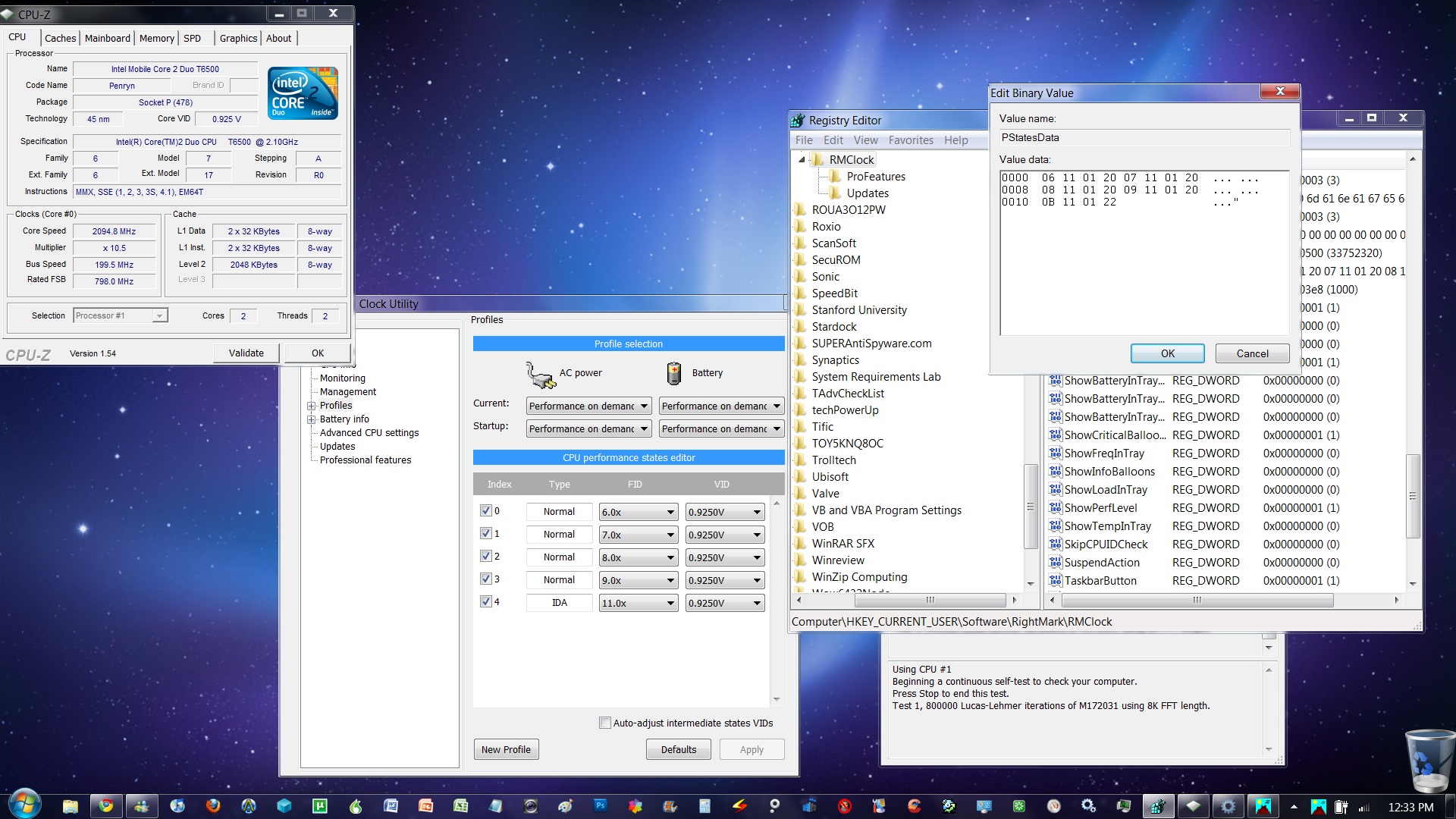
I also did that trick long ago for my P9500, I just didn't tell you since it's not officially supported by RMClock, lol. But I did not set skipcpuidcheck to 1, what does that suppose to do?
What CPU do you use? Since RMClock doesn't recognize the "IDA" feature of my CPU, I don't know why. Is this normal, anyone? -
Actualy I don't know what it does - perhaps RMclock gets som info from CPUID... but then it works...at least for the half multipliers.
I use T9400. And did it work for you? And what OS do you use?
I don't know about the IDA function. For me everything except the chipset was recognized by RMclock -
Yes it did, but I'm at Vista x64. So you have the "IDA" function?
-
I'm also at Vista x64. And did you also try to set the CPU speed at one multiplier? If so, how did you do it? And how did you find out that RMclock hadn't recognised IDE?
-
Setting the multiplier to a single value is still indicated in the guide, why can't you see things there? Lol..
And it's IDA not IDE. Intel Dynamic Acceleration, sigh again.. Duh, you will see "IDA" in your highest multiplier if you have it. -
is it safe to undervolt and set back to normal often? is that possible to do without big side effects?
-
You wrote "IDE"! If you write like I didn't know how to tick one box in RMclock, you have to look at my other replies, what exactly is the problem and don't post usles stuff. Dude...
I asked if you tried setting just one multiplier, the highest one, in Vista x64 and if stayed so? -
Wow, thanks for the guide, it worked great, now i dont "suffer" from that 133MHz cut

Os: Vista Sp2 x64 -
You're welcome.
What OS do you use? -
Where do you see f'ing "IDE" in my posts?! I never wrote IDE!
If you feel that my posts are useless, so be it.
-
it's probably been answered before... but there's 337 pages in this thread, so I'll ask now. Do we have to leave the RightMark CPU Clock program open all the time for the undervolting to stay in effect?
-
No, RMClock has an option for the undervolt settings to be applied at boot. Don't apply this until you're absolutely sure that the thing is stable or you might end up locked into instant BSOD at boot forcing you to stop it in safe mode.
-
Hi,
I've been having some overheating issues with my Asus M50vm-B2. I opened it up and cleaned out the fan, filter, and heatsink. The heat's improved quite a bit but I've been trying to undervolt it as well. I have an Intel Core 2 T9400 and I got to the step 3: setting up the profile:
"Now we head back to the Main Profile page....
ii) Change the current profile in the drop down box to "Performance on Demand" for both AC Power and Battery
-Make sure all the index boxes are ticked. If you have SuperLFM or IDA i suggest leaving this out for the meantime. See down below later on for what these features do.
iii) Untick "Auto Adjust intermediate-states VID" near the bottom and hit the Default button. Your factory voltages should now show up. Click Apply."
However, after I click Apply. The factory voltages aren't showing up. And I'm sure i've followed all the steps until here to the letter.
Help! -
Alright so this one is mostly directed towards scott.ager since I've kind of come to your thinking on undervolting, but maybe others can help to.
Just got a MSI laptop (the GT628 barebones) running win7 x64 with a p8700 that has the dreaded half multiplier issue (in this case, the largest one is 9.5x). When I load RMClock it shows Index 0 as SuperFLM, 6.0x, Indexes 1-4 as FIDs 6.0x-9.0x, and Index 5 as IDA @10.0x (but really it's 9.5x). I'm trying to use scott's "why speedstep, just undervolt" theory, so I only have Index 5 (IDA) checked. I've also tried to turn off IDA in the Advanced screen, but every time I hit apply the program just turns it right back on.
So I did a test on both Orthos and on encoding some h.264 videos, the CPU Info screen shows the VID correctly at 1.075, a voltage at which the CPU passed a 3-hour stress test and even more hours of encoding. Running at this setting, in combination with my built-in overclock mode (pushing my 2.53ghz to 2.93), runs the CPU at 58c instead of about 63c... but I'm undervolting in order to squeeze as much uptime out of my little 6-cell battery rather than being worried about cooling, the temps are well within acceptable range even without undervolting.
Problem is, whenever I don't have the computer at full load the monitoring screen just loses its sh**, bouncing between 6.0x/.925v and 9.5x/1.075x like crazy. I have the power settings set to RMClock Management (and whatever defaults it equips). I also have SpeedStep enabled in the BIOS still, solely because I'm paranoid that turning it off will turn off something I actually do need.
Also, everytime I pull the power cord I get a blue screen within seconds... negating my goal of increased battery life. The only theory I have on that is that my MSI-equipped "ECO modes" are screwing with the voltage when I move to battery, but I've heard of others with similar models undervolting.
I admit this is a bit of a ramble, so if anyone is willing to help but needs clarification, ask away. Thanks in advance! -
Just go use Crystal CPUID. It is very easy to undervolt half multipliers there.
Install, go to file -> multiplier management settings -> enable voltage -> change voltage as you desire -> apply -> function menu -> multiplier management.
That will set your voltage to what you want. Now, go stress. Once you get a stable undervolt, go to task scheduler.
Control Panel -> Administrative Tasks -> Task Scheduler
Do create a task on the right.
Under triggers, do begin the task at log on, I personally delay it for 30 secs.
Under actions, browse for the CPUID .exe and under arguments, put in "/CQ /HIDE"
And then you're set to go -
Seems to be pretty simple, I'm running a test right now...
Only problem is it shows voltages that I think relate to a desktop processor (kind of like what RMclock does if you don't change that one setting to "Mobile"), so I have to do a little math. Is there any way to get it to show the correct voltage numbers? -
how come some people gets their CPU to idle at 800mhz, my P8400 seems to be idling at 1.7ghz (only available multipliers are 6, 7, and 8).
-
Do you have the SLF multiplier?
-
Sorry if this has been asked before but is there much of a difference in squeezing every last volt out you can or is it more worth your time to simply drop it by .1-.15 volts test it and call it good. I ask because I'd rather not waste my time stress testing as far down as i can unless the benefits are worth it
-
r Tracerit: kevin is right, you have to enable SLFM (if you have), also, use the newest CPU-Z, it shows the SLFM freq. correctly (previous ones didnt show for me).
jshadoww: i belive every step of lowering voltage makes the CPU a bit cooler, and if you are satisfied with your Undervolt temperatures even if you dont squeeze out the lowest stable voltage, and dont feel like testing for hours and hours, i say go with it.
The difference between your .15v undervolt and the lowest stable undervolt depends on your CPU's lowest stable voltage, it is possible, that with that 0.15 you hit your CPU's barrier, or you may get lucky and even get .25v undervolt, and then there will be more difference -
nice, i just enabled SLFM, .85Ghz
-
What do you mean by correct voltage numbers? The voltages that CPUID detects are fine and I use CPU-Z as confirmation.
-
I think I've sort of got it all. First, turn off BIOS control. Windows operating systems with ACPI take over anyway during boot. You don't need two cooks in the kitchen fighting.
Next, the trick I used isn't really a trick. The Russian developers of RMClock posted a similar but more complicated workaround. It seems that the program can handle half multipliers but they only allocated one byte for the FID display ie. no room for decimal points
Maybe they thought fractional multipliers were only for capitalist lackey dogs (like me)
To get your top speed, you need to use only the last highest FID in Profiles. Don't check anything ese. Use Max Perf. and select your one and only choice. Reboot and then uncheck the "Use IDA" box. Since your rig doesn't overheat, why slow it down with stepping? Battery life depends only on how much real computing work you do and for how long. Let me know how you do. Also, I have no clue about your built-in overclocking setup. -
I don't want to be critical, but for $10 you can have my 1999 Pentium III machine that runs at the same speed
-
another question here:
if our highest index voltage setting is lower than a lower index voltage setting, can we just safely assume we can lower the voltage on the lower index without testing? -
Yes. That's your starting point for the next FID down the ladder.
-
You don't have to run each stress test for 45 minutes. Run every test for 15 seconds (yes, seconds), record voltages on a piece of paper, and after the first BSOD, raise it 2 steps up, and THEN run an extensive overnight test.
-
A nice, but not too technical, explanation of how transistors use voltage to push current around to achieve computing.
For those who want to know why they do what they do here. Why higher FIDs need higher voltages. From Yale.
http://www.yale.edu/pclt/PCHW/size.htm -
OK, so far I've been able to successfully undervolt my laptop down to .9500 volts all the way up to my 7.0x multipler. Is this normal/possible/even heard of? If not, am I doing something wrong here?
-
It's possible and if you've followed the guide on the first page and tested at least the highest multiplier, you should be fine. Welcome to the land of the Undervolted
-
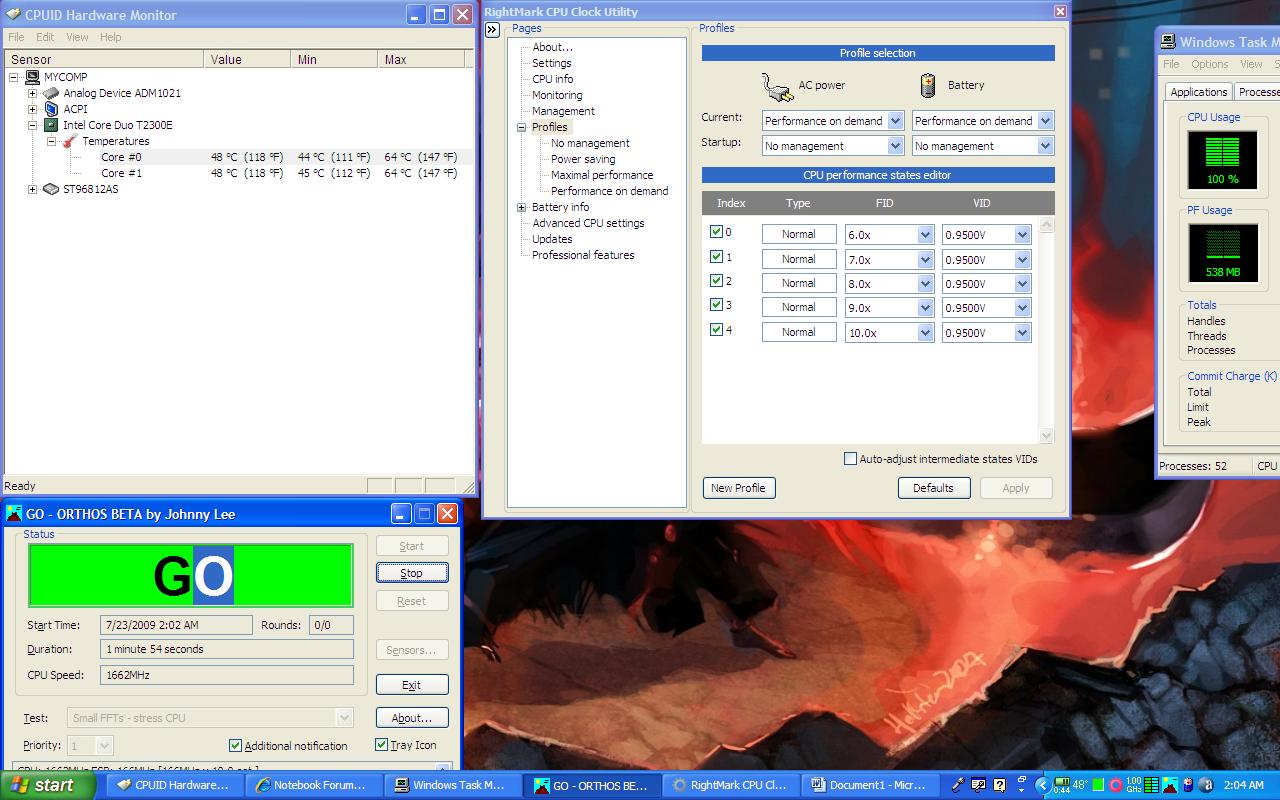
Check out these stats!! I undervolted all my multipliers to .950 and running the stress test now. I dropped my temps from 73c to 48c! I will be testing my battery life tomorrow to see the difference, but it is friggin weird for my laptop to feel like an A/C out the side! Check out this screenshot:
Attached Files:
-
-
Wow those are nice! Not to be sceptical or anything, but did you do a thorough
stability test? -
I just completed an 8.5 hour stress test on the machine, which ran stable the entire time, and now as I send you this message, I am D/Ling a movie, watching another, browsing the web sparsely, and updating a game I play, and my laptop is sitting at a sultry 46c. I'll update in a week or so to see how this is running, but as for now, I am thoroughly impressed! This is amazing!
-
Running a stress test now, but I hadn't gotten a single BSOD on the way down, and am now on the lowest voltage listed for my CPU. From 1.150 to .925
Temps dropped about 13C.
It's a Dell Studio 1555 with a T6500 CPU
Thanks for the great guide! -
I finally got a computer that can use RM clock. Going to undervolt, even though it has yet to go above 57C. Thanks for the guide! +1 Rep.
-
I just tried undervolting my T9300 and I'm having bad results. I'm doing the stability testing for 12X multiplier and the the it's seems that the lowest I can get is 1.05V when the default is 1.1375V. That means it has only lowered by .0875V. The temperature fluctuates between 75-80 degree C. Is there anything I can do to improve my results?
By the way, I have an XPS M1330 if that makes a difference. -
Well if you were doing it while overclocking, then you can undervolt more by running stock but then you'd have to sacrifice how much overclocking you can get.
Every processor is not made equal so while some can undervolt by a ton, others might not be able to do so much at all. -
I'm running stock right now because I have a Dell M1330 so I was expecting better results, but I guess some undervolting is better than none.
I'm also trying to have the voltage set for all the other multipliers by ticking "Auto-adjust intermediate states VIDs" and then clicking on apply but I don't see any changes to the other multipliers. Am I doing something wrong? -
You know what, I consider you lucky. In my case, my default 9.5x voltage is 1.075 and I can only underclock it up to 1.025 without BSODs. Imagine that 0.05 difference only compared to yours with 0.0875? That's why stop complaining
-
Maybe I am lucky after all!
I'll just keep it the way it is now.
I noticed that my Advance CPU Settings Page looks different from the one shown on the instructions page.
![[IMG]](images/storyImages/capturerlj.jpg)
I've highlighted the differences. Should I adjust mine so it matches the screen in the instructions? -
hi there,
don't know if this has been answered. let's say i got the optimal voltage for each multiplier. is there a way to check for overall stability?. or i need to test each one individually for at least 3 hour. that would be time consuming -
It's clearly stated in the guide that you should test EACH multiplier. Please have patience even this is time consuming since you're not even paying yet your getting less temps
-
The first time I followed the undervolting guide, I gave up after running Orthos. I ran the "blend" stress test and my notebook laughed, w/ both cores staying in the 40s Celsius.
Tried again today running the "small FFTs" test, and this time the CPU cried for mercy. One core actually hit 88C, the other topped at 84.
Unfortunately, my CPU's tolerances are not great. I lowered the highest multiplier by .100v . . . no problem. Tried .150 . . . BSOD. Lowest stable voltage was 1.0375 (down from 1.1625). That minor adjustment still lowered CPU temps under stress test to 70/74 - a decrease of 14 degrees C. I'll take it.
I didn't manually test all the other multipliers. I just used the "auto adjust" function in RMClock. I guess I got lucky - several hours later and I've had no problems.
Battery life seems to be a bit better, but not remarkably so. Probably 15-20 minutes w/ the 6-cell. With the bay battery added, I guess I'd see a 25-30 minute improvement. -
Hi, I've just recently started trying to undervolt my studio xps 16 T9800 @ 2.93GHz laptop and I'm having problems with doing it. I followed everything in the guide up to the point where I first brought my highest multiplier voltage down by 2 and ran orthos with small FF - stress CPU settings. Within 10 minutes my laptops was around 100c and it shutdown the first time ever from extreme heat. After awhile, I started my laptop again and brought the voltage down 1 more from what I previously had it on. I am running orthos now for about 1 hour and was wondering if my voltage is too low. Also, for some reason i'm not able to lower my voltage by small increments but instead large ones.
I started with 1.1750v on my 11x multiplier and its now on 1.1375vAttached Files:
-
-
nvm, I found out that I am able to lower it .1v instead of .01v
-
You have a ways to go yet. Too low is a BSOD. Anything else is OK. Your high temps mean you're still too high. Get aggressive on lowering voltages and don't waste an hour at each step. Try 5 minutes until you get close to a reliable minimum number.
-
will 5 minutes be enough time to show that I am stable?
-
Yeah, go a little faster.
My XPS M1530 is undervolted all the way to .9500v and it hasn't BSODed because of it yet, even when encoding video for 24 hours straight.
Anyone know about undervolting GPUs? -
ever since undervolting, my laptop has been making a high pitch noise when its on battery. The noise becomes more quiet when I put the laptop back to normal voltages. Any ideas?
The "Undervolting" Guide
Discussion in 'Hardware Components and Aftermarket Upgrades' started by flipfire, Apr 1, 2008.