Problems? See this thread at archive.org.
I got a p8400. I haven't even undervolted yet. That was my pre-stress test to starting the undervolting guide
-
-
I also am getting different temperature readings on my CPU with different programs. At idle I am getting 25 degrees with RM Clock and HW Monitor.
Then I ran Core temp and Real Temp and I'm getting an idle temp of 30 degrees.
I'm not sure which one to go off of. Obviously one of them is off. -
Get RealTemp.
Accurate, small, and nice digital readout in your system tray (or not).
RMC reads 5C low on many systems. You can add an offset in the registry. Search this thread for instructions. -
What are you trying to achieve?
-
Check CPU-Z; what speed and multiplier does it go to? Battery plugged in, profiles, etc.? This info would be helpful....Voltage, as well.
What program are you using, too? We need some more information........
~Ibrahim~ -
Core Speed = 2128Mhz
Multiplier = 8x
AC Power is plugged in.
No profiles.
Voltage = 1.1375v
I'm using Orthos for stress testing and RM Clock for undervolting, but haven't undervolted yet -
Flipfire,
In your side notes... what do you mean by, "T8100/T9300/P7350/P8400/P9500 will underclock by 100mhz". I have a P8400 so if you could explain it a little more that would be great. -
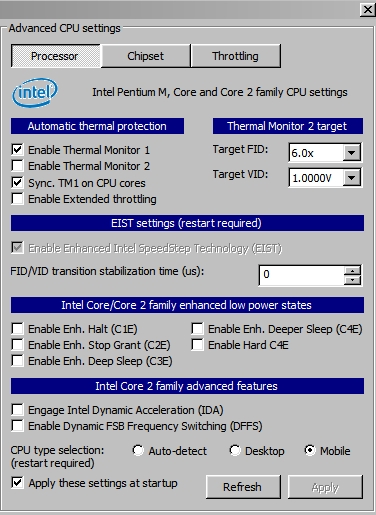
My problem's been solved. The thermal monitor under Advanced CPU Features was apparently locking my CPU at a multiplier of 6x at 1.000V. I've unchecked it, and my CPU now actively scales up to my max upon demand :].
-
same question as infinity what do you mean t8100 would downclock?? im running with rmclock a 2098 mhz... wich is... the whole 2100 mhz of the t8100 right? i mean ok im loosing 2-3 mhz? but nt a 100... got ida and SuperLFM ticked so probably with ida activated im getting the whole frequency of the processor?
-
Alright, I have a P8400.
I have 3 multipliers. 6x(1), 7x(2), and 8x(3)
I figured out my max voltage on 8x, which was 1.0125v. Now when I undervolt my other multipliers do I only have to figure out 7x max voltage because 6x is my minimum multiplier or do I still have to find that one out to?
The reason I ask is because Flipfire said in the guide that, "You do not need to test the lowest multiplier (idle) because we cant change/never changed the voltage. This voltage will always set at a stable voltage". Or was he talking about the SuperLFM Multiplier? -
@infinity
What program are you using to find out your temperature? And, technically, you can't say "no profile", as you are always in some profile. Start, Control Panel, Power Options. Change it to High Performance, if it's not. And when ORTHOS is testing, you saw these numbers (1.1375, 2128MHz, etc.?), correct?
I went ahead and did my lowest voltage one.... -
The results for another Dell M1710 w/ T7600 @ 2.33GHz. Stock voltage was 1.2v and max temp was 83C. Stable u/v is 1.0875v and max temp is 72C. The 14x FID was all I did, the rest, other than the 6x FID, are disabled.
![[IMG]](images/storyImages/th_T7600desktop.jpg)
-
Nice work Cowboy

Now, if you just disable the 6X, your machine will run the way it was built to run.Attached Files:
-
-
You're not "losing" anything. Your oscillator clock is running 0.095% slow. Mine runs at 2095 MHz. That's a manufacturing tolerance issue not an UV thing. Hardly a big enough deal to call your lawyer about
-
Undervolt every FID you're going to use (no more than two). Skip the rest.
-
Thanks Newf.
The unit(s) run a couple of degrees cooler idling at minimum FID, and to me cooling trumps all. If there was no temp difference between the min and max FIDs, then I would run on the max FID only.
Get any snow this week? If not, come up for a couple of cold ones, and I will give you some to take south.
-
Are those 2 degrees including local wind chill. Canadians always exaggerate low temps.
Geez, in 25 years from now your notebook will qualify for antique decals on the keyboard, eh
Because of undervolting, I can run Folding@Home 24/7, plus Youtube plus Outtlook and not break 64C. Good enough for me
-
I got my p8700 running at 1.00 volts at 9.5x and .876 at superflm
Attached Files:
-
-
Are there any programs that I can use to undervolt in Windows 7 64-bit? Can't seem to get RMClock to work
-
It's actually easy to disable it.
Most notebooks come with their spread spectrum modulation enabled.
And most of the time it's downspread (not centre spread).
Most desktops come with it disabled and they have an option in their BIOS to enable/disable it.
With notebooks you can use setfsb to disable the spread spectrum.
I disabled myne.
I made a post in this thread before saying that if you disable your spread spectrum, not only do you get your extra mhz back, but also you can undervolt slightly more.
This also depends on the % amount of spread.
Here are a few quotes from wikipedia:
Spread-spectrum clock generation (SSCG) is used in some synchronous digital systems, especially those containing microprocessors, to reduce the spectral density of the electromagnetic interference (EMI) that these systems generate.
a perfect clock signal would have all its energy concentrated at a single frequency and its harmonics, and would therefore radiate energy with an infinite spectral density. Practical synchronous digital systems radiate electromagnetic energy on a number of narrow bands spread on the clock frequency and its harmonics, resulting in a frequency spectrum that, at certain frequencies, can exceed the regulatory limits for electromagnetic interference (e.g. those of the FCC in the United States, JEITA in Japan and the IEC in Europe).
To avoid this problem, which is of great commercial importance to manufacturers, spread-spectrum clocking is used. This consists of using one of the methods described in the Spread-spectrum telecommunications section in order to reduce the peak radiated energy.
Spread-spectrum clocking has become more popular in portable electronics devices because of faster clock speeds and the increasing integration of high-resolution LCD displays in smaller and smaller devices. Because these devices are designed to be lightweight and inexpensive, passive EMI reduction measures such as capacitors or metal shielding are not a viable option. Active EMI reduction techniques such as spread-spectrum clocking are necessary in these cases, but can also create challenges for designers. Principal among these is the risk that modifying the system clock runs the risk of the clock/data misalignment.
Spread-spectrum clocking works because the measuring receivers used by EMC testing laboratories divide the electromagnetic spectrum into frequency bands approximately 120 kHz wide. If the system under test were to radiate all of its energy at one frequency, it would register a large peak at the monitored frequency band.Spread-spectrum clocking distributes the energy so that it falls into a large number of the receiver's frequency bands, without putting enough energy into any one band to exceed the statutory limits.
The usefulness of spread-spectrum clocking as a method of actually reducing interference is often debated, but it is probable that some electronic equipment with sensitivity to a narrow band of frequencies will experience less interference, while other equipment with broadband sensitivity will experience more interference.
FCC certification testing is often completed with the spread-spectrum function enabled in order to reduce the measured emissions to within acceptable legal limits. However, some BIOS writers include the ability to disable spread-spectrum clock generation as a user setting, thereby defeating the object of the EMI regulations. This may be considered a loophole, but is generally overlooked as long as the default BIOS setting provided by the manufacturer has the spread-spectrum feature enabled. An ability to disable spread-spectrum clocking for computer systems is considered useful as the spread-spectrum techniques used can affect the maximum clockspeed achievable by the components involved due to clock skew, affecting overclocking efforts.
http://en.wikipedia.org/wiki/Spread_spectrumLast edited by a moderator: May 8, 2015 -
If you have a popular laptop model, or you've taken yours apart to identify the clock chip (PLL), and it's supported by SetFSB, you can do all sorts of fun things. Otherwise, you're S.O.L.
-
Cool. Great post as usual.
actually is it safe to do so and i couldn't quite understand why they used it. Atm i don't really care about Speed. I don't game much and mostly into conserving.
You said you can UV slightly more which got me interested. -
It is safe for your notebook. But it might cause electromagnetic interference to other devices.
Here is a good paragraph from wikipedia:
It is probable that some electronic equipment with sensitivity to a narrow band of frequencies will experience less interference, while other equipment with broadband sensitivity will experience more interference.
also:
The usefulness of spread-spectrum clocking as a method of actually reducing interference is often debated...
It's just to pass FCC certification.
Another quote:
EMC testing laboratories divide the electromagnetic spectrum into frequency bands approximately 120 kHz wide. If the system under test were to radiate all of its energy at one frequency, it would register a large peak at the monitored frequency band.Spread-spectrum clocking distributes the energy so that it falls into a large number of the receiver's frequency bands, without putting enough energy into any one band to exceed the statutory limits.
I think there is really no use for the spread spectrum modulation.
I tested it with my notebook, the results were poor
I would say it's because I only have 0.5% Down Spread.
Some notebooks may come with up to 2.5% Down Spread. In that case I would guess you could lower the voltage by 0.015V or so. -
Cool. so being able to lower another 0.015V would be nice. i've lowered almost all, (well i only use LFM, 6x and 8x atm) and have lowered them twice ~0.03V each and still seems stable. nothing wrong so far
Not so sure how much lower it can go but i'll definitely try more with setFSB.
I'm mostly worried about when they say EMI is hdd, any other components, and wireless i guess.
How did you know how much down speed you have -
It is written in the datasheet for my clock generator (PLL).
Can you tell me what PLL your notebook has, I might be able to tell you how to disable your spread spectrum. -
@moral hazard
That is interesting
What PLL have you got? In the datasheet of my PLL the Spread Spectrum bits aren't documented, maybe they are compatible.
Edit:
Nevermind, found it! -
@der mali, is your PLL ICS9LPRS365?
Because on page 20 of the datasheet you can see the spread enable bits.
Bit 0 and bit 1 of byte 4.
EDIT: If you PLL is SLG8SP513V, then it looks like bit 0 and bit 1 of control register 4 will disable the spread spectrum. -
I haven't opened my laptop or really know wat PLL is
so will have to research when i have time and let you know. For the time being i'm going to just lower my voltages first ^^ and monitor the Vidock hehe
-
Thanks
The problem was that I just overlooked those settings. I concetrated on the spread spectrum table where the values were missing instead of just checking the enable/disable bits. -
Still trying to pin down Windows7 64bit RMClock. Anyone get it to work?
-
I have 3 multipliers including the SuperLFM.
The multpliers are 6x (Index 1), 7x (Index 2) and 8x(Index 3). SuperLFM is Index 0.
My question is would it mess up my computer if I undervolted the multiplier 6x? Or is it recommended to undervolt all the indexes to get the best results? -
omfg i left my laptop on to eat dinner and after coming back i found my lowest temperatures yet! this was after waking up from sleep mild web browsing then leaving it alone
superlfm 6.0@ .887vAttached Files:
-
-
You mean just UV 6x or should you do all? IF so, then it doesn't matter.
If you want lowest idle heat then you just do LFM and 6x. If you want lower others you can do all. I think all is best
wow congrats. The P8*** are much better aren't they. Mine won't go below 39C during idle. But now maxing out at only 61C! -
i am using a cooler but this is much better than my old p7350 which wouldnt go under 30 UVed and coolered
-
Undervolted my t5800 to 1.000v. idles at 42* maxes out at 61* without cooler, 59* with cooler.
-
My P9500 can't pass a minute of Prime95 going below 1.0, it seems to be rock solid at 1.0, though. In my older laptop, my AMD ML-30 shocked me and is running rock solid at .95 after over 10 hours of Prime95. Setting it to the next notch down immediately causes a blue screen, though. I find this odd because the ML-30 has a much higher voltage listed in its specs. Additionally, the ML-30, a 35TDP CPU is now running cooler temperature than my P9500, a 25TDP chip, at both idle and max temps.
These CPUs are in an MSI 1223 and MSI 1013, both 12" laptops of very similar designs. -
Attn: Speedswitchers and Throttle Jockeys
FYI - http://paulsiu.wordpress.com/2007/06/23/does-on-demand-clock-modulation-odcm-conserve-battery/ -
Transistor circuits don't gradually dim down like the filament in a light bulb. Below a certain voltage, which varies between chip models and even within a production run of the same model, they just quit functioning, abruptly as you noticed. You get what you get. Forecasting is not of much use.
-
i ran the programs and on my 8930g i got these results
only mod done is i replaced the heatsink paste with arctic silver paste
and ran your test for 10mins same as in the first post
![[IMG]](images/storyImages/Capture10minsrunning.jpg)
-
I'm too much of a chicken to undervolt my laptop, because I've had wayy to many BSOD's with my old tx1000z and though I'm sorely tempted to lower my temperatures at no cost, my GPU and CPU rarely go above 55C.
The minute I hit 60C on any of my components on the HWMonitor though, I think that's enough of an impetus to use this guide and try to lower some of my temperatures.
I won't be doing this without an expert there with me in person to blame it on if something goes wrong, though. Lol.
Mr. Mysterious -
lol. It's honestly safe to do so i'd say. Although if you get a lot of BSOD i guess your system is probably prety unstable so yeah i understand you. However if you still ever get anymore BSOD then i recommend turnning off automatic restart whenever you get errors through the 'startup and recovery'
atleast there you can check what is causing the problem. I've had BSOD due to driver issues in both graphics and sound. It was pretty freaky at the time because it was a fresh install. But yeah i had slightly wrong drivers -
The only thing that's mysterious (besides you ) is BSODs with stock voltages. You've obviously have got to fix that first or buy a more reliable tool. After that, just test your highest clock speed for a few minutes at lower and lower voltages until you get a BSOD. Then, raise it up one notch. You only need to do one more, your lowest (non-SLFM) FID and you're pretty much done.
BTW, 60C is considered an excellent working temp. for CPUs. It'll outlive you unless you drop it. If you do that, you'll be demoted from Mysterious to Gamer. It's a tough town. -
"Demoted"? I don't think so. I'd never even dream of dropping my precioussss...
BTW, see my sig, I don't have that tx1000z anymore...It lasted 2 years instead of the 6 months for most people, so that should be a sign that I'm -extremely- careful with my laptops.
Mr. Mysterious -
ok, im having some problems undervolting my dv1000 (Pentium M)
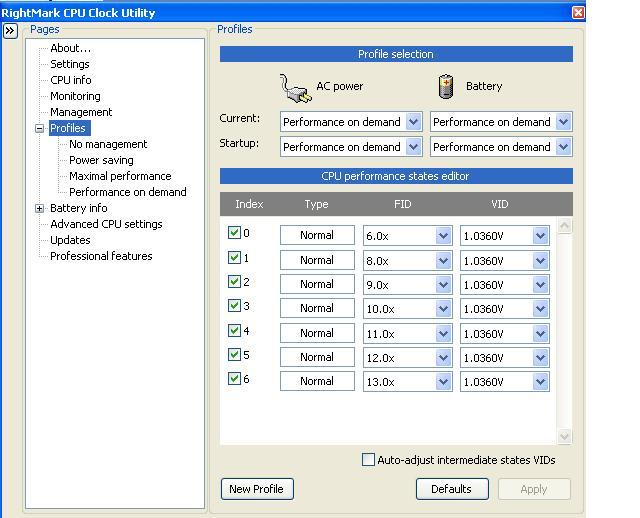
I undervolted pretty far. I went from 1.356v to 1.036.
...so thats 300 more than most people get as you said.
Although... my temperatures are no different...
Any ideas?
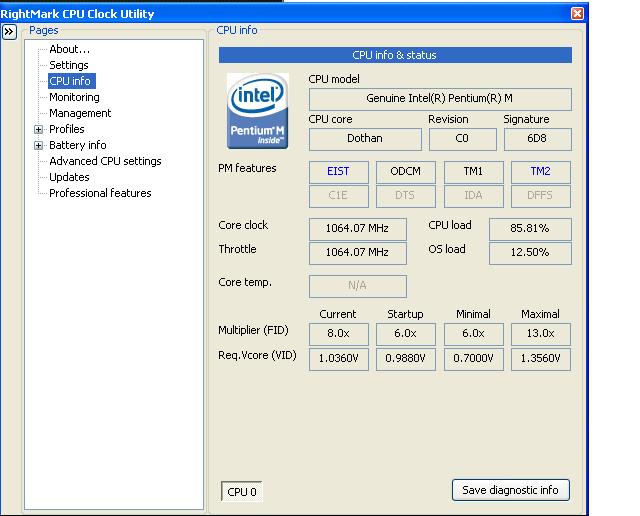
And anotherthing, is my cpu appears to be downclocked from 1.73 to 1.6GHz. It never goes up past 1.6 now. And doesnt down step pst 1.06GHz to its usual 0.8Ghz. -
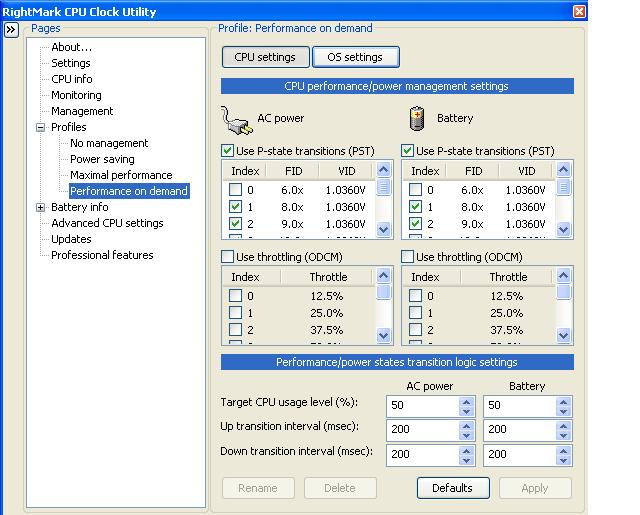
Why don't you post some Thumbnails of your RMC settings, profiles and monitor page. You don't give enough info.to proceed further.
-
Sure thing.
Attached Files:
-
-
Bear with me for an hour.
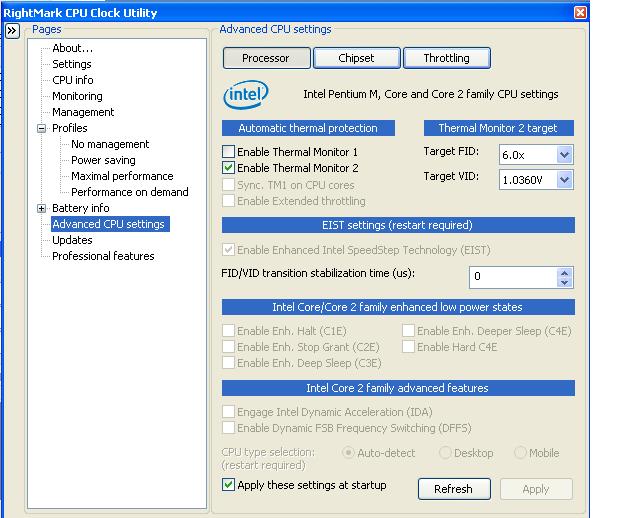
1. Disable TM2, enable TM1.
2. Select Mobile at the bottom of the above page.
3. In Profiles, check ONLY 13X
4. Select Max Performance, use only 13X
5. Post thumbnail of the monitoring Graphs.
Thanks. -
I have 2 questions:
1) I undervolted my max multiplier by 0.2 volts and just did the auto adjust intermediate states VIDs but the numbers for them didn't change at all. How does that feature work?
2) I'm trying to help a friend do this, she can only access RMclock on administrator account but the one she normally uses is a different user account. After doing the undervolt, will these changes not affect her normal account? Her normal account is also administrator but for some reason RMclock won't open on it. -
1.) The auto-adjust feature doesn't seem to work for lots of people. Don't use it. Instead, pick the two FID's that are important, ie. high and low, and manually set them. Your CPU doesn't waste time shifting up and down through all those intermediate steps anyway.
2.) Workarounds for the permission "thing" are all over this thread but not sorted into one basket. Do a search. I haven't saved them because I wiped Vista within an hour of getting my new laptop. -
yeah. I think its UAC. You right click on application and go run as administrator. few more other steps to do too but i think even when i did it, as long as UAC is on it never really works.
furthermore i gave vista a chance but its crap. Sluggish. Windows 7 is much better.
The "Undervolting" Guide
Discussion in 'Hardware Components and Aftermarket Upgrades' started by flipfire, Apr 1, 2008.


![[IMG]](http://s367.photobucket.com/albums/oo118/mklym/T7600%20Desktop/?action=view¤t=T7600desktop.jpg)