Problems? See this thread at archive.org.
Oh yeah. Tried setting up on gf's system. Benq S32 compared to my s41. Both same CPU.
Anyhow, her voltages were much different to mine. They were all higher. Her lowest is 0.9000 compared to my 0.8750.
Both of us are running same windows XP. Now i don't think intel would be manually testing each one and setting the voltages would they so how come its different?
Also when i first installed RMclock, the advance cpu settings seemed much different (haven't compared but seemed so) and didn't have mobile type as default. Is this normal?
My system seemed to have those automatically (although i have to say RMclock was installed on my system more than once - but ofcorse i uninstalled so should have lost the settings)
it's just a bit wierd.
-
-
Voltages are not locked by Intel, only by the BIOS chip which is usually unique for different laptop brands using the same CPU.
-
Ok i will be trying this tonight.

-
oh ok. But they're the same brand. so i'm guessing due to different models? the benq s32 has integrated graphics. could it be higher because the cpu handle's that too?
The laptop doesn't have the usual under vent+fan so gets hotter quicker. Would like to UV it further -
Hi
I've got some problems with the configuration of Rightmark.
I'm using a Dell Studio Laptop with a Core 2 Duo processor P7350.
By Default Rightmark shows me only the following P-States:
![[IMG]](images/storyImages/20091009125450.th.jpg)
I tried to add new P-States in the Registry what works, but in Rightmark i can only select from one voltage option (0.825V) for the new Multiplicator 8 and super LFM Modus which I added, which is a little bit too low for Multiplicator 8.
Is there someone who's using a P7350 and has working Configuration with Settings for Super LFM and the Muliplicator 8?
Maybe you can give me your registry key?
Thanks for your help -
It's the model, not the brand name. Unless you can program and burn BIOS chips, you're stuck.
-
Why don't you use thumnails here to post your graphics. I don't have an account at your forum where you posted them so I can't see them. BTW, why on earth are you trying to create new P states
-
Has anyone tried to undervolt an i7 CPU yet?
-
yeah man... i hate forums who require log in to view crap. Pretty sure NBR here does too >< gets annoying haha. use imageshack to host
-
I'm sorry, i thougt there is no login required.
-
oh yes. I think i have seen that before. It's rather odd you only got 6 and 7. Didn't get the others? did you follow the steps in the first post?
-
yes id did, i think the easiest way would be to get a working registry file form someone whos using rmclock with a p7350 or p8600
-
If you can find a good laptop with an i7 mobile chip, buy it for me. I'll gladly UV it
-
Now I see what you're trying to do. Create an 8X to fool RMC into giving you the max 7.5X. I know this trick works if your CPU has IDA. I'm doing it right now on a T8100. But, the P7350 doesn't have IDA according to the specs I read. Does it work by a registry hack, and if so, where's the problem? You may have to go to one of the other utilities.
-
lol.....am I right in thinking RMClock doesn't support i7 right now, though? I didn't see it mentioned anywhere on the site nor the forums.
-
The last rev. of RMC, 2.35 was completed on 02/29/2008. It couldn't even "know" about W7, but it works. It doesn't "know" about half-multipliers, but it works, mostly. I'll bet it works for i7 chips, but with limitations.
-
He meant i7, which is short for 'Intel Core i7', not Windows 7.
-
I'm sure I said i7 chips and not i7 OS, right? He got a free history lesson too.
-
Windows 7 is a lot like Vista, in terms of program compatability. Half-multipliers work because RMClock is lucky enough to have IDA. But i7 sounds too far different, IMO: it doesn't use FSB (irrelevant, I know) and how would RMClock override/work with Turbo Boost?
I'm skeptical, but I hope I'm wrong. Maybe it'll have super-awesome temperatures and I won't have to, lol. -
Not exactly. It's the CPU chip that contains IDA functionality. Many chip models have it, some don't. RMC can manage this feature only if it's available. It looks Turbo Boost is the new IDA, and from Intel's own material, it looks like they want to put control of everything on the chip itself. We'll see. RMC may become redundant.
-
Question, hopefully it hasn't been ask before but I can't really go through 400 pages for posts...
When I use ORTHOS to stress my CPU, before I even lower any voltage, it has a notification saying my CPU is overheat and my laptop shuts down. My computer temperature reaches over 100C. And my graphic card is even hotter than my CPU.
Any suggestions please?
Specs:
Dell XPS M1330 Window Vista 32bit
Intel Core 2 Duo @ 2.4
4GB RAM
GeForce 8400M GS -
UPDATE:
I am able to lower my CPU temperature by dropping the voltage from 1.1375 to 1.0500. My CPU temperature stays around 70C with CPU stress test.
However, my graphic card (GPU core) is still at 93C, any way to lower that temperature?
Thank you -
You know about this right?
http://en.community.dell.com/blogs/...ment-to-all-affected-customers-worldwide.aspx -
OK,Guys,i dropped from 1.250V to 0.9875V On a Acer 6920G with a T5750 (2.0GHz).Multi 12X.Still Testing tough.
My regular full temps were 80-85º with orthos.Now i'm having 71-73º.HOT,i Know.
I have to test a game to see if it still throttles.
Also,If i use the 11x multipler(thus lower clocks) i'll get better results with lowering the voltage?
Could someone answer?
Thanks for the great guide! -
Yes you would run slightly cooler at 11x times multi and might also be able to take the voltage down even further however you would lose a 1/12th of the current speed of your processor running at 11x so would be slower performance
-
The Problem ist that i can add the 8x multiplicator, but i cant switch the voltage. I don't think the P7350 will run with a multi of 8 and voltage setting of 0.825V.
What i heard an read is that P7350 doesn't use IDA but, I don'T want to use IDA, but the 7.5 multi, which i tried to realise by adding a 8x multi.
I tried to use Crystal CPUID but there i can't use Super LFM. -
there is a ton of stuff out there about undervoting GPU cards, especially with popular brands like Dell.
-
I am sorry if I might have misled you, but here's the situation you're in. Your CPU chip uses half multipliers which RMC doesn't understand. A while back, I found a workaround for my T8100 (which has IDA), where I could set RMC on 11X and turn IDA off to fool the program into giving me 10.5X all the time. What you're trying to do seems similar, that is creating an 8X to fool RMC into running your CPU at 7.5X but you don't have IDA in your processor to make this workaround function correctly. Your P7350 doesn't have a natural 8X state to work with that's why it won't accept the voltage. If you look at your monitoring graphs I think you'll see that you really don't get an 8X. If you do, post a thumbnail because I'd like to see it.
I strongly suggest, if you really want that last half multiplier, is to use Crystal CPUID. Super LFM state is a complete waste of time. It doesn't save battery and you can't run any good application at that ridiculously low speed. -
I didn't know... I never research on the overheating issue because buying a laptop fan sort of fixes the issue. but I dont have problem with the video, it's just that the temperature is really high. or is that part of the problem?
sorry if my question has an obvious answer, but I don't know too much about this...
Thanks for your help -
Okok, I will research on it, thanks!
-
i dont think HWMonitor64 works with win7
my temp seems stuck at 49c
and rightmark too doesnt seem to work right also
its monitor is stuck at 34c -
RMC apparently does work with W7 according to posts here, but requires a bit of special handing. Search this thread.
For HWM, I don't have a clue. -
yeah rmc is working, its dropped the volts etc its just the temp never moves off 34c
i ran speedfan to test the temps and before the volt mods it was maxing out at 50c with the volt mod it was down to 36c
![[IMG]](images/storyImages/Capture-1.jpg)
-
A couple of suggestions from across the Pond: Uncheck everything except 5X, run Max Perf. @ startup AND current. Your temps are so good that you should be running your machine like an Aston Martin not like a bloody lorry. Post a thumbnail of your RMC Monitoring graph page.
-
it does run fast when it needs too, cpu runs a 2.2gig when called upon
but when just on IE8 etc its running at 1.2gig
its certainly not running slow that for sure -
I was hoping to point out again, that speed switching is a bit of an urban myth. In itself, it does not save energy or reduce battery consumption. Only undervolting does. Here's why: at zero load, there is virtually no current flow through the CPU at any clock speed. That can be shown mathematically and measured empirically. So, at rest, it doesn't matter what the FID is set at.
Under load, when it steps up to a higher clock speed it almost always steps up to a higher voltage. Since power (watts) is directly proportional to the square of the voltage, speeding up your CPU to take on a higher load actually consumes more energy than if you'd left the clock speed low.
I'm a great fan of undervolting, but speed switching for energy-saving is a myth. Once you've controlled temperatures with undervolting you don't need it.
. -
wow good point. Well it actually makes sense however i've always set it to lower FID. If it's not important i can wait for things to load at using only 0.9V instead of 1.05.
-
Once I undervolted to lower temps (I really don't care about the extra minutes of battery time gained), I set my CPU to the speed it was designed for, built for, advertised at, and sold to me as. All this jerking speeds around does is to waste processor time trying to decide what "gear" to be in. Geez.
-
So, let me get this straight:
0% load on 2.8GHz, 1.3V
0% load on 1.4GHz, 1.3V
These two would consume the exact same power? What about 100%?
Like, I was under the assumption that clock speed and voltage controlled power draw.
~Ibrahim~ -
Since your low and high FIDs use the same voltage, the power draw at idle is exactly the same. Both by calculation and by actual measurements (me, chumley, mklym).
As I posted to you before, given equal voltages, at 2.8GHz and 100% load, your CPU runs twice as fast, uses twice the power and goes back to idle in half the time. You gain absolutely nothing by running slow (as long as your temps are good from UVing). -
Undervolted my P8700 yesterday from 1.137v to 1.000v at highest multiplier. Load temps went from 69C/156F to 60C/140F which is about average as far as the temperature difference but I think this laptop does run quite a bit cooler than most.
-EDIT- as I was typing this I got the idea to try two more tests. My laptop has the 9 cell battery that raises the rear of the laptop maybe an inch or so off the surface. So I was curious what type of cooling benefit that had.
No battery 1.137v 74C/165F
No battery 1.000v 64C/147F
So essentially my 9 cell battery and undervolting gave me a net total of -14C/-25F. -
60C is excellent for a laptop. The beauty of undervolting is that you can cut heat production at the source instead of employing lots of effort (and power) removing it externally.
-
Hello!
anyone that has undervolted an Inter Atom N270 (or generally any atom) CPU?
Most probably for his netbook.
I read somewhere that Atom CPUs won't have any noticeable difference difference when undervolted regarding battery consuption..
Is that true? Same applies to CPU temperatures?
Let me know what u think! (or even better what you know!)
Thank you! -
Hey Scott i read your post a while ago about using a wattometer, do you remember any of those stats? specifically the reuction in watts before and after undervolting?
-
I thinik it was proportional to the voltage. cpu uses like 10-35 watts, saves a bit off there and fan cooling power too.
most laptop uses less than 100watts too
oh does anyone know how to underclock further than the motherbard is set? I got same cpu on different systems, 1st with .85 and other with .9V -
I too undervolted my T7300 some 3-4 months ago. I'm happy with the reduction in CPU heat, it went down almost 30C, which is very impressive.
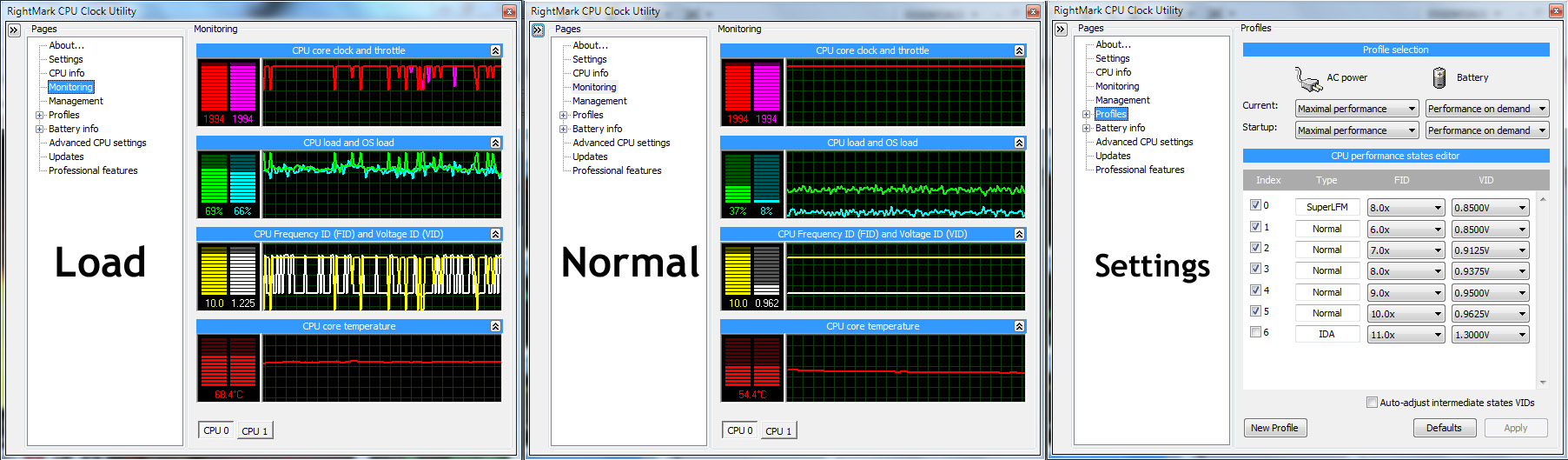
I just recently noticed this weird switching the CPU does even though I've set it to Maximal Performance and checked only the highest multiplier in the list (10x for me, not counting IDA). You can see what I'm talking about in the image I've attached.
The first screen is of the system under fair load - I was, among other things, streaming an HD video from YouTube. The FID and VID are jumping all over the place even though, like i said, it's set to Maximal Peformance. You can also see (in the same first screen shot) that it's sometimes completely ignoring my specified 0.9625V for the 10x multiplier and jumping to the default 1.225V. In the second screen shot, the system has not been streaming the HD video, but doing other non-laborious stuff. I've also attached my settings in the image - the last screen shot.
My question is if this is normal behaviour or if something is wrong. I'm running Windows 7 on this laptop, so I'm thinking that it might be the problem. I don't understand why it just doesn't stay at the rated maximum 2.0 Ghz instead of jumping all over the place and sometimes ignoring my VID settings.Attached Files:
-
-
I think something is fighting for control with Rmclock.
I can't really help you there.
I do have to say that your VIDs are strange compared with myne (also T7300):
SLFM = 0.8500V
6x = 0.8500V
7x = 0.8500V
8x = 0.8500V
9x = 0.9000V
10x = 0.9750V
I think you should lower your 7x, 8x and 9x VIDs. -
Hey guys..i'm new in here..lol
im going to buy g51vx-a1 tomorrow..i read some opinions about this ASUS series..and overall..the problem is it about the heat that is produced??well..i'm not too familiar with those overclock things and so on..
and i guess..i will run my laptop without overclocking it..*that might causing a problem in the heat temp.and i think it's enough for me..hehehe..
Will i have the heat problem if i dont do the overclock?and like i saidd..im going to buy g51vx-a1 tomorrow..and i want to undervolting it i guess..does it work for Q9000 quad-core processor? and just for suree..it won't cause any damage to the software/hardware if we have the bsod or eror screen,and after that just raise the voltages?
Quicker Alternative: If you dont have to time to stability test every multiplier there is another way. Ticking the "Auto-adjust Intermediate States" box will fill in all the multipliers in between your Idle (6x) to your highest multiplier accordingly. It seems to work well for at most cases but theres no guarantee that all the multpliers are 100% stable, since it just fills it in mathematically. It seems to work fine for most people though.
what does it mean?does it mean i dont need to run the stability test..and through ticking the "Auto-adjust Intermediate States" box, and then what will be shown after that? noob ask..hehehe..Thx anyway.God bless.. -
We were debunking the Urban Myth about speed switching being able to save energy. Mission accomplished. No one bothered to jack their voltages back up just to get an actual number though. I will eventually, but in the mean time, here's the easy way to calculate the percentage power saved:
[(Stock volts)^2 - (UV volts)^2] X Stock watts = Saved watts.
Lets do one. Stock volts = 1.1375, UV volts = 1.025, 35 watt rated T8100.
[(1.1375 X 1.1375) - (1.025 X 1.025)] X 35 = [0.243] X 35 = 8.5 watts saved at full load
Pretty typical result: About a 25% power saving on the cpu (plus fan, too!). -
Hello thanks for the guide. I managed to get to top temps down by 14 degres celsius(Topped at 70 celsius on stress test). But there is no effect on the lower one its on 47. How did u manage to get it so low. I am using same cpu T7500.
The "Undervolting" Guide
Discussion in 'Hardware Components and Aftermarket Upgrades' started by flipfire, Apr 1, 2008.


![[IMG]](http://img113.imageshack.us/i/20091009125450.jpg/)