 Problems? See this thread at archive.org.
I've talked to the store where I bought it and they didn't know the problem, only sending to Acer for verification... Also, does anyone know why I can't see any properties of the CPU in BIOS? In RMClock, on Advanced CPU settings-> Throttling, I can't do any changes, my chipset is not recognised... Getting tired of this...
-
-
Been there, done that...

-
Thanks mate, new to Win7 so didn't think of using vista driver. Loads up now, will carefully try using it later after work, see if i can drop a few degrees.
-
HI i just try to undervolt my g50vt-x5 laptop and since the p7450 is not good with half muptifliers processor so i try the cpugenie and i got my temp down. but when i check the cpu-z my core speed keep going from 1.6 to 2.13. can someone help me to return it to normal?
-
I'm in the midst of my first go at this. I noticed that when I was on the main Profiles page, I couldclick all the CPU performance checkboxes on the left, but when I hit 'Defaults' as told to do in the instructions, box 1, 2 and 3 unchecked. I'm running the tests that way, but I'm wondering if it's a significant issue that I need to do something about, or just something related to my particular processor and computer (AMD Turion 64 Mobile Technoloty ML-32, Acer 5000).
Any ideas?
Thanks! -
Jerry, let's ask flipfire to post the x64 driver on Twitter, Tweeter, Facebook, etc. to make it more accessible
-
Tried undervolt on su7300 - there's only 6x multiplier for that and it's normal power savings mode just cuts fsb in half, so don't know how much this truely gained from it (solid 2C lower CPU after stress test though, but that's all from initial 0.1V drop)
Might try this in more detail next week, but since it cuts clocks from 1.3-1.2ghz some of that temp drop might just be from underclocking - and I don't know if it can still cut the fsb in half to idle with RMClock settings -
Been hoping to give this info some actual usage lately, and I just acquired an HP "business class" 6510b in almost pristine condition - from a pawn shop, no less. I swear there's not a mark on this thing, and it's fairly loaded:
Intel 965 Mobile Express chipset (aka Santa Rosa)
Core 2 Duo T7300 @ 2 GHz
4GB of Patriot DDR2 667 (still wondering if the Santa Rosa can support actual DDR2 800 at that speed, hmmm...)
14.1" LCD
8x dual layer optical, 100GB 5400 rpm hard drive (disappointed it's just an SATA I but I'll have a fast Hitachi in here soon enough)
4 USB 2.0, 1 Firewire, PC card slot, memory card reader, VGA, S-Video, etc, the usual laptop fare so I'll shut up with the specs
When I first got it working it had Vista Business on it which just had to go. The previous owner had wiped the drive of the recovery partition so I lost the ability to make a restore DVD but I used RStudio to locate that partition even though it was "gone" and recovered the actual recovery files - they're just in some weird encrypted form that I haven't been able to do anything with just yet, something related to the Phoenix BIOS recovery software.
Installed Windows 7 x86 (I choose the 32 bit version because everything works without issues, and I actually use the ~1GB of RAM the OS can't see for a RAMdisk with SuperSpeed RAMdisk Plus software for temp files, etc), loaded up Core Temp and saw the idle temps sitting at about 60C or so, nothing surprising.
Grabbed RMClock, followed flipfire's most excellent instructions in the first post, enabled SLFM, dropped the voltages, dropped the temps, etc, and now it idles comfortably at 600 MHz with temps around 42-44 most of the time depending on my ambient room temp here in Las Vegas.
So far so good. I have the max VID set for 1.100 at this point (doing an x264 encode at this point which stresses the CPU pretty hard, almost as good for testing as ORTHOS is really) and temps are sitting at 87-88 on the cores, so more work to be done.
![[IMG]](images/storyImages/coretemp.png)
I've got two questions if anyone can help but let me say this first:
The temps above are "normal" and I'm ok with them for the moment, still working on lowering the max VID at 10x so I can bring those temps down; when it's idling the SLFM works fine and it cools it down, and yes I'm going to gut the laptop and redo the cooling/HSF with Arctic Silver 5 and blow out the fan blades as well - took a peek under the keyboard earlier and yes there's some gunk so, the overall project will leave me with a much cooler running laptop when I'm done in a few days.
But the questions are:
1) What's the deal with the "Real-time" priority for RMClock... if anyone can explain it. I'm guessing because of the nature of the utility it's required but some background on it would be great to know.
2) I see some other people with the T7300 Merom that I have in this laptop and they're showing .8500 as the lowest voltages in their pictures/screenshots, whereas mine is not showing anything below .9000 and so I'm wondering... is there a way to manually "inject" voltages in the application? If other people have that listed, why not this one...?
Just curious, but so far, my eternal gratitude towards those that have come before me and created this wonderful guide, flipfire being at the top of the list. For the $300 or so I paid for this great solid workhorse laptop, having is running cooler is just icing on the cake.
Thanks... -
Did you select "mobile" in the advanced CPU options?
Your temps are too high.
Thermal paste should give you great results.
I have a T7300, here are my voltages:
0.8500V (SLFM)
0.8500V
0.8500V
0.8625V
0.9250V
0.9875V (10x)
IDA not used. -
After it's all said and done, RMC seems to be the most stable when you uncheck just about everything you can
-
If you apply the registry fix that comes with RMC (in the program directory), you can unlock many features including voltages and priority. I set my priority to normal because I only use RMC for undervolting and not for horsing around with speed switching. Works fine.
You can try going to lower voltages as others have. You're limited only by the preset lower limit burned into your BIOS chip (and of course, the lowest voltage the transistor gates will operate at). -
Genie has had a continuing problem holding on to FID setpoints. If they could just fix that......
Your 7450 is a lot like my 8100. See previous posts on running at 2.1 GHz all the time, undervolted of course. -
is there any other undervolting software except rmclock??
i think rmclock 235 didn't recognize my P8600 well enough.
somebody help me plis. -
1. CPUGenie, NHC, CPUZ, and others are available. Search this thread.
2. RMC is 2 years old and won't recognize your CPU exactly, but it will work.
3. As far as help with your screen name, you're on your own
-
Hey guys,
First of all, thank you very much for this extraordinary thread. I used to referre to it alot when I was still using Windows Vista 32 bit.
Back then I did some undervolting and it affected the temperatures of my hard drive and gpu big time!
I have an Acer Aspire 5930g (Intel Core 2 P 8600, and a Nvidia 9600M GT) and recently changed from Windows Vista 32 bit to Windows 7 32 bit.
Since then I am now longer able to run RMClock with my old settings. (I attached a screenshot of the old settings)
Back then I was able to set the lowest frequency mode on 6.0x with a VID of 0.9000V. Now -under Win 7- the VID won't go down that far any longer. The lowest I can get is 1.0125 V.
I didn't change my hardware, so how come that get these different results??
Is there a way to undervolt my notebook nontheless?
Thank you so much for your help!!
Best regards,
Till.Attached Files:
-
-
Trying to undervolt my laptop but i have already come to problem and i was wondering if anyone has a fix to it? or some suggestions?
Thanks in advance
Steve
![[IMG]](images/storyImages/rmc1.jpg)
There's none of the options i need in the 1st page guide. -
When you reinstalled RMC, did you remember to select "Mobile" in Adv. CPU Settings ?
-
You're the man! Thanks... Damn that was a silly mistake...just focused on the VIDs.
Do you think I can use the same settings as I did under Windows Vista 32 bit?
Could I post some images once I'm done configurating and let you guys have a quick look, just to check if everything is right?
Thank you so far!
Best regards,
Till -
I think if your on anything new (P#### and probably some T####) you should look into cpugenie or an alternative to RMC. RMC will recognize it, but (at least for me) you get no SLFM, and half multipliers aren't recognized (I paid extra $$ to get that .5x lol). then CrystalCPUID would only hold the voltage for a certain amount of time before the system takes over again...
again thats my experience btw...
heres my voltages for my P7550 (testing for a week now, been gaming and such)
SLFM 800MHz @ .875v
6.0x 1600MHz @ .875v
8.0x 2133MHz @ .875v
8.5x 2266MHz @ .900v
(i disabled the middle values because that would be unnecessary step ups/downs lol)
Btw the P####'s are pretty low already, 1.088v max, with everything else at 1v.
also went from 79C(75C @ 10 min with orthos) tops, to 68C(normally even at 66C, but after long gaming..) tops, so 11C drop
quick question, is there a way to lower past the cpugenie limit? I want to see if I could drop the SLFM lower... -
I hope you know that you can run 8.0x at 2.13GHz and use exactly the same enery / battery as you do with SLFM at 0.875v.
And, you can run full speed at 8.5x all the time for a very tiny premium in battery life and skip all the speed switching.
Somebody tell me what SLFM is good for. Please ! -
Yes. Everyone's doing it
-
Is this for real or is there an electric shock waiting for me
Last edited by a moderator: May 8, 2015
-
While I do agree that, in theory, if a processor is pulling a given voltage - for example the specifics shown by fresh.filipino above where his SLFM, 6x, and 8x voltages are identical - the battery drain should be identical, I'm sure that somewhere down the line there's going to be some variance to account for that does end up draining it a bit more.
My immediate answer would most likely be because it'll run cooler even if the voltages are the same which should be tough to argue with. A processor running at 600 MHz at a given voltage is most assuredly going to be cooler than the same processor at 800 at the same voltage, even if the difference is literally just a degree or two, probably less.
I re-did my 6510b yesterday and figured I'd post some images if that's ok; if not I'll delete 'em or post thumbnail links. The best thing I can say is: if you haven't bothered to take your laptop apart, especially if you've owned it for a significant period of time (months, perhaps a year or longer), then you should consider it given that you are capable of it (and everyone is, just needs a bit of confidence and a service manual).
Before temps: 55C idle (with RMClock functional, SLFM at 600 MHz, .9000v)
After temps: 44C idle (bare idle, no RMClock functionality whatsoever)
Mind you all I did to get that ~11C drop was clean the gunk from the cooling fan and the heatsink exhaust port. Here's the pics...
![[IMG]](images/storyImages/pic1113002.jpg)
Little bit of gunk on the fan blades can be noted in that one, but it's nowhere near what I've seen on some machines. We do live in the desert here in Las Vegas where I am, and this wasn't my laptop until a few days ago so, I have no idea where the previous owner lived. In this town, items from all over the world end up in our pawn shops when tourists run broke and need money so they dump their items for quick cash.
![[IMG]](images/storyImages/pic1113006.jpg)
This is where you can plainly see the primary reason for the 55C idle temps, even at 600 MHz/.9000v - the gunk is caked on so thick (literally like a piece of carpet, almost) it effectively blocked any and all potential airflow coming off the fan blades. Luckily, I'm past it now...
![[IMG]](images/storyImages/pic1113010.jpg)
Nasty, ain't it?
![[IMG]](images/storyImages/pic1113012.jpg)
This I was actually surprised with. Typically, OEMs just slather on thermal paste like it's going out of style, but HP apparently did a fine job of applying the paste in this instance. It's still a bit much, to be honest - for the T7300 core die, a little tiny dab about 1/4 the size of a piece of "regular" white rice is all that's required. When I cleaned the core die off to a high shine, I applied just that much Arctic Silver 5 as a dab (and no, you don't smooth it out with a razor either, that can have detrimental effects - the mating of the surfaces will handle that and fill in the gaps as required).
Put everything back together and did the testing for the idle temps as noted above. The 55C was done with RMClock working and SLFM in operation as well, but I didn't apply the tweaks so the lowest voltage was of course .9000v. All that was done last night and I just tested it with RMClock installed, functional, with SLFM engaged, at 600 MHz at .8500v and it's reading 36C at bare idle (Windows 7 Professional x64, updated, Device Manager is fully clean, ACPI support is solid).
Yes, Virginia, I am a happy camper. Hell, I was happy with the ~11C drop and the nice cool (mostly) airflow blowing out the side of the laptop, to be honest. But with RMClock in operation, and my 10x max at 1.050v and a measured max temp of about 72C so far (x264 encoding with HandBrake of a 22 minute sitcom, HD source), again I'm still happy.
So, to all those that are caring so well for their machines, don't think that RMClock is the end-all-be-all savior because while it's a fantastic addition to our arsenals of keeping our machines running cool and efficient, you can do more by ensuring the machine can "breathe" just as mine now can. If it's choking - and just staring into the exhaust port from the outside isn't enough more often than not, a disassembly is going to be required to do this right - then giving it a nice "Spring cleaning" can also have a dramatic effect on operating temps, as this post hopefully has shown.
Have fun, always... -
Your voltage for the 10x multi seems too high. My T7300 only needs 0.9750V and I run it at 0.9875V.
-
1. In the flat portion of the voltage curve, a CPU at any speed does the same total amount of work. Zero at zero load and twice the rate for half the time for a 2X speed loaded up. Computers are digital creatures and operate on a piecework pay scale. The theory is textbook physics but several of us bought watt meters to check it just for fun. The observations match the math. I don't know anything about any hypothetical "variance" that you're sure of.
2. The whole point of undervolting is to to be able to run at full speed and load (what you paid for, right?) without overheating. Once you do that, there are no extra brownie points for running the "coolest" on your block. The average CPU has a projected lifespan of 35 or so YEARS at temps below 80C. Close enough for me.
3. A clean cooling system is a happy cooling system. 100% agreement
-
Yah, well, that's how it goes. If you took two T7300 processors fresh off the assembly line one right after the other in sequence and put 'em in the same laptop and did the whole testing, there's a better than 50% chance that the two processors will not match in terms of the final settings for voltages at given multipliers. You've apparently overclocked it close to 3 GHz in the past, probably still do for all I know, so you have yourself a phenomenal T7300 for sure as compared to mine and many others.
Variance...
Doing more testing on a clean install and having BSODs with the .8500 voltage so I'm sticking with the .9000 default from now on and concentrating on bringing down the 10x voltage. That's the one that concerns me as I do that x264 encoding with HandBrake and having a cooler running laptop while still maintaining the functionality is what it's all about.
I rarely use my laptop on the go, actually, and when I do I'm even more rarely not in the vicinity of an AC outlet to get power from so, the battery life isn't the reason for any of this. I will do some testing at some point but it's not the focus. -
Intel will be stunned to know that their process control only yields a coin toss in reproducibility
I better copy them on this shocking news
Last edited by a moderator: May 8, 2015 -
It's serious.
Wouldn't mind some help on the issue.
steveLast edited by a moderator: May 8, 2015 -
The Advanced CPU setting are missing. Could be because the program does not recognize your CPU. Without more info on your proc and screen shots of the other pages in RMClock, it is hard to say.
-
OK then. You need to post more than the "About" page of RMC. It has no settings to look at.
-
Might need to ask an Admin or Mod to change your title to "King of Sarcasm" there, bub. Even flipfire stated in the OP that his own processor would only allow for so much variance based on his own testing while other people with the same processor got significantly better results with lower max voltages. You'd be surprised how many folks come to this thread and wonder "Hey, that guy has the same CPU as mine and I can't get the same results... why?" and... well, you'll figure it out.
Anyway, after more testing overnight I've found my "Golden Rule" settings with a 10x max of 1.0500v solid and stable with ORTHOS (Small FFTs to stress the CPU, max temp 69-70C after 20 mins which is long enough). It's stable at 1.0375v but but but, I'm giving it the cushion to 1.050v just to be "safe" and I'm still a happy camper. HandBrake during x264 encoding doesn't pull a solid 100% on both cores consistently (it's usually about 94-96%) so the temps are actually slightly lower when doing that activity.
![[IMG]](images/storyImages/final1050v.th.png)
Have fun, always...Last edited by a moderator: May 8, 2015 -
Actually Joe, all the variations you describe are from identical processors being installed on different motherboards with different BIOS chips ordering the voltages, fans, and temps. That's why Intel has so much "slack" in their voltages and so many heat protection mechanisms built in. They have to ensure that their CPU will work on any discount MoBo no matter how bad it is. After all, they seem to get sued even if the laptop came without a fan and without a clue.
Glad to hear that your UV program is working well for you.
. -
thx so much scott.
ive tried cpugenie and it works so damn good.
also the UI looks pretty similar with rmclock.
i think the developers were the same guys.
lol. -
hey i have the same laptop with u.
i think u should try cpugenie.
rmclock wont ever recognize our cpu.
also rmclock will make the cpu overheated and shutdown automatically after 30-60mins of playing games such as prototype,pes2010,etc.
my cpu never overheated and shutdown automatically when im turning off rmclock and playing any games. -
i have another question.
why everytime i enabled cpu management on cpugenie,the cpu-load goes to 30-40% ??
and everytime i disabled cpu management on cpugenie,the cpu-load goes back to 2-7% ??
i dont have any application running except cpugenie 1.3.1
thx for your help. -
Consider posting this question, or searching for an answer on the official CPUGenie forums; It's where they should know best, afterall.
Good luck
-
I am stable down to .925v on all multipliers, I ran individual 20 minute ORTHOS tests. Over the course of the week I will run overnight tests on each multiplier just to be safe. I saw a 15* drop in temps and +25 minutes of battery life(As reported by XP32) -
Yes, simpler is better. Here's a few simple hints:
1. Skip the orthos all-nighters. If you're 0.0125 volts low, big deal. Up it a notch and reboot.
2. You can run top speed with no battery loss due to your flat voltage curve. Try it.
Nice work. -
okay, that's interesting. Thanks!
I will download the program sometime this week. May I ask you for your settings?
Do you also have an Acer Aspire 5930G?
Best regards,
Till -
Thank you for pointing that out.
Why am I bothering with the lower clocks if the 10x runs stable at .925? d'oh! -
ya ive been on this lappy for 1year+.
here's my setting on cpugenie:
SLFM 6.0x 0.9v
normal 6.0x 0.912v
normal 6.5x 0.925v
normal 7.0x 0.925v
normal 7.5x 0.937v
normal 8.0x 0.950v
normal 8.5x 0.975v
normal 9.0x 0.987v
btw do u feel okay with win7?
what version do u have?
last week i upgraded to win7 rtm from msdnaa.
when i started winamp (the latest ver) without ANY other programs running, the cpu usage boost to 30-40% and it go back down to 0-5% when i closed winamp.
did this happen to you too?
it didnt happen on vista home prem so i changed back to vista. -
I just switched from my Dell m1330 to a Dell studio xps 13. When I tried to undervolt the sxps13 I saw that voltages would drop up until 1.000V. I've tried setting the max multiplier to voltages as low as .9250V, but when I stress test in ORTHOS, RMclock says that the cpu is running on 1.000V at the max mult. I can, however, control the voltage when it's set to a rating above 1.000V. Does anyone know what's going on?
I've read about other people having this issue on the thread as well, but I don't think anyone ever found an answer. Any ideas? -
Assuming that you're set on mobile CPU and not desktop in Adv. CPU Settings, I'm going to guess that the 1.000v is locked in by your BIOS chip.
RMC (or any other utility) can NOT override the allowable voltage range burned into the CPU chip which is usually narrowed even further by the firmware in the mfrs. BIOS chip.
Just because you ask for it with RMC doesn't mean the MoBo will comply with your request. -
You probably mean "Auto-adjust Intermediate States VID's", anyway... how long do i need to stress test with that option ticked then ?
-
The amount of time needed to stress-test the voltages is not affected by that setting; Use whatever time you used with your lowest voltage/highest multiplier, as mentioned in the first post of this thread.
-
Hey, thank you very much for your settings, I will try them out as soon as I get to it. Unfortunately I don't use winamp, so I can't help you with this one...
I did an update via msdnaa as well (the professional edition). In case you are missing the HD- Mode of the Acer Crystal Eye Webcam after changing to Windows 7 (like many others do) I can give you the proper driver to fix it.
Windows 7 didn't suprise me that much and it's still not the perfect solution for my Aspire 5930 G since some functions won't work any longer 'cause Acer doesn't offer the right drivers (i.e. Fingerprint Sensor, the media buttons etc.).
Did cpugenie work fine while playing games (concerning the temps...) and what Windows energy mode did you choose to run alongside cpugenie?
Best regards,
Till -
i mean winamp-like programs such win media player,etc.
ya thanx maybe ill need that later.
i agree with u.
7 is not too perfect.
hmm i think acer wont release those drivers soon.
so far it's going fine.
plis note that im using vista now.
recently i found the same problem with rmclock.
but it only happen once.
so i try to disable the non acpi p-states.
hope this will going well.
i choose balanced power everytime no matter what i do. -
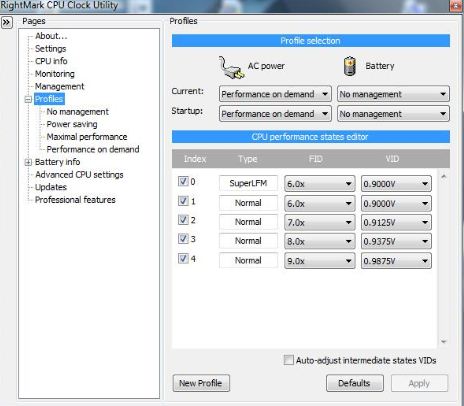
is it unusual to have rmclock indicate a current multiplier and voltage that don't match up with the multiplier-voltage pair settings you chose in the "performance on demand" profile?
for example, these are my settings:
superLFM - 6.0x - 0.8750V
normal - 6.0x - 0.8750V
normal - 7.0x - 0.9125V
normal - 8.0x - 0.9625V
normal - 9.0x - 1.0000V
but when i look at the CPU info page of RMclock, it shows the cpu alternating between 6.0X and 9.0X multipliers, both at 1.0000V?
idle is also at 6.0X 1.0000V
core temps at 42.4C so no issues there, CPU load hovering around 20-30%
is something going on here, or is this normal? -
http://lifehacker.com/5406486/power-efficiency-reports-tune-up-windows-7s-energy-use
I did a powercfg -energy check after reading the lifehacker article and it seems RMClock uses the processor every couple minutes or so. Its not alot like 0.5%. Is it because of the monitoring? anyway to stop this or the actual cause? -
Nice link. Thx buddy. W7's control seems so strong that I use RMC to just set voltages. Then, I morphed the balanced plan to my liking.
It makes sense because M$ will never give end-users voltage control due to liability with BSODs so RMC is still needed for that.
I suspected that the crazy load readings were false and the true "overhead" for RMC was low enough to still make it a valuable tool.
The "Undervolting" Guide
Discussion in 'Hardware Components and Aftermarket Upgrades' started by flipfire, Apr 1, 2008.




![[IMG]](http://img264.imageshack.us/i/final1050v.png/)


