Problems? See this thread at archive.org.
Unusual, but is the signed .sys driver correctly installed in the RMClock program directory?
-
-
Thanks,
This is what I asked to myself and I could not answer that. -
can someone help me??????????????
-
Thanks guys , got it running on win-7 ult 64 , just had to open the rm folder in prog 32bit and delete rm64thing and drag the new signed 64 bit driver from the first page guide and it works !
The only thing is temps are 5-6 degrees higher in win-7 64 than they were in xp pro 64 . Now have temp of 70c at 100% running WCG boinc where in xp it was at 64c , still better than 83c ! mistake , tool it down a few , now getting temps of 63c at 100% cpu for hours -
Hello,
I have a problem with RMClock but I don't seem to understand what's wrong with me setting it up.
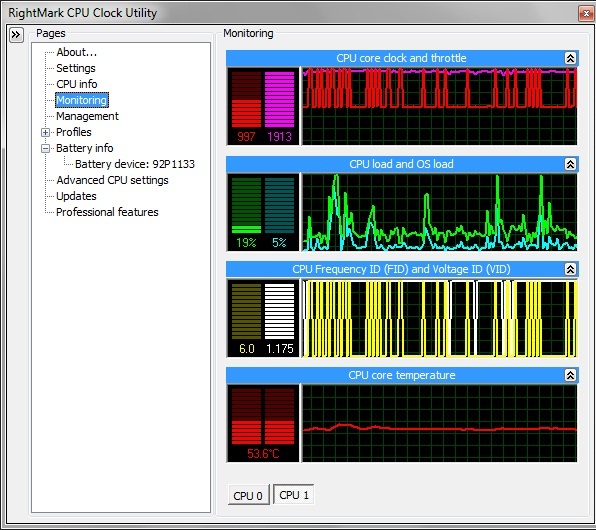
My laptop uses a T9300 and when I execute RMClock, its speed doesn't go higher than 1200 MHz
This is my configuration on Windows 7 Ultimate 64 bit:
![[IMG]](images/storyImages/uzHQPs.png)
![[IMG]](images/storyImages/hDeGms.png)
![[IMG]](images/storyImages/rLxiAs.png)
![[IMG]](images/storyImages/4SQAys.png)
![[IMG]](images/storyImages/hSddns.png)
![[IMG]](images/storyImages/tUCZbs.png)
![[IMG]](images/storyImages/K6Pccs.png)
Anyone can help me out? Thanks in advance
-
RMC typically reads 5C low with XP on C2Ds. Temps are correct with W7. That should explain the diff.
-
Hola Baraja,
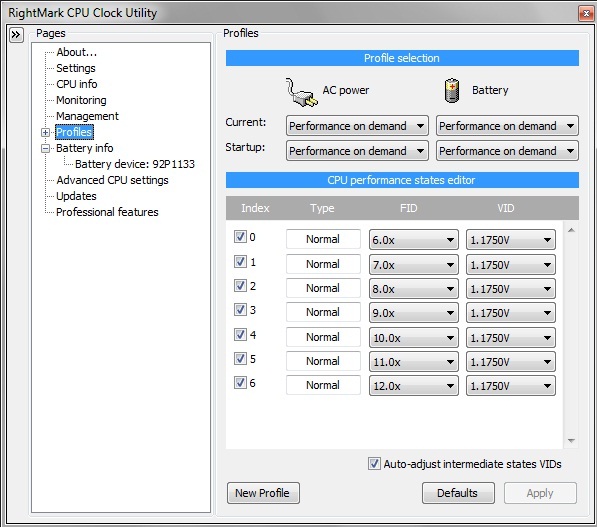
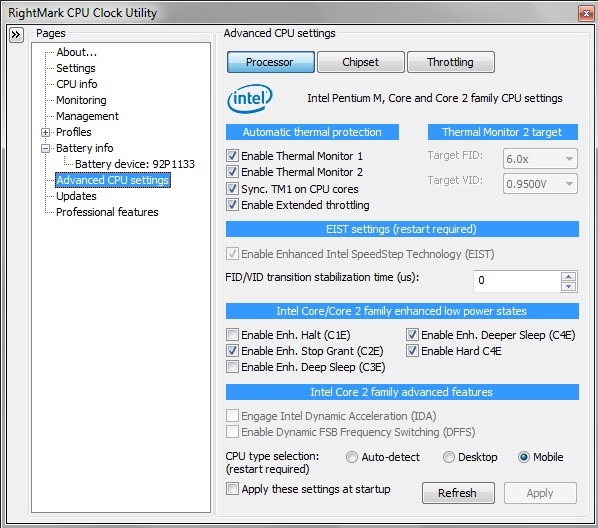
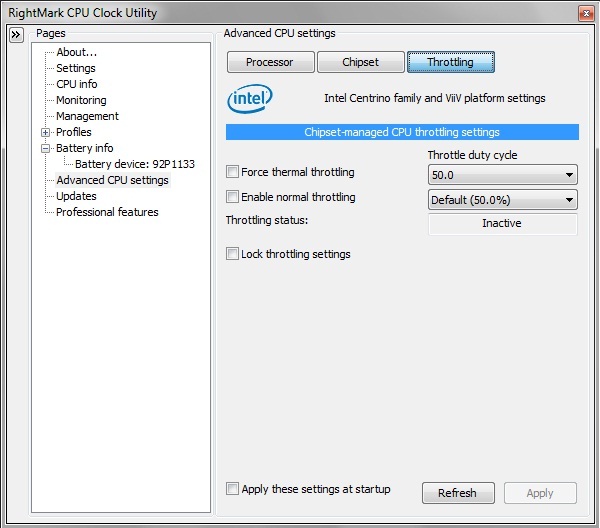
When you use Performance on Demand (POD) your CPU speed will stay at lowest level you checked until there's a demand for more. Here are some tips:
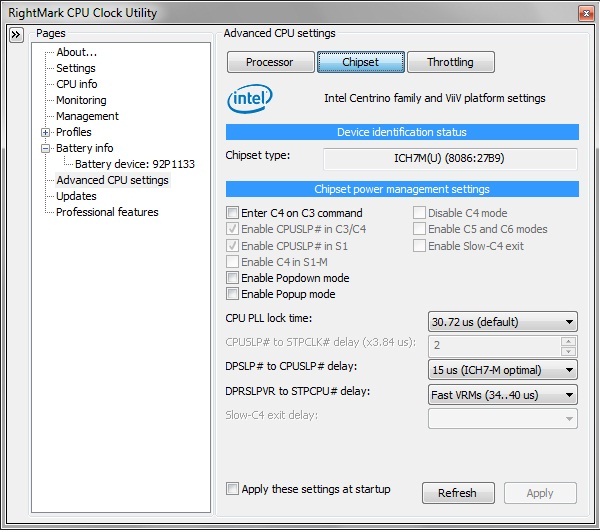
1. Uncheck Popup and Popdown.
2. Uncheck DFSS and IDA in Adv. CPU
3. Uncheck SLFM and IDA boxes in Profile
4. Set POD threshold to 15%
5. Please use Thumbnails for your pictures.
6 Re-post your config for "Round 2"
Hasta luego, -
WIll someone plz refer to the thread below and help me with my problems with RM Clock?
http://forum.notebookreview.com/showthread.php?t=429508
Thanks. -
Problem solved .
Thanks for your interest and your time
-
A little off-topic question:
Could someone with T8100/T8300 CPU tell me what are their default voltages for 6x multiplier and SLFM multiplier?
Thanks. -
T-8100 - Stock was 1.065 or 1.075 if I recollect. After UV it's 0.950 and locked.
10.5X stock was 1.1375 for sure. -
Excellent guide....dropped 20C on full load with my XPS 16 (91-71), ambient temps quite high atm, hence the higher temps.
10x multiplier at 1.0750V (T9550). Will try going lower when I get time.
What's the general consensus with IDA....use it or disable it? -
I'm in the same boat with you the_scotsman; XPS 16 runs crazily hot when I play WoW. Want to know whether to use IDA or not too.
This part I don't understand: "Note: After your done, make sure you re-tick the multiplier boxes in the "Main Profile" page then "Performance on Demand" sub-profile page, If you dont your CPU will be majorly handicapped"
So do I untick all the index boxes in Main Profile tab and Performance on demand tab? Confused =S -
no, make sure they are ticked.
Also dont use IDA. -
has anyone run these undervolting programs or is it possible to run them on windows 7 home?
-
does anyone know how to UNDERVOLT AMD Athlon 64 X2 QL-65?
My laptop is Gateway NV52
here is the specs of my processor according to wikipediaHTML:http://www.bestbuy.com/site/Gateway+-+Laptop+with+AMD+Athlon%26%23153%3B+X2+Dual-Core+Processor+-+Coffee+Brown/9548643.p?skuId=9548643&id=1218122584574
Athlon X2 QL-65HTML:http://en.wikipedia.org/wiki/List_of_AMD_Turion_microprocessors
2100 MHz
2 x 512 KB
2000 MHz
10.5x
35 W
Socket S1G2
Q4 2008
AMQL65DAM22GG -
Hey, i have a Hp Dv3t with a P7550 2.26GHz processor at 1064Mhz FSB.
*EDIT*
Using RMclock i noticed the rated CPU temp is the same as speedfan's temp (which can be around 20 degrees lower than HWM reads); which reading is accurate?
Also my multipliers are only 6x 7x and 8x; is that kind of low? Or is it because the high FSB frequency?
Thanks for the help
Btw, i had cpu-z running while i was browsing the net and on 6x multiplier, the Core VID is already at a low .875, and jump up to 1.000 every so often. Would you think if i undervolted it to .875, the processor should be fine? Or why would the voltage vary like that in the first place? -
Wow. This is a great guide. I'm always using silicon paste to lower the temperature of the CPU. I'll link this to my next post in my blog.
+++Kudos to you Flip. -
If "them" means RM Clock, yes it's more than possible. Like OxyClean, it really works.
-
Hello, I have a dell xps m1530 and for the past month it has been suddenly shutting down and I'm guessing it's getting too hot (which is why I'm trying to undervolt it).
I did the first ortho run to find out the max temp, and 5 minutes into it my laptop shuts down with the temp at ~83C. So I went ahead and set my 11x multiplier down .1v and ran orthos again and this time 8 minutes in it shutdown with the temp again at ~83C.
Any tips for what I can do to help stop this from happening?
Thanks,
Ryan -
Clean the dust/lint from the heatsink/fan.
-
First, follow mklym's advice and clean your cooling system. Next, finish the undervolting job you started. Keep dropping the voltage until it BSODs. Then, raise it back up one increment at a time until it doesn't BSOD. Presto, you're done.
-
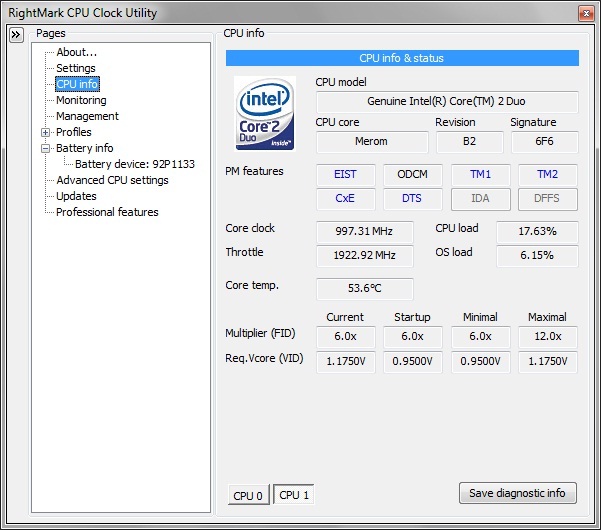
Hi have a question, when i look at the monitor for the cpu core clock and the throttle the graph shows it running at 100% is it suppose to be like that?
-
What program? Is it actually reading the frequency or just tells you what CPU you have?
And if it is reading the frequency/voltage (like CPU-Z), maybe you were doing something that forced it to go to 100%.
~Ibrahim~ -
Many of us prefer it that way. But if you want speedswitching, you have to enable at least one other multiplier in main Profiles. Then, select it again in the Performance on Demand profile.
-
![[IMG]](images/storyImages/rmresults.jpg)
thats my results after i undervolted, and my question is: does the cpu core clock and throttle look normal? -
Why don't post Thumbnails of your RMC setup screens, esp. Adv. CPU.
-
I have a T9400 which has 6.0X multiplier of 0.95V.. i can't seem to lower it.. is there anyway to do so? I already have my 9.5X multiplier at 1.125V... but i need my lower multiplier to go down...
-
sean did u switch ur cpu selection type in cpu adv to mobile?
Okay here are some pics
![[IMG]](images/storyImages/cpu.jpg)
![[IMG]](images/storyImages/voltage.jpg)
![[IMG]](images/storyImages/rmresults-1.jpg)
my question is: does the cpu core clock and throttle look normal? -
1. Uncheck boxes for IDA and DFFS
2. Uncheck Indexes 2 and 3
3. Use thumbnails (Manage Attachments) for your pictures. -
No, it's locked in your BIOS for your own protection. Intel doesn't trust you.
-
hey scott u told me to uncheck indexes 2 and 3 but why? and also i am using windows 7
-
I figured you were on W7 from your load graphs.I just finished installing RMC on 32 bit and 64 bit W7 on two different T8100 machines. There's a lot of tricks to know.
RMC really only jumps between your lowest and highest FIDs. Uncheck the middle ones. They just aren't used. Then, do my other suggestions before we go further, if you want to. -
Hi, does anybody know if rmclock is going to work somehow with mobile core i7?
-
okay thank you scott, strange how it works with windows 7, do i need to do anything after unchecking the middle ones?
-
Uncheck IDA, SLFM, Popup, Popdown. Post thumbnails so I can see if I missed any.
-
Great post! I've got a problem seeing the temperature of the CPU, cause when I run ORTHOS the temperature on the CPU's cores are always at 12 degrees (53 F) :S the only temperature oscilation that is visible is in the GPU. Even after 20 min of running ORTHOS it still keeps on the same temperature in the value, min and max fields (10º for Core 0 and 12º for Core 1) . Anyone knows what's the problem? My specs are:
Win7 x64
Intel Core2Duo 2.4GHz
4GB DDR3
nvidia 9600M GT
Tks
-
Are you checking your temps with CoreTemp?
-
I'm gonna follow my own post with a question: Is anyone having trouble getting the settings to work while on the battery?
My states work as they should on AC, but on the battery it just jumps between 800MHz and 1.2GHz when I have it set to 2.8. I have the power profile set to high performance and the min cpu set to 100%. Ideas? -
I found W7x64 to be a bit of a challenge also. Every version of Windows since XP has gotten more possessive about power management at the expense of RMC. So, in this case, I let W7 run the power plan and locked the available FIDs with RMC. Only the W7 balanced plan gives you full access to all FIDs for both AC and battery use. It's also easy to customize. Just modify your balanced plan details, select it in W7 and then tell RMC to let W7 manage the plan. To cut down on weird chatter and false load readings, do not use SLFM, IDA and uncheck everything you can in Adv. CPU Settings except TM1.
-
Then mind explaining how some ppl are able to lower it below 0.95V? There must be some way.
-
Some "ppl" have computers with your CPU but from different manufacturers with different BIOS chips than yours.
You can always learn BIOS coding and EEPROM flashing. -
Okay I got a question here.
Do you think "Undervolting" is really needed in my Studio 1555 whose current temps are like this. (CPU/HDD monitored by HWMonitor and GPU by GPU-Z)
Idle:-
CPU - 35 each
HDD - 40
GPU - 40
Busy (after game):-
CPU - 40 each
HDD - 45
GPU - 70
I mean Undervolting ultimately helps in bringing down the CPU temperature right? Currently its 35 each core and max 40-45 on game.
So do you think Undervolting is really needed in my case??
Thanks -
No, as long as those are reliable numbers.
-
Wow, I'm impressed with the great advice being dispensed on this thread. Thanks for sharing the knowledge folks!
My question: Will I get better performance and/or lower temps by altering my RMC settings for W7 as per Scott's most recent posts?
I set up RMC on my thinkpad T60 while trying to cope with a noisy fan. Almost a year later, I've dropped a new fan and HS in and upgraded from XP to W7, but I kept RMC because I was enamored with the drop in temps (and fan noise) and extended life it gave my aging battery. Now I'm wondering if I should "untick" the intermediate states in my "performance on demand" profile. I never realized that the xp to w7 jump had such dramatic consequences on how the cpu was used. -
well this is quite confusing. When i just leave it alone i can watch it idle as low as 6.0x .9250v but when i actually get into the program it won't let me go any lower than 1.000v. Which is quite confusing to me as it naturally goes lower than 1.0v but rmclock won't let me make it go that low with it's own thing.
-
did you select "mobile" in the advanced CPU options?
-
I think i found my main problem :X I think the CPU temperature sensor is not working properly... P.e, Using ORTHOS for stress the CPU and joining another one or two programs to really "pull of" the cpu strengh
, obviously the temp rised but in ALL programs I used to see the temperature is always 28/33 deggres (depending on the program). this is stupid! anyone knows how to check the core temperature sensor without loosing the warranty?
Does anyone know a program to make the cpu fan run 100% to see my problem is really because the cpu temp sensor? (acer 6935g)
I tried to use speedFan and other programs to "play" with the fan, but they don't even find the fan (not even the GPU fan, basicl no fans encountered)...
Tks again and sry my english
-
no luck with this as there's some sort of digital driver signing problem... :'(
-
did you read this on the first page ?
. : : : : : : : : : : : : : : : : : : : : : : : : : : : : : : : : : : : : : : : : : : : : : : : : : : : : : : : : : : : : : : : : : : : : : : : : : : : : : : : : : .
RMclock for Vista 64bit users
A digitally signed/secure driver is required for RMclock to run on Vista 64bit. We have finally acquired a digitally signed driver for RMclock!
Here is the link for the signed RTCore64.sys driver: (Virus free and tested)
www.flipfire.net/download/rtcore64.zip or here
Download and extract it to your RMclock folder and overwrite the old driver.
(NOTE: This driver is only for Vista 64bit. The XP 64bit drivers are already included with the standard installation)
. : : : : : : : : : : : : : : : : : : : : : : : : : : : : : : : : : : : : : : : : : : : : : : : : : : : : : : : : : : : : : : : : : : : : : : : : : : : : : : : : : .
Other handy cooling solutions can be found HERE by the NBR cooling team
------------------------------------------------------------------------------------------------------
search tags: undervolt undervolting undervolted underclock undervolt guide
Id like to give credit to blackbird (i followed his guide on my first time), John Ratsey for the signed x64 drivers, Rightmark, CPUID, ORTHOS and www.graphxservice.com for the banner and anyone else who i didn’t get to mention. (Let me know)
Attached Files
File Type: zip RMClock x64 Drivers.zip (7.2 KB, 2142 views)
The "Undervolting" Guide
Discussion in 'Hardware Components and Aftermarket Upgrades' started by flipfire, Apr 1, 2008.


![[IMG]](http://imgur.com/uzHQP.jpg)
![[IMG]](http://imgur.com/hDeGm.jpg)
![[IMG]](http://imgur.com/rLxiA.jpg)
![[IMG]](http://imgur.com/4SQAy.jpg)
![[IMG]](http://imgur.com/hSddn.jpg)
![[IMG]](http://imgur.com/tUCZb.jpg)
![[IMG]](http://imgur.com/K6Pcc.jpg)