Problems? See this thread at archive.org.
Hey all,
Qondering if I did something wrong, Rightmark "Core Clock"
Only reads 1196.11 Mhz.... when I know I have a 2.8 Ghz processor...
(And that reading doesn't change significantly at full stress test)
Also "Current" Startup, minimal etc multipliers in CPU info never change either
Did I screw something up?
(And lastly "CPU load" is always fluctuating around 60%...
when OS Load is more like What I thought I was using?")
Either way, thanks very much for your time.
-
Attached Files:
-
-
Need to see more of your settings to tell you what's wrong.
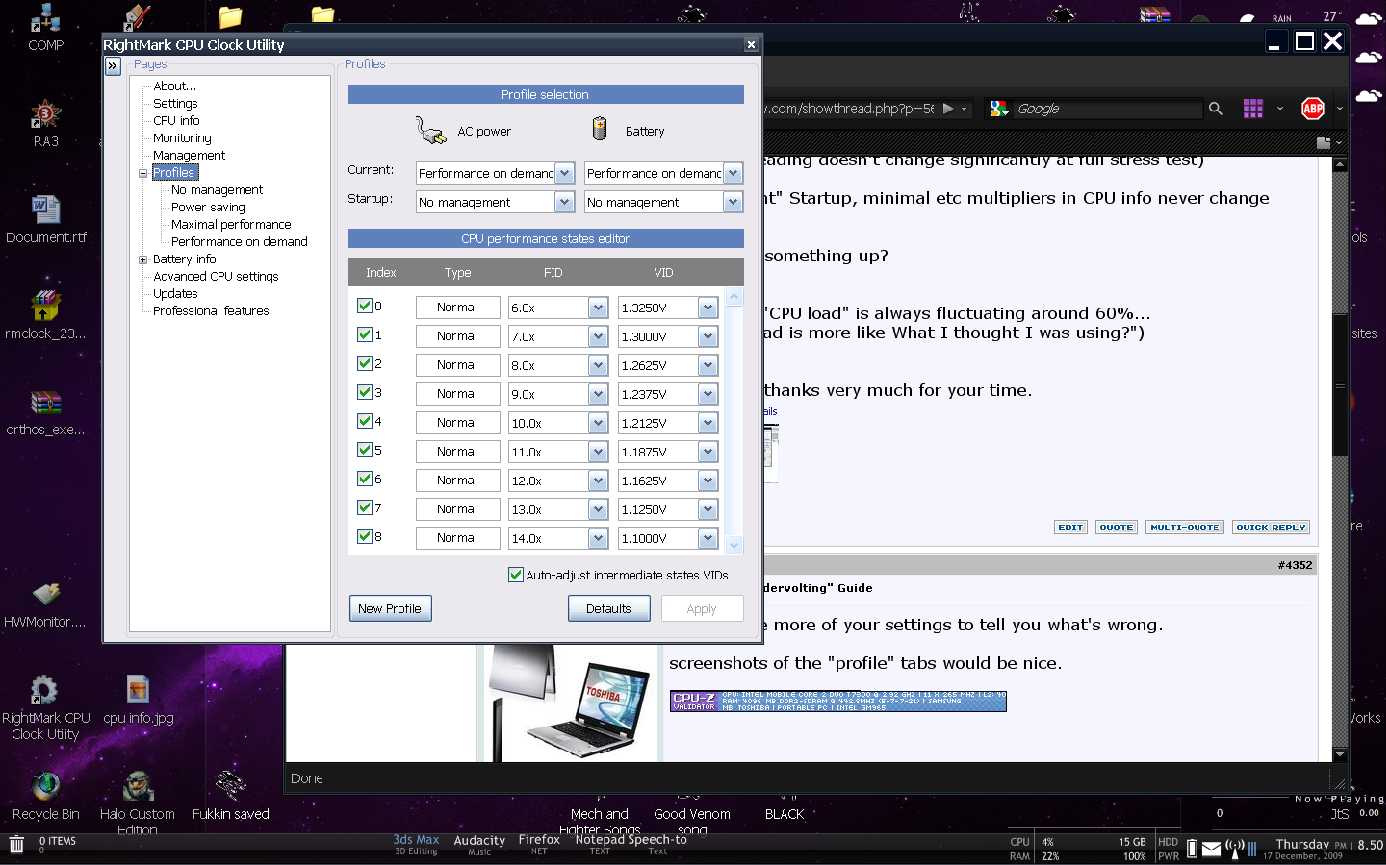
screenshots of the "profile" tabs would be nice. -
Ah, sorry,
didn't see how that would help, I just thought I was misunderstanding things.
Precision M6300, 2.8 Ghz, tried on and off battery pwrAttached Files:
-
-
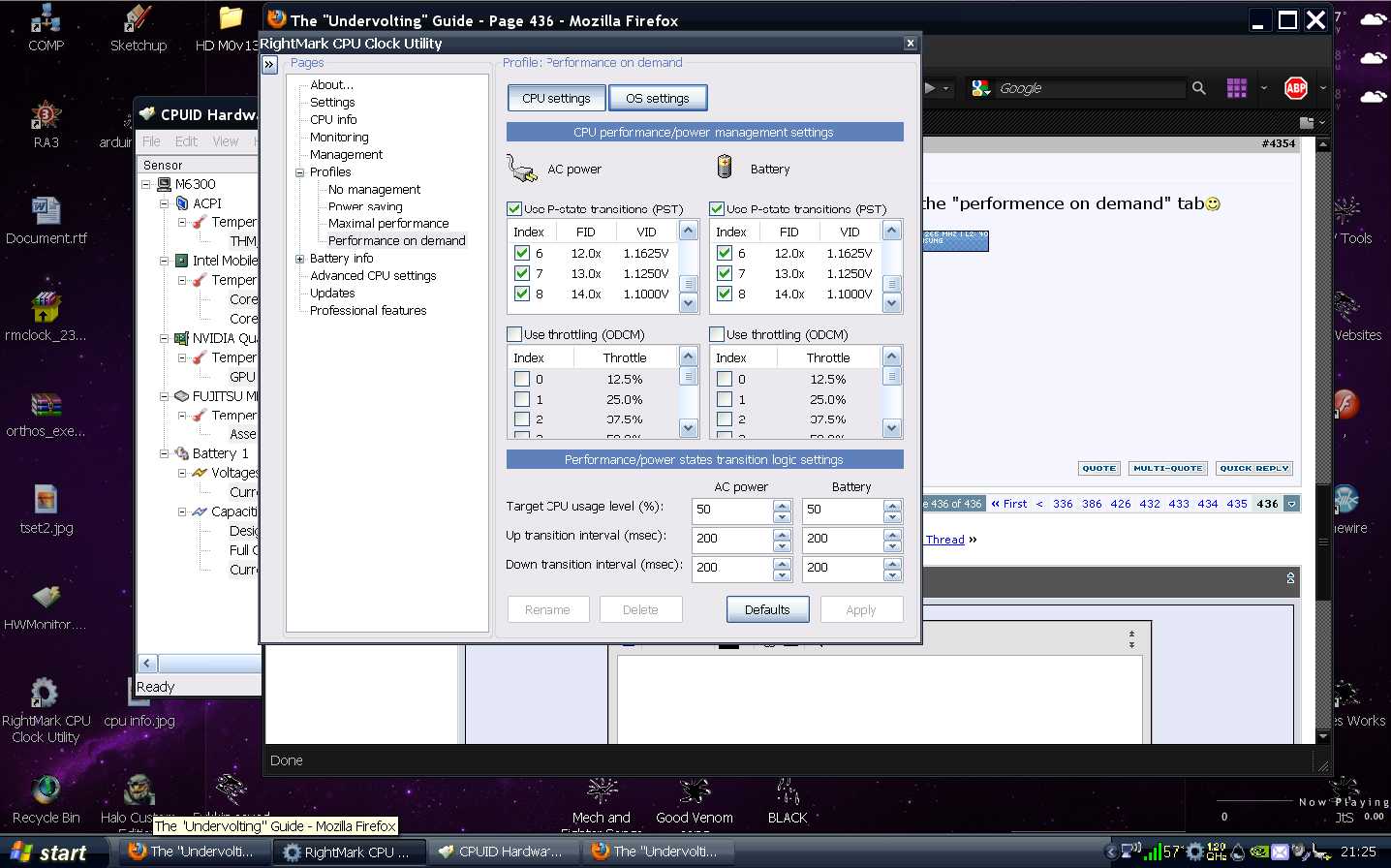
One more screenshot please, of the "performence on demand" tab

-
(sry for poor quality/slow replies
and tyvm for all your help
(All those boxes in those things are checked)Attached Files:
-
-
ugh... target CPU useage lvl % right?
why would I want a set number there? wasn't the whole point that it can go between?
(Or should that be at 100% for optimization?)
bleh : p -
no, I think you have it set up right.
Are you using win7? -
nope : ( just regular XP I think
-
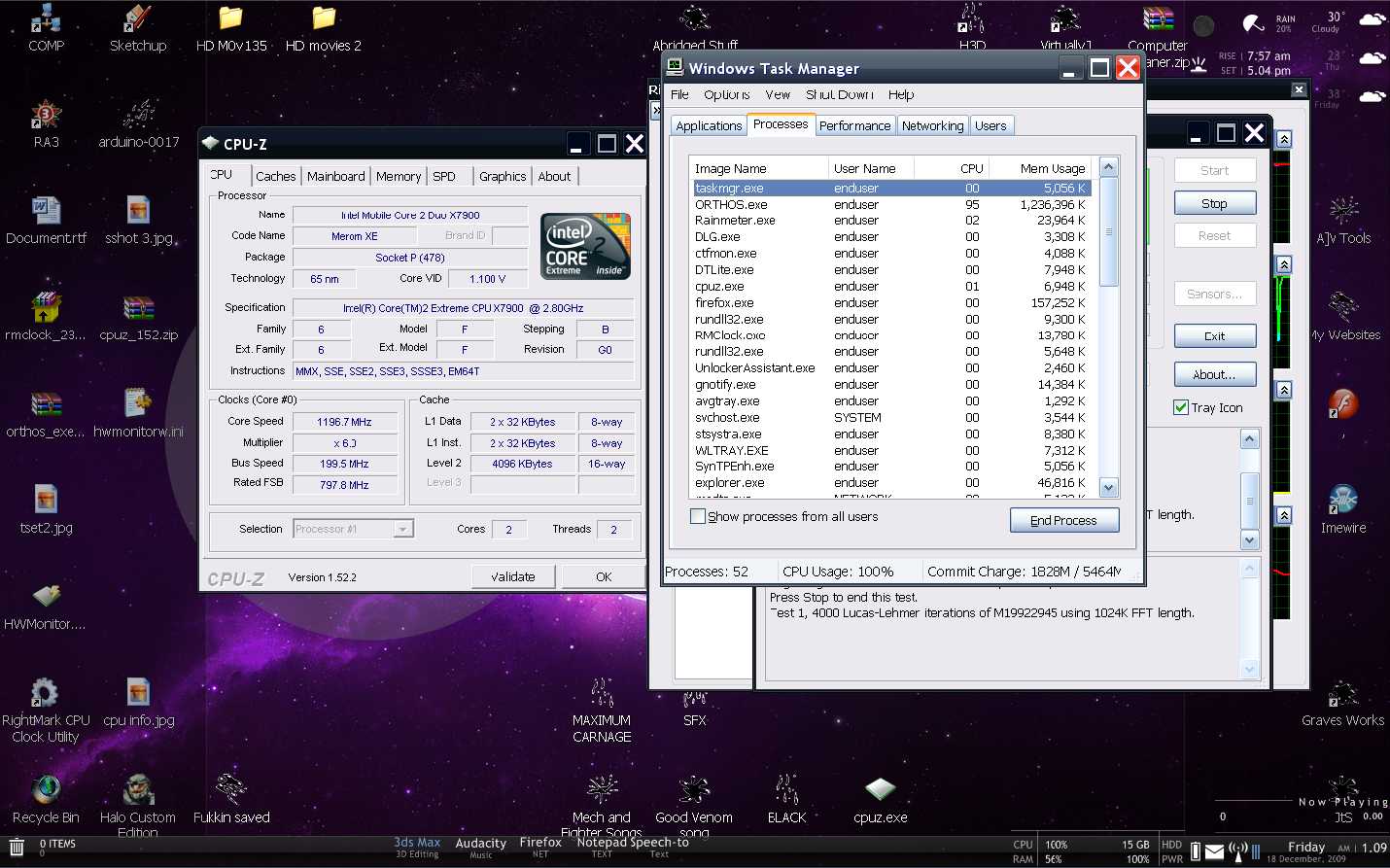
What does CPUz say when you run ORTHOS?
-
sry, CPUz? everything in the areas we've seen stays the same?
-
Download CPUz
-
My laptop overheats and shuts off about 40 seconds into the orthos cpu loader. It reached between 90-110 degrees C.
Even surfing the web sometimes with multiple tabs open or with youtube vids it can go up to 90 degrees and shut off.
I recently applied new thermal paste and it didn't make much of a difference, if any.
Any suggestions?
Thanks. -
Ah, sorry : )
same with 0-100% CPU useageAttached Files:
-
-
>>>"My laptop overheats"
So undervolt already! : )
first notch dropped me by 20 -
Do you have any BIOS options to change the multiplier?
-
The target or threshold percent level is often overlooked and left at 50% in the Performance on Demand profile. Yet, IMHO, it's the key to speedswitching working correctly. The target percent sets the point where your CPU steps up to high speed in response to heavier workloads.
If you set it at 100%, it never steps up and your CPU will stay at your lowest speed all the time. If you set it at 50%, your speed will only step up when your CPU reaches 50%, a heavy load. What's the point of having a 2.8GHz CPU if it only runs at top speed with something like Orthos?
When I use speedswitching, which is never , I set the threshold to the lowest, 15%, so my CPU will get off it's butt at a reasonable workload. When the heavy lifting is done, the speed drops back down automatically.
-
But no matter what I set that speed to,
CPU info's "Core clock" Never changes,
always around 1196 mhz...
Which should be 1400 for a 2.8 ghz, right? -
After I hit the defaults button on the profile tab, and hit apply, a few seconds later my screen blacks out and I'm forced to restart. And I can't even restart immediately since it just automatically shuts off again (overheating?).
-
No. 1200 MHz (1.2 GHz) is a typical bottom speed for many 2 to 3 GHz chips. It doesn't HAVE to be half the rated speed. Look at a Profiles setup screen.
-
Hmmm for the RMClock, I don't see a "Advanced CPU settings" tab. Why is that?
-
>>>>"No. 1200 MHz (1.2 GHz) is a typical bottom speed for many 2 to 3 GHz chips. It doesn't HAVE to be half the rated speed. Look at a Profiles setup screen."
I can get that, but I mean, at max processor useage (Stress test or 3D rendering)
It Never goes above 1.2
when I thought it should be 1.4 for full on one core? -
No.
You can check it with CPUz running - when you exit (instead of minimizing) RMClock, the voltage will/should jump. -
Not installed correctly.
Using 64 bit OS ?
UAC on ? -
HALT the CPU during idle time.
-
Have you looked up the specs on your chip on Intel's web site ?
-
Yes?
I mean it's a 2.8 ghz chip :?(
http://ark.intel.com/Product.aspx?id=31730 -
Now I'm confused. On CPU chips, both cores always run at the same true clock speed though throttling may lower the "apparent" speed.The load, however, can vary a lot between cores depending on how they split up the workload.
1.4 GHz on each of 2 cores does not mean 2.8 GHz operation. -
My T5250 started running @ 1.25 V (77C max temps with fans spinning),
I've taken all multipliers down to the available minimum voltage (0.95 v) and ran an 8 hour stability test, which passed with 64C max temps (no fan spinning). Does anyone know why the available voltages are capped at 0.95? Can I go lower? -
It's locked by the mfr. so new owners won't mistake a low volt BSOD for a defective computer and return it under warranty. Nice UV job. You should see some more battery life, especially with the fan on a leash.
-
i still need help on this
-
Well, from the limited info you have supplied, I think you have hardware problems. The 'Defaults' button brings up the stock voltages of the CPU. If your unit is shutting down when you apply the stock voltages, that is hardware, not software.
You said in an earlier post that you applied new thermal paste. Did you clean out the heatsink/fan(s)? Are you sure you applied the paste properly?
If the laptop is under warranty, send it in. -
Yeah it is a hardware problem, it overheats extremely easily, as I said it can reach 90-100 degrees just by surfing the web.
I cleaned out the fans/heatsinks, and I'm pretty sure I applied the paste properly. Unfortunately it is no longer under warranty.
I'm tempted to even buy a laptop cooler but I'm a bit weary that won't even make that big of a difference considering I can't even run that program without my laptop overheating in under a minute. -
I would try applying thermal paste again. When you pull the heatsink off the CPU, check the 'squish' pattern of the old paste. Check that it completely covers the CPU, with no air bubble pockets. Make sure you are using a good thermal paste, such as ICD7, AS5, or something similar. Good luck.
-
Help. I can't find the squish pattern selection box anywhere in Advanced CPU Settings
-
Click the 'Chipset' button at the top of the window. Hope that helps.
-
Yeah I just did, even though it was a pain since I have to unscrew like 9 screws just to get the heatsink off. The paste completely covered the cpu, and I reapplied it. So far it still overheats pretty easily like before.
-
If the fan(s) is working, then I think the heatsink is shot. The tube is filled with nitrogen, and if the heatsink is defective/damaged, then there is the chance the nitrogen has left the tube. Get a heatsink off eBay.
-
Alright, but is there a definite way to tell if it's actually the heatsink that's the problem? Nothing more aggravating to determine what's wrong by buying new parts then finding out that wasn't the problem at all.
I have a gateway t-1620 btw, it came preinstalled with vista but the performance was sluggish, so I downgraded to xp. I had to search and find most of the drivers to be compatible with xp, so would that be one cause of the overheating problem? -
Actually its usually just water there area few other chemicals that can also be used but nitrogen isn't one of them.
-
I stand corrected. I was going by memory, I thought I remembered reading they used nitrogen. Here is the low-down:
http://en.wikipedia.org/wiki/Heat_pipe
Thanks for the heads-up, Lunar_wolf. -
It's the first time I'm undervolting my notebook (Dell Studio XPS 16) and I'm trying to read this thread as much as I can. I'm still undervolting only my highest multiplier (9.0x - 1.1125 so far) but I read some posts about "voltage spikes" and got worried.
I read a lot of stuff but I still can't understand it well, how do I see if I'm having these voltage spikes and what can they do to my laptop? -
Voltage spikes are harmless, as is undervolting. Neither one can hurt your laptop. It's overclocking, pushing your machine past it's limits, that can be potentially harmful some times. Undervolting does only good.
Spikes are built into CPU chips naturally to give the chip a speed boost during a period of heavy workload.
Free gift from Santa: Only pick your highest and lowest speeds to check. Your CPU doesn't even use the middle ones. And, don't waste more than 5 minutes at each stress test checking for your lowest voltage right now. When you go too low, it'll BSOD. Raise the voltage up a notch and test again until no lock-ups.
Happy Holidays
-
Sorry I couldn't shift through 440 pages of this thread. I have a question for you guys.
Just bought a brand new laptop. Acer 8940G 6865 running Win 7 Home Prem x64 build 7600 with a Core i7 720QM.
My question is: How should I go about undervolting this thing? Under normal load the temps are around 54oC, and shot up to 84oC when faced with 8 Prime95 x64 threads. Due to the design, most of the heat is concentrated where your hands rest on the thing, so I'm looking for ways to increase my comfort while gaming and doing stuff on this beauty.
I've been looking around, but so far haven't found anything that can be used to undervolt this i7. Help?
Oh and btw, I can't buy any software right now so please, freeware preferred. I don't want to have to pirate stuff. -
Can't help with the undervolting of an i7, but you should check out IntelBurntest 2.3 if you really want to see how hot your beauty can get. And, quicker too.
See:
http://downloads.guru3d.com/IntelBurnTest-v2.3-download-2047.html -
EDIT: Oh I get it.
Anw, any1 knows any soft for mobile i7 babies? -
Yeah, yeah, yeah. Using Burntest at Max. couldn't break past 67C on my T8100 at a constant 2.1 GHz. Stock fan, undervolted to 1.025V with RMC. Thanks to free Russian software courtesy of detent
-
Can I find the optimal voltage for my highest multiplier and call it a day? or do I have to set all (3) multipliers to take 100% advantage of under volting?
-
I always recommend undervolting your top FID, un-check the rest, and get back to opening your presents.
-
Guys, maybe u'd want to read this: http://www.tomshardware.com/forum/270223-28-undervolting
So according to the info here the only real benefit you'd get from undervolting is a cooler system. Or is there more to this? -
The guy with the "best answer" is way wrong. You'd think he'd spend an equal amount of time getting his facts straight as he did bragging about his qualifications.
Undervolting is just getting your CPU to operate at the lowest possible voltage and power without it making any mistakes, Benefits are less power use, less heat, more battery life. Downsides are none.
The "Undervolting" Guide
Discussion in 'Hardware Components and Aftermarket Upgrades' started by flipfire, Apr 1, 2008.