Problems? See this thread at archive.org.
Tried this but it doesn't seem to be doing anything. According to cpu-z, and rmclock itself (cpu info dropdown), it's lowered my T4300 from 1.1500 (10x) down to 1.1250 (10x). It seems stable but the temp isn't noticeably different. It fluctuates between 136 and 140F once the fan kicks in. Probably risky to try 1.1125 but I'll do it anyway
It's hard to tell because of the cooling procedure on the dell. It's staying around the same temps, but I noticed at 1.1125 at 8 minutes the fan is still on the first stage. Right at the 10 minute mark it stepped up to speed #2. Within the first 4 minutes at stock voltage it steps up to the second speed. Maybe if I set the Power saving options to "passive" cooling it'll give me a more accurate indication.
-
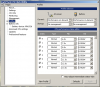
You're not noticing much temp. change because you haven't done much voltage change (0.025V). Drop it down until you get a BSOD and then raise it back up a notch. Start at 1.000
-
Great guide!
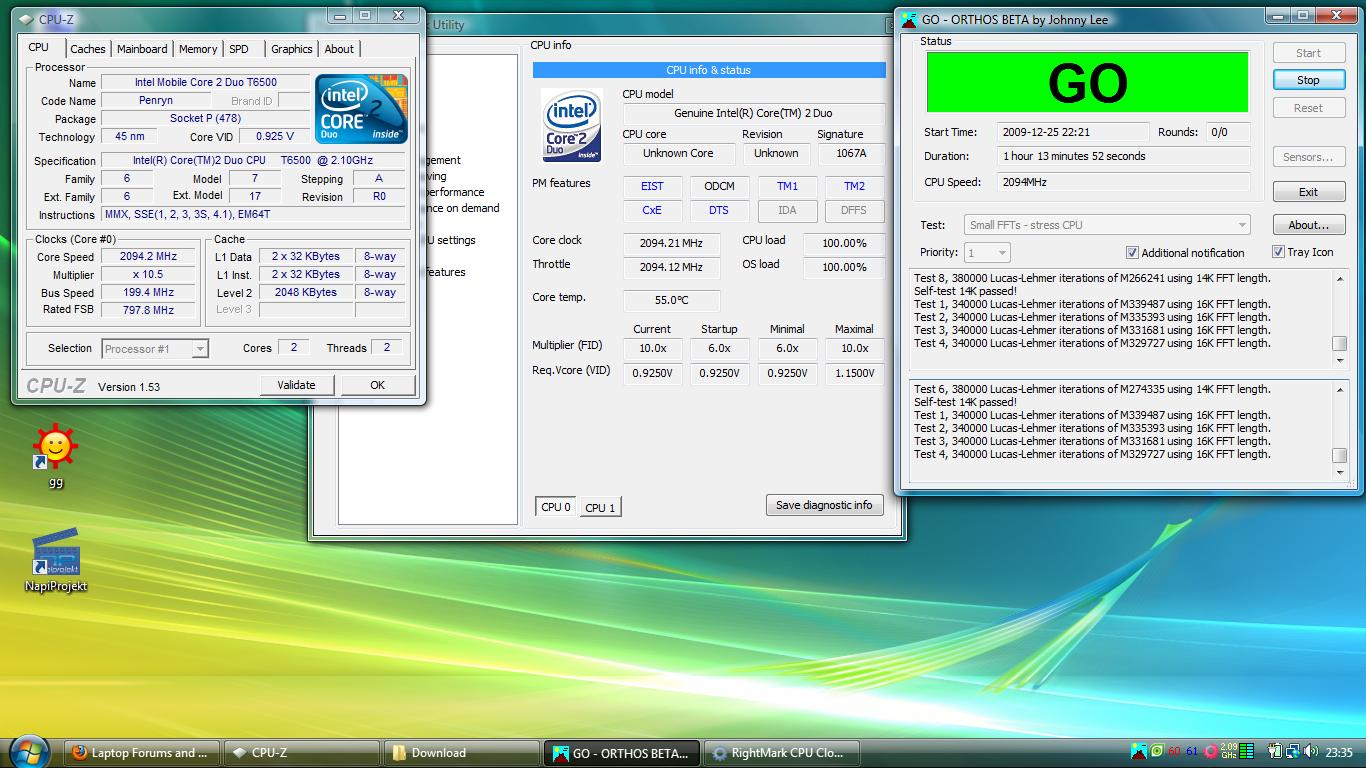
unfortunately i had to digg the internet to find how to force rmclock to work with 10.5 multipler (manual edit of registry needed).
But I successfully undervolted my t6500 to 0,925V on 10,5 multipler.
Orthos running just over 1h, but i hope it not to crash
rly thx :]Attached Files:
-
-
So I undervolted and I get these conflicting temperatures between my CPUID HWmonitor and Rightmark CPU clock utility on the bottom right. (I have a dell 14z with a 9400M btw)
My computer was running super hot and was stuttering so I went to check on my CPUID CPU-Z and it showed it was running at 1.150V (standard for highest multiplier and was not running at the setting I had set it up for)... so two questions. 1) does the rightmark utility need to be running at start up to get the undervolting settings? 2) which is my real CPU temperature? I see like 5 different temperatures on my screen...
Everytime I play games even something like Warcraft III... the computer eventually gets too hot and the frames starts stuttering and the sounds starts crackling... Should I contact dell about this? If I am on basic 1 year warranty will they replace my laptop?
Thanks
![[IMG]](images/storyImages/fuv2ns.jpg)
-
Ok, so I reformatted my computer last night, was the worst decision I ever made. I just reformatted my win7 6935G to win7 again, so no different operating system or whatever. Using x64 bit again btw.
I installed RMclock again, because undervolting solved my problem with throttling. I set it all up, used my same voltage as I did before I reformatted which is 0.9625, which I have found safe.
I'm using it in maximal performance because I've found it better...and then...
I'm used to having the CPU clock at 2527 because I have a T9400, 2.53GHz processor and the throttle sits below it constantly at something like 2.394, which I found fine and I was happy with because the CPU and throttle did not fluctuate and my problem was solved.
Now my worst fears are here, I've brought it back up and its fluctuating both the CPU and Throttle like madmen. It's going insane, just view my attachment.
How do I fix this? I've changed absolutely nothing to my computer other than a reformat of the windows7! Any help will be more than appreciated, thankyou!Attached Files:
-
-
Ok, I'm very sorry for the double post but I needed to add more attachments of my settings so it will be easier for you guys to see if I have set something wrong.
Please, any advice will be appreciated, this is a major problem for me.
Attached Files:
-
-
Try deselecting 'Engage Intel Dynamic Acceleration (IDA)' on the Advanced CPU settings window.
-
I can't select or deselect that.
(see attachment)
Is there anything that I can do?Attached Files:
-
-
I fixed it! I knew that it couldn't be RMclock, because I had the right settings for me. My computer was automatically set to Balanced performance, set it to high performance and it works perfectly fine now.
All people if you have a fluctuation like mine, make sure you check power settings.
-
bump. can anyone help?
-
1. Yes, it needs to be started when windows loads. On the Advanced CPU settings page, tick the check-box for 'Apply these settings at startup'.Also, on the 'Settings' page, there is the option to run at windows start by registry key or startup folder.
2. Use RealTemp.
When was the last time it was apart and had the heatsink/fan cleaned? If it is still under warranty, then Dell should be able to do something for you. Replacing the is their call, I do not know.
Hope this helps. -
Thanks
I tried to open it up last week, but there were so many screws and things were packed so closely together that I thought I might break it so I put it back together again. I'll give Dell a call. -
If you want to save yourself a bit of time, I recommend trying CPUGenie for your undervolting. The undervolt wizard in that is a great way of giving you an idea of different voltage stability.
-
is it normal to have all multipliers with the same VID(0.925V)?
because i ran the CPUGenie optimization wizard, and all multipliers ended up having the same voltage, which was the lowest VID -
my T8100 had the lowest VID for all FIDs
And I know some of the member that had all lowest VID as well -
yeah cool, was just making sure i didn't screw anything up
i'm gonna run a stress test for a few hours just to make sure its stable -
I tried the new 1.4 like all the other versions since day one. I've always liked the program but it still loses its hold on FID setpoints over time.
-
PLEASE use thumbnails.
-
I need some help with this, I have a DV5 with a P7350. First of all, RMClock will not completely recognize my processor. It doesn't show the core model of the number. Also, the temo it shows is WAY different than what hardware monitor shows, by about 30+ degrees (I trust HW).
Also, I managed to change the voltage. I have 2 FID's, 6.0x, and 7.0x. I put both of those down to 1.0000V and it is 100% stable, but I can't go any lower than that.
Regardless, I still have shown I huge decrease in temps. My GPU temp went down 3 degrees, and both cores of my processor went down about 7-8 degrees. Those temps are while playing TF2 or L4D2.
Thanks for any help. -
RMClock hasn't been updated in a long time(almost 2 years), and therefore doesn't fully support newer CPUs.
There are alternatives to RMClock such as CrystalCPUID or CPUGenie that support newer CPUs -
Orthos dosnt work on my laptop for some reason. I keep getting an error after running it for less than 1 minute.
This is the error:
Test 1, 4000 Lucas-Lehmer iterations of M19922945 using 1024K FFT length.
FATAL ERROR: Rounding was 0.5, expected less than 0.4
Hardware failure detected, consult stress.txt file.
Torture Test ran 0 minutes 18 seconds - 1 errors, 0 warnings.
Execution halted.
I checked the .txt file and i still couldn't find out what was causing the error.
Here's the .txt file contents:
Type: Blend - stress CPU and RAM Min: 8 Max: 4096 InPlace: No Mem: 3804 Time: 15
CPU: 2667MHz FSB: 0MHz [0MHz x 0.0 est.]
12/30/2009 1:59 AM
Launching 2 threads...
1:Using CPU #0
2:Using CPU #1
2:Beginning a continuous self-test to check your computer.
2ress Stop to end this test.
1:Beginning a continuous self-test to check your computer.
1ress Stop to end this test.
2:Test 1, 4000 Lucas-Lehmer iterations of M19922945 using 1024K FFT length.
1:Test 1, 4000 Lucas-Lehmer iterations of M19922945 using 1024K FFT length.
2:FATAL ERROR: Rounding was 0.5, expected less than 0.4
2:Hardware failure detected, consult stress.txt file.
2:Torture Test ran 0 minutes 18 seconds - 1 errors, 0 warnings.
2:Execution halted.
1:Torture Test ran 0 minutes 18 seconds - 0 errors, 0 warnings.
1:Execution halted.
Here are my laptop specs:
Intel core2 duo CPU T9550 @ 2.66ghz
4.00GB RAM DDR3
ATI Mobility Radeon HD 4650.
(if you need more info let me know). -
The error means your system is not stable.
Either the ram or CPU.
Try to increase your CPU voltage a bit.
If that doesn't help then try to remove one stick of ram, test it.
If it still doesn't help then swap the ram sticks (i.e. put in the one that was removed and remove the one that was tested).
I think your ram is not stable. Try running orthos in the "stress CPU" setting. -
1. RMC doesn't always need a perfect recognition to work just fine. It's 2 years behind.
2. Newer laptops have lower voltages locked to prevent false warranty returns.
3. Uncheck TM2, set TM1 and lock on it. -
Hey HazMan, Orthos is older than RMC. Does it work with 64bit OS memory ? The guy's log says 0 RAM and no FSB. What about that new one that people are listing here ?
-
Hi all.
May be, it is a stupid question: When I come to point 4) ***Undervolting***, do I lower the voltage at FID=11x up to its minimum (I could lower by almost dU=0.3V!) and restart then the whole procedure with FID=10x? I surely modify also 10x, 9.0x, ... 8.0x, right?
Update: Everything is described in step 7 ... .
Funny, I comment myself ...
-
It works for me.
Do you mean intelburntest?
You're right, it's a good idea to try some other software since ORTHOS is old. -
OCCT is another software used for testing system stability in overclocking/undervolting and is newer than Orthos.
http://www.ocbase.com/perestroika_en/index.php?Download
Lol the website looks like a Red Alert 3 fansite. -
I'm useing OCCT and its working great but this program is very diffrent from Othos so i'm not really sure how to work it with this guide. In the stress test section it says to run Orthos in small FFTs; i cant find that option in OCCT. How can i test my cpu in small FTTS mode with OCCT?
-
I suggest you run intel burn test first to see if your system is stable. It only takes 10 mins.
-
CPUGenie has a built in stability tester which it does for every voltage. I have no idea why people are still using outdated software that is giving them issues when you have something that is updated on a regular basis, is very stable and can be set to automatically test stability 20 mins per voltage or up to 24 hours using a method that is similar to Prime95.
-
I think one good reason to use RMClock/Orthos/etc, is because they, contrary to CPUGenie, are completely free.
-
all softwares are so called stable until you start finding bugs on them lol..
why am I still using rmclock? because it's very stable on me well at least for the 5 processors in my sig.. even for T9300 that has half multiplier.. no problemo
and to add, it's free, uses less resource, and had been tested by hundreds of people without problem .. so why should I change to something that do exactly the same and pay for it?
anyway... Happy New year guys !!
-
I ran intel burn test and it works BUT I'm really lost. I ran the test on standard mode 1024MB 5 times. The first time i ran the test i ran it on my default factory voltage and i got an error saying my system is unstable. What do i do now? I'm really confused because when i ran OCCT i never got that error with my factory defaults but with intel burn i get an error. I'm really lost..does this mean my factory defaults are wrong? does this mean i have a messed up laptop? can someone please help me?
-
Stress tests are not error-free or even real-world for that matter.
Most of us are are content to lower CPU voltages to where our processors run reliably and error-free doing the kinds of everyday computing work we bought them for.
Use one of tests that will help you get to your UV destination without a hassle. -
Anybody that can drop a thousand dollars or more on a laptop can afford $15 for software to make it run better. But, Genie still has stability issues holding on to VID setpoints.
-
Are you running the tests with a notebook cooler? If not, re-run them with one (or a large fan blowing at the raised notebook).
No, they are not real world, correct. But, if Intel is using a version of these tests to validate their products - I have to disagree to change the test until it gives the results we want. Seems counter productive to me. -
I'm not using any external coolers (just my standard built in laptop fan). So what do i do to fix my cpu? or is it the RAM? or should i just ignore it since my laptop has been running fine so far on its default settings (BSOD sometimes). I'd say I'm content with the way my laptop runs but i just wish it was better/more stable.
-
I wouldn't call BSOD sometimes to be "running fine" ..
there's something wrong there, and it's more likely the ram, cmiiw..
what about the result of Orthos "small FFTs test" have you done it? -
It is the ram. Try running the test with one stick, then with the other. That will show you which stick is bad.
And I agree with crayonyes, run the "small FFTs" test. That will not show an error if your CPU is fine (even if the ram is slightly unstable). -
tribeam,
If we're still talking about IntelBurn Test 2.3, then it may not be the CPU, it could be the RAM at fault too.
What IBT does is run the CPU to it's maximum (or at least more than any other program I know of) - thereby stressing it and the memory system to see any weaknesses. In your system, it found it.
If the cooling system is running fine (no dust, fans spin, etc.), then you may 'need' a notebook cooler to ensure BSOD do not occur because of overheating.
Or, you may simply need to re-install your O/S with the latest BIOS, drivers and software you're using to ensure that the BSOD is not software related too.
If it doesn't BSOD when you're using it normally, then you can possibly forget about this. If it does though, then you need to determine if it is heat/hardware related or, if software is the issue (maybe even some combination that I can't think of too, right now?).
Myself, I test each new system with IBT and also when I change RAM modules too. If a brand new system didn't pass these tests, I would be getting something replaced until it passed them!
Remember, that IBT takes the testing to 'theoretical' values - maybe it could be the design of your notebook's cooling system won't allow it to reach those heights - at least not without additional cooling. -
I ran the Orthos small FFTs test for 10min (wasnt sure how long i should run it) and here are the results:
Type: Small FFTs - stress CPU Min: 8 Max: 8 InPlace: Yes Mem: 8 Time: 15
CPU: 2667MHz FSB: 0MHz [0MHz x 0.0 est.]
12/31/2009 8:13 PM
Launching 2 threads...
2:Using CPU #1
1:Using CPU #0
1:Beginning a continuous self-test to check your computer.
1ress Stop to end this test.
2:Beginning a continuous self-test to check your computer.
2ress Stop to end this test.
1:Test 1, 800000 Lucas-Lehmer iterations of M172031 using 8K FFT length.
2:Test 1, 800000 Lucas-Lehmer iterations of M172031 using 8K FFT length.
2:Test 2, 800000 Lucas-Lehmer iterations of M163839 using 8K FFT length.
1:Test 2, 800000 Lucas-Lehmer iterations of M163839 using 8K FFT length.
2:Test 3, 800000 Lucas-Lehmer iterations of M159745 using 8K FFT length.
1:Test 3, 800000 Lucas-Lehmer iterations of M159745 using 8K FFT length.
2:Test 4, 800000 Lucas-Lehmer iterations of M157695 using 8K FFT length.
1:Test 4, 800000 Lucas-Lehmer iterations of M157695 using 8K FFT length.
2:Test 5, 800000 Lucas-Lehmer iterations of M155649 using 8K FFT length.
1:Test 5, 800000 Lucas-Lehmer iterations of M155649 using 8K FFT length.
2:Test 6, 800000 Lucas-Lehmer iterations of M153599 using 8K FFT length.
1:Test 6, 800000 Lucas-Lehmer iterations of M153599 using 8K FFT length.
2:Test 7, 800000 Lucas-Lehmer iterations of M147455 using 8K FFT length.
1:Test 7, 800000 Lucas-Lehmer iterations of M147455 using 8K FFT length.
2:Torture Test ran 10 minutes 9 seconds - 0 errors, 0 warnings.
1:Torture Test ran 10 minutes 9 seconds - 0 errors, 0 warnings.
2:Execution halted.
1:Execution halted.
P.S when i run the Orthos Blend-stress CPU & RAM test i always get an error within 1-2min of running it. -
Yes it is your ram!!!!!!!!!!!!!!!!!!!
Change the ram, take one stick out. It's definatly the ram. -
yeah the tests confirmed it
go with moral hazard's steps in changing ram, you'll find which ram(s) the bad ones..
you need to replace the bad ram.. and voila.. no more BSOD -
lol i guess your right. should have listened to you 3 pages ago. Thanks for the help . So how do i fix it?
P.S will my warranty become void if i open my laptop to change out the ram? sorry i'm a noob. -
It's unlikely that your warranty would be void from just taking out ram. Check your manual, if it has instructions for removing or adding ram then I think it means that your warranty wont be void.
As long as you don't take off any (warranty void if removed) stickers.
Try taking out one stick, then test with ORTHOS on the "blend" setting.
If it fails then swap the ram sticks and test again.
I don't think both sticks could be bad. And you might even get a free replacement stick of ram if you have warranty. -
I have been experimenting with RMClock. I don't really see a difference in overall temps. CPU's (T3400) peak at about 60C after several orthos tests, and system temp (I'm guessing, THM_ in Hwmonitor) peaks at 70C, and around 45C doing normal tasks, (web browsing, etc...). The big difference I noticed is battery life. Setting all of my P states to 1.1000v (yes they are all stable), and using ODCM throttling, I managed 3 hours and 25 minutes out of the 6 cell Dell battery on my Inspiron 1545 with HD4300 video. This is with an external USB wireless mouse connected. Video is a little jerky (dragging windows, scrolling web pages, etc...) with it throttling the cpu to 400mhz or so, but for basic tasks it is very usable and seems to prolong battery life. I plan to try disabling the first 3 throttling states, and see if it's more responsive.
-
Hello I have got a T2250, just want you guys to check the stuff.
I mean I almost managed 50% off :S isnt that weird?Attached Files:
-
-
Nice work. Now that you carefully did all that testing, you can uncheck everything except 6X and 13X as the others won't ever be used. Brought to you by the UV dept. of dirty tricks
-
Your rig must have a good cooling system so UV won't make a huge difference. Extra battery is a big plus from undervolting. BTW, throttling saves nothing. It just forces the CPU to idle a fixed percentage of the time. Code execution takes longer so net power saved is nada
-
Gateway pioneered this business model years ago. Now, everyone does it. That is, buy the cheapest components you can to build the computer and sell it. When (not if) failures happen, try to keep the customer content with good service. This plan is more profitable than using more expensive, thoroughly tested, components and having very few returned units. The numbers hath spoken.
The "Undervolting" Guide
Discussion in 'Hardware Components and Aftermarket Upgrades' started by flipfire, Apr 1, 2008.