Problems? See this thread at archive.org.
Is this a correct profile? 12x was 1.0375 before (now 1.0000)![[IMG]](images/storyImages/underqj4.jpg)
I don't know if I should set 2x to 11x to different voltages.
It's a T9300, 2.5ghz, 69ºC before, 59ºC now.
What voltages do you suggest?
-
How is that??? My T9300 has x12 at 1.0375 BY DEFAULT. How can you undervolt it by going to 1.0500??? :S I set mine to 1.000 (read previous post)
EDIT: Ok my default is 1. 1375 Ignore this
-
Is it still the general consensus to leave IDA (number 8 in my set up) UnChecked when running RMclock? This does disable IDA correct?
Are the "benefits" just not that big of a deal with IDA? Or are the "bugs" mentioned in the post #1 by the OP only caused by runniing RMclock? -
In my experience, finding the benefits of IDA in real life is about as easy as finding sub-atomic particle. Having it around, with it's preset very high voltage, doesn't bring much, if any, benefit.
John -
Ok this CAN'T be right
View attachment 18717 View attachment 18718
11-13ºC ? The ambient temperature is higher.. -
Sorry for late replies. Been busy over the weekend, back to sobriety for me.
Run memtest86+ to check if your RAM is fine. Let it run for 3 hours or so.
Any CPU-z version after v1.41 will show incorrect voltages. You have to use v1.40 - v1.41 . This is a known issue, not sure what they did to CPU-z
Yes you will still be able to undervolt to a certain extent while overclocked. You have to OC first, then undervolt then do a thorough stability test
Its your power management settings. If heat is down that definately means less voltage is being used
The XPS series BIOS somehow stops the CPU from being detected correctly. Penryns get detected fine on the other dell notebook ranges. It should still work though.
CPU-z is made mostly designed for desktop use which means SuperLFM and voltages wont be detected correctly since it doesn’t exist on desktops
ORTHOS shows highest clock speed it will stress at.
RMclock is right.
You must have missed something buddy. My T2500 works fine.
Ive seen the tests/benchmarks they did for IDA. It was ridiculous. They had a hard time getting it to engage and when it did, it was only active for several seconds. Its in google somewhere. I recommend avoiding this feature. The news article I posted in the guide describes it as “Intel dumbs down dual Santa Rosa cores with IDA"
Definitely not right for both programs.. Try Coretemp. Also update your BIOS. -
flipfire we missed you man
This happens AFTER updating bios. Coretemp shows EXACTLY the same temps as hwmonitor and rmclock. Please don't tell my my sensor is fckd up
Edit: It's confirmed XP issue, under Vista I get my old XP temps - 45-50ºC. Yesterday all my rmclock config somehow vanished, reconfigurated the same way as it was, and now I get wrong temps. Doesn't make any sense to me..
Edit2: After hour and a half, mostly idle just watchin some series, the temp in vista is 16ºC. I guess its not XP..for the record, I have RMclock installed on different partitions, one installation for xp, one for vista.
Edit3: SpeedFan reports..ok this is getting really boring..the same temps(19ºC right know). Didn't detect any voltages or fans though. -
Thanks flipfire,
that is what I was thinking and hoping all all above. I did read the intel Dumb down article several days ago. Just making sure it was still true.
Sill working thru the undervolting for each multiplier. Got about half of them comfirmed now from the highest (12x) down, -
Dude, RMClock itself shows the temps too, and it shows them correctly.
-
Yeah I know, but how come in the room is 19ºC, and RMclock is showing 16ºC core temp. Check out the screens a few posts up to see some screenshots with rmclock and hwmonitor at 13ºC
-
Hmm. I have had issues with correct temp monitoring, but only with NHC, HWMonitor and RMClock worked flawlessly everytime.
Must be Vista? -
It happens in both vista and xp. When I log in the temps are like they were - 45-48ºC. In about 1-2 hours of watching something and browsing the temps drops to 13-20ºC. All the programs I've tried shows exactly the same thing. 2 days ago I updated my BIOS, but I cannot say for sure if this happens AFTER the BIOS update or it was already an issue. Well, I'm expecting a 320gb Hitach this week, I will install fresh xp&vista and then I could say if its software problem, or the BIOS did something to my sensor, or the sensor is..broke?
-
You know, up until HWMonitor, on my NX9420 , I trusted NHC for CPU temps.
And once it showed me an alarming 100C !
But nowadays is 40-45C, whereas HWMonitor says 50-55C, which seems more like it, the HP can get quite hot.
After 2.5 years,and running very hot when gaming(80C for the T2300) it hasn`t died.
So the 80C I keep prophecising about is a good deal
Also, reboot is your best friend sometimes
-
I'm a newbie here but I do know reboot helps sometimes
Offtopic: Btw the 'avatar link' in your signature doesn't work at least for me. Site's down? -
HALP!
![[IMG]](images/storyImages/6xij8.th.jpg)
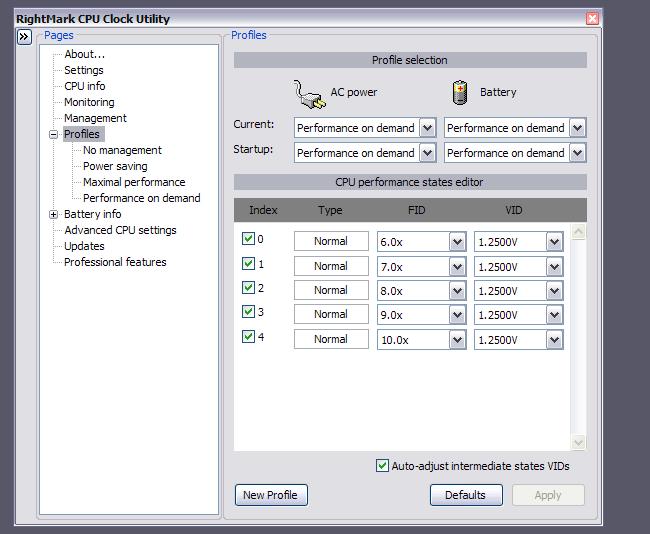
Why is it only 6x? I am running Orthos, everything configured like the tutorial. Everything ticked, it worked before and it showed "12x" in Current.
Rebooting didn't fix it
What can I do? How can I remove/reset all RMclock settings? Uninstalling doesn't work (it keeps the settings)
EDIT: I found "wipe out" in RMclock folder, and it reset all the settings. Now I re-did the tutorial and it's working again
-
You must`ve not ticked all the multipliers.
@Atthegates, the site is been acting up on me too. It`s a problem that the servers are having.
And the pic was uploaded from my computer...
-
Jinroh: its downclocked at 6x because you forgot to this:
-
I think I did that. All boxes were ticked, and current was "Performance on Demand"
-
first of all thank you OP for this awesome guide
i was able to lower the cpu temp by ~12 degrees
i've some questions though
1: i set the multiplexer voltages to 1.0000v but when i look at the CPU info page, the Req.Vcore (VID) is 1.1375v...i'm little confused here. is that the required voltage? i set the voltage to 1.0000v, does that mean i'm doing harm to the CPU..(see attached)
2:after finding out the minimum voltage and applying those settings do i've to retick the SuperLM and IDA options found on the Profiles
thanks a lotAttached Files:
-
-
That`s the "recommended" default. But as long as the system passes the Orthos stress test after about 1 hour, you`re fine.
-
thanks
did you see my second question? -
I got an error after installing rm clock and trying to open it -> Cannot install or load RTCore64 driver. Make sure you're loading this application from not a read-only medium and/or a network, drive, and that you're logged on with Administrator rights. I am using it on my new dv9700t vista home premium x64...help please =)
-
From page 1:
-
Yes, but I forgot to answer
Tick SuperLFM since that is the multiplier that will be used on battery mode, forcing the CPU at a max speed of (# of multiplier)xspeed.
I`ve mine at 6x=600 mhz,awesome battery life
About the other, I`ve never used it,so I don`t tick it. -
THANKS, I got it
-
I got a question about startup. I have tweaked it to begin with the power on demand setting and to startup with windows, but it is asking me for the admin privileges. I know I can disable the UAC then disable popups from my beloved command center, but is there another tweak so it can stop bothering me with minimal impact? Thank you
-
thanks man
-
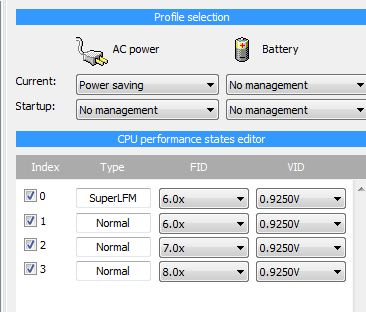
If i can use 0.9250 V ( = lowest setable voltage) at x11, battery life and temp should be the same as if i used x6 with the same voltage right?
How do i make the CPU stay at x11 at all times instead of it going down to x6? -
I think I bottomed out...
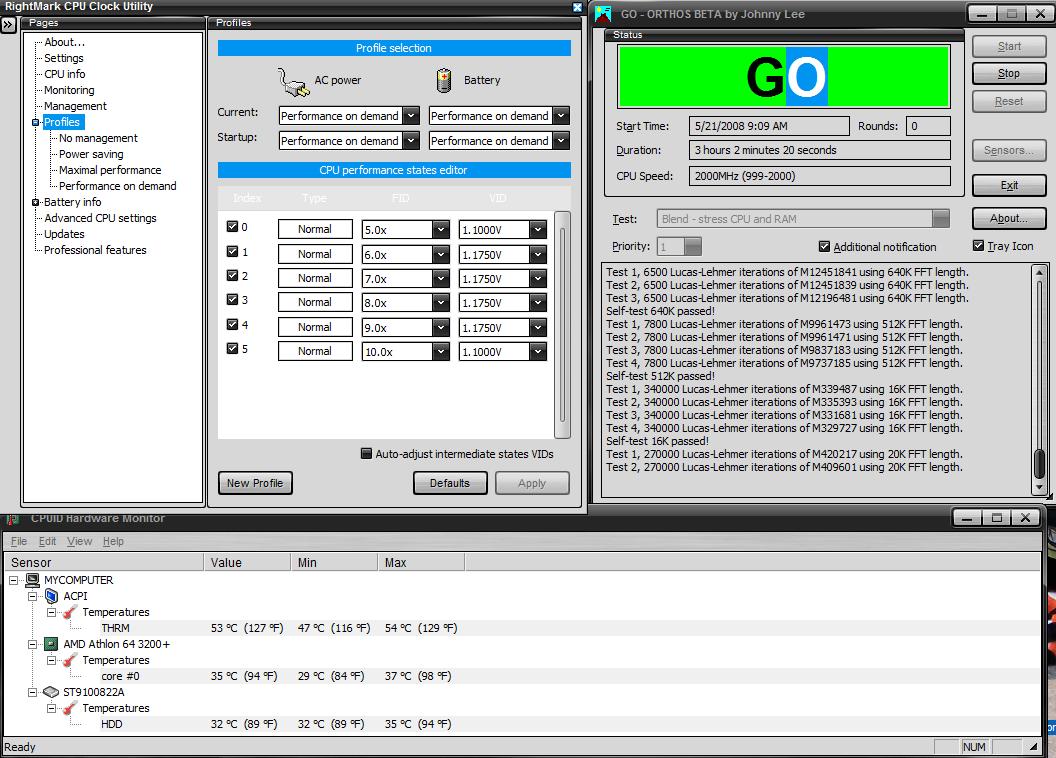
Currently 1 hr into testing at 1.100V, max temp under load 37C. I'd go lower, but I can't! XD 1.100V is the lowest selection available to me in RMClock and so far has been stable in testing. I'll post screenshots after I do a full 2-3 hr Orthos test.
For reference, default voltage on 10X (highest I have) was 1.350V and 46C under load. Some intermediate defaults were actually higher voltages, but will be lowering them all to 1.10V if this works out and see where that put's me on this system. -
By checking only the 11x multiplier and leave the others unchecked in your current profile.
-
What CPU do you have? that`s an extremely low temperature,you`re either very lucky or your temp monitor is not working correctly
-
Yeah like in my case, currently - 24.3ºC
-
I checked temps in RMClock, HW Monitor, and PC Wizard 08, and they all report the same temps. Athlon 64 3200+ @ 2.0GHz After a 3 hour test at 1.100V, it never BSOD'd on me. Attached is a screen shoot of RMClock, Orthos running, and HW Monitor all running at once.
*EDIT* The notebook is at least 3 years old, so maybe it's possible that the sensor is going?Attached Files:
-
-
Why do you have multipliers from 1x to 4x to higher voltage? If your highest and the lowest multipliers goes fine with 1.100 then I see no reason to not have all multipliers at 1.100. Mine are all set to 0.950.
-
I was just initial testing full load, and Orthos will push it all the way to 10X and keep it there, so dropping the others during testing is moot. After I stopped the test, I did drop them all to 1.100V. I'd have love to try for lower, but 1.100V is the lowest I can go in RMClock.
-
It's not RMclock fault but your processor
I thought I can go below my lowest voltage but I can't.
-
AMD Cpus have a nasty habbit with HWMonitor of not showing up correct temps. Weird that RMClock shows the same temps.
A friend with a desktop AMD 4400+ X2 has his CPUs at 10 , 13 C
-
My AS5 + Articlean has finally arrived. Will be applying it onto 2 notebooks and 1 desktop over the next few weeks.
Hopefully i can achieve a supercool 29c idle on my dv2500SE (Freshly cleaned fans, UV'ed, Cooler + AS5).
If all goes well, i just might permanently OC it and turn it into a T8300
Im afraid youll have to disable UAC. Microsoft has already confessed that UAC was made to annoy users. If you have a decent AV/Spyware programs installed you dont need it. Half the time you dont even look at what you click "Yes" too
You may set the all your multipliers to 1.1v and test each multiplier by 45min (except for idle and the one you already tested)
The temps look fine to me, you did loose a significant amount of degrees to prove that undervolting did work.
Notebooks made 3 years ago dont have the same temp ranges as todays notebooks -
I know what ya mean.
That notebook was never as warm as my new one, just by touch. My new one has a T8300 in it that I plan to UV once I'm done setting everything else up. Will be posting those results here as well.
-
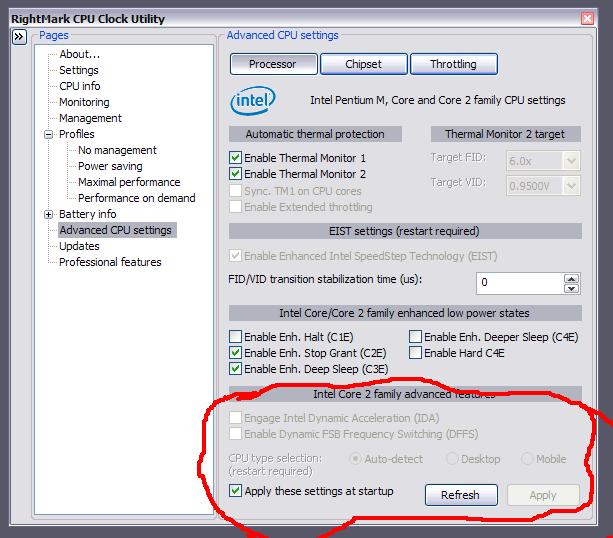
Ok,here is what I said about my T2300 not being able to UV.
The options are grayed out in the second pic, and the voltages are all the same?!Attached Files:
-
-
I receive the voltages all the same until I hit the default button. As for the inactive options don't have a clue why..
-
Thanks, that took care of the voltages part.
Should be ok now, even without the grayed out parts,since it recognizes it as a Yonah CPU.
I`ll have to rep you for this later on(I`ve been too generous in the last 24 hours) since I couldn`t for the life of me figure it out... -
Son of a dog, my max temps, not even using Orthos were over 80C .
The T2300 is one hot bastard.
I managed to get it to 1.15v from 1.25 and shaved off 15C from the usual operating temps, max out at about 63-64C.
I`ll have to work on it more,the thing is way too hot for my liking. -
Good for you
I just changed my T2370 with T7500 and now RMclock freeze the computer even with the default voltages. Damn..
-
Run RMClockWipeout.reg in the RMClock folder. This clears all the entries in the registry so RMClock will then re-detect the CPU.
John -
Damn it you're right! Thanks will try it.
Edit: Yep it worked. Rep for you no matter it's disabled
-
I have added an advantage to undervolting. Its somewhat eco-friendly by using less power.
I think ive done my part for the enviroment by undervolting. I can now sleep at night knowing ive made a difference in this world. lmao. -
I managed to undervolt my T2300 to 0.950v on all of the multipliers except the highest. Maybe because my Dell Inspiron E1505 doesn't have a dedicated gpu it is able to go lower?
-
It shouldn`t matter.
Going above the voltage would cause instabilities and restarts due to lack of power.
Going below would end up in BSODs and restarts,due to lack of power again.
Undervolting actually leaves more power for other components if they need it, so it shouldn`t be the case.
0.95V ? wow, I`m at 1.15V right now, but I can`t go lower , since I have an app started, and cannot under ANY circumstance have it shutdown on me, it`s got a pretty nasty licensing system(about 10 licenses have to be opened for it to work each time) and quite frankly,I don`t know the sequence.
Maybe I`ll give 1.1V a try, should be safe since you got to 0.95V ... -
How in the world did yours go as low as 0,95?
Mine just BSOD`ed at 1.15V ...god damnit..
The "Undervolting" Guide
Discussion in 'Hardware Components and Aftermarket Upgrades' started by flipfire, Apr 1, 2008.


![[IMG]](http://img140.imageshack.us/my.php?image=6xij8.jpg)