Problems? See this thread at archive.org.
how does observe your photo help ? LOL
use k10stat
-
-
We can't help without knowing your operating system and CPU.
-
Excellent guide, I'm in the process of overnight stress testing my T7500, brought it down from 1.2500 to 1.0675, with temperatures at 70+ down to 65/67 max.
+Rep for the guide, and for faster way
Is there a guide out there for undervolting a GPU (8600m gt in my case)? As long as it won't affect it's performance, I'd really like to undervolt my graphics card as well. I'm starting to have overheating problems with it. -
Good move. GPUs eat even more power than CPUs. Do the GPU first, then the CPU.
http://www.guru3d.com/ -
Mind on expanding on that? I can't find any undervolting guides there.
-
-
excellent guide, FlipFire thank you ...!!!
-
I've got a T5250 (for some reason my T8100 doesn't work with this notebook) in my tecra M9, I took it to the lowest voltage of 0.9500 from 1.2500.
-
congratss on your M9 !!
what happened to your T7300?? -
Thanks
The T7300 is in my Tecra A9.
I now have an M9 and an A9.
They are pretty much the same just one is 14.1 and the other 15.6. -
I found something interesting, I BSOD for the first time, undervolting my 8.0x multiplier. When I restarted and went to reconfigure my settings, I forgot to untick "Auto-adjust intermediate states VIDs", and when I selected 1.0625V for my 11x multiplier, the auto-adjusted voltages were significantly higher than what I was actually able to achieve! Just a heads up, you might get better results if you take the time to undervolt each multiplier manually.
(So far I've got 11x, 10x and 9x at 1.0625V, 1.0000V, 0.9500V, and am now 4/5 hour stress testing 8x at 0.9000V) -
I had great success with undervolting in Vista but I just upgraded to W7 64 bit and when I try to run rmclock I get this message: "Cannot install or load RTCore64 driver. Make sure you're loading this application from a not read-only and/or a network drive, and that you're logged on with Administrator rights."
What do I need to do to run rmclock? -
You need the RTcore64.sys file to run it. Google and download.
If you have EVGA Precision, you can use that copy of the file. -
You need the 64bit driver which you can find on the first post of this thread.
-
thanks. I forgot about that. I had to use it for vista but its been a while since I did this and I had such great luck the first time. Thanks again.
-
Suggested voltages are like suggested retail prices. A little negotiation never hurts
-
Here is my story.
I habe g50vt-x5,
i recently installed x9100, my p7450 temps weren't great, but x9100 really is a hot cpu, it is c0. BTW.
Normally, it would run at 3.06GHz stable even at very high temperatures like 85ish max.
Now, I undervolted and I get max 72 after 10 mins.
THis is a great improvement
I set my voltages from 1.2375 to 1.1625 using this guide and RMclock, I didnot have a BSOD at 1.1500 but 1.1625 is good enough. -
i do not have the "advanced CPU settings" area. maybe because the program cannot detect my processor. at "cpu info" it says:
cpu model:unknown model
cpucore: unknown core
revision:unknown
a have a sony vaio vpcw12s1e with an intel atom n280 inside.anyone knows what could cause this ? -
The atom is already cool and it doesn't use much energy. Undervolting it might be a waste of time.
-
My PST options for AC power and battery are greyed out... ?
-
so there is nothing i can do to keep the cooler a little bit quieter ?
-
What CPU and OS do you have?
Maybe mod the dsdt table to change the fan speed.
Here is a guide:
http://notebookequus.blogspot.com/2008/09/patching-dsdt-table.html -
Acer Aspire 5335
Genuine Intel(R) Core(TM) 2 Solo
Windows Vista -
Can you please post a screenshot?
-
-
Sorry I have not seen that before.
Maybe you want to try using crystalcpuid to undervolt? -
my luck
ty tho. i will give that a shot
-
any crystalcpuid guides out there besides for AMD?
-
Here:
http://forum.notebookreview.com/showthread.php?t=401345
Just scroll down to the undervolting part. -
thx once again
-
i gave it a shot but my dsdt.asl file is different so i cannot change the fan speeds from here. any other ideeas ?
-
Can you upload your asl file, I might be able to help.
Any chance you have some bios options or power plan settings that can change the fan speed?
Also try speedfan. -
the bios is very limited and does not have any options regarding the cpu.
i tried speedfan but it will not recognise my fan.
in the power plan settings the closest thing i've got is "processor power management" where i can set the maximum and minimum processor state, but it has no effect on the fan, even at 37 degrees celcius the fan is reving quite noisely.
here is my asl file and thank you for your support
http://www.2shared.com/file/10580887/a543168a/dsdt.html -
Ok, the following code should set the cooling policy:
If you change it to the following, your fan will stay off longer:Code:Method(_SCP, 0x1, NotSerialized) { If(Arg0) { Store(One, PLCY) } Else { Store([B][COLOR="Red"]Zero[/COLOR][/B], PLCY) } Notify(\_TZ_.TZ01, 0x81) }
Code:Method(_SCP, 0x1, NotSerialized) { If(Arg0) { Store(One, PLCY) } Else { Store([B][COLOR="red"]One[/COLOR][/B], PLCY) } Notify(\_TZ_.TZ01, 0x81) } -
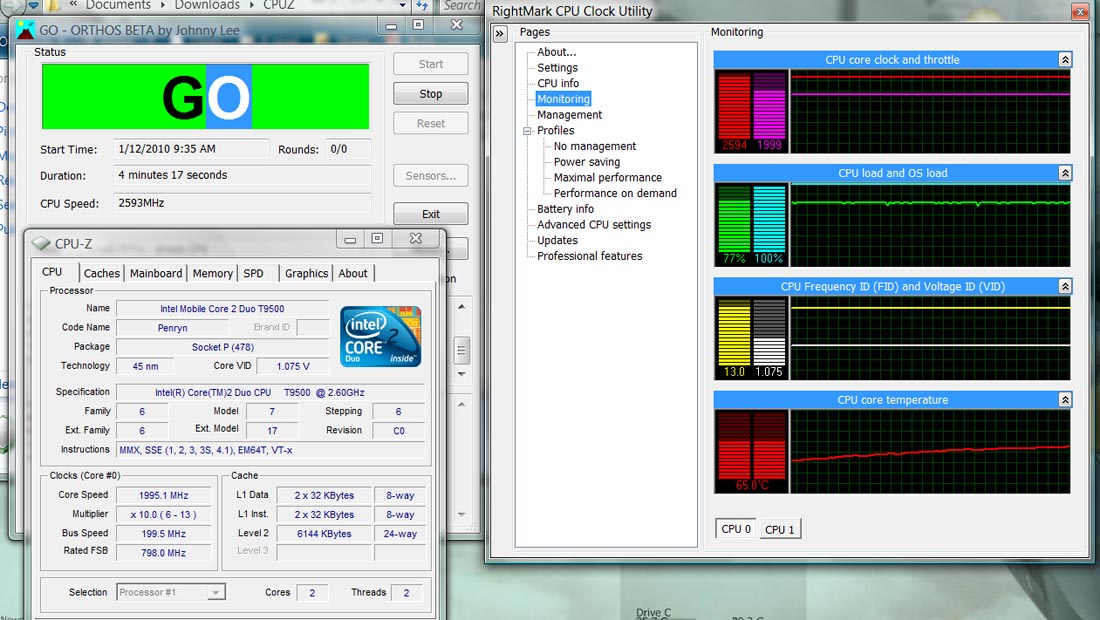
Is there something wrong with my CPU? Specifically, I was wondering why in the first graph the "purple" CPU is not running at 2600Mhz? I also ran wprime and got which finished the 32m test at ~40 seconds as opposed to ~30 seconds reported normal for the (edit) T9500.
Attached Files:
-
-
in theory maybe it should be better, but practically it`s the same :-<. thanks for your help
-
Sorry it didn't work.
I can't think of anything else. Maybe try using CPUgenie or crystalCPUID to undervolt. -
What CPU temp do you have?
-
what cpu are you using anyway? you said T9600 but the sig said T9500?
and a screenshot while running Orthos would help
-
Sorry, I'm running the T9500. Got them mixed up for a bit. I'll post screenshots later (using a netbook right now) but I've never had a problem with heat/throttling. And I checked, last night, my past wprime 32M scores - before I had something like 31 seconds, now I'll be lucky to finish in 41 (max 46).
It doesn't make sense. RMClock indicates that I was running at the 13X multiplier. Wonder where all that performance went. -
One of the problems of using Performance on Demand is letting the computer know your intentions about when and if you want to speed up the clock in response to an increased workload.The RMC default is 50%. If your benchmark doesn't present above a 50% workload, your CPU speed stays low and slow. See your own graphs.
-
--edit: misread your cpu with T9300 --
-
Interesting. That could be it, lemme try in a bit =)
The T9500 doesn't have half-multipliers. I'm running at 2.6Ghz at 13X. Sorry, I totally screwed up in my previous post. -
sorry, I misread that with T9300
what is the throttle speed when on 100% load? is it still top 2.6GHz ? -
No, the throttling bar never tops 2.6Ghz - the purple never meets the red. Something weird is going on. CPUZ reports that the speed never goes above 2.0Ghz, while RMClock is reporting that it has hit it's max multiplier.
Unfortunately, if I turn off RMClock and run ORTHOS, CPUZ reports that my CPU sticks to some 4.5X multiplier...when the only multipliers I thought available were 6 through 13. wPrime seems to confirm what CPUZ is reporting - Intel C2D CPUs typically finish the 32M test in ~40 seconds.
Temperatures are ok, IMO. Could it be because I'm running 64-bit and there's some weird incompatibility thing going on?Attached Files:
-
-
Are you sure you didn't have the "use throttling" checked?
And what about the OS' power options? what is it set to?
The screenshot looks like a throttling to me -
If it is, that throttling is not mediated by RMClock. Closing RMClock results in a constant 4.5X multiplier, even when running ORTHOS. It doesn't even jump to 10X anymore.
-
I've just successfuly undervolted my T5250 to [email protected] MHz @multiplierr x9 (my max)
Having ORTHOS checking full stability atm and all seems to be fine for now
Have I done sth wrong? Or the values are OK?
BTW - max temp went down from 79C to 55C need to work on GPU now
-
So, I followed the instructions here and got some pretty odd results. I seemed to be getting higher temperatures after applying the undervolting.
After playing around for a bit I discovered what the problem was - until I started up RMclock and activated performance on demand, my stress-test temperatures would stay in the 45-55C range. Once I activated performance on demand, they skyrocketed to 85C. Applying undervolting, down by 0.175V, reduced that to 74C.
So my question is, why do the stress-test temperatures seem to low when I'm not running RMclock? And does this mean I'd be better off not undervolting?
Yours confusedly,
Cardinalsin -
What's your OS' power option before activating rmclock?
If it's battery saver of course it'd be cooler, because your cpu speed is down-clocked
The "Undervolting" Guide
Discussion in 'Hardware Components and Aftermarket Upgrades' started by flipfire, Apr 1, 2008.


![[IMG]](images/storyImages/92209787.jpg)