 Problems? See this thread at archive.org.
Don't worry about the jumping back and forth from your new voltage to the stock voltage. My T7400 Core 2 Duo does the same thing, it's just the OS/CPU fighting with RMClock to set the voltage.
If your heat is reduced, then it's working.
-
I haven't had a chance yet to test this but if you go into the Control Panel -> Power Options and use a profile with Minimum and Maximum processor state set to 100% then that might prevent the jumping VID. RMClock could be fighting with Windows 7 for control of the FID and VID when lightly loaded. I'll be testing this out later today. RMClock works with W7, it just needs some tweaks.
RMClock does not accurately report VID or FID when you are using IDA mode so you might as well enable that multiplier and get some extra performance.
Of course you have to worry about that. If it is jumping up and down it means that something is not set up right and has to be fixed. -
Ah, well, on my old Clevo it only happens very rarely. But, if you are trying to keep it cool, wouldn't you not want windows to keep the processor at 100% and thus prevent the SpeedStep?
-
Hi unclewebb,
I've been using throttlestop with my P8400. I have VID = 0.8750 @ 7.5 multi (2Ghz) and I'm pretty sure it's helping at full load. I didn't notice any difference in power draw at idle either.
I'm using the 2.0 beta 17 version, but this will expire soon? I'm willing to pay a few bucks for the full version. Dual IDA mode could also be fun to try out. -
For RM Clock to work correctly in Windows 7 you need to set the Minimum processor state to 100%. This will prevent Windows from fighting with RMC.
![[IMG]](images/storyImages/rmcsetup.png)
If you don't do this then the VID will be jumping up and down higher than what you have it set at.
You need to do the same thing when using ThrottleStop. If you want RMC or TS to be in control of your CPU then this is the way to do it. This won't put your CPU at 100%. It will just let other programs control your CPU without fighting against the OS.
Adjusting VID lower definitely makes a difference at full load in power consumption and the CPU core temperature.
I think I found out the reason why this happens in the newer 45nm CPUs. Regardless of any setting you make in RMC or TS, the CPU will be spending 99% of its time in C3 or a deeper sleep state so all these VID/FID adjustments at idle don't do anything. There might be some tiny power savings but only during the 1% of the time when the CPU is paying attention to your settings. 99% of the time it is doing its own thing and lowering power consumption regardless of how you have it set up. I'll post some more pics of the testing I did a little later.
NightElfMohawk: If you find a version of ThrottleStop you like and it works OK for you then hang on to it. The recent versions don't expire anymore. I will probably be adding a Donate menu item back in when 2.00 is finalized in the near future. If you want to buy me a beer, I won't complain.
Edit: Here's the interesting test I did. I set the CPU at the maximum FID and VID and set the Minimum processor state at 100% and turned off all the C-State options to force the CPU to run at its maximum. I opened up Performance Monitor and discovered that the CPU has a mind of its own.
![[IMG]](images/storyImages/c3idletest.th.png)
No matter what program I used to adjust the CPU, it was still spending 97% of its time in C3 or a deeper sleep state. Performance Monitor is not capable of measuring the time in C4/C6 in Windows so that time gets added to the C3 calculation. When I turned off CPU-Z and Task Manager, it went up to 99%. This has got to be the reason why adjusting VID, etc. gives you zero power savings at idle. The CPU is not using any of those settings the majority of the time because it is in a deeper sleep state.
This does not apply to the original 65nm CPUs like the T7000 series. You could drop power consumption and core temperatures at idle by adjusting the VID lower but I don't believe this does you any good on the newer 45nm CPUs. More testing still needs to be done to prove this but I found it interesting.
I think the battery power draw stats in the Performance Monitor might be able to prove what's going on. Time for some more testing. -
Oh, I see. Thanks for the explanation on that. And yes, the T7400 GREATLY benefits from being undervolted. I can surf the web indefinitely while staying below 38*C (100*F)
-
w00t! Unclewebb, that did the trick. Nice and stable now. Thank you!
-
OMG, thank you!
Made the change on both laptops last night and no more random voltage changes! Still seems counter intuative, but WTH, it works! Thanks! -
By the way, even with undervolting the computer is still too hot for me to work on really. But I find for most of what I do, I can keep it at a "power management " profile set to the lowest multiplier only and not burn my fingers off or set my lap on fire.
It's a Dell 1640 XPS. Sigh.
Under power management the core runs at a cool 35c. Without it; it runs about 10c higher just doing normal web/text stuff. -
I have undervolted from 1.1375v to 1.0375 and let RMC to adjust the intermediary voltages, I'm very pleased with the result as it not only reduced my maximum Temp by 12 deg c but also quieten the fan noise.
Thanks for the great guide.Attached Files:
-
-
Great guide! Thanks!
-
A very cool guide! Didn't know that I wouldn't sacrifice performance! I thought lowering the voltage would lower the performance, now this is a very good piece of information, my thanks!
-
A quick question, I just remembered the advanced settings for the power management of RMclock, the enhanced sleep settings.
Could anything bad happen from me enabling these (or would it just ignore it if it isn't supported?) and would it slow my system down at all? Also how much difference can it make? -
I'm trying to undervolt my DM3 that has a L335 amd neo chip.
I've followed the guide, but not sure if I'm doing it right.
I click on performance on demand tick all values for both battery and ac.
I then go to profiles, unclick the intermediate thing and then click default.
I then go to the x8 multiplyer (my highest) and change it from 1.000 to 0.8750(0.8500 gives me black screen) I do this for all multiplyers (all 0.8750), I then apply. Powerplan is already rmclock, so I make sure profile is performance on demand, it is. I then run orthos, after 40 the lappy turns off! What am I doing wrong?
Edit: I've also tried single step(as tried by another dm3 owner) rather than muti but still get black screen
Also how to I replicate windows power saver mode? By using a lower mutiplier profile? -
I'm trying to follow the guide but when I open Rightmark CPU Clock I have no "Advanced CPU settings and furthermore I have no profiles other than "No management".
Where am I wrong?
Thank you.
---
AMD II Athlon X2 215 on motherboard M2N68-LA
Motherboard Specifications, M2N68-LA (Narra6) HP Pavilion Slimline s5300it Desktop PC - HP Customer Care (United States - English) -
There's your problem, the higher multipliers need higher voltages, you have to test each individually.
-
my highest is 8, my lowest is 4 so it shouldnt make a difference.
-
Hi all, I have HP Pavilion tx2500 Notebook PC with 2.0GHz AMD Turion(tm)X2 Dual-Core Mobile RM-70, 32-bit Operating System, and 3GB ram
and I install theRMclock v.2.35, ORTHOS CPU Loader, and HWmonitor .
Somehow, when I run RightMark CPU Utility, it does not show me option for Advanced CPU setting and neither Performance on demand option in profile tab. so please help me with this my computer is frying up, and make up so much noise
thanks all -
As said before, you have to find what works, keep stepping up the voltage on RMclock untill you no longer crash, then once you've found a stable voltage which runs without fault for a few hours, put it one step higher and you should be good to go (one step is all you should need although if you want absoloutly garuntee that nothing bad will ever happen then step up two).
If it's getting progressively worse then it's your cooling that's the problem. I'd clean out the heatisnk before bothering with undervolting, it takes a lot less time and is a lot more satisfying when you see the dust fly. After you've sorted out the heatsink then it's time to consider undervolting, and if you're paranoid like me you can even go to the extent of changing the thermal compound. -
Need some help? Using RMClocking ver. 2.35 2008/02/29
HP Pavilion DV9535eg, Nvidia 8400M GS, Conexant HD Audio. AMD Turion 64 x2 TL-58 Windows 7 64 bit
This is a sound problem. Works ok in AC and DC (battery) mode. When RMClocking is not running
When RMClocking is running in AC Mode the sound is OK. In DC mode the sound is garbled.
New Battery. Like I stated before works ok, when RMClocking is not loaded at all, or in AC mode only.
Using Task Scheduler I load RMClocking in AC and DC mode, if I remove the AC from laptop with RMClocking running in DC mode the sound is garbled. Using Task Scheduler I told RMClocking NOT to run in DC mode. Still Garbled sound.
Sound = music, videos etc.
Thanks -
I have an Hp 6510B, Can You tell me where can I found a guide/correct settings for rmclock ?
-
Hi all, ive set my profiles up...set the voltage values at 1.0 and yet under load and at random times it peaks to 1.125. I was wondering if this is normal or is the undervolt not working??
-
There was a recent post explaining this problem and how to fix it.
http://forum.notebookreview.com/6188315-post4907.html
amazing-boy: The first post in this thread has lots and lots of information about setting up RMClock. -
I'd like to know, in particular, to know how set the options available under "advanced cpu settings".
-
unclewebb:
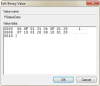
I would like to use your RMClock half multiplier guide, but do not see the same hex values in my PStates registry entry (attached photo).
I have a P8400 which has a max multiplier of 8.5.
Do you mind taking some time to help me out with this?
Attached Files:
-
-
There are a lot of options in the Advanced section. Which settings are you interested in?
How you set things up depends on what you want your laptop to do. Some of the settings are trial and error because what works on your 65nm mobile CPU to save power at idle might not have any significant effect on a newer 45nm CPU. I understand some of these settings so ask some specific questions and I'll try to find an answer for you.
tetheredjink: Post a screen shot and I'll help you out.
The P8400 has a default multiplier of 8.5 and an IDA multiplier of 9.0. For RMClock to recognize 8.5 you need to use 4 for the half multiplier and 8 so combined you would edit the registry and use the digits 48. This is the second last multiplier and then the last one is 09 for the 9 multiplier. If you have that picture of the registry I posted, this should make sense.
http://forum.notebookreview.com/6135486-post4871.html
Go into the PStatesData and count backwards in steps of 4. The first step back is 0B in my picture and that's the IDA multiplier so change that to 09 and then go another 4 steps back and that is your default multiplier so change that to 48 to represent the 8.5 multiplier. That will show up as a 72 multiplier in RMC because it doesn't understand the 4 digit (the half multiplier digit).
OK, I can see your picture now. Do you have all of your P-States enabled or have you turned some off like the IDA multiplier? You might as well enable it so you get some free performance. -
Thank you for the help! There is a screenshot attached to my post, not sure if it is showing up for you.
The clarification of the PStatesData being a DWORD makes much more sense. I thought the values were a short, not an int so I looked in the wrong spot.
From what I see, I need to change my 08 10 01 20 to 48 10 01 20 (last 4 digits).
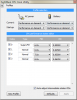
Edit: Didn't see your addition. I haven't disabled any PStates or turned off the IDA. Not sure where I would disable the IDA in RMClock. RMClock only shows a subset of what CPUGenie was showing for my CPU.
Edit2: Found the IDA setting in RMClock, the checkbox is disabled.
Attached is the profile tab in RMClock.
For Windows 7 undervolting:
I created a power profile named "Undervolting" with Min/Max processor speed set to 100%.
I set RMClock to enable this profile when running (Profiles -> Performance On Demand -> OS Settings -> Use OS power Plan (Undervolting)). This ensures RMClock has the ability to control my clocks/VID.Attached Files:
-
-
Changing 08 to 48 should give you access to your half multiplier.
I'm not sure why your IDA multiplier is hiding. The bios might have disabled it.
You can try ThrottleStop. It might let you enable and use the IDA multiplier.
http://www.fileden.com/files/2008/3/3/1794507/ThrottleStop.zip
Try running a single threaded benchmark like Super PI mod when testing to see how high the multiplier goes in ThrottleStop.
RMClock does not fully support the 45nm CPUs and it doesn't accurately report when the CPU is using IDA mode. In ThrottleStop make sure Disable Turbo is not checked. -
Thank you, the 8.5 multiplier is being used now!
IDA is not functioning, I believe you are correct that my BIOS is disabling it. Looks like most programs thing EIST is disabled too. I've ensured EIST is enabled, not sure what is going on there.
Even with Super PI, I am only seeing the multiplier jump to 8.6 in ThrottleStop. Not a huge deal to me as I am trying to cool the laptop as much as possible, but still weird!
Again, thank you very much. You give a lot to this undervolting community!
-
When testing with ThrottleStop, make sure that you don't have RM Clock running at the same time. On the 45nm CPUs that only boost the multi 0.5 in IDA mode, it's not worth worrying about it. At least your 8.5 multiplier is working.
At idle on my 45nm T8100, I don't see any difference whatsoever whether the multiplier is at 4.0 or both cores are locked at 11.5. Same with changes to VID settings. Under volting is still very useful at full load but at idle these newer CPUs seem to do their own under volting and I don't believe any settings in RMClock or ThrottleStop make any difference at idle on the 45nm CPUs.
You can use the Windows Performance Monitor and monitor the Battery Discharge Rate and you will probably come to the same conclusion at idle. -
Hadn't had a laptop in some time but, as I recently acquired a kick little Toshiba Satellite U205-S5057 for $80 (yes, $80 cash) I figured I'd give undervolting a shot. Before I got around to this procedure I had disassembled the laptop and cleared out the heatsink/fan of (roughly) 1/8" of "felt" that covered the exhaust port - which I'm sure anyone that has cleaned out a laptop knows exactly what I'm talking about: the dirt/dust/hairs/gunk gets so thick it actually forms a piece of material that is in many ways similar to a piece of felt laying directly on the exhaust fins, blocking airflow and seriously hampering the cooling potential.
I didn't go so far at that time (this was about 2 weeks ago) to remove the motherboard completely to gain access to the CPU assembly itself and redo the heatsink/thermal compound with Arctic Silver 5 but I plan on that soon. Suffice to say removing that layer of "felt" significantly improved things but, the laptop - as it is right now - still idles fairly high at about 50C. When I get that complete re-assembly done it should drop somewhat but I'm fine with the 50C for now.
But today I spent time doing testing with the tools from the first post in this thread and decided I'd post my results which I am VERY pleased with.
First statistic - ORTHOS 10 min temps
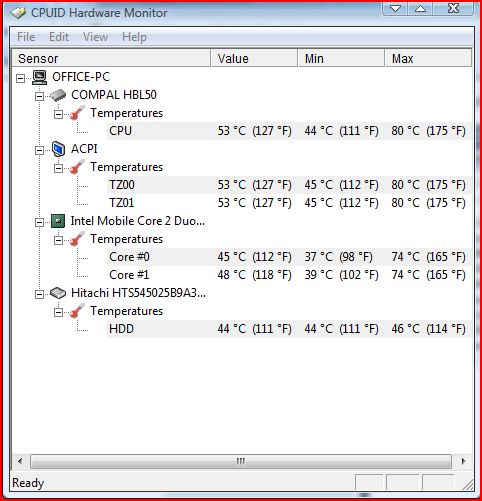
10 mins pushed this little machine to 86C - yes 86C but it performed like a champ and kept going. Fan obviously was going on high and the entire bottom of this laptop has holes everywhere for air intake. I have a fan on my desk that was blowing on me but not specifically on the laptop itself so, about 7 minutes in it hit that 86C peak and stayed there till the 10 minute mark when I ended the test. I was using RMClock's CPU Info page for temp monitoring; I didn't use HWMonitor so, I'm guessing their results would be similar.
Installed RMClock and did the proper setup for this CPU which is a Core 2 Duo T5500 @ 1.66 GHz - Merom class processor. The stock 10x multiplier voltage is 1.225V. I set everything as suggested by the instructions in the first post and when it was ready to go, I adjusted the voltage for the 10x multiplier as suggested, with an initial drop of .100V for a result of 1.125V and then let ORTHOS rip.
I didn't want to test for the suggested 45 minutes as I've done that in the past and didn't really feel like sitting here that long this time. If I hit a BSOD at any point by using 10 minute windows for testing then I'd just bump up a notch as expected.
After 10 minutes the temp - at 1.125V - was 78C, an ~8C drop over the stock temp at full voltage. Not too shabby...
I adjusted the voltage to 1.075V, shaving another .050V off and retested for another 10 minutes. Result = 76C, still not too shabby overall. Now, being the impatient bastige I am (ain't getting any younger) I decided to drop all the way to 1.000V dead even and see what happened. As noted, if it crapped out with a BSOD, no harm, no foul, reboot and start over.
To my surprise, I got 10 minutes of ORTHOS (using the Small FFT setting, of course) at 71C - a ~15C drop just by undervolting, and no errors at all (given it was just 10 minutes). I am quite the happy camper at this revelation, and also because ORTHOS really is a pretty severe stress for temps that normal folks, even hardcore users like myself, will rarely actually see.
The most CPU intensive thing I do on this laptop is an occassional x264 encoding done using HandBrake, which is properly multithreaded. I decided to run a test of a short encode using HandBrake and a 1080p clip I have and see just how far it would push the temp at the now default 10x multiplier 1.000V setting.
After about 9 minutes of the encode the temp sat squarely at 67C and didn't budge so, there it is. I don't expect things to change above that since that is the "toughest" thing I do on this laptop. I'm sitting here typing right now with the following settings:
![[IMG]](images/storyImages/voltages.png)
So, again, I am a very happy - and much cooler running - camper. The battery on this machine is shot, barely holds a 2% charge anymore (part of the reason it was only $80, primary reason was the AC adapter died and the previous owner was told by "an expert" that the mobo needed to be replaced, pishaw), so when I do get a new battery (extended one for longer runtimes I hope) with the lowered max voltage now I can fully expect far better life off it.
An almost 20% drop in voltage equals a nearly 18% drop in max temps...
Still idles at about 50-51C (just checked and it's showing 49C!) but I'll take care that of soon enough with a tear-down and re-assembly once more. At least now I can say I am definitely satisfied and again I thank the people in this community with their support and this great thread.
Some shots:
![[IMG]](images/storyImages/10minuteorthos.th.png)
![[IMG]](images/storyImages/handbrake.th.png)
ps
And yes I realize I could (and probably will) attempt to go lower at some point, but the nice round 1.000V figure is just fine for me presently.
Last edited by a moderator: May 7, 2015 -
Well, I have a core 2 duo T7250.
Which "automatic thermal protection" have to be enabled/set ?
Which "enhanced low power status" "..." ?
Which "chipset power management settings" "..." ?
thks -
ok probably generic question but i tried RMclock and now EVERY other cpu monitoring software except for ORTHOS says im stuck at 6x multiplier, 1.2ghz!
whats the deal? is this just... one of those things that happens?
i have since closed RMclock, ran ORTHOS for 5 minutes and not seen my CPU temps in HWmonitor jump above 50c so im sure its tell the truth... what happened
edit - i tried that throttle stop as well, no luck. -
Im having alot of difficulty undervolting, ive tried pretty much every program i can find. For RMClock there is not an Advanced CPU settings tab, does this just mean im out of luck and my laptop isnt supported?
-
lorywindrunner: Why not tell us what CPU is in your laptop. Run CPU-Z if you're not sure. The newer Intel Core i CPUs no longer let you adjust core voltage so if you have one of them then you are out of luck.
amazing-boy: Thermal Monitor protection is designed to slow your CPU down and control its core temperature after it hits 100C. It doesn't reduce performance in normal use and if you ever have a CPU fan failure, it will help keep your CPU from reaching the thermal shut down temperature at 125C.
I'd turn on TM1 and TM2. I once ran P95 Small FFTs on both cores of my E8400 desktop chip and I unplugged the fan to see how long it would take to blow up. It didn't. It ran great for 3 hours with zero errors until I finally got bored testing. The temperature on one core hit 100C only once. The majority of the time both cores were at 98C. As the CPU heated up, the thermal monitor kicked in to slow the CPU down which cooled it down and then it immediately went back to full speed until it got too hot. It cycled continuously like this for hours which maintained the core temperature at a steady 98C, even without a CPU fan. Without TM1/TM2 enabled, it likely would have went up to the 125C shutdown temperature and shut down.
The Enhanced Low Power State settings don't do anything for my 45nm T8100 that I can measure. These settings seem to be mostly ignored. If you are using RMClock to manage your voltage then I don't think you are going to see any huge power savings by enabling these options. It doesn't hurt anything to turn them all on. If your CPU doesn't support one of these features then it will simply ignore that setting. I found the Windows Performance Monitor - Battery Discharge graph to be an excellent way to see if these settings make any significant difference to your idle power consumption. Most of them don't.
I just leave the Chipset tab with all of its default settings. I'm sure some setting in there might save you a milliwatt or two but the result is going to be very difficult to measure or prove. On a T7250, reducing the VID is where the majority of power savings will come from. If you have that taken care of and your CPU is using its lowest possible VID at idle then you don't have to worry about the 101 other settings.
niffcreature: Reboot and make sure SpeedStep/EIST is enabled. If it is not then your CPU can get stuck with a 6X multiplier. Once again, I don't even know what CPU model you're talking about. At full load when running Orthos, CPU-Z will report your CPU model and speed so post a screen shot of that and also include a screen shot of ThrottleStop while fully loaded.
Use the PRNT SCRN button on your keyboard and then open up Paint and paste a screen capture into Paint, crop it to an appropriate size and then save it and upload it somewhere convenient like ImageShack® - Online Media Hosting and post a link here. -
Ive got an AMD Turion II Dual Core Mobile M520
-
Under volting Intel Core 2 based CPUs works great but I don't know of any software that supports AMD CPUs.
The new Intel Core i CPUs can't be under volted either.
-
Is there any way to change the default profile it uses at startup?
I hunted around the interface and I can't see a dropdown box for it, and as far as I know it starts up on the "no management" setting. -
Whatever is shown under the Startup dropdown menu is what's going to load in place of the OS defaults for AC or battery:
![[IMG]](images/storyImages/startupz.png)
-
is there anyway to undervolt an i720qm? the advanced cpu settings are not showing up in RMclock and i also cant tick the p-state.
-
-
no u cannot undervolt core i series processors.. intel's changed everything so undervolting is impossible.. it only works for core 2 quad and below...
-
Just curious: Undervolting on Core i processors is totally impossible, or just we've not known the way yet?
-
Intel removed the VID, requested voltage, information from model specific register MSR 0x199. Because of this, in the Core i design, you can no longer request how much voltage you would like the CPU to use. There is no VID information in register 0x199 anymore so Core i CPUs don't look in there before setting the core voltage. Some older software designed for Core 2 CPUs can read data from this register and it might make you think that it is reading VID information but it isn't.
Intel says this is no longer possible and there is nothing in the publicly available documentation to show how to do this if it is still possible. If anyone discovers a way, they'll be an instant hero but so far there is no software available to do this. -
hi every one,
I just bought an laptop with SL9600 CPU.
I tried to use RMCLOCK to undervolt but it seems not working.
I run RMCLOCK on windows 7. I set the SuperLFM FID 6.0x VID=0.900V
I just check only the box of this setting to be sure that I'm running the correct setting. But when I use orthos to stress CPU+RAM. I see in HWmonitor. The speed of CPU jumps to maximum speed 2.1Ghz, and the voltage runs from 0.925 to 1.025V????!!!
Even when I leave the laptop idle the voltage still is 0.925 instead of 0.900V?
So what's wrong with my work? -
Try this vragon:
http://forum.notebookreview.com/6188315-post4907.html
An SL9600 supports IDA mode and has a maximum multiplier of 9.0 for a total speed of 2400 MHz on one core while the second core is in the C3/C6 sleep state. This can happen automatically when set up correctly. RM Clock is not accurate at reporting IDA and it does not officially support the 45nm CPUs so there might be a few small problems but it should work OK when set up correctly. -
Anyone know if there's a problem with AMD Athlon II M340 processors?
I can't seem to find the Advanced CPU settings tab in RMClock
-
RMClock is not updated to work with AMD 45nm CPUs from the Athlon II / Turion II family.
You could perhaps ask the developers of CPUGenie if their application supports AMD CPUs.
But its not free and only offer 30 day trial. -
one question
will i loose the garantee ?
because the hardware can take damage of this -
Are there any reports in this 496 page thread of people damaging their CPUs?
If you reduce the CPU voltage too much your computer might become unstable and it might crash or reboot. If it does that, give it some more voltage and try again. Pretty hard to hurt a CPU.
The "Undervolting" Guide
Discussion in 'Hardware Components and Aftermarket Upgrades' started by flipfire, Apr 1, 2008.


![[IMG]](http://img20.imageshack.us/i/c3idletest.png/)





![[IMG]](http://img697.imageshack.us/i/10minuteorthos.png/)
![[IMG]](http://img339.imageshack.us/i/handbrake.png/)


