 Problems? See this thread at archive.org.
I tested 8.5x @ .925v for an hour with Orthos: Small FFTs, but I'm not planning on making the settings start with boot after I feel like a blue screen isn't looming in my near future, although theres always safe mode if it does happen after I set it up.
-
I'm very interested to see how much core voltage your CPU needs to be stable while running a single thread of Prime95 with IDA enabled by setting the multi to the 9.0X setting in ThrottleStop.
When I was testing a T7300 and it was loaded with 1 or 2 threads of P95, I was getting a difference at the wall of approximately 2 watts for every change of 0.025 volts.
You might be able to create a reliable gaming profile with an extra 0.025 or 0.050 volts so that you can use IDA mode without causing a BSOD. Since you can monitor GPU temps now, you could get TS to automatically switch to your gaming profile based on GPU temperature. When the GPU temperature went up 5C or 10C it would automatically switch to your game profile which would allow you to enable IDA and use the maximum speed of your computer. Sure it would cost you a couple of watts but if you're plugged in that shouldn't be an issue and when you're finished gaming and the GPU cools down, it would automatically switch back to your 8.5 maximum multiplier profile.
Not a perfect solution but it might work OK.
Edit: I found this post from last summer about getting RMClock to work with half multipliers by using a registry tweak.
http://forum.notebookreview.com/showthread.php?t=411168 -
RMClock 45nm Half Multiplier Fix
Here's a better method.
![[IMG]](images/storyImages/rmclock45nm.th.png)
You won't be able to access all of your half multipliers but at least you can set the important ones like the IDA and maximum default multipliers correctly.
If this is too complicated, there's always ThrottleStop. Last edited by a moderator: May 8, 2015
 -
Thanks unclewebb, although TS seems to be more straight forward which is a definite plus since I'm more or less new to undervolting. Autochanging power plan based on GPU temp is also something I'll have to set up. Thanks again!
-
Thanks UW! When you say drop the multi, is that the same as when RMClock shows my CPU dropping to around 600mhz at idle? Or do I actually have to change the FSB somehow?
If I do have to change the FSB, can that be done with a utility, or do I have to hope the BIOS supports it? -
A lot of laptops don't give you the option of changing the FSB or BCLK speed. You can usually only change the multiplier.
The SLFM option in ThrottleStop will give you a low multiplier at idle. If you have a 200 MHz FSB then it is possible to adjust ThrottleStop to go as low as 3.0 x 200 MHz = 600 MHz and I'm sure RMClock is the same. If not, I'll show you how to tweak that program. In my example above, you can edit the registry and instead of using 4 which is the half multiplier flag you can use 8 which is the SLFM flag.
86
Should get you the 6 multiplier with half the bus speed (SLFM mode) which is equivalent to 600 MHz at idle.
I think it's great that users have a choice now. RMClock is more capable after a tweak or two and TS is nice and straight forward for newcomers. -
Does anybody know why my laptop freezes everytime I enable SuperLFM?
Can the things mentioned above make a difference?
I have a t8300 in a studio 1535. I sure hope it's not a BIOS restriction.
TIA -
1313: Are you using RMClock or ThrottleStop and trying to enable the SLFM option?
If you boot up and you run ThrottleStop in monitoring mode only, what does it show for your multiplier at idle? It's probably something simple but you need to provide some more details so I can help you get things sorted out. I have a laptop arriving, hopefully this week, that has a similar T8100 in it so I should be able to do some testing and get something figured out for you. Developing software is always a pain in the butt when you don't have enough hardware to play with. That's what I keep telling my wife every time the UPS man arrives.
-
hi ...
does anyone here still have ASUS W7J? i want to ask, is undervolting safe?
how to undervolting ASUS W7J? which should i use cpu genie or rm clock?
step by step tutorial for ASUS W7J please, since i'm nubie and i'm affraid something happen to my laptop.
thank you -
The very first post in this thread tells you everything you need to know about setting up RMClock. If that is too overwhelming then perhaps ThrottleStop 2.00 might be an option for you. I'm assuming your laptop is using an Intel T2400.
1) Download it and read the first sentence of the warning message.
2) Download Prime95 for Windows and run 2 threads of the Small FFT option so it works both of your cores.
3) While Prime95 is running, start up ThrottleStop, maximize the multiplier and the voltage, put a check mark in the Set Multiplier box and then click on the Turn On button.
4) Start reducing the VID voltage one step at a time until you lose stability
and Prime95 crashes or gives you an error. When you find the lower limit, add a little more voltage and test Prime95 for a longer period of time.
If this works for you then you won't have to spend money on CPU Genie and you won't have to read through the first post in this thread.
Under volting is safe as long as you don't get carried away. Reduce the voltage in small tests and test the stability of your computer at each step.
LinX is another good program for some fast stability testing.
http://www.xtremesystems.org/forums/showthread.php?t=201670
It uses the Intel Linpack library and separates the stable CPUs from the not so stable very quickly. -
unclewebb,
Any chance you'll be adding the ability to set different VIDs for all of the FIDs? I have a T8100 and need around 1.10V for the highest multiplier but can lower the VID to 0.95V for most of the lower multipliers.
Or is there already an option in TS that mimics that behavior?
Thanks for the great program! -
That's still on the things to maybe do list. I haven't decided yet.
If you need fine control of VID and FID then RMClock is still your best option. With a couple of minor registry tweaks, it looks like RMClock can somewhat support the 45nm CPUs like your T8100. Once I get my own T8100 then I should be able to do some more testing. I might even write a small utility that modifies the RMClock registry settings so users that are scared of the registry will be able to set up RMClock for better half multiplier support.
If you post a picture of the PStatesData registry key as shown in this post
http://forum.notebookreview.com/showpost.php?p=6130270&postcount=4855
Then I should be able to show you what needs to be edited so you can use RMClock for your T8100 and get the control you're looking for. -
Well, mostly I'm using RMClock. Yesterday I tried Throttlestop but it froze up too. My multi in idle is 6, SLFM multi is 8.
BTW, how do I reenable monitoring mode? -
There might be a problem with your CPU. SLFM is designed to cut the internal FSB / BCLK speed of your CPU in half. Is your computer stable with the 6.0 multiplier while using the lowest possible SLFM voltage? I did a comparison and at idle, I could not measure even a 1 watt difference in power consumption between the 6.0 multiplier at idle and SLFM mode as long as the voltage was the same for both of them. These CPUs are very efficient at idle as is. The important thing is getting the core voltage as low as possible. If you can get that down to its minimum then using SLFM mode or not doesn't make any difference.
Intel sets the SLFM voltage very low so over time a CPU might require slightly higher minimum voltage to remain 100% stable. With RMClock if you raise the voltage for SLFM mode significantly, is it stable then? It should be. -
Thanks. I'll post a picture after I get home later tonight.
-
I sure hope not!
I know.
Well, RMCLock shows 0.9V as default SLFM voltage. I can get the voltages of muti's 6-9 stable at that voltage, which isn't bad I think.
I wanted to use SLFM because it might reduce power consumption more, maybe by lowering chipset voltage. That might not be necessary than.
It's not voltage dependant, it just freezes, like the processor halts but all the other devices keep "functioning". (doing nothing ofcourse)
I also noticed that the "SLFM" option in Throttlestop has no effect IF I don't enable "Powersaver". Then it freezes too. And by looking at your previous posts about changing Pstates in registry, I tried setting the first p-state at 88 (originally 08) but this doesn't help either. Must be something with my CPU or some Dell restriction. -
The biggest advantage of SLFM is that it lowers the voltage. If you can run stable with a 6 multiplier and the SLFM voltage then there's no need to try and use the SLFM frequency.
When testing with a Kill-a-Watt, there was no difference at idle. Once the voltage was at its minimum, it didn't matter what multiplier you were using because the power consumption stayed the same. Whatever tiny difference there might have been was less than the 1 watt resolution of the Kill-a-Watt.
I'll do some more testing once I get some more hardware. I know the half multiplier trick works in RMClock but I haven't tried the same trick when trying to get SLFM to work. If RMClock has 08 in the registry for the lowest value then it likely combines that with the SLFM bit separately so this trick won't work for that.
If you have a look in the ThrottleStop.ini file there is a key in there called MinPayload
What number is yours set to?
Try changing each of those keys to 35343 and then start up ThrottleStop, click on Power Saver and then see if it locks up or not when you click on SLFM. You can also try the magic number 35087. This trick is that it will be trying to use SLFM mode but with a higher multiplier. A 10X multiplier combined with SLFM should get you an effective 5.0 multiplier as reported by TS and the lower value will combine the 9X multiplier with SLFM for an effective multiplier of 4.5 in TS. Those numbers will make some more sense when you put them in calculator and click on the Hex button to convert them to hex.
If there are 4 digits, an 8 in the first digit represents SLFM, the next digit is the multiplier and the last two digits are VID. If the first digit is a 4 then that would represent the half multiplier. The half multis can't be combined with SLFM. If you changed the first two digits of this key to 47 then that should give you a minimum multiplier of 7.5 when using power saver mode. Some combinations will be ignored if the CPU doesn't support them.
Have fun playing and let me know if you get SLFM working.
-
Here you go.
Attached Files:
-
-
![[IMG]](images/storyImages/t8100.png)
This mod is too easy.
The default multiplier for a T8100 is 10.5 and the IDA multiplier is 11.5. For Intel Core 2 CPUs, the half multiplier is represented by a 4 in the first digit of the two digit multiplier number. The 10 multiplier, converted to hexadecimal, is represented by the letter A. To change the default 10 multiplier from 10.0 to 10.5 you just need to precede that digit with a 4 so instead of 0A use 4A.
Same thing for the IDA multiplier. It presently shows the digits 0B which is the code for the 11 multiplier. To change that to the correct 11.5 IDA multiplier for your T8100 just change that to 4B. Remember to do this with RMClock turned off.
The only thing left is to add an extra key into the RMClock part of the registry. Create a new DWORD called.
SkipCPUIDCheck
and set it to 1.
Edit: I found that I didn't even need to add SkipCPUIDCheck. It seems to work fine without this.
When you open up RMClock your default multiplier and IDA multiplier are going to look strange. It should show the 74 and 75 multiplier because it misinterprets what that 4 really means that you just added to the registry. Don't worry, the CPU understands what that 4 means.
If you subtract 63.5 from the number displayed, it should tell you what the real multiplier is. The monitoring section of RMClock might also have an issue with reporting your half multipliers correctly. ThrottleStop can handle this. Put it in monitoring mode only so it's not trying to fight with RMClock and then go run a single threaded benchmark like Super PI mod and TS should definitely be reporting that you are able to use your full multipliers now. When both cores are loaded it should show 10.5 and when a single core is loaded it will likely average about 11.35. The less background activity on your computer, the higher it can average. Post a screen shot or two if this works correctly.
You will never see the full 11.5 multiplier during a 1 second sampling period because there is always background activity that needs to wake up the second core. That immediately drops the multiplier back to the default of 10.5 when two cores are active. When the second core goes back to sleep, the first core can resume with the 11.5 multiplier again. This multiplier transitioning is happening hundreds of times a second so you can't rely on the RMClock graph or CPU-Z to accurately report IDA mode.
The only problem I found is that when you exit RMClock, it won't restore your full multiplier including the 0.5 but once setup, most people have RMClock running full time so this probably won't matter. Keep TS handy if you want to boost your CPU up to the full multi with the 0.5 after you shut RMClock down. -
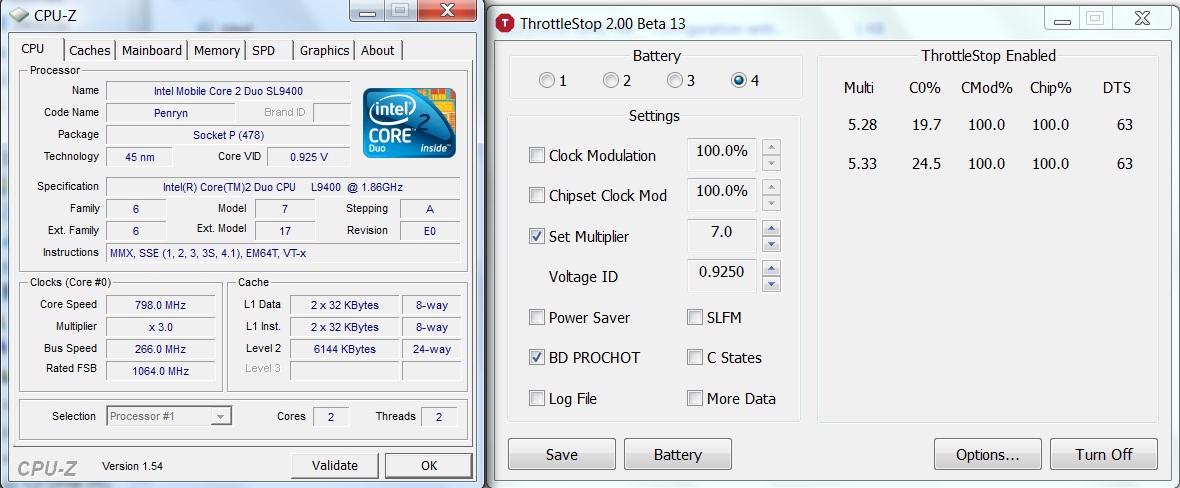
Reported by CPU-Z:
When I have PS enabled, ThrottleStop constantly changes between 6x and 8x (IDA mode.) But if I open more applications like MS Office and stream video from Hulu, it starts using 7x at 0.975v. Is there a way to tell it "Hey, when you're going down to 7x, let's use 0.925v instead. 0.975v is for IDA only."? That would be perfect.
Anyway, I prefer saving energy to having some extra CPU power because the programs I run are not CPU-intensive. Opening 10 tabs of internet browser, Word+OneNote+Outlook+Excel plus Windows Media just take up more RAM. So I set up 2 profiles: Performance and Battery. While plugged-in the computer will use Performance with IDA and Power Saver enabled. In battery mode I set speed at 7x - 0.925v. But I'm not sure if I should enable PS, because in this case both 6x and 7x use the same voltage. I know there's no difference in power consumption, but how about heat?
About RMClock: I was surprise to know that RMClock doesn't use IDA mode often although I enabled both 7x and IDA. It sticks to 7x - 0.925v, the voltage I set for that multiplier. If I run CPU-intensive programs, it jumps to 0.975v, but still 7x. It rarely goes up to 7.5 or 8x. I don't know why.
Another question: If I turn off RMClock/TS and forget to change minimum processor state back to 5%, will it damage my laptop? -
Thanks, unclewebb.
I think I have everything setup correctly in RMClock now.
Still playing with ideal VIDs for stability, but here are a couple screenshots. The 1st is stressing both cores, while in the 2nd only one core is being stressed.
Thanks again. Can't wait to see what the future holds for TS.Attached Files:
-
-
tvu32: At the moment, ThrottleStop is a simple solution that might not be for everyone. For the kind of fine control that you are looking for, you'll probably be better off with RMClock.
If there is no difference in power consumption then there will also be no difference in heat.
Keep in mind that it is very difficult for any software to accurately report VID when using IDA. You can't judge whether your CPU is using IDA mode by looking at the RMClock graph. I can have IDA mode enabled over 90% of the time and the graph in RMClock will show a flat line at the default multiplier. Same thing for VID.
JTravers second screen shot shows an average multiplier on the second core of 11.10. The first core at 10.81 shows that it is getting some IDA boost as well since the default multiplier for this CPU is 10.50. This also proves that the RMClock mod is working correctly with his 45nm CPU since it is using the default 10.5 multiplier when both cores are loaded and it's intermittently using the IDA multiplier when ever it can when only running a single thread just like it is supposed to do.
When not running ThrottleStop, if you don't set your Minimum processor state back to 5%, it won't damage your laptop but it will run a little hotter and if on battery power it will use up your battery faster if you are on battery power. If you need any help moding RMClock for your CPU then post a screen shot like JTravers did and I'll help you out. Once set up correctly you can run that program full time and get your CPU running just the way you want it to.
JTravers: I was just talking to a friend today who found a way to trick his P8400 so that it can use IDA mode on both cores full time. That would be a nice addition to ThrottleStop if I ever get that figured out.
-
Wow, that's pretty cool. I'll be waiting to see if you make any progress on that
What about some of the deep sleep states of the Core2Duo's like C4? Does TS still allow those to occur -- automatically or via a setting? Or am I totally off-track here, and TS has nothing to do with these things?
The more I think about RMClock vs. TS, the more I realize that I may not need the fine control of RMClock all the time. It seems a good compromise for me would be to run TS and have it switch automatically between profiles for AC vs. Battery (highest FID vs. lowest VID for power savings). When I need more performance on battery, I can turn off TS and start RMClock.
Thanks again for all of your help, unclewebb! -
Unfortunately the publicly available documentation from Intel about C-States is non existent. Most of the important bits within this register are listed as reserved so I have to dig through scraps of info, usually from the Linux world.
I was playing around with this last night and toggling the appropriate bits but I wasn't seeing any noticeable change in power consumption. At idle, once the SLFM voltage is being used, I don't know if there are any huge overall power savings still left to be had.
I'll be tweaking the C-States feature in ThrottleStop a little based on what I learned but don't expect battery life to suddenly improve to 12 hours.
I agree that there are situations where RMClock has an advantage. One thing to keep in mind is that RMClock uses more CPU cycles to do its job so its ability to finely tune core voltage better than ThrottleStop might not be as big an advantage as it seems. I might have to add "power consumption" to the new battery button so you can see what options work best.
I plan to keep tweaking ThrottleStop. If I ever get dual IDA mode figured out, I'll definitely be adding that new feature and posting about it here. -
Thanks. I have uninstalled RMClock so I don't have its screenshot. I'm using 2 profiles in ThrottleStop: Performance (IDA + Power Saver) when the laptop is on AC power and Battery (7x with a lower voltage) when on battery.
The IDA + PS mode works as expected. However, in Battery mode where I set the multiplier at 7x (no PS or SLFM), I'm surprised to see that sometimes it goes down to 3x. I thought it is supposed to use 7x only, isn't it?
Edit:
I just found out that my power plan has changed to "HP Optimized" instead of My Custom Plan , which I use together with TS. It explains all of TS 's erratical behaviors. I will report back if there is any other problem with it. Up to now, TS has been quite good!Attached Files:
-
-
I just bought my HP 8440w with a Core i7 620M. I was just wondering, are the new Core i7 mobile processors also able to undervolt and if so, are there any changes to the steps I should take via the Guide on post #1 compared to C2D processors?
-
they cannot be undervolted by any current software so this guide doesn't work.. in fact nothing has been able to undervolt it at all.. so forget undervolting.
-
My friend somebody on TechPowerUp recently told me about a Core 2 Duo bug and how to exploit it to enable Intel Dynamic Acceleration mode on both cores at the same time even when both cores are fully loaded.
By design, IDA mode is usually only available on one core while the second core is asleep in the C3/C6 state. Whenever the second core wakes up, IDA mode is gone and both cores operate at the maximum default multiplier.
Here's an example of a T8100. By default, a T8100 is designed to run at 200 x 10.5 for a total of 2100 MHz. When IDA mode is active, a single core can use the 11.5 IDA multiplier for a total of 2300 MHz.
With this new trick, even when both cores are fully loaded, the multiplier for both cores will be locked at the IDA speed. Here's an example with wPrime fully loading both cores.
![[IMG]](images/storyImages/dualidamode.th.png)
This new feature will be added to ThrottleStop in the near future. -
Awesome Thanks! I use this app since my CPU Genie trail period ended. So simple and easy to use. I agree with another poster if there could be an option to lock the multipler as well.
-
If you have the Minimum processor state set to 100%, like the initial warning message tells you to do, ThrottleStop will be in control of your multiplier and you can lock it to whatever you want. RMClock and CPU Genie work differently than ThrottleStop. They create their own power profiles whereas ThrottleStop modifies the current profile. If the minimum isn't set to 100% then ThrottleStop has to fight against the operating system.
If you're using TS then it's best to set it to 100% and if you want a low multiplier at idle then use the Power Saver option and it will drop your multi and VID at idle. Now that I finally have a laptop that I can test on, I'll be making some improvements to Power Saver mode.
You can also use the C-States option but personally, I've never been able to measure any power savings with a Kill-a-Watt when that option is enabled as long as your VID is already at its minimum. I usually leave C-States turned off.
I played around with dual IDA mode some more today and found some limitations like being forced to use the CPU's default IDA VID so this trick isn't going to be for everyone. It might come in handy though when gaming if you can keep 'er cool.
In multi-threaded tasks, you get a nice boost in performance.
![[IMG]](images/storyImages/wprimeida.png)
-
I lowered all my FID and all but one are on the lowest possible voltage. From 6x to 11x they are all at .9500 V. Would it make any power difference if I only used 12x and 11x?
-
At idle, power consumption hardly varies on Intel CPUs as you adjust your multiplier up or down. They are mostly controlled by voltage. At full load, power consumption varies linearly with MHz so a lower multi will reduce power consumption by a similar percentage.
-
I did some more testing and discovered that I was wrong about this. You will be able to use whatever VID you like when Dual IDA mode is enabled.
The only negative so far is that not all laptops support the ability to change SpeedStep on the fly. You need that option in the bios or you need to have the SpeedStep lock bit turned off in order for this trick to work. -
unclewebb, is there a thread dedicated to ThrottleStop somewhere, so we can keep track of its development?
Thanks! -
ThrottleStop is a multi-purpose tool that it doesn't have a dedicated thread yet.
I did start a new thread in the Software section today where I've explained how to enable Dual IDA mode for users that have a bios that supports this new feature. You need to be able to toggle SpeedStep (EIST) but not all bios versions support this. Luckily my Dell D830 does.
http://forum.notebookreview.com/showthread.php?t=477704
Give that new thread a bump or two so it doesn't get lost.
I did notice when testing the 45nm T8100 that FID and VID and C-States didn't make any significant difference to power consumption at idle. I think these CPUs idle down to a low power state no matter what you have them set to. If anyone else has a Kill-a-Watt meter or similar, hopefully they can post their own results. -
I've upgraded an Acer 5570z to a T7200, and must have gotten a good sample on eBay - I'm running .9875V on 12x and 11x-6x are stable at .95V. Lowered load temp at 12x multiplier from 87C to 73C. I don't think I applied the AS5 right, might need to disassemble this little guy and try again...whoops.
-
I'm not sure of your answer. I'll to make a question easier to answer. Will a CPU running at 2.0GHz with .95V have the same power consumption than the same CPU running at 1.5GHz with again .95V. Same voltage, but different multiplier.
-
At full load when the VID voltage is the same for both tests, a higher multiplier and higher GHz will consume more power.
At idle, when the VID is the same for both tests, a higher multiplier and higher GHz does not significantly change power consumption. The difference is less than 1 watt and is difficult to accurately measure with a consumer grade Kill-a-Watt meter. -
Thanks, now I understand correctly
-
When testing a T8100, I get zero power consumption difference at idle whether the VID is as high as it can go or as low as it can go and same with the multiplier. C-States enabled or disabled also makes no difference.
The Kill-a-Watt shows a constant 23 watts (0.20 amps) regardless of any changes including whether Minimum processor state is set to 5% or 100%.
I tested a T7300 before and went from high to low with VID and FID and the difference was easy to measure. The same KAW meter went from 20 watts to 27 watts during this test so adjusting your settings correctly would result in a 26% decrease in power consumption. The HP T7300 used Intel graphics so maybe that's why it was a little more efficient.
On a 45nm T8100, I'm seeing zero difference at idle. I can even enable Dual IDA mode and once again, at idle, there is no difference.
Intel must have changed something when they switched to 45nm because regardless of any user settings, these CPUs seem to be in a low power state at idle. It would be interesting to see some more user testing of this.
At full load, lowering the VID definitely makes a difference so it is well worth doing that. I'm going to go do some Prime testing for comparison.
Edit: On a T7300, lowering the VID from 1.200 to 1.000 volts while running Prime 95 Small FFTs reduced power consumption from 56 watts to 42 watts. Big difference.
On the T8100, IDA VID is 1.200 but when running two threads of Prime and with IDA disabled, that drops to 1.1375 volts. Full P95x2 load resulted in 47 watts power consumption and dropping the VID down to 1.000 while running this test only dropped power consumption down to 41 watts. With 45nm, the savings aren't nearly as significant. I'm not sure how stable this CPU is at a VID of 1.000 so the real savings might even be less.
For comparison, with the VID steady at 1.1375 while running P95x2, I dropped the multi to 6.0 and power consumption went down to 39 watts at the wall.
Edit #2: I rebooted and switched to Dual IDA mode. At idle, power consumption was exactly the same as before. At full load with the VID at 1.200 and the multiplier at 11.5 on both cores, power consumption was 51 watts. By lowering VID to 1.050 volts, power consumption dropped to 43 watts while running P95x2 Small FFTs. I tried this test at the default VID of 1.1375 and it was at 47 watts, exactly the same as before. The increase in the multiplier made no significant difference while the CPU was fully loaded as long as VID was the same. -
I decided that I would try to undervolt my laptop but I'm having issues finding "Advanced CPU Settings." I apologize if this was already resolve somewhere else but I couldn't find any solution to this problem. I saw someone else have this problem but I saw no solution. I downloaded the rmclock from this guide's direct link including the RTCore64.sys. Let me know if I need to post anything else for more details! Thank you!
![[IMG]](images/storyImages/help2o.jpg)
![[IMG]](images/storyImages/helph.jpg)
-
It is impossible to under volt a Core i7/i5/i3. There is no known method or software available to do this. Intel changed the design of their CPUs and got rid of the user adjustable voltage feature.
-
Okay, thank you!
-
@flipfire, Thx for the wonderful guide.
I used this method to test the undervolting and managed these.
Processor T5750
06x 0.9500v
07x 0.9500v
08x 0.9500v
09x 0.9500v
10x 0.9500v
11x 1.0125v
12x 1.0750v
Stress tested for about 8 hours and everything seems fine.
Now, I read somewhere that difference shoudn't me much between two steps. But in my case, there is some difference b/w 12x and 11x and then 11x and 10x. Is it safe? -
Howdy All!
i've tried to follow this nice technique...
but failed to start the RmClock 2.35 under Win7 Ultimate x64 either with the originally integrated x64 driver (~7kb) or with the attached to this thread at the beginning (~15kb).
Error message was always same: "Not all system processors are available to the process. The application cannot continue."
PC is Dell Precision M65 with T7600 @ 2.33GHz, RAM 4GB (3.25 usable).
Any good advice?
Thank you!
well... sorry to loose ur time. the problem is solved. it looks there was some conflict between RmClock and another CPU software installed.... -
mani1128: As long as your CPU is stable, it's perfectly safe. Any voltage you select in RMClock is no greater than what Intel intended the CPU to run at. Each CPU is unique and will require different amounts of voltage to be 100% stable at each frequency. Intel mass produces CPUs so doesn't have time to do the thorough testing that a user can do to find out how much voltage a CPU really needs to be stable. Enjoy your new cool running CPU.
-
Thx for the reply. I was just concerned about big difference in voltages in stepping from 12x to 11x and 11x to 10x, thats it.
-
Hi everyone, I followed the guide very carefully and I have the settings on RM Clock changed to reflect a lower voltage on 9.0x (my highest multiplier). However, when monitoring via RM Clock it sometimes shows the original VID settings, 1.125 with 9.0x and not the new .975 as the processor moves up and down the various multipliers, sometimes it shows .975.
I have the on demand profile selected, both current and at startup. Is there something I'm missing?
I have a new XPS 1640 with a P8700 dual core processor.
Thanks! -
9.0 is not your highest multiplier. RMClock does not correctly support 45nm CPUs like your P8700 without some adjustments. The default multiplier for a P8700 is 9.5 and the IDA multiplier is 10.0. You need to edit the RMClock registry entries to take advantage of these or else your CPU will be operating at less than its full potential.
http://forum.notebookreview.com/showpost.php?p=6130270&postcount=4855
Are you using Windows 7? There might be some compatibility issues between that and RMClock causing the reported VID to get jumpy but the problem might be because of RMClock's lack of support for the newer 45nm CPUs that have 0.5 half multipliers. -
I have enabled logging but I don't know where to find the logs... If I knew that I would attach.
Thank you! I am using windows 7 64 bit, but I will try the registry adjustments to see if that solves the problem, it kind of makes sense that one of the multipliers is "missing". I do have IDA disabled at the moment.
I did change the registry and it changed the multiplier on IDA to 74x like the instructions said it would, but I have that disabled.
I'm still having the 1.125/.975 flux at 9.0x (and the other multipliers flip back and forth from original to new voltages too).
I fear it may be Windows 7 incompatibility. It still has reduced the heat load somewhat, so all is not lost, but it would be nice to be able to make it behave. Interestingly, under stress test conditions is runs at a constant .975.
The "Undervolting" Guide
Discussion in 'Hardware Components and Aftermarket Upgrades' started by flipfire, Apr 1, 2008.

![[IMG]](http://img89.imageshack.us/i/rmclock45nm.png/)






![[IMG]](http://img709.imageshack.us/i/dualidamode.png/)


