 Problems? See this thread at archive.org.
Use speed shift instead of speedsteep.
For my 10th gen using only speed shift and disabling speedstep in bios gave me much better scores in beneches than with speedstep enabled
-
On your 8750H, does ThrottleStop show a Lock icon near the PROCHOT Offset setting?
![[IMG]](images/storyImages/aD9WsML.png)
This means that the PROCHOT Offset feature is locked, likely by the BIOS. Once this register is locked, ThrottleStop cannot be used to unlock this feature. You would need to modify the BIOS to clear the lock bit on this register.
Thanks for noticing that bug. It has been fixed. I had to bump the problem size up 25% so it is evenly divisible by 1, 2, 4, 8, 10, 12, 16 and 20. When I was learning how to factor numbers back in elementary school, I had no idea I would still be using those skills in 2020.
I am looking forward to testing this. In theory, once Speed Shift is enabled, it should not make any difference whether SpeedStep is enabled or not but I would trust real world results more than any theory. What type of testing did you do?Last edited: Dec 11, 2020tilleroftheearth and Krzyslaw like this. -
Your scores and temps are excellent I have 8750h on my laptop too but my score with throttlestop is 2400 ish I also have new thermal paste and pads. But my temps are throttled at 95 all the times how did you get it. I have seen the FIVR screenshot I can never get that much undervolt did you do anything else
Just a question did you have microcode updated bios?Last edited: Dec 11, 2020 -
The screenshot you posted shows -225 mV but this is only for the core. The 8750H will not be stable if you set both the core and cache to -225 mV. Try setting the cache offset to -125 mV and the core offset to -200 mV. Run Cinebench R20 and see if your scores or temperatures improve. If you have a laptop where the turbo power limits are being forced to a maximum of 45W, you will not be able to get maximum performance out of your 8750H.
If you are not stable when the core is set to a big number, try reducing the cache to -110 mV or -115 mV.berkkocaturk and tilleroftheearth like this. -
I noticed that when I disabled speedstep and left only speed shift in BIOS, I had speedstep and speed shift enabled by default when I was making tests n Fire Strike my cpu score and combined where much higher.
I do not remember exact numbers now, but it was huge bump in scores like 700-800 points in cpu physics test and around 1100 in combined. For combined I remember that I couldnt score more than 10K qhen speed step was enabled, and when I disabled it 11k no problem. I can post benchmarks but I will do it tommorrow as it is late now in my countryLast edited: Dec 12, 2020 -
Would you mind take a picture of your BIOS? On my GS73VR 6RF unlocked using the key combo, I can modify PROCHOT Offset in Advanced-CPU Configuration-CPU Thermal Configuration-TCC Activation Offset.
-
@unclewebb Just wondering for ThrottleStop to undervolt on Core 2 Duo, is it basically read 0x198, apply the offset, and write to 0x199 dynamically as the OS requests different frequency? If so then isn't it possible to do a VF curve for pre 10th gen CPU?
-
@Kers - The Core 2 Duo had both the multiplier and voltage in MSR 0x199. When Intel introduced Core i, they dropped the voltage info from this register. The 4th Gen Haswell to 10th Gen all use the overclocking mailbox. Software can use this single register to read and write voltage information to and from. The 4th to 9th Gen only allow offsetting the entire voltage curve. It is not possible to change the voltage of individual points along the curve.
10th Gen is a little different. I will save that for another day.
-
I have followed your advice core was -140. I set core to -210 Mhz and Uncore was always at -140. I left that since I know it is not stable beyond. I disabled speedstep from bios.
I had less than noticeable increase in score.
I went ahead and changed advanced bios settings to set offset as 0 as you can see in this screenshot. PROCHOT went 100 C.
I got instant shutdowns while testing cinebench without bsod without error without stuck speaker sound etc. screen is shut like power is down and keyboard light goes default red then pc is shut. I have even disabled critical temp shutdown from bios but it still happens maybe there are some things that doesn't let over 100C in this laptop. I will investigate further.![[IMG]](images/storyImages/X54p3y.png)
Also my core to core delta is terrible. There is more perf to gain but 2800 ish scores like other person seems far fetched for me. -
The Intel specified thermal shut down temperature is not until 125°C. The problem is that some laptop manufacturers think this is too high so they set their own shut down temperature at 100°C. If you change the PROCHOT temperature to 100°C, the moment the CPU hits this temperature it will both start thermal throttling and it will also immediately shut down. That is why Intel leaves a 25°C margin before shut down begins.
I am not sure if the MSI shut down temperature can be disabled. It is not necessary. Intel CPUs will shut down as specified if they get too hot. There is no need for a secondary shut down temperature set lower than the default Intel value.
If your temp deltas are huge you might have to try doing the thermal paste again and again. Some laptops are finicky. The thermal paste has to be almost perfect to get good temps.4W4K3 and berkkocaturk like this. -
Unfortunately MSI like few others uses 100C as a shutdown temp. I advice to set temp offset to 1 so the max temp would be 99. You will have max performance and no shutdownstilleroftheearth likes this.
-
Is it possible to make sure that a certain profile is applied when starting the game, and when closing it returns to the previous one?
-
ThrottleStop does not have any features to change profiles based on what game you are playing.tilleroftheearth and OgUrecheK like this.
-
Well I set it to 96 degree since when on stock 95 C after heavy use max temps were 99 C on throttlestop so it does move above that for me 4 degrees is too much but still I can not afford random shutdowns wish there was a way to raise the limit
-
There is a way to raise the limit. Buy a platform without this arbitrary limitation.
-
I have seen the setting! Thanks a lot. On my new msi it is under "Advanced > Thermal..." it has its own submenu but on this laptop it was under "Advanced > CPU information" and I managed to change TCC Activation offset. Somehow my boot setting also changed I have also reverted it back to uefi and now I did it.
Laptop 4k playback better. Because it boosts higher and fan also works more so it was in the cooling curve too. Thanks again.
Now I am hitting power and current limits very hard.
![[IMG]](images/storyImages/1b5uTk.jpg)
![[IMG]](images/storyImages/nlEvrk.jpg)
Well I set it to 96 degree since when on stock 95 C after heavy use max temps were 99 C on throttlestop so it does move above that for me 4 degrees is too much but still I can not afford random shutdowns wish there was a way to raise the limitLast edited: Dec 12, 2020tilleroftheearth likes this. -
Can you find the IMON setting in your BIOS? That can help you to bypass PL1 PL2 completely. It exists on 8th gen MSI laptop but my 6th gen doesn't have it. After some rough investigation, I think it's a new feature implemented by newer AMI reference BIOS because my 7th gen HP spectre has the option but it's hidden. On my GS73VR 6RF it doesn't exist even if you check the BIOS with AMIBCP.
Forced shutdown temperature can also be modified in the BIOS. Just look for thermal settings.berkkocaturk likes this. -
I'm not sure if my idea is right or wrong. Please correct me if I made any mistake. What if throttlestop set cpu to a specific frequency, store the default voltage at that frequency, take undervolt value from user for that frequency, then dynamically change frequency and associated undervolt based on cpu usage? If my understand is correct, throttlestop can already do every step mentioned above. Just need to combine them to make a VF curve. It's probably slower than speedshift or speedstep though.
-
TS 10 core development is coming along nicely. The monitoring table finally reports all 10 cores / 20 threads. The C0% number is now being properly calculated since all available threads are being sampled. Time for some testing.
If you run a 10 thread load on a CPU that has 20 threads available, one would think that the CPU will have to spend 50% of its time in the C0 state working on this task. The Windows background tasks will still be running during this benchmark so the CPU will need to spend just slightly more than 50% of its time working.
For the first test, I will disable Intel Turbo Boost. At 50%, ThrottleStop and the Task Manager are in agreement.
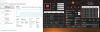
While the test is running, time to enable turbo boost so we can go up to full speed. There is still a 10 thread load running on a 20 thread CPU so ThrottleStop continues to show a hair over 50%. Have a look at what the Task Manager is now showing. 71%???
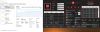
Are the fancy graphs in the Task Manager graphing meaningless data? They kind of are. The Task Manager does its calculation based on the default multiplier. When turbo boost is disabled and this CPU is running at the 36 multiplier, everything is fine. When the CPU uses a multiplier higher than the base multiplier, which is what all Intel CPUs do, the Task Manager data becomes a joke.
50.2% X (51 / 36) = 71.1%
That is where the Task Manger gets that meaningless number from. It reports a scaled up version of CPU load based on the multiplier the CPU is using divided by the default multiplier. The more turbo boost an Intel CPU uses, the more meaningless this nicely graphed data becomes. If you look at the fine print, the Task Manager does not claim that this is CPU load. Instead it calls this Utilization. Everyone assumes that this is load when it is clearly not.
My other rant is that after all these years, Windows 10 still cannot calculate the BCLK correctly.
The 10 core CPUs have changed how the turbo ratio limits are requested so I built a new window into ThrottleStop so this data can be properly entered. If you want a 52 multiplier when up to 4 cores are active and you want that to drop down to the 50 multiplier when between 4 and 10 cores are active, you would enter that request in like this.
I also fixed up Speed Shift so it works correctly now on the 10 core CPUs. You can use the Speed Shift Max variable to dial in whatever speed you like, whether idle or loaded. This makes it easy to check out the VID voltage a CPU is using at a specific frequency.
There are still a few more goodies to add during the next day or two. This new TS version is going to be a big improvement for 10 core owners.Last edited: Dec 13, 2020dmanti, Papusan, tilleroftheearth and 1 other person like this. -
In theory this sounds like an interesting idea. The problem is that Intel CPUs can vary their speed and voltage thousands of times per second. Any user software is going to be way too slow trying to compete with what the hardware is capable of doing. No one would want to run software that is sampling their CPU 10,000 times per second as it tries to micromanage the intermediate multipliers and voltages which are rarely used anyhow.
When a CPU core has something to do, you want the CPU to get up to speed as fast as possible, get the task done as fast as possible and then immediately go back into the low power C7 state where it sits at 0 MHz and 0 Volts. That is the whole point of Speed Shift Technology. Intel CPUs do a great job of constantly bouncing back and forth between full speed and no speed. This maximizes performance and minimizes power consumption. You want the intermediate multipliers to be used as little as possible. If a CPU spends 1% or more likely 0.1% of its time at any of the intermediate multipliers, being able to precisely control the voltage along the curve is going to show no measurable benefit in power consumption.pressing, dmanti, Papusan and 1 other person like this. -
On msi GE72 2QE POR setting is 100 C so I am not touching that intel specified value. But i can not locate IMON even in the AMIBCP.
![[IMG]](images/storyImages/OLyfZb.jpg)
On GP73 8RE I have already seen and changed critical temp to POR temp which is 119 C before. But it still shuts down at over 100 C i am guessing something is set to 101 C.
On AMIBCP I have located IMON slope values and will enable them to show on BIOS. Thanks.Last edited: Dec 13, 2020 -
Intel CPUs will thermal shutdown at approximately 125°C. This feature is built into the hardware to protect the CPU. I think the POR setting in the BIOS is what is causing your premature shutdown issue.
-
It wasn't clear on older laptop it was 100C and it was intel specified that is working fine at prochot 95C
On new laptop even when it was set 119C by intel it still shutsdown onover 100C as described I can see 100C for maybe 15 to 45seconds than it is shut. -
I'm totally lost at HFM/LFM/SLFM/SLFM6 state on my T9500 right now.
read MSR 0xEE returns 0x9EB90400
convert that into binary 10011110101110010000010000000000
change bit[28] 100 01110101110010000010000000000
write MSR 0xEE 0x 8EB90400
read MSR 0xEE again returns 0x8EB90400
After doing so, if i request 0.8 GHz & 0.925 V by writing MSR 0x199, cpu only undervolts to 1.2 GHz & 1 V by reading MSR 0x198. If I revert 0xEE back to default value, it undervolts to 0.8 GHz & 0.925 V without writing to MSR 0x199 again.
Does this behaviour mean that LFM is enabled by default and what I did disabled it becuase 1 V minimum and 1.2 GHz minimum sort of corresponds to the minimum limit of HFM info from intel datasheet
https://datasheet.datasheetarchive.com/originals/library/Datasheet-076/DSAE0032718.pdf
(PS: datasheet for Penryn is so difficult to find for unknown reasons. A simple trip to google will give you the datasheet for the gen before and the gen after. However, Penryn's datasheet is deeply hidden in a random website and I found it using the website's own search function.)
2.8 GHz - IDA/Dual IDA - 1-1.3 V
1.2?, 1.6?, 2.0?, 2.6 GHz - HFM - 1-1.25 V
0.8GHz?, 1.2 GHz - LFM - 0.85-1.025 V
0.8 GHz - SLFM - 0.75-0.95 V
0.6 GHz - SLFM6
Running everything at default, my CPU VF curve looks like this
0.8 GHz (0x88) 0.925 V (0x11)
1.2 GHz (0x06) 1 V (0x17)
1.6 GHz (0x08) 1.05 V (0x1b)
2.0 GHz (0x0a) 1.0875 V (0x1e)
2.6 GHz (0x0d) 1.1375 V (0x22)
2.8 GHz IDA (0x0e) 1.225 V (0x29)
Then what value should I write to 0xEE to enable SLFM/SLFM6 and unlock the lower VIDs?
I see so if my understand is correct, on these old cpu where you can write FID & VID to 0x199, this idea would work fine since you are not battling with the CPU. And if you take over frequency control from the system, then voila you get VF curve that's exclusive to 10th gen.
Agree with this but the problem is the top multiplier requires excessive voltage to reach while the intermediate multiplier may use -25% voltage for -10% performance loss. Intel simply has pushed their 14nm process way to far beyond the sweet spot because of the 10nm delay.Last edited: Dec 14, 2020berkkocaturk likes this. -
Intel knows their scam on these boost with that much voltage cpu is never gonna get cooled even though performance has increased it is not keeping with thermal or voltage power limits to be honest so increase in performance is in vain the consumer has no idea.
-
A repaste might be a better option.
-
@unclewebb
A new idea for TS
Is it possible that you could add an option for per core HT enable/disable switch near the multiplier/core menu.
This is also new feature of 10th gen cpus -
As far as I know, you can only enable and disable threads when you are in the BIOS.
@Kers - Sounds like you are figuring out bit[28]. It needs to be enabled to access the lower voltages on Core 2 Duo.
Since the deep low power C states were added to Intel CPUs (Core 2 Duo - 45nm) , there has been very little to be gained worrying about the intermediate multipliers and voltage. The max speed voltage is important and the min speed voltage is important. CPUs spend such a small percentage of time at the intermediate multipliers that fine tuning these ones does nothing beneficial. Here is a good paper about race to sleep.
https://www2.eecs.berkeley.edu/Pubs/TechRpts/2009/EECS-2009-140.pdftilleroftheearth likes this. -
Yes I realized this a while ago from reading the SLFM description at the first page of this thread. The problem is bit[28] defaults to 1 and I get 0.925 V voltage floor. Writing 0 to bit[28] results in voltage floor of 1 V. Looks like the limit is hard coded inside the CPU and it's depend on the binning. I think back when the laptop was running windows with throttlestop, it could go lower than that but now I'm not so sure about that. Running 2 GHz at 0.925V isn't too bad. Running prime 95 small fft with -0.1625 V gives 20+°C reduction.
Just for curiosity, since bit[28] controls SLFM, then which bit controls SLFM6? They can't be controlled by the same bit right? -
As for HT I tought so, but just wanted confirmation.
Is race to sleep is the same as race to halt?
Is it beneficial to enable RTH? In my bios for 10th gen by default it is disabled. In 8th gen refresh U-cpu it is enabled. But I don't see any major difference with RTH on or off. -
Another day and another new TS feature. This one is aptly named, "Too Much Information". When you double click on the monitoring table, if you have a CPU with more than 8 threads, you will be able to keep a close eye on each and every one of your threads. No need to mess around with a scroll bar.
All 20 threads are mostly idle, looking for something to do. Idle temps are nice and low.
-
This is useful to me as I game with a 2nd monitor that has MSi Afterburner, GPU-Z, Throttle Stop, etc all monitoring system info. I kind of hate overlays on my gaming screen so if I can monitor all threads/more info from the 2nd monitor it gives me warm fuzzies! Looking forward to the new version! And thank you!tilleroftheearth likes this.
-
Nice, I will be able to monitor all my 16 threads in my laptop when you will finaly release new version of TS to the public.
GREAT JOBLast edited: Dec 15, 2020tilleroftheearth likes this. -
You are welcome.
The new window of info also works in Mini Mode. Lots of data per square inch.
When you spread the Windows background tasks over 20 threads running at 5200 MHz, the time spent in the C0 state per thread is minimal.
I was thinking the same thing last night. Still one or two more minor features to go.
There should be a fresh beta available in a day or two.Papusan, Krzyslaw and tilleroftheearth like this. -
Most recent computers do not use Clock Modulation throttling so I added an option to the Mod column in the monitoring data. When you click on the Mod table heading, it will display the ID of each thread. I was finding that when you have too many threads, they can be hard to keep track of which one is which. If one fails during a Prime95 stress test, I want to know the ID of the problem child.
In the first example, the ID column increases in steps of 2. That means that hyper threading is disabled.
In the second example, hyper threading is turned off for the first 5 cores so the ID initially increases by steps of 2. Hyper threading is enabled for the other 5 cores so after that, the ID increases in steps of 1.
The important part is that even if you have an odd ball number of threads like 15, the table will automatically size itself appropriately. I always get in trouble from @Papusan if I add a new feature and heaven forbid, it takes up an extra pixel or two. He does not like wasted CPU cycles or any excess fat on his monitoring apps.
One more feature to go. -
A user sent me some Cinebench R20 tests. His 9750H appreciates that the core offset is set higher than the cache offset. I would go with -200 mV for the core.
![[IMG]](images/storyImages/qcqYRmN.png)
![[IMG]](images/storyImages/xjWGPv2.png)
![[IMG]](images/storyImages/WL3UI4K.png)
![[IMG]](images/storyImages/Ji4Ythg.png)
Here is a complaint. Every time I use Visual Studio, it locks itself to one thread of the second core. Always the same. Twenty threads to choose from but it prefers a single thread. Locking a task to one thread is so 1990s. Ironic that Microsoft's programmers do not have the smarts to let this task bounce around from core to core. Hello MS, it is 2020! CPUs have more than 1 or 2 cores.
The pic also illustrates the new Min temperature option in TS.
![[IMG]](images/storyImages/pvpr7q3.png) Last edited: Dec 18, 2020berkkocaturk, 4W4K3 and tilleroftheearth like this.
Last edited: Dec 18, 2020berkkocaturk, 4W4K3 and tilleroftheearth like this. -
Since undervolting is disabled on Tigerlake processors, would you expect better performance from an undervolted icelake or a normal tigerlake? Maybe that would be about a wash? Given the same TDP/laptop of course, two XPS 13s in this case.
-
Tiger Lake is much more performant. The thermal performance and the sustained performance depends on the specific notebook we're talking about.
See:
The MSI Prestige 14 Evo Review: Testing The Waters Of Tiger Lake (anandtech.com)unclewebb likes this. -
That's an underwhelming cb r20 score though. 9750h cpus should be in the 3100-3200 range
-
Hi, I have a Dell 5290 2-in-1 laptop with a i7-8650u, and I'm trying to get better performance out of this laptop. The main bottleneck with this laptop is that it is power limiting. Therefore, I am trying to find a way to circumvent the power limiting, but I am not sure where I should look.
Some random information:
- Without ThrottleStop, PL2 for this laptop seems to be set from the factory at 44W, which is plenty.
- Without ThrottleStop, PL1 for this laptop seems to be set from the factory between 12W and 18W depending on "something". When I run a long stress test, PL1 starts at 18W and gradually decreases to 12W.
- With ThrottleStop, using only the "Disable and Lock Turbo Power Limits" setting, PL1 seems to get changed to a constant 18W
- Setting PL1 in the TPL screen doesn't seem to have any effect on PL1, meaning it stays at 18W even if I set it to 14W or 22W.
- Setting PL2 in the TPL screen does have an effect on PL2, but only when setting it lower than 44W.
- PL1 gets triggered a lot quicker when the laptop has already been stressed beforehand (e.g.: it might take 30 seconds for PL1 to kick in when I stress test after the laptop has been idling for a long time, but it might take only 1 second for PL1 to trigger when I re-run the stress test immediatly after the first run)
- Setting PL2 to 19W makes PL1 trigger much later than when PL2 is set to its maximum 44W.
- Disabling DPTF by following this guide doesn't seem to change the behavior of PL1 and PL2
- Undervolting Core/Cache to about -50mV with ThrottleStop doesn't seem to change the behavior of PL1 and PL2
So my question is the following: Where should I look and what tests should I perform to find exactly what is causing PL1 to trigger? I want to figure out if it is time-based, current-based, thermal-based, etc. before modifying anything.
Thanks a lot in advance, and let me know if you need any further information!Last edited: Dec 19, 2020 -
You sound like the kind of person that likes to tweak their laptop. My first thought is that you bought the wrong laptop.
There are three unique sets of turbo power limits. The primary set are the ones you can adjust in the TPL window. There is a secondary set that you can tell the CPU to ignore by checking the Disable and Lock Turbo Power Limits box in ThrottleStop. The problem with your laptop is there is a third set of turbo power limits. Dell is in total control of this third set of power limits. If Dell wants your CPU to throttle and run below the rated TDP, then your laptop will throttle and there is nothing you can do about it.
That is a good way to put it. You would have to be good friends with someone deep inside Dell before you will ever find out exactly what the triggers are. It does not matter what the exact triggers are because ultimately, you cannot control anything anyhow. You are at the mercy of Dell. If they decide that your laptop should throttle, for whatever reason, reasonable or not, it will throttle.
The 8th Gen U series have a lot of potential. You will have a time tough time reaching that potential when one of these CPUs is installed in a Dell laptop. Watch out for any BIOS updates that disable CPU voltage control and will make things worse.
![[IMG]](images/storyImages/eo0J744.png) dmanti, tilleroftheearth and Papusan like this.
dmanti, tilleroftheearth and Papusan like this. -
Hey unclewebb, thanks for the quick response and thanks for the amazing software!
I totally understand where you're coming from, I found out after doing some research (probably in this thread) that the performance of these CPUs is dependent on the manufacturer's will. However, I am not ready to get rid of this laptop just yet because it ticks so many other boxes and the performance is literally the only thing that is coming a little bit short, and imo not by a lot.
I understand that reverse engineering whatever firmware is controlling the power limits would be close to impossible (in my case at least), but I thought that maybe I could perform some simple tests that would give me some hints as to what physical variable (e.g. time, current, temperature) is causing the power limiting. And if I can determine that it is, for example, temperature-related, I could indeed eventually control this!
Do you have any idea how I could verify if the power limiting is caused by temperature?
Thanks for the advice, but how exactly do I check for this? I suppose Dell wouldn't write this sort of technical information in their changelogs, right?
EDIT: I'm specifically asking about the temperature because I found on the internet that some XPS models had VRM cooling problems from the factory, and by better cooling the VRMs and modifying the power limits (which I can't do) those XPS models can get much better performance. Therefore I'm lead to believe that maybe I have the same "issue"...Last edited: Dec 20, 2020 -
When you are testing, open up Limit Reasons. Some of your test results do not make sense. If you set the long term PL1 power limit in ThrottleStop to 14W, long term, it should throttle at this level. You should see PL1 light up red in Limit Reasons when this happens. The turbo time limit is not an exact number. It can vary depending on how far you are over the PL1 limit.
Some of your other testing makes sense. The amount of turbo boost available is like water in a bath tub. If you are running your CPU just over the PL1 power limit, the amount of turbo boost will last a long time. If you are running the same CPU at 44W, that is like blasting a hole in the bottom of the tub with an elephant gun. Turbo boost will not last long at all. Back to back testing is the same sort of thing. If water is leaking out of your tub faster than it is going in, running a benchmark back to back will result in worse performance. In this situation, the bath tub is never fully replenished so the total amount of turbo boost available is much less.
I know this was a problem for some Dell laptops. Limit Reasons will report if your throttling is voltage regulator related or if your throttling is simply because the power limits are set too low by the firmware. If your real problem is the power limits, cooling the voltage regulators will not solve anything. Look for VR THERMAL or VR CURRENT in Limit Reasons.
I would play it safe. If your laptop is running OK then I would avoid installing any BIOS update. I use Sledgehammer to try and manage Windows Update to avoid getting side swiped. Sad when we have reached a point where updates from trusted sources can be more dangerous than some viruses.dmanti, tilleroftheearth and Papusan like this. -
I know they don't make sense hahaha, but those are the results I got. Here is a screenshot I took to backup my claims. However, I found that I had no problem modifying PL1 and PL2 in XTU, so I documented some of the tests I did at the end of this post. (Note that XTU was never opened before this screenshot, this was a after a fresh reboot, and I applied PL1 14W before running the test)
Sadly I have never seen these in my Limit Reasons, but I do see some sensors named GT: VR Thermal Alert, GT: VR TDC, RING: VR Thermal Alert, RING: VR TDC in HWiNFO, but they never got tripped (look at the Maximum column in this screenshot), so I guess that's what you're talking about?
Thanks! I have never heard of this software before. I'll give that a try.
Thanks for the comparison, see if you can understand what's going on in the following tests I did with XTU :
After seeing the results, I realized that the algorithm responsible of triggering PL1 seems much more complicated than I thought...Code:#################### Nomenclature #################### Variables: T_0: Temperature at the start of the test T_amb: Ambient temperature PL1: PL1 limit set in XTU PL2: PL2 limit set in XTU Fan: Fan speed manually set by DellFanCmd (only 3 specific speeds are available) Results: Time to PL1: Stress time (with FurMark CPU burner) before PL1 gets triggered ####################### Tests ######################## T_amb: ~22C ~~~~~~~~~~~ Variable: T_0 ~~~~~~~~~~~ Test#1 T_0: 43C (fan-level2 equilibrium) PL1: 18W PL2: 20W Fan: level2 Time to PL1: 59s Test#2 T_0: 49C (fan-level1 equilibrium) PL1: 18W PL2: 20W Fan: level2 Time to PL1: 58s Test#3 T_0: 62C (fan-level0 equilibrium) PL1: 18W PL2: 20W Fan: level2 Time to PL1: 58s ~~~~~~~~~~~ Variable: Fan ~~~~~~~~~~~ Test#1 T_0: 43C (fan-level2 equilibrium) PL1: 18W PL2: 20W Fan: level2 Time to PL1: 59s Test#4 T_0: 44C (fan-level2 equilibrium) PL1: 18W PL2: 20W Fan: level1 Time to PL1: 59s Test#5 T_0: 44C (fan-level2 equilibrium) PL1: 18W PL2: 20W Fan: level0 Time to PL1: DNF (Thermal Throttle kicked in) ~~~~~~~~~~~ Variable: PL2 ~~~~~~~~~~~ Test#1 T_0: 43C (fan-level2 equilibrium) PL1: 18W PL2: 20W Fan: level2 Time to PL1: 59s Test#6 T_0: 43C (fan-level2 equilibrium) PL1: 18W PL2: 25W Fan: level2 Time to PL1: 29s Test#7 T_0: 43C (fan-level2 equilibrium) PL1: 18W PL2: 30W Fan: level2 Time to PL1: 22s ~~~~~~~~~~~ Variable: PL1 ~~~~~~~~~~~ Test#8 T_0: 43C (fan-level2 equilibrium) PL1: 18W PL2: 20W Fan: level2 Time to PL1: 58s Test#9 T_0: 43C (fan-level2 equilibrium) PL1: 15W PL2: 20W Fan: level2 Time to PL1: 31s Test#10 T_0: 43C (fan-level2 equilibrium) PL1: 12W PL2: 20W Fan: level2 Time to PL1: 18s
Last edited: Dec 20, 2020 -
I always enjoy a challenge and I really enjoy when the truth comes out.
I see guides on YouTube all the time that recommend dragging the Turbo Time Limit slider all the way to the right. This seems to be a popular and recommended thing to do. Hardly anyone has a good grasp of what this setting does so let me explain.
The Turbo Time Limit is the number of seconds a CPU will operate at the short PL2 power limit before it switches to the long term PL1 limit. This time limit is in seconds. You are requesting the CPU to switch to the 14W limit in 3,670,016 seconds. That is approximately 42.5 days. Hmmm. I think I see the problem with your testing. How about let me know in February if your CPU finally switches to the 14W power limit.
When power limit testing, I do not have that kind of patience. How about set the Turbo Time Limit to something more practical like 4 seconds. The Intel recommended default is 28 seconds but for laptops with U CPUs, that is usually too long to be operating at the higher power limit. It all depends on how much cooling is available. Being able to adjust this time limit gives you some control over how long before a nuclear meltdown begins.
Dell uses their firmware to set their own turbo power limits. When the Dell power limit is lower than the above limit, Dell is in charge of your laptop. You can set the ThrottleStop power limit lower than the Dell controlled power limit but that does not really accomplish much. You would end up with even more throttling. The CPU compares all of the requests and the lowest power limit request always wins.
That power limit data you included looks interesting. Maybe I will include something like that as part of the TS Bench someday.Normimb, ole!!!, Charles P. Jefferies and 4 others like this. -
I have sanded the surface of direct die copper block which looked really good even before sanding on GP73 8RE and replaced the thermal paste with MX-4 again(It was MX4 before too). And cleaned the fans there was so much dust it was barely pushing air through thin fins. And voila.
![[IMG]](images/storyImages/a8eJNg.png)
On my GE72 2QE I did the cleaning of fans and sanding (although not as great) the cpu block was aluminium rather than copper it didnt had many heatpipes etc. So it didnt affect much on the temps. -
Hey there,
I do have the same device but with the i5-8250u.
Just for reference, I have attached my (currently) stable Throttlestop settings:
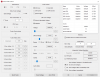
If I set the Core (not the Cache) to -130mv, I start seeing errors in TS Bench after a few seconds.
Similarly, if I increase the undervolt on the UHD 620 to -160mV the GPU crashes in 3D Mark.
The current settings have successfully gone through some desktop use, some light gaming and a 3D Mark Timespy stress test.
Regarding your throttling:
I am seeing EDP as the main throttling reason on CORE and RING, but my device is only going down to 18W and stays there permanently.
However, I have not installed DPTF and have previously setup something that prevents the reinstallation - while I no longer know the exact steps, I remember it being similar to your guide.
Unfortunately, I don't know how to get around the 18W power throttling.
Using the settings mentioned above (running BIOS 1.12.1 and some BIOS and physical tweaks), I am seeing temperatures in the low 80s under load and would like to gain a bit of additional performance.
On a similar note, my device seems to be using RAM at 1866MHz which is quite low.
Is there any known way to increase the RAM frequency?
In case you want to compare:
CineBench R23 gives my settings (after a short cool-down period, i.e. not power-throttled when it started) 2948 Points in Multi Core
3D Mark's Wild Life gives me 2828 Points, Timespy gives me 464 Points.Last edited: Dec 23, 2020 -
ThrottleStop 9.2.9
https://www.techpowerup.com/download/techpowerup-throttlestop/
New Features
- added 10850K / 10900K support including a new Turbo Group access window.
- updated the TS Bench and the C State window for the 10 core CPUs.
- enabled Limit Reasons support for Comet Lake CPUs.
- improved access to the Windows power plans.
- added AVX offset control for unlocked K series CPUs.
- double click the monitoring table for an extended view if you have more than 8 threads.
- added clickable monitoring table headings, including minimum temperature and APIC ID.
- blocked Set Multiplier access when Speed Shift is enabled.
- more obvious FIVR window feedback when CPU voltage control is locked.
- improved consistency of the turbo power limits Lock feature.
- ability to clear the turbo power limits Lock option when accidentally locked.
- changed and fixed the logo selector.
- added an INI option to disable ThrottleStop's access to the turbo power limits.
NoSetPL=1Last edited: Dec 26, 2020dmanti, t456, FrozenLord and 10 others like this. -
Merry Christmas @unclewebb!
Wishing you a safe and joyous holiday!
Thank you for the the thoughtful gift! Right before I put the milk and cookies out for the great grand kids, who are waiting for Santa tomorrow.
Our Santa brought our presents early!
ole!!!, Papusan, 4W4K3 and 1 other person like this. -
A welcome and appreciated Christmas present! Thanks @unclewebb!!!
cfe, Papusan, tilleroftheearth and 1 other person like this.
The ThrottleStop Guide
Discussion in 'Hardware Components and Aftermarket Upgrades' started by unclewebb, Nov 7, 2010.


