 Problems? See this thread at archive.org.
TMC01: It might help a little since you'll have two drives to share the load, but if your using a laptop it's prob software raid. From my understanding a good raid controller card (for desktop machines) have cache which help avoid the stutter. I bought a 32gb transcend drive myself (PATA not sata) for my old skool c400 at work.
It's great for getting me into windows, but the drive does stutter quite frequently if you try to do medium/heavy multitasking. You would be better off getting a vertex drive, since these newer drives already have cache built into them to prevent stutters.
-
I think we have the same drives. I put it into my powerbook 12", thinking to turn it into a netbook for travelling around. I have yet to test the drive so I am not sure how bad the stuttering is. Since I have another drive, I thought I might as well raid it to ease the load. Either that or I would just use it as a boot disk.
-
Really? Look here:
http://pc.watch.impress.co.jp/docs/column/hot/20090409_110626.html
http://pc.watch.impress.co.jp/img/pcw/docs/110/626/html/hot_5.jpg.html
http://pc.watch.impress.co.jp/img/pcw/docs/110/626/html/hot_6.jpg.html
http://pc.watch.impress.co.jp/img/pcw/docs/110/626/html/hot_7.jpg.html
And then look here:
http://img.hexus.net/v2/internationalevents/cebit2009/Day0/Biostar-big.jpg
http://img.hexus.net/v2/internationalevents/cebit2009/Day0/Jetway-big.jpg
The first couple pics are from JEDEC presentation and second two are the pic from a P55 motherboard on display. Right of the memory slots you'll see a similar looking slot but much shorter. One of the pic says "ONFI" beside and another says "High Speed NAND flash". Remember for Turbo Memory it uses a 500MB/s connection PCI-Express x1 slot for it. That's almost double the bandwidth for SATA2-300.
Its not guaranteed it'll be how future boards look like but its a start... -
PCIe 2.0 x1 has 20% overhead, still a whopping 400MB/s max. In theory Turbo Memory looks good, though I wonder if it doesn't work in reality since from what I've seen from Intel, there aren't any plans in the next generation chipsets...
-
They haven't abandoned the concept. See the two pics of the slot on the pic I linked in the above post? Well that is "Braidwood", what some might call it Turbo Memory Generation 3. Integrated NV controller on the PCH to improve throughput to "SSD-like" levels.
-
Much less careful. About as careful as with my cellphone.
-
And I don't see that not fitting onto a 64gb or 128gb ssd except for games. and there, for most games it doesn't matter that much. really depends on the game.
-
Yeah this was all in a real specific context of someone telling me I shouldn't consider an SSD drive as 'storage', my entire initial point and comments revolved around that. Outside of the context my comments may not hold as much relevance. SSD has always been high performance, but it's becoming a good storage replacement for the top 3 issues that matter most. 32GB or 64GB is personal preference and based on individual usage, although I do I run alot of apps. I have somewhere in the neighborhood of a hundred installed apps and utilites and some quite big, not to mention a file repository of tools I need, games aside. Also, on a laptop I really don't have the luxury to do my photo editing or my HD video editing on a seperate data drive connected to a laptop, I don't use laptops as desktops ever, and with a 256GB SSD inbound I am excited that I won't have to sacrifice. Before large drive sizes where available people could make a case for using smaller drives without a problem and keep their drives clean of files, purchasing today I just don't need to put up with small size since price/GB is a pretty flat line and 256 and 512 are finally available.
Although you know this, one major barrier to SSD adoption has been size limits and that is just now being conquered, so alot of new customers will jump on the bandwagon. Next big one is price, and with those two hurdles you current SSD owners won't be <.01% of the computer user population anymore.
For me what is important for SSD's is performance, size, price and in that order, and size is a close second for a laptop, price doesn't hurt either just as my days of buying SLI cards are behind me. -
More competition! Lower prices! http://www.tomshardware.com/news/mlc-slc-ssd-hdd,7532.html
-
Wow, great post!
This is what I'm talkin' 'bout:
![[IMG]](images/storyImages/hot_7.jpg)
When you think about it, this is inevitable, as I think IntelUser is pointing out. The question is: will it occur sooner rather than later? It seems possible that Intel could make this a reality by this time next year.
If the CPU took over controller duties, what would stop notebook manufacturers from integrating, say, 32GB of flash right on the system board using the PCI bus? This would be quite inexpensive to do and would remove the connector problem being discussed. The immediate concern, IMO, is to get operating systems and applications running off of fast solid-state storage. If the on-board route were taken it would still leave open an SATA connector for a huge 500GB+ HDD for data. The best of both worlds, at least until flash prices fall far enough were even data is cost effective to store in solid-state? -
This looks promising...
Isn't this really low power consumption compared to current SSDs?
And isn't this sequential bandwidth super fast compared to current SSDs? Note that it claims these speeds at a comparatively small (?) 128K block size.
And yeah, 35,000 4K IOPS may be slower than Intel, but all things considered, the specs indicate this is far and away the best controller (not yet) on the market...
I wonder just how soon they are planning on releasing this product, and how competitive they intend to be with the current SSD offerings? -
That is the "SSD Processor Specification".
Real world numbers on transfer rates will likely be a bit different, they always seem to be.
Furthermore, it's aimed at enterprise and is likely to cost accordingly. -
Actually, I do all you've written quite fine on 128gb. Including video editing and hd-stuff. So, again, tell me why you need more than that? 128gb is quite affordable. (I got it for 200$).
-
I'll wait to see results from real world performance. I wish companies would post random read/writes instead of sequential, because really, when you reach 100+ MB/s for sequential, it doesn't make much of a difference for most applications.
-
new ssd contollers could mean it will be quite some before intel puts it in the chipset. I can't see all the work and money going into these new drive controllers if intel is just going to "give" intel ssd performance to us.
-
There are more chipset manufacturers than intel. Imagine on the new ion platform from nvidia an indilinx controller. Imagine that SandForce controller being on the next amd chipset.
There isn't just one. But Intel provides nice one-fits-all-solutions. Others do so as well. I like that idea of the ram-module-style. -
For a laptop that I will have for a couple years of toting around and not have to worry about loading several 10GB games on it as well as be over concerned of backing up media all the time. Is that sufficient?
I won't tell you that 128GB is not sufficient for you if you don't tell me that my desire for a 256GB SSD for my needs is not valid, fair enough?
I paid $325 for my Samsung 256GB SSD upgrade over the 500GB 7200RPM HD, so I think I made the right choice. -
Hell yeah! where did u get that price? or was it with purchase of new notebook?
-
I said except for games I see no need for more..
And for games there's a simple rule: you only have one or two multiplayer games at most you play often, and singleplayer games you play one after the other, and won't play the next before you finished the first. That way, your games never eat more than 30 - 40gb. Solved (I actually manage a lan-center, those hdd's are 300gb and we have tons of games on it. So don't tell me they realy need THAT much space if you do a little self-control
).
And you where talking about a pc anyways. on a notebook, true, one hdd rules it all => it has to be big enough for everything.
But on a pc, you don't need games on an ssd. At least not all of them, as it doesn't matter for most. That's what i said.
And yeah, 325 for 256gb is nice rrrrhhh
edit: and the backup thing => windows home server. and then, just forget everything you've learned (4.5tb on it, so i don't need big data locally at all. and backups are always done automatically.. one happy dave
)
-
Actually, SandForce is the first MFR that I've seen to actually publish IOPS at all, which, as I understand it, is a much more appropriate way to specify random speeds compared to listing random bandwidth.
In consideration of previous discussions of the vRPM spec, I think it is interesting to note that even though SandForce is publishing IOPS, it demonstrates the problem that remains even if this becomes standard practice. They publish:
But what does that mean?
- How was the test performed (benchmark program, parameters within it such as queue depth, disk size, length of test, etc)
- Are they saying 30,000 write IOPS *and* 30,000 read IOPS? Are they suggesting synchronous read/write performance, just like a HDD? (answer: not likely)
- Since this specification is almost certainly a combination of read and write IOPS in some proportion, what is that proportion? 50/50? 90% read, 10% write? They don't tell us.
The point is that a published spec of 30,000 "random read & write IOPS" is purposely fudged, and they even fooled Tom's Hardware, who was in then in turn fooled by Intel's reply!
So first of all, Tom's Hardware fails to make a distinction between read and write IOPS. When the queury Intel about it, Intel conveniently ignores the distinction as well and states that their drive is still faster. But see below...
Intel's X25-M does about 35,000 random read IOPS.
It does about 6,000 write IOPS, about 24,000 IOPS short of SandForce's claimed 30,000.
How, then, does Intel legitimately claim that their drive is faster?
See the problem? How are consumers supposed to make informed decisions with no standard method of reporting performance when even the big tech sites like Tom's Hardware are deficient in this regard? -
owners of MLC Intel drives might be interested in this article :
http://pcper.com/article.php?aid=691&type=expert&pid=1 -
nice article. lets see if they make the write-cap higher..
-
its good that intel fixed the degradation issue, i am hoping intels new frimware can increase the writing speed, say 100-120MB/s
-
pcper states the write is 80mb/s
-
yep, and they state it looks like a cap. and there is the thing that intel will release updates for its ssds very soon. it may be new drive sizes (160gb for 1.8" jummie
) and it may be that they set the cap to 100mb or 120mb.
maybe. but the great thing is, it looks like the drive is now perfect bugfree. this is the biggest news by far. next: tweak the performance..
-
Must. Get. X25-m.
It's no longer a question of choice - I will wait until the 80GB model drops into my price range and upgrade then. -
hmmm, I am still using my 256G samsung as my main hard drive, and put 80G in 2nd harddrive bay for backup;
-
an intel for backup? you *****
-
/me slobbers uncontrollably
-
Considering the drive is already the cream of the crop, further performance increases via firmware updates from Intel is pretty crazy. It's a little unbelievable just how good of a SSD Intel came out with on their first foray.
-
I have 2 256 GB Samsungs in my Thinkpad T400. I have a express card 64 GB SSD in the express card slot and a 32 GB compact flash card in the Cardbus slot.
-
I was getting a laptop anyway, so it was good timing to get an SSD upgrade option on a Dell Studio XPS 16.
This thread helped me out months ago to get up to speed, so thx to all. -
Okay, here's a description of my typical usage from earlier in the thread:
The drive was purchased in February and has been in that sort of environment since, almost nonstop except for a small gap of a few days. My torrent and usenet downloading has gone from occasionally to quite often. It's never been HDDErased.
Here's a ATTO bench performed just now, as you can see my synthetic bench degradation is much worse than what the PCPer guy got:
![[IMG]](images/storyImages/attot.jpg)
One thing I should point out is that even with this degradation, actual performance never seemed to really be affected aside from when moving big files around. The Intel at its worst has felt as good or better than the Titan 128 and Corsair 128 at their best.
I'll be flashing the new firmware tonight and posting a new ATTO bench afterwards. I'll also post another ATTO bench after a week of my typical use to see if there's been any major change. -
Guys,
I have the x200 and it doesnt have a cd/dvd drive. Is there a work around to updating the intel drive via a usb thumb drive?
Tuan -
yeah, well, if ssd controller is on board, all you need to plug is slc or mlc memory chips integrated on green pbc, so, what is the point in that, I mean, then all ssd-s will be the same...
I think this is stupid
I see it like this, if controller is standard, than it means that we all will have same performance ssd-s, and that is stupid, I just can't believe it...
those p55 boards, well, it is some kind off desktop card ssd slot, but, this does not mean by any way that p55 has ssd controller chipset integrated...
or does it
-
Samsung 256GB in spotted in 1.8" form factor
This makes it obvious that SSDs are easily capable of matching, even surpassing HDD storage density...the largest 1.8" HDD is 250GB, and Samsung has matched that...2.5" drives are surpassing HDDs already, though nobody has spotted one of the 1TB 2.5" drives at retail. All we need to wait for now is for someone to be crazy enough to stick enough flash chips in a 3.5" enclosure, and then price will be a SSD's only barrier. -
Yea. I have said multiple times. The "Ibexpeak-PCH will have versions with integrated non-volatile controller".
It's not stupid at all. This is one way to reduce prices of SSDs to acceptable level. Current SSDs are really not acceptable because of the ridiculously high $/GB cost. -
ATTO bench immediately after firmware update:
![[IMG]](images/storyImages/atto1.jpg)
ATTO bench immediately following first bench:
![[IMG]](images/storyImages/atto2.jpg)
One last run:
![[IMG]](images/storyImages/atto3.jpg)
Pretty drastic difference compared to the pre-update results. I'll bench once more after a week of my typical usage to see if anything changes. -
Man I hope Intel fixed that degradation issue with this new firmware. I guess we will have to wait and see how it performs over time.
-
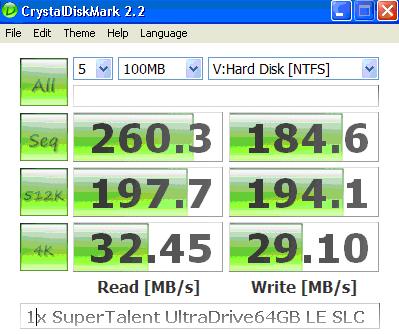
Someone requested some benchmarks for an Indilinx based SLC drive. Just put one in today. No time to really test right now but here's a look. Seems pretty good compared to other single drives I've seen posted. Have no idea what firmware it is. I just put it in and did a quick format. No tweaks (yet) that I'm aware of.
Attached Files:
-
-
Wow. That firmware rocked it....
-
Simple CrystalDiskMark results before and after update. Top is Before and bottom is After.
![[IMG]](images/storyImages/apr1309beforefirmware.th.jpg)
![[IMG]](images/storyImages/apr1309afterfirmware.th.jpg)
Last edited by a moderator: May 7, 2015 -
Performance is awesome. Is this the Solidata? How is the heat and power consumption? Hope it's not like the MLC drive.
IntelUser, how is the degradation on your SSD? -
It's a SuperTalent UltraDrive LE. Supposed to be same as Vertex except it is an SLC version. Picked it up from ewiz (SuperBiiz?) I'm using as a shared drive among 3 workstations so I wanted an SLC drive. So far seems good.
-
Man I'm tired. Solidata is Jmicron. Sounds like the SLC Idilinx SSDs are awesome.
-
how much would a 160gb SSD cost? 250gb? Also, what is the life time of these?
Thank ye -
An SLC will last you far longer than your PC will.
-
It was never that bad. But some rare occurences of freezing for 2-3 seconds did occur. The benchmarks never show what's happening all the time in real time so hard to tell of course.
-
I dont consider about the life time of SSD. coz I wont keep a hard drive that long. I dont know who will keep a hard drive for 5++ years???
-
I still use WD360GD Raptor 36GB drive. I bought it as soon as it was available near me. So I had it for almost 6 years.
The new SSD Thread (Benchmarks, Brands, News and Advice)
Discussion in 'Hardware Components and Aftermarket Upgrades' started by Les, Jan 14, 2008.



![[IMG]](http://img6.imageshack.us/my.php?image=apr1309beforefirmware.jpg)
![[IMG]](http://img6.imageshack.us/my.php?image=apr1309afterfirmware.jpg)

