Problems? See this thread at archive.org.
oh, I know, but I don't have a DVD drive anymore... and my LAN I believe is Intel.
-
4K Reads are not that important. For reads, sequential speeds are important as random speeds. But for writes its different. It's the way SSDs work.
Intel drive excels in: Sequential Read/Random Write small file sizes
http://www.techreport.com/articles.x/17269/7
And it pays off, why? It's because an SSD uses different logical and physical tables. The entire drive will essentially will be more or less "random". Depending on your usage, it might be the most important stat. -
There is a thread over at the OCZ forums about a firmware flasher for the Summit series SSD. The Summit series has a Samsung controller. Up until recently the SSD's were shipped without garbage collection and users with original firmware are experiencing significant degradation in read/write benchmarks. Samsung has issued a beta flasher but will not allow OCZ to make it public. Samsung has also stated that a firmware flasher would be issued by the time Windows 7 is released.
The thread has got over 5,000 hits yesterday alone 13,800 something since it began a couple weeks ago. Could be the Newegg shellshocker Monday that had the 60gb Summit for $129.
This morning OCZ moderators closed the thread until a firmware flasher is issued. -
My Drive is faster in Sequentials than intel (except for small block), so they dont actually excel there (though in truth 260 vs 250 isnt that noticable so its mostly a moot point)
The only think intel really does well is the small block sequential reads/writes and random read/writes. Which i do agree with you is very important due to the arrangement that SSD's use, but for "most" (and i do stress most not all) there will come a point that the small block isnt going to matter.
Most files written (program files) "should" be more or less sequential (though i suppose with the way SSD's are broken up thats a bit of a misnomer in itself) and the random files on the system, shouldnt be so large or numerous that it takes 10zillion IOPS to read or write them effectively.
Thats why i was talking about the satraturion effect. While some intense power users will need the insane random capability of intel, i would dare say most users will never notice a difference. For most users it will only come into play at the very last stages of drive fill up where everything is becoming more and more random as the drive tries to effectivly wearlevel and add new info.
Having said all of that i'm not disagresing that intel is more than likely the top SSD available, but its not so amazing as to be the only contender for that spot.
Though i will get down on my knees and thank intel from the bottom of my heart for forcing the rest of the industry to start a price war on SSD's and that in itself makes intel a king among SSD companies
-
well, what you, and most others don't get, is "saving a file" does not result in ONE SEQUENCIAL WRITE. it results in an update of the file system, and it gets updated at several, different places. so mostly any write is some random small writes, and a bigger (but random, too) write.
same for reads.
(it would be nearly true on a fat32 formatted drive. there, a save, and a load, means accessing the fat, if you're lucky, once, and then the file, if lucky, in one bit).. but modern file systems are very complex built, so randomness is always the default. -
not to mention that intel has almost all other SSD (for instance Crucial) beat $/gb
-
Very true, each file with in a program is written seperately, but one would think the controller would split those files down the various pipelines it has available (as the intel and indilinix controllers use a for lack of a better word RAID set up) and the file journal would record that sequentailly. If not then their is still a fundimental flaw either in the journal system or the way SSD's store data.
Even Large files (say a 10GB movie) should more likely than not be split between the pipe lines to obtain a better overall transfer. But again the journal shoul record those blocks sequentially
Though i am mostly speaking of installing files and not updating already installed programs which would be a completely random even in most cases (as the controller has no way of knowing how much space you will need for saves and updates)
But again i go back to my point of "most" users wont be using programs that require 10GB random saves.
I'm, agan, not saying intel isnt the top teir of SSD's just its not an insane amount ahead of others in the top teir. THough i am still rooting for them (or anyone really) to produce a drive that all forms of writes and reads max the SATA2/SATA3 connection. No one would need speeds like that for many many years, but it would be nice to have
agreed
ewww you had to go and mention a FAT32 system
NTFS is showing its age a bit but its still better than FAT... though ext4 is blazing fast compariativly and has much more capacity. I wonder when MS is going to update its file system (still room for alot of improvment from them)
I actually kind of did mention the price thing (just not in a GB/$ fashion)
-
actually, that was not what i ment. what i mean is, even an unfragmented (and in the ssd unfragmented) file-save happens to create much more file reads and file writes besides the actual file.
file system might get a new file entry, but has to get updated anyways.
last file access has to be updated
last used file shortcut has to be updated in windows, and registry entries or file entries for the app that saved it, too.
indexing softwares of all kind will happily read the new file, and write to their indexes (that won't be a single nice write)
vire scan softwares will scan the file, big chance for another disk access to the vire-database. maybe they update their index on "save files", other file writes.
etc etc.. that's just out of my head, system sure does even more.
so, saving a file does not mean ONE FILE WRITE even for the os.
and then we can start about file system fragmentation as a next layer, and then we can talk about the ssd indirection and controller based fragmentation for wear leveling on the ssd.
and then you should realise that typical os usage means tons of random reads and writes everytime you're "not doing much". (don't let us start about browsing, and what indexes and lists and caches and all get written and read all the time during it).
and that's where the intel shines, and that's why the intel feels more snappy in os usage than the samsung for me: as the cummulated accesses to the disk are really random for a single click, and the intel then just delivers faster, at least faster the first reaction. if i start a bigger program, obviously the large file reads will dominate in the benchmark, but no one benches how long till the first loading screen. there, intel shines. -
ah ok, nevermind then we're on the same page again i think
I was talking about something completely different -
yes. but both is true
-
hehehe! INtel in 1 day! YAH!
really there is nothing wrong with the Vertex, or equivelents except the price.
It cost about 240$ for a 60GB Vertex in Canada, Intel 80GB G1 234. Or G2 is 275$.
so in both cases intel is the better deal. just imagine... 4x80GB RAID 0... oh! I wish I could... anyone care to give me 3 more 80GB intels?
what do you guys think I should do with my older Jmicron Drive? it's the G.Skill 64GB one. it's one of the better ones with limited to no stuttering -
Make it a large temp folder for backup images of your drive. Test writes on it to see how long it can go and how much it degrades.
-
Hey, look at what I sees:
OCZ Agility EX SLC SSD
http://www.legitreviews.com/news/6403/
what do you think? -
http://www.legitreviews.com/article/988/5/
Not in actual measurements. Many equal/higher rated drives don't reach that with measurements and especially not after degradation. The 200-something rated Veetex often had average read throughput of 140MB/s. Like Postville for example shows 0.0ms as the read latency is too low for some programs to measure.
Excellent read speeds with blisteringly fast random writes. Seems to work well if not better than those with 3x sequential writes and relatively fast reads.
See, I'm pretty sure higher sequential writes are better to market for one thing. It's also not completely useless metric of measuring performance. But they went with low sequential writes anyway. Plus Postville gets significantly higher file transfers with little to no increase in write throughput. How did they do that? -
Here is output from HD Tune 3.5. I used it to test my new Intel 160GB G2. The performance looks about 10% lower than what I have seen from others (perhaps on an emptier drive?).
-
Use the JMicron firmware update on it. It will breath new life into it. Then you can use it in a number of scenarios - HTPC, CarPC, portable storage...or just use it in an older computer.
-
I might do that... my Bittorrent server could use this... anyone know if the G.Skill is supported?
Edit: or maybe my i7, if the update is a big difference. -
Just finished installing my new Intel SSD in my work notebook (below).
The documentation for my machine claimed that it was SATA 150. I took the plunge anyway, figuring that sequential reads were really the only aspect of the Intel's performance that would be bottlenecked. Results were a pleasant surprise, to say the least.Attached Files:
-
-
You aren't bottlenecked thankfully
The Agility EX looks really good, though I thought the Agility was Samsung controller based w/ 128MB cache. For $399 that's really competitively priced for a 64GB SLC drive! -
I cant say I see a point in SLC, it last way longer than MLC is the main advantage IMO but if a MLC is supposed to last like 5 years, dont you think most people will upgrade to a newer faster and better SSD in like 3 years well before its end of life, and the money saved going with a MLC now will pay for your much better and faster SSD in the future.
-
one thing about slc is, due to the longer livings, it allows for a more "simple" wearleveling and all, resulting in better, more constant performances. writes can be, thus, faster.
-
as I recall, slc memory is by default faster than mlc, but, controllers has improved so much, so, slc-mlc difference is no more relevant...
-
as there are so much discussions about wear leveling algorithms, GCs, performance loss over time/depending on freespace, etc, and none of this was ever much of an issue with mtrons or memorights soon two years ago, when they got first announced, i guess, yes, there is still a huge gap between slc and mlc.
but with lots of messing around, the companies get that gap to be hidden quite well, yes. -
There has to be something to it if SLC's are still being produced and marketed to wholesale buyers and server conglomerates. I just...if I'm gonna' spend a few hundred on new technology, it would eat me up not to get an SLC drive. I'd like to try it before I bash it.
-
The pricing in Canada is not very good, 100% agree. However, if you were to compare with the Crucial M225 64GB at newegg.ca when it was $165 (2 weeks ago, before they ran out of stock and then subsequently raised the price) or the Supertalent ME (64GB for $149 for ShellShocker special), these are where the Indilinx based SSD's should be in terms of pricing, imo. They are good drives but they need to be clearly under $200 (no, $199 doesn't count ) for them to be really attractive alternative.
-
The Agility is an indilinx drive with cheaper/slower FLASH chips than the vertex... So i would assume the same is true with the SLC versions of the two...
-
Hi Chris,
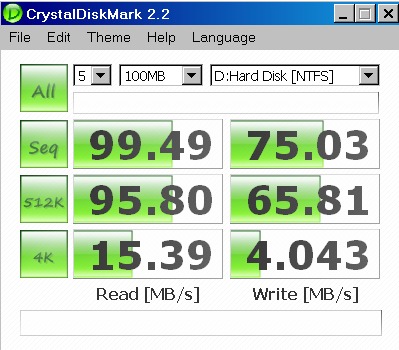
What operating system/hardware are you using? My results don't seem as good as yours. I am using XP on a Dell D830.
HB -
xp? have you aligned it (the partition)? what are your results? is 150MB/s the limit, or not?
and he has the g2, which one do you have? g2, too? -
Hi Dave,
My HDTune results are in post:
http://forum.notebookreview.com/showpost.php?p=5248885&postcount=7872
In that post, I indicated that I have G2.
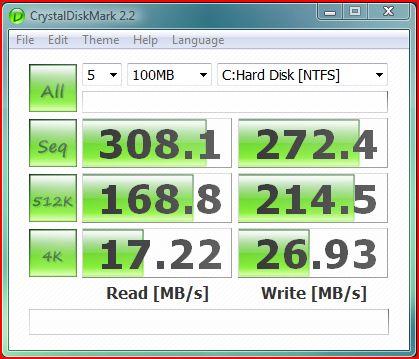
My CrystalDiskMark 2.2 results are:
![[IMG]](images/storyImages/CrystalDiskMark2.2.gif)
I have not aligned. I turned off the page file.
Thanks,
HB -
alignment would be the only thing (besides using xp on such nice hw
) that would be causing the difference. pagefile doesn't affect this at all, and is useless to turn off anyways. *runs and hides*
but i'd say it has to be some driver for the sata, or the alignment causing this.
i get 230MB/s read with the G1 on win7 right now, and had around 250MB/s on vista. but this might be driver related as i have some mess with the sata drivers currently (and some others).
-
Oh yeah, thanks. I was thinking Summit for a minute there. And it's almost half the price of the Vertex EX, for a slight decrease in speed, a good deal...
-
It's the work laptop (Fujitsu) in my signature: Lifebook S6520, Vista Business, etc.
-
Would a 16GB SSD be too small? My laptop has two HDD bays and I already have a 500GB 5400RPM HDD, so I would really like to make a SSD my primary drive. However, my laptop doesn't support raid, so I was wondering how I would go about making an SSD my primary and if it would give that much of a performance increase...
-
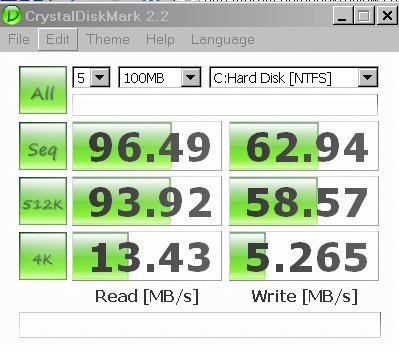
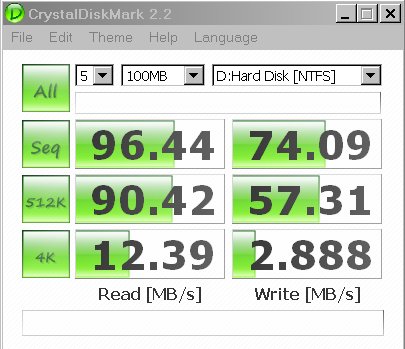
What to think about the following CrystalDiskMark ratings ?
I have different values for the C and D ...Attached Files:
-
-
Looks like normal variation to me. The drop in sequential write may be due to a few processes interfering while benchmarking
-
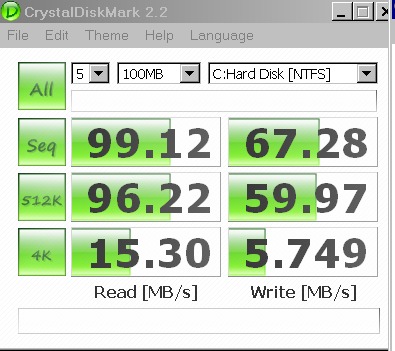
Ok, Mozilla had around 100 windows open and had a java application running, I will try again with nothing running.
What are typical values for a normal HD ?
Now I did benchmark with a clean PC after restart.Attached Files:
-
-
I don't understand, I been waiting for over a month now... when is the 160 gb Intel G2 SSD will finally hit newegg.ca?!!!?? I am sick of waiting!
-
How can I tell which firmware revision I have?
-
It's not happening. Newegg.ca took over a YEAR to list the G1 80GB. buy it from NCIX.com. I get my shipments in 2-3days with the standard UPS shipping. newegg = minimum 6 business days.
http://www.ncix.com/products/index.php?sku=41763&vpn=SSDSA2MH160G2C1&manufacture=Intel
Also, if you find it cheaper elsewhere use there price match feature and you'll get the lowest cost (they price match newegg.ca). -
![[IMG]](images/storyImages/oczs.jpg)
Ocz vertex 120gb (1.41b firmware) -
Just got my 60gb ocz summit shell shocker $129.99, installed Windows 7 and display driver, crystalmark...
![[IMG]](images/storyImages/ssdr.png) [/url][/IMG]
[/url][/IMG]
-
Do you have CrystalDiskMark benchmarks ?
-
Does turning off the page file makes a big difference ?
-
got 80GB G1, Vista Intall is almost done!
the coldest part of my computer is now the HDD bay!! far cooler than my Jmicron! -
well looks like newegg increased the price of the 80gb g2 and the eta is now 9/2.
-
increasing the price on popular items is newegg's MO, so this really doesn't suprise me... they know people will still buy it...
-
No, it was available for a very short period today, as I received a notification that it was in stock again. Must have sold out within 2 hours then.
One question: What are the advantages of the Intel G2 SSDs over the Intel G1 SSDs besides the slight increase in write speed? I might grab an 80GB Intel G1 SSD soon. -
I think the increased write and a little bit faster Random read. I just got a G1 today. still installing drivers etc. but it's going very quick.
-
Official TRIM support.
The new SSD Thread (Benchmarks, Brands, News and Advice)
Discussion in 'Hardware Components and Aftermarket Upgrades' started by Les, Jan 14, 2008.