Problems? See this thread at archive.org.
As in, there is an "unofficial" way to enable TRIM on G1 drives?
-
-
I just ordered an Intel 80GB SSD for my Lenovo T500. I've a VMWare image of almost 12gb.
Shall I put the VMWare Image on the SSD or on my 320gb 5400rpm drive going to the Ultrabay? -
wow, I have the EXACT same setup(unless you ordered the G2) I'd put it on the SSD... VM loading at 230+ MB/s pretty nice.
-
I just ordered Intel G2 from this site in UK
http://www.scan.co.uk/Products/80GB-Intel-MLC-Flash-25-SSD-SATA-3Gb-s-Read-250MB-s-Write-70MB-s-OEM
I don't know whether it's in stock until Saturday when it should be delivered -
VM's fly on a good SSD, I'd run it there

-
NCIX.com is running low on the G1 Intel hardware... I just got a back order notice on the 2nd drive I orded for my bro. hmmm... I'll be upset if he get the G2 instead...
-
no, so far, there isn't. but as trim will only be supported on win7, and even there are issues (all the drivers have to support it down to the disk), and trim only helps to "stay as clean as before" on the disk, but does not help to clean it up at all, you still have to have a fast garbage collecting disk for cleaning up if you access it just once without trim.
so while trim support is nice, it may help ssd manufacturers to hide the problems of bad ssds (suddenly, even good old first gen jmicron would perform well) instead of really fixing them. so, for me, trim is a mixed bag. and as win7 is a mixed bag, too, i have no plans so far to moving over to it.
but yeah, that's mostly it: g1 -> g2: bit more speed in random cases, trim support.
i would right now have the money to buy some ssds.. but somehow, i'm not in the mood for it i wait currently for my axis-49 midi-keyboard. that'll provide endless fun, hopefully starting next week
-
damn never got that email
-
Just pulled the trigger on a Crucial CT256M225. I really wanted the G2 Intel, but I need something bigger than 160GB, and who knows when the Intel 320GB unit will be released. I was going to buy the CT256M225 for $535 from NewEgg, but since they ran out of stock they have raised the price to $575 and now $599. I got it from a reputable reseller for $549 shipped. It should be here next Wednesday.
So is this the part where everyone piles on and tells me what a mistake I've made?
-
NO!!!! you didn't make a mistake at all the M225 is a VERY capable drive and will be far cheaper than the Intel 320GB when it comes out (like a month or so I believe). It's also A LOT faster at writes and is pretty close on reads.
Enjoy! I wanted the 128GB but it was overkill and out of stock. -
WHAT A MISTAKE!!!!
i hope it's a good mistake
i hope you like it.
Last edited by a moderator: May 8, 2015 -
Hey!
I've read every single post to this thread (some even twice!) and have come to the conclusion that the Intel drive(s) are the only ones I'll consider. Whether I end up with a 160GB G2 or a 320GB G2.5 is the only question.
I am looking to upgrade my Win 7 x64 Sony AW to 8GB ram and an Intel SSD upgrade will definitely finally put further upgrading that notebook at the bottom of my (performance) list.
At least for the foreseeable future.
However, I wanted to ask the knowledgeable members on this list what I should expect coming not only from a Scorpio Blue 500GB drive in the notebook, but also being used to an 8GB Intel quad-core desktop with 1 velociraptor, 3 'regular' raptors and 2, 1TB Seagate drives for storage.
I know that I will get better than vraptor 'desktop-like' performance from a single Intel ssd (numbers-wise), but my question is will the notebook be so far above my quad core desktop that I should just go ahead and order two (or more) ssd's to upgrade the notebook and the desktop computers at the same time?
Also, (for the notebook) would you order the ssd first, or go from 4GB to 8GB of ram in the computer first? (I'm guessing the ssd - but it doesn't hurt to ask the experts).
For a little more background;
I use my computers for photo editing and typically have 4 or more high-end raw image editing programs running (at least on my desktop).
I have also tried the Seagate 7200.4 500GB hard drive in the Sony AW and it felt much less responsive to me than the 500GB 'Blue. Although technically it is 'faster'; it was not a very satisfying experience for me because of this 'lag' (if davepermen has used this drive, I'm sure he'll agree with me).
For sake of reference, the best notebook hard drive I've ever owned/used is the Hitachi 7K200 - it is so far ahead of the Seagate 7200.4 in 'responsiveness' that I returned 2, 7200.4 Seagates because I thought they were 'broken'. (This was determined even before Vista had finished installing on them)!
By going ssd - and specifically Intel ssd, I hope to get the snap and responsiveness that I have always pursued in all my computers - since the original TRS-80 dual floppy drive 'monster'!
I also wanted to thank everyone for their contribution to this thread - wow! I've learned a lot from all you guys!
Thanks in advance for any and all responses and if anyone sees a great deal for a Canadian price for these intels, please, please, please post here! -
well, my core2duo 1.2ghz 2gb ram kicked my core2quad 2.4ghz 4gb *** after i got an mtron into my laptop. it was "only" 100MB/s and higher latency than the intels.
but my desktop didn't have raptor raids. i would still order for the desktop, too, if you can afford it. just because it allows to silence those raptors and you don't want to be worse at the desktop than on the laptop
well, if money is no problem (but it looks like it isn't for you) -
davepermen,
Thanks for that! That's exactly the information I was looking for.
Just to clarify though... I originally had the 4 raptors in RAID 0, but couldn't live with the decrease in responsiveness (yes, decrease). Of course, this was using only the Asus' motherboard's onboard RAID options, but it definitely 'felt' slower than running a single vraptor by itself (with the 3 other raptors being used as temp drives for the various photo-editing programs I run).
Copying (huge) files back and forth though - whoa! that's what RAID 0 is built for and not even the newest vraptor could touch even a 2 drive RAID 0 of the old, (original) 74GB Raptors... still (to me) the computer felt slower overall!
As to the 'money is no problem' issue... let's just say that you've enjoyed the mtron's performance while I simply drooled at the performance charts for that drive!
Nevertheless, time is money and if I notice even a 30% increase in productivity, then this will be money well spent.
Are there any other 'real-use' stories out there for the rest of us who haven't jumped in to ssd-land yet? -
hdds are loooouuud
if you get used to not hear anything from your disk, hdd's are sooo annoying
-
EDIT: NM, re-read your post and saw that you did used the Fujitsu notebook no MBP.
Interesting... is your Macbook Pro this model: MacBookPro4,1
How is it possible for you to get more than SATA150 speed? What version of OSX are you running, did you do any tweaks? Please tell, I don't want to buy a new MBP just to use an SSD
-
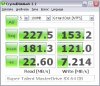
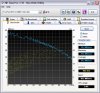
60gb ocz summit benchmarks
![[IMG]](images/storyImages/atto.png)
![[IMG]](images/storyImages/cdmr.png)
![[IMG]](images/storyImages/wei.th.png) [/URL][/IMG]
[/URL][/IMG]
did some tweaking--enable write cache, disable indexing, disable superfetch -
ATTO results for my Super Talent MasterDrive SX 64 GB look almost the same for Your Summit 60 GB, but CDM are fare better.
Attached Files:
-
-
Weird, thought they both used the same Samsung controller.
-
I know what you mean. Fans too!
-
What tweaks if any, are you using? What firmware revision do you have? Mine is Revision VBM18C1Q
-
yep. i'm building up a no-fan-environment. i only like real fans. those groupies that like to listen me when i'm gigging
-
I think they are using same controller because ATTO results are almost the same.
Mine is VBM1801Q.
Edit: After little google-ing I find that VBM18C1Q is newer FW and have better garbage collection. -
how does the OCZ Vertex Turbo compare to the intel x25 g2?
-
like turbo SSD vs. bi-turbo SSD (Vertex Turbo vs. Intel G2)
-
256GB X25-E 34nm on the way
http://www.fudzilla.com/content/view/15225/1/
So according to current pricing that'll be ~$1500
The Turbo is merely Vertex with faster on-board DRAM. It'll be faster than the regular one in everything, but its not a redesign so it'll still compare similar to the X25 as before, as in, random writes are untouchable by any other drive, and sequential writes are faster on Vertex. -
AHAHAHAHAH. Oh man, a man can dream.
-
![[IMG]](images/storyImages/34391154.png)
shouldn't my performance be better than this? -
Are You kidding?
Here are results for 2.5" HDD Fujitsu MHV2100BH (spinning at 5400 RPM) that I got with notebook and for my SSD (witch should be same as Yours).Attached Files:
-
-
yes your being bottle necked by something
-
Hey folks, does anyone know if there are any PATA SSDs out there that aren't powered by a JMicron controller or an equivalently bad controller? I've been Googling for the past hour or so, and not really getting any solid info and/or benchmarks. Thanks!
-
well, photoshop cs4 portable edition is ready to run 2-3 sec after i click on it's icon to open on my d620
-
PhotoFast G-Monster IDE V2 with Indilix
Here are benchmarks for 128 GB
BTW: just pay attention that G-Monster IDE with JMicron is blue, G-Monster SATA V2 is red and You are looking for yellow G-Monster IDE V2 with Indilix -
I just installed the Intel SSD 80GB G2 that was delivered today in UK and these are the benchmark
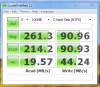
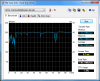
What does these numbers and readings mean? -
There is no image?
-
Sorry, I'm struggling trying to load images. But here it is
View attachment 37956
View attachment 37957 -
This is impressive, save that I can only find one e-tailer for the drive, and at $250 for a 32GB unit at that. Is that really the MSRP of this thing, or are they just taking advantage of the fact that they're the only people selling it?
Second generation? I finallypicked up a first generation after NewEgg raised the price of the Gen2 to something stupid and eBay prices of the Gen1 started falling... -
How do someone load pics of benchmark on NBR?
-
darQ96, Thanks!
That 2-3 seconds for opening CS4 is with 2GB RAM and 32bit Win 7 on a 1.66Ghz cpu - very impressive.
Is this on an Intel (G1 or G2), or some other brand ssd?
chukwe,
Even more impressive are the benchmarks that the G2 Intels deliver 'fresh' - those write speeds are insane (the 4K ones - + 44MB/s).
(BTW, I can see all your attached images so whatever you did - you fixed them).
When Intel issues the firmware that officially supports TRIM in Win 7, then will this be (closer to) the new benchmarks we should be expecting (260/90 MB/s instead of 250/70 MB/s)?
Like many other people on this thread, I may not even be able to wait for a G2 (the G1's are available NOW - just a 10 minute drive away)! -
host your picture (imageshack/photobucket) and link to it using url + "insert image" option
-
Intel SSD 80GB 2nd Gen is out in UK for £170 from www.scan.co.uk. I'm using mine on my Lenovo T500 Windows 7 Ultimate X64. My Temp is averaging 32C using Speed Fan which very cool.
![[IMG]](images/storyImages/_action=view¤t=hdtune.png)
![[IMG]](images/storyImages/_action=view¤t=diskmark.png)
-
That Agility EX doesn't seem like a bad option at all. Maybe we'll have real competition in the SLC market. I should have just bought the 1.8 inch 64 GB Samsungs when they were $200 on Newegg: I have to admit even with the stupidly fast speeds of Intel, Indillix, and Samsung MLCs I too am the kind of person who would sacrifice a little speed for the peace of mind of SLC.
-
![[IMG]](images/storyImages/betterr.png)
![[IMG]](images/storyImages/uhhuh.png)
Had to go device manager and uninstall Nvidia sata controller>check box delete driver. Microsoft installed default sata controller after a couple reboots. -
Probably just taking advantage, but if Your fine with 32 GB SSD than maybe MTRON MOBI 1.8" ZIF IDE + ZIP to 44-pin IDE adapter or Samsung 1.8" 50-pin + 50-pin IDE to 44-pin IDE adapter will do the job.
Bout are SLC, MTRON power consumption is much higher then Samsung, but MTRON is faster.
I was using Samsung 16 GB 1.8" + 50-pin to 44-pin adapter in Dell Latitude D600 and it worked very good.
It's just numbers and they look OK, but if it's working fine and better then previous HDD/SSD then it's working perfect. -
Now it's fine. :yes:
Enjoy it! -
yap, it's very cool, and, I must say, it is PORTABLE edition, so, portables usually load longer than normal installed versions
and, loading on ssd is so fast, so, I just like to use those portable editions
ssd I use is not intel, it is samsung slc, the one from my signature
p.s.
those portables are really cool stuff, couse, once you reinstall windows and realize that all those cool portable stuff are on another non-system partition, ready to be lunched again, one will feel need to have all soft portable
-
Does anyone have more info about the SSD in Toshiba's R600?
http://laptops.toshiba.com/laptops/portege/R600 -
MTRON was actually my first consideration, but it's also expensive. 16GB costs almost as much as the X25-M I just bought (though at least they make a 16GB device). Do you have any benchmarks for the Samsung drive? I recall someone way back mentioning that it wasn't very good...
-
Here are benchmarks.
Probably it isn't very good comparing to Intel, Indilix based or new Samsung SSDs but I'm sure it is better than any JMicron SSD and it was much more better then HDD I had in Dell Latitude D600 before I bought it.Attached Files:
-
-
darQ96,
I wanted to ask what you meant by portable edition of CS4. Is this something we can make/do with any app, or does each software manufacturer have to provide a specific edition that is portable?
I can see the allure of re-installing your computer and instantly having all your apps ready to go!
Actually, if you had a big enough usb stick, you would be able to use All your programs on Any computer, right?
If you 'made' CS4 portable yourself, can you point me to any resources so that I can do this for my apps too?
Thanks!
The new SSD Thread (Benchmarks, Brands, News and Advice)
Discussion in 'Hardware Components and Aftermarket Upgrades' started by Les, Jan 14, 2008.