Problems? See this thread at archive.org.
Well, it's not like I can't afford it. It's more of a matter of improvement over cost ratio. Plus, I would rather RMA the drive first before dumping it on someone else.
-
well, improvements should be big, having enough storage, and getting your intel to run at full speed all time.
but yeah, first RMA, then sell it..
-
Sorry Dave, degradation being proven to not happen anymore is false. And I'm not talking about small degradation, I'm talking about it getting bad enough for it to be feel-able. I've been able to successfully degrade every single X25-M I've come across (4), all with the firmware update and all within 2 weeks of owning the drive. Degradation hasn't been eliminated, but the threshold to reach it has been significantly increased. Now with the firmware update if I simply lighten my usual activity I don't have any problems, whereas I had to significantly modify my behavior prior to the update. It's a small but important nitpick.
Which isn't to say I'm not a fan of the drive. I'm pulling this number out of my but I'm guessing that 95% will never see any issues with the X25-M, and I recommend it to everyone who can fit it in their budget. And with the G2s, I'm assuming that once the TRIM firmware is released, we'll be able to confidently say that there will be no more degradation. -
well, degradation being an issue rendering the drive unusable, that got eliminated.
all other degradation is natural and happens on all ssds, and even with trim, degradation due to filling the disk will still happen. that's just natural.
but degradation being an issue slowing down the disk to unusable states, that's a thing of the past.
or do you physically notice the degraded state, without benching? (and without filling up the disk to nearly full to really get to the extreme?) -
Physically notice it, with the drive being only 60% or so full. Firefox hangs, the Adobe Creative Suite hangs, etc. The drive certainly isn't unusable, but it's nowhere near perfect in that state either.
-
interesting, don't notice it here, even when going sometimes to 80% or so. and having recently installed win7 and removed it, and never did a hdderase.
so it should be in degraded mode by now for sure. still performs just as on day one.
but the real issue was that it went to unusable. and that got fixed. -
It's not caused by simply filling the drive to x% and leaving it that way, it's by constantly moving data in and out of it. For example, transferring 20-50GB into and out of the drive every day or every other day.
-
i know. but i've overwritten it by now quite some times, too. that's what i ment.
-
Perhaps you haven't done it with enough data? We're talking about a couple of terabytes worth within a relatively small amount of time.
-
do i have to disable indexing when using a ssd? i heard it should be disabled :x
thanks -
Firefox hang Here! So I switched to IE. Whatever, I'm fine with it. I'm pretty sure in a few month IE will hang and I'll be back to Firefox. Strange, strange device
Transferring large amounts of data regularly, NOT! Hell, I have used this computer without ever transferring any data for 3-4 weeks.
There definitely is something up but nobody really knows. -
uhm so there are some bugs with ssd´s.. hmm
-
Bizarre. I think the transferring large amounts of data degradation is consistent since I've been able to recreate it on 4 drives, but I don't know what would cause hangups without it. Have you tried a different drive? And how do your ATTO runs look? Whenever I've reached the degradation threshold, I always get a significantly reduced write speed on one of the small file sizes. The specific size varies, but it's always a low write on one of them without fail.
-
From what I gather it depends on how you use the 'search' function in Windows. If, like me, you only ever use it to search for filenames then you may as well switch it off as searching is so quick on an SSD.
However, I've been told that, if you often search for data within files (i.e., you want to find the phrase "purple penguins eat peanuts" in a Word document) then you should leave indexing on. -
firefox going wrong these last days my internet banking wont login in firefox some another sites wrongly displayed am using chrome ..IE stopping working in win 7 x64 dunno why ...
-
Guys I just made som benchmarks again and write speed is lower? i had 190
-
my ssd went back to higher score yay 7.1
-
no, don't. au contraire, leave it enabled, as it was never less notisable to be enabled, and still gives you tons of gains.
-
it might be bugs in the os, too, which doesn't yet treat the ssd right. because for the most time, they work fine to perfect. so if it's just f.e. firefox that hangs (or outlook was a big boy at the beginning), then they need to get fixed.
-
just leave it on anyways as it doesn't hurt. and step by step, you learn to use the search function and start to love it. took me quite some time to get used to it myself
-
Im installing the ssd atm, and i just wanted to ask if someone has a guide or a link to what i have to disable (but also where is the stuff).
Thanks, -
just disable automatic defragmentation. NOTHING ELSE.
you have now a device that is much better than any hdd => leave all enabled to experience the os in it's best form.
don't mess with it. it will degrade the os' performance, and your experience with the ssd. -
thanks guys
i will soon order a intel postville 80gb for my laptop:
-put it in laptop
-install win7 (no format) (hope it wont automaticalyl format)
-disable defrag in "disk defragmenter"
-have fun
is that fine?
-
what ssd did you buy ?
-
80 gig is notenough
I ordered 128 and that is 119 real and after all installed soft, prog i have 80 gb free so .. that is accurate when I will install something later..
I really didnt wanted go under 250 gb but I did .. -
it should, on win7, disable defragmentation anyways (but still show it up, as it's enabled for other disks that you might plug in your system). so you don't need to do anything.
and of course it will automatically format, but it will "quick format", which doesn't overwrite the whole disk, but just writes at the start "look, i'm C:\, and there's nothing on me yet". which is the way you would have done it on a HDD, too, because formatting without quickformat takes ages on nowadays drives. -
here is HD tach old soft won't recognize my interface
-
Thx dave, btw where do i disable it?
X25-G2 160GB
-
type "disk defragmenter" (or in my case "defragmentierung") in the startmenu, enter, confirm UAC, and there, disable "run on schedule".
![[IMG]](images/storyImages/windows-vista-disk-defrag.jpg)
i'm shocked, it was still on here!! ?!!?
-
ScifiMike12
Hi why you have SSD on SCSI and mine says Crapy IDE ??
I have SATA 2 no ?
![[IMG]](images/storyImages/asssdbenchintelssdg2916.png)
I really dont want to show score because this soft is worst , what have in my laptop, wrong measurement , wrong information etc.. -
davepermen
why u defragmenting ??
-
@ZEPHYR
Not sure who you were wink winking at back there but daveperman has as he stated a samsung gen2 mlc and i was clearly defending it the whole time, just simply stated i wouldn't buy one given the current prices and competition, and in fact, i did not buy one. I did however get two agilities that are performing wonderfully in my RAID0 set up -
Don't worry, the software can't read the drives correctly since they are running in raid.
With a single drive, it shows IDE.
![[IMG]](images/storyImages/asssdbenchintelssdsa2m0.png)
If you look at the picture it's from 2007, so it's not "his" or current.
-
well, i could have just enabled it for the pic, if it would've been mine.
but fact is, below the pic, i stated "oh crap, it's enabled on mine".
which it was, irritatingly i thought i've disabled it.
-
Obviously to those who have never used the drive yet automatically shot it down. Don't worry, I'm not singling you out here. If you don't want to consider a Samsung drive, that's your choice. At least I appreciate the fact that you don't bash it to no end.
-
well, i have it, and continue to bash it. it's not worth the money. that is a big point in the ssd topic
-
No. Just leave it enabled, it won't be a showstopper.
Hey Abula,
please have a look at http://forum.notebookreview.com/showthread.php?p=5230927#post5230927
There's a "By default, Windows 7 will do the following whenever it detects that it's running on a good SSD:" section in that post.
If you're already running Windows 7, you don't have to do anything at all. If you're running Vista, you can apply these changes to your system. If you're running XP, you can still apply "Disable defragmentation" and "Disable (...) prefetching". The post includes code snippets which you can drop into a command shell to accomplish the changes, but does not explain how to undo them. I'm sorry for any headaches, uncertainty or inconvenience caused by this, I don't have that much time at the moment.
Think before you paste, only do it if your SSD doesn't stutter. I may expand that post to contain more information about it if people are interested. If you're experiencing problems, don't hesitate to contact me.
Christoph -
about disabling prefetching: really depends on the ssd. so far, in all cases, prefetch and superfetch enhanced the performance.
so so far, i leave it everywhere on. and everyone else should, too, except if he measures gain from having it disabled.
it could be useful for systems with low amount of ram, to disable it, so that it doesn't prefetch to just later drop everything out of ram anyways. -
hey guys lets just talk about ssd improvement and how to speed up ssd
how to restore it to defaults , no about defrag thats not topic for ssd -
well, i now got my microsata-sata adapters, and have installed one of my samsungs on a mini-box i have around (tiny pc with atom330 in (2cores x 2hyperthreads @ 1.6ghz, 2gb ram)).
so now i have a samsung 128gb with 100MB/s readwrite, and the reboottime (from our famous notebookreview script) is 45 seconds with windows 7 RTM fresh installed.
what do i do with that pc now?
-
On the other hand, i would like to slow down mine cause it's too fast. I don't even have the time to read the text displayed during RE5 loading, this is unacceptable !!!!!! But i won't give up, i'm on a good rhythm and am able to read one word per loading, i guess i'll manage to read the whole sentence after 15-20 loadings
-
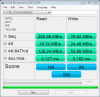
Does anyone know why my 4k read/write is so much slower than other people with the same drive??? Its a brand new X-25m G2 drive.
I even used HHDErase 3.3 to secure erase the drive when i first benchmarked it. I thought something was wrong with it. But even after a second secure erase, i am still having the same problem.
Its seems as tho my 4K scores are cut in half than what they are supposed to be. AHCI is enabled.
Attachment is the "AS SSD Benchmark Software"
The other is CrystalDiskMark
--------------------------------------------------
CrystalDiskMark 2.2 (C) 2007-2008 hiyohiyo
Crystal Dew World : http://crystalmark.info/
--------------------------------------------------
Sequential Read : 258.695 MB/s
Sequential Write : 87.820 MB/s
Random Read 512KB : 198.667 MB/s
Random Write 512KB : 85.654 MB/s
Random Read 4KB : 17.172 MB/s
Random Write 4KB : 32.277 MB/s
Test Size : 100 MB
Date : 2009/09/20 23:38:05Attached Files:
-
-
your accesstimes are quite high (should be around 0.065ms), might have to do with it?
update your sata controller drivers? -
Try using the built-in Microsoft AHCI driver.
-
thanks for the reply. Im running Windows 7, but im using Vista32 sata drivers and Intel Matrix Storage Manager from the Dell's website.
Any other ideas what may be causing slow access times?
But wouldnt slow access times effect my read speed too? My reads are normal. -
Where is this driver located?
-
I have a DELL Precision M6400 laptop. AHCI is enabled.
Problem is, my READ/WRITE SPEED are normal. Its my 4K read/write thats 50% slower than the norm. Its weird. -
Hey everyone, in post #8252 in this thread
http://forum.notebookreview.com/showpost.php?p=5303849&postcount=8252
and post #8259
http://forum.notebookreview.com/showpost.php?p=5304727&postcount=8259
I was enthused about my 8GB of RAM for my VAIO (finally!). I also reported how I used a beta version of eBoostr to make the most of the RAM. This is the update I promised.
I have found no compatibility issues so far, but I found that instead of using RAM as the cache for eBoostr, the most sense is to use a USB stick or in my case, a Lexar 16GB SSD ExpressCard drive.
I have to say, this is a very bad (slow, slow slow) drive for backups (what I originally bought it for a couple of years ago) but decided to test it as a cache device for eBoostr.
I won't make you read the rest (unless you want); so without further ado, my conclusions are:
For the price, eBoostr is definitely worth it - not only for low RAM systems (I tried on a couple of friends computers but won't include any results here) but even (I want to say 'Especially') for high end systems too.
Looking a little forward to sometime in 2010, (and assuming that Braidwood will be at least as awesome as eBoostr is) I am thinking that Intel's Braidwood technology will be what changes things for most consumers - instead of SSD's. At least until prices drop drastically for SSD's, but even then, I think an SSD with Braidwood technology will be even more 'awesome'.
So, some numbers for you.
First, how slow is the Lexar SSD I used? eBoostr gives it a speed rating of under 27,000 KB/s for random read speed. The write speeds don't matter (they are horrible) except when eBoostr builds it's cache the first time (a 7GB cache file takes about 55 minutes to build).
So, I load 58 programs into the start menu and reboot the computer.
It takes 10 to 11 seconds to shut the computer off.
It takes 33 seconds to 'see' the desktop again.
At the two minute mark, there are 22 programs loaded.
The total time to load 58 programs is (an average) of about 5 to 6 minutes.
This is with 8GB RAM and a Scorpio Blue 500GB 5400 RPM HD. What is most noticeable is how responsive the computer feels with all these programs loaded. When in PS CS4, for example, the program responds as if it's the only one open (they all respond like that and switching between programs is very, very fluid).
I also timed how long it takes to shut down all these programs; with eBoostr enabled, it always took less than 3 minutes and, when the last program was closed, the hard drive was not thrashing around for another minute or two like the test without eBoostr enabled.
I take out the Lexar 16GB ExpressCard SSD (thereby disabling eBoostr, but still allowing it to load) and did the same 'test'.
Time to shut down: 15 to 20 seconds.
It takes 55 seconds to 'see' the desktop again.
At the two minute mark 7 programs are loaded.
The total load time for all 58 programs is (on average) about 12 to 13 minutes.
The computer felt sluggish depending what program you were switching to, and the hard drive was working with each 'switch'. When I tried PS CS4 with all the other programs open, it didn't seem that sluggish, but it was definitely slower than with eBoostr using the Lexar ExpressCard SSD as a cache (and again, the hard drive was almost always on with each mouse click I did).
The time to shut down all 58 programs took over 4 minutes, but the hard drive kept going for almost another 2 minutes.
My computer was using 62% of an 11264 KB cache (11GB total cache size and using just under 7GB for actual data), so I think that Intel aiming at 16GB for it's Braidwood technology seems 'spot-on'.
I know there was not one response to my 'is eBoostr recommended' request, but I promised I would give an update and I always try to keep my promises.
Hope someone else finds this useful. How has this helped me?
Well, with this 'tool', I think I can hold off on getting even an Intel SSD for a few extra months now - especially after all these recent posts about even the Intel drive not being 'perfect' (not that I'm comparing eBoostr to the performance boost an SSD would give a system).
Once again, I humbly ask for any opinions on others experience with eBoostr, especially when used with big RAM + SSD systems.
One other thing everyone should know; I also tested the current version too in addition to the v4 beta of eBoostr and found that the beta is definitely faster (and the only one worth considering) - specifically, I found version 3 seeming to cause the system to 'lag' and sometimes (very infrequently, but still noticeable when it happened) was much slower than even without eBoostr.
Here are some individual load times for specific programs, I know, still not SSD fast, but considering that the Lexar was only offering less than 27,000 KB/s random write speeds, I think the improvements are still in the Wow! range (for a $40 program).
...............Normal......eBoostr
PS CS4......18 sec......7 sec
NikonNX2....12 sec.....3 sec
Roxio 2009..48 sec.....5 sec
If no one else responds to this, I will drop the 'eBoostr' questions here. Thanks for your indulgence though.
Oh! Before I forget, the extra boost in battery life dropped down to about 1Hr 35Min (95 min. total just 5 min less than using RAM instead of the ExpressCard based Lexar SSD) using the ExpressCard SSD as an eBoostr cache. Still a definite improvement from 73 minutes without eBoostr. -
is it true that win7 automaticalyl turns of prefetch and superfetch when u install it on a ssd? if yes, why does it disable it ? should i enable it?
normally these features should improve the performance? -
This lag you are mentioning on the bolded part.
It's inherent to caching. It happens in the "best" SSDs.
The "acceptable" SSDs are VERY expensive. Maybe at the time when storage space far outstrips usage, SSDs are still very much, a rip-off. And still, the problems are there. It cannot hide it, no matter how advanced the controllers are(Intel, Indilinx, etc.), it still exposes the weakness of flash memory.
-If the controller algorithm doesn't fail, good SSD>>>HDD
-If the controller algorithm messed up for even very short, HDD>>SSD
I love how you posted your info about eBoostr. Even if Intel fails in the software aspect with Braidwood-derivative, they tell us we can use the space like regular 16GB, SSD. Then we can use 3rd party programs when the included software doesn't work as well. If they can get the tranfer rate to really high to be damn worthy of a cache(200-400MB/s from various rumors), then it'll succeed.
The new SSD Thread (Benchmarks, Brands, News and Advice)
Discussion in 'Hardware Components and Aftermarket Upgrades' started by Les, Jan 14, 2008.