Problems? See this thread at archive.org.
Too bad ~$400 isn't a realistic price; I don't see any way to order just the SSD itself from Dell otherwise I would have gotten one already...
-
-
Hopefully someone will sell rebadged. Like OCZ or GSKILL.
But still, i've just received my new laptop, and after a year of running of a CF card, the 5400rpm isn't that bad. I'm willing to live with this for another year, really wish a good 64gig SSD drops below 100$. -
dseo80, thanks for that update...I personally would not buy an SSD if it isn't an Intel or Samsung (I trust them)...i've been eyeing those two companies so to have this first hand observation is quite rewarding for me. Again, thanks and keep um' coming.
-
It might not be a realistic price for you right now, but there are lots of early adopters who will pay that price
 $400 is pretty cheap ATM for the 128GB MLC SSD, with discounts you could be paying only $300 easily.
-
I have completed a reinstall of windows vista
I have not encoutered any disk corruption and/or stuttering so far
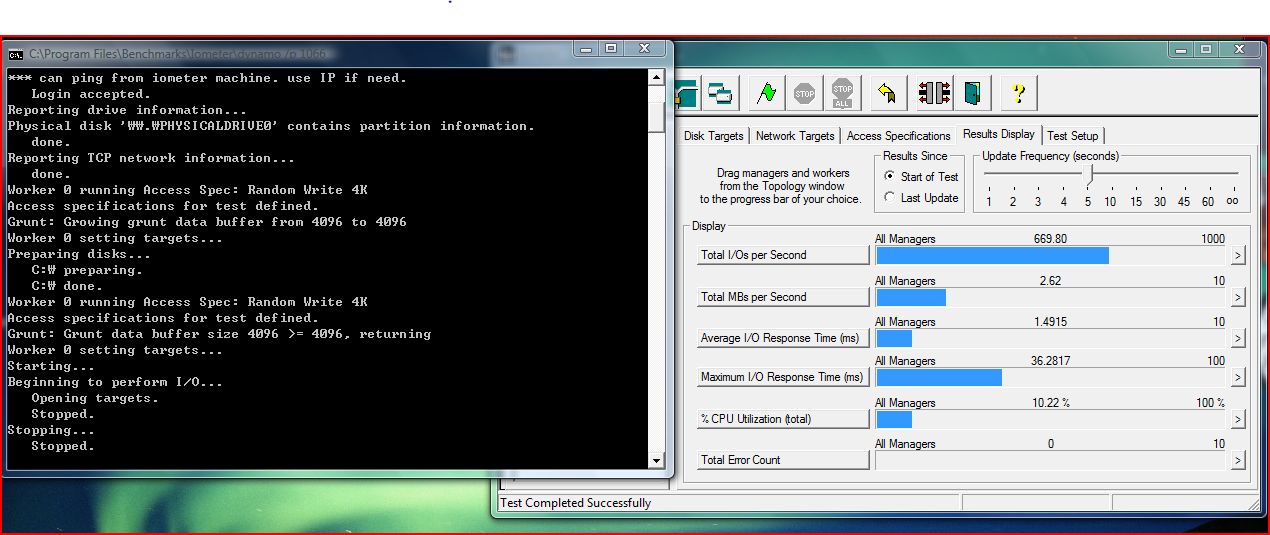
and the results from iometer indicate that i shouldnt.
the max delay for 4k random write (slowest) was 40 times less than ocz core.
(the max delays would most likely be responsible for a pause)
I will remove the drive later on tonite to get the samsung model number -
what about average write latency/iops of 4k random write?
can u run this test? its the one that a lot of ocz users get 4 iops on. -
its at the the top of this page those were done with THAT test.
I got it from the ocz forums specifically to test for the stuttering
oh and as a non ocz customer, just reading those forums will never make
me want to buy anything from ocz >.< -
oh right, it wasnt clear what test you had run - thats a great result for a MLC drive.
lets hope we get some rebadgers of this drive (even if theyre ocz!) or samsung/dell sells them retail -
You misunderstand. I already bought an OCZ Core V2 128GB SSD for $499. My point is that the Samsung drives cannot be ordered by themselves anywhere on the Dell web site, otherwise I would have gotten one already. The $400 price is academic if the only way to get it is by ordering it in a laptop - I just want the drive, not another laptop.
-
Anyhow, wow is this SSD major fun. Ive ran a couple more benchmarks, and checked the model number of the drive.
Samsung P/N: MMDOE28G5MPP-0VA
thats is the same number as the 128GB Samsung SSDs on ebay for $800~1000 currently.
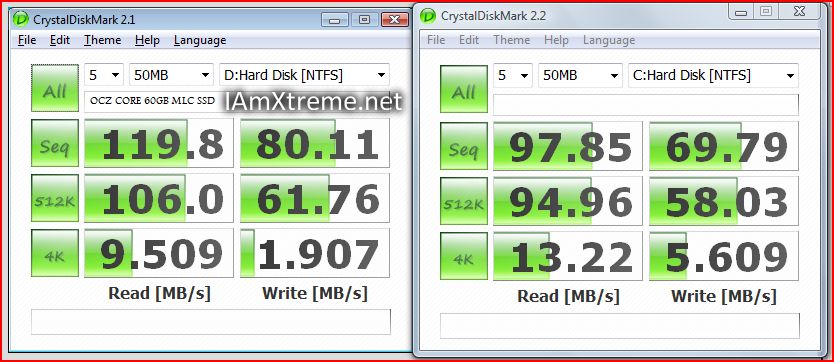
I have attached all the benchmark files down below. I've shown the ATTO benchmark compared to the OCZ Core from benchmarkreviews.com (however rigs are not the same so take it with salt.)
It basically shows similar performance except the samsung drive seems to handle multiple I/Os much better, hence average of 1ms random write delay compared to average of 250ms write delay on the core series.
Obviously the sustained seq. transfer rates are not gonna be as quick as SLC flash yet. However the random 4kb constant write rate is ~6-7 times faster than even the 64GB samsung SLC drives which have shown such great real world performance.
I think this drive (and ofcourse Intel's) prove that MLC flash can be more competitive than SLC in the mainstream market.Attached Files:
-
-
looks quite nice. nowhere close to the intel in the maximums, but as i care mostly about the minimums right now, it sounds well.
so, i'll want to get it for 400$. anyone needs a notebook without a hd? *smile* -
!!!NEWS ALERT!!!
the new intels got listed in some shops around here. You can find them among other ssd's here:
http://www.toppreise.ch/grp3_2001.html
the NEWS about it: it does list the intel SLC, too. 32gb for around 925 US$, according to google currency converter.
I can't wait to see benches of the SLC.. -
Apparently, iometer can provide widely different results when tested for 4kb random writes, depending on among other things the size and duration of the test run.
The thread below shows the Core series achieving anything between 4 and 380 IOs per second, depending on runtime (with 380 IOs per second suggesting that the Cores series would be 2x - 3x faster than a Samsung SLC, which it most likely is not).
http://www.ocztechnologyforum.com/forum/showthread.php?t=42769&page=3
dseo80,
What were the test parameters for your iometer test run?
EDIT: Found Les benchmark results for the Samsung SLC
Les' test of the 64GB Samsung SLC-drive
![[IMG]](images/storyImages/cdmsamsungrbxtc5.jpg)
-
the intel x25-m is come to market already in canada
http://www.ncix.com/products/index.php?sku=33277&vpn=SSDSA2MH080G1C5&manufacture=Others -
Indeed, the methodology outlined one page 5 of that thread basically abuses a slight 'bug' in IOmeter in order to get around the truly random part of random writes. Basically, if the drive is formatted, then it's necessary for IOmeter to create an iobw.tst file in which it can perform its testing - this is why 'preparing the drive' takes awhile. By canceling the test and restarting IOmeter before it's finished, the iobw.tst file is much smaller than intended, but IOmeter believes it to be just fine and so runs the test. So, how large was the iobw.tst file used? It should take up all free space on the drive.
-
I have not used the "bug" method the ocz representative suggested to use.
I used the method stated by the original poster and used in anandtech's review of the Intel SSD. my values of 6-7X ios of the samsung SLC come from the SLC random io tests that were performed by anandtech. -
well i had a theory on the good results with less than 10gb file compared with bad results with full iometer file - that the first 20% of the drive is performing normally, so if the test is contained on a file within this first 20%, itll be fine. (see this sequential write graph for why i think something could be fishy with the last 80% of drive).
also explains why generally ocz say they dont see the problem, because they nearly always are running the core as a non-os drive (and therefore blank). people running the OS are probably using the first 20%. and also maybe explains why ocz tony says the longer he lets the test run (im not sure if he means the allocating or actual test), the worse results get.
but as for getting someone with the core to partition the drive in 20/60/20%, and then compare performance on first 20 with last 20, havent had any luck. -
just a question while reading the thing from newkleer. is there any sense in partitioning an SSD besides 'good old habit'?
about the thing of separating data and system/programs: i'm using home server with daily backups => i don't care _what_ messes up, i just restore (best thing i've ever had..)
the gains of not having different partitions: default paths always work, as i don't have to remap anything to D: (or E.
more diskspace readily available. having a c: of 20gb and a d: of 80gb, and suddenly one of the two is full while the other still has space is just *AARGH*.
the main reason for me to partition was to split data and system for faster defragmentation and less fragmentation of the system drive. oh, and the fact that the first part of a disk is faster than the rest. but both of these reasons are mood on an ssd. -
I will still partition so i can cover my system partition with a EWF write filter but leave my data partition open. That, and i might also multiboot, and i want the data partition to be shared between the two.
Anyways, the wear leveling will still move things around accross logical paritions (i hope) so there's no worry about that. -
yep. you can then call your partitions virtual partitions.. uhh
i wouldn't use an EWF filter on a good ssd. that's just me.
hm. haven't thought about multiboot. that's one acceptable reason to still partition. -
yeh no point really mainstream ssds should outlast their usefullness neways....
-
I started write-filtering my OS when i was running of a CF card. Right now i'm running off a plain old 5400 HDD and i still put the EWF on it. There are inconveniences but i got used to feeling safe that any malware that would crap my install would be flushed with a reboot.
There's also a hypothetical increase in battery life for leaving your drive idling more often. -
i'm doing the exact same thing using a cf-ide adapter minus EWF of course lol... i reinstall so often that i cant be bothered to keep implementing it.
-
Well, doesn't it choke all the time if you don't put the EWF? The Core of OCZ could use the write filter, it would spare it all the small write chokes.
-
nah it actually boots faster than most hds, and never really chokes - and i'm using a cheap £2 cf-ide adapter that i got from ebay that only supports udma3!!! Everything's so fast lol... its prob cos i got the fastest cf card you can get- teh lexar 300x slc one.
-
Where do you get the EWF from?
-
Get it from winXPe. Follow instructions here:
http://granturing.blogspot.com/
jisaac:
Mine booted pretty fast too, and it was a crappy no name CF off ebay. The seller claimed it was x266 or something, promised 40MB/s, but the thing only got 12MB/s. And it did choke on writes, so EWF was a must for me.
Problem is now i'm on a x61 tablet and it only takes SATA. The CF to SATA adaptors are ****, and they consume just as much as a regular HDD. The old dumb IDE adaptors were good stuff, too bad i can't use it anymore. So i'm back to waiting for a real cheap energy efficient SSD to come out. -
So far, the samsung mlc drive has been living up to specs during use.
However, one thing im not satisfied with is the boot time. Although my vista
starts up only necessary devices drives and antivirus + threatfire + rmclock + windows sidebar (and all the vista visuals enabled)
it takes 40s to load into a useable OS. Is this an issue with 32bit vista? what kind of boottimes are ppl with other SSDs seeing in vista? Les?
You can check boot times in the event logger. -
vistas boottime is not that much dependend on disk speed, sadly. this is even noticable on ordinary systems, as the disk-status does not glow during the whole booting. so an ssd can only help to get rid of the disk-part of the boot process.
i don't think you can get much faster boottimes even with a ram-based bootdisk.
microsoft is working on this, as you can read up on their windows7 blog. they use all the user-data from the ones who agreed to submit improvement data. there, they have data from millions of users on boottimes, how long each driver / service etc takes, what blocks where, etc.
i'd just hoped instead of windows7, they'll marked it as vista R2 / SP2 similar to win2003 and winxp with their R2 and SP2 respectively. i don't want to pay for the update, just like in the mac world.
on the other hand, hibernate should be pretty fast on your system? (then again, having to store / load 4gb of ram does take it's bit of time.. ) -
Please excuse my ignorance, but I recall reading somewhere [and can't find it in this thread] that there are two types of SSD's: ones that will last 50+ years, and ones with normal HDD lifetimes. Which is identified by which? 'Cuz I cruise around newegg and I see some SSD's in the 128 GB range not nearly as expensive as I would have expected, and suspect these are the 'worse' SSD drives?
-
i think you're referring to slc/mlc where slc should last longer. Of course getting one of the larger capacity 128gb will also increase your drive's max no. of writes.
-
also mlc is kinder on your wallet, just make sure to read the reviews first many first generation mlc ssds have issues.
-
Why are the MLC's lower lifetime capable? What are the main differences?
-
MLC writes to a block twice as much as an SCL (it writes 2 bits of data instead of 1 like in a SLC)
-
no, they write exactly the same times to a block. However the material structure used for MLC flash is not the same as SLC flash. Due to the limited write endurance of each cell (MLC is 10000 cycles, SLC is 100000 cycles) the respective SDD's have different failure lifetimes.
-
Will SSD's coming out have MLC/SLC specified in the specs? Or is that something a retailer would try to cover up you think?
-
I received the Patriot SSD on Monday. Cloned across (and repaired) Vista and all was well.
The next morning? Nothing. Dead. Unresponsive. On three different computers.
As bad as this sounds, I'm happy that it failed quickly.
Cheers, -
Toshiba joins the MLC club:
http://www.toshiba.co.jp/about/press/2008_09/pr2602.htm -
I have read this whole thread, and when I got in here i was all exited to get 2 SSD in RAID 0 for my laptop, I was going to go with the OCZ Core v2, but all this talk of shuttering and bad benchmarks on ATTO for these drives is kinda scary.
I have one point to bring forward. If when i set my drives in RAID i set my cluster size to lets say 64k, Would that shield me for the small read/write issues since everthing will be written in blocks of at LEAST 64k. I dont really care if i waste some space (especially if it means getting rid of the drives major weakness). Has anyone tested this and could post a bench to see if it works?
anyhow let me know! i have to buy them in the next 3 days if i want to get that mail in rebate! thanks!
Also out of the Affordable MLC SSD, witch one is the less plagued by this slow writes of random small files. And can this be avoided in any way? (disabling page file, etc) -
I believe that some Core users tried different cluster sizes in a single-drive scenario and saw little improvement. On the other hand some desktop users, with raid cards that cache writes are reporting very good performance and no stuttering issues.
Unfortunately, I do not think it will be easy to find conclusive information that will let you know whether you will suffer any problems or not. If you can wait, you should probably do so since SSDs are developing rapidly (especially MLC-ones) which should result in falling prices. -
I see, so the only real alternative at the moment is the Intel 80gb drive then. Witch sells for pretty much double the price. That blows my raid-0 out of the water, but then again I am pretty much certain i wont get the OCZ witch gives me some waiting time to see better things launch.
In the end if in the next month there is nothing better i might pay the premium for the intel and use it as a single drive until i can afford a second one, simply because low power consuption, no noise and high performances simply cannot co-exist in a regular HDD.
So rounded up OCZ core v2 and Patriots Warp2 Didnt solve anything? what about Samsung? I recall seeing some nice numbers from their latest drive somewhere? -
with the intel, you may not need a raid0 at all..
-
dave:
Maybe not; but talk about some serious geek bragging rights
-
The problem is the Jmicron controller. Some say the new Patriots and Samsungs don't have this controller or have a newer/better one that doesn't stutter or have random write problems, but the reviews are few, so I'm not sure the conclusion as to if these drives are ok to use...
-
I need a 1.8" 64GB IDE ZIF SSD, any links to where I can purchase one from?
-
the only sort-of-usable one is the samsung one, now that mtron canceled the 64gb one.
i've ordered a 32gb mtron one..
both are available here. the 64gb from samsung is very costy compared to it's performance and size..
http://www.dvnation.com/Samsung-SSD-Solid-State-Disk-Drive.html => http://www.king-cart.com/cgi-bin/ca...t_name=Samsung+64GB+ZIF+SSD&exact_match=exact
sadly, they moved to sata on the 1.8" land, leaving all the ones with quite modern small notebooks that cost much to buy in the dust. it would be great to see some vendor creating a zif version of their 1.8" ssd's (espencially the intel one)
-
Ill vouch for the the samsung ssd in my xps m1530.
However you cant find them retail and its more expensive than the intel drive
off ebay. -
My Patriot V2 had the stuttering problem.
-
Urm I have it right here... Now the question is: Should I open it to see what controller has? Im not one of those guys who cares about the warranties but you know...
![[IMG]](images/storyImages/my.php_image=img0091px4.jpg)
Maybe Im ready to be the guinea pig.
The new SSD Thread (Benchmarks, Brands, News and Advice)
Discussion in 'Hardware Components and Aftermarket Upgrades' started by Les, Jan 14, 2008.