Problems? See this thread at archive.org.
Well so far every single user that said they didnt experience any lags or freeze have been very rare or simply didnt use any software that did alot of random writes of small sizes (unless I am wrong) Disabling Defender and anti-virus resident scans are all good, but in the end its sacrifices you should not have to make when you are paying 300+ for a storing solution that doesnt store all that much.
I have been doing more reading this morning, and it looks like the only ``Viable`` product on the market yet without seriously having to go out of your way with tweaks is the Intel one.
Did you run bench on your samsung and how well did it do with Random writes that are 4kb and down?
MexicanSnake: Do you experiance any lag / freeze with it? do you have windows defender/antivirus running on your machine? Did you run a random write bench with file size of 4kb and lower? Its just really hard to find accurate information out there most reviewers do not test where it hurts .. maybe to keep getting free drives from manifacturers... who knows .. but I sure want to know!
-
-
Ok, I just got it
 , Im currently looking for a screwdriver XD also Ill install Vista home premium X64 with some caching tweaks
. Wait a while and Ill post ANY benchmark you dessire
.
, Im currently looking for a screwdriver XD also Ill install Vista home premium X64 with some caching tweaks
. Wait a while and Ill post ANY benchmark you dessire
.
-
Sounds good mate, I am going out to see The Dark Knight (Finally) in a couple of hours but I will come back to look! Like I said the benchies that really mean something are the random writes of small files 4kb and down. As far as I am concerned SSD outperforms standard HDDs in the rest of the feilds easily or at least come on par with them witch is good enough for me!
+rep for the testing!
Oh and when i get this SSD, you can be sure you will get all kinda of benchmarks from me and my new machine! its already torture have it sitting there with no hard drive. :S -
Holy mother of God!!!! this thing is FAST. Maybe I dont get the "175mb/s" but this thing runs everything quickly, boots windows XP in matter of seconds
. Slowdowns??? NOT YET
.
Windows XP HDTUNE 2.55 benchmark: 64kb
![[IMG]](images/storyImages/patriotssdxt7.png)
Ok if you need more benchmarks just tell me the name of the app and what do you want .
Tomorrow Ill install vista home premium x64. Some say that the SSDs are slower in windows XP... -
Hmmm... Its either this or a BluRay drive...
Convince me! -
can anybody tell me what chipsets are being used in dell studio 15 and hp pavillion dv-5t series notebooks?
-
sorry i have not used dell and hp notebook before
i always use IBM/Lenovo thinkpad -
Nice one Mexican Snake, do you have access to Atto by any chance? and could you try the smaller size writes .. like 8kb and lower.
thanks in advance -
i also want to know these questions
thx -
Ok Ill post results this night or for tomorrow(Ill install vista x64), sorry for my ignorance, is Atto a program? maybe I can download it and post some results .
-
Thanks
Ill try this at night. I remember that I ran a 8kb test... It wasnt fast at all but it was like the speed of a regular notebook hdd BUT with 4kb or less it was slow.
Btw what settings should I set for the atto benchmark? -
As for the settings you can use a range from .5 to 128kb or higher if you want, but like i said before we all know that all MLC, SSD perform really well above that point. For the lenght you can use 128mb that should be extensive enough.
Cheers! -
Forgive my stupidity on the subject, but what exactly are we testing here?
-
If you look at the benchmark results i tested, you will see good performance on the samsung 128GB MLC drives for all random writes. Not as good as intels, but more capacity for 60% of the price.
-
Random Writes of small blocks
-
I need a need a new SSD for my Vaio TZ which brand and type would you suggest i need 1.8" ZIF SSD
-
Mtron Mobi is a good 1.8" SSD in 32GB and 64GB
http://forum.notebookreview.com/showthread.php?p=3777396&highlight=2510p#post3777396 -
the 64GB version got canceled... sadly.
so depending on storage, get the 32gb version (should be worldwide available in 2 days), else, the samsung 64gb ssd on dvnation would be okay. it's the one of the macbook air..
edit: the 64gb ssd is very expensive for what you get in performance, just to be aware. (i'd suggest ebay, but i dunno) -
So, any more work on the Patriot Warp V2? I am considering buying one, but want to hear more user opinions.
EDIT: The rebate expires tomorrow, so please let me know -
Someone in this thread said that the Patriot V2 stutters.
-
Just got a video fm Samsung showing a 2.5" ssd thrown off an overpass than put in a laptop to work fine...wondering how to post it....hmm.
-
Nice!...they should try that w/ a regular HDD.
Ahhh...the reliability of SSDs.
-
Mine does not. No matter what I try, it will not slow down.
-
Have you tried the Warp V2 on a Windows machine?
-
What do you mean slow down?
-
Hes referring to the stuttering issues that are commonplace among MLC drives.
-
What about using a file share site? Or maybe youtube.
I'd like to see it. -
http://www.dailytech.com/Super+Tale...SSDs+at+179+299+Respectively/article13087.htm
new cheapos.. hope no jmicron.. but i guess yes.
-
Dave:
It's too soon to tell with any certainty at this point.
I wonder how much of the total cost these drive-based controllers are. Is there a huge price differential between the J Micron part and other alternatives that perform better?
Just thinking out loud here. -
Full text of the SuperTalent press release:
Super Talent Shatters SSD Affordability Barriers
Too Expensive No More: a High Quality 128GB SSD for Under $300!
San Jose, California – September 30, 2008 – Super Talent Technology, a leading manufacturer of Flash storage solutions and DRAM memory modules, today launched a pair of new high quality SATA-II SSDs that shatter previous price barriers.
Super Talent’s MasterDrive SSDs have become legendary for their many advantages over hard drives. MasterDrive SSDs offer five times better resistance to shock and vibration, consume less power, support a wider range of operating temperatures and altitudes, and are completely silent. The new MasterDrive LX, offered in 64GB and 128GB capacities, offers all these benefits.
The MasterDrive LX has also undergone Super Talent’s rigorous battery of validation tests, ensuring the highest levels of compatibility and reliability. What’s unique about the MasterDrive LX is its incredibly low price point; the 64GB model will retail for about $179, while the 128GB unit is expected to retail for under $300. Both models will begin shipping this week.
Backed with Super Talent’s 1-year warranty, the MasterDrive LX is built with NAND flash and uses a SATA-II 3Gbps interface that makes it 100% interchangeable with hard disk drives. These SSDs support sequential read speeds of up to 100 MB/sec, and sequential write speeds of up to 40 MB/sec. Integrated ECC, wear leveling and bad bit management functions dramatically improve the reliability and lifespan of these SSDs.
Code:MasterDrive LX P/N Description Max Read/Write Speed Expected Street Price FTM64GO25H 64GB 2.5-inch SATA-II SSD 100/40 MB/sec $179 FTM28GO25H 128GB 2.5-inch SATA-II SSD 100/40 MB/sec $299
“The MasterDrive LX is our most cost-effective SSD yet. However, we’ve made no compromises in quality and reliability”, Super Talent Director of Marketing, Joe James explained.
About Super Talent Technology
Super Talent Technology Corporation based in San Jose, California, designs and manufactures a full range of DDR, DDR2, and DDR3 memory modules and Flash based storage devices for computers and consumer electronics. An ISO 9001 certified company, Super Talent utilizes its state-of-the-art factory and leading-edge components to produce award winning products with outstanding reliability. Super Talent is an active member of the JEDEC and ONFI standards bodies, and holds over 200 patents in Flash and DRAM technology.
Pricing is approximate as of announcement date and may change without notice. Usable capacity is less than specified after formatting.
-
I am helping a friend replace his 1.8" HDD in a HP nc2400 (I believe it is the predecessor to 2510p). We have ordered the 1.8" ZIF-ATA SSD by Samsung and are waiting for it to be delivered.
Were you succesful in getting both the Mtron SSD and the built in optical drive to function together? Previously, a guy (with a nc2400) here at NBR that replaced his drive with a Sandisk SSD was forced to remove the optical drive as the computer would hang if both optical and SSD were connected at the same time. -
Too bad the ST have such low write speeds. I hope they changed the controller or updated it. I wonder how it compares with the fastest 7200 RPM drives to see if it's really worth getting... at least the prices are a lot closer now.
-
sgogeta:
It does push a lot closer to the $2/GB threshold ($2.34/GB) as compared to other "cheaper" solutions at ~$400 (after rebate) which are at about $3.12/GB. That's a 25% drop in pricing.
Performance is a big question mark. If it doesn't stutter we're to the point that I would buy this for my laptop.
Cheers, -
That's because the idiots who design the laptop use a HDD ribbon that splits the bandwidth between the HDD and the optical drive. My TZ has the same problem, and I can't get it up above UDMA mode 2
So basically, you waste money getting a really fast SSD, because you can't achieve more than half the advertised speed anyway. -
Quick question guys: how do the SLC/MLC drives differ from regular flash drives? I got into an argument with my friend the other day about how using say a 16 GB flash drive to stick games/OS on it would be impractical, which is why they're making SSD drives. I'd appreciate some clarification.
Aside from the bottleneck of USB 2.0 connection, why do SSD's outperform lil' old flash drives? -
The basic architecture is the same, but SSDs emulate a hard-disk drive interface, while normal flash drives perform more like optical drives.
-
With SSDs there are also usually multiple controllers accessing the array to increase throughput vs a USB memory stick.
Cheers, -
Guys -
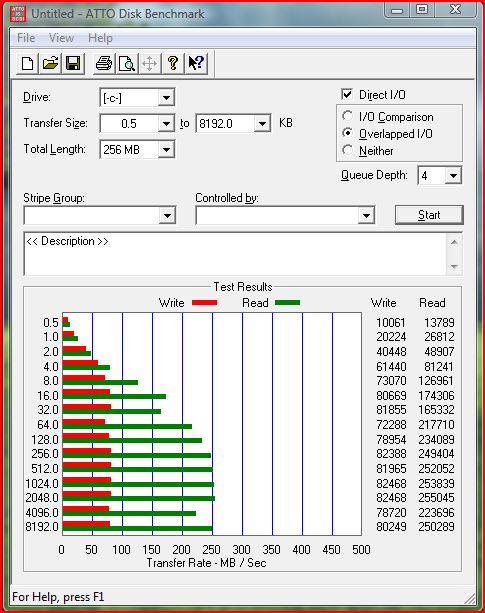
Been following this thread for a while.... Just received my Intel 80gb X25-M SSD today and threw it into my Mac Pro as an additional drive and here are some quick ATTO Benchmarks.... They look *really good*.....
Going to go ahead and install Vista on it and test again when it's my boot drive.
AaronAttached Files:
-
-
Where did you get the Intel SSD from!? And how much!?
-
I got the drive from buy.com
Search for it by part number: SSDSA2MH080G1C5
Paid $638.99
Vista is installing pretty fast on my Mac Pro (bootcamp)!!!
Aaron -
not a bad price, i ordered mine like an idiot from pcmall for my cfo. Glad you posted this, got mine and a another 2 workers from here so you just saved me about 3-400 bucks
. PS. I got the intel drive from pcmall. I don't get near the atto specs but I am on a sata 1 board so it's probably not as fast because of that, but it is still pretty dog gone fast. Same adobe 9 install that the guy with the patriot ssd above took my machine 22 seconds on the intel. Now it does have better processor but overall i still think it smokes. Too bad it's only 80GB thou got to conserve space
.
-
All -
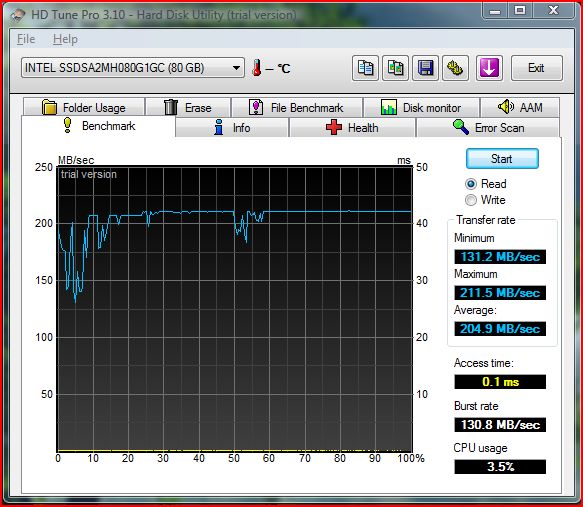
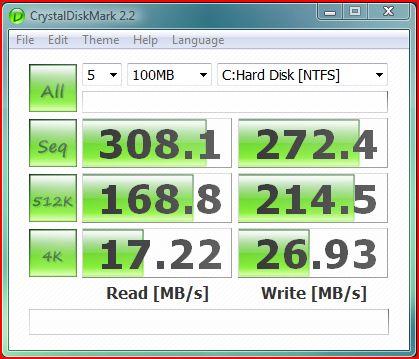
Vista installation went very quickly -- 15 minutes at most. Installed all bootcamp 2.1 drivers and re-ran ATTO and also ran HD Tune with the Intel SSD as my boot drive. Here are the results:
AaronAttached Files:
-
-
Read speeds appear to have doubled on the Intel compared to the Patriot Warp V2. But write speeds look about the same
-
sequential write are about the same (only at large block sizes), random write intel should be much better (but we havent got anyone posting tests for that for the patriot yet)
-
All i got to say is if any ssd manufacturers follow intel's path and do what this drive does, the future is here. This drive is INSANLEY fast. It is well worth the money for this thing, its godlike. It dominates in random writes. I'm talking lets see. about 80Iops on 100% write and 100% random test of 4k clusters on the last gen super talent mlc ssd to 3300Iops sec on the same test on this Intel. It is definatley what it's cracked up to be by far.
I don't even know if this is running full speed. I got it on a newer machine need to get my hands on atto again so i can test it.
PS.
Adobe Reader 9 installs 23sec on this drive, 1min 55sec on my 7200 -
i'm starting to wonder if i got something wrong with this one i got, i get roughly half the speed you are getting on your atto. I'm thinking this computer only has Sata1 (hp 6910p) but I still should get the low end throughput that you are getting on the smaller chunks but I get roughly half, only about 15/MB sec at 4k. Oh well I got 3 more comming in the mail, we'll see then. I couldn't even imagine how fast yours is with those speeds when mine is about 1/3 of what you get!!!! and this thing is insane!
-
sorry for the multiple posts, not the interface because I'm now getting 240/MB reads and roughly the same writes actually at 32kb + tests, I enabled advanced write cache ;p. however My drive is slower on the smaller tests, not sure exactly why at this point, it's still mega fast, I will do more tests once i get the other drives so I can make sure they don't differ in speeds.
-
Ok, so I fixed it, don't know if this works on any other ssd's but it boosted my low end size transfers more than double. now my atto looks like yours, it didnt go up until I install the latest intel matrix drive dated in august and enabled the advanced write in device manager. Now me happy. It's even faster than it was before!
Attached Files:
-
The new SSD Thread (Benchmarks, Brands, News and Advice)
Discussion in 'Hardware Components and Aftermarket Upgrades' started by Les, Jan 14, 2008.