Problems? See this thread at archive.org.
Outllok 2007 update: I had bad .pst files and turned off cache on m SSD. It worked but after running scanpst.exe and fixing the .pst files, I'm happy to report that I can run my SSD with cache enabled in advance mode with NO problems.
-
I would just like to say that I've just got a new test SSD drive from Kingston. They're not being released yet but we spend so much money with them in memory every year they came to us so we could eval 2 models of their SSD line that will be coming out soon.
I specifically have the 2.5" Sata2 Server (S Series) version right now in my Dell XPS M1530 (obviously not a server, but the server version is faster so i'm testing it)
The drive is part of the " SSDNow S Series" drives to be released hopefully sometime soon. They're quite fast. The S series apparently means Server, as there is an E series which has a slower write speed.
Specs from Kingston:
Part Number: SNS125-S2/32GB
2.5" form factor
250mb/sec read, 170mb/sec write
Interface: SATA 1.5gb/sec and 3.0gb/sec
Capacity: 32gb
Storage Temp: -55 degrees to 95 degrees celsius
Operating Temp: 0 degrees to 70 degrees celsius
Dimensions: 69.85mm x 100mm x 7mm
Weight: 80 grams (+/- 2 grams)
IOPS: 4k read: 35k / 4k write: 3.3k
Vibration Operating: 2.17G (7-800 Hz)
Vibration Non-Operating: 3.13 G (10-500 Hz)
Power: Active 2.4W TYP
Power: Sleep 0.06 W TYP
Life Expectancy: 2 million hours MTBF
Operating Shock: 1,000 G/0.5 msec operating and non-operating
This thing is fast, guys.
My System Specs are listed in my signature. Right now I am running a fresh load of Windows XP Professional SP3.
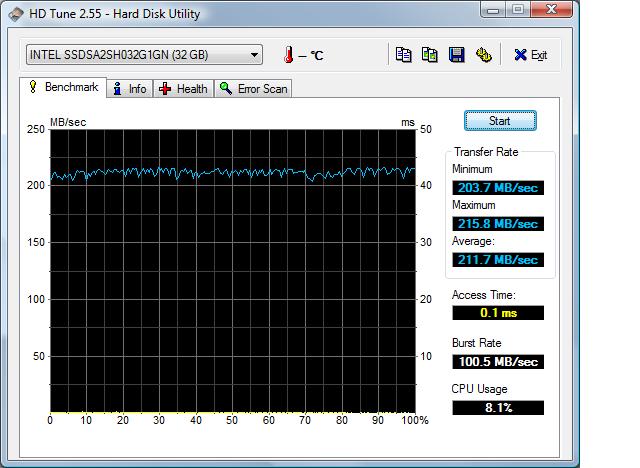
I just ran HD Tune (free version) and am getting some crazy numbers for speed. I was actually reading through this forumn while running the test which may account for the 2 spikes, was watching video, etc.. from the first page in this thread.
See for yourself: I asked the Kingston rep and he said the 32gb S series would be around $800 or so, and about $600 for the 80gb E Series (70mb/sec write compared to the S Series 170mb/sec)
Let me know if there's anything you would like me to test specifically and I can get back to you. I'm very impressed so far at how quickly things load up and write speeds are very pleasing too
Attached Files:
-
-
random writes and battery life versus your old HDD at the same casual loads
-
One other thing on the Kingston, It isn't written on the spec sheet they gave me, but the mean time between failures... they put into a more realistic number that users can understand. In relationship to how many writes you can do in a lifetime of the drive, it is S.M.A.R.T. compliant and the S Series i am testing should be able to write 1.7 Terabytes of data per day, every day, for 5 years without failure.
Also, in their testing (keep in mind the capacity difference here), they were able to more than double the IOPS of traditional 15K Hard Drives. 490 drives could do lets say.. 60,000 and with only 8 SSD S Series drives, 120,000 (numbers are not fact... it was on a slideshow and I do not have a copy of it) -
Read here:
http://www.theregister.co.uk/2008/10/06/kingston_resells_intel_ssds/
Kingston SSD is simply Intel rebranded, nothing more.
By the way:
Intel X25-E released:
http://www.ubergizmo.com/15/archives/2008/10/intel_starts_shipping_x25e_sdd_e_for_extreme.html -
The 2nd link you mentioned shows a picture of the drive. Thats exactly it, down to the Intel Logo... with the exception of the big black area being where they put the sticker with all their barcodes, etc... which specifically states that its for engineering tests (aka, non production yet)
I wish the drive was larger, but i'm extremely impressed so far. Thanks for the info, I knew Intel was involved but wasn't sure how. -
oh ****, you have an slc intel... you *******!!
I'd guess they're the wholy grail of ssd right now (which are plugable ordinary into any pc as a harddrive.. no funky pcie thing or so).
-
So my X25-M finally arrived
. Here's some pics!
Size comparison with regular desktop drive
![[IMG]](images/storyImages/dsci0003cp9.th.jpg)
![[IMG]](images/storyImages/thpix.gif)
Boxes and things inside
![[IMG]](images/storyImages/dsci0012od1.th.jpg)
-
Congrats on your X25-M
It's indeed an amazing drive, of course don't compare it with Intel SLC hehehe.
I'm also very interested in to buy another intel x25-M drive for my desktop computer to replace my velociraptor.
I believe you can just plug it into the desktop SATA and it should work right out of the box right?
Any recommended adaptor for mounting 2.5" to 3.5" desktop slot? -
Hey did your problem disappear??
-
+1 Props for the X25 pics
Hope you have fun with it -
My freezing problem disappeared COMPLETELY!!!
Of course after having to undergo a painful format and Vista clean install procedure. Looking back, I would say the formatting was very well worth it.
I even have indexing On now without any hiccups.
I also start turning on my prefetch and superfetch today again since other Vista and Intel SSD users have reported no problem with all vista features on: prefetch, superfetch, and Indexing on.
![[IMG]](images/storyImages/intelssd.jpg)
-
Thanks for the screenies.
-
Ha! It's fixed.
That's yet another reason for me to stick to plain old reformatting when it comes to these things, not image software.
Greg -
Hey jlingo, what laptop are you using? Your speeds seem a bit slow. I think you are being capped by SATA1 interface. I read about someone (was it you? lol) that had the (same) problem on the Lenovo T61p.
-
hm yep it could run twice as fast. looks like you're on s-ata 1. no clue if that changed the behaviour a bit as well in the first place?
anyways, the thing has to be very fast compared to the ordinary disk so it doesn't really matter
i'm interested in the new slc intel. as slc doesn't have any of the slow write issues i like them much more
-
I'm using Thinkpad T60. I know the benchmark looks disappointing. But even then, It still smoked my 7k200 mechanical harddrive. There is really no contest. It used to take me at least 5 minutes to boot up with 7k200, and during that time, my computer was really crippled. I was practically unable to do anything with the laptop.
Now with Intel SSD, the booting takes about 2.5min, however, within 40sec as soon as I typed in my username and password, I was able to open few applications at once and started working straight away(Intel Multitasking Strength). And That IMO is a huge difference.
This makes me wanting so badly to put one into my desktop computer. Does anybody here already installed SSD on the desktop computer? Where did you guys order the 2.5" to 3.5" Hard Drive mounting adapter?
Strange thing is when i searched online T60 supposed to have:
Storage controller type
Serial ATA/IDE
Storage Controller / Serial ATA Interface
Serial ATA-300
Isn't SATA-300 supposed to support Intel SSD fully? Perhaps something can be tweaked further? -
Good thing that you got it working! I'll get the same or bigger SSD sooner or later and put that in my MBP.
If you, or anyone else, really really really want to speed up your machine, get two x25-m and replace your CD/DVD with a Optibay chassis and create a RAID 0 array. (Something like this) I would do it myself, but I'm short of cash right now.
EDIT: 1) Redirected the link to the original article. Read the comments for more info!
2) From the comments you can see that you do not have to limit your options to Optibay. There is another firm that sells similar product(s) that are a lot cheaper. ( LINK) -
Jlingo,
Check the lenovo forums, somebody tried their intel ssd in a desktop and in a t61, the ssd capped at 100 in the laptop, i think 200 in the desktop. Sounded like lenovo capped the sataII interface at sataI speeds for power savings. I think he's trying to find a workaround, but I havent seen anything yet, -
Thanks Mulletbooger for the info. I already posted on Thinkpad forum but no resolution just yet.
I just disabled prefetch and superfetch as I was actually experiencing stuttering which eventually lead to a total system freeze no matter how long I waited. Finally, I had to do a force shutdown. Actually I was fortunate enough for being able to replicate this problem twice at least it’s not random like the last time.
This happened when I had an excel open, a word open, outlook open(Trying to reply email), Opera browser open with many tabs, Foobar Player was open doing song names inserting wirelessly from another computer.
Basically, I started to notice my mouse stuttering when I switched from one application to the next. During that time, I also experienced stuttering when moving from one email to the next especially those which contain HTML linked graphics. In the end, after a minute of stutters joy, it transformed into a complete freeze.
Problem seems solved by disabling prefetch and superfetch, haven’t seen any lagging or stuttering yet with similar amount of work being done. I guess when I was doing so much work at the same time, it was overkill for Intel X25-M. -
2.5" and 3.5" SATA drives use the exact same plugs, so you don't need any adapter. Just stick the 2.5" drive into your desktop.
http://techreport.com/articles.x/9378 -
you'll still need the mounting bracket
-
Something like this:
http://www.nextag.com/Startech-com-3-5-613102768/prices-html?nxtg=22140a1c052f-5BAF9F9F26A171BA
I'm thinking of getting a pair of SSDs to replace the 4 old slow HDDs in my desktop. Would do wonders for the noise/power on that machine. -
I received my X25 last week. Originally I had it in my desktop but didn't do any benchmarks. I now have it in a Dell Vostro 1400 with a Core 2 Duo 2GHz CPU. HD tune shows-
Transfer Rate Minimum-148.1 MB/sec
Transfer Rate Maximum- 181.5 MB/sec
Transfer Rate Average- 177.5 MB/sec
Access Time- 0.2 ms
Burst Rate- 81.4 MB/sec
CPU Usage- 8.2%
This is with Prefetch and windows search enabled on Vista Ultimate. The drive formatted out to 74.5 GBs and with all programs and apps, I have 46.5 still free.
For those who wonder what the benefit of these might be, get ahold of one and open Photoshop, Acrobat 8 and Dreamweaver in succession and watch the pages open almost instantaneously! I am very very impressed and will pick up two more of these for my desktop for raid, when the prices fall a little more! The difference it made in both my systems was like comparing a current day Core 2 hotrod system to an early P3 system in terms of the "feel fast" factor. I had originally planned on playing with this for a week or two and selling it, but it has definately found a home! -
Jlingo, from your HDTune graph, the drive is certainly capped. It shows almost flat line, which indicates a bottleneck. Here are my screenshots.
(Apparently even the ICH can bottleneck the drive. You can raise the read transfer rates to the theoretical 250MB/sec from ICH's 220-230MB/sec using a seperate PCI Express, SATA2 based RAID controller card)
HD Tach 8MB Zone
![[IMG]](images/storyImages/hdtach8vs7.th.jpg)
HD Tach 32MB Zone
![[IMG]](images/storyImages/hdtach32ke1.th.jpg)
HD Tune Pro(Default settings)
![[IMG]](images/storyImages/hdtunex25mre6.th.jpg)
CrystalDiskMark
![[IMG]](images/storyImages/crystaldiskmarkyl3.th.jpg)
Notes:
-I sort of confirmed lower performance as drive became full. HD Tach went low as 190MB/sec
-I searched around and enabled AHCI, which enables more advanced SATA features as Hotplug and NCQ. The transfer rates went back up to 220MB/sec.
-19.8GB/74.5GB filled
-Indexing/Write cache enabled
-My Desktop configuration is:
*Core 2 Duo E6600
*OCZ Value Series DDR2-800 2x1GB
*Intel DG965WH
*GMA X3000
*SATA Devices:
Intel X25-M SSD 80GB(Boot/OS Drive)
WD360GD Raptor 36GB 10K RPM
Seagate Barracuda 7200RPM 160GB
Samsung DVD-RW
*Windows XP Professional SP3
*Intel 14.36.2(6.14.10.4980) graphics driver -
those "mounting brackets" seem expensive. 20 bucks plus shipping for something that I can make out of twisted scrap metal?
-
Yes True very expensive.
Before I tried ordering $20 + $60(Shipping to Australia).-
and I pressed cancel afterwards
-
pft. you don't need a mounting bracket.
-
just plug one screw in so it fits and forget the rest. it's an ssd, it doesn't bother moving around, nor does it move by itself...
not pretty, no, but works great
-
Btw, I installed Samsung's SLC SATA-II SSD in Sony Vaio Z
It is MCCOE64G8MPP-0VA 1.8" model, with ThinkPad 1.8"->2.5" adapter, which fits in Vaio Z (with some slight pressure ;-) - so, this also means that Vaio Z SATA connector also supports 3.3V apart from 5V (phew, I was holding my breath during power-on as I bought the SSD on E-Bay)
So, after installation of tweaked Windows Server 2008 - results are pretty nice compared to WD Scorpio Black - boot and application load times are noticably faster, I'd say they are cut to almost half. Windows boots in cca. 12 seconds, while Office applications load in ~1sec regardless of the state of the OS / current workload.
I decided to buy this particular SSD, as I noted on many reviews that it performs better than Intel X25-M on Windows Boot and many application boot cases - I suspect it has something to do with the fact that Samsung drive is SLC and has better write performance than Intel's X25-M - and, besides, the amazing read speed of X25-M won't be fully utilized on ICH-9 found in Sony Z.
Anyway, I'm contemplating buying X18-M as a second drive, if I somehow managed to get the Sony Vaio Z RAID cable used to connect those SSDs in the most expensive Z configurations
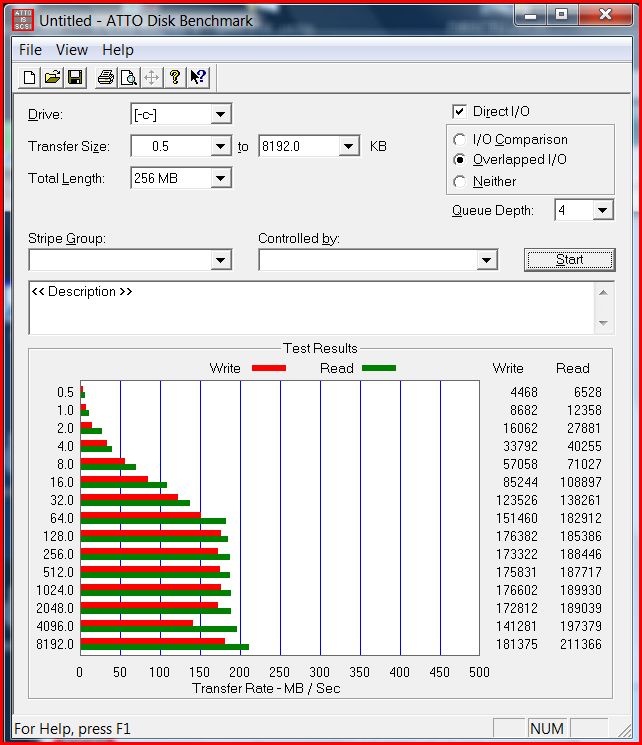
Anyway, here are HD-TUNE and ATTO results... HD Tune benchmarks are somehow funky, but I guess it has something to do with caching...Attached Files:
-
-
Any chance of them mtron benchmarks
-
still on holidays
-
By the way, I was reading
http://www.corsairmemory.com/products/voyager.aspx
It's a flash memory with high write speeds and very durable, you can freeze it, boil it, etc. etc. and it has a 10 year warranty. This type of flash is it SLC base?
Yes, read the specification, it seems SLC can write 100,000cycles.
for 2.5" harddrive you can also use velcro to place the harddrive in position. -
i never even thought about that, good tip!
-
Do you mind running Crystal DiskMark and posting the results?
-
how long are your holidays?
-
one week.. ? you're very stressing
-
I ordered a 2.5" ata/sata adapter that came with the rails for about $7 from someplace on the web. Maybe PC Outlet...
Cheers, -
Not sure if anyone mentioned this, but G-skill came out with some new SSDs (64gb and 128gb). More info here: http://www.tcmagazine.com/comments.php?shownews=22519&catid=2
-
If it's any consolation to any of the folks out there, my usage patterns are similar to jlingo and I have the Gen 1 Samsung SATA-I SLC in my M1330. I have a couple of 700MB PSTs containing 10 year old (archived) mails which are open (primary and current mail is all on the Exchange server) and I experience the freezes in Outlook all the time. I attributed that to mail client/server performance with using RPC over HTTP but clearly this is not the case. Just FYI.
BTW My M1330 is dead so can't run any tests...sorry
-
Was hoping G Skill would release the new samsung MLC, but looking at the specs just looks like another one of those jmicron controlers.
-
See my posts in SSD speedup tips and tricks.
Outlook 2007 being slow is a major problem on all drives, including HDDs. -
Some of you might know I have the Intel X25-M SSD.
To summarize what I'm about to say, I'm not too impressed. Granted I was coming from the WD360GD 36GB Raptor drive, which is still one of the fastest drives.
-I don't experience minute long freezes or anything ridiculous like that. But sometimes I feel there's something wrong that might be related to having an SSD drive. Let me put it simply that I can "feel" the caching work. Everything works fine and suddenly there is this delay. With the Raptor, the difference is smooth and you can't really feel it.
-My boot times aren't magnificently faster, or my game doesn't load amazingly fast. Sure, the computer gets ready to use faster after boot. But the OCZ drive that exhibits freezing symptoms can do the same thing. So why did I spend the extra to get "less" of the problems??
-Surely I can feel that the hard drive is slower. However, I did not feel it until I went back to the hard drive. Again, did I need to spend that much money in order to feel that every other system in the world suddenly became slower(rather than feeling your system became faster)?
Yes, SSD is the CLOSEST technology that's coming to replacing the hard drives. I do not believe in MRAM/PRAM or whatever other technology doing that. You'd think in theory the tech is amazing until its put to test in real world use and see everything is not roses as it seemed.
Here's the problem with SSDs. It needs caching and advanced algorithms associated with it to be acceptable. All this talk about "100x faster IOPS" is BS because that only happens in an extremely rare circumstance in an app that you might never use. That's why the 3-4x advantage SSDs have in PCMark degrades down to mere single to double digit percentages in real world.
-100x advantage over hard drives only happen because its a fundamentally different technology
-3-4x advantage in PCMark happens because of caching/advanced algorithms
-10-20% in real life happens because when your application exceeds the size of the cache or the program doesn't fit the algorithm, all there is for SSDs performance wise against the hard drives are the chips alone.
-SLC won't fix the problems. SLC still needs advanced algorithms in the controller and caching to work well
Take out the controller and the advanced algorithm/caching and ALL the chips from all the SSDs do not differ much. I believe the problems with Outlook that apparently happens with all the SSDs exaggerate the fundamental problems that the technology has, which is that writes are inherently slow.
I always like to say this to people who believe in miracle technology(not the Core 2 Duo-like miracle but miracle as in say 20x performance/10x lower power/2x reduction in size, which applies to the SSD).
There is no miracle in technology. When things seem too good, they are likely TOO good to be true.
This is same with MRAM/PRAM/ZRAM technology which claims to have speed/capacity/power advantage all at once at the same price.
There's a reason DRAMs have been invented in the 60s and we still use it, and there is a reason HDDs are resilient to change. There are no real substitutes to them. They might eventually get SSDs exceed HDDs in all fronts, but I don't see that in the near future. They have a long way to go.
You shouldn't need "optimizing". What's the main selling point of the SSD?? Its the ultra low latency, which is performance. You optimize outdated computers that feature P2's. You optimize games running on integrated graphics.
Sure, not all systems are configured same and used the same and some HDD based systems might have a problem with Outlook. So?? Why do you think MS has a article specifically stating a problem with SSDs. My view is that its a problem with the SSD technology, not Outlook.
P.S. Sigh, I like the drive, but I admit I have fallen to the SSD hype. -
Little more notes on the X25-M SSD.
According to Intel there is a feature that they call Intel Adaptive Memory Controller technology, which tries to adjust to usage patterns and optimize performance based on it.
I can believe they have whatever they call it. When I surf the net, sometimes the webpage has a 2-3 delay loading. But when it loads, it loads everything instantly.
Like:
X25-M: Click enter-->2-3 second delay-->everything loaded
Raptor HDD: Click enter-->the bottom shows items loading one by one then loads finally
It feels like the SSD is holding the files and releasing it all at once. Sometimes its annoying. It feels like freezing in a milisecond scale. But it only affects the single program and not the whole computer. The computer feels slower because of the delay, which actually is not. This must be a combination of MLC freezing problems+caching. It feels like the freeze is still there, but lowered by magnitudes.
After using the computer for couple of days, the same delay seems to become shorter and shorter everytime. If this isn't the Adaptive Memory Controller working, I don't know what it is. -
get an slc drive. there, small writes are not much of an issue, performance is very consistent.
i was planning to get an intel mlc, but i changed my mind. i have a (in my system slow) slc drive and it's really much faster than anything i had yet. and that with 70mb/s read / write.
what i like about slc's is the consistency they have.
i'm really interested in the intel slc, even while it's terribly expensive. 2 of those in a raid0, 500mb/s readwrite..
-
maybe your tubes are filled with garbage, and loading the same pages again and again widens them? (yep, my first 'series of tubes' reference).
i have disk caching on the web completely disabled. i prefer to really get my stuff from the web
-
Its interesting that you have such a negative opinion of the Intel SSD. I have been using the Samsung 128 GB SSD provided with Dell computers and I have been astounded at the performance. Boot times are faster (I concede 30 seconds and ~1 minute don't really make a huge difference in the big picture.)
However I usually have to open multiple PDF, PPT files during work, some which can reach 100s of MB. This is one place where I have noticed SSDs cannot be matched by any harddrives. The elimination of seek times really help in loading. I can have either type of file open and showing in ~1 second, whereas previously the delay was as great as 5 seconds (long enough to notice). This adds up significantly when you have to look at 10-20 files per day.
The only other SSD i would even consider was the Intel drive. With its almost double read throughput over Samsung's I would have thought that all performance increase I was having could be increased even further. The only thing stopping me was the higher pricetag + lower density (although I admit im only using ~30GB on the samsung, but like many things in life... its always better to have it and not need it right?).
However on the Samsung drive I have experienced nothing similar to the "freezing" anyone has been reporting on these forums. I am not a heavy Outlook user, as I mainly use gmail. However even in the occasions I have used it, it has been a smooth experience. Webbrowsing seems neither faster or slower. However the loading times for firefox/chrome/explorer are quicker than with an HDD.
Other than with the 1st generation of Samsung SSDs (SATA-I) version, I have not seen many people complaining about their performance. I have not even tried any "optimizing" for the SSD that I would not do with a normal HDD.
I turned off paging (4GB RAM, 99% of the time using ~1GB), turned on the advanced caching options (I do this for my 5400 320GB Hitachi HDD as well).
Other than that I did not change any options, and have kept well enough alone.
I completely agree that there is no miracle technology. There are always growing pains. (Vacuum tubes performed better than their solid state counterparts when they were first invented! Infact, they still offer better performance and are used for audio applications I hear). However, I recall at a conference 5 years ago, when someone asked if Flash would ever replace the harddrive, even expert opinions were negative as even if we made 20GB flash drives, HDD guys would have 20TB HDDs. Anyhow, this has become so long-winded, I would never go back to HDDs for my main laptop computer which I use mostly. That said, I also would not pay the premiums for an SDD for my home server, or any less used computer. -
Oh one more note regarding Samsung's SSDs. As you probably know Samsung is a huge company with several business divisions. The manufacturers of controllers and the SSD as a product is the Storage Division, which manufactures traditional HDDs.
I think this is one advantage they have over the other manufacturers who were in the memory business (samsung also has a memory division, which makes the flash chips). I wonder what SDDs would be like if Western Digital/Seagate/Hitachi joined the fun? -
I think you mean WHEN they join the fray
-
ssd arent as afford yet i think the harddrive still win!
The new SSD Thread (Benchmarks, Brands, News and Advice)
Discussion in 'Hardware Components and Aftermarket Upgrades' started by Les, Jan 14, 2008.


![[IMG]](http://img369.imageshack.us/my.php?image=dsci0003cp9.jpg)
![[IMG]](http://img528.imageshack.us/my.php?image=dsci0012od1.jpg)


![[IMG]](http://img204.imageshack.us/my.php?image=hdtach8vs7.jpg)
![[IMG]](http://img204.imageshack.us/my.php?image=hdtach32ke1.jpg)
![[IMG]](http://img60.imageshack.us/my.php?image=hdtunex25mre6.jpg)
![[IMG]](http://img204.imageshack.us/my.php?image=crystaldiskmarkyl3.jpg)