Problems? See this thread at archive.org.
dseo80, thanks for the great write-up
Can you enlighten us on the spec of your 128GB Samsung SSD?
After some research, it seems to me it is a MLC version. So does it mean this 128GB Samsung MLC is the ONLY OTHER MLC drive with proper design, th other one being Intel X25-M?
Is the performance similar to Samsung 32GB/64GB SLC SSD?
-
The Samsung MLC drives are known to be good. Performance is less than SLC drives (primarily in writes, not reading), but the access time is still 0.1ms.
Greg -
Greg, thanks for the clarification.
-
I'm using Intel SSD to replace my Hitachi 7k200 harddrive. And in my case the speed has helped me tremendously. It reduced my booting time from 5 minutes to less than 1 minute. As soon as I entered the password, I could straight away launch my favorite apps and started working. Using Hitachi 7k200, my computer would be frozen and rendered useless for at least 5 minutes before I could launch any apps. And yes, I could launch multiple apps at the same time, and each apps would open within 1 sec, unlike the Hitachi 7k200, I would have to wait for a lot longer for each app to open. Besides, the extra battery life, silence, and resistance to any vibrations are such a bonus to my Thinkpad.
Outlook and SSD are still a big problems though. Unfortunately I'm just a heavy user for Outlook. It crashed very often on me. Although I already splitted my .pst to less than 600MB each. I guess the problem still somewhat persisted. The worst thing that happened, Outlook would freeze completely until the rest of my interface froze, I had to hard reboot everything. It didn't happen often, but when it did, it just killed the whole system. Not sure whether there will ever be a resolution from Microsoft part or it's an inherited problem from the SSD itself that I have to live with.
Also, sometimes I experienced 15-30sec delays with browser. It happened when I was clicking so many things at the same time. This problem didn't happen often, but it's there. I disabled Disk Cache today and see if the problem resolves.
Those are the updated problems so far I encountered when using Intel SSD with my Thinkpad T60. My desktop computer is currently using 300GB Velociraptor. It also booted very fast and already very responsive. I could also pretty much launch any application the minute I filled in the password. Of Course, there is no doubt Intel SSD felt snappier, but not by much. Definitely not worth the trouble having to introduce freezes to get snappier experience in your system. Afterall reliability is very important. -
The samsung MLC version's seq performance is less than the SLC Sata-II versions
SLC: read/write = 120/90
MLC: read/write = 90/70
However, the random write controller has been improved. 700 IOPS compared to 200 IOPS max on the SLC version. So there are tradeoffs there. The access time is also negligible.
To compare: with Intel and OCZ core (approximatly, correct me if im wrong)
Intel has read/write of 170/90 (i think?) and 10,000 iops.
OCZ core has read/write of 190/100(?) and 4 iops.
Also comparison with the Raptor.
In a desktop i guess the difference in negligible but raptor will use more power (less battery life), as well as be noisier (annoying), and run hotter. -
Here is the one I want. First I have seen it for sale. It is the SLC model!
http://cgi.ebay.com/INTEL-X25-E-EXT...=39:1|66:2|65:3|240:1307&_trksid=p3286.c0.m14
Dave -
They only have 2 available although other vendors will probably start selling them too.
![[IMG]](images/storyImages/champagne.gif)
![[IMG]](images/storyImages/content.gif)
![[IMG]](images/storyImages/ecstatic.gif)
![[IMG]](images/storyImages/eeek.gif)
![[IMG]](images/storyImages/puzzle.gif)
![[IMG]](images/storyImages/smileyup.gif)
-
Dell Canada had Patriot WARP 64G on sale for 199.99 .. Tried it and it is complete garbage due to extreme stuttering.
It went back for a refund -
That's a total rip-off!
-
Since SLC costs roughly just twice as much as MLC, i dont know how they managed to get the price so high
 . Probably just the ebay seller trying to gouge some people? Official Intel price on the intels slc should ~same as mlc (~half the density)
-
Folks, we know the price is high on good SSD's. Me, I am waiting. But thank God not everyone is as poor as me. We also know the price will come down.
-
I feel ya Cape.
I'm just itching to get an SSD. -
Yeah, I want one for my desktop and laptop. I have plenty of externals for storage of the useless junk I seem to collect
Dave
-
Just got my HP 2710p tablet, was thinking of getting an Mtron 32gb 1.8" SSD. I'm a little concerned if 32gb is enough for Windows Vista. Vista tends to have a growing winsxs folder that can reach 10gigs all by itself. How do people organize their files to fit a small capacity SSD?
Also, how fast in the real world is the Mtron 32gb SSD over the PATA interface? How long does it take to boot up Vista? Are there any freezes? Can someone post an HD tune chart? Thanks!
BTW, my current HDD on the 2710p is a 1.8" 5400rpm 120gb. Would I be able to feel the speed bump from the Mtron SSD? -
yep you should be able to feel the bump. the best thing is to get a vista sp1 disk, and install from that. that way, the sxs stays small from the start and doesn't grow that rapidly as when you would have to run all the updates from day0 to today first.
on the 2710p, you get 70mb/s read/write, 0.1ms, NO FREEZES (its an SLC, they don't freeze except if an app freezes completely.. superfetch can freeze _any_ system, so any ssd, too).
http://www.youtube.com/watch?v=neSA8FYVdIs the boottime.. -
Well waiting over a week for a few screenshots, i.e 5 minute job makes me, do you want me to provide the links to the benchmark software?
-
problem is, i'm really not often on my notebook currently. but yes, a link collection would be nice anyways (espencially to the "how to measure mlc buggy writes" configurations for the benchmark tools.. should even get an own sticky then, or so
)
-
Thanks for the reply davepermen. I can get the 32gb Mtron Mobi3000 1.8" zif SSD for $280 right now. Do you think the performance boost is worth that much money over the 5400rpm HDD? How is the battery life with the SSD? A bit longer, same, or shorter?
Does SSD's have problems with multitasking? I usually leave like 20 windows open all the time. Will the SLC SSD slow down because of that? -
I have a 4200rpm 1.8" ziff with a 1.2ghz c2d, now that i have cleaned vista up it runs pretty smooth, not bad startup time...
-
What do you do to speed up vista boot times? Much appreciate it. I think I'm going to wait a little longer for the SSD prices to go down some more.
-
If I understand you right, it shouldn't happen because I have bare minimum of apps running in background. I use the default Windows XP background with perhaps 10-12 icons, and my wireless utility+2-3 apps running.
Now, I think the delay I feel is exaggerated by the fact that normally, it responds very fast. So the same amount of delay you might notice on HDDs, gets exaggerated on the SSDs.
I don't believe SLC will fully solve it. Because all the caching and the algorithms do not escape the fundamentals of the SSD technology, which being that without the advanced controllers, SLC/MLC will be all ****.
The difference between the $200 MLC OCZ and the $600 MLC Intel is 2-3 min delays vs 2-3 sec delays that will get fixed over time. Difference between $600 Intel MLC and the 2x price SLC is that now that 2-3 sec delay might become hundreds of millisecond of delays.
I don't think vast majority of users will notice anything faster than the X25-M. Of course there are always users that need more than faster loading time.
That's the problem. The drive is not bad(no in fact I love it), but ALL the SSDs has to be cheaper. OCZ SSDs should be $1 per gigabyte and Intel's should be $2-2.50 per gigabyte for MLC. Most of the users need more than some random faster loading times for the amount of money they spend(which btw, the OCZ MLC can do that for you too, I mean the faster response times). -
it's fun how much people start to not believe in slc, because of mlc from ocz experience. mtron delivered ssd's since now over a year, so does memoright (and samsung, too). NOONE ever reported any stuttering, lagging or similar issue on these slc drives.
they have completely different write characteristics compared to mlc. they DO escape the fundamentals of the SSD technology that you state. the fundamental BAD thing of ssd technology is ONLY in mlc.
I'm a DJ. i can't accept _any_ stuttering AT ALL. not even some milliseconds of os-stuttering. you wouldn't want to hear that in a club
i have an mlc usbstick and know what they're write behaviour is. it's scary. copying some 4gb worth of files from it (==read) is quite fast. trying to write the same files (lots of small files) onto it, and you can wait minutes to hours to days till it's done.
they should finally start to spec the disks by their minimum guaranteed performance. this should be for harddrives, too
-
I just updated my Intel Matrix Manager software from version 8.5 to 8.6, the complete freezes gone, instead I'm now introduced with a 30sec random freezes. Hmmm.
Disabling disk cache in the web browser didn't really eliminate any problem in my case. -
I guess the problem with me is I tend to go a bit off topic I guess
. I'm talking for eventual HDD-replacement technology. Look here:
http://www.anandtech.com/cpuchipsets/intel/showdoc.aspx?i=3403&p=8
The differences are in mere tens of milliseconds which users won't notice(We notice in what?? Hundreds of milliseconds??).
Random Write
OCZ SLC: 9.17ms 14.5ms 21.2ms 28ms 28.5ms
Seagate Momentus 7200.2: 9.4ms 8.95ms 9.14ms 9.82ms 12.1ms
Intel X25-M: 0.089ms 0.23ms 0.44ms 0.84ms 1.73ms
I'm not talking just to you, you might not have problems sure, more power to you.
1. Intel X25-M shows fantastic performance in synthetic benchmarks
2. The differences in more real world benchmarks, its much less, granted we can take that as concluding most apps are not really hard drive bound.
3. X25-M can dip in performance as the drive gets full or you change usage patterns, particularly running IOMeter. It can show rather dramatic drops even in synthetic benchmarks
4. So my system doesn't show any drops in benchmarks. But I notice it. Something is different. It feels like the basic flaws of MLC is there, its covered by the advanced controller and caching algorithm.
(Intel did say basically the only difference between the other SSD drives and theirs is the controller and the caching right??)
Then lets go back to the Anandtech article:
OCZ SLC is a good example of an SLC drive that is "raw", meaning using older controllers with not much intelligence and caching.
Hard Drives(that matter not the low performance laptop drives) are 5-6x faster than "Raw" SLC drives(for the random write that we care about, and IOMeter which server guys care). All the Intel SLC drive does is have maybe a better algorithm in the controller and a bigger cache. When there's a file size that exceeds the size of the cache or when the algorithm messes up, it'll go back down to the "Raw" SLC drive performance.
Now take a technology that's inherently superior peformance wise to the HDD, the DRAM. The DRAMs used in the Pentium II systems, will probably rival the best SSDs out there right now, if not better. It'll perform better in apps that matter, and probably almost every situation. It doesn't need caching to do it. Caching helps, but its merely a bandaid when the performance is horrid.
You might never notice it. The X25-M has 256KB cache in addition to the 16MB DRAM for write levelling algorithm. The X25-E with inherently faster SLC might cover it well enough that you might never see it.
They still have a long way to go. Some tech advancements, like LEDs have advantage over the predecessor in every way even with first gen. It's not SSDs. There are knowledgeable doubters out there.
Right, that reminds me of a post. This guy was talking about how the Intel SLC X25-E claim was basically over-inflated because in servers you wouldn't want to use write caches and disk caches for data reliability and safety, then there goes the claimed advantage over the other SSDs.
Anyway, its not recommended for PC users to disable caching generally. I mean, it is done for performance and without it there's not much difference between a regular MLC and Intel MLC. I think the problem with jlingo's system is that the SATA-150 interface might somehow bottleneck the drive.
Ok I'm not saying SSDs have no potential. But most reports put this technology as some sort of a miracle device, but its not. I'm just slapping people in the face who thinks this way.
-
Hi IntelUser,
I'm sorry, just would like to request for a clarification. Are you really saying that I should turn on the "Enable Write Caching on the Disk"? otherwise there is no difference between regular MLC and Intel MLC?
Because people have been recommending me to turn off Write Cache with SSD. -
IntelUser, i don't have an intel mlc disk. slc memory does NOT have the bad write behaviour of mlc BY DEFAULT. they are completely different. thus, slc disks with a stupid controller may be slow, but they are NOT prone to lockups.
write leveling does not result in those problems at all.
it's the problem that you always have to rewrite large memory blocks in mlc. in slc, this is not true => no such issues.
of course, having higher performance disks hides the problems a bit better, of course a better controller gives better performance in certain cases. and of course, they just hide bottlenecks. but slc disks and mlc disks are completely different beasts.
and yes, users will notice the difference between an slc disk and an mlc disk. there are enough users noticing some lagging in the intel and other mlc disks currently in this very thread. no such behaviour got ever reported on any slc disk. even slow ones don't have that issue (and i owned a slow one.. it was just constantly slow, but still responded quite fast. it just had long to load stuff).
EDIT: and btw, HARD DRIVES CAN COMPLETELY STALL A SYSTEM, TOO. they just don't do that often, but f.e. in combination with superfetch it is even reproducable (and the reason why quite some users think vista is so slow, because superfetch messes up while trying to precache some huge file and completely locking out every other disk access).
because of that, i had to disable superfetch on all sort of systems and i'm working with microsoft on a bugreport for fixing it. -
and yes, ssd's ARE a miracle. you should not stare at raw numbers. use one (use an slc one) for a while and you can never step back..
-
They come from same NAND technology, they both need to erase blocks before writing, which slows write performance.
http://www.anandtech.com/cpuchipsets/intel/showdoc.aspx?i=3403&p=2
Even SLC takes stupidly long to erase a block compared to its read speed.
About "freezing" look at it this way.
OCZ MLC drive systems locks because the latency is in hundreds of milliseconds. Significant enough that you'd FEEL EVERY write. That in IOPS terms is single digits.
SLC chips with no fancy controller achieves ~100 IOPS. Think that's fast?? When the read speeds gets in terms of thousands of IOPS?? In PC terms, even a crappy controller SLC is acceptable, because you don't notice single digit millisecond latency.
What are the common fundamental problems with ALL SSDs?? That writes are slower than reads regardless of operation(just that some types of writes are slower than others), because it needs to erase before writing. And not just small amounts, much larger amounts than it uses for reading.
Really, all SSDs are fast at loading apps because all its doing is reading, and it has amazingly low latency. Be it, OCZ, Intel, Samsung, doesn't matter. Even Intel say themselves, "the high transfer rates may help the loading times, but its really the low latency of the chips that help". Didn't you read the Anandtech review?? They say along the lines of "On the OCZ MLC SSD program loads ridiculously fast then it freezes". You don't need SLC to "feel" that it responds fast, all you need is an SSD drive, low random write performance or not.
So here's why Intel's SSD drives don't boot the fastest. It's cause in the chip level, they don't use the fastest chips in terms of latency. Sure with most of the crappy HDD test programs all it shows for SSDs are "0.1ms". But you can get better than that and show it in nanoseconds. When some of the SSDs are reaching 40-50ns, Intel ones are twice as higher. Yet on the drive level Intel has advantage because of the controller.
On a Human level, 10 IOPS is called "lockups". SLC chip alone achieves 100 IOPS. Its just less of a lock up. We don't really care about read IOPS at this stage of SSD evolution because most achieve ridiculously high IOPS.
So Intel SLC chip is doing ~100 IOPS, or maybe a bit lower. But the controller is good enough that along with caching it achieves ~3000. They did not eliminate the fundamental problem, and its that flash memory isn't fast as its hyped out to be.
"IntelUser, i don't have an intel mlc disk. slc memory does NOT have the bad write behaviour of mlc BY DEFAULT"
Sure they do. Because if they didn't, read and write would perform within 10% of each other like hard drives. It doesn't. It performs at 1/10x(35k vs 3k). SLC just has less of it then MLC. The THING ABOUT NAND FLASH is to erase in blocks before writing.
Look here: http://download.intel.com/design/flash/nand/extreme/extreme-sata-ssd-datasheet.pdf
4K read IOPS: 35K
4K write IOPS: 3.3K
8K 2:1 read/write IOPS: 7K
Write Cache: enabled
Shouldn't 2:1 be (35K x 2/3)+(3.3K x 1/3)=24.2K??
Disable write cache like they would do in a server environment and the thing will plummet to <0.1K. -
IntelUser , that is a great research.
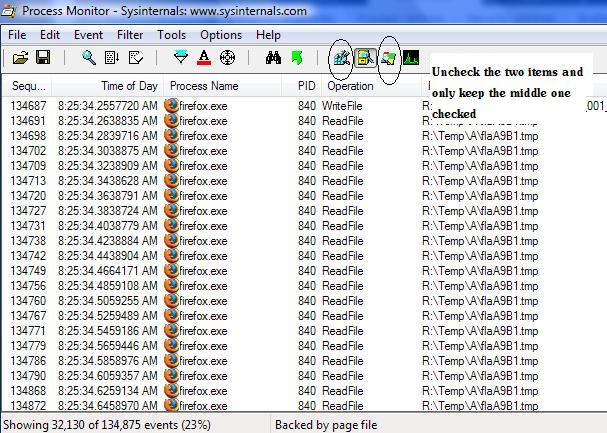
Btw, if you want to know which program is constantly accessing HDD/SSD, please download procmon.exe from Microsoft. This info should be valuable, especially for MLC SSD users who experience system freezing alot.Attached Files:
-
-
Hmm, come to think of it, that depends. The X25-M has a 256KB cache and 16MB write levelling buffer.
Maybe they are talking about the 256KB cache and not the buffer.
Update:
It wasn't a program actually, I was loading up a particular webpage. Now I think of it, it could have been the internet connection as I recently updated the firmware on my router and right after that my internet is fast again(yea my internet slowed coincidentally with installing the SSD). -
IntelUser, do you think write cache converts (to a degree) random write into sequential write, thus improving SSD performance to a degree?
-
nope, SLC should be NOR. not?
edit: ok it's NAND, too.
and slc has much less overhead in writing small data. even if it's NAND. they don't have to flush that much data each time (afaik they can access the cells individually or close-to). -
Amphibia: I have no idea, its just a idea speculated by someone that they might do that
Anyway, here's Outlook 2007 problems with Samsung SSD
http://www.petri.co.il/forums/showthread.php?p=115950 -
thats what i ment with my statement above: it may just be your web that was slow at that very moment.
you should not measure an ssd (nor a harddrive) in any way by any behaviour your web does. it's just so much slower and has so much higher latency that everything else doesn't matter. or do you have a webconnection of 240mb/s read, 0.085ms latency, 70mb/s write? if not, don't ever try to judge your ssd based on the web. -
Well, think of it this way. The particular page had lots of thumbnail size icons with descriptions on them. There's probably 30-40 icons, and loading them up simulates disk writes. It's not like all the internet is based on your connection speed only
.
-
you're too focused on write speed. write speed doesn't matter. slc have much less data per cell => they have less overhead per write. they are faster at writing, too.
ssd's perform well there where it matters, at READ speed. does it matter if it takes half a second or 2 seconds to save your document? no. because it can do it in the background. of course, depending on controller, there can be stalls if too much individual write jobs are in the pipeline. this is true for EVERY harddisk.
but show me one slc drive that does show up stuttering. it's not that i can't see. every write op takes time. stuttering is not because it takes time. stuttering is because the controller can't respond to the os, or the os can't respond to the app, or the app can't respond to the user, that it's still writing, resulting in a spinwait.
you're very blinded by your idea of ssd == bad because they behave different than disks. disks are bad, too, they have random latencies in the multi-milliseconds. they have different sequencial write performance depending on where you write data. they can stall (yes!! i've had it often enough) on read, and on write.
anything can stall on overload. the question is, where's the overload. -
Hi
Just wanted to write a mini review of this item
newegg - com/Product/Product.aspx?Item=N82E16820609348
I got it yesterday and have used it on my Sony VGN-C220E Laptop for a few hours now. I am using Vista Ultimate with all the bells and whistles and it works like a charm. Please note that this is a budget MLC SSD probably designed only for regular Notebook use. And it does a good job at that. For those who eager to know : IT DOES NOT STUTTER AT ALL. I had Media Center with Live HDTV and Youtube video running at the same time without any problems what-so-ever. Also, I can surf multiple pages without any issues.
I just wanted to write a mini review today and maybe more later as I have more experience with this SSD later,
*** TODAY, 31st OCT, IS THE LAST DAY FOR GETTING A $20 REBATE FROM NEWEGG. ***
I believe this is a great buy at this moment for this price / performance.
The chipset on my Notebook is Intel 945GM With ICH7-M if that matters to someone.
Thanks. -
yes it is, i've disabled disk cache since years as i see no use in it. it resulted in (guess what?!) amazing disk trashing that made my system stop for seconds to minutes.
besides that, it makes it possible to load wrong (old) pages by accident. and (on ie) the disk cache can grow over it's allowed size, filling up the whole disk (seen it enough at work). -
Long time reader, first time poster.
I am seeing that on Newegg the price of the Samsung SATA-II 64GB is now $549!
I have a question. One of the customer reviews state the following:
"Since the fast single-cell SSD's currently have limited storage, you can get ~2% more space by formatting it to 512B or 1KB cluster size versus the Win default size."
The default size is 4KB. Are there any adverse effects of changing the cluster size to 512B or 1KB as the reviewer stated?
69 -
That seems to be a great advice (hypothesis). I am about to receive my new Samsung SLC 32GB SATA II and certainly wont mind testing with that cluster size.
But can anyone advice me what kind of adverse effects I should test? -
Vista boot partition wont boot on any partition not=4k.
Try checking out OCZ forums regarding cluster size changing. However it seems that larger cluster sizes 64k etc, improved performance for OCZ core users. -
I have like 8 Icons on the taskbar thingy at startup, yes Norton 360 2.0 is one of them, i'll screen shot you it tomorrow, also if you defrag the HD once a week it makes it run smooth..
But I just uninstalled all the google crap, and other sony software I did not need.. -
Once a week? A bit excessive, especially if you're going for longevity.
-
What's wrong with defragging once a week? I used to do it like 3 times a week lol
-
Hrm, not sure if this goes here, but would this ssd work in a dell mini 9? I'm not afraid to crack open the case.
-
Don't bother doing it so often unless you're moving around big files. Lot of small read/writes just wears the platter down.
-
The speedup benefit will be felt immediately, while as the wear will only kill your HDD >5 years later. I think it's worth it.
-
Maybe not exactly same but I have a friend who loves to format. He would format 2-3 times a week. He doesn't do that anymore because couple of years ago the HDD slowed down to a point where running IE would take 10-15 seconds. Perhaps the drive may slow down?
-
Surprisingly, It's my third day using my laptop without any freezes whatsoever. I didn't even tweak anything just regular use. :/ So confusing sometimes.
-
Well, considering that if your hdd is thrashed and the head has to read all over the place, that might also wear your drive hypothetically.
The new SSD Thread (Benchmarks, Brands, News and Advice)
Discussion in 'Hardware Components and Aftermarket Upgrades' started by Les, Jan 14, 2008.