Problems? See this thread at archive.org.
we don't know the future normally, no.
I don't know any other store with MTron 3500, or similar prices.
-
-
No.
J Micron vs. Micron Technology.
Cheers, -
okidoki
 well then, lets hope they don't use a j micron in there
-
Micron is co-developing SSD technology with Intel (memory in X25-M is coming from Intel/Micron plant), so I am quite sure they will not use JMicrons inside
So, what is happening now is that we are overseeing a generation change in SSD market - new 8-channel controllers are going to provide 2x speedup in read and write speeds of the SSDs.
All important players (Intel, Micron, Samsung, MTRON) announced SSDs for Q1 2009 that are capable of reaching 240-260 MB/s for reading (and, depending on the technology and vendor 100-250 MB/s for writing) - next year is really going to be very interesting.
In addition, looks like that many will implement advanced caching - so we we will be seeing random write IOPS in the range of few thousands, not hunderds like until now.
Interesting times... I think during the next year, SSDs will definitely became de-facto speed kings on all fronts. -
So will the current SSD's completely lose their resale value once the new faster ones come out? I'd like to think that a $200 SSD will be worth atleast half that in 5 months..
-
I think that SSD depreciate much more than lousy cars
Just a year ago, 32 GB MTRON SSD was $1500.
Now, you can buy 32 GB MTRON for $239 (at Rocketdisk)
And, when the new generation of >200MB/s SSDs come @Q1 2009, I'd expect even more drastic price cuts, as more and more big names get involved in mass NAND production. -
my next task: install 2 64gb mtron 3500 ssd's in my main pc.. and the time is: NOW
actually, those are crazy days here..
first: i got a tiny silent intel atom 330 (dualcore, quadthread) to rebuild my windows home server with
second: i got my studio monitors to be able to finally produce good sounding tracks in ableton live (+midi controller for the fun of it)
third: i got my 2 64gb ssd's..
now i don't have a clue in what order i should do what...
fun times, fun times..
my next ssd task: getting one of those mini-pcie 64gb ssds and hoping to get my 2710p to 100gb that way (well close to).. so i'll be back at my original hard disk size i had first...
-
@davepermen,
Please provide us with some MTRON 3500 benchmarks if you find some time.
I'd pe particularly interested in ATTO & iometer's random 4K writes.
Unfortunately, MTRON lowered max. 4K random write IOPS in 3500 - from 130 (found in MOBI 3000 and PRO 7500) down to 60, which is quite low - but... then again, it might not impact real-world workstation performance too much. -
currently testing it. well, the raid0 works so far so well: 200mb/s readspeed. atto is running now..
it started with 120iops and is now running slowly down.. maybe some caching-issue thanks to the raid controller, dunno.. lets wait and see..
-
ok now doing a longer test, and specified a 10sec ramp-up time.. it's stable at 109 - 110 iops from the start.. and i'll let it run.. and run..
-
Would be great if you couldcheck non-RAID0 (single drive) speed as well, as I guess that's what most people will be interested in
-
but i am not.. OKAY I'LL DO IT!!
killing my hellsweet raid...
should get a third one and raid0 them together.. and then call the diskvolume "300" like the movie (for 300mb/s, that is) -
Would be interested in that too.
Especially in non-Raid.
How does it perform as a system disk?
Tempted to pull the trigger on the pre-order but would like to see some "real world" tests first -
ordinary non-raid: 56-57iops. just like the 1.8" i have.
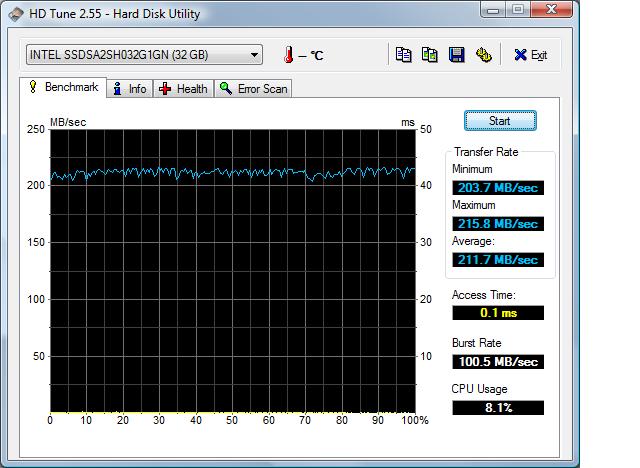
hd tach: between 90mb/s and 98.8mb/s (**** below 100), 0.1ms accesstime.
hd tune: about 90mb/s
this is with intel matrix storage controller as non raid config, and write cache enabled (ordinary vista one, not the extended one)..
shall i disable, too? -
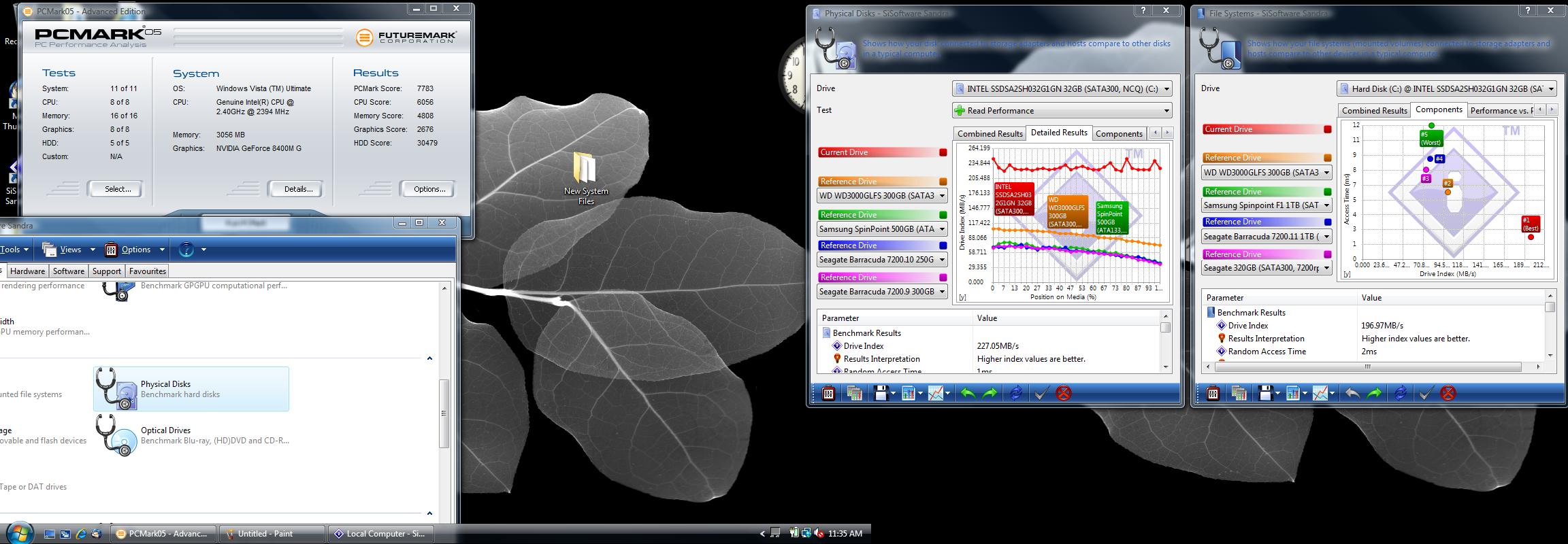
Here is some bench info on Intel X25-E 30GB SSD
Its pretty **** fast.
Notebook Specs.
Intel S37S or ASUS Z37S
T8100 2.10Ghz 6M Cache (Not Mistake)
4GB RAM
Nvidia 8400MAttached Files:
-
-
well.. for the intel slc, the only thing i'd bother is the iops at worst case. for the rest, my raid0 is the same in performance +/-, but much cheaper. but i guess my >100 iops will be beaten badly by those
-
Indeed, Intel SLC can do 3500 4K random write IOPS...
But... question is, how much that impacts usual Windows workstation patterns... I'd guess that 4K random write IOPS affect Workstation use just a little bit, while they might have a lot of effect on certain server usage patterns.
And... if you're looking for IOPS, I'd wait for the new MTRONs with new controller that will allow up to 260 MB/s read - those will also have 8000 4K random write IOPS as well.
****... I'd like to have something noticeably faster than Samsung SLC, but so far - my only choice is to wait for X25-E (and... its capacity is small) or buy MemoRight GT now which costs a lot and does not look really so much faster than Samsung SLC...
There was a guy selling X25-E engineering sample on ebay, but he wouldn't ship it outside US... and then, ssd-pros on ebay were selling two X25-E for ridiculous $995
-
digitaldiscount doesn't write correctly what their state of delivery is. that means, no, it's not there. wait till it's at rocketdisk, _then_ it's there. i've ordered some disks from digitaldiscount which in the end never got there, thus never got to me (and mtron is still not delivering them)
namely i've ordered a "stock" 64gb ssd 1.8" zif mtron. which obviously never was in stock, and I'd guess never will. -
Yes, please. Would very much like to see performance without the RAID controller write cache.
What IOPS do you get with the SSD directly plugged into your mobo (without controller)? -
Your T8100 can't have 6MB...
http://processorfinder.intel.com/details.aspx?sSpec=SLAP9 -
oops for got to PUT ES
Shoot, I can not prove the CPU....
CPUZ shows SP9400.
This probably means Montevina Processor is backward Compatable to 965PM Chipset.Attached Files:
-
-
Why would you want to buy an ES anyway,they're very unstable.
-
OK, I have had a taste and now believe more than ever that SSD drives are the future. I had a bad experience see thread here http://forum.notebookreview.com/showthread.php?t=319992
But now I still want one of these and am unsure if a Intell is any good as after all it IS mlc. I also wonder would a Mtron 3500 SLC be a good drive for me to start with? I am a semi early adaptor as hard drives are my passion and hobby. And the price of $389 at rockdisk.com is sort of affordable.
While archiving stuff I did not need, I realized 2 things. One, I got my working footprint to about 50GB, amazing! Two, that what I archived I really would like on what I call nearline storage as opposed to full achrive. Like on a spinning disk in same computer that will have only data no programs.
So, with this arena changing faster that light, I am just wondering what everyone's thoughts are on what drive to get now that would give me the experience that I KNOW these drives are capable of?
thanks in advance for your thoughts. Dave -
if they bring MTron 64GB at rocketdisk.com for the price that they say, I'm all over it
SLC FTW
-
I think I'm going to wait to see what Samsung and others will be delivering Q1 2009 and a bit longer. I can wait and I imagine comeption will benefit the end users. Still, maybe what I'll see will only convince me the Mobi 3500 is the right one for my Thinkpad.
-
So is the general consensus that even thought the Intel is a touch bigger and way fast, that a Mobi 3500 would be better? I have been waiting since way longer that these have been anywhere near mainstream. The amount of activity in this arena has been nothing short of amazing.
I actually had a 16GB Mobi 3000 in a laptop for a week or so a year ago. Hard to get a sense as I use my desktop for daily business. But it did not have any stuttering problems that I can remember.
I guess I can wait another quarter. Unfortunately, I know that this will not be my last, by any means
Dave -
I am very torn between getting the MOBI3500 SLC or "trying" the much cheaper Patriot MLC on sale at Frys. The nice thing about Frys is that I can return it B&M if it doesn't work out.
I currently have a 7,200rpm HDD and would really get an SSD for 4 reasons:
1. Speed
2. Speed, speed, speed (sick and tired of a full Vista boot taking 2+ minutes)
3. Doesn't get corrupted as easily as an HDD in my Tablet PC
4. Battery life
If I pull the trigger on such an expensive upgrade as the Mtron, I really need to get some bang for the buck.
If only I wasn't also lusting after an e-ink eBook Reader (Kindle?) and a Dell Mini (passive cooling for the weak!) ... -
This thread is so long, I just purchased a samsung 128gb MLC and i know INtel is scary fast, but the Samsung was only a 200 buck upgrade from the base hd so it was a good deal. can someone comment on the speed of 128gb mlc with benchmarks?
-
search the thread. theyre already here.
-
I did, but I kind of want to see HDTune results/pcmark, not the 90mb/sec read 70mb/sec press release
-
Pricy, but has anyone seen the Super Talent PX 64GB? Looks pretty darn fast and SLC.
http://www.newegg.com/Product/Product.aspx?Item=N82E16820609336 -
But is it twice as fast as an mtron? If not.. is it worth twice as much?
dunno, I'm happy with my mtrons
-
There is only a single test of those I can find on the whole Internet
http://forums.techpowerup.com/showthread.php?p=1060414#post1060414
And it is in RAID, so no indication of random write performance. -
Would you mind running Crystal Diskbench on your Intel SLC and post the result here? Some comparison numbers (Samsung MLC and Intel MLC):
http://pics.bbzzdd.com/users/redly1/Samsung_v_Intel_CDM.JPG -
Yes, kind of hard to tell on those tests. Sure am interested in trying out a good SLC for a direct comparision to my lousey MLC experience.
May be I should wait till the 1st quarter and see what comes up then.
Dave -
I am trying to get myself a next-gen SSD (240/220 MB/s) to replace one of my Samsung SLCs as OS drive.
If you are not in a hurry, I think it definitely makes sense to wait until the next-gen SSDs appear in Q1 2009
I am quite sure that 128 GB SLCs will be under $1000 very soon, and for $500 it will be possible to net very fast (>200 MB/s read) 256 GB MLC.
Right now, it is very hard to find 2.5" SLC drives with more than 64 GB, except very expensive MemoRight GT - I guess everybody is waiting for new Micron and Samsung NAND chips, in order to cram more storage space in 2.5" casing.
And, yes, I think X25-E is terribly overpriced - but as soon as it appears it will probably get cheaper in matter of weeks. -
Ahh I just read through every single page in the thread....
Yet I didn't quite gain any of the information I was looking for.
How reliable are the Samsung 64GB MLC SSD's? Lenovo is offering them in their notebooks for only a $210 upgrade.
I kinda assumes that it would be less likely to stutter since Lenovo was supplying it OEM and not as a part like from Newegg where you cannot be sure about the quality...
If I get it and it stutters, can I send it back to Lenovo and have them send me a new one? -
First of all, OEM is not more reliable, don't base anything on that. Dell sold defective chips for several months that kept overheating and breaking after about a month in their xps.
However, lenovo is a fairly reliable company and are known for making good laptops built from good and reliable parts.
I do not believe the samsung mlcs stutter.
If they do stutter, it won't do much good to send it back as the stuutering is caused by a choice in construction, using the jmicron controller and thus nearly all of the ssds will stutter if one does -
OEM or not, they all come from the same manufacturor.
Newegg is very reputable site, even the best out there IMO.
do not buy MLC of any kind if you want pure performance. -
SAMSUNG 128 GB SSD - COMES WITH DELL XPS 1530M BENCHMARK
See page 111 of this thread. -
Well where can I get the samsung SLC SSD for 3-400 dollars?
Is it even possible? The 64GB MLC on Lenovo.com is only $212, and the 128GB only $420 or so...
I'm not worried about speed, more reliability.
SSDs are fast, I won't really notice the 20mb diff in write speed. -
Rocketdisk is selling a SLC Mtron 64 GB for 389.00. http://rocketdisk.com/product_info.php?products_id=109
-
That might just be my next drive. All the companies are trying to make some crappy variation of MLC and SLC, or just re-worked MLC. How about just ramping up production of SLC chips and bring economies of scale into effect. Duh.
MLC will never be as reliable as SLC. -
It still has 2x the transistors which is one factor in how low the cost can go in comparison to MLC.
No basis in fact for this. Reliability is failures in the field.
If you mean never as durable that's a different matter altogether. All that is necessary is to get the anticipated lifetime of the drive to exceed the typical lifetime of that user's computer. 3-5 years is all that's practically necessary.
Given that this technology is primed for mass explosion, it may be that 1-2 years as all that's really needed for the current generation of product.
Cheers, -
I guess I meant durable
I just figure that if using MLC to get the price down, but at the expense of the product not working at all for its intend3ed use, well, that seems kind of silly to me. And going by only my one experience, which is certainly not a fair sampling, I would have to say that MLC does NOT work.
And I am not really interested in trying to run my business on something that might or might not work.
So it will be SLC for sure on my next go around with these haunting little beauties! Dave -
Am currently trying the Patriot Warp V.2 64GB SSD from Frys ... I think this one will be going back fast:
- no "real" speed improvement from my 100GB 7,200rpm HDD
- horribly slow when installing things (drivers, windows updates, etc.)
- the worst stuttering happens when multiple small files are extracted (e.g. some of the drivers - e.g. intel chipset: 5MB ... maybe 200 files - took minutes to extract
- when the system slows done like that it still is responsive for "read only" multitasking ... e.g. loading the webbrowser is fast
- installed Adobe Reader 9 which took 1:30; this definitely is NOT the best test for stuttering! -
Yup, that's one of the bad drives.
Greg -
Ran HD Tune:
Transfer Rate:
Min - 0.2MB/sec
Max - 102.8MB/sec
Avg - 44.6Mb/sec
Access Time: 1.4ms
Burst: 16.1MB/sec
CPU: 25.1%
A slow, slow, slow drive.
Vista takes 1:30+ to boot (clean install) ... if at all that is 10% faster than my 7,200rpm HDD. Withint windows the speed difference is not noticeable.
Considering all the Youtube windows with 20-30 second Vista boots ... that's BULL$H!T.
Are the SLC drives really much better?
With this experience I am very doubtfull that a SLC SSD (e.g. the Mtron) will noticably improve system speed.
------
I tested this on a Lenovo x60t [email protected], 3GB RAM, 945GM chipset (ICH7)
Everybody NOT experiencing the stuttering and bad performance is probably using a REALLY SLOW computer. I did not experience any 'freezing' per se but some tasks just take FOREVER. I am talking 20+ minutes to install a driver which takes less than 2 minutes to install with an HDD. -
yes
(inserting text to have at least 10 characters)
The new SSD Thread (Benchmarks, Brands, News and Advice)
Discussion in 'Hardware Components and Aftermarket Upgrades' started by Les, Jan 14, 2008.