 Problems? See this thread at archive.org.
still no word/reviews on the new "next gen?" MLC drives?
-
-
I'm looking forward to reviews on the new OCZ Vertex drives, new Samsungs, and I think some new Toshibas. 2009 will be the year I get SSD. Hopefully Intel will get some decent competition and it will force the prices down on the good SSDs.
-
End of next year the other flash memory vendors are going to 43nm while the joint Intel-Micron venture IMFT is transitioning to 34nm. That's going to give them advantages if they reserve the chips for themselves. Intel's lead in process technology is coming to flash.
-
this "trifoo" adapter combines up to 6 sdhc cards into one 2.5" sata drive : http://www.shoxx.com/catalog/product_info.php/cPath/267_338_469/products_id/9803
I wonder if anybody has heard of it before ? and I suppose the performance would be low ? but that could be a cheap solution given the low price of SD cards ?
PS :
oops I noticed similar adapters under the name "photofast cr-9000" here : http://forum.notebookreview.com/showthread.php?p=3755751&highlight=cr-9000#post3755751 -
Mmmmh - do I understand it correctly that the new OCZ Apex SSDs are essentially 2 SSDs RAID'd in one 2.5" case?
http://www.ocztechnologyforum.com/forum/showthread.php?t=47949
Might or might not be a benchmark on the site (small random writes look bad but not THAT BAD anymore).
Kind of ridiculous how the OCZ mods on that board are acting like they just invented something groundbreaking that everyone else is going to steal.
After the performance of their previous drives, they should try to post as many benchmarks and good info as possible. -
sitecharts:
I suppose you could think about it as being a RAID-0 but multiple controllers to the SSD flash is a common design to improve throughput. -
Planning to get one of the new Intel X-25E 32GB SSDs now.
They are blazing fast! Trumps even the X-25M. -
For the cost, it darned well oughtta.
$700 street for 32GB SLC versus $500 street for 80GB MLC, the cost per GB isn't even remotely close ($22/GB versus $6.25/GB). -
if you can plug in 2 disks (as it looks from your sign) better get two mtron 64gb for that price in raid 0. you get 120gb for about the same price as the 32gb from intel, for similar performance.
that, if you want high end (slc) memory.
iops in worst case will be lower, but i use such a configuration and it's great so, dunno. 4x the storage for about the same price and performance..
then again, i'd like to have the x-25e, myself, too why not? (except for price)
-
Except 120GB is not enough. So I have 32GB for OS and a 7200rpm 320GB for media
-
hm right. i always forget how much storage people can need.
-
You need all that storage for all the smut out there.
-
i'm looking into replacing my main hdd that i use for the OS and some applications, and i want to look into SSD.
i think the stock hdd that Alienware put into my notebook was an Fujitsu 80gb 7200 RPM drive.
performance wise, would a SSD really be worth the money for something with 80+gb of hd space?
i eventually want to switch my secondary hdd to a ssd but i'm waiting for much larger capacities. -
If you get a good SSD (intel, samsung, mtron) you should see a difference in performace (app loading, etc.) Whether its worth the money is up to you. Intel 80gb drives are ~500 now i believe.
-
Disappointed with Intel SSD:
Last month:
![[IMG]](images/storyImages/intelcssd.jpg)
This month:
![[IMG]](images/storyImages/intelcssdbad.jpg)
With regular usage. Didn't do anything special, except for may be diskeeper hyperfast for 3 times this month? but the first time I did it, I ran CrystalDiskMark and didn't notice any performance hit.
The Capacity used before and after the same. Before 14GB free, and now 14GB free space. -
Any major difference between now and then as far as percentage of disk capacity used>
-
How is your computer usage pattern like?? Give a brief summary.
Don't use hyperfast. If it changes write patterns in any way it'll mess up with the drive's own optimization algorithm. Drastic changes in usage patterns will show big drops until it stabilizes again.
(Another thing about CrystalDiskMark, the scores are the highest out of the 5 runs. If the read results are 240, 232, 259, 230, 241, it'll show 259 as your final score. The benchmark itself is flawed that way.)
Try running HDTune again.
Two tips for the X25-M.
1. Don't disable "write cache" on the drive properties
2. IBM laptop users try disabling the feature which protects the drive from shock. I heard the feature turns off the drive when it detects the shock. It can mess up with the controller and the SSDs are much better than HDDs on shock(the Intel rep demonstrating dropped the X25-M drive from 4 feet height to show how resistant to shock the drives are)
Funny CrystalDiskMark score:
![[IMG]](images/storyImages/cdm3na8.th.jpg)
My 4k random write is higher than my sequential write HAHA. -
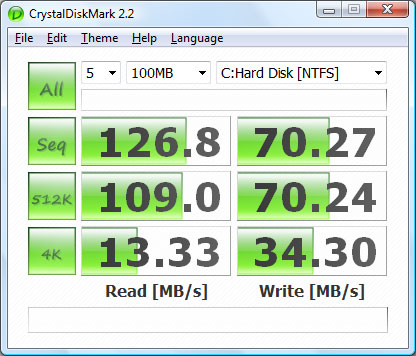
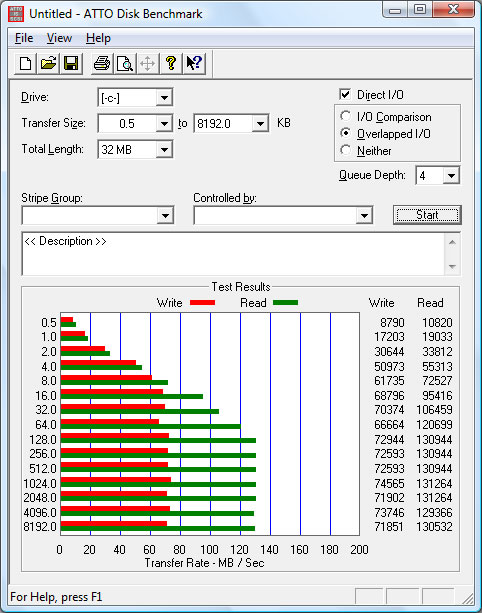
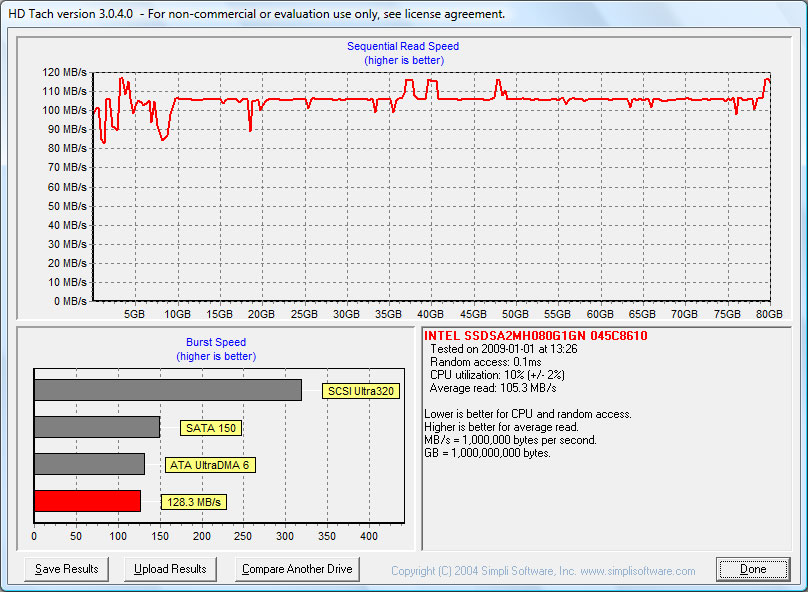
Managed to get hold of a X25-M and popped it into an aging laptop of mine, based on the ICH7-M southbridge (SATA/150 only).
This is a new piece, SMART reports 4 hours of runtime (install OS, drivers, patches) only before I ran the benchmarks.
I haven't done any registry 'tweaks' yet.
Does AHCI mode give more battery life? I'm running in IDE mode now, and I'm getting close to 20% less battery life than when I was using my WD Scorpio Black on AHCI mode. -
The X25-M drive supports a feature in SATA-IO called DIPM or Device Initiated Power Management. I'd assume it requires DIPM in order to achieve the low power consumption characteristic. You might want to check if your laptop supports that.
Otherwise, it'll probably run at full power all the time which might be why your battery life sucks.
I think the lesson we learned is if you have an older laptop or a laptop that doesn't support latest technology(ehem, IBM/Lenovo laptops...) don't get the X25-M and get the cheaper SSD drives. -
Does DIPM and any other power saving features require AHCI mode to work? Or either AHCI or native IDE mode is fine?
-
AHCI is probably required to have DIPM work as AHCI is needed for SATA features like Hot Plugging and NCQ.
Features like DIPM isn't mandatory but one of the options so even if you enable AHCI if your controller doesn't support DIPM, it won't work obviously. -
Usage pattern:
First thing in the morning, turning on the computer to download emails and went off to work.
At work, opened my outlook, launched my Opera browser, and Excel spreadsheet started working away my day. Occassional Word processing, and CorelDraw for editting. That's about it.
So that is really my usage pattern nothing really extraordinary. I don't play games.
I don't have HDD shock proof software installed on my Laptop. and Write Cache has always been disabled because whenever I have this activated, I experienced a lot more stuttering. That's why I finally decided to turn off the write cache.
I read somewhere that you may need to convert it back to factory state by using Secure Erase command. Does anybody know where I could actually download this software to perform such operation?
Thank you in advance,
-
Hmm interesting.
Now I think of it Secure Erase isn't a special command. You merely find a program that will erase the content of the drive by writing 1's to everywhere. You know that you can recover the data on the hard drive after it has been erased right? But you can use a program to make it hard to recover the deleted data. I'm assuming that can be used to "reset" the X25-M.
Also, if you can try to enable AHCI if it isn't already. It'll probably benefit the performance. -
Gee even Intel X25-E have performance problems
http://forum.ssdworld.ch/viewtopic.php?f=1&t=82
not only the Intel X25-M
http://forum.ssdworld.ch/viewtopic.php?f=1&t=35 -
My 120GB OCZ CoreV2 is no longer booting reliably, and is now locking up within a few minutes of coming up. I've been trying to copy my files off it, and it dies before I can get a complete backup. Buyer beware.
-
Best to stay away from OCZ SSDs entirely, regardless of the generation. My 64GB Core is less than useless; it's effectively a 4200rpm drive.
Nice scam OCZ is running with their shoddy products. -
Wow I'm really considering the intel x25-m.. its very impressive. Also the constant write speeds of 79 MB/s is very impressive (still faster than a raptor drive).
-
I had a Core SSD in my system for a brief period. Without tweaking Windows XP the drive caused lots of pausing which was very annoying. However, after installing SteadyState it zipped along almost as quick as my Samsung SLC drive (truecrypted though).
Now OCZ is recommending partition alignment as another way to achieve significant performance increase and eliminate pausing:
http://www.ocztechnologyforum.com/forum/showthread.php?t=48309 -
Anyone here use the intel x25-m in their mbp? If so, is it well worth the price?? I can score a x25-m for $428 with free shipping and no tax.
-
So does the much anticipated FusionIO: http://forum.ssdworld.ch/viewtopic.php?f=1&t=59
The reason all these 3 SSDs have fluctuations in performance is because they are all made for server-grade reliability and they try to keep random write 4k performance very high.
When the drives are fresh the performance is at top, but once you start writing data to them the SSDs start having data all over the drive and they become all fit to random IO operations and sequential speeds drop. In essence the drive becomes "dirty".
To get the sequential speeds back up the controller takes some time to optimize the drives again and "clean-up" the drive. The older controllers don't do that since they neither have the reliability controlling mechanism nor the performance in random writes.
Look at my post #1886: http://forum.notebookreview.com/showthread.php?t=208242&page=189 -
@inteluser, my laptop supports NCQ though and supposedly SATA2, only somehow the SATA2 is being capped. The NCQ is certainly there, the option is offered in the BIOS and selected.
-
Are you sure AHCI is enabled?
Chipset requirements: http://www.intel.com/support/chipsets/imst/sb/CS-012304.htm
http://www.intel.com/support/chipsets/imst/sb/CS-012305.htm
* Intel® Matrix Storage Manager software
* Hard drive(s) that supports NCQ
* Intel® chipsets using a controller hub that supports AHCI
![[IMG]](images/storyImages/ncqtv2.th.jpg)
Seriously?? Where do you get that? Yea the Macbook Pros aren't capped like the Thinkpads, at least the newer ones anyway. -
Here it is mine:
![[IMG]](images/storyImages/ncq.jpg)
-
*subscribes*
Great thread!
I spent the last several nights with this very enjoyable read, starting from page one.
Thank you all.
Still haven't made the move to SSD yet, but looking forward to Q1 09 (& ff) very much. Can't wait to make the jump. This thread (and associated links) has been a nice little up-to-date primer, IMHO.
C'ya 'round (and happy new year). -
Happy new year everyone. May this be the year of the SSD for everyone who contributed in here.
-
My goal is... SLC, 128GB, under $300, fast, with NO STUTTERS and NO fluctuating performance as mentioned above
Dave
-
I do have that, made by a raid0 of 64gb ones. I can say you'll LOVE that target once you reach it
btw, got now the mini-pcie ssd for the asus eee. sadly, it doesn't fit my 2710p. but it works in the eee. now I'm considering reinstalling directly onto that disk.
I now have an EEE with 128gb + 16gb + 4gb ssds in there hahaha. -
Interesting...check out the "Upgrade Path" line (recently edited) in my sig. We both chose the same size device capacity and same price point. And my definition of "suitable" pretty much matches your device requirements too.
Could we, and others like us, be the critical mass "inflection point"?
/me looks up and down his block wondering if his neighbors are ready to buy, too -
as i'm living (and able to live) with a 32gb ssd, i know 128gb would be great for a "i don't have to think about anything" live
i'm now targeting 2-disk notebooks only. still messing around with ordering a 2530p, but waiting for the one with an 80gb 1.8" ssd to be available.
that way, i can get a ratherslow but big mlc ssd + a very fast one for system & data. the fast one will most likely continue to be the intel ssd that is already in there hehe. -
Your picture should give you some clue as to why your speed is capped. Compare your Intel Matrix Manager spec sheet with Inteluser's. You should notice the "Current Serial ATA transfer mode." Yours is generation 1, which indicates SATA-1, and Inteluser's is generation 2, which indicates SATA-2.
This means that your T60's speed is capped to SATA-1. My X61 tablet also has generation 1.
There's no way to change that, as far as my knowledge goes. -
Duplicate reply due to a bug, sorry guys.
-
Duplicate reply due to a bug, sorry guys.
-
Duplicate reply due to a bug, sorry guys.
-
Duplicate reply due to a bug, sorry guys.
-
Duplicate reply due to a bug, sorry guys.
-
Duplicate reply due to a bug, sorry guys.
-
Agree completely. Yours is an ideal scenario.
Sadly, my notebook is a single HDD model. I likely could use a 64G w/o any probs (maybe even 32G if I really trimmed the fat - I doubt it), but I think I would feel more comfortable with the added headroom of a 128G.
I may even just grab the new Seagate 500G 7200R Momentus 7200.4 (sacreligious, I know) if nothing decent falls out of the new SSDs and price drops before I get too impatient. -
you may consider testing out non-ordinary upgrade ways. i tried to plug an ssd into my wwan card port. sadly it didn't work. else, i'd now have 32gb os + 128gb data ssd. my card reader can't read over 2gb sd cards and is very slow so that's no way as well.
an expresscard34 ssd would be an option but they're overpriced for their usage.
taking out the cdrom and plugin in a disk there is another option.
i'd love to see a vendor bringing out an ssd that has two drives in a 2.5" package. 48gb slc for os, 192gb or so mlc for data. even possibly be pluggable (a short slc disk and an mlc to plug in from behind so one could extend the data storage in the future).
that would be AWESOME
i think 48gb would be a sweetspot for os. it would be very cheap, but enough for os and some of the most needed apps.
UHH THIS IS POST 2000!!!
-
I actually thought about this option after seeing an HDD drive caddy for Macs that plugs into the CD/DVD slot, but losing the ability to (easily) work with CD/DVD removable media is a very high price to pay. That would force using a USB removable media drive, I suppose.
Thx for ideas, tho. -
hm. not a very high price for me. after installing vista, i need about .. 1 cd during the live of the notebook afterwards.
i never use disks really. only for the car, as i don't have a direct audio connection there yet.
The new SSD Thread (Benchmarks, Brands, News and Advice)
Discussion in 'Hardware Components and Aftermarket Upgrades' started by Les, Jan 14, 2008.


![[IMG]](http://img261.imageshack.us/my.php?image=cdm3na8.jpg)



![[IMG]](http://img257.imageshack.us/my.php?image=ncqtv2.jpg)


