Problems? See this thread at archive.org.
oh, and, for vista, i actually could use an usb stick and install from there haha. i really like the new setup routine of vista, very flexible.
AND WE HAVE MORE THAN 2000 POSTS IN OUR SSD TOPIC!! *congrats*
-
-
Let's get to 2009!
Anyone have an Intel X-25E yet?
Lol daveperman, more than a third of your posts have been from posting in the SSD Thread.
davepermen 198
Les 154
John Kotches 127
Cape Consultant 119
sgogeta4 79
IntelUser 70
Spare Tire 60
PhilFlow 50 -
hehe. /me likes ssd's.
i now started to contribute more and more to software issues with windows and similar. but besides that, i don't have _that_ much knowledge to share for other issues. i'm no gamer, i'm no notebook tweaker. -
delete duplicate post

-
Here it is my Mtron 3500 benchmark from Ultrabay:
![[IMG]](images/storyImages/mtron3500u.jpg)
Eerie write speed.
Someone else seems to get a similar benchmark as me.
http://forum.ssdworld.ch/viewtopic.php?f=4&t=70 -
--------------------------------------------------
CrystalDiskMark 2.2 (C) 2007-2008 hiyohiyo
Crystal Dew World : http://crystalmark.info/
--------------------------------------------------
Sequential Read : 79.090 MB/s
Sequential Write : 61.563 MB/s
Random Read 512KB : 79.255 MB/s
Random Write 512KB : 28.877 MB/s
Random Read 4KB : 21.398 MB/s
Random Write 4KB : 2.366 MB/s
Test Size : 100 MB
Date : 2009/01/02 13:57:03
(you can copy the text straight from the edit menu.. how cool's that?)
i beat you (be aware my system is capped at 80MB/s no matter what with the mtron.
-
if that random write test would be true, i'd have 605 IOPS per second for random write. it should be more around 50 IOPS.
-
try that instead:
1. grab iometer http://prdownloads.sourceforge.net/iometer/iometer-2006.07.27.win32.i386-setup.exe?download<br />
2. this iometer config http://www.ocztechnologyforum.com/forum/attachment.php?attachmentid=6566&d=1220994173
3. extract the config file (whereever) and then open it (iometer will open)
4. expand your PC treeview thing on the left and click worker 1
5. in disk targets, select OCZ core drive letter
6. click results display tab and move update frequency to say 10s (so you can watch it go)
7. click the green go button. it allocates like 10GB file on the drive, and then will randomly write to different portions of it.
(copied from the ocz forum) -
http://www.ocztechnologyforum.com/forum/showthread.php?t=48309
partition alignment could be interesting. -
I was thinking about one of those but the 32GB size sort of put me off as I currently have a 32GB SSD from Mtron in my Fujitsu and prefer to get the new 64GB SSD that should be out soon. My next two laptops that I want are the Macbook Pro and the X200 Tablet. Want to place SSD's in both of them.
-
Wow!
I'm shocked, somewhat embarrassed, and feeling a bit naïve. This is my first foray into Vista. So I decided to poke around a little, and do some cleaning up of my Vista x86 install. I stumbled upon Les' Vista guide, and decided to remove all my old restore points, keeping just the most recent one. I had 40.1GB used space prior to removal. So, how much do you think I ended up with post removal?
17.5GB!
Over 23GB of RP and shadow file data were removed in the click of the mouse.
TBH, I'm absolutely amazed. I know I’ve D/L'd a lot of utilities, patches, updates, and other apps over the last 5 weeks, and always set a RP prior to any s/w or config changes, believing I was acting in good practice. But this is wild beyond my imagination. I somehow accumulated ~23GB of RP data in 5 weeks totaling ~60% of my total disk use!
And I haven't yet touched the Vista auto-adjusted 2GB PF, all the Toshiba bloat and trial ware, or any other tweaks.
I didn't intend to make this post drag on this long. But I may have to re-think my disk size requirements: 64GB may actually work reasonably well for me, rather than the 128GB minimum I had originally set for myself. I'm fearfull of starting to consider 32GB. -
hehe saves a big bunch of money
my winfolder is 11.8GB currently. it's a clean windows installation, no tweaks what so ever. the programs i need are installed (visual studio f.e., traktor 3).
if i can live with 32gb you can live with 64gb. though, more would allways be great
-
The Ultrabays of the Thinkpad X6X series are native PATA implementations. The SATA Ultrabay adapters contain SATA-to-PATA bridges which obviously degrade performance.
Put your system drive in the Ultrabay and the Mtron benchmark drive in the real hard drive bay. Press F12 on BIOS startup and select the Ultrabay disk as boot disk. Then redo the benchmark for the Mtron and repost the results. -
Ok This is my benchmark with main bay instead of ultra bay:
--------------------------------------------------
CrystalDiskMark 2.2 (C) 2007-2008 hiyohiyo
Crystal Dew World : http://crystalmark.info/
--------------------------------------------------
Sequential Read : 94.980 MB/s
Sequential Write : 86.947 MB/s
Random Read 512KB : 94.683 MB/s
Random Write 512KB : 29.488 MB/s
Random Read 4KB : 19.777 MB/s
Random Write 4KB : 2.810 MB/s
Test Size : 100 MB
Date : 2009/01/02 21:06:42 -
looks much better. like mine without 80MB cap.
-
Yup yup.., All I need to make sure now is, no stuttering at all then I would be home free.
At the moment I activated superfetch and prefetch, indexing, everything ON. and try to use it for the whole week, see if I encountered any stuttering or problems.
Free space: 5GB. -
you shouldn't. i haven't any as well.
how big's yours again? i have 10gb freespace on a 32gb version. -
I have a 64GB version and 5GB freespace I know I know, I'm a pretty heavy user. With 80GB intel, I had around 15GB left.
Anyhow once everything runs very well and troublefree with 64GB Mtron 3500, I'm going to Secure Erase my intel x25-M and transferred some of the data to it. Fingercrossed. -
sounds great.
btw: you may look into the post i've made above about the partition alignment. may help for the intels, too? -
From a practical perspective that should not be a limiting factor as SATA1 speed limit is 150 MB/second.
-
64 GB is too small for me as I carry around about 30GB in OS images that I run out to various build machines in the field.
128 is ideal for my uses and my laptop is a single-bay design.
The $300 price point is a magic one for me too. -
Do you guys recommend the OCZ core 2 for a laptop? I am looking to upgrade the 5400 rpm drive in my x200. The reviews of the OCZ is mixed at best but I heard there are now fixes for it. I may wait for the OCZ Vertex or Apex as they should ship this month.
I only use my lappy to surf, email, and word documents. Not sure if the prices of the SSDs are worth it for me. -
Most tend to not like the core2 here as they are prone to stuttering issues, but a few have had positive experiences
-
I posed this question a little earlier in the thread, but I'll ask again: Does anyone know what Microsoft's plans are as far as optimizes Win7 for SSD's? Also, are they going to be making any changes to how Vista functions on SSD's?
-
But it is a matter of fact that is limited down to SATA-1, then limited some more even beyond SATA-1.
-
Any ideas on some 1.8 Zif SSD drives? I have seen some Mtron drives but they are a bit to power thirsty for me i think. I have also seen some PQI drives but they seem pretty impossible to get hold of.
I am aware that you can get adapters but they just don't seem that stable to me. I have tried using one in another laptop before and it is not something i would want to use again. So i would prefer to stick with a Zif drive now. I am thinking ahout upgrading the HD in my Sony TX. I was thinking about getting a 64GB drive.
I have also tried Dell.com but they have no refurbished 1.8 SSD drives in right now.
Thanks -
Man limited to SATA-1 in this day and age is just plain sad.
-
My OCZ Core v1 is the best upgrade I have ever made tuan209.
THAANSA3, ever heard of search or Google rather than shouting?
To save your fingers...
Microsoft have stated that they are not making any major system changes for SSDs in Windows 7.
http://vista.blorge.com/2008/11/08/windows-7-will-be-more-ssd-friendly/
Quite pathetic really. However Window 7 does run incredibly well on my Core v1. -
First Impression with Mtron 3500, It actually runs quite warm to my touch, compared to Intel X25-M. Usually my system T60 temperature stabilized around 60degrees, however now it's hovering around 68degrees.
And if I use both intel X25-M and Mtron 3500, the temperature hits even higher over 70degrees. So far haven't experienced any stuttering even with all the eyecandy on.
By the way, Someone mentioned that even Intel x25-E causes stuttering with the Thinkpad T60. Perhaps incompatibility with the Intel controller?
My Intel X25-M in Ultra-Bay after SECURE ERASE:
--------------------------------------------------
CrystalDiskMark 2.2 (C) 2007-2008 hiyohiyo
Crystal Dew World : http://crystalmark.info/
--------------------------------------------------
Sequential Read : 85.181 MB/s
Sequential Write : 55.746 MB/s
Random Read 512KB : 79.333 MB/s
Random Write 512KB : 54.445 MB/s
Random Read 4KB : 13.286 MB/s
Random Write 4KB : 27.243 MB/s
Test Size : 100 MB
Date : 2009/01/03 10:30:11
Random Write 4KB kind of improved dramatically. -
Given that there is little that can fill the channel with one device consistently it is, IMO, one of those non-issues that get blown way out of proportion.
-
150 MB/s? Plenty can surpass that these days.
-
hm yes. my raid0 has 220MB/s constantly. an intel ssd has 200 to 240MB/s read speed. even crappy ocz cores are higher than s-ata1 in read speeds.
-
Back from vacation and finally got my X25 installed. Real feel is definitely a lot faster, though I'm not sure if it's worth the money. I'm still entertaining the idea of selling it and getting a G.Skill 128MB MLC instead. Thoughts?
Here's a screenshot of an HDTune benchmark with 512k clusters. Had a whole bunch of processes in the background, which makes the results all the more impressive.
![[IMG]](images/storyImages/X25%20-%20512k.png)
-
How fast your system feels and responds has nothing to do with large block sequential reads and writes.
Since Windows operating systems work with 4k to 64k data blocks, the random read and write performance of an SSD in that area will be the deciding factor on how fast Windows works.
To my knowledge, not even the Intel solution is able to push past SATA-I speeds in those areas. -
difficult to measure, as the smaller the data, the bigger the communication overhead.
and the random read performance of an ssd easily surpasses sata-i speeds, not even careing about communication overhead of the s-ata protocoll when requesting small data.
and fast random reads are important for the system speed feeling. if i want to open firefox, the system has to load the whole profile with tons of tiny random reads (really bad made from mozilla actually, they could've done this somehow sequencially and ff would boot much faster on ordinary hdds). an ssd gives a huge boost there.
edit: but you're at least sort of right: an ssd that is very fast at random writes (and random reads of course) that "only" maxes out s-ata1 (150MB/s r/w max, less because of communication overhead) would still be very very very fast. that's why my mtrons feel so fast while they are only sata1 (or even less on the 2710p.. they're 80MB/s max). they're very balanced.
but problem is: if the intel can not reach full speed, it may result in some sort of stuttering as it always tries to speed up, gets throttled down by the bus, blocks, waits, speeds up again, throttling, blocking, waiting, etc....
only on an s-ata where it does not have any limits in the way, it looks like it works flawless. that may be why intel only wanted to sell it in new notebooks which they can test for compliance. -
From T60 users and comparing to Macbook users who aren't limited, even the random write speeds are lower on the T60. All speeds are slower with the limited T60 than on the laptops which aren't limited.
-
I actually get the impression that Microsoft is doing quite a few things to speed up performance (both on HDD and on SSD) but that they seem to be wary of overhyping it and then having to deal with the disappointment if they fail to deliver.
For one, they are apparently trying to cut down the number of background random reads and writes that W7 will do. The reduction in random writes is much more beneficial to SSDs than to HDDs.
Check out these MSDN blogs and related comments for some interesting info
http://blogs.msdn.com/e7/archive/2008/08/27/windows-7-approach-to-system-performance.aspx
http://blogs.msdn.com/e7/archive/2008/12/15/continuing-our-discussion-on-performance.aspx#comments
My guess (purely speculative of course) is that Windows 7 will be to Vista, what Windows 98 Second Edition was to Windows 98/95.
If they only would come to their senses and include a real "Windows Classic" UI in W7. The rearrangement of everything in the UI is truly horrible and mind boggling. If they want to introduce new stuff .... fine .... but why oh why give your old users the middle finger? -
because old users should sometimes start to learn new stuff? the new way is quite cool (well, new as in the vista way. i don't use win7 yet).
it's not like you don't like in your new car that it does so much more automatic and more simple but a little different.
anyways, yes it looks the win7 enhancements for disk help ssds much. i've linked some pages before to an ocz forum report about partition alignment and it's impact on ssd performance. may be they do such tiny things better by default in win7? well, that special tweak should, according to the ocz forum, be implemented even in vista. that's why vista >> xp on ssd's right now.
still, it's not the big things that make ssd's crawl. it's the tiny but tiny wrong things. fixing them removes much of the problems from ssd's. still i wouldn't buy an ocz. i'm just brandmarked from all the bad reports about it. -
I can't agree with you there. The W7 UI is even more re-arranged than the Vista UI (compared to XP). I have absolutely nothing against learning new stuff (e.g. SSDs being a new area of knowledge to me).
However, no one can convince me of the benefit of just moving settings and options from one place to another like they have done in W7 (and to some extent in Vista). Same thing with Office 2007 and the ribbon UI.
Somehow Microsoft seems to have forgotten that their major repeat customers are business users. There was little love lost on Vista and Office 2007 from the business community but they do not seem to care.
Ah well .... this is a discussion for another thread -
Can you point me towards some comparative random write benchmarks? -
I actually do agree with you. And out of the discussion. (Me doesn't like Win7 that much. Espencially knowing, if people would like Vista, we would get all the updates of Win7 for free as sp2..).
Currently doing some BIOS updates on my 2710p. I hope I don't brick it. -
Mine:
http://forum.notebookreview.com/showthread.php?t=208242&page=198
1974
TWY
http://forum.notebookreview.com/showthread.php?t=208242&page=197
1970
Another review on X61:
http://japan.cnet.com/blog/tomono10/2008/11/07/entry_27017738/
The reason I doubt SATA150 isn't only limiting sequential reads are because the controller could have done more to reduce power. According to the IBM tech support site(or w/e the site is for), the controller is indeed SATA2-300 but limits speeds to SATA-150 to save power.
Now if the controller capped the speeds to only 150MB/s it might make sense that only sequential speeds are impacted.
But say that the power management is such so the ENTIRE controller chip is throttled. It CAN limit random read/random write speeds in that case.
Jlingo, try turning NCQ off.
EDIT: I just realized this post:
Your Random read and write still sucks. Sequential speeds are understandable as the drive is on UltraBay. -
@inteluser:
I already moved my Intel X25-M to my desktop computer:
--------------------------------------------------
CrystalDiskMark 2.2 (C) 2007-2008 hiyohiyo
Crystal Dew World : http://crystalmark.info/
--------------------------------------------------
INTEL X25-M
Sequential Read : 252.183 MB/s
Sequential Write : 74.888 MB/s
Random Read 512KB : 167.437 MB/s
Random Write 512KB : 73.928 MB/s
Random Read 4KB : 16.986 MB/s
Random Write 4KB : 39.461 MB/s
Test Size : 100 MB
Date : 2009/01/03 12:24:33
--------------------------------------------------
CrystalDiskMark 2.2 (C) 2007-2008 hiyohiyo
Crystal Dew World : http://crystalmark.info/
--------------------------------------------------
VELOCIRAPTOR 300GB
Sequential Read : 94.198 MB/s
Sequential Write : 96.986 MB/s
Random Read 512KB : 44.086 MB/s
Random Write 512KB : 66.703 MB/s
Random Read 4KB : 0.797 MB/s
Random Write 4KB : 2.058 MB/s
Test Size : 100 MB
Date : 2009/01/03 12:35:56 -
Haha nice, that's what its supposed to be.
Still, my speeds are higher than yours for some unknown reason.
Could it be that Vista is worse than XP? -
I need a 128GB 2.5" PATA SSD for my older laptop. What's reasonable out there right now? The 120GB OCZ Core V2 in my new laptop is dead, and I've migrated back to my old laptop while I send everything back for repair/replacement, and the totally slow performance is killing me...
-
I didn't even know they made SSD's in PATA!!
-
Strange given how I've carried out the tests that you've asked and my Core v1 was just as good as your MTRON, all for a far superior cost per GB.
-
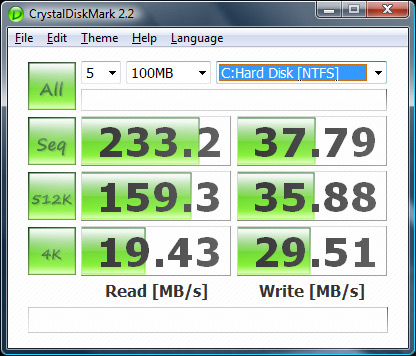
Just installed an X-25m in my Core i7 desktop (Vista 64) and the benchmarks aren't where they should be.
Disabled prefetch/superfetch, disabled indexing/defraging, enabled write-caching and advanced performance, all the usual tweaks but the drive's write performance is about -50% of where it should be along with the read performance being erratic.
Few benchmarks, not sure what I missed:Attached Files:
-
-
Hi mates,
its about 5 months when I posted my benchmarks of OCZ 60GB core v2 in this forum. It was imho cool but after filling my disk with data stuttering starts. I tried every tweak without success. I just want to ask about possibility of sales return (or RMA how you probably call it ). Do they give money back or what? Because it seems that every core ssd have this problem.
Another question. I checked prices of new MLC drives. I was thinking about two cheap SSDs for raid0 on my desktop. Especially A-Data SSD 300 seems to be fine. Is there review or does somebody have an experience? And what about raid0 on MLC? Somebody told me that SSDs doesnt work so fine in raid.
Thx for your answers -
Few questions:
-Was the benchmark ran right after the installation??
-Was the installation a clean install or a image?
-What's your daily usage pattern(short summary)
-Is the drive a new drive? Or was it used before(maybe it was used on a laptop then transferred to the new system)
-What was the capacity of the drive at the time of benchmark?
The new SSD Thread (Benchmarks, Brands, News and Advice)
Discussion in 'Hardware Components and Aftermarket Upgrades' started by Les, Jan 14, 2008.