Problems? See this thread at archive.org.
HELP PLEASE
An OCZ SOLID 60GB (about $100 net) just arrived, and it should tide me over until an SSD champion emerges. It will go into a new Toshiba R600 (9400 at 1.4GHz), with a 2.5" SATA bay.
What is the best way to set up the new SSD? I have gotten excellent advice from TidalWaveOne (Albert), and welcome any further suggestions regarding:
1. Initial preparation and tweaking of the drive, including offset or whatever.
2. Safe method to transfer contents (27GB) of old drive onto new one. Is it just a matter of using Acronis to move a disk image? I would hate to have to go through all the setups, etc.
Thanks!
-
1) If you search for "Partition Alignment" on NBR, you'll find a thread that links to another thread on the OCZ forums that contains a very good guide on partition alignment. I simply plan on following that guide when I image my own Solid/Vomit.
2) After the partition alignment, I do believe it's just a matter of using Acronis and imaging the new drive. I've actually been using a free program called "Disk Image XML" which may or may not be better than Acronis, but it does it's job, so I'm satisfied. Once I align my partition, I'm just going to image the drive and that should be that.
Then of course you can scrap your pagefile, do like Steady State or whatever; but if the drive is working fine at this point, I'm probably not going to touch it anymore. -
I want to add a comment about partition alignment.
I got my Corsair for exactly 2 weeks and had many did partition alignment setup from 63, 64 to 128.
Everytime I did a fresh install along with all the windows update. I ran Synthetic Benchmark like HD Tune, HD Tach and ATTO before and after update. For some reason, the very very first benchmark I ran with 63 offset I got the fastest read / write speed (115 MB/sec read / 89 MB/sec write). I try other offset after like 64 and 128 and got lower read / write speed.
Can someone explain why? SSD fastest when there is no data? -
Did the corsair come preformated like that?
-
Glad you found my info helpful. I got my 2nd 60GB OCZ SSD today (for my Vista notebook) and am trying to copy the Vista system over... this time I tried Acronis but it seems to have redone the partition! Ugg! So I am starting over and trying the robocopy method again. It seems that Acronis will change your partition. It seems to have changed my offset from 128 to 64 according to diskpar.
-
Unless someone points me to a clear and low risk path to optimize the installation with some sort of migration, I'm ready to swap the SSD into the laptop and then re-install XP Pro w/SP3 and all my apps. That might be the least risky, though the most work.
What is the best way to set up or tweak the SSD prior to doing that? It has a mini-USB port... -
Do the alignment and create the partition you will install XP on:
http://www.ocztechnologyforum.com/forum/showthread.php?t=48309 -
I've had trouble transferring my partition from the old HD to the new SSD while preserving the alignment. Currently I'm using Snapshot ( http://www.drivesnapshot.de/en/down.htm) and it seems to be working great. It may not look pretty, but it is now restoring the partition and is suppose to keep the alignment according to the OCZ forum info. notaguru, you may want to try this utility after using diskpar to create an aligned partition.
-
I also used drive snapshot to restore and it does not touch the alignment .
I used the Vista recovery disk to do the alignment and I'm running XP. -
First review of the Vertex showing great sequential read/writes but disappointing write speeds when it comes to smaller files:
http://benchmarkreviews.com/index.php?option=com_content&task=view&id=299&Itemid=60 -
Ok I am running a OCZ core as boot and have it optimized....but what if you run a second Disk drive? It is longer optimized because of registry edits? Is there a way balance the 2 types of drive togather?
-
Pros:+ Impressive 248 MBps read and 225 write bandwidth with EVEREST
+ 64MB Cache buffer permanently solves 'stuttering' problem
+ Very low 0.10 ms random access time
+ Lightweight compact storage solution
+ Resistant to extreme shock impact
+ Up to 250GB of SSD capacity
+ 2-Year OCZ product warranty
+ Low power consumption may extend battery life
Cons: - Metal case is heavier and less durable than plastic
- Lacks integrated USB 2.0 Mini-B data connection
- Expensive premium-level product
Ratings:Presentation: 8.75
Appearance: 8.75
Construction: 9.75
Functionality: 9.75
Value: 8.00
Final Score: 9.0 out of 10.
Excellence Achievement: Benchmark Reviews Golden Tachometer Award. -
In flash memory, writes are inherently slower than reads. That is compounded by the fact that SSDs are divided into pages and blocks. While reading and writing can be done in much smaller "pages", deleting them only happens per "block". Usually dozens(32-128) of pages are in 1 block. Another thing flash can't avoid is having to delete before writing it the 2nd time.
So when your drive is fresh, it doesn't need to delete and it performs fast. When every sector of the drive is written once, it needs to start deleting before writing again. And that will happen quickly because SSDs have algorithms to spread data around evenly due to flash memory's write life limitations. -
Irrelevant, they gave the same accolades and award to the Core drive: http://benchmarkreviews.com/index.p...sk=view&id=200&Itemid=60&limit=1&limitstart=9
We all know now how that turned out. -
Here's a random thought re: full performance vs new performance, if one were to use a disk wipe routine to write 0s to every sector, would the drive return to its like new state? I get the impression that logical 0s are the "base" state of the blocks so re-writing from there shouldn't take a big performance hit. Obviously this would be TERRIBLE for the life of the drive, and I kinda wonder if the wear algorithms wouldn't interfere, but would that work if you didn't give a crap how long the drive lasted?
-
I don't think running a standard HDD with your OCZ Core is going to affect the performance of the Core. I don't think it matters if you only use the HDD for storage or if you load an OS onto the HDD either. Whatever tweaks you made in the OS on the Core aren't going to change if you install another drive into your system; there shouldn't really be another to "balance"?
64MB cache buffer permanently solves stuttering problem? This seems to imply that having a cache automatically eliminates stuttering. Maybe this drive doesn't actually stutter, but the low random writes would still dissuade me from buying one. It's nice that the drive has very low 0.1ms accesses too, but if it doesn't translate into performance gains...
Lightwight, shock-resistant, up to 256GB of capacity, 2-Year OCZ warranty; every OCZ SSD has those characteristics.
Also, they mention the low power consumption of this drive, but don't actually test it anywhere? Their findings on temperature might even contradict this statement? The HDD could dissipate heat better than the Vertex, but I think the difference of rate in heat dissipation is minimal. Hot controller is hot?
Well you know, compared to the competition at the time, the Core was cheap and relatively fast... even with the stuttering issue it might have been worthwhile then?
... naw.
EDIT: Also, why are Mtron 7500 and Memoright GT still so expensive? Surely Intel X25-E is faster, even in enterprise applications? -
My current plan is to use diskpar and then Drive Snapshot, hoping to save all the work of re-installing everything.
Questions:
1. Will beginning "fresh" result in a system that is sufficiently faster to justify 2-3 hours of work?
2. Where is "diskpar" on this XP Pro SP3 system (Run> doesn't produce it)? -
Yea it does work, that is one of the ways recommended by SSD manufacturers to "reset" the drive to factory conditions.
Actually SATA SSDs have command called SECURE ERASE. Specialty programs like HDDERASE can activate this and it does it at blisteringly fast pace(80GB Intel SSD will take few seconds).
The downside is of course you'd have to reinstall your OS and you'd use a write cycle.
I'm wondering if SSDs will ever become mainstream before another tech comes and replaces it. Come to think of it, some roadmaps already speculate replacing flash with another technology within a decade.
Supposedly "Cheap" SSDs have problems, and all the new ones with less to zero problems are expensive, even the ones like Vertex. People think 256GB at $500 is cheap, then you look at HDDs(which actually get faster as platter density increases) which you can get 500GB for $70.
Commander_Wolf: So you want a drive with lower sequential writes and good random writes over a faster sequential writes and slower random writes. Well that is good. But have you wondered about this?? Some say the best algorithm to fix slow random writes is to turn all random writes into sequential. But you know what happens to your sequential writes when you do that?? They eventually drop near the levels of random write speeds.
How much sacrifice of sequential writes it has to do depends on how aggressive the algorithm is. There will be a tradeoff between each other and the degree will vary between implementation. High sequential write and acceptable random write is what PC users will be looking for.
daverperman: You keep inflating SLCs to a level that seems fundamentally different from MLCs but on a cell level, the performance differences lie at 2-3x, not 10-20x that SLC SSD vs MLC SSD is. All SLC implementations use expensive controllers and DRAM buffer on them. You tell me of a modern SLC drive that doesn't use DRAM buffers on them. On Intel drives, both SLC and MLC uses the EXACT controller. Look up the model numbers for the chips and only different chip between X25-E and X25-M are the flash memory chips. -
1) Unless your disk image is of an already aging and bloated install, probably not.
2) It's not part of XP. You have to download it like they mentioned in the OCZ thread.
I think it depends on how you define "solid state". For the most part, I'd say anything without moving parts can still be considered "solid state", whether it be flash or some more exotic form of storing 1s and 0s. And I don't think that another device with moving parts is on anybody's roadmap within the decade? -
1. I don't think so. I would use diskpar and Snapshot and not install fresh.
2. Download link and more info here:
http://www.ocztechnologyforum.com/forum/showthread.php?t=48309 -
Here's the latest "version" of my SSD saga which now includes upgrading my Vista x64 notebook:
This is my "story" for upgrading an older Seagate 7200.1 2.5" hard drive in a Windows XP notebook to a new OCZ Solid Series SSD.
For my main system, I have a Vista x64 system with two drive docks, an eSATA one and a USB one. I removed the old Seagate 7200.1 80GB HD from my Windows XP Dell E1505 notebook. Unfortunately I forgot the hard drive was password protected so I had to install it back into the notebook and remove the password before I could put it in the dock and my computer would see data on the drive. I wonder if the OCZ drive supports password protection? I may have to investigate that.
I put the OCZ 60GB Solid drive in my eSATA dock and followed the directions on the OCZ forum for using diskpar to create an aligned partition. NOTE: I use a program called "HotSwap!" to install/remove drives in my eSATA dock which I find very handy (makes it work more like USB drives). NOTE: Don't forget to make the new partition on the SSD the actve partition.
Partition alignment info:
http://www.ocztechnologyforum.com/forum/showthread.php?t=48309
I then used robocopy (included in my Vista install) to copy the files to the OCZ drive (two commands because two partitions):
robocopy d: l: /MIR /COPY ATSOU /R:2 /W:2
robocopy f: m: /MIR /COPYATSOU /R:2 /W:2
I had some errors trying to copy some "crypto" files (and some others). Security related?
To restore the MBR, I used "mbrfix64.exe" from http://www.sysint.no/Nedlasting/MbrFix.zip:
mbrfix64.exe /drive 8 fixmbr
I then put the drive back in the notebook and hoped it would boot up... and it did!
I then applied some of the tweaks mentioned on the OCZ forum. This included some registry tweaks and disabling the Indexing Service. I did not do the "tweak in beta test" and I did not disable my page file even though I have 2 GB of RAM in the computer. I also did not setup a RAM disk.
XP tweaks:
http://www.ocztechnologyforum.com/forum/showthread.php?t=47244
I had some problems with Outlook XP. It may have been how the files were copied with robocopy (I would have preferred to use Acronic True Image but was concerned about it preserving the partition alignment). Doing a "Detect and Repair" operation in outlook and then shutting down and restarting Outlook seems to have fixed it.
So far my impressions are very positive. The computer boots much faster and is very quiet. Programs load faster. I have not experienced any obvious stuttering.
I liked the drive so much I bought another 60GB for my Vista notebook. I did the alignment and created the partition like I did above for XP then used Acronis True image to make a backup of the system partition and then restored the back to the SSD drive (did not use robocopy this time). Unfortunately Acronis seems to have changed the alignment so I had to undo it and start over. So don't use Acronis if you want to retain your partition alignment!
Like with my XP upgrade, I then tried robocopy but something wasn't working right. I then tried copying the files using Windows Explorer and drag and drop (with it set to show hidden files and folders and protected OS files). That didn't work right either. I then downloaded Snapshot ( http://drivesnapshot.de/en/index.htm) and made a backup of the Vista partition on the old hard drive. While restoring (at the end), Snapshot gave me an error several times - "Setting new Value (11000001) in registry failed: Last Error 0x5". Fortunately it seemed to work anyway. However, I couldn't get my notebook booting with the SSD even after trying to fix the MBR with mbrfix64. The solution was to boot from the Vista DVD and do a repair operation. Then it booted! Fortunately I got it working but it was not as smooth as when I upgraded my XP notebook to an SSD drive.
Code:Vista x64: Before SSD (Samsung 250GB 5400 RPM): Processor: 5.4 RAM: 5.1 Graphics: 5.9 Gaming: 5.5 Primary HD: 5.2 After SSD (OCZ Solid 60GB): Processor: 5.4 RAM: 5.1 Graphics: 5.9 Gaming: 5.5 Primary HD: 5.9 NOTE: Boosted Primary HDD from 5.2 to 5.9, the highest rating in Vista.
-
You'd still agree going from flash to possibly new tech like MRAM is a big change equal to going from platter devices to flash right?? It doesn't matter if they are both "solid state" really.
-
You're pretty much on the dot there; I'd like to see drives better balance sequential and random writes. I think the X25-M does a good job of that.
It's a big jump, I agree, but not as big as that from HDD to SSD. For me at least, the transition from mechanical storage to any solid state device, is much greater than the transition from one solid state device to another. Hence there's this distinction between HDD and SSD. On the flip side, I think future generations using flash-based storage and/or MRAM-based storage (or whatever your preferred future solid-state technology is) will still call both devices an SSD.
Errr, I'm trying to suggest that just the way we label these devices suggests that the difference between one set is larger than the difference between the other. -
Great info, thanks. Not sure if I'll take the dive to do this to my drive but it's been junked up with a lot of stuff messing with it and I'd like to just go to using it as a system drive where it won't get written too much so I might use the ATA secure erase thing to 0 it and see how it performs. I didn't pay all that much for the drive anyways so if i lose a write cycle oh well.
-
I think my samsung 64gb slc arrived today, got the note from post office to pick it up, so, in about an hour from now, I'll be in the post office waiting to pick up my first ssd...
weeeeeee
I'm so nervous right now
edit: by the way, I read somewhere that using torrents on ssd is no good option...any info on that ? -
It's fine with a SLC, don't worry about it and enjoy your drive.
-
Congrats!
As fo torrents, many probably do a lot of little writes. You may want to consider using a RAM drive or program that only saves after a large amount of data has come in instead of a bunch of little writes. Or maybe just ignore the problem altogether as you'll probably upgrade before you wear the drive out.
Or if you have a mechanical HD, just save to that. -
I agree with commander wolf. FWIW...
Apply my own logic to what you guys have taught me anyway... -
Something bugs me in what you're saying. When a drive is new and a block that needs to be written to is considered empty it just does a write. When a block is filled with some info, the info needs to be read to cache, the block erased, the new writes combined with the old info in cache and writen back. Up to here, all okay.
Now if all sectors have been written to once, but effectively empty of relevant data because it was deleted in windows, which doesn't actually physically delete anything, the block is still empty, why is there a necessity to be erased before written to. Does the controler discriminate against a block full of zeros and a block full of random data that's considered garbage? Why would it? Zeroes are data too. Why wouldn't it just append writes? Doesn't make sense to me.
Also, i'm interested to know the "block" size of each drive if anyone has that kind of information. Is the "page" size equal to 512bytes (1 sector)? How big is a "block"? I hear intel erases blocks of 512kB, what about other drives? I believe block size is relevant to partition alignment since we know MBR will always be at the first sector of a drive and if you don't exclude the whole block that contains the MBR, that block will always need to do an erase before write, by that logic. Just a hypothesis. I actually asked the guy who wrote the partition alignment guide at OCZ why it was recommended to use 128 sectors specifically (over say 64 sectors), he said he had no idea, it was just tested as such. It was confirmed by the OCZ liaison dude on the forum who said his engineers said 128 sectors was best, but they didn't say why. He probably has no idea why. -
I think b/c a 0 isn't actually a 0 its the state of the silicon that is interpreted as 0.
unmanipulated state=0, manipulated state=1 -
My understanding is that each pair of bits is 4 little switches which make up a cell, if all the switches are off any write operation requires just flicking the appropriate switches on. To write in a block with logical 1s already written in it you have to first switch off some switches and then flick on the right ones, and that takes a lot more effort than simply switching some off switches on and moving along. My understanding is that the switches are written all at the same time using essentially a "wave" of electricity that has to be tuned to the right wavelength to flick only the correct switches as it passes through that cell and its easier to turn switches on than back off.
-
Spare Tire: check out this particular page from anandtech's review of the X25-M, it covers pretty much all your questions: http://www.anandtech.com/cpuchipsets/intel/showdoc.aspx?i=3403&p=3
-
Silicon Power's 256 GB SSD Released:
http://www.tomshardware.com/news/SATA-SSD-256GB,7053.html
Hasn't everyone, for awhile now, been using the revision B of the Jmicron controller (if they use Jmicron)? Wasn't there an article posted here that said that?
I've been happy with the OCZ Solid's I've installed in two of my notebooks. I still think you can't beat the price/performance factor (at least for typical computer users). I probably wouldn't use them in my main computer unless RAIDED. -
I'm pretty sure revision B still has the same problems, think the Core V2 uses it.
EDIT: Yep, thought so:
http://www.dailytech.com/Exclusive+Interview+With+JMicron+on+SSD+Controllers/article14004.htm -
right now I'm typing on my dell with samsung installed
it's so niiiice
everything works in snap, no more loading on anything, all programs and drivers installs in seconds...windows boot is 25 seconds, compared to my old drive when it was 55 seconds
still can't believe
using ssd compared to old hdd is like driving new gsxr 1000 compared to driving a car...
beautiful
-
ok, think i have some problems here.
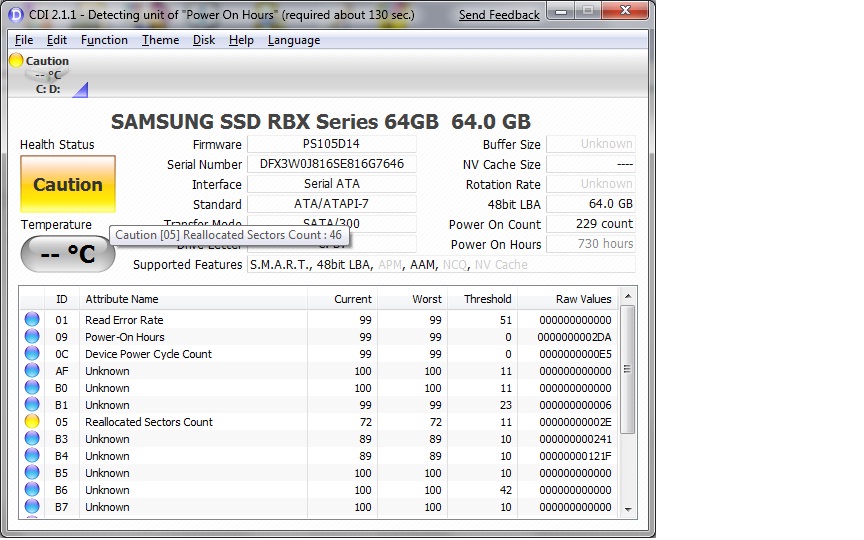
my windows 7 just gave me an error saying that my drive will soon be malfunctioned and that i need to backup all my data ?!?!?!
so I ran crystal disc info, and it says:
caution: reallocated sector count says 46 ( picture attached )
google says that reallocated sector is data from bad sector moved to another sector, so, do I have some data corruption on my drive
Attached Files:
-
-
I think you're fine. My Samsung also has a warning on its reallocated sector data. SSD SMART data just can't be interpreted the same way as HDD SMART data; but the SMART reading programs obviously don't know that. SMART data just isn't all that pertinent to an SSD in the first place; hence all the unknown values you have there...
-
i think this maybe has something with wear leveling...
so, how to disable hard drive failure warnings in windows 7
-
Tony at OCZ forums has confirmed that, per overwhelming consumer request, the Vertex will be shipping with lower sequential read/writes but much better IOPS performance. Reads still remain wonderfully fast at around 220, it's writes that have been diminished to 90.
See here for the benches: http://www.ocztechnologyforum.com/forum/showpost.php?p=344401&postcount=156
http://www.ocztechnologyforum.com/forum/showpost.php?p=344591&postcount=209 -
If there was a way to customize the firmware such as to make these adjustments ourselves...
-
There should be. He mentioned after the drives are released OCZ will release an even more tweaked high IOPS firmware that gives better write speeds.
-
... and if the SSD was smart enough to make these adjustments dynamically, depending on the load...
-
For me, I'd take the high sequential speed/low IOPS choice, and let my filesystem cache manage the difference. No matter how fast your drive, the fastest I/O is the one you never had to execute in the first place.
-
I'd worry that my drive would be so smart that it would "screw up". :laugh:
The more complex something is, the more chance for bugs.
Vertex sounds interesting for my main computer, but I think it is best to wait at least one month to see if there are any issues that appear (and the price will probably drop too). After all, it's using a new controller and I doubt these companies have quality control as good as Intel.
-
so if they are only now finalizing the firmware ... i would guess that means availability in 3+ weeks at the earliest?
-
Could someone explain to me how random writes differ from sequential read/writes? What do they apply to?
-
Hopefully sooner, Tony said that it takes 3 days for the drives to ship to retail warehouses around the world... but he hasn't given an indication as to when that shipping will occur.
Random writes help with many small files whereas seq. writes help with very large files. So with the former, we're talking about the speed in which an application, or an OS, that uses many small files loads, and with the latter we're talking about the speed in which you can move around really large files like HD movies.
At least, that's my understanding. Anyone feel free to correct me if I'm wrong. -
Random access: 1, 3, 20, 396, 53, 29
Sequential access: 1, 2, 3, 4, 5....
That's basically it... -
Yes but in laymen's terms or practical use, what is it? Ashura answered closer to my question..
-
It's really exactly as it sounds; I guess my explanation would be a combination of Ashura's and IntelUser's explanations. When an HDD or SSD performs a sequential write, it will go to block 1, write to it, go to block 2, write to it, go to block 3, write to it, etc. When an HDD or SSD performs a series of random writes, it will go to block 1, write to it, go to block 3, write to it, go to block 20, write to it, etc. The time it takes to access a certain random block is very small on an SSD, but still big enough to make a significant difference in total throughput when the drive is making many random writes.
The new SSD Thread (Benchmarks, Brands, News and Advice)
Discussion in 'Hardware Components and Aftermarket Upgrades' started by Les, Jan 14, 2008.