Problems? See this thread at archive.org.
The random write performance highlights the key differences between HDDs and SSDs. Since in an HDD a read/write head has to physically travel to a particular location before it can access a sector, it has a very slow "seek time" or "access time". But once it gets to the right location, because the disk is spinning so fast, it can access an entire track's worth of sectors very quickly. So it has pretty good sequential I/O speeds. The other key difference is that the time it takes to read or write a sector (once the head is in position) is identical and constant. (Because the platter spins at a constant speed, the head can't take more or less time to do reads or writes.)
An SSD is an array of electronic memory, with address lines in rows and columns. Generally you can access any sector instantly, just by using a disk block number as a row/column address. So SSDs can have very fast (sometimes unmeasurable) access times. But while flash memory can perform reads at arbitrary sector addresses, writes have a lot more constraints. Generally, writes can only be performed in pages, which are a group of sectors. And, unlike HDDs where new data can be written over any sector at any time, for flash, data must be explicitly erased before new data can be written. And worse, erases must be done in blocks, which are large groups of pages. On common flash chips an erase block is 512KB or more, and the fast SSDs are using arrays of flash in parallel, so it has to erase in sizes of blocks x channels. (And in general, even without erases, writes are much slower than reads.)
Because of the constraints on how writes and erases must be performed on SSDs, their random write performance can be miserably slow. If you have a partially written block and want to overwrite an already written sector, the entire block must be read, erased, and then written, even if only a few bytes needed to be changed. These partial writes are needed most often in heavy random-write workloads.
The solution to this slow erase speed is to use intermediate mappings from the user-visible disk block numbers to the physical flash addresses, in an attempt to make sure that all random writes (as seen by the disk interface) are actually done sequentially. The downside is that then what one would expect to be sequential reads will actually become random reads, and while SSDs have "fast" access times, the access time is non-zero and adds up quickly. A smart write-mapping algorithm will generally lead to slower sequential reads, as a result.
-
-
Thanks for the great informative post highlandsun!
-
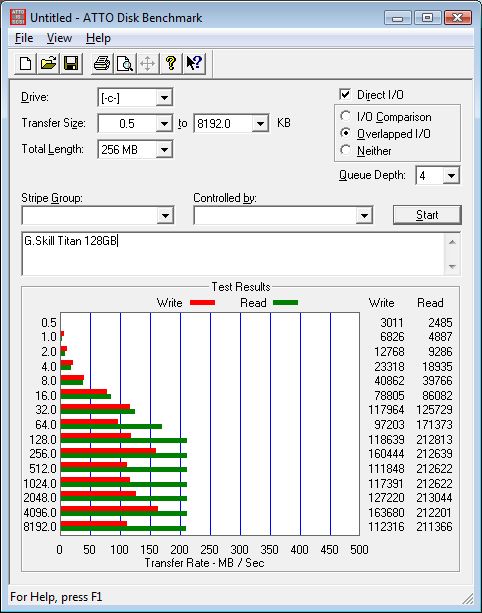
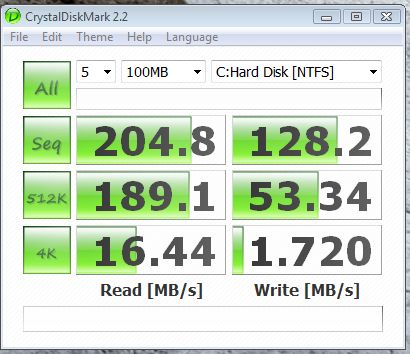
This is the first benchmark from my G.Skill Titan 128GB --
I ran this after closing all my open items on the desktop, without a reboot. Minor tweaks (shutdown superfetch, no paging etc). I'm not using any software tools to improve performance.
System is as listed in my signature...Attached Files:
-
-
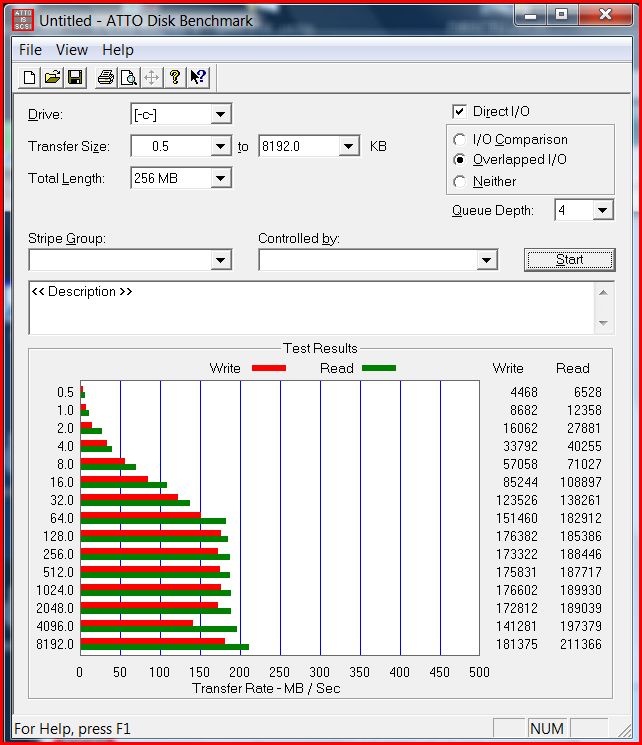
here are some tests for my drive...
guess I don't need to be worried about those reallocated sector warnings after all
Attached Files:
-
-
Where can I get this http://www.novatech.co.uk/novatech/specpage.html?SAM-SSD64M#top
At the same price in the USA? -
Looks pretty much like what I get on mine. Enjoy your new SSD
I've been wondering the same myself since we got the 128GB Corsair
-
Does anyone think getting a SATA 1 64gb samsung SLC would be slower than the SATA 2? The specs are still 100mb/s read 80mb/s write, right? and SATA 1 is 150mb/s. SATA 1 shouldn't make a difference with this drive, i'm thinking...
-
It won't make a difference since it won't saturate the bandwidth of SATA/150.
-
Are you referring to the fact that the Samsung itself is SATA1 or that your interface is SATA1? There are two generations of Samsung SLC; the first is nominally designed for the SATA1 spec, and the second is nominally designed for the SATA2 spec. Neither drive saturate even a SATA1 connection, but the point is that the older SATA1 drives have a lower read/write speed than the newer SATA2 drives.
So watch out if you see a "cheap" SATA1 Samsung SSD. You might be getting the older, slower model. -
Hehe.
It seems to me as if the PCPer article caused another price drop for the intel 80GB x-25M:
$358 on Newegg!
http://www.newegg.com/Product/Product.aspx?Item=N82E16820167005
I am sure we will see another price drop once the Vertex lands.
-
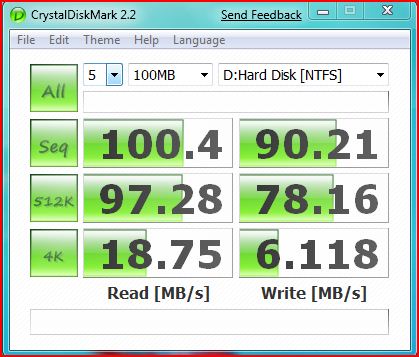
Antother benchmark, and I'm attaching both for easy reference. This time it's Crystal Diskmark. Sorry for the edge of my screen the cut/paste wasn't clean as I would have liked.
I'm away for the next day or so, so no benchmarks any time soon
Attached Files:
-
-
Let's see, you can get an OCZ Solid 60GB for $96 after rebate... makes it about $1.60 per GB. I might be willing to pay 40% more for the Intel... which makes it $2.24/GB... so for 80GB that's $179... so still too high if you ask me.
-
That's about $120 USD excluding VAT (which would not be charged on an order shipped outside of the UK). I wonder if they'll ship to USA?
-
I see $229 on eBay...
http://cgi.ebay.com/ws/eBayISAPI.dll?ViewItem&ssPageName=STRK:MEWAX:IT&item=180327267375
Possibly that's what it'll cost after exorbitant international shipping
-
Not sure if it so great price, I got 128GB version for $285...
-
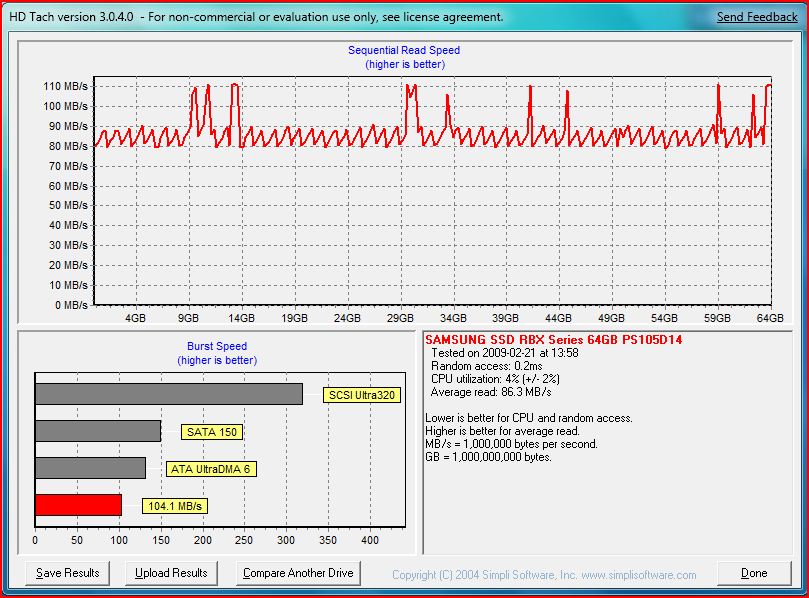
For those who are looking to spend a bit less money on the SATA-1 Samsungs, I would say the first-gen Sammys are definitely a slow bunch. Here are my Read benchies from Everest. I will compare with my E4200 'thin SATA' drive a bit later but I think the results tripled (more or less).
Attached Files:
-
-
Well, I agree that it's probably not a better value on the whole, but for people like me who never really use up more than 50 to 75 percent of a 64GB disk, that extra 64GB just isn't worth anything. It's just about getting the cheapest thing at the minimum feasible size and performance.
-
Hi! This is my first post. I am interested in SSD for my Dell XPS M1530 notebook.
Whereas there are a ton of MLC vs SLC lifetime issues discussed, what about size of the MLC drive vs used space?
It seems to me that if you are currently using 30 GB of space on your hard disk drive, putting a 64 GB SSD would have a longer life than using a 32 GB SSD, and a 128 GB SSD would last longer than a 64GB SSD.
There would be more free blocks to use before wear leveling kicks in. If you don't have a lot of free space, the drive will be have to perform much more block management, perhaps copying blocks with static data to blocks that are frequently used, just to ensure that the last few free blocks don't get constantly reused so all blocks get erased nearly the same number of times. Otherwise the SSD would get to end of life far too quickly.
Is this a correct assumption? If so, has anyone determined the optimum SSD size vs used space to achieve maximum life? -
Thanks for making the decission easy i'll keep looking
-
More benches of the Vertex, this time with the shipping firmware, Vista 64 installed and no tweaks aside from manual partition alignment: http://www.ocztechnologyforum.com/forum/showpost.php?p=344962&postcount=221
-
I tried checking out but USA wasn't listed. Other European countries were listed, however.
Bummer. I'll have to wait some more
-
Ashura, those are some very nice results. It would be so good to get another real player to give Intel some competition. Nice link!
-
You get what you pay for ... OCZ/jmicron drives suck.
(And unlike you, we don't get paid by OCZ to push their drives.) -
Why are you using an OCZ drive with a JMicron controller as a baseline? They are sh1t drives. You get what you pay for...
-
I'm not sold. The ATTO benches show unusually slow read AND write speeds at smaller transfer sizes, and I personally think the ATTO numbers are a bit inflated already. IO performance actually doesn't look that bad, but due to my lack of IOMeter familiarity, I wouldn't know if his settings are inflating his numbers (as opposed to say, AnandTech's testing).
Also, these people work for OCZ, don't they? They obviously aren't going to come out and say that their drives have problems X or Y... or are they?
While I wouldn't say that the OCZ Solid and JMicron drives in general are complete crap, I too don't think it's appropriate to value the Intel drive on the same price metric. You're paying four times for the Intel, but you're also getting ~130% storage (80/60), ~170% sequential read speed (230/150), ~140% sequential write speed (70/50?), and some ridiculously high percent random write speed (20/<1?). I'd go so far as to say that the Intel is a better value at this current price point (~350) than the Solid (~100).
(And sorry if my stats/math is off; I'm just going off the top of my head) -
Yeah, the money from OCZ is just rolling in. :laugh:
-
Just because something isn't as good as Intel doesn't mean it's sh1t. I guess you think Toyota is sh1t because it's not as good as Lexus.
![[IMG]](images/storyImages/shakehead.gif)
Very happy with my OCZ Solid drives. Good drives for the money. -
How much are they paying you?
... and I'm working for Samsung and Mtron
Toyota > Lexus
I'm not a hippie, but I'd rather have a Prius. -
I think the market's negative perception of OCZ was caused by poor preparation for the introduction of their products, caused by a race for market share.
It's well-known now that their drives require setting up with the right offset/alignment and block size, as well as serious tweaks to the computer. That knowledge base was painfully accumulated, but applying that wisdom enables good SSD performance at relatively low prices.
We just received a 60GB SOLID, and though we couldn't get it into the laptop for which we bought it, we did install it in another unit with stunning results. Of course, we have the advantage of history - and did the diskpar thing, etc. (thanks rookie and tidalwave).
I believe there are far better SSDs, and some that work better out of the box, but the OCZ SOLID is probably the most cost-effective product in this fast moving market. On the other hand, if you're not willing to set it up properly, it might be the worst. -
Wow...exact same drop and price on Amazon too: Link
They've both been identically priced, to-the-penny, for the last several price cuts.
Scary how Egg and Amazon move so perfectly in tandem. -
Wendy actually works for clubcdfreaks so her review has a bit more weight, but yeah I'm also waiting for anandtech's review before I drop the cash for it.
(if it'll ever get in stock that is!)
-
$349 and free shipping on EBay for Intel 80GB, yep! Gonna keep a very sharp eye on this Vertex.
-
I think the only thing good about OCZ SSD is their SSD forums.
There is so many problems with their drive, their SSD support page suddenly become very informative. -
because he is an ocz spammer. half his posts are about how great these drives are and how people should buy them. rather annoying.
-
Well, I've said before that I don't think the OCZ drives are particularly great, but in TidalWaveOne's defense, I don't think he should be ostracized for promoting his choice of drive.
Say you bought a 10 or 12 inch netbook. For most people these days, including yourself, a ULCPC is sufficient for a whole slew of everyday tasks. So when people ask you to recommend a basic, portable computer, you recommend an EEE 1000 or a Mini 12. Now you're on NBR telling every other person to buy a netbook instead of a clunky mainstream 15 because it really is good enough.
Obviously anyone doing this would probably be told off here, but I mean what's the problem? Tons of people got along fine with their late nineties Pentium III or early Pentium M; the same mainstream grouping would be perfectly content with a ULCPC; they're cheap, small, portable, and not really all that slow.
Maybe that wasn't the greatest analogy, but you can see where I'm coming from. I mean just as with this netbook analogy; if you bought a Solid and found it affordable and not really all that slow, would you not promote it as well?
All in all though, I agree that these cheap drives continue to fail to impress; I'm just trying not to write off the entire bottom half of the market... -
So I had some misunderstanding regarding real free space and "free space". The proper way of doing reliability management means it doesn't do idle free space erasing.
You are right that the 64GB SSD will have greater lifespan than 32GB, but only because it has 2x the amount of space to write on. -
Sitecharts, your posts are the least informative and most anoying of all. you just gotta chill out man. we get it. jmicron drives aren't your cup of tea. I think everyone agrees with you though you get what you pay for. You fork out $350 you get an awesome 80gb intel drive. your fork out $100 bucks you get a 60gb drive that needs some legwork to get up and running. It's like highering someone to rennovate your house or do it yourself. Its a pain in the to do it yourself (and probobly still not as good as pro's doing it) but it's a lot cheaper. We all know this so chill the eff out man. I don't know y your so angry all the time maybe you should get laid or something or take care of it yourself if you've been having those sort of problems...
-
What did OCZ do to you to deserve this hatred? Did you buy one of their original Core drives or something?
-
Most of the SSD's that I own use the Jmicron controller and I haven't had any problems with them. The only Two drives that don't use the Jmicron controller are the Corsair s128 and the OCZ SLC Sata 2 64 GB. I've been using the G.skill Titan for over a month now and I haven't run into any stuttering problems with this drive. The only two OCZ drives that I own are the Solid 250 GB and that's in an enclosure and the performance SLC 64 gb drive.
But if you have the money get a Intel, Samsung or a good SLC drive. -
Are there any official reviews of the 256gb samsung drives that dell uses?
-
I've found this two month old piece to be an interesting "Big Picture" article, highlighting some of the difficulties in attempting to test and evaluate SSDs with our current commonly available tools and techniques (and HDD point-of-reference):
BenchmarkReviews.com - SSD Testing: JMB3xx vs ICH10R.
I try to stay current in this thread and don't recall seeing this specific article, but hey, with the quanitiy of posts and pages I could've missed it (a cursory search produced useless hits). My apologies in advance, if so. -
So basically not only do JMicron flash controllers stink, their SATA controllers aren't that great either?
... and even more shockingly, an Mtron 3500 gets < 500KB/s on 4K random writes? Seriously?
-
I've had several JMicron controllers on my desktop Asus mobos and haven't had any serious issues, but they do seem quirky and a PITA. I've never benched them tho, 'cuz they're only for removable media drives (in my specific instances).
But from other forums I've frequented, they do seem to often be disliked, if not outright despised; But this I've gleaned from purely random posting I've seen while passing thru. I did not participate in those specific discussions.
Edit: BTW, on page two the author states:
+++
In late 2007, when Solid State Drive (SSD) products were first reaching the retail market, it was discovered that Intel ICH9 chips exhibited a strange behavior when connected to SSD products. As a result, many large review websites, Benchmark Reviews included (but not so large, I add with a frown), used one of the other SATA controller chips for our testing.
+++
Have we actually seen ICH09 SSD issues here? I really don't recall. The author doesn't expound. Many of the/our current notebooks are running ICH9-M (I know mine is). -
What I find even less informative is someone promoting drives that 90% of the people in this thread are saying are horrible.
But guess what: I am not on here to please you!
There is a big difference between someone saying "Hey, I don't have these issues everyone is talking about, but be careful when you buy one and buy them so you can RMA them if it doesn't work out!" and the blatant spamming he is doing.
I bought a V1 and a V2, used all the tweaks and the drives still were crap!
Also tried a warp v2 and it was crap too!
3 out of 3 ... don't tell me that the issues can be fixed.
Maybe if you don't use your computer you don't have issues but even if you do the lightest office work the drives stutter! -
AFAIK, for as long as I've been following this thread (since around page 200?) there hasn't been any real discussion on SATA controllers, not to mention problems with said controllers. That being said, I'm using ICH9M without any (known) problems. Possibly some tweaks were made between the desktop and mobile variants? Will be testing the desktop ICH9R when my OCZ Solid comes, though.
Also using ICH6M on my older machine with a 4GB CF SSD solution. A little bit of stuttering here and there, but I believe it's just due to the fact that the CF is comparatively pretty darn slow. -
as far as i remember, mtrons had some issues depending on the s-ata controller, but they all got fixed due to firmware updates.
-
An individual who owns a jmicron drive can voice his opinion the same as you. If %90 of people want to say they are crap they are allowed to. If the other %10 say they are fine, so be it. Stop being a commie.
-
I hope one of the *real* experts on here can chime in, but I recall reading some early SSD reviews with interest and learning that the Intel ICH9 were capping max transfer rates at 80MB/s (IIRC) (also note that many older SSDs didn't go much faster, if any, than this anyway). I believe this was discovered to be a limitation resultant from the then-current driver and NOT a limitation of the hardware. A subsequent driver release must have fixed the problem because ICH9 chipsets no longer cap max transfer rates.
-
Ok folks, what do we all think about the Samsung 64GB MLC? I offered $175 for one on eBay and the guy counter-offered $200, shipped. Call me a Samsung fanboi, but I'm seriously considering buying that and returning/reselling my Solid, which still hasn't arrived at the moment.
-
FWIW, some quick research I just did, leading to several user forums I respect (XS, OCF), supports the info you (and Daveperman) supplied in your posts.
I recall the early 80MB/S issue, but thought it was a manufacturer specific problem. Apparently I was mistaken.
sample ref: Anandtech - SSD Update - Intel ICH9R Problems Solved
The new SSD Thread (Benchmarks, Brands, News and Advice)
Discussion in 'Hardware Components and Aftermarket Upgrades' started by Les, Jan 14, 2008.