Problems? See this thread at archive.org.
Well the thing for me isn't that the installation itself takes time (and I agree here, XP also installs in some ridiculously short amount of time, even from CD), it's that reloading your programs and resetting all the settings in those programs takes time. And it gets worse after you've added more programs and changed more settings over the lifetime of an image/installation.
Of course, this is all resolved if you simply make a disk image right after you've set up your installation the way you want it, but I haven't had the foresight to do that yet...
-
-
Even with the barrage of programs I install, it takes less time to do a fresh install than it does to clone (I keep all the install files on USB and bring them onto the SSD as soon as I'm on the desktop). Plus, by fresh installing I can actually use the laptop faster since I don't have to wait for the cloning to finish.
It really depends on what's more convenient for the person, either way does the job. -
I went to the doctors today [for an appointment] and noticed all the office computers run on XP Pro still - makes me happy hehe. Eventually I want to install Xp Pro x64 and W7 (I think I'm going to skip over any of the Vista trials). I wonder if x64 XP has different partition offset requirements on SSD than x86?
-
Recommended partition alignment offset is the same regardless of whether it's a 32-bit or 64-bit OS.
-
I used hdtune and i couldn't read any smart out of it.
-
Full review of Vertex! http://benchmarkreviews.com/index.php?option=com_content&task=view&id=299&Itemid=60
Will this be the one to make us all buy it??? Looks pretty darned good. How about a nice big fat PRICE DROP to go along with it? -
I would honestly wait for a few weeks and MANY reviews before committing to an OCZ product after so many failures. I mean, seriously! Benchies be darned! (Guess you can't say d a m n e d--sheesh NBR, the censorship is way outta control)
-
As I said before about the benchmark reviews review:
http://forum.notebookreview.com/showpost.php?p=4544971&postcount=3380 -
i would love to see the power consumption on Vertex.
-
According to Tony it runs cooler than the Core which, from my personal experience, was very good with regards to heat and power.
-
Vertex:0.5W idle load 2W ( from Tony)
Intel X25-M: 0.06w idle, active 0.15w (from intel website)
Man, intel ssd saves more power, so i assume intel x25 runs cool in the laptop. -
my doc still had win98 till about a year ago. shouldn't make you happy and support your thought in using old os'. it was a fixed installation with machines connected to, and no net-connection. why should he change what worked?
and remember, most offices never use the actual os. they use certain apps, but the os is just the boot-layer for the app. i actually use my os (explorer, search, task switching, etc) quite much, and am thus very happy that i have vista, and not xp.
but it's offtopic anyways. if you have vista licencees around that you don't need because you stick to xp for what ever wierd reason: send me the licence. i have enough people here around that would switch but don't want to pay extra.
and yes, partition alignment requirements are always the same, and it's something that only matters on xp, no matter what bit-type. it's actually more an issue of the ancient setup routine of xp, not xp itself. -
And the "free" 30 day trial doesn't hurt the ease of recommending it, either.
But yes, I use Acronis, and it is an excellent utility. -
That's real deal breaker for me...that's another reason why I went with 128GB Samsung, which has 0.2W idle and 0.48W active according to Samsung website. For me SSD is not just about speed (I didn't really notice difference from my 320GB Hitachi, while startup and turning off take longer time)...but the real difference is in the overall nb's temp, which dicreased for about 5°C, what in my case means that the fan doesn't go on anymore Also my battery life improved for about 1 hour...
-
i personally use windows home server, so i have no personal need for it. but i suggest acronis (and successfully used it in different cases myself) for everyone.
-
Hello,
My first post here. 2 days ago I have received 4 Samsung 64GB SLC from Nocatech.co.uk (I have a friend in Scotland that bought them ans send them to me). I paid 460 UK Pounds that is around 660 USD plus 10 dollars for shipping.
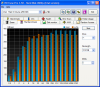
They were setup in a P45 motherboard with ICH10R as raid0. These are my results (4x64GB Sammy SLCs):
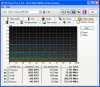
And here is a measure of a single Sammy IOPS (single) :
Do they look fine ???Attached Files:
-
-
looks quite fine from first view over it. you had a great price if you payed 660$ for all the 4 of it.. *envy*
-
Yeap it was an offer 114.99 UKpounds for each. Now they have Samsung 64GB MLC for 99UK Pounds (~ 143 USDollars) which is a very good price for MLC. Only JMicron-controlled MLCs you can find at this price. Here's the link http://www.novatech.co.uk/novatech/specpage.html?SAM-SSD64M
-
Just to share a standard CrystalMark of the Corsair 128GB SSD.
I'm running on AHCI with the default Vista drivers. I only installed the basic Intel INF, but not the Intel Storage Matrix drivers. I don't see why I should hmm...
Compared to the Intel X25-M, the Corsair doesn't feel as 'snappy' but it does feel cooler.
Compared to my previous Scorpio Black 160GB (single platter), you would be able to notice that it's faster, but not by much. However, things like the difference in Photoshop loading time is pretty obvious.
Battery life has improved by about half an hour (rough estimate) over my previous 7200rpm mechanical drive.
Laptop fan comes on lesser (in battery mode) and it remains on low more often (in AC power).
Got it at an overpriced US$360 or so, but that's what my local distributor could offer...Attached Files:
-
-
First of all... When was this article written???
Second that article was VERY inconsistant with comparisons of ALL the drives it had listed and didn't use very many benchmark tools to start with... And why was that benchmark that didn't interface with the OS even there. This is a consumer drive it WILL be interfacing with an OS and most likely be baught specifically for the OS!
the numbers don't look like they match the high IO firmware Tony said we were getting and benchmarkreviews.com seemed to be patting themselves on the back a little too much for a crappy review.
If that review is an indication of what the vertex will be, i think i'll pass. Especially at that price! they were supposed to go down not up!!!
And i was so excited to finally make the plunge =(
Well hopefully there was little truth in that review... -
Acronis destroys aligned partitions, at least it did for me.
-
Uh-oh!
After setting the alignment on an OCZ SOLID, we did a fresh OS install with gratifying results. However, a similar process on our other machines would be a burden, so we really need a reliable migration/cloning tool.
If Acronis is inappropriate, what works? -
Drive Snapshot:
http://drivesnapshot.de/en/index.htm -
Do you mean that if you create an offset and then clone over, Acronis removes the offset? Does it keep the offset of the original partition?
-
That review is with the old firmware so disregard it. DailyTech also mentioned price drops for the Vertex, but since no US e-tailer has them in stock we can't confirm pricing for now.
-
Man, just when I thought I had a good deal on one Samsung SLC, you get four at just a little higher per drive... for the first time in my life I wish I lived in the UK XD
-
Yes, it seems to remove the offset that I created with diskpar after restoring the partition. I checked it with diskpar after Acronis had restored the partition and it didn't show the same offset. I'm not sure if it's keeping the old one or not or just changing it to what it likes.
Here are my notes:
Before Acronis Restore (SSD):
C:\DiscUtils>diskpar.exe -i 9
---- Drive 9 Geometry Infomation ----
Cylinders = 7793
TracksPerCylinder = 255
SectorsPerTrack = 63
BytesPerSector = 512
DiskSize = 64099607040 (Bytes) = 61130 (MB)
---- Drive Partition 0 Infomation ----
StatringOffset = 65536
PartitionLength = 54485057536
HiddenSectors = 128
PartitionNumber = 1
PartitionType = 7
End of partition information. Total existing partitions: 1
After Acronis Restore (SSD):
C:\DiscUtils>diskpar.exe -i 9
---- Drive 9 Geometry Infomation ----
Cylinders = 7793
TracksPerCylinder = 255
SectorsPerTrack = 63
BytesPerSector = 512
DiskSize = 64099607040 (Bytes) = 61130 (MB)
---- Drive Partition 0 Infomation ----
StatringOffset = 32256
PartitionLength = 54484222464
HiddenSectors = 63
PartitionNumber = 1
PartitionType = 7 -
Hmm, do you still have the old drive to pop back in and see if the offset is the same?
If yes, that means that using Acronis from SSD to SSD should be fine since the original offset should stick. It's going from HD to SSD where you have to do more work. -
Thank you for the input TWY.
The Corsair and the intel are the two drives I am considering.
At this point the intel is $30 more expensive but apparently faster. The Corsair is cheaper and has 48GB more space.
I am very torn.
The nice thing about the intel is that there are more resellers for it. I so far have only found the Corsair only at Newegg and Newegg's RMA policy for SSDs is horrible! How did you find a local reseller that carries it?
Also my space usage hovers between 55GB and 65GB normally ... I am concerned that the high % of used space will diminish the performance on the intel (I remember reading in this thread that performance goes down as the drive fills up) ...
Tough decisions.
I wish the Corsair was available from other/better resellers. -
Go for Intel. It's significantly faster. Not only in random writes, too. Samsung/Corsair is a fine drive, but when it's that close to the Intel price point, I wouldn't think twice about getting the Intel instead. I don't think Intel performance degrades when you simply fill up the drive; I don't remember the specifics, but I think PCPer had to do some pretty wacky things to slow down their drive?
-
As someone who's used both, I echo TWY and Commander Wolf on the X25-M's superiority compared to the Corsair 128. It was a very noticeable speed difference going from the latter to the former.
Don't worry about the slowdown issue as by the time you end up doing enough writing to the drive to feel the effects, Intel will have come out with a special defrag utility for its SSD. -
Does anyone know if my 7811 would benefit (speed) from Raiding two 32gb drives as apposed to one 64gb? I'm trying to keep a budget under 300US$. In particular i'm considering the vertex...
-
Yeah RAID increases access time which is bad with HDDs because they are already take longer but i thought the benefited seq read/writes. the access time of .1ms should be affected with SSDs but will software RAID increase sequentials on SSD with them already being so fast...
-
Yes, it should. Lots of people are doing that already with onboard Intel RAID.
-
I actually remember reading that, at least for some of the earlier JMicron MLCs, a RAID0 array helped ameliorate some of the stuttering (not sure if this only applies to select RAID controllers).
That being said, a RAID0 array should theoretically straightup add the read/write throughput of two SSDs; in a perfect world, two 100/100 R/W SSDs would get 200/200 in RAID0. It will, of course, have averse affects on access and subsequently random reads and writes, probably dependent on your drives and controller. -
Well if the random writes/reads are smaller than the stripe it shouldn't affect anything, right?
-
Yes, I still have it. Unfortunately diskpar couldn't read the partition info for some reason:
C:\DiscUtils>diskpar -i 7
---- Drive 7 Geometry Infomation ----
Cylinders = 30401
TracksPerCylinder = 255
SectorsPerTrack = 63
BytesPerSector = 512
DiskSize = 250056737280 (Bytes) = 238472 (MB)
Get Drive Layout failed -
Thx for posting this. I see it too has a free trial period. Never hurts to have another poker-in-the-fire.
-
Acronis would not copy a partition managed by MFT from one SSD to another for me. It just failed. MFT said they have some kind of clone tool for this, but I didn't look into it, I just reinstalled from scratch.
-
Following up on my ebay problem, I tried heavyharmonies' tip but the PO supervisor told me that USPS doesn't do that sort of thing so I had to just take my chances and open the package... I'm happy to report that I've received the drive and it seems to be in fine working condition.
I plugged it and it works, so either the buyer regretted his purchase and needed the funds back asap or he didn't know that he needed to create a partition to see the thing in an OS.
Either way, I'm very very relieved. The whole situation was giving me unnecessary stress all week.
And based on everyones' comments on X25-M vs Vertex so far, it's looking like this will be my SSD. -
yeah if you got the cash i would def. stick with the intel. (purely based on what others have discovered) I don't "need" the xtra 20gig so i'm hoping the vertex will be a good bit easier on my wallet... Good to hear it wasn't worst case scenario!
-
is this a problem, too, if you don't care about partitions but do a full disk copy?
-
5PM EST and still no Vertex review from anandtech... I hope they manage to get it out today as promised.
-
That's what I was doing. It copied the OS partition (the first partition) fine and that booted fine, but it wouldn't copy the MFT maintained partion. Not sure how MFT works, but it creates a partion (I used NTFS) and another hidden partition for queuing writes) and does some kind of capturing of write (I assume) at a low level.
This is also a concern if you wish to pull a drive and later get your data by attaching it rather than booting. Thus you wouldn't have the MFT software running. You can't see that partition then either.
MFT has such a performance increase for SSDs it's impossible not to use, but it's forcing me to finally workup up a serious backup scheme. -
Interesting. The price on the OCZ Solid 60GB has gone up on Newegg and Amazon.com. Anyone know why? It's $169 before rebate on Newegg and $150 on Amazon. That's significantly more than it was previously going for. Are SSD prices going up for some reason or is this just a "blimp".
-
I'm not sure how MFT works (I don't use it), but perhaps you need a program that will do a sector-by-sector backup and restore. I think Drive Snapshot can do that.
-
In case anybody was wondering the File Mate 256 GB is the same type of drive as the Titan and the Apex.
-
Thats why I bought four of them.
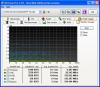
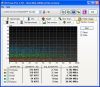
And some screen shots with the 4 of them on raid0 (strip 128K - copy was made with acronis) :Attached Files:
-
-
man, i wish Corsair will have 256G ssd soon
-
Who needs Raptors?
The new SSD Thread (Benchmarks, Brands, News and Advice)
Discussion in 'Hardware Components and Aftermarket Upgrades' started by Les, Jan 14, 2008.