Problems? See this thread at archive.org.
The gigabyte is actually sata, it just plugs into pci slot but it doesn't do anything. And as far as i know, you can't normally boot from those pcie drives, right?
-
-
You can boot from the Gigabyte (since it's basically a SATA device) but not the Fusion IO. What other PCI-E devices are there besides those two (not counting this thing OCZ just showed)?
-
http://www.storagesearch.com/ssd-pcie.html
I thought one of the biggest problems with Gigabyte's design was that memory is much faster than what the SATA specs allow, hence its speed was crippled. Several companies such as Sandisk came out with small (16GB) and slow PCIe SSDs but that concept didn't really take off due to its limited usage. The Fusion IO only really made news because of its high speed and IOPs. -
Well, that's pretty cool, but who needs 1TB of that type of speed? I suppose a few people might, but I think it would be much more practical to offer 128GB or 256GB for much less $$$... then with the extra $$ one saves, they can buy many more terabytes of HD storage space if they need it... like the nice, quiet, cheap, and efficient WD 1TB or 2TB green drives.
-
Considering you can boot from PCIe RAID cards and that the OCZ Z is basically a big RAID card with SSDs attached, I don't see why it wouldn't be bootable. Or if it's not bootable now, why it couldn't be made bootable.
-
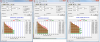
For those interested, I just did a small ATTO benchmark comparison between:
1. Samsung 128 GB MLC drive
2. Samsung 64 GB SLC drive
3. Intel X25-E 32GB SLC drive
All tests were done on my notebook - ICH9M / GM45 + Intel's AHCI driver (64-bit)
Image attached...
Conclusion? Benchmark-wise, Intel is far above both Samsungs, while SLC Samsung is somewhat better than MLC in random r/w of smaller chunks of data.
In a real-world scenario for a typical desktop usage, there is no huge difference in day to day work between those three - only time where difference shows is when you copy large amount of data, where Intel's huge bandwidth does pay... So, for a desktop use - I'd say that samsung MLC is more than adequate - and who is paranoid about the data security, should go with Samsung's SLC...
X25-E looks like a good server drive... For typical desktop use, it is just too much.Attached Files:
-
-
Thanks, that is what I would expect. I would also expect an OCZ Solid to not be much different either (probably would be a bit worse though - but not much) in typical desktop use but at a significantly lower cost (which is why I think it's such a good deal). I wish you had thrown one of those in the comparison. It's the typical desktop use that matters most in my opinion (real world use).
-
I think the next big wows will come from SSDs that surpass s-ata. Imagine S-ATA 3; an SSD with 600MB/s read(+write). that may allow every os and app to boot 3 times as fast as most current ssd's.
or then the pcie route directly (which, ironically, the ultra low end asus eee 900 celeron thingy went, too ), which could give gigabytes per second. there's not much difference in all the newer ssd's except fixing actual problems.
the next thing will be similar to pci -> agp gpu's: a real new bus to have ultra fast ultra low latency ssd's possible.
i still think it's stupid to release s-ata3 that way. why not bump it up to 1.2mb/s max directly? that way it could exist at least for a while.. -
3x faster SSD does not mean 3x faster boots though... there are a lot of things going on besides just transferring data into memory when booting or loading & starting programs. Those things take time too.
As for SATA 3, you must mean 1.2GB/s. -
So, whats the battery life gain in a laptop that uses SSD instead of 5400 RPM drive? :] In my opinion that is a very interesting advantage.
-
This is EXACTLY what happens on my system with the X25-M. The FF browser freezes but the system doesn't really halt. The weird thing is I used to use IE and it would do that so I switched to firefox(for some reason I couldn't use IE because it would freeze the app itself).
It happens pretty rarely so its hard to document what happens(maybe once every 25-30 hours of usage). I think internet usage and MMORPG games peform a LOT of writes to the drive.
I'd say if darq's experience isn't "freezing/stutter" its not happening to me either. But its been long using platter HDDs so I can't say what's really true. I think these SSDs will suffer those problems but the occurences are low enough that people will continue to use them. -
There's a lot of factors involved so there's no easy answer.
Factors: how much power the SSD uses compared to the 5400 RPM drive (some SSDs are more efficient than others and the same is true for HDs), overall system power usage, battery capacity, etc. -
i said "may" i know f.e. that in vista, it doens't do much to go from 100MB/s to 200MB/s by using a raid0.
of course, os have to be designed for it. but by 3x faster i hope, 3x lower random latencies as well, so at least all sort of accesses get 3x faster else one would really not gain much from it
-
Wow--that's an amazing lead.
-
well, man, I don't know what to say, when I first started to notice that, I run some benchmarks, but, read and write speeds were same, both random and sequential, random access times as well
so, it seams that ssd itself works fine
upgrading firefox solved freezings, now I'm on xp, will try to drive it few weeks to see how it works...
also, I had some problems with nod32, also reinstalled it, and also works well after that...
don't like the fact that I've spend some serious money for the stuff that won't work at least same as hdd drives...
what OS you were on when the problems started ?
me on w7 -
After reading these previous posts from IntelUser, I have some questions:
Does the X25-E 64GB, then, have the same number of memory chips as the X25-M 80GB (meaning 20 4GB chips) with ~20GB of non-user accessible space?
If so, is it then possible to take the HDAT2 program and reduce the amount of non-user accessible space? Like, for example, take the X25-E 64GB (which is really 59.6GB in binary reckoning) and increase the capacity to 68.7G (64GB in binary reckoning), decreasing the non-user accessible space to 16GB?
I'm just curious. It's more likely that I would buy the X25-M 80GB and increase the non-user accessible space so that the capacity is reduced to 64GB, like davepermen said, if that improves performance.
01 -
The X25-E uses SLC chips. The 64GB X25-E probably has a significantly larger number of chips than the 80GB X25-M. I'd bet that you could decrease the size of the inaccessible space, but I'd bet that it would do more harm that good to your drive. Coupled with the fact that running the program might mess up your drive already, I just wouldn't start. It would be $350 down the drain...
-
I think those improvements will be interesting for server-usage only (and, maybe, for very advanced workstation - e.g. movie editing, etc...)
For most typical desktop scenarios - I think the current generation of desktop software and operating systems simply has no use for such speeds.
If you use Windows boot analyzing software with SSD (such as WinBootInfo : http://www.clockmod.com/index.php?/products/view/winbootinfo_1.0/) you'll notice that I/O activity is now very small portion of the boot process and that for the most time of boot your computer spends in driver initialization and waiting for it to complete, so there is not too much to gain there after you eliminate slow HDD seeking.
Like I said, comparing Samsung MLC with Samsung SLC and X25-E SLC I see no big difference in typical desktop usage patterns - yet, all three are significantly snappier than any notebook HDD (I used WD Scorpio Black) - All that is left is I/O of very large amounts of data - where difference matters. And for average user, that could be only occasional DVD-backup or smth. similar.
What I think is going to be more important for desktop users is - only one thing: PRICE - once all vendors get rid of crappy SSDs with cache-less JMicron controllers, I bet all SSDs will be "good enough" for average destkop/notebook user - then, it is just a matter of price and how much GB you get for it.
I like having X25-E & Samsung SLC in my notebook as I am a tech freak - but looking what I really got for that money, I'd say that most people would think I'm crazy. -
Hrm, I typically keep Chrome open with about 125 or so tabs split amongst 3 windows and Firefox open with about 30 tabs in 1 window, and I've never experienced the freezing mentioned a bit earlier in this thread with my X25-M. Is it simply a matter of time? This is with a X25-M that has roughly 20GB free space left.
I also do the occasionally heavy usenet and torrent download. -
xp, vista or 7 ? -
It's in his sig... Vista Ultimate 64
-
wops
nevermind -
To add to my earlier post, the only tweaks I did from OCZ were:
1. disabling prefetcher in registry
2. disabling superfetch in registry and services
3. turned off system restore
4. made sure write caching and advanced performance are enabled under the policies tab of the SSD in device manager
5. disabled defragmenting
6. partition alignment
Everything else like disabling search indexing and other registry tweaks were ignored. ATTO benches have gone down, but the drive still feels as fast as the day I got it. -
Ashura,
Are you still planning to get the Vertex?
I may return my x25-m for the Vertex or go back to the Corsair. -
Eh, can't say that I am. I'm still waiting on anandtech's review to make a final decision, but Vertex performance would have to be significantly better or the price significantly cheaper than the X25-M for me to be interested. As of right now I'm very very satisfied with the Intel.
EDIT: This is of course dependent on whether or not I experience the significant slow down others have, and whether or not Intel releases their defrag utility to fix it. -
I tried doing that via ROBOCOPY ... it doesn't work.
(Normal copy and paste also failed to copy some 150MB of files. And while using ROBOCOPY, my 25GB Vista+programs wouldn't fit into a 40GB primary partition ... somehow the size inflated during the copy process.) -
No. It will be far worse, since the random write performance of the jmicron remains horrible. Can you please stop with the OCZ spamming?
-
I wish you'd stop. The user reviews on the OCZ Solid are typically 4 and 5 star reviews. If it was so bad (as you say) in typical usage, then it wouldn't be getting those ratings. Remember, talking typical "normal" desktop usage.
-
Vertex 120gb units have started shipping from Amazon. I just recently returned my x-25m because i can't bootcamp with that drive which ended up being a deal breaker
The price is steep, but going back to a 5400 drive from solid state is painful!
TidalWaveOne: i have a transcend drive with jmicron as the controller, and it's ok for a work PC. The writes really do freeze the system frequently though, which takes away from the experiance.. Time is valuable and having had the intel x-25m jmicron is literally inferior performance wise.
That's my take thus far, i'll share my experiance with the new drive tomorrow if it arrives as expected.
-jb -
I don't doubt at all that the Intel drive is a better performer (at a much higher cost), but I do not have experience with the Transcend. However, I do know that not all jmicron implementations are the same so I suspect the OCZ Solid is a better implementation based on my own experience and the reviews.
-
Looks like the Vertex's are on Newegg now.
-
This will be the most stupid post I ever made, because I fear I know the answer but I am not truly sure;
Are SSD disks easily installed and do they work on all motherboards? Do I have to change anything in bios to enable the support, or is it 100% compatible and as easy as changing a normal hdd? -
In theory installing or replacing an SSD should be just as easy as installing to replacing an HDD. There will, of course, be exceptions, but they are generally few and far between. This is, of course, assuming you just want to get the SSD "working" with your system; with some drives like the simple JMicrons, you may need to do a number of tweaks to bring performance up to par.
-
It's normally 100% like an ordinary hdd.
-
Thank you kind sir.
-
did all the same for my windows 7 except partition alignment, and, those registry tweaks you didn't made on your system were done on mine...
maybe that's the issue ? -
Might be, I'm paranoid so I always set partition offset manually (it's 64kb right now). I would first undo all the other registry tweaks as they shouldn't be necessary with the X25-M, and then if that doesn't work try reinstalling with a manually aligned partition.
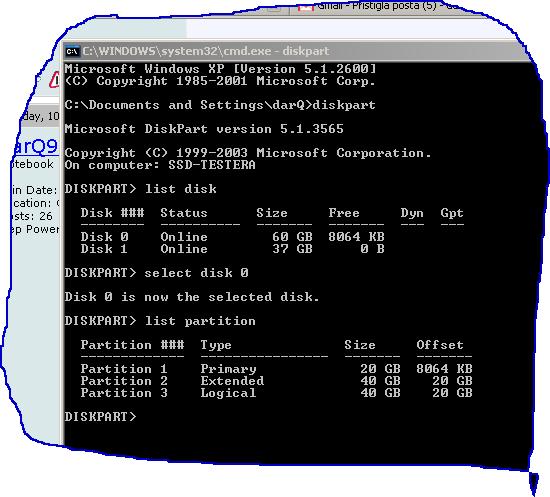
Actually, check first to see what your offset is as redoing it might not be necessary. In command, type in 'diskpart' and hit enter, type in 'list disk' and hit enter, type in 'select disk x' where x is the number corresponding to your SSD and hit enter, and type in 'list partition' and hit enter. Your current offset should be on the very right.
Or, and this is a big OR, it could just be that my drive hasn't reached the point yet where performance will slow. So it might end up being that trying the above won't help you. It would however help us confirm whether or not the problem is with the drive, or if it's with the OS settings. -
Seconded. OCZ SSDs, particularly the latest ones (ie, solid series), allow a certain type of user to get a certain level of performance at an acceptable price.
sitecharts: as has been mentioned several times now, you don't own the forum. Keep in mind that you are "spamming" certain manufacturers yourself.
Readers of this thread should be able to make up their own mind about which drive suits them best. Not every user has hardware that will take advantage of SATA-II speeds, performs large sequential writes, cares about where their hardware ranks in benchmarks, or values their seconds of time in hundreds of dollars. These users need to be aware of all the options available so that they can weigh which drive suits them best once all things are considered. Personally, I'd be pissed if I laid down $400+ on an Intel SSD only to discover I could have spent 75% less on a drive that suits my needs just as well.
I haven't received my 60GB solid series yet, but when I do I'll be sure to give it a vigorous review both when I receive it and over time. If it sucks as bad as you claim it will then I'll be sure to validate your claims of current OCZ drives (and all jmicron-based drives) being unusable for any user at any price. OTOH, if I find that I have just quadrupled the performance of my system for $100 - a feat that I can't accomplish with any other hardware upgrade at any price short of buying an entirely new system - I'll be sure to let you know that your consistent advice for *all* users to steer clear of OCZ/jmicron drives is misplaced.
Coincidentally, the 60GB solid series drive has price-dropped again on Amazon: now at $101.99 after a $40 rebate
-
Interesting that the Intel MLC holds up in this environment.
Sad to say, I have similar use patterns (with more torrenting, tho) and have been hesitant to go SSD due to this, being particularly concerned with the torrenting.
My notebook is only single-storage-drive-capable.
So I'm considering having a go at RAMDisk for browser temp storage, and some custom torrent-client cacheing techniques. -
I feel the first page of this thread really needs to be updated with a listing of currently available drives and the pros and cons of each line of products. Benchmarks, too. Right now we've got six drives up there and pretty much only the Mtron is still relevant. That could go a long way in helping new members decide what kind of drive they want without having to read all 386 pages of thread.
-
well...
right now I'm on xp, so, partitions of windows 7 are gone
I have erased them manually during xp installation
current offset is 8064kb, but, think that is the size of unpartitioned space on ssd, think this is those 8mb that I can't set as partitioned space no mather what I do
under w7, alignment was default, as I recall that vista and 7 do that stuff on automatic if I do fresh format while installing OS -
Alignment doesn't have to be default in Vista or 7, you can do it manually right before the installation which is what I did. Are you having those performance issues you mentioned in XP too? Can you follow the diskpart instructions above and confirm what your current offset is?
![[IMG]](images/storyImages/capturer.jpg)
-
There's something similar to your idea executed nicely at XS: http://www.xtremesystems.org/forums/showthread.php?t=219538
-
hehehehe, yes, I have done that stuff, my black window say 8064 kb
xp works fine now, but, it is a new installation, installed this morning...
maybe inteluser could write word or two about his tweaks for his ssd since he had same problems as myself...
the only thing on my mind, according to your ssd usage, is that I didn't use my enough so it started to give me some hints
edit: my offset is attachedAttached Files:
-
-
Heh, what? Did you set that offset on purpose and if yes, why?
I don't know whether or not having too large an offset is a problem, I think Tony at OCZ forums mentioned smaller offsets gave better performance. -
noup xp set it itself just like on every other install
didn't gave much attention to that offset stuff
will do some studying about that offset stuff -
I would suggest following these instructions and setting your offset to 64kb. This will require an OS reinstall though... so if you're not having problems with your XP setup, don't bother (unless you're curious).
-
no issues at all at the time...
I'm reading this one right now:
http://www.ocztechnologyforum.com/forum/showthread.php?t=48309
but, to be honest, it seams like a bunch of BS to me
ok, allocation size seam to have some importance, but, dude, in some logic way, it should be as bigger as possible, not as smaller as possible
sorry, but, I just can figure it out how the position where my system partition is starting to be written is so much important
-
It's not smaller or bigger as possible, it's finding the best fit. That's why I'm not at 32kb with my offset and why those with RAID setups are using much higher offsets. Why the rule isn't bigger is better, I couldn't tell you, but higher offsets only seem to be advantageous when dealing with RAID.
As far as partition alignment being BS, it's definitely not as confirmed by Microsoft themselves: http://www.ocztechnologyforum.com/forum/showpost.php?p=336713&postcount=161 -
And like I said multiple times before ... I wish YOU would stop.
And I am not the only one to say so. While you certainly seem like the most vocal proponent of the cheap OCZ drives. And ONLY OCZ drives!
So as long as you keep spamming the forum at every opportunity how great the cheapo OCZ drives are, I will keep slamming you for it.
The new SSD Thread (Benchmarks, Brands, News and Advice)
Discussion in 'Hardware Components and Aftermarket Upgrades' started by Les, Jan 14, 2008.