Problems? See this thread at archive.org.
... now slash the price of the venerable 64GB model in half and I will buy two
-
-
There are no 3rd Gen Sammy SLCs yet, are there?
-
what price do you base that on? the samsung is around for tons of different prices..
-
Sadly, not that we know of. Seeing as their 2nd gen SLC and 1st gen MLC offer similar performance, I'd take a stab in the dark and say their 3rd gen SLC and 2nd MLC will offer similar performance as well. They'll probably even use the same controller.
I generally consider the 64GB SLC to be worth around $300 (aka you can generally find BIN for $300 on eBay). So $150 or less is when I'll buy two. Also, tablets FTW. I've only had one for a year and I couldn't go without it. -
i've got the 128gb mlc 1.8" now for 300$. and could nearly get one for 200$..
-
Please share how you could get it for this price.
-
So if I buy the 64GB Samsung SLC drive for $180, you will buy it for $300?
As for the video on the SSDs, the guy must not be familiar with our thread cuz he defragged his SSDs lol. -
So I gathered up the data for SSD drives that offer partial "stutter" issues, sorted out by post number.
Samsung 64GB SLC
Windows 7 D620 laptop #3789
32-bit Vista GM45 #3799
Samsung MLC write speed drops:
http://pc.watch.impress.co.jp/docs/2009/0212/hirasawa014.htm
Intel X25-M
Windows XP G965 #3829
Vista 64-bit #3660
Whether it'll stutter often, not at all, or partially is dependent on usage
#3837
Mtron Mobi 3000
Fujitsu laptop #3974
OCZ Vertex(not confirmed but showing in benchmarks) #4108
The above is post #3837. The usage is pretty intense, but if the drive deems that the pattern is similar enough, the performance change won't be drastic. I'm assuming what is happening is that the majority of the writes being done are similar size so basically your "usage pattern" is same.
Conclusion:
-All SSDs tested so far will have "stutter" issues
-You might NEVER see it depending on usage
-SSDs can stand intensive usage(example #3837), if the usage pattern is stable
-The "issue is OS and system independent
-The flip side of having low IOPS in previous generation SLCs like Mtron and Samsung is that it'll bottleneck the drive less. Low IOPS would mean it might be bad in intensive usage, but in light usage or random light usage the chance for stutter would be less
Daveperman: I'd think most of the new SSDs would be OK for DJ usage(X25-M/Vertex/Samsung MLC/Mtron). It probably wouldn't require much writes and the usage pattern will be relatively constant(which is determined mostly by writing). Contrary to what people think, something that people call Light Usage is demanding to the disk. Anything that requires that the data not be lost requires lots of the writes to the drive to prevent data loss.
-Internet cookies and browser data
-MMORPG games that saves the state of your character(not all to your computer but some)
-Games that require smooth transition between one zone to another(no loading screen)
-Simple MSN chat(the program saves every part of your conversation in case you'd want to retrieve it later)
-Hibernate -
woow
my post counted in here
anyway, just wanted to say that so far I only had problems with win7, xp worked fine for about a week and half and just an hour ago I've instaled vista and it's FLYING
really good stuff
also, in w7 I was running win defender and nod32 in same time, I'm an xp fan so, I've forgot to disable windows defender
don't worry, I've disabled it in vista
anyway, sort off stutter isn't the only thing that was giving me the hard time in w7, had some display driver issues to, and, all ssd benches were fine, so, this is not an ssd stuttering thing, I still believe it was only beta thing...
-
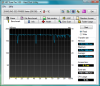
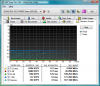
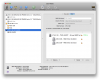
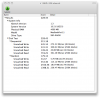
I've got a chance to run HD Tune on Samsung 256GB today...
Didn't got a chance to do the write test because I already have the OS on it.
MacBook Pro 15" (Late 2008, Unibody)
Core 2 Duo 2.53GHz 4GB Ram
Windows Vista x64
The latter 4 pics is from within OSX, it said 18GB because I tested on a 18GB partition but the results should be the same for the whole drive anyway.. right?Attached Files:
-
-
The increased power consumption of the new samsungs is not a tradeoff i am willing to make.
-
From where are we getting power consumption figures? I don't recall seeing any tests?
-
From Samsung datasheet at
http://www.samsung.com/global/business/semiconductor/products/flash/ssd/2008/down/PB22-J.pdf
Compared to my Samsung 500GB HDD HM500LI
http://www.samsung.com/global/business/hdd/productmodel.do?type=62&subtype=67&model_cd=373#
SSD definitely use less Power, it hardly feels warm at all.. 91-93 °F (33-34 °C)
The HDD usually hovering around 100-105 °F (38-41 °C) -
Commander Wolf
how is ur SSD performance on DELL E6400? Does it support SATA3.0Gb/s? I am thinking to get a laptop having SATA3.0Gb/s performance coz i am really dont like my Thinkpad now... BTW, why E6400 doesn't use DDR3 memory? -
FYI, I think I mentioned way back in this thread that Outlook used to stutter with my 1st Gen Sammy SLC. That seems to have been rectified by my 2nd Gen Sammy MLC, however, I am actually in the States with a hyper-fast network connection whereas my SLC was being used with a 1MB connection in the Middle East. There is a possibility that the internet speed had something to do with Outlook hanging from time to time, but I don't really think so. In any event, I will find out soon enough as I fly back this week.
So far so good! -
Compared to the consumption of the SLC, under load it has tripled.
I don't care about temperature, battery life is what's important to me. -
Higher temps = more power used/wasted -=> less battery life
Lower temps = less power used/wasted -=> more battery life -
Interesting... is there actually a temperature sensor on the new Samsung, or are you guessing/using a probe?
Yeah, it supports SATA2. It doesn't use DDR3 since DDR2 is still cheaper. -
It might not be just a coincidence. I notice that everything stopping and happening all at once occurs when I'm on the WiMax modem at low signal. But on the WiFi which is more stable/stronger, it rarely happens if at all.
The thing is I used hard drives for so long and when it lags I don't see everything happening all at once, or as noticeable. I'm pretty sure the behavior has to do with the drive.
Maybe on an SSD, where it uses buffer to mitigate write speed issues, slow internet speeds are more prevalent.
Perhaps internet connected applications are bad way to test SSDs? -
I think Outlook is a bad beast to test with ANYthing
Except, of course, that hilarious 24-SSD beast built in the video above! Did you see how fast those 53 windows opened! -
I have long been an advocate of Samsung SSDs. My experience with the 1st generation 128GB MLC drive has been spectacular. I wish to replace my main systems drive with the 128GB 2nd Gen MLC, I just wish that samsung offered their drives retail (or though rebadging).
The performance for cost of these drives is phenomenal, you pay less than the good Mtron drives or similar Intels, while getting much more performance than their slower MLC peers.
I suggest that anyone looking to purchase an SSD not to worry about a few dollars difference in cost and purchase Samsung rather than shady drives from
various retailers. Anyhow, one good way to get the drive if your looking for a laptop is through Dell. I believe they price the drives cheapest when added on. I am not sure if their 128GB is 2nd gen but i believe it should be. -
Samsung 256GB doesn't have the internal temp sensor, I use the infrared thermometer.
-
Seagate, AMD Show Blazing Fast SATA 3
http://www.tomshardware.com/news/Seagate-AMD-SATA3-Standard,7223.html
This is nice and relevant for SSD discussion. I really like the fact that everything will be backward compatible and even the same cables can be used. Support for SATA 3 should begin soon (1st half of this year).
I am excited about my next computer build planned for next year... major upgrades of my next build will be:
1. DDR2 8GB to DDR3 (probably 12GB or more)
2. E8400 to Core i7
3. USB 3.0 will probably be supported
4. SATA 3 will probably be supported
5. Faster, larger, and cheaper SSDs
6. Windows Vista to Windows 7
But heck, my computer as it is now is very nice and should be nicer when I get those Samsung SSD drives tomorrow.
-
I just got my new Vertex 120 GB SSD installed today at the Apple shop on my new Macbook Pro. Shut down speed is amazingly quick at 2 seconds but boot up time is a bit slow I feel at 25-28 seconds
I had seen some people getting their laptops to boot in under 20 seconds and was hoping I can get mine to do the same with this new SSD.
Any tips on getting it to boot quicker on a MACBOOK Pro?? -
Woot my samsung is on the way from memphis, still scheduled to land tomorrow on FedEx tracking =)
what's up with the 7200.12 reaching 288mb/s? does that really happen? -
Yeah, I'd like to know... probably just burst rate or something. Can't imagine it would be sustained.
-
Yep. Same here.
Actually, after doing some more reading and the fact that apparently the new OCZ Vertex SSDs also suffer performance degredation ala Intel X25-M, I just went and bought another two Samsungs. $185 shipped for a 64GB SLC is just too nice of a price to pass by...
[Heck, right now these drives are selling for $75-100 more on eBay so what's the downside?] -
Is the Intel X-25M supposed to fit into the laptop HD bay?
http://www.newegg.com/Product/Product.aspx?Item=N82E16820167005 -
If you have a 2.5" hard drive bay...
-
It should fit in any 2.5", 9.5mm laptop drive bay with a SATA connector... is there something that suggests that it shouldn't fit? When did they raise the price back to $400?
-
When the vertex came out
-
It seems the vertex had opposite affect we thought it would... its own price and the price of others went up on newegg instead of down :cry:
-
Hey, sorry if I missed it but just wondering where you guys ordered your Samsung's from. Is it the unit from Dell?
-
COMPUTER GEEKS
Dell used to use them but now they use the larger second generation samsung MLC rather than SLC -
That's a little odd. I got better boot times with my g.skill Titan. Did you copy an image to the drive? Maybe installing from scratch would be better. I haven't heard of any tweaks for OSX like there are for Windows. The other issue is, what version of Macbook is it? More importantly what version of SATA does it support and at what speed? Mine was a late 2008 Unibody.
-
I could be wrong, but I believe that these Samsung SATA II SLC SSDs are what Dell lists as "Ultra Performance" when configuring machines...
-
Hmmm I haven't checked Dell's website lately you could be right i was just going off what i heard/maybe assumed (sorry)
-
Currently on something like the E6400, there are three SSD options: 64GB Mobility, 64GB Performance, and 128MB Mobility. I'd still say that the 64GB and 128GB mobility options are the first-gen Samsung MLC drives (the 128GB being the Corsair re-brand as well), and that the 64GB performance option is the second-gen SLC.
On something like the M1330, they have two SSD options: 128GB performance and 256GB performance. I'd say both of these are second-gen MLC drives; interesting that they don't offer an SLC option here?
Seeing as these drives go on eBay for about $300(?) and $600(?), I'd say Dell's pricing for the second-gen MLC drives is pretty reasonable, though. An additional $200 for 128GB and an additional $400 for 256GB. It's not so reasonable for the 64GB MLC and SLC, though. -
Oh, the 64gb slc. Gotcha, for some reason I thought you guys were talking about the 256gb MLC Samsung.
Thanks! -
One thing I can't remember reading anywhere: do the 1.8" Samsungs perform exactly the same as their bigger brothers?
-
Yep, they do - I have one 1.8" and one 2.5" SLC Sammy and they behave exactly the same
There is one difference though - 1.8" SSDs do not use 5V wires in SATA connector, but 3.3V ones! So, if you connect them sometimes to cheap SATA->USB adapters, most likely they won't work as majority of those adapters just provides 5V from the USB port and miss support for 3.3V. -
I bought mine 2 days ago and did a clean install. My laptop is the new Macbook Pro with a 2.53 Processor 6MB and 4 GB of RAM
-
Well, I performed the secure erase on my Vertex and so far it's been behaving better. Mind you, I haven't installed an OS on it yet, I've only ran benchmarks and done a bunch of file copys to it.
On the original install Vista aligned it to 1024k automatically and setting it to 64k didn't seem to make a difference after the performance had degraded.
This time I set it to 64k right away after the erase, don't know if that has something to do with it or if I just haven't abused it enough yet
I guess I'll find out after I reinstall Vista. -
*chuckle*
I went back through this thread and did some reading. Can you believe that it's only been 11 months since we were all going "OMFG!" about the 64GB Samsung Sata II SLC SSDs and their 100MB/80MB read/write specs, when they were a whopping $1,000 upgrade to a Dell (and their street price was at least that much)?
Now we've effectively doubled those specs with Intel and OCZ Vertex (although the long-term sustainability of those drives is in question) and these same Samsung SLC SSDs are obtainable on the street for $180...
What a difference a year makes.
P.S. I miss Les.
-
Hence, I'm waiting almost another year to finally buy a SSD.
-
... and those once $1000 Samsungs and Mtrons are still some of the better (read: least problematic) drives on the market; pricing seems to be the only thing that's changed
Not that that's a bad thing, of course; when this whole SSD thing kicked off, I thought, you know, "pffft, who needs an SSD?". Didn't think I'd be sitting on two (and a half?) at this point in time, even as late as mid-2008. And $180 for the Samsung is a steal, people. Buy them while they're hot
-
Les, please come back and make the prices go down! And the number of GB go UP! And the stuttering go away completely! Dave
-
If I wanted to spring right now for a second generation Samsung 128GB, would it be SLC or MLS, or both (2 separate drives of course)?
And how would I know that I was getting the second generation? Thanks, Dave -
what is the best way to do a 100% copy of a hd to ssd? I have a dv5t hp laptop. It only has one hd slot. (i haven't bought the ssd yet, not until I can be sure I can do a transfer).
-
AFAIK, no 128GB Samsung SLCs available at the moment
The first-gen 128GB MLC is easy to get a hold of; the second-gen 128GB MLC... not so much? I don't think I've actually seen one for sale outside of a Dell. You can tell by the rated sequential speeds; first-gen is 90/70 and second-gen is in the triple digits.
Get a SATA/USB adapter and use something like Acronis to copy your current drive image to the tethered SSD and then just pop said SSD into your machine.
The new SSD Thread (Benchmarks, Brands, News and Advice)
Discussion in 'Hardware Components and Aftermarket Upgrades' started by Les, Jan 14, 2008.