Problems? See this thread at archive.org.
IntelUser:
As I know from some distributor, intel will issue a new firmware for ssd, may be the 8790 take over 8610, do u know any detail about this upgrade ?
-
Yes I did, I didn't attached it because I can only attached 6 pictures.
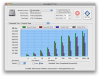
Here is the results I posted on Apple forum...
And another Xbench from another run is attached..Code:Disk Test 121.12 Sequential 169.02 Uncached Write 244.98 150.41 MB/sec 4K blocks Uncached Write 170.61 96.53 MB/sec 256K blocks Uncached Read 91.48 26.77 MB/sec 4K blocks Uncached Read 358.21 180.03 MB/sec 256K blocks Random 94.38 Uncached Write 27.18 2.88 MB/sec 4K blocks Uncached Write 265.87 85.11 MB/sec 256K blocks Uncached Read 1615.06 11.44 MB/sec 4K blocks Uncached Read 827.40 153.53 MB/sec 256K blocks http://db.xbench.com/merge.xhtml?doc2=349251
I'd love to see the Xbench number for Vertex too if you have them.
I'm waiting for my 2nd Samsung 256GB from Dell to do the RAID0 in the MacBook Pro, will post the Xbench when I have it all up and running.
UPDATE: Saw Xbench of Vertex at http://forum.notebookreview.com/attachment.php?attachmentid=31854&stc=1&d=1237159754
Very impressive indeed.. But ATTO didn't look really good on the small size though..
Can't wait to see 2xSamsung in RAID0 -
For anyone interested, I've posted a lengthy review of the OCZ Solid Series here:
http://forum.notebookreview.com/showthread.php?t=363042 -
My Macbook Pro needs about 28 seconds to boot completely using the new Vertex 120GB SSD.
 Those are good numbers from that Samsung.
-
I think those that own Lenovo laptops are having the most problems with the new Vertex.
-
These are time to the login screen though..
I need 35 more seconds after login for tons of my Startup Items to be fully loaded... (used to me 2-3 minutes with the HDD) -
Wow... nice review. Have not heard of that power tweak. I'll have to check it out.
Sitecharts is going to be mad at you because you are happy with the drive. :laugh: -
I mean, it is what it is. I have no reason to defend a crappy drive nor do I have any desire to use a drive with poor performance. The fact is that it easily *slaughters* a 5400rpm drive in every task I throw at it. And all this for a mere $100. I'm happy. I would be very unhappy (actually pissed off) if I had dropped double or triple that amount for what amounts to a marginal performance improvement in day-to-day tasks.
With that said, it is still the lowest-end SSD on the market. Small reads and writes have performance about the same as a 5400rpm notebook drive (although it is quite possible that the SSD benchmarks would increase substantially if I were to redo the benchmarks with the power tweak I mention). Other SSDs are no doubt better in all aspects - but the key thing to remember is that they are double the price or more. I won't pay that much.
It won't be long until we will be able to get Intel performance at Solid Series pricing and this argument won't even matter anymore. Within the next year or so computers will be bottlenecked by some other component rather than the drive.
Regarding the power tweak: I take no credit for this idea. I read a link that was posted on here a few days ago regarding power-saving settings and poorer SSD performance and this gave me the idea. I suggest everyone checks this out. -
you guys, that's what I was talking about couple pages ago, about acoustic modes and stuff, power management makes most difference from all other tweaks...
2jackboot, my samy slc also looked great first 5-6 days, then it started do do some troubles in every day usage, but ONLY in w7, both 7000 and 7022, later on, I found some info that those troubles could be chipset driver related, but, I was on vista when I have found about that possibility, so, didn't get a chance to test it out
this morning I've installed 7057, so, will try do drive it and test it if further problems pops up -
Really. That's interesting. My X25-M has 8610. Could be just a bug fix though. There were rumors about them making a firmware for 120MB writes on a Korean site but I took it with a grain of salt.
-
Yes, it is a great drive for the money. Of course it is not the fastest or best.
I wouldn't say that... there are worse (slower) SSDs still available on Newegg.
Yes, that will be nice! This is why I'm glad I bought the Solid for my notebooks since they are perfectly adequate for my uses and spending more money would have just resulted in a greater depreciation loss. -
You know you guys are always talking about boot times and shut downs. What are you doing, just restarting your computers all day? The place where I have seen the most improvement is video editing on my notebook. Navigating HD video is much faster. It's very nice.
-
Hi All,
I have made some calculation about durability of my new Samsung SSD 128 GB MLC disc. Specification say durability 10.000 cycles per cell. If one cell will be writen every ten seconds will be dead in 1.25 days.
6 times * 60min * 24 hours = 8.640 cycles compared to durability 10.000
In SLC disc durability is between 1-5 millions, typically 2.000.000
6 times * 60min * 24 hours = 8.640 cycles compared to durability 2.000.000 it gives 231 days.
Is it possible a MLC disc will be so weak compared to SLC? What is wrong with my calculations? Will my disc be useless ofter few month typical Vista usage? -
to fill 128GB (every cell) every 10 seconds, you would need bandwidth of 12.8 GB/s. The Lifetime calculations for SSD are based on writing ~10Gb per day.
if you wanted to you could trash your disk faster by using it in an elevated temperature (endurance usually drops at higher temps)
-
You won't write to one cell every 10 seconds. These drives (SLC or MLC) should last more than the time you calculated. I wouldn't be overly concerned. Mechanical drives will eventually fail too.
-
Of course not, but boot times are something comparable, and a very simple and first example of how an ssd improves your systems performance. It's simply the first thing you notice on a system, everyone does it, and we can compare it.
If i'd say uhh Traktor 3 boots that much faster than without ssd, then it's nice to know, but you don't even know what Traktor is, so you can't really imagine.
I know editing movies is quite nice with an ssd
-
I can't get the iometer random write test file anymore on the ocz forum. looks like they moved threads around..
anyone still has the config file for me? want to test my samsung.
I personally, just from feel, think it's slower than my mtron. a little less snappy. But it's still very fast..
Btw, I took out the ram of my old 2710p and put it into the 2730p now. now i have core2duo 1.86ghz, 4gb ram, 128gb ssd. quite a beast for a tiny 12" tablet (and around 5h batterylife, but never tested without the ssd at all
). WEI is (4.8, 5.7, 3.8, 3.6, 5.9). so not exactly perfect for gaming, but else very high end
-
Got it wrong buddy. You got the 10,000 cycles per cell on MLC right, but wrong on SLC. SLC is 100,000 cycles. The 1-5 million they state isn't cycles but how long the whole disk will last based on hours.
But NO SSD manufacturer is stupid enough to have the disk controller write to one cell over and over until its dead so it'll last longer than the simple calculation you put. -
would be fun, not? write write write write dead... NEXT!! write write write write dead... NEXT!!
-
Haha. That's what happened to early EEEPC flash didn't it?.
Here's a theoretical scenario with an 120GB SSD that's writing at file sizes that would write at constant 80MB/s.
MLC: 10,000
(120GB*10,000)/80MB=173.6 days
an SLC would last 4.8 years in that case.
There are two cases that would make the equation incorrect in real world usage, one which is positive and one which is negative.
1. No one writes 80MB/s constantly. Writing 80MB every 10 secs would increase the lifespan by 10x
2. Above is assuming the drive has PERFECT wear leveling, and write amplification reduction features. If write amplification is 5x(amount actually written to SSD is 5 times greater than the amount requested by the OS), then the lifespan would be 1/5x. With bad wear levelling parts of the drive will die out faster than the other. -
no clue, but at least the one from my gf doesn't behave that way (it would be dead by now)
looks like the ssd's will last longer than my batteries, so i'm save (as i switch notebooks when batteries die)
-
It was in a EEEPC forum. People were wondering why their drive space had been reduced, only after 6-8 months usage. This has to do with some cells wearing out.
Oh and they were SLC. -
heh okay..
must've been really cheap slc, then. if they died within month. even without useful wear-leveling, this shouldn't really happen that quick, should it? maybe it should
-
Maybe all the os and internet writes to the same cells every time could do it fairly quickly...
Oh yeah, I was haveing all sorts of problems formating my drives and installing os. Mostly noob probs because it was my first fresh install i did of vista, because my 7811 came with very little bloatware and my last PC lasted me 5+ years. I was able to format the drives using a Vista install disk. -
what problems do you have? just install it. ne need for formatting or anything. it will install on the unformatted full disk and partition it by itself.
or whats the problem exactly? -
LOL. Well it was a Samsung chip 4GB in size so it probably had only a basic controller chip to save costs. Which reminds me big part of SSDs are the controllers, not the chip. There are Intel chips used in obscure SSD brands out there too.
-
intel has cheap ssds for low end, too..
don't want to know how good they are.
i guess the original asus eee just had modified "usb-sticks" as disks in terms of controllers at least. -
Guess what? My 8G with its fine little SLC died. It conveniently happened a month out of warranty too. The drive is so dead, it ain't funny. The laptop won't even see it in the BIOS so it won't boot. It's a $550 paper-weight now
-
No probs anymore... just stupid stuff i had figure out on my own by doing it for the first time i guess. knowing what everything does what to get rid of what to install. was having booting issues from messing with things i probably shouldn't have. Most of it i mucked up myself then decided just to format and reinstall and not mess with that particular thing. then repeat once or twice
-
Have you used the beta Intel chipset drivers for Windows 7?
I recently posted this in the W7 buglist thread:
http://forum.notebookreview.com/showpost.php?p=4634534&postcount=234 -
well, after installing w7, chipset drivers was already installed, so, I used those that came with w7 itself, so, no, think I didn't use those from your link
anyway, currently, my 7057 beta seams ok, but, if it start to bugging me again, for sure I'll try those, but, my d620 has 945 chipset, so, it is not 965-x58 like mentioned in link from your post
-
You should definitely install the Intel drivers instead of the default microsoft drivers.
The beta drivers I linked to are *also* for the 945 chipset, which is actually what I'm using also. From the release notes:
-
where did you find this release note
ok, I've just installed it, it runs, all looks fine, although benchmarks are showing very small performance drop, especially in read section, but it seams that cpu usage has dropped and burst rate has gone up
-
I'm sure you already know, but for anyone else that's wondering, the release notes are in the zip file.
I'd be surprised if the default Microsoft chipset drivers are more efficient than the Intel ones...but who knows! -
Stranger things have happened, and it's not all that unlikely to begin with. The Microsoft drivers are normally fairly mature--certainly for the older chipsets. Most of the time they are based on Intel or OEM drivers anyway.
-
The 2nd Samsung SSD 256GB from Dell delivered today..
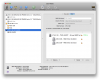
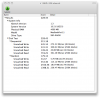
Here are the results from Mac OSX software RAID0
Compared to the single drive results here
http://forum.notebookreview.com/showpost.php?p=4636006&postcount=4370Attached Files:
-
-
Just wondering, the new Macbook Pro allow raid setup?
I gotta say, those numbers are amazing. Can you run some windows benchmark? -
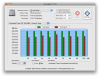
These new MACBOOKS are really quick with the Vertex SSD in them. My Read speed is 139.4 MB/s and Write Speed is 228.4 MB/s
So far I am happy with my new Vertex and believe me if I run into problems I will post them but knock on wood so far so good
Did this test with the AJA System test for 2GB. -
Wow!!! (In a word)
-
I'm sorry... This is software RAID and it is a part of Mac OSX. It won't allow Bootcamp to be installed in the drives that has the RAID so I can't do any windows benchmarks...
It doesn't matter if it's a new MacBook Pro or not. You can set it up with any machine running OSX.
One more thing to note is that OSX boot time increased by 20-25sec because the system need to initialize the RAID before it boots. -
new anandtech ssd test is up:
http://www.anandtech.com/storage/showdoc.aspx?i=3531 -
ok, right now I'm on page 10, trimming and stuff...
and it says:
windows 7 still didn't disable defraging on my drive on any version I've tried, so, I have a question, is it because w7 don't do that stuff jet, or is it because it does but it just don't recognize my drive as ssd
-
it doesn't recognise yours as ssd. as far as i know at least it does disable defrag yet on certain ssds.
-
for real ?!?!?!
huh
so, what can I do now ?
edit: in device manager under disk drives it says :
SAMSUNG SSD RBX Series 64GB ATA device
by the way, how do I know if defrag is disabled
right click my computer > manage > task scheduler > under active task it was defrag as active
is this right way ?
-
just disable defrag manually? it's the only thing win7 does right now. and the other features like TRIM will not be ssd dependent, but TRIM support dependent. if your disk reports "i can trim", win7 will let it trim. but your ssd won't report that anytime soon. at least not without a firmware update.
-
what do you mean by that ?
my sammy can't trim ? -
no ssd right now has support for trim. that just has to go into the new ata spec first (possibly with sata3?).
-
I just put one of the 64GB SLC SSDs from Geeks (which are sold out now, darn it) into my desktop at work, a Gateway E-6610D, and am seeing some wonky, albeit interesting, numbers.
This is the boot drive in the system. ATTO is giving me a write failure on the very last stripe. I've never seen that before. I ran the test 3 times, each with the same result.
![[IMG]](images/storyImages/SamsungAttoError-20090318.png)
So I downloaded the trial of HDTune Pro and the numbers are... bizarre. I expected the read numbers to stay in the 85-100MB/sec range across the board, but at some point it shoots up to 160MB/sec, not spiking, but staying there. Is that because those portions of the disk are empty? Still, that's way above spec for these drives. They shouldn't be going that fast.
Or is HDTune Pro questionable in its methodology?
I ran the Error Scan portion of HDTune, just in case the read error was due to a problem in the drive, but it reports no errors, and as I watched it run the scan, it confirmed the shift from 80MB/sec to 160MB/sec in read speeds; once the test hit that area, the sector-by-sector results displayed much faster.
![[IMG]](images/storyImages/Samsung64GBSSDRead-20090318.png)
![[IMG]](images/storyImages/SamsungErrorScan-20090318.png)
![[IMG]](images/storyImages/SamsungFile32KB-20090318.png)
![[IMG]](images/storyImages/SamsungFile32MB-20090318.png)
![[IMG]](images/storyImages/SamsungFile256MB-20090318.png)
![[IMG]](images/storyImages/SamSungRandomAccess-20090318.png)
-
ok, why the hell his atto say he has MCCOE64G5MPP-0VA00 and mine atto say I have SAMSUNG SSD RBX Series 64GB
? -
Is the current Samsung 256 GB going to be OCZ's new Summit drive?
The new SSD Thread (Benchmarks, Brands, News and Advice)
Discussion in 'Hardware Components and Aftermarket Upgrades' started by Les, Jan 14, 2008.