Problems? See this thread at archive.org.
Sure, but I'd like to actually be able to USE the notebook...
-
-
LOL, quote of the day
-
ok dudes, i got my 2730p. i got my samsung 128gb ssd. and i got NO SPACE and have NO CLUE how to get the disk out to plug the new in..
-
Industrial strength SUCTION CUP!!!!
-
it was just stuck on top of another plattern. i thought they where solidly connected and i would gonna break it
okay.. trial and error has won
-
okay.. please boot from my usb cdrom..
that would be the last big step, so i could see the ssd
my external cdrom is dead. NOOOOH
lets quickly build up a bootable usb stick.. I WANT MY VISTA
-
If I remember correctly, there was a separate setting to determine what the "HARD DRIVE" setting meant in the boot order. It only gave me the options of hard drives. Perhaps there is another BIOS option you are missing that lets you tell it what you mean by "hard drive" so you can tell it which one to boot from? At least worth a look but I wouldn't be surprised if that option wasn't there.
-
No wonder. What you need to do is to scrap that recovery stuff and find a real Vista/XP installation CD. I can almost guarantee you that that will solve your problem. Recovery disks = fail.
-
Ok guys, I just installed vista x64 on my T500 with my new and awesome Samsung SLC 64gb! I just have one question: should I enable the "advanced performance" option under the hard drive settings? It is beneficial at all in real world( I don't care about benching)? Thanks in advance guys!
-
T500 should use SATA3.0Gb/s SSD, such as samsung 256G, vertex, or ultradrive
-
It's too bad we can't order those Sammy's from Dell with discounts-need premier account and/or business account!
They are only charging 487.49 for the 256 GB SSD with a premier/corporate account!
-
Why did You disable hibernate?
It don't have anything to do with SSD tweaks. It will just free 4GB of space (because You have 4GB RAM). -
Great price, thanks for the post
-
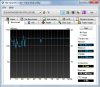
I just installed my X25-E in my Dell SXPS 16 running W7 x64 b7048
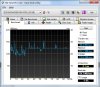
I ran a quick HDTune bench and something's very wrong. I was expecting to atleast get an average of 190 read, but it's far less. I'm not sure if it's that my notebook cannot handle the speed, or maybe it's incompatible, or maybe the hdd's bad?
Any advice?
Here's a pic:
-
still trying to format my old hard drive... apparently i don't have permission to change the permissions
-
Alright so I was able to use a vista install disk to format my spinner but now it won't let me boot into the samsung... It says can't find the OS but it's still there... 22.9gb free of 59.6. I changed boot order, I changed ahci to IDE not I reinstalled on spinner to to at least get a functioning notebook again. Now I see a file on my samsung under windows folder "BOOTSECT.BAK" I opened it with notepad and it says "disk read error occurred" "BOOTMGR is missing" "BOOTMGR is compressed" "Press Ctrl+Alt+Del to restart" and it's got a lot of symbols all over it... Any suggestions?
-
Quad, did you clone the drive? So this is with Win7? How many processes are running? Try to run HDTune in Safe Mode to rule out a runaway process.
-
Have you tweaked anything yet?
I've done some system tweaks and my Gskill Titan murders that Intel. Below is my HDTune results:
Read
Minimum: 115.2 MB/s
Maximum: 185.2 MB/s
Average: 157.1 MB/s
Access time: 0.2 ms
Burst rate: 150.7 MB/s
Your burst rate is especially low
Try the following tweaks:
Disable
------
Superfetch, Auto Defrag, Indexing, Write Caching, Short File Names, NTFS Timestamp. Disable ACHI in BIOS before Vista install.
Disable Short File Names
-------------------------
The run command:
fsutil behavior set disable8dot3 1
Note that the Windows XP environment variables %TEMP% and %TMP% typically use short names. Program installations sometimes use these variables. If this change causes trouble and you need to restore the short name function, the command is; fsutil behavior set disable8dot3 0
Disable Timestamp for Last Access
----------------------------------
The run command:
fsutil behavior set disablelastaccess 1
Note that some backup programs may need this information. If you wish to restore the timestamp, the command is; fsutil behavior set disablelastaccess 0
I didn't bench my SSD before I made these tweaks so I have no comparison to make but if I compare mine to the same model reviewed over at Bjorn3d.com my SSD comes out on top.
Also, visit www.blackviper.com and check the services section. You can disable between 50-75 services depending on how courageous you feel and they might help...as mentioned above.
One more thing. Your screenshot shows very low CPU usage, it may have something to do with that but I'm not sure -
I fresh installed Vista with the Dell recovery disc and installed all updates and current drivers. I then ran the test in safe mode and got:
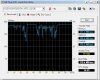
-
I think I'm going to send it back to amazon for a refund because it seems for my light use, the performance increase over the 250gb Samsung would not be that much different.
What are your guys thoughts on the Vertex 120gb vs the lastest Samsung 120gb? -
The Vertex gets my vote. Its been getting very good reviews, some very high read & write times
-
Get the Samsung.
-
Well the thing about the samsung is that I can swap out my Dell laptop and get it with the samsung. That way everything is compatible and setup from the factory.
I just don't want any controller/moderboard etc issues that make the vertex not perform as good as other reviewers have gotten on there systems. -
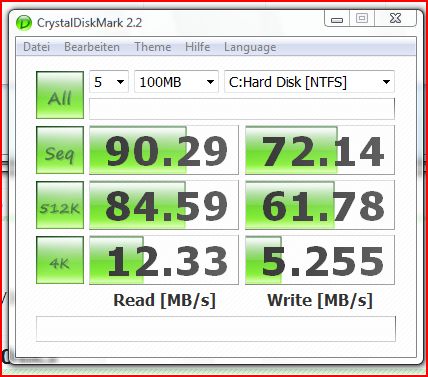
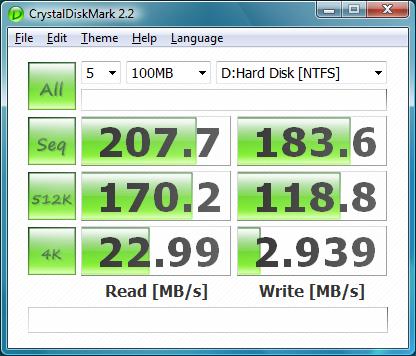
Here is my Crystalmark from the 2730p
Attached Files:
-
-
as i said, you need to get owner of the files.
-
Davepermen,
Do you have enabled or disabled the "advanced performance" option for any of your ssds? -
enabled all caching if that's what you mean, yes. i know the risk of data-loss very well, and on my systems i don't care about it.
-
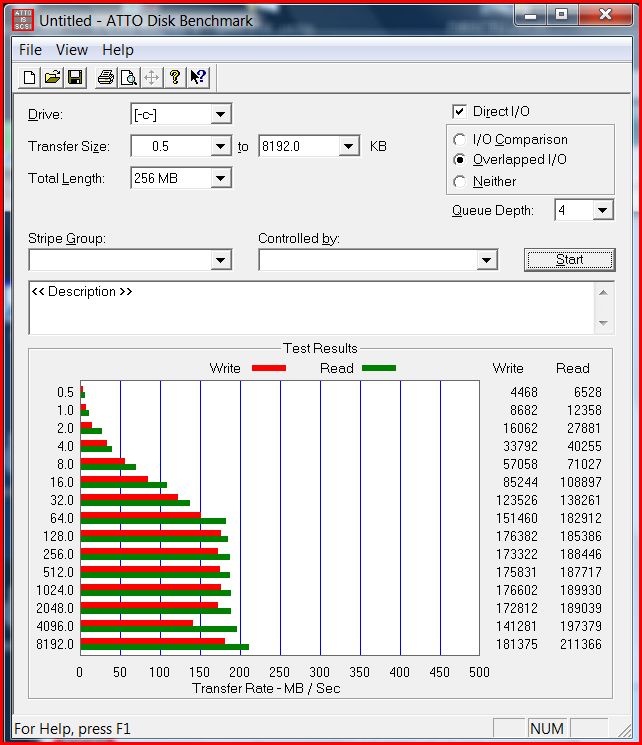
Here is my ATTO on the Samsung 256GB SSD. It has stayed the same so far, hasn't changed.
Configuration is Dell XPS M1530/T9500 CPU, 4GB RAM, Cenetek ram disk, MFT Trial (On F:, so it won't affect the results on C, Vista Business 64bit on C:
I believe I am installed in ACHI mode and write cache is greyed out, so I can't enable that.Attached Files:
-
-
Here is the ATTO for the MFT partition. I have heard these aren't reliable, but the numbers look impressive. Too bad MFT doesn't do the OS partition.
Attached Files:
-
-
It's somehow related to your notebook and SATA. Even those that use full SATA2-300 connections aren't running as fast as a desktop to save power. The HP Elitebook showed only ~180MB/s and the Intel drives can reach 220MB/s in desktops.
-
My m1530 that's on it's way will have a 128gb SSD. I'm anxious to see how it performs.
-
Hmm but doesnt it consumer more power? I'm confuse...
The SSD have a new type of power management? -
I think it does have a new type of power management.
I think this drive has 128 MB of onboard cache. -
I think I'm going with the Samsung 256gb from Dell in my XPS 16 instead of the X25-E that's going back to amazon.
-
I have the Vertex 120GB SSD in my Macbook Pro and have had it for about a week now (maybe less). So far I have not had any problems with it and it is quite quick. The laptop is dead silent and shutdown speeds are now about 3 seconds from the 2 seconds it used to take. Bootup is around 28 seconds. Was expecting better bootup times from this SSD. -
Samsung 256GB SSD in MacBook Pro 15 inch Unibody (Late 2008)
OSX 10.5.6 boot time: 20 secAttached Files:
-
-
poppap,
Did you run Xbench on the samsung 256?
I can't decide between the Samsung 256gb and the Vertex 250gb.
Some of the Xbench numbers that I have seen users post in a mac forum show that the small random writes from the Vertex look much better than the Samsung. Despite this I wonder if perhaps Samsung could be more trusted to produce a combination of hardware and firmware that will be reliable in the long term. -
The Samsung seems to be a reliable drive while the Vertex is too new to really say...
-
poppap,
Never mind... I just found your post (with Xbench scores) in the Mac forum.
sgogeta4,
I am sure you are right about the samsung, but then I get seduced by the speed of the vertex... -
I'm using a 120GB Vertex, I'm getting 175MB writes and 245MB reads On a Sony Z21.
-
There are beta firmware updates already available for the Vertex. Check out OCZ's forum for details. Not quite ready for prime time, in my opinion. Should have held off on retail until firmware was polished, including AHCI support.
-
The new firmware isn't beta, my drive already came with the new firmware.
-
1199 is getting lots of not recognized and freezing at random times reports. That makes it Beta quality, even if they released it to production.
Trying to be first to market is costing OCZ a lot of their reputation. Expecting early adopters to flash their drives and lose all data is... at best, unfortunate. -
I have the Vertex 120gb as well, it's honestly been pretty awesome and on the few tests i did run it seemed to bench well. The new 1199 firmware just came out but i am hesitant to flash my drive after receiving it only two weeks ago. I know it gave sequential speeds a 25% boost i believe, but can anyone verify the gains being significant?
The price is also dropping rapidly which is rather annoying but thats the early adopter game
-
Holy crap, here are some benches comparing the old Vertex fireware to the new:
120GB
http://www.ocztechnologyforum.com/forum/showpost.php?p=355325&postcount=23
60GB:
http://www.ocztechnologyforum.com/forum/showpost.php?p=355602&postcount=68
More in that thread. -
Its really odd that a FW upgrade would have such an effect. I dunno, i already didn;t trust OCZ, this doesn't help me believe that there aren't other issues with the drive. Is this related to their idea of having different firmware, one to benefit read/write speed, the other to benefit I/O throughput at the expense of write speed(i thought ocz posted something on that)
-
Yeah, if there's that much difference then I wouldn't trust OCZ to know what they're doing.
I prefer I drive I can trust that I don't have to mess with upgrading the firmware on. -
http://www.ocztechnologyforum.com/forum/showpost.php?p=355662&postcount=77
With crystaldisk scores like that I imagine it must have pretty good IOPS performance, enough for no stuttering except during very heavy loads.
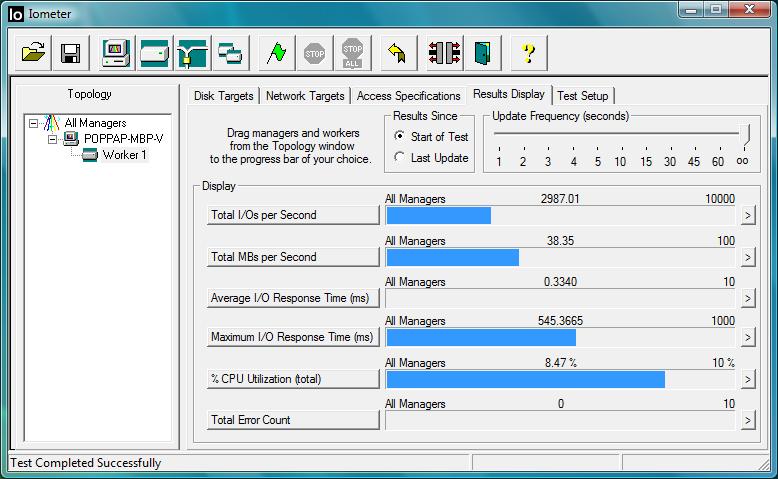
IOmeter test done by Tony comparing Apexs to Vertex. Take it with a grain of salt since the tests are done with the drives hooked to a RAID card
http://www.ocztechnologyforum.com/forum/showpost.php?p=355644&postcount=75
However, I agree it's better to wait and see how the Vertex holds up in the long term, in case this new firmware has performance degradation issues. -
Cruising along and found what looks like a recent TITAN review:
http://benchmarkreviews.com/index.php?option=com_content&task=view&id=302&Itemid=60
The new SSD Thread (Benchmarks, Brands, News and Advice)
Discussion in 'Hardware Components and Aftermarket Upgrades' started by Les, Jan 14, 2008.