Problems? See this thread at archive.org.
I keep hearing Intel will have updated firmware for X18-M/X25-M to achieve 120MB/s writes.
Whether its true or not I am still not 100% sure and even less sure whether the drives will be upgradeable but it is interesting.
-
where did you got the idea that the vertex is faster? the biggest samsung is about as fast, not?
-
sounds jummie
give me one such, intel, 1.8" with 160gb and i will lose a lot of money
-
I was looking at these posts:
http://forums.macrumors.com/showthread.php?t=658571
#19: http://forums.macrumors.com/showthread.php?t=667228
I guess there isn't that much in it except for random uncached 4k writes? -
I just wanted to say I've been running a 120GB Vertex in my VAIO Z for about a week now and haven't seen any of these issues you're talking about. I'm running the 1199 firmware. Performance is great in all aspects (booting, application loading, copying, shutdown, etc.). I've had no "stuttering" or lockup issue. Even with building large programs in Visual Studio I haven't seen any problems. I'm not too concerned with the firmware changes. It's a painless upgrade for me using a WinPE boot disk and imagex. Applying my imagex image is considerably faster than the 5400RPM drive that came with the Z.
-
Has anyone had luck with ordering one of those Sammy SSD's from Dell?
I placed my order for one back on 03-14-09 and I just keep getting an email stating my order has been delayed! Im wondering...
-
Vertex doesn't have stuttering problems. It has complete freeze-to-death problems once filled.
-
Yeah, I would not recommend a Vertex until they are proven reliable and firmware stabilizes.
-
Hey Guys,
Gee, this thread has grown considerably since I have stopped reading for a month. It took me over 3 days to catch up with every post in the thread. Simply unbelievable! Now that I have completed reading the thread, I would like to share some insights with the comments made in the thread.
I own 3 SSDs namely:
Intel 80GB X-25M
64GB Mtron 3500
Corsair 128GB SSD
The Corsair I also just bought today, after finished reading the thread.
I believe, For an SSD to be acceptable, should not experience any stuttering without having to do any TWEAKINGs whatsoever. For average user this drive should be plug and play, meaning that all standard Vista features should be enabled such as:
Superfetch/prefetch
Indexing
Enable Write Caching on Disk
By the way, in my experience superfetch is very helpful, it makes the system to respond a lot snappier than without superfetch. When you first activate the superfetch, you may not notice it initially because it requires sometime to collect usage data from you, and yes your boot up speed would significantly improve with Superfetch. Try to use superfetch for a month and then turning it right off.
Indexing is also superbly helpful especially if you use Outlook since you can search the email by text within the message, also you could search text within word documents with indexing. Indexing would provide information to you within 1 second which technically impossible with SSD. Like Mr. Daveperman has mentioned, the speed of SSD can’t beat, the speed of RAM. Essentially indexing is about storing information on the RAM for instant retrieval.
Anyway, I love very much both Indexing and Superfetch features.
On my system so far, all the three SSDs performed magnificently with superb snappiness and responsiveness. I honestly, didn’t feel anyone of them lagging. Except for Intel X-25M, it unfortunately stutters on my system. I experienced at least once a day. When it did stutter, my computer would stop responding for 2-5minutes, it was in consistent. Turning off features in Vista such as prefetching, indexing, did help in this case. Now that I moved my X-25M to my desktop computer, it has been working flawlessly.
Mtron 3500 like I said, has been working flawlessly since January 2009. Unfortunately 64GB for my usage was not enough, I only have 3GB of freespace left on my Mtron. Even then, I never experienced any suttering at all which was amazing. I would recommend highly Mtron 3500. The only setback with Mtron 3500, it felt warm compared to Intel SSD and Corsair 128. I think Mtron felt as hot as my regular 7200RPM Hitachi HDD. My overall system temperature was increased by 5 degrees using Mtron 3500. Otherwise, performance and reliability top notch. Haven’t really heard any problems with Mtron.
Corsair 128GB, although it’s an MLC, it looks promising so far. Hopefully, it would get the same stability in performance and reliability as the Mtron 3500. I really need the extra storage.
Here it is benchmark result from my Thinkpad T60.
![[IMG]](images/storyImages/mtron3500u.jpg)
![[IMG]](images/storyImages/intelcssdbad.jpg)
For Corsair 128GB:
--------------------------------------------------
CrystalDiskMark 2.2 (C) 2007-2008 hiyohiyo
Crystal Dew World : http://crystalmark.info/
--------------------------------------------------
Sequential Read : 89.241 MB/s
Sequential Write : 74.083 MB/s
Random Read 512KB : 85.766 MB/s
Random Write 512KB : 53.622 MB/s
Random Read 4KB : 12.183 MB/s
Random Write 4KB : 4.279 MB/s
Test Size : 100 MB
Date : 2009/03/24 19:25:15 -
If you're not a "power user", Newegg has the OCZ Solid 60GB for $99 after rebate and promo code EMCLPNR86, and with free shipping.
I bought two of these "to get my feed wet" with SSD and am glad I did, but bought a couple of Samsung SLC's for my "power" desktop. -
Great Post. Very detailed and it looks like you now see with the same eyes I do the Mtron rocks
but besides, the trick about the Index is not just about having it in memory, it is about not having to search. The Index is just like the thing on the right of a phone-book. instead of going trough say 100000 files, it goes directly trough the index in about 6-7 hops and finds all the files that fit. and you can NEVER beat 6-7 file accesses with 100000 file accesses, no matter how fast your non-indexed disk is. and even then, you can index that fast disk to get the factor 10000 speed boost
(and indexing is about finding stuff IN files, not only by filename. which is amazing, too).
i use one tweak currently: changing the indexing targets. i took away c:\users\ from the index, and instead added my folders (documents, video, music, pics) manually. that way, it doesn't have to index appdata and local and locallow and such, which i don't actually want to search trough, and only costs a lot of additional time to index (as it's much more often updated than my files, and actually tons of tiny files..).
that way, index-building is reduced much, and still search is awesome fast. but this i'll do independent on disk type.
-
The samsung has twice the onboard cache than the vertex and it uses less power. I still think the best OCZ drive that they released is the rebadged Samsung SLC 64 GB drive.
-
And Dell's website list the drive as "Usually Ships: Within 24 hours."
http://accessories.us.dell.com/sna/...x?c=us&l=en&s=dhs&cs=19&sku=341-8981#Overview
You should call them and ask what is up with your order. -
the highest end ocz will be the summit, which is just the samsung. so even ocz thinks the samsung is better than the vertex. should be enough reason
-
If I recall correctly, the Vertex does do better in random writes; random writes on the second generation Samsung MLC are about the same as random writes on the first generation Samsing MLC. That being said, I'd probably go for the Samsung as well, at least until the Vertex has been out for a few more months.
-
OCZ Summit:
http://www.dailytech.com/OCZ+Summit+Series+SSDs+Targeted+for+End+of+April+Launch/article14286.htm
My question is:
Is this a rebadged Samsung? Or is it , as they say in the article, a "Similiar to" the Samsung. Are "rebadged" always changed in some way besides the printing on the unit? Never changed? Sometimes changed?
Anyways, this tells me yet again that I should wait until sometime after the end of April to see how this new product shakes out. I generally agree with the few above posts. Intel or Samsung for me. i got to trust what I use
-
I wanna say it's actually a re-brand and not something "similar"... I feel like I've seen pictures of someone disassembling a Summit and letting the world see the Samsung controller inside. Granted, that Summit was probably a pre-production model, but I doubt they'd change controllers...
-
jlingo, welcome back! We missed your insightful posts.
-
I seem to remember the 64GB SLC OCZ rebdage of the Samsung to be pretty exact, even down to the firmware. My REAL question is that once the NEW Samsung and the SUMMIT are available, will there be other considerations, or will it simply be a matter of best price as both drives are EXACT copies. For instance, I am pretty sure that the Kingston rebadge of the Intel SSD is EXACT except for the name on the unit. Yes?
-
the kingston gets actually sold here under the exact same name, just with a "kingston" on the end
it looks like, for the summit, ocz tries to change the firmware. but besides that plan, no rebrand ever had anything special except the name change, yes. -
For instance, I am pretty sure that the Kingston rebadge of the Intel SSD is EXACT except for the name on the unit. Yes?
Yes, that's the conclusion I came to when I read about it in the newegg reviews and went to the Kingston website. -
Myself, I always thought a rebrand/rebadge was the exact same thing. It adds a layer to the decision tree if this is not so. It is funny that OCZ "considers" the vertex to not be as good as the Summit. However, changing something as big as the firmware functionally adds a whole new drive to the list to choose from. Intel, OCZ Summit, New Samsung. Looking to clear the fog so that when I FINALLY do buy, I do not make some stupid mistake due to "marketing". Which, of course would NEVER happen as I use this awesome thread as my SSD bible
-
http://news.cnet.com/8301-13924_3-10196422-64.html
A Dell rep in Customer Support chat sent me that today when I was inquiring what SSD's were being sold to Dell for the XPS line of laptops. The 64/128 GB are apparently Samsungs like I suspected. -
I am VERY interested in a Samsung 128GB. Looks like they will be generally available fairly soon. If they are good enough for Dell, they are good enough for me. Dell has always done quite right by me and my clients.
-
I'm unsure if there will be a 128gb samsung with the 220MB/s performance. i have a 1.8" samsung 128gb and it's a 100MB/s performer. I thought the new chip currently only gets used in the 256gb one. sadly.
-
Samsung states 220/200 MB/S RW here http://www.samsung.com/global/business/semiconductor/products/flash/ssd/2008/down/PB22-J.pdf for the 128GB version.
-
uh nice. and it's 1.8", too..
maybe i'll replace my current one with that one one day?
what's the format of the 64gb one? i like that (i like small).
still. as my current samsung is quite a bit less snappy than the mtron, i'd like to test the faster one before to see how snappy-or-not it is
-
Would anyone explain what FireWire is?
-
not in this topic? it's not about firewire at all in here. create a new, own topic?
-
I'm sorry, but I don't know what it is, so I don't know where to ask or create a topic.
-
It's like usb, better in my opinion but less industry support.
http://en.wikipedia.org/wiki/Firewire
Wiki it up dude, instead of hijacking threads. -
it's very offtopic, but at least a good laught
espencially poppap's reply
-
LOL, when I look back.. I misread it ...
Try again.. Haha... Sorry about that
http://en.wikipedia.org/wiki/FireWire
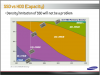
Just saw this graph from Samsung white paper
http://www.samsung.com/global/busin...lash/ssd/2008/down/SSD_Market_Update_1212.pdf
Seems likes 512GB SSD is coming soon and we'll see 1TB by next year..Attached Files:
-
-
yep, density is no problem. i've seen (very expensive) 1tb ssd's in 2.5" sizes, and similar stuff => it's no problem. the problem is, to have that dense and much chips for cheap
cool to see it from samsung. hope they always release their highest end at <1000$ streetprices that would mean another 50% drop
-
Higher density is nice... lower price per GB is nice too... but if the former goes up at the same rate that the latter goes down, you end up with the same base price for a good (new) SSD, which isn't terribly helpful for me. Given the same drive quality, I'd rather have a $50 64GB drive than a $200 256GB drive.
I hope the folks on second-hand market adjust their prices accordingly... -
Well said, CW. I want a cheaper drive with lower capacity too!
-
This is true of a mechanical drive as well, but you have to wait for the drive to spin around to the same location again.
-
I just bought a 500GB HDD, but am still going to upgrade as soon as the SSD prices become competitive with that of the HDD's. That'll probably be by the end of next year and the year after
-
OK, but I'm enjoying the speed NOW!
-
Cool, I'll enjoy it later when my cheap arse can afford one with decent space (256GB for me to store my music, some movies, and lots of images, PSD's, etc).
-
It's unfortunate that laptop users can't benefit as much from SSD's as desktop users at the moment. Most laptops only have 1 drive so you have to pay out the wazoo to get a high capacity, high performance drive. I'm fortunate to put one 30GB drive in for $83 and use my 6 other drive bays for storage.
These manufacturers really need to fix once and for all these controller problems. -
If you rarely use the DVD drive on the laptop then what you can do is putting 500GB HDD in place of DVD for storage..
-
Sounds like a good idea for many, read about someone doing that. I don't have a DVD reader though. :] I wish the expresscard ssd's were useful.
-
External hard drives are an option assuming you don't need all your data to be mobile, I keep pretty much everything on a 1.5TB drive in an esata enclosure. All my X25-M has is the OS, my apps, my documents and my music. That leaves me with about 20GB of expendable space that I use for downloads which I offload onto the external.
-
and i do since half a year it's really something different, right?
-
yes but there are mostly ways around those problems. be it external disks, be it realisation that, if you don't store movies, you don't need much storage at all. or you go the real way and have a homeserver (tm) and use it as your big storage (best anyways as you have the same access from every machine, which makes live simple and structured).
for me, 32gb where enough with win and apps and my actual in-use data. for the rest (if i have to take something with me for a friend) i have a tiny 1.8" external disk with 100gb.
(and i have webaccess to the homeserver if i forgot something. and, if i have no web directly, i can always go over my phone to phone home)
-
Yeah, I was thinking of going the external HDD route but I don't know. I like having everything with me without the hassle of carrying any extras. I'm fussy like that :/ And for the DVD swap, neat idea, but I'm still under warranty, don't trust myself to do something like that and my XPS m1530 notebook is a slot load drive, I don't think it'll be so easy.
I still visit this thread every other hour, though. Hoping to see some bargains, new reviews, and whatnot. I learned a lot here, thanks to all participating
-
Even with slot loading there really is no problem..
![[IMG]](images/storyImages/3352879477_39b5607534.jpg)
![[IMG]](images/storyImages/3377394836_3f5e25e95e.jpg)
-
Would be cool if you lived nearby, but I still couldn't trust myself to do this. Maybe if there were a guide for the m1530
The new SSD Thread (Benchmarks, Brands, News and Advice)
Discussion in 'Hardware Components and Aftermarket Upgrades' started by Les, Jan 14, 2008.