 Problems? See this thread at archive.org.
Greetings fellow enthusiasts (from an enthusiast wannabe/working on it),
I was lured in to the Black Friday/Cyber Monday sale, and with my 10% military discount, the 12% Ebates cash reward, 10% Dell Cash, I took advantage of the Alienware 17 R4 with the 32GB Ram, GTX 1080 Video, and 512GB m.2 pciE storage... Oh, and the 6820-HK proc..
I have tried to follow the thread so that I would sound like I attempted to do some homework before making a tool out of myself with my first-ever post in this forum, but am afraid I'm still going to fall short... Here goes.
From what I gather, the paste/tape that Dell has chosen to use on their latest flagship product sucks... Fine for run of the mill usage of the machine, but you start to take advantage of the capabilities of the machine (overclocking) and it falls flat...
I ran the torture test (although I think it was discouraged) and my system went a whopping 4 minutes 51 seconds before the max temp of 85° was exceeded and the test terminated...
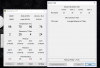
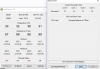
Below are a couple of pics that I took during the test and at the end where it failed..
Could someone please let me know if my system would be able to benefit from re-pasting/re-taping, bending the arm thing?
Thank you in advance for your constructive feedback.
69 seconds into the test... (1 min to ramp up and 9 seconds in)
![[IMG]](images/storyImages/image4055)
Game over man, game over!!
![[IMG]](images/storyImages/image4056)
Thank you
-
-
-
Yes indeed. All the systems now are being shipped out with a Virus called, bios 1.0.8 and 1.0.6.
These two viruses was Dell's bait and switch tactic to cripple the system so that it doesn't run at its full potential...ie...having a Car capable of 200MHz only being able to go 60MHz max. That's very sleazy and unethical.
Now looking at the big picture of this fiasco, Dell's original issue has cornered them into resorting into such unethical practices such as the crippled bios. It's a domino effect...one that is not welcomed at all.
The good news is that we're still able to have an unlocked CPU and GPU with the help of the older bios. If that BIOS was gone, I'd be the first to shout from the tops of the hills to return your AW and look elsewhere.TomJGX likes this. -
Not exactly cripple, stock performance works OK which is fair, but overclock is severely limited.
-
I mean crippled as it not being able to fully utilize an unlocked 6820HK and a GTX 1080. If those are being limited to run at its full potential then that is no better than an 6700HQ and a GTX 1070.
-
A 94W Whr battery is big by any notebook standards and will give proportionally more run time under standardised test conditions. You should be able to get a full working day under light usage as long as the display isn't too bright (the backlight can use more power than the CPU under light usage). However, if you try gaming on battery then you will discover that the battery can be drained in an hour or two (although proportionally longer than another notebook with similar CPU /dGPU but with a smaller battery).
I agree with you with that bigger is better regarding batteries (for given usage conditions the bigger battery will have an easier life and shouldn't wear out as quickly) but just thought I should note that gaming and notebook batteries don't co-exist comfortably. Anyway, I'm dragging this thread off-topic so I had better stop.
John -
Any way to unlock the current BIOS in case you repaste your unit and make it stable? Or is there any "absolutely required option" for stable OC system gone now? If yes i won´t place a new order for the AW15 R3 =(
Regards,
aVa -
BIOS is secure flashed and cannot be modified AFAIK
-
Not sure I'm understanding something... I hear talk about 1.0.6 and 1.0.8 being "nerfed"...
My newly arrived Alienware 17 R4 came with 1.0.8 installed...
Here are some screenshots of the BIOS...
BIOS 1.0.8, right?
Select "Advanced" then "Performance Options"...
This "Advanced" menu comes up with options such as "CPU Performance Mode", "Fan Performance Mode", "Core Over Clocking Level", "Core Extra Turbo Voltage"
As I am an "enthusiast in training" perhaps I am overlooking something? If this is a "nerfed" BIOS, what options does 1.0.2 have that 1.0.8 doesn't?
Thank you in advance for your helping me to learn.
--Uncle Sam's Misguided Child -
What if newer released firmware fix problems that have not yet been discovered and still have same crippled power settings as all the newer one? Are you stuck to the old one? What if Dell put lock in newer bios version? Aka Impossible to re-flash older working bios version. Are you or will you all be screwed?

-
Well folks, on my system, it does not appear that the BIOS is locked to where you cannot downgrade it to 1.0.2
Here are the default settings for the "Performance" tab...
Now.... I will tell you that when I went to "downgrade" the BIOS, Dell "strongly recommended against it"... But, as a n°°b I didn't understand what it was talking about and my inner Marine kicked in and I bravely charged forward!
The system rebooted, the BIOS flashed, some cryptic window popped up basically saying that the flash had completed, and then the screen blacked out, whilst the fan was running at FULL SPEED...
The keyboard was still back-lit, however the ALIENWARE and Alien head on the outside of the display were not illuminated. System was plugged in, btw...
So, I let it sit for about 10 mins and then... NOTHING... NADA... ZIP... ZILCH...
I unplugged the power supply, and the fan was still running at full speed. I then did the unthinkable... I pressed the lil'Alien button and golden silence ensued...
I pressed the lil'Alien button and the ALIENWARE logo illuminated, and the lil'Alien turned blue, then the system shut down. I pressed the button agian, and it turned blue, then red (should have written down the sequence, but didn't)... Calmly, I pressed the button over and over again until the system finally booted!
BIOS 1.0.2 now installed, and well, cosmetically looks the same as 1.0.8TomJGX likes this. -
they sort of effed with the CPU power limit, 1.0.2 overclocks much higher compared to 6/8
locked bios = no modify by community to unlock additional features
if you look around techinferno you can see example of M17/M18 bios unlock by svl7
you are still able to flash official ones though, even an older version -
Can you offer suggestion as to what values to place in the:
Core Limit Ratio Override: 41?
Core Turbo Voltage: 0?
Power Limit 1: 100000?
Power Limit 2: 100000?
Thanks!! -
1. Flash 1.0.2
2. OC level -> Customization
3. Set all to be "0" (zero)
4. Install XTU, max out all power limit and ICC Value on Core/Cache/Graphics/Others
5. Use throttlestop to overclock -
Checking that out now... Thank you! -
I have GT72S 6QE Dominator pro G with 6820HK processor and 980M 8GB GPU. GPU temperatures are just fine. But CPU temperatures while stress testing using prime has around 100 Celsius on 2 cores and around 73 on other cores. When I stop the stress test, temps quickly come down to around 40.
Under stress test:-
98
75
96
76
Idle temp:-
38
35
38
35 -
Thanks for sharing. Mind posting some screen shots? Also, what clocks where you running at?
-
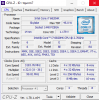
Please find attached temperature. This motherboard is already a replaced one. I asked the service support to install the heatsink again but the results are same. I regret buying this machine really. I have uploaded CPU-z output as well.
Attached Files:
-
-
If you had bothered to read reviews before the purchase...
http://www.notebookcheck.net/MSI-GT72S-6QE-Dominator-Pro-G-Notebook-Review.151922.0.html
Regardless. Max Temperature should not be higher than this reviews. -
Thanks for the reply, I did check the reviews and his temperatures are 96 MAX with all the core having almost the same temp. In my case there is a huge difference. And I got 98 C even 100 when I ran the test again, that too withing a minute.
Papusan likes this. -
This laptop is fairly easy to maintain. Re-paste with a proper thermal paste and the result will be a lot better. Take your time, read manual - see videos and do the work yourself
Choose a good thermal paste like Gelid extreme, ICD or Grizzly Kryonaut. Liquid metal if you think you can handle this. -
I really want to do that. I hope it would fix the issue but there is this stupid sticker that says Warranty void if removed
-
In my experience, they cannot legally enforce that. I just broke open an Asus desktop last month so I could test the dying hard drive before I sent it in for RMA. Its now shipping back to my work and nothing was said about that sticker. I think its more of a mental deterrence, but they have no legal authority to void your warranty if you remove that sticker.bilalgooner and Papusan like this.
-
I live in Saudi Arabia and here they dont think like that
.
-
@bilalgooner
have you tried to use turbo fan and use a cooling pad?bilalgooner likes this. -
I have tried turbo fan and cooling pad, no difference.
-
Download throttlestop and disable turbo until you cAn get a replacement or another warranty claim.
I can also teamview your system if needed.bilalgooner and Papusan like this. -
Thank you for your support. I have selected that Green mode which runs around 2.5Ghz, with max temp of 70 C under prime95 stress test.
-
use OCCT, it is much safer
for more temperature drop you should use FIVR -> Core -> Unlock adjustable voltage -> set the offset -25mv
DO NOT USE PRIME95 WITH CPUS NEWER THAN IVY BRIDGE
DO NOT USE PRIME95 WITH CPUS NEWER THAN IVY BRIDGE
DO NOT USE PRIME95 WITH CPUS NEWER THAN IVY BRIDGE
DO NOT USE PRIME95 WITH CPUS NEWER THAN IVY BRIDGE
DO NOT USE PRIME95 WITH CPUS NEWER THAN IVY BRIDGE
DO NOT USE PRIME95 WITH CPUS NEWER THAN IVY BRIDGE
DO NOT USE PRIME95 WITH CPUS NEWER THAN IVY BRIDGEAman Krishna, Papusan and bilalgooner like this. -
Or Aida64 You also get the nice sensor panel and different types tests
@hmscott
bilalgooner likes this. -
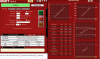
OK thanks for the info. I have now tested with OCCT. Please find attached OCCT snapshot.Attached Files:
-
-
Please use imgur, this forum's attachment is beyond broken.bilalgooner likes this. -
http://imgur.com/OQRw71p. Here is the link of imgur.
-
-
Oh OK. How these temps look like?. Temps are low but still there is huge difference +10 difference between cores.
-
You have headrom for Turbo boost. You can fine put [email protected] clockspeed with Throttlestop as well reduce core / cashe voltage as @Mobius 1 said.
You stiil need re-paste for fix the uneven temp between hottest vs. coldest core.bilalgooner likes this. -
Yes because while playing BF1, temp reaches around 90C. For re-paste I am now thinking to just take that sticker out gently, re-paste and then put the warranty sticker back. Anyways thanks for your support guys. I have to say AW has amazing community
-
You're not in the Aw thread now All sorts of people here
http://forum.notebookreview.com/forums/hardware-components-and-aftermarket-upgrades.27/
-
oh ok. Hopefully I will update you guys about re-pasting results if I do that.
Papusan likes this.
-
I believe someone in msi forum remove the sticker very easy with thin razor and hairdryer.
-
- Liquid Metal Magic: Grizzly Conductonaut
- Thermal Pad Replacement: Fujipoly 14.0w m/k
- Realignment of the top tension screw on the CPU side of the heat sink. Click here.
- Lapped Heat Sink.
- Polished Everything Squeaky Clean.
-
It seems they actually may be the cause of the uneven heatsink (incorrect size pads). I am waiting for a little bit more info in regards to this and what is actually the correct size of thermal pads required on the cpu side (for the 15 R3).
I'd recommend going normal thermal paste over LM if you don't have a lot of experience in this area. Also the fujipoly pads i believe can be purchased off Amazon in the US. For me, in Australia, it's very expensive and opted for some different pads (with 5W/mk - assume it'll still be better than the stock pads).Last edited: Dec 17, 2016TomJGX likes this. -
Fujipoly is always expensive, totally overpriced and over rated IMO... I would suggest Arctic Cooling thermal pads or Phobya XT pads, much cheaper and worth the price!!
Sent from my LG-H850 using Tapatalk -
yeah thanks - i ended up going with eXtreme-Cool 360 (EC-360) pads from Germany (off eBay); rated at 5W/mk. Pretty cheap for 100x100mm; just have to wait a month to receive em haha.
-
Thanks for the input! but is there a curtain thickness that's needed? if so, which ones? Thank you again I really appreciate it!
-
0.5mm and 1mm pads are used. However, recently there has been an update and for one part of the CPU side of the heatsink, 0.1mm thermal tape has been used (previously were 0.5mm pads).
-
correct, now you don't need to replace the thermal pads on cpu side of the heatsink
-
Not sure about these ones, go fod the Arctic cooling or Phobya XT ones, they are known thing.. You can get them off eBay, the Phobya XT pads are actually from a German seller there with Xbox
Something in the name..
Sent from my LG-H850 using Tapatalk -
Just finished up this 17R4 and here's the 1 Hour OCCT run.
Repaste+Repad+Custom HS Mod+Fix
Max: 55, 52, 53, 52
Current: 47, 47, 47, 47
Avg: 49, 46, 47, 47
![[IMG]](images/storyImages/nqmRLZs.jpg)
---
Here it the 1 Hour OCCT run at 40x.
(The one posted before was a stock clocks 36x.)
Repaste+Repad+Custom HS Mod+Fix
Max: 65, 61, 61, 61
Current: 53, 53, 53, 53
Avg: 55, 53, 53, 53
![[IMG]](images/storyImages/AFGdRA9.jpg) tilleroftheearth, hmscott, TomJGX and 1 other person like this.
tilleroftheearth, hmscott, TomJGX and 1 other person like this. -
Good Job, terrible shame that you have to put so much effort into fixing this because of Dell's ****ty design..
Sent from my LG-H850 using Tapatalk
Warning: Some i7-6820HKs and i7-6700HQ have Uneven Core Temps due to Uneven Heatsink
Discussion in 'Hardware Components and Aftermarket Upgrades' started by iunlock, Oct 25, 2016.



![[IMG]](images/storyImages/OQRw71p.png)


