Problems? See this thread at archive.org.
Don't worry so much about the core speed. The memory is what's bottlenecking the 5830. 575 vs 600 core won't change the scores as much as 800 vs 1000 memory speed.
-
-
How easy is it to swamp from i5-540m to i7-620m?
-
I guess I should be blessed that my Envy runs fine and dandy at 575/1100 stable then. I understand that it is memory clocks and bandwidth that is stopping the 5830 from its full potential.
@ smilepak: Looks easy. Just pop the laptop open and do the switch. I am consider doing that as well some point in the near future.
PS: I just realized that the Envy is running only on 8x PCI-e 1.1??? I thought this laptop did PCI-e 2.0... See attachment...
Attached Files:
-
-
I think you misread that post you quoted from me. I had a gen 1 machine with the i7 720qm and was comparing photoshop performance with my new gen 2 i5 540m machine. That compariaon would not apply to the i7 620M since it is a dual core not a quad core like the 720qm.
As far as upgrading from 540 to 620 it should be a simple exchange and reboot. I have exchanged my CPU fan assembly and that was quite easy, once the fans are removed it's a simple ZIF socket to replace CPU and some thermal paste for the heatsink and reassembly.... -
Cool. I wanted i7-620m and HP doesn't offer it. At least going with i5-540m, i can at least have room for upgrade. Where can you buy the CPU anyhow? And can I go directly to i7-720QM/i7-820QM with the same board?
-
Play with the 540M for a while, give it a chance. The 620M will use more power than the 540, even if it's binned the same, so you'll get better battery life out of the 540M while only having a marginal performance increase from going to the 620M. If you want to upgrade your CPU, wait a bit until some quad-core i7's come out on the new process, so they'll be in the lower thermal envelope. The 540M is your best bang for your buck (and battery) in dual-core machines.
-
Definitely. Ain't upgrading the CPU immediately. I would replace the 2GB stick with a 4GB stick to have more memory immediately though.
-
It has been reported by another user (Sleey0) that an upgrade from an i5 540M series to a 720QM does not work. He believes it has something to do with the HP BIOS and has given up trying to make it work. He actually had his 720QM up for sale on this site.
As far as the upcoming 32nm lower TDP quad cores, I have no idea if they will be compatible with the i5 mobo.
@Pitabred --
Where did you get the info that the 620m is more power hungry than the 540m ?
I just read a comparison (I can't find the link right now) that essentially said the 620M is equal to or better than the 540M in actual power usage depending on the tasks being run. There was some mention of changing thier earlier test results / conclusions on qualification samples they had tested that used significantly more power than the full production version. -
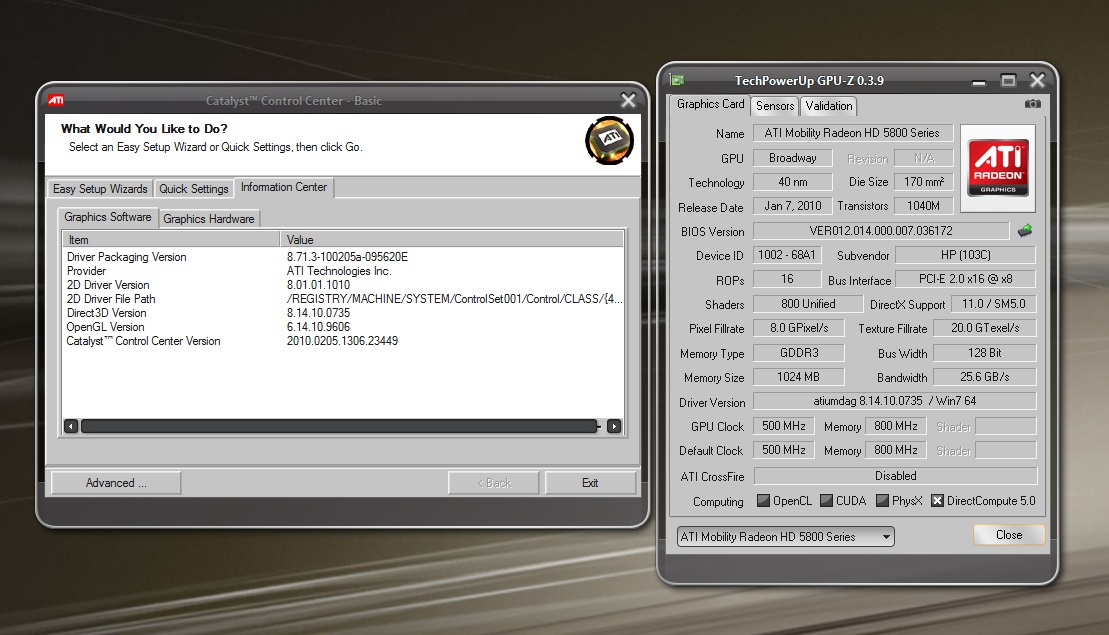
I am still perplexed regarding my Envy's PCI-e x16 2.0 Slot only detected by GPU-Z and AMD GPU Clock Tool running at PCI-e 1.1 @ x8. Does anyone have this problem? Is it due to the 10.3 Beta drivers or is it an anomaly on my Envy? I know gaming wise, it appears to be running as expected but running on a limited slot when it shouldn't is perplexing.
-
To be honest I'm not clear on this as well. I noticed the x8 on my system when I ran the tools as well and wondered but never asked. I just assumed it was a limitation of the MB for some reason.
-
This is the link I've read, with the power usage graph being the last one on the page. It may be because the GPU is being tested as well as the CPU in those tests, but I can't imagine that'd have such a large effect.
-
Is that not right at all? We brought a very high end system with a good graphics card and all it ended up plugging into a half-powered PCI-e x16 slot? That is real shame right there.
-
I just don't know but if it was running in x16 it would be much sweeter. This is my very first laptop tho so I wasn't sure if this was normal and a common limitation, HP just trying to cut corners or an issue. Can anyone else explain or confirm/deny this is how its supposed to be?
Sincere Thanks
EDIT: Also as far as I'm aware its not actually plugged into a slot but is instead mounted directly to the MB, which is why I thought it might just be a limitation of the MB. -
I know for a fact that my old dv6500t was running its 8400M GS on PCI-e x16 1.1. This got to be wrong. I tried calling HP CS last night regarding the issue but they won't help me since somehow I don't have the built in diagnostic tool and they refuse to accept more reliable third-party programs, unless if I recover the whole laptop and show stats from their, in my option, a stupid tool.
That lady was nice too saying that anything you buy retail or reseller is probably tampered before sold to you and that she has 4 years at selling HP's and has sold quite a few Envys herself since its inception. She thinks she is more godly than me, in which I KNOW my Envy pretty well here.
EDIT: So the 5830 is not soldered directly? Proprietary MXM? -
AND @ Strikesaber
Don't worry about what 'readings' your seeing about PCI E. Think about the performance your getting. With a 24W TDP GPU and 128bit memory bus we are seeing performance at or near the GTX 9800M and GTX 260M which are both 75W TDP with 256bit memory bus. There is no problem with your GPU's just the readings of the software.
I think your partly correct 'Bratboy', Since it's directly on the mobo it probably confuses the readings. Funny how no one complained or thought there was a problem when the last drivers showed we had a 5850 installed, LOL. -
Could someone please tell me why my catalyst version does not show up in CCC -- usually, from the screenshots people have been posting, their catalyst version would say 10.2, mine doesn't. I installed the 10.3 ati preview driver and it seems the actual driver is up to date; it's just the catalyst version is nowhere to be found. I've also been trying to overclock my gpu to see how far I can take it since I will be returning this envy 15 shortly for a new one; I truly believe that because I can't see the catalyst version -- it means the catalyst hasn't been updated. Due to this, my gpu can not be overclocked like other people with working 10.3 catalyst version -- this leads to black screens. Could someone shed some light on this?
Attached Files:
-
-
Hehe, very true. Actually mines weird. I just installed the 10.3 preview over my 10.2 install which had change my card to show as "5800 Series" in device manager GPU-Z and Support asst. Now with the previews its still listed as 5800. Been wondering if I should revert back to the origonal drivers that were installed and then run the 10.3 set on top of those.
Well I compared my window and all the numbers match you just seem to be missing the line about Cat version. What happens if you change to Advance view and then go to the information section? Opps forgot you had posted GPU-z as well, sorry. Anyway even though it doesnt say (Catalyst 10.whatever) In the driver version line the actual number matches mine as well. Almost like it just failed to write the id key in your registry but it looks like they are installed. -
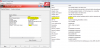
The screen shot shows your running the 10.02 CCC version, just drop the 20 at the beginning of the catalyst version. I just finished reinstalling win7 again due to a adobe CS4 problem and I just loaded the 10.3 preview drivers directly (no older versions) and get the same 10.02 CCC, so I'm sure that is the most recent version.
EDIT: here is a screen shot of my CCC and my sys info data, note the highlighted driver version numbers, ATI is different than windows which does say 10.3 (looks like ATI lost a '0' somehow). This is with just the 10.3 preview only installed on my computer:
-
oh... then why am i getting black screens of death?
-
Don't know, I have never had that problem with any of the 4 ATI drivers I've used. Just reinstalled win7 and only the 10.3 drivers so if it happens I'll let you know....
-
So the 5830 isn't soldered on the motherboard, but frankenstein-ly attached on top of the motherboard? Interesting...
-
What a perfect description. If you look at the attached link to the picture I posted (SSD and GPU) you can see some blood red colored glue (?) on the corners of the GPU when you zoom in. When I had it opened I wondered if the GPU was in a socket or soldered to the mobo but never took the heat sink off to find out. But it does look very " frankenstein-ly"
http://forum.notebookreview.com/showpost.php?p=5816047&postcount=1279 -
BIOS F .19 installed, looks like I gained about 50 points on 1st 3Dmark06 run with same O.C. settings. Screen shot linked to the score in my signature.
-
I just don't know how you are getting 10k++... I barely got 899x with 550/1100 =[.. Anything over that my laptop just black screens.
-
It's a matter of luck I guess. I got my envy yesterday, flashed F19 and installed catalyst 10.3 and broke 10k on my first try @ 600/1100. The cooling system on this notebook is mighty impressive, GPU didn't go past 55°C after an hour of left4dead at 1080p at those clocks, with fans running quite low. I actually almost fell off my chair when I flashed F19 from the noise it makes at full spin.
![[IMG]](images/storyImages/3dmark.jpg)
-
I just realized that what we are seeing as 'x8' in those readings is probably the softwares way of showing the 2 x 128 bit memory bus. 16 'x8' = 128, if it was 16 'x 16' it would be a 256 bit bus which most higher end GPU's are using
-
Not at all, the reason is quite simple : the PM55 chipset only supports 8 pci-e lanes. It could have supported 16 pci-e lanes but I reckon intel decided to support more memory instead. A x8 connection is more than sufficient for the 5830 though, so there is no reason to worry about that.
-
Thanks for clarifying that. Some people were 'stressing' over the x8 reading they got in GPU-Z. I knew it wasn't impacting performance but was unclear as to why it read that way.
-
I don't believe any of the current Intel Mobile chipsets support more than x8 lanes for Video. The other x8 lanes are shared with other i/o devices. As noted the performance is not degraded but don't expec the same bandwidth as from the desktop chipsets.
The X58 chipset I believe offers more performance in this area and has full SLI/CrossX support. -
here are two gameplay recordings I took with fraps, mass effect 2 and arkham asylum respectively.
http://www.youtube.com/watch?v=z-2qJD_S1UQ
http://www.youtube.com/watch?v=lj8WWvcwwFw
unfortunately to avoid choppiness from fraps I had to lower res to 720p in both cases, but without fraps it's about the same in 1080p. -
Might be stupid but how are you guys overclocking? Did you need to mod the desktop Ari control center?
-
Its called ATI GPU Clock Tool. I think its version .26 you wan't if you have a 5830 GPU anyway:
http://www.techpowerup.com/downloads/1641/.html -
i got one and a half hour battery on i7 gen 2 watching a movie, without the battery slice. if i get one, would i get like three hours of viewing videos?
with light tasks i got like two hours of battery life, its okay but i really want at least the double. -
OC'd the 5830 to 550/950. Will try to get the memory a little higher; the GPU barfed at 575 so I don't think I'll push it much more, though the temps were only up to 65 max with very little fax.
3dMark06 Vantage:
GPU: 5129
CPU: 7986Attached Files:
-
-
Got the GPU up to 5437. Will re-run the whole thing tomorrow with both and post that. Pretty impressive cooling.
-
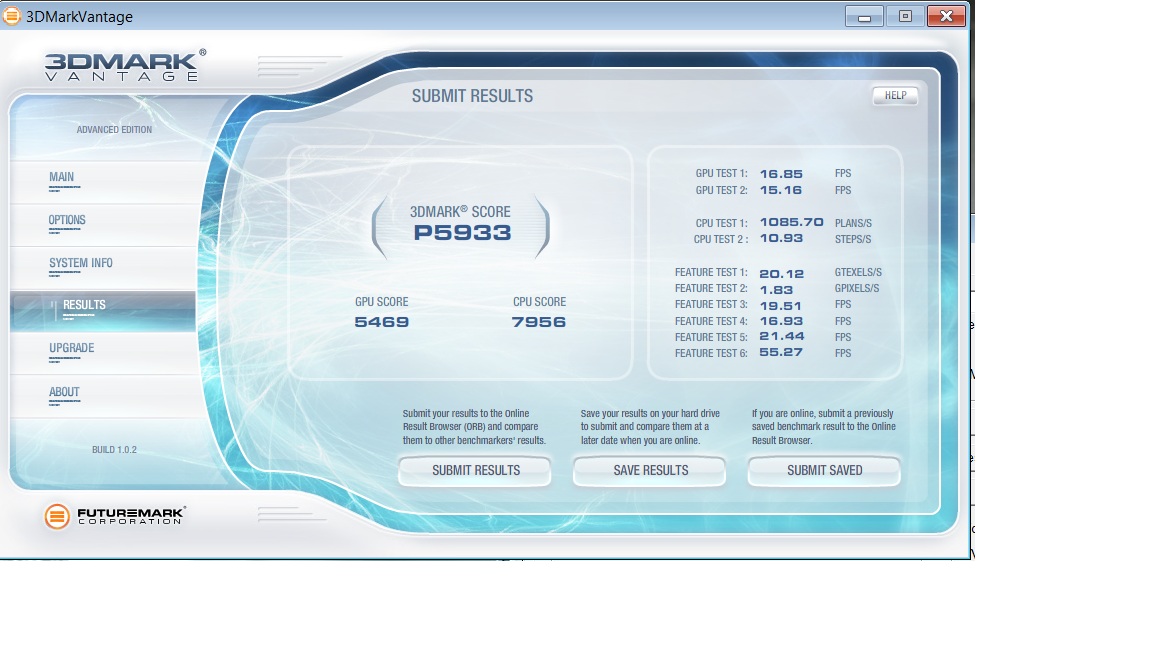
5469/7956
Last one at 550/1100 - not going higher than that.
Dumb question: how do I set the clock tool so that it will save the clock speeds I give it and apply them on boot?Attached Files:
-
-
Someone else posted this about Clock tool shortcuts. I can't recall who to give credit to but here is the text:
"You can create a shortcut to "'C:\Program Files (x86)\AMD GPU Clock Tool\AMDGPUClockTool.exe' -eng=500 -mem=1000" (replace the numbers with your desired clock/memory speeds) and put it in the Startup folder in your Start Menu (or create a task in Task Scheduler and set it to start at system startup)." -
WOW! Huge improvement with the 10.3 driver in my 3DmarkVantage score with max O.C.
I gained 1 point
P6554
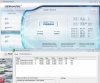
-
I've actually found that I have to reduce the clocks a little in gaming versus 3dMarkVantage. I had it at 550/1100 for the benchmark but Napolean froze up after a minute or two. I knocked it down to 535/1100 and it was fine. There's probably a sweet spot in there somewhere.
-
Doesn't surprise me. I find I can actually run Vantage at a higher OC than Mark06. Considering Vantage is supposed to test/tax newer cards more I'd expect it to be the opposite but I can run Vantage 3x in a row and then try to run 06 and almost always the same clock will lock at the point in the first test where the guy is marching with his BFG
-
Can you guys help me understand how much difference it is between a desktop with Q6600 + HD5770 and the Envy i5-520QM + HD5830?
I assume that the desktop is better, but there is a huge difference?
I also would like to know what you guys think about the LED Display on the 15" model, compared to a conventional desktop LCD, it's better? More colourful and brightness?
Because i've never seen a LED notebook display yet, so everyone of them it's really bad compared to a desktop version.
Thx o/ -
The Q6600 comes in 2 places below the i5 520M and 8 places below the i5 540M according to notebook check: http://www.notebookcheck.net/Mobile-Processors-Benchmarklist.2436.0.html
The Mobility radeon HD 5770 comes in 4 places below the mobility radeon HD 5830. But that is the notebook version, if the 5770 you have is the desktop version I'm sure it would be much higher performance:
http://www.notebookcheck.net/Comparison-of-Graphic-Cards.130.0.html
You should also be able to compare the performance of your desktop to the envy 15 by reviewing the benchmarks on the 1st page of this thread.
The screen is excellent, one of the best notebook screens I have ever seen, especially after proper calibration.
Hope that helps. -
I posted this on different threads for more people can help me, thanks~!
Hi, I've been reading this forum for like a month and I just joined to post questions, I have some problems with my Envy 15 and I hope some can help me with it.
I just got my Envy last Thursday (Mar 19, 2010), my specs are:
i7 Q720 1.6 Ghz
ATI 5830 1GB
4GB memory
500GB HDD
1920*1080 glossy screen
Bios: F.18
All dirvers are up-to-date. (CCC 10.3 installed)
Basically I have following problems:
1. Apperance: I noticed there is a lump/bulge on the right hand side of my keyboard, looks like something is sticking out from inside; and my battery lock is really loose, making noise when i move the laptop around. Anyone have or heard similar problems?
2. System: it is wired that if I try to boot up my envy with an external USB hard-drive plugged in, the system will not boot up, it will start but the screen just turns black and not even enter the very first HP bios page. I guess that is the bios problem?
3. Gaming performance, after reading lots of benchmarks and gaming reviews, I think my envy's gaming performance is worse than others' my graphic card is always on 500/800, never OC, and got only 8007 on 3dmark06 under default settings (1280*1024, SM2.0: 3088, HDR/SM3.0: 3386, cpu: 3021)
And i also ran some games test FPS with Fraps:
BattleField Bad Company 2:
1920*1080 res, Medium settings(High Texture) 1xAA 4xAF,HBAO off, Single player, it was not smooth, I get FPS various between 25 to 45, drop below 20 when intense (like buildings explode) And the graphics lag too much, kind of buggy. That is not good Comparing to the review I read (which runs very smooth)
Dirt2: with all settings on Ultra/High (Except Post process on medium) No AA, I got average 22 FPS on benchmark test, comparing to the review I read, which got average 30 FPS on above settings.
Modern Warfare 2:
1920*1080 res, all settings Ultra, all Yes. FPS from 45 to 70 when not intense, when intense it drops to around 30 or even 24 when very intense. There were times it drops to 22 FPS when I use right mouse button to zoom.
Left4Dead 2:
1920*1080 res, Maxed out everything, (8xAA 16xAF, very high, high, high)
I got normally average 35 FPS, around 40 when not intense, drops below 30 with intese environment and fights, lowest once drops to 20 FPS, which is really bad I think, compared to the review saying "normally 60 to 70 FPS and lowest 50 when intense". How mine is much worse than his on this game??
Crysis Warhead:
1920*1080 res, gamer on most and shadow, effects, particles, waters on mainstream, No AA, I got only 14 to 18 FPS, intense drop to 11 FPS.
1650*900 res, all on mainsream but textures on gamer, no AA i got average around 35, sometimes drops below 30
below is some reviews I used to compared with:
http://hpfansite.com/hp-envy/hp-2010-envy-15-review-ati-mobility-radeon-5830-core-i7-quad/
http://www.youtube.com/watch?v=hmuluCS0vJA
I know I asked a lot of questions, I really hope someone can help me and give some ideas about what's going on. Why there is such a big difference in performance between mine and others? I have no clue, above results I got is after the fresh reinstall and all up to date driver installed, bios F.18. I tried to run the games without Fraps, still the same performance.
I have about 8 days left to decide wether exchange a new one or return it, could somebody help me out here? Is it possible something wrong with my video card when they assemble it? I will be really appreciate with any idea and suggestion.
Thanks!! -
ATI card is commonly used for graphic editing ,not gaming. If you want to game,I suggest you to get a NVIDIA one
-
Uh, what?
The 5830 is a great gaming card for a notebook this size. It's better than most any other notebook out there that's under six pounds. For now, at least. -
The only thing better that Nvidia has out in 15'' laptops is the 360m, which is about the same as the 5850. But the 5870 crushes it.
-
What are you talking about??
Here is a partial quote from the ATI / AMD Mobility 5800 series product page;
"The barrier-breaking ATI Mobility Radeon™ HD 5800 series GPUs are the first mobile GPUs offering full support for Microsoft DirectX® 11 enabling rich, astonishing realism and explosive HD gaming performance so you can dominate your gaming competition at home or on-the-move." HERE
The 5830 was designed as a premium gaming GPU for notebooks. Performance rankings by Notebookcheck place it between the Nvidia GeForce 9800 GTX and the GTX 260M (which are 2 of Nvidias top gaming GPU's). HERE -
Why is sleey0's screen a garbage matte display? Is the 1080p matte display bad?
-
I've got the 1080p matte display and I love it.
-
Oh, ok. I like matte displays. Are your dual 160GB SSDs Intel G2s? Are they 1.8 or 2.5"? Do they come in RAID 0?
Envy 15 2nd Gen Benchmarks
Discussion in 'HP' started by jyar727, Jan 21, 2010.