Problems? See this thread at archive.org.
Already running 10.5 beta version now with no issues other then no WHQL which only seems to affect CS4 openGL functionality which isn't a big deal...
Check strags.com , they have 10.6 alpha already
-
Right. I've got that driver running right now (I don't think it's WHQL either). I didn't know what version you were running, if you were being conservative since you didn't have the 10.6 already.
-
how's the 10.6 driver?
-
Can someone confirm my temperatures are normal:
Low load WEB+PDF+MATLAB:
CPU = 40 - 50 C
GPU = 44 - 46 C
RAM = 1.59GB used
Gaming:
CPU & GPU ~ 71 C -
what's your CPU?
-
LOL, not conservative but cautious. Wanted to wait until I finished a few business meetings I needed the envy for before potentially messing things up.
What BIOS are you using with the 10.6 ? I am debating whether to try the F .24 A or stick with the F 1B A which is no longer on the HP site, I think it was up all of 4 days... along with the reports of people bricking their machines with f .24 and no way to go backward to f.18 I don't know what to do... Once I decide on what BIOS to keep then I'll try 10.6. -
Sorry I have a i7-720QM
Are they normal? -
I had no bricking going to F.24. I did have to reinstall a few devices after updating to it though, so I think it's doing some non-trivial changes.
I'm getting great performance in games (gonna bench it next chance I get) and since I fixed the heatsink, I'm barely breaking 70C even when overclocked to 550/1000, which is about the max that's reliable with my chip, maybe 20-30MHz headroom on each. -
ALOT COOLER than mine... how do you manage to keep your temps
-
Are you guys flashing bios': a) just because you want the latest b) for performance benefits or c) for major problems getting fixed?
Not that I'm criticizing or anything, but it seems like HP puts out bios' for the envy on a fairly consistent basis; from what I'm deducing the risk seems a little higher than usual with the envy compared to a traditional laptop or mobo.
I honestly have a hard time imagining any true performance gains from the new releases though :GEEK: But I could be wrong. -
The F. 1B A and the F. 24 A BIOSes has been bricking several Core i5 Envys during installation (including mine). I don't recommend flashing to them yet, but there are people who got theirs flashed successfully, but found themselves having operational issues. I have used F. 19 A before but I didn't personally like it as it kind of made the HD 5830 a bit weaker on the default core clocks then original released from the factory and made some OC figures more unstable than in the previous revisions. However, you can't get F. 19 A anymore from their site. I suggest staying on F. 18 A until their next release. The reports of users on this site getting their Envys bricked due to flashing to F. 1B A and F. 24 A as well as some other users experiencing sudden freezes and crashes concerns me from leaving the stock F. 18 A BIOS.
-
After receive my Envy, I updated the Bios and performed a fresh install, nothing more, I have a ssd and hhd, maybe to have a high revolution hhd make a difference?
-
my temps are considerably lower using the f24 bios, but beware, have heard of some bios flash failures... my envy failed on me flashing earlier, but was able to recover it...
i'll post new temp results, using an 820qm. -
I know this has nothing to do with benchmarks, but maybe good to know: envy 17 is coming soon.
http://www.engadget.com/2010/04/21/envy-17-pops-up-on-hp-com-begging-to-be-officially-launched/
Are your temps with or without a notebook cooler? -
Funny, the links from that article to the HP site have already been taken down, no more mention on the HP site of the Envy 17.... Someone screwed up when they added that website page.
-
Agreed, 100%. Mine is on it's way back do to BIOS update failure from F 1B A to F .24 A I do not recommend that anyone with an i5 try this yet.
FYI: I did find out that the BIOS recovery option does not work do to the fact that the HP service paq BIOS links are in a .exe format that must install (flash) after the current BIOS posts. Since when your machine fails to flash sucessfully (bricks) you no longer can get the old BIOS to post, so there is no way the InsydeH20 'BIOS recovery' can work. The tech who figured this out is going to escalate an 'emergency' fix request to the software lead so they can provide a non .exe format download for recovery if needed, they called this a 'pre-post flash' which should at least allow a recovery without having to send in your machine. Won't help me for now but hopefully will prevent this from happening in the future....
Not that this should even be needed if the frickin HP software guys could write a stable BIOS...GRRRRRRRRRRRR!!!!!! -
About time a HP Technician figured this out...

-
A little to late in my opinion
-
I updated the bios first thing, right out oft he box in case it bricked it and did not have a problem. It came with F.1 bios but had a date of 3/10.
-
I updated because of the fan updates. My GPU was running hot, so I figured it may be BIOS related. Silly me, it was just HP's inability to properly attach the heatsink to the chip
I do love my Envy, but I'm wary of recommending it to people who don't want to a) send it back a time or 3 to get it working perfectly or b) do it themselves. -
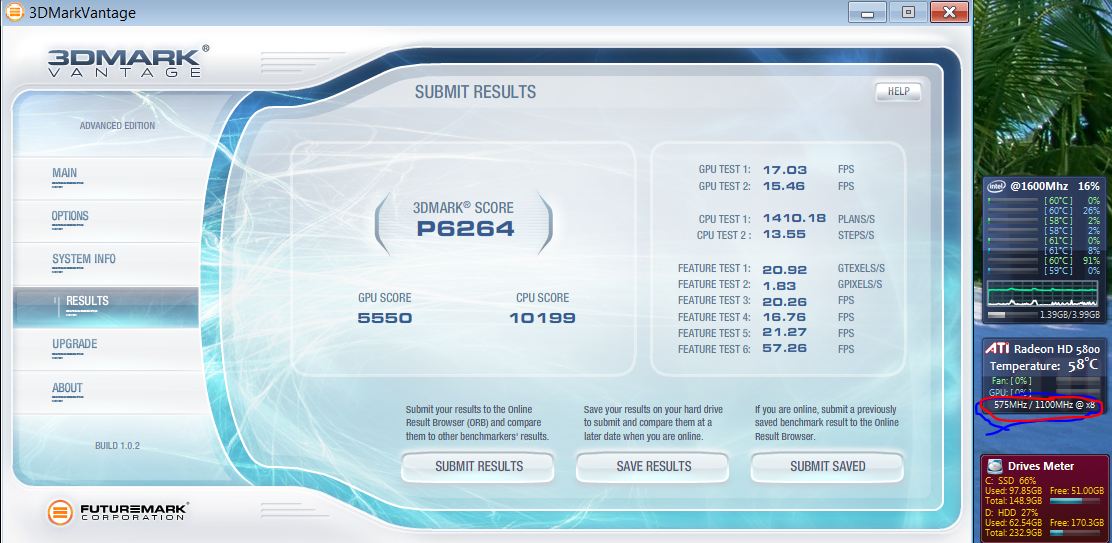
What do u think about my 3DMarkVantage:
Attached Files:
-
-
Here's how the 5830 might rock 3dmark06 with GddR5 and some more voltage...
My desktop with $130 ATI 5770
3DMark Score
17241 3DMarks
SM 2.0 Score
6696
SM 3.0 Score
7981
CPU Score
5141
OS Windows 7
CPU Intel Core 2 Quad Processor Q9450
CPU Speed 3447 MHz
GPU ATI Radeon HD 5770
Memory 4096 MB -
Looks good.
-
What CPU you have?
-
He has a i7 720QM (according to the 8 threads @ 1600mhz)
-
Ok I missed that.
-
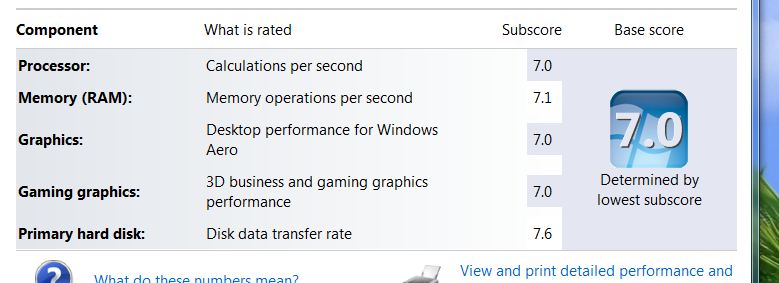
Here Windows 7:
Attached Files:
-
-
Surprising how much diff the faster memory makes over the i5. What kind of HD do you have?
-
What widgets are those (ati and intel)?
-
I'm gonna reapply AS5 tomorrow. Is there any important things I need to know?
BTW my AS5 tube is used and almost one year old. Will it make any difference? -
http://gallery.live.com/liveItemDetail.aspx?li=8496a28a-107a-4f0f-90c4-747dfa53ce7d&bt=1&pl=1
http://gallery.live.com/liveItemDetail.aspx?li=83a44bd6-6b5f-4bc7-ba0f-28758cd9c509&bt=1
What is the maximum temperature which the GPU should operate?
Mine can reach 72C with 575/1100 -
72C is well in the safe range. That's a darn nice OC, too. I can only get about 550/1000 and have it stay stable.
Anything over 85 or so is reason to worry. -
mine gets to 540/1100, haven't gone any higher, just wanted to break 10000 with 3dmark.
-
Have you tried the newest drivers yet?
-
i'm using the 10.6 alpha, probably won't use the 10.4 since bad company is playing just fine.
-
is there a major difference in performance between the 10.3 (8.712) and 10.4 or 10.6a?
-
boy am I out of the loop 10.6a? I went to Stragg and can see one file, which I'm downloading now. is that a 32& 64 bit pkg? Also if I want to use it on my laptop system do I need to just run that or do I still need to use tricks or another file first?
-
My vid card started artifacting so I had to send in the envy. HP had me send it in and start the process for a new one. est. build date may 17.
Bad times. None too happy about this! -
Did you massive OC? Going insane with it is bad...
-
yeah, i rarely overclock anymore. overclocking is not necessarily the cause of artifacting, since the notebook has temperature failsafes. defective card possibly.
-
To be honest, other than when I was benchmarking, I really never overclock. It handles whatever I'm doing just fine usually. At least for me it doesn't seem necessary. I only do it benching just for the curiosity of it.
-
Looks like my new Envy can hit over 600 Core and 1100 Memory. Been playing stably in ME 2 for 30 minutes with the clocks and I see no artifacts or sudden crashing at all. Looks like the production parts are getting better and better.
-
What are your temps now?
Can you set your core to default (500) and get even a higher memory speed? Because I see much people have problems with increasing the core freq. while the memory speed is the most important one due to the 128bit GDDR3.
I want to see the absolute max speed/peformance of the card. So bacisly P6500 is max vantage score someone can reach? -
Overclocked on this new Envy at 600/1100 for 30 Minutes, 67C.
After running 3DMark06 in a stuffy room, here are my results (10,512 - I think I beat JJB!?!?) with temperatures of 71 C Maximum. Not bad cooling-wise.
I want to try out Vantage but I don't have an external monitor at the moment that I can run it off of (I didn't opt for the FHD LED for several reasons).
About the memory, I am not sure about that. I know that JJB can't hit over 1130 regardless of core clocks but there is a slim chance that is can hit 1150 if you are super lucky. At the moment, I am not going to try to surpass 1100 but if I am ever in the mood, I will let you know my results.Attached Files:
-
-
Great score. It could be the screen resolution you are running at. JJB was running his test i believe at 1280x1024.
-
Great OC. That must be knocking on the 5850's door. You need to bench '06 in 1280 x 1024 for meaningful comparison as already mentioned, however.
The Apple freaks are getting all up in arms over their "great" '06 scores with the overclocked 330M but have neglected most of the systems run at a lower-then-default resolution... don't turn into one of them.
-
Let me get access to an external monitor and I will rerun 06 as well as Vantage and I will repost scores. The price you pay for not getting FHD lol...
Also, I ran 06 just to see if the clocks were stable to operate. My last Envy couldn't even hit 575 on the Core before crashing minutes later... -
A question: is there a possibility to oc your i5 CPU to let's say 620M speeds?
@strikesaber
What's your vantage score (1366x768)? -
You can't overclock the CPU yet, or at least there is nothing known how to do it yet. Also, Vantage can't run on 1366x768 as it needs at least a 1280x1024 resolution screen PHYSICALLY to run the damn thing. So once I get access to my friend's HDMI Acer FHD External Monitor, I will give you some figures. However expect it to be around P5900-P6300 based on other people's tests in this thread.
-
Yes, much higher than my score, although for some reason my system seemed to do better on the CPU1 test. Unfortunately, I only have the free trial version of 3DMark, so there is no way to adjust to the resolution you used. Here is what I got with the 1280x1024 resolution option:
< Main Test Results >
3DMark Score 8,123.0 3DMarks
SM2.0 Score 3,078.0
HDR/SM3.0 Score 3,390.0
CPU Score 3,338.0
Game Score 0.0 points
< SM2.0 Graphics Tests >
GT1 - Return To Proxycon 23.8 FPS
GT2 - Firefly Forest 27.5 FPS
< CPU Tests >
CPU1 - Red Valley 1.1 FPS
CPU2 - Red Valley 1.6 FPS
< HDR/SM3.0 Graphics Tests >
HDR1 - Canyon Flight 32.8 FPS
HDR2 - Deep Freeze 35.0 FPS
Envy 15 2nd Gen Benchmarks
Discussion in 'HP' started by jyar727, Jan 21, 2010.