Problems? See this thread at archive.org.
The "top cover" consists of the basically keyboard and the steel around keyboard and mousepad. It's not connected with the screen. This is how you do it:
1. Remove the two covers underneath the laptop ( 4 screws ).
2. Remove SSD/HDD ( 4 screws )
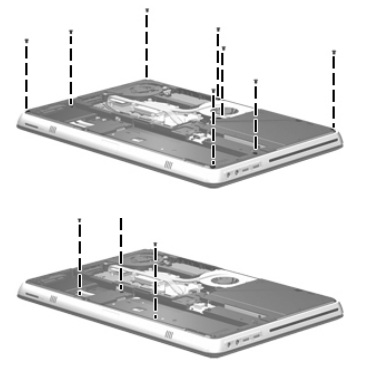
3. Disconnect the cable you see under the battery in the middle of the area. (connected to the motherboard).
4. Remove screws connected to the topcover from computer and battery tab:
![[IMG]](images/storyImages/image990)
5. Gently use your nails to lift ut the top cover from the space between bottom of touchpad and top cover.
6. Release all 3 cables connected while you take it off.
I'll suggest you try unstick it with the solution mentioned here before you replace it. If you break it, there's no big deal to replace it. Remember. If you send it to HP they would probably do the same, but you still risking they will replace the whole computer and the lost of you radiance since you spoiled juice all over it..... I dunno.
-
Attached Files:
-
-
Nevermind my last post, I just got a message on start up that says the SMART check has detected an imminent hard drive failure. I kept wondering why I was getting no bootable device messages and now this confirms it. It told me to back up my data and run the hard drive check. Anybody got any suggestions who to contact to get the best customer service?
-
Need help with OC the ATI card on an i5 ENVY.. Guide someone? Can't find any...
-
No, do not delete (uninstall) the old updates.
Though they are all titled the same, they all address a different issue (identified by the KB####). -
i experienced the same problem. i used the solution suggested by ShaoLinx on the first page of the thread. download the SP49493 7z archive, unzip to a folder called SP49493 under the SwSetup folder. Then extract the 01436.bin file from the new bios installer using WinRAR and overwrite the one in the SP49493 folder. The installer shouldn't freeze this way.
-
Okay, thanks bro!
-
Ive recently been getting horizontal rainbow lines in vertical columns all across my scree, when waking up from sleep, or exiting full screen. I'm afraid it means that my video card is going bad. Can anyone confirm this?
Also I am having trouble with the Wi-Fi randomly and suddenly turning itself off. The only way to turn it back on is to enable then disable the device, and sometime when it is "enabling..." it freezes, and I have to to a HARD (holding down the power switch, and getting greeted by the Windows Error Recovery Screen on Reboot) Restart. Any remedies?
Oh, and I got that dumb "Bluetooth Stack Error". That seems unfix-able. Anyone care to save the day?
I once had a clean install (In August when I got it), but its starting to get cluttered. -
I posted about the backlit keyboard problem on another thread.
I think it's relevant here. It could be helpful
for current and future owners of the HP Envy 14.
http://forum.notebookreview.com/hp-...ven-keyboard-backlighting-common-problem.html
I don't want to be redundant but I'd like to state
that the HP Envy 14 is supposed to be the "premium" series.
So certain aspects of it should be the same or better than the HP Pavilion dv6.
Based on my observations, the keyboard keys, on the dv6-3160us, are evenly lit and brighter compared to the Envy 14.
If HP is capable of making excellent distributed lighting on the dv6 backlit keyboard,
HP should be able to do the same or better on the Envy 14.
The brightness level difference of the keys, from one key to the next, is what makes it much more noticeable
on the Envy 14. A key is very bright then the next key would be very dim. If the brightness decrease
wasn't that extensive, from one key to the next, then it wouldn't be so noticeable.
What makes the other keys much more noticeable also, the dim keys are at the middle area of the keyboard.
On the two Envy 14s, I've so far tested, the keys which are distinctly dim are
(esc, f1, f9, f10, 7, 8, Y, U, I).
HP support is willing to replace the keyboard. But my main concern, after waiting a week or two,
is that the keyboard replacment will have the same uneven backlight characterisitcs.
Maybe I'm just unlucky and got two envy 14s with defective keyboards. Maybe only a few
that have posted here have defective keyboards as well.
Are there Envy 14 owners here that have the (esc, 7, 8, Y, U.....) keys as bright as the others?
Or, are those keys dimmer than the other keys also? -
I really wonder if it's not just an improperly installed keyboard. It seems a little uneven. I agree that if the lighting is even on another model of computer it should be on this one as well, but it doesn't bother me too much really.
-
Good point.
Hmmm, I might just try to unplug and
reconnect the keyboard ribbon connector,
and see if it makes a difference. Thank you.
Well, besides the backlit keyboard issue,
I really like the form factor, performance, etc.
of the Envy 14.
I totally agree with all the postive reviews
the Envy 14 has earned. -
Im getting similar problems with my screen but I have the brightview. Its only been about a month and a half for mine.. Im sending it for RMA. Everytime i turn on the comp, the screen goes crazy with the lines. After about 20 times of turning on and off, eventually I will be able to get it and it goes to recovery. Interestingly enough, it happens mostly after my laptop bumps around in my backpack or even if I lightly throw it on my bed.. how annoying.
-
Good choice. Maybe bad connections or an unop motherboard.
-
You might find this helpful. I also had a similar problem (strange artifacts all over the screen), but it turned out its only an issue with the drivers.
http://forum.notebookreview.com/6671487-post3980.html -
Hello everyone I've recently purchases the hp Envy 14 and should be receiveing it on the 22nd or 23rd hopefully. While I ordered it with longevity in mind since my desktop has just crashed completely, I ordered the i7 720 processor hoping the more things in the future will be able to take advantage of it. (I also ordered 6g of ram) I mainly plan on using it in college and I guess some light gaming but I mainly just want it to be better than my old desktop that was around 5 or 6 years old. And from what ive heard from my more tech savy friends it should be easily( I do not know the exact specs of my old desktop) I also don't really care to much about battery life 2hrs is all I really need since I'm never very far from an outlet and I also plan on ordering the slice battery after I see how the battery will be on the laptop. My question is however did I make the right choice in getting the i7 720 and 6g of ram and will it be able to handle the light gaming at playable framerates? I would appreciate easy tech terms in an answer because I'm honestly horrible when it comes to computers and technology but I tried to educate myself before buying the laptop and I'm still trying to learn more right now.
( I'm sorry for any typos or incorrect grammar as I'm typing this on my iPhone) -
Hello nisiandrew,
The i7 720 with 6 GB of RAM should suit you just fine. It will easily handle gaming, light and not so light. Your Envy should be leaps and bounds ahead of your 5-6 year old desktop, as computer hardware has advanced significantly since then and the Envy is well outfitted with the latest available processors etc.
If anything, you may have actually upgraded your Envy more than needed. An i5 with 4 GB of RAM seems like it would have been more than adequate at handling everything that you plan to throw at your Envy, and more, and would have saved significantly on battery life due to the switchable graphics feature which is unavailable with the i7.
But, since battery life is an insignificant factor for your planned usage, I think you'll find that you're more than happy with what the Envy you've ordered can do. -
Thank you random15, and I figured what I got was overkill but I got it because I plan on it lasting me a while or at least I hope it does but thank you for the help

-
The i7 processor generates a lot more heat than the i5. I have owned both. My old envy 15 i7 was around 50c idling.. my envy 14 i5 idles as 33c.
-
Same here mate! When I saw the envy14 on paper before it was released I was a little skeptical and wondered what the quality might be like, but I was nothing short of impressed! I get complements just about every time I let someone in a class use it.
Cheaper than MBP 15, faster, and probably the only thing that's even close to MBP build quality (excepting mayb panasonic toughbooks...) -
I usually get "I hate your laptop. I dont know how to use your trackpad"
-
Hi
I was wondering if anybody here uses BitDefender Total Security 2011?
Ever since I installed it a week ago, my average cpu temperature (using Speedfan) jumped up 10 degrees (from ~20 to ~30)
It annoys me how it gets warmer, even on idle. I don't know if I should keep BitDefender. Any recommendations?? -
I recently sent in my Envy 14 in for repair and it has come back with notes showing that apparently the system board has been changed.
Is there any way to know if it actually has or not? The warranty date in bios is the same as so is the serial etc -
I don't know but those security programs freak me out. Kaspersky/Nod/BitDefender. I always end up with some really weird thing happening.
I would try Norton Internet Security 2011, IMO, the best suite out there.
There's a free 90day trial, no strings attached...use it, if you like it, find another trial or buy it.
http://forum.notebookreview.com/security-anti-virus-software/535009-nis-2011-90-day-trial.html -
Nope, no way to tell via software. You would have had to open it up beforehand and put some sort of telltale inside on the mobo.
-
Ordered anew HP ENVY 14 beats Edition! Can't wait for it to get here. The order status on the HP website says it will ship 12/21. But I have heard from others that that date is actually the delivery date? What were your experiences when you ordered your Envy? Does anyone have any thoughts?
-
CTO laptops have 48hrs of "buffer time" built into the estimated shipping date to sort iron out any paper work kinks, so generally if everything goes smoothly, you'll get it shipped out 2 days before the estimated date.
now if fedex is competent, or that you got the 2 days shipping, you will in fact get the laptop on the estimated ship date (estimated - 2 days + 2 days shipping).
so far, HP has consistantly been shipping it out 2 days before delivery date, but fedex has taken 5 business days to deliver it, both times. so in fact i got both of my envy 14s 3 busness days after the estimated ship date. -
im gonna need that direct download link so i can update my Envy 14
says it runs black ops better
so im willing to give it a shot
thanks! -
Check page 1, post 1 of this thread or go to AMD's homepage. On the right side are pull down menus for the drivers.
-
yeah, only downside for that 2.0 is that we have to do the sony laptop work around and download the drivers directly from ati (can't use the downloader, it refuses).
http://forum.notebookreview.com/gam...540234-amd-huge-catalyst-10-12-out-today.html -
My Envy 14 charges up to 98.1% ( according to Battery Bar ), and then charges at that same percent for like 10minutes before gradually charging to 100%
Is there a way to rectify this problem? -
It's normal-ish. Nothing to worry about presently.
-
Can you verify this? It's kinda choppy on blackops for me so i'm a little disappointed..
-
Hello, I'm looking into an external blu-ray burner. And since the beats, has an external ESATA connection, should i look for a burner that is capable of using that connection, or just stick with an usb 2.0 connection.
The burner will also be used for blu-ray playback, through the beats HDMI port. -
hey everyone,
i got my envy 14 beats a week ago. cosmetically it's perfect aside from just the slightest raise on the bottom right corner of the touchpad.
there are other things though that are really nagging me. my boot times have been averaging almost 3 minutes from pressing the power key to desktop. i haven't uninstalled any bloatware yet and i think i'll be doing a clean install, but there's no reason it should be that slow should there?
i'm also a bit disappointed at the speakers, which are hardly any better than the ones on my six year old inspiron. the laptop also gets fairly warm and in a silent room the fan is loud and i can hear the hard drive. i guess i really just came here to rant a bit, hopefully the clean install can fix some issues for me. -
Dump it.
Microsoft Security Essentials, common sense and an ad blocker. -
Why do people use ad-blockers? Many website rely on ad revenue to pay for running costs. Blocking ads is essentially steeling, as you are using a site and blocking its revenue stream. If everyone used these, half the web would go out of business...
-
Hello envy1222,
Just to be clear, you are experiencing boot of times of 3 minutes from the moment you press the power button to the moment you first see the desktop?
If so, that seems much much longer than is normal, regardless of whether or not you have uninstalled bloatware, or reformatted, or what have you. I personally didn't use my Envy in factory status for very long because I did a clean install of Windows early, but I know for certain that even straight out of the box my boot times were nowhere near 3 minutes from pressing the button to seeing the desktop. If I were in your position this would be a cause for concern.
Unfortunately I have no advice as to what may be causing the slow startup, but again I can tell you with near complete confidence that 3 minutes is a very long time, and as far as I know, abnormal. Hopefully someone else will come along with some more concrete information or advice.
As for the speakers, I agree that they aren't too spectacular on their own either in regards to sound quality or volume output, however, in my opinion the Beats audio does shine when using headphones or an external speaker setup.
Good luck! -
if i try to upgrade my video drivers from default to latest.. they doesnt show any up gradation in information tab in Catalyst Control Panel.. its stays at 10.07.. instead of upgrading to 10.12..
why is that so? -
Anyone has problem updating the latest F23 BIOS?
I tried 3 times and everything it just hang at the ok or cancel screen.
Fan is at full speed and I have to unplug the power cord & pull the battery to recover. -
Referencing the HP Envy 14 User Manual,
I managed to disassemble my laptop
and check for any loose connections pertaining to
the keyboard.
I did it slowly and carefully.
It was nerve racking, didn't want to scratch/damage
anything on the new laptop. Hehe!
The service manual has a great step by step guide.
There's a diagram which shows 3 screws to remove from the battery bay
in order to be able to remove the top cover.
On my HP Envy 14, I had 4 screws to remove.
The service manual doesn't warn about the touchpad ribbon cable
being sort of short. I had to carefullly unplug that prior to
lifting further up the top cover.
The rest of the procedure was pretty straightforward.
I noticed all the parts in the laptop is nicely connected. The person who assembled this laptop
did an excellent job.
No loose connections. But just in case, I disconnected
the power button cable, keyboard ribbon cable, and keyboard
light ribbon cable from the system board connectors.
I even removed the keyboard from the top cover.
I noticed the keyboard itself is flexible. It's not stiff, so that's
why there's some flex when pressing hard on the keyboard.
I thoroughly checked and cleaned the keyboard light cable.
The other end of the keyboard light cable goes directly inside
the keyboard. The only way to find out how that end is connected on the keyboard
is by removing more parts on the keyboard. I didn't want to risk damaging
the keyboard, so I didn't continue disassembling the keyboard.
I reconnected everything and made certain everything was securely connected,
especially the keyboard light cable.
The final result after doing all this. The same keys are still dim, compared
to the other keys. Sigh.
It must be the keyboard itself that has the uneven backlighting, and not because
of any loose connections.
It might be a bad batch of keyboard parts, or I'm just unlucky, or whatever, but the two HP Envy 14s I've used have the same exact areas/keys that are dimmer than the rest.
I think I might as well accept HP support's offer of replacing the keyboard.
I'll await how that turns out. -
I experienced the same thing the very first time I turned on my HP Envy 14.
It's just Windows 7 and other software doing their final setup.
Subsequent boot times are much faster.
But if you're consistently getting 3 minute boot times, that's an entirely different matter.
I agree about the speakers.
But you can adjust the settings to make some improvements.
You just can't expect audiophile quality sound with deep bass from those small speakers.
On the other hand, I am really impressed with the headphone jack sound quality though.
No hiss or distortion.
I thought this is also some marketing hype. But there is something different there.
I've read other HP Envy 14 owners experiencing hiss/distortion when using their headphones/IEMs,
but I haven't experienced that.
The excellent sound quality from the headphone jack surprised me and it's able to sufficiently handle
my M-Audio Studiophile Q40 headphones. I don't have to use a portable headphone amp or USB soundcard/DAC
when listening on the HP Envy 14.
-
Hello, New to the Forums but have been reading for a couple months regarding the Envy 14 reviews, finally purchased one, core i5 450, 500gb Sata7200,4gb ram, ati 5650 standard stuff and 1600x900 Radiance. The laptop of course is refurbished, I honestly cannot stand the new 1366 by 768 or whatever resolution it's horribly grainy, say perhaps look at a 15.6 screen with that resolution g series HP and it's like looking at an ugly ugly cousin. I have some issues and am seriously thinking of returning the laptop.
As of today it has frozen 4 times and crashed once today instant reboot, tried to find a crash dump log and nothing ..... ran a program to find the log and nothing in the reliability monitor it shows nothing of the crash
that weird banging noise when just using the touchpad instead of the buttons my Envy has that it's really weird noise too and loud I wonder if it was meant to simulate a clicking noise when not sing the buttons???????
The touchpad is not flush with with the palm rest in the front slight rise to it.
The touchpad is pretty aweful and I can't seem to setup those envy touchpad custom programs just right. the pinch zoom and scrolling are sooo freaking annoying.
The only cosmetic blemishes that I noticed was a deep scratch on the bottom of the laptop off to one side and the feet are a little worn
The battery door isn't flush either as on one side there is a little flex
Things I do love
Keyboard is amazing love the chic-let style keys, keyboard has the least amount of flex I've ever seen
The screen is amazing, I mean amazing the brightness is just amazing for watching movies in bed
The touchpad size is great and even though the scrolling sucks i find that unless i'm playing a game the touchpad is very functional
The slot load dvdrw is nice space saving
no noticeable cpu whine
The fans cycle on and off only when playing flash movies in a warm room other than that it stay a constant low, even playing graphics intense games like sims2 and 3 it stays on low
The activity monitor shows 4 cores I thought this was a dual core processor
Kinda confused the Hp support thing is good I guess if not random updates
Speakers are loud if anything but still lacking any sort of bass the sound from headphones and external speakers is really nice
Haven't tested batter times but the switchable graphics thing is nice and I've only spent a little time unplugged and was running many applications and noticed no lag or visible throttling of the processor speed
any comment or thoughts as I would appreciate
Thanks ^_^ -
I have a 1366x768 LG LCD screen on my HP Envy 14. It's not grainy.
I was quite impressed that it's clear, sharp, and bright.
I've seen grainy and other bad traits from other 1366x768 screens
(other laptop brands/models), but the LCD screen on my HP Envy 14 isn't like that.
I haven't experienced anything as you described with the touchpad.
Also no flex with the battery door.
Hard to determine if the crashes are a software or hardware problem
based on your description.
Do you still experience the constant crashes after a full Recovery that
reinstalls everything?
The touchpad and battery door problems are indications why it's refurbished.
There are of course refurbished ones that are in better condition/function,
but yours seems worse than normal.
You should definitely consider an exchange or have those specific parts replaced. -
Hello! I've been (lurking) getting a lot of great info from this site for several weeks as I waited for my (1st) Envy 14 to be delivered. A day later, it went back (DOA) and I just received #2 yesterday. While preparing for a clean install, I downloaded the Samsung "SSD Magician" tool to see if my 256GB SSD had TRIM support. Imagine my surprise when the tool said I didn't have a Samsung SSD! Turns out that it's a MTFDBAK256MAG-1G1 (Micron?) drive but there's only one reference to that number on the internet and it's from a HP Elitebook 8740w owner who got one as a replacement drive yesterday! Nothing on the Micron site fessing up to this product - only references to a MTFDDAK256MAG-1G1
Can anyone shed some light on this puzzle? I'd sure like to know what the specs are on it while I can still ask for something equivalent to the Samsung!
Cheers all, and thanks for all the great posts! -
Ditto. I've tried 3 separate installs and it always causes a massive freeze that requires battery removal to restart the system. Any thoughts?
-
Because they can house viruses/exploits and can disrupt browsing to a large degree.
If people took greater control over the ads they served it wouldnt be such an issue. -
it seems that it disconnects all of your attached input devices (keyboard, touchpad, any usb) when it begins. the computer itself does not stop working.
after it froze I logged into the envy via remote desktop from another computer and was able to continue the setup. unfortunately the update didn't actually fix my problem, but it did go through. -
I wish the backlighting on my HP Envy 14
keyboard was as good as this photo from Computer Shopper.
![[IMG]](images/storyImages/OoStS.jpg)
Excellent distributed lighting.
All the keys are bright and evenly lit.
Is that photo not a good example of an actual HP Envy 14 backlit keyboard?
Do owners here have backlighting as good that photo?
Or is your backlighting uneven. Some keys bright, some keys dim? -
Its a Samsung rebranded Micron SSD. Basically Samsung pays Micron to make SSD's for them, and then Samsung just does a little tweaking and sticks it in their case. a lot of companies do this, so you will find out there aren't many real SSD manufacturers out there. Same goes for RAM. The only SSD I know that Samsung has made completely on its own is the 470 series, and those are one of the top rated SSD's out right now.
-
my first one did, my second one is very dim on the left and right edges.
-
Thanks teotuf!
I wish the dim keys on my keyboard were at the edges.
That would be fine by me. Hehe!
Mine are in the middle, like f7, f8, 7, 8, Y, U.
*HP ENVY 14 & Envy 14 Beats (1XXX series) Owners Lounge, Part Deux*
Discussion in 'HP' started by 2.0, Jul 22, 2010.