Problems? See this thread at archive.org.
That version is just the 10.7a hotfix I install a few days ago (not the one from HP). I'm going to install the new one from HP and see if anything changes. This one seems to be working fine though.
-
-
So I formatted the USB, installed the UEFI to USB, I extracted contents of SP49999 to the "New" folder on the USB and ran Winflash as admin and it goes through everything and restarts, but no new BIOS.
-
Hmmm... it didn't boot from the USB drive? I don't think you extract the files to the USB drive, I just let it extract to SWsetup. I just let it extract where it originally extracts for the winflash which I believe is SWsetup. Probably should reinstall the BIOS update utility. The "New" folder is for winflash to use ie. it does all this itself when you run it.
-
Am I supposed to set my computer to boot from the USB after extracting the new BIOS to default folder?
EDIT: tried that and still no dice. -
I guess that's what I meant, what is the HP version? I just installed it as well. Uninstalled 10.7a actually, then the HP version. Seems to be 10.7, not sure if it includes the hotfix though. We will see.
-
It should automatically do it. I didn't adjust my boot order, when you run winflash, it won't finish, the computer will just restart and after post, it will go to a screen which says HP BIOS update utility press enter to start. then it will do it's thing.
try pressing escape when it reboots and select HP diagnostic at the list. I guess maybe pressing escape is a part of the process, I forgot I did that
reinstall HP BIOS update utility, or delete the files you extracted to the New folder. -
Oh, no. It didnt do that at all. Maybe I will run the Winflash and then during the restart boot from USB.
Edit: nope, I get the s=restart but then it just loads windows normal. BTW I have the HP TOOLS partition and the formatted USB -
It's has to be "HP_TOOLS"
-
Yep, its from the original. I never formatted or changed that partition
-
try just booting from the drive, press esc, select system diagnostics and see if it boots
-
Does the new HP video drivers really break the brightness control settings?
-
I tried booting from the USB (SD), but I cant boot from the partition because its all included in the HDD boot selection anyways.
-
you still have HP tools partition on your HDD?
-
Yes,
10101010 -
Thats the problem, take the folder, move it to your desktop and then try to do it. It's wanting to go to the partition on your HDD. I hope....
-
Ah crap. I have a pretty bad dilemma here. I've been offered $350 to keep the laptop with the brightview screen(which sucks) or I could return the laptop and get a new one with the radiance display. This is off the base price of $1099 so I'm at a serious loss at what I should do. Previously I was willing to sacrifice a $200 refund to get the replacement but $350 is getting to the point where I start caring since with my student budget that's a decent chunk of change. Opinions?
-
Moved Hewlett-Packard folder to desktop and tried Winflash and Insydeflash as admin. Nothing
-
Double post
-
I would still hit up the Radiance screen with the $200 discount. It's a great screen.
-
I guess maybe they have something in the original SWsetup that helps to allow for updating the BIOS. I don't know what could be the problem, HP tech support isn't very helpful, but updating BIOS is pretty important, some people in the thread have done some kind of trickery to update BIOS, but I don't remember where it is and this is a huge forum.
-
Yea, I have no idea what the issue is. Thanks for the help though.
-
Do you stil have original SWsetup?
-
It isn't a $200 discount. It was previously a $200 refund but when I told the guy I'd rather get a new envy with the radiance screen instead of the $200 refund he emailed me back and offered the $350 which is why I'm stuck right now. I was willing to ignore the $200 in exchange for the better screen but $350 refund is a significant amount. I'm still considering returning the laptop as $350 is just about a week's salary but $350 off a $1099 laptop is pretty damn good.
-
No, that is long gone.
-
Did you make the recovery discs? or have the recovery partition?
-
Woops, I read your post wrong. In that case, that is one tempting deal. I dunno.....
-
No, neither.
-
are you putting the "_" in the partition title HP_TOOLS
-
It is already like that.
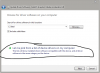
And Ive tried with removable storage HP_TOOLS removedAttached Files:
-
-
man... I was really hoping this would work for people... sorry I wasted your time man, I wonder why they made BIOS updating so difficult for clean installs. One thing that I can note is I did not run winflash as admin, but I can't see why that would matter... man
-
I'm pretty sure it's 10.6 although I haven't installed it; the version number (8.741.1.3) is lower than that of 10.7 on my desktop. I wouldn't install the HP over 10.7 if you've got it installed, probably would cause bad things to happen.
Oh also, does anyone know how to get Quickweb back after a clean install? It's a third-party SSD so I don't have anything that was on the original install, but I've got the original HDD as I received it basically. I have the SWsetup folder and I tried installed the HPQWEnvy thing but it just gave me the settings panel in Windows, but no actual QW. I don't mind too much since with the SSD it boots Windows in around 30 seconds anyway, but it would be nice to have.
I had been under the impression that Quickweb was on a separate chip on the motherboard so I'm a little confused as to why it's gone after a clean install though. -
@Mike... are you on F.02 BIOS? I don't know if this would help but have you tried resetting options back to default in the BIOS? Try resetting the CMOS as well. Turn it off, take out the battery and AC adapter, press the ON button for 30 seconds, and boot up your computer. Then try updating the BIOS.
-
I hadn't thought to ask what BIOS he is on, It's not a good idea to jump too many versions when updating a BIOS...
-
Just wondering, does HP Envy 14 with a radiance screen have any light bleed from the bottom? I found it in every laptop now days, and I have difficult time distinguish between black and gray near bottom 1/4 of the screen...
I am hoping that the radiance screen doesn't have that kind of problem. -
Doesn't seem to bleed for me.
-
According to Justin in the drivers thread it seems like there will be an envy 14 refresh soon based on some updated documentation....interesting.
-
No, it's 10.7. I installed it shortly after that post: http://forum.notebookreview.com/hp-...-owners-lounge-part-deux-316.html#post6611535
QuickWeb is actually just software based, probably set up like a customized dual boot configuration. It's in your SWSetup folder called HPQWEnvy. -
F.05 which it came with. Ill try doing that though
-
I have a 2nd e14 coming to me. i currently use i5-450 and the other one is i5-520. i don't know which one to keep. money isn't a factor to me. if it's a small upgrade in speed and security, i'll probably keep the i520 and return the 450 back.
my 450 is in good condition and very low whining with BT on. hopefully, my 520 will be the same.
anyone have any other opinions or details between these two i5 ? -
Taking out battery did not work either.
-
Wonder what it'll include...
-
Just did some updates to the E14, BIOS and ATI driver...the BIOS went smoothly, seems to improve the high pitch sound, but not 100% sure. Okay, the question is...when I updated the ATI driver, the screen went blank on me...so after a while, I closed the lid and re-open it and BAM! BSOD...dumping memory, is anyone having the same issue?What might cause it?How to read the DMP file?
-
what power plan are people on? HP recommended?
my battery bar is only showing 1 hour 42 minutes for battery life??? -
i did a minimized system recovery and i'm just wondering, how do i get rid of the recovery partition?
-
Make the recovery DVDs first, then go into administrative tools, computer management, storage select the recovery partition, and delete it. After you delete it go to your main partition, right click it, and select extend volume, follow the on screen instructions after that.
-
Will your computer not boot at all now? When the screen went blank on me, I followed the instructions that people here listed. Wait 10-15 minutes or until HDD activity has calmed down to be sure the installer is finished, then press windows key, right arrow, enter to shutdown. Restart the computer and the update should be applied. If it won't boot at all try going into safe mode, press f8 at start up and then try a system restore.
-
Hey fellas,
I am in the process of writing up a "home based" review of my new envy 14...
And whilst testing the mDP & hdmi out's I bumbed into a little problem.
I cannot connect any other display then a DP display to my mDP connector.
It recognized the display and the res, but no image what so ever.
This was done though a normal mDP -> dvi adapter.
The same display worked flawlessly though hdmi->dvi adapter.
So I started to search and google.
It turns out that our envy's have a 'normal' dp female connector instead of a dp+ connector.
What this means is that this mDP can only transfer a dp video signal.
So if you want to connect a dvi monitor to it, you need to use an active adapter. ( like this one, witch is power by usb to provide the signal dvi/vga monitors need.)
So ... my question to ya'll.
Did anyone have any experience with this phenomenon?
And what to do now? -
Does the ATI driver really break the brightness controls?
-
thanks zman420
another question, i think this might have been asked already
is there any way to use the keyboard volume buttons without leaving full screen
i was watching a video and when i used the shortcut, it exited full screen mode
kind of annoying -
There is one on page 1, uninstall mediasmart smart menu to get HP's to go away
*HP ENVY 14 & Envy 14 Beats (1XXX series) Owners Lounge, Part Deux*
Discussion in 'HP' started by 2.0, Jul 22, 2010.