 Problems? See this thread at archive.org.
would you be able to swap out a core i5 and replace it with a sandy bridge? or would you need a whole new motherboard?
-
-
new motherboard
-
damn it
 haha what kind of dedicated gpu you think they will upgrade the envy 14 to? since sandy bridge runs cooler...
-
please forgive me if this has been answer in another page, but going through 436 pages of posts seems like a bit of an undertaking at the moment...
I have a recently clean installed envy 14 with
Intel(R) Core(TM) i7-720QM Quad Core processor (1.6GHz, 6MB L3 Cache) with Turbo Boost up to 2.8 GHz. I looked at the 'clean install' instructions on the first page of this thread Justin's driver page explicitly states NOT to install 'Intel Turbo Boost Technology' driver. I was doing a stress test using PRIME95 and the processor doesn't seem like its breaking through 1.6Ghz level. am I looking at the CPU-Z reading wrong or is PRIME 95 not pushing the processor enough to go 'TURBO' or do I not have the proper driver installed for TURBO to be enabled?
if anyone can shine some light on the subject it will be greatly appreciated.
Thanks in advance.
p.s. I've used the HP support page for drivers and the TURBO BOOST driver I'd downloaded doesn't seem to take. -
Is there any word on what the quickship model(s) might look like after the refresh? I'm not going to be able to buy direct from HP, so quickship is all I get.
-
Most likely not. Installing RAM upgrades are pretty straightforward.
-
I don't know about you guys, but I think it's crap how HP refreshes the E14 so soon with something the original one should have come with (touchpad). If the new touchpad indeed delivers what's promised, I feel it's worth an RMA because this will be the best PC touchpad that finally might compare to Mac's.
-
it doesn't install?
that makes sense since I think the driver isn't labeled right. It's technically the intel gpu driver (which doesn't exist on the quad core)
did you backup your swsetup folder? That should of had all the drivers you need to install. -
You'll only get full turbo boost speeds with 1 or 2 cores being used. IIRC prime 95 on a quad core uses all four cores = no max turbo boost. Try running Super Pi at idle (no other apps running) to see if you hit the 2.8Ghz speeds, it should use only 1 or 2 cores.
-
I tried all the Audio tweaks mentioned on Page 1: Audio Output Tweak - by poster JJB (works with Envy 14): http://forum.notebookreview.com/5668647-post3614.html
First, I didn't notice much difference in the ENVY 14's audio from before the tweaks, maybe more of a bassier sound, but definitely not the 3x improvement in volume level mentioned in the post. I wonder if the ENVY 14 already has a fairly high volume level compared to JJB's ENVY 15.
Second, The settings mentioned didn't work when I tried making phone calls using Google Talk. I got a loud buzzing sound when the person being called picked up the phone, and was unable to hear them. I determined the problem to be the 24 bt 96000Hz (Studio Quality) sample rate and bit depth settings. None of the Studio Quality settings worked with Google Talk. I was able to get it to working by going back to the default 16 bit 48000 Hz (DVD Quality) setting. Just something to bear in mind for anyone trying to use their ENVY 14 as a phone. -
After a little tweaking and installing Reil's trackpad software, I have actually been liking the trackpad, though I must admit you are right about how they should have included the newer trackpad. I really only use 2 finger scroll, and the default synaptics 2 finger scroll sucks, reil's works very well. If they could fix the grey lines screwing up 2 finger scroll with pinch zoom and make pinch zoom work a little better, this trackpad would be great.
-
i finally got my envy 14 back from repairs. they replaced the motherboard and the problems seem to be resolved. it was returned to me in factory settings so i decided to do a clean install using the windows 7 disk i made before but at the end it said something about my windows 7 not activated but it still booted up. in the bottom right it says "This copy of Windows is not genuine" I checked under the battery and my key is still the same.
-
You might have to call Microsoft. They should take care of it.
-
I heard that was a real pain. I dont understand why this problem occurred because I did a clean install before i sent this in for repairs and i didnt get this problem.
-
Activation keys are tied to the motherboard that they are installed on. If your motherboard was replaced, then the system thinks that you are using the key for a second time.
-
I haven't tried using those settings with any internet phone apps yet, but the Beats equalization trick definitely boosts the volume - I use it when I'm teaching, since I have to play songs for my students and one of my co-workers swiped my powered speakers. I wouldn't call it 300%, but maybe a 75% boost in output, which makes a huge difference in a large room with a bunch of chatty kids.
It's an issue of using an OEM key on a retail installation. The general advice is to back up your key with some program (I don't recall what it's called), but in your case, you didn't have much reason to. The other option, as mentioned above, is to call Microsoft and get them to sort it out for you. -
ohh crap my motherboard was replaced. so what should I do? i already did a clean install
-
Just call Microsoft. They should take care of it. I know it's a pain, I hate calling anyone, but I'm pretty sure it's the only way. And FWIW, I clean installed and my activation key worked for it. It's gotta be the motherboard replacement.
-
yeah im sure it is the motherboard replacement. before i call microsoft, is there a way i can restore my laptop back to factory install with the genuine windows 7 it had after doing a clean install?
-
im thinking i could just restore it back to how it was using the recovery disks and then just do a minimized image recovery to avoid any issues
-
I think clean install is the way to go. HP installs so much unneccessary crap even on minimized that I believe it causes issues. You could try, but recovery dvd's don't work on BIOS f.12. At least they didn't work on mine on f.12 and some other users here who tried. Maybe they will work on yours though.
-
well the system recovery seems to be working. not sure which bios i have but i just put in disk 1 and booted from cd. i just hope it gets me back to exactly how it was before the clean install, with a genuine windows 7 and all.
if i wanted to do a clean install then i guess i would need to use that program to backup the new activation im given with this new motherboard and restore using that. but if this system recovery takes me back to exactly how it was before ill probably just do the minimized recovery to avoid anymore problems. -
Hope everything works out well. It really is a nice computer, I have been thoroughly enjoying this machine.
-
ok i thought doing a system restore using the recovery discs would take me back to how it was before the clean install but it did not. It looks like i now have windows home basic. and also under hard disk drives, it says local disk (c) 32.7 GB free of 67.9 GB...? also has HP_TOOLs(D) and system(F). what is going on?
-
I don't know, that sounds like something got screwed up there. HP dosen't seem to be able to do anything right at this point. Maybe just clean install and call MSFT to get activated. I don't believe you should get any trouble out of Microsoft, after all you do have a legitmate product key.
-
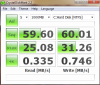
Does anybody think that these scores are in line w/ the Toshiba 320 GB HDD?
I have gotten an ESENT error 508 that indicates I have slow disk performance and says I may have faulty hardware, but the actual disk checks out OK, it could be Intel's drivers, but I have been wondering if something could be the matter.
-
I thought i was one of the lucky ones that didnt get the CPU whine, turns out that i have a Power Supply Whine. omg
-
yep i just clean installed it again and called up microsoft. got it working thanks all
-
Awesome.
-
I get similar numbers on my hdd which has used about 1/3rd of the space and has not been defragged yet.
so.
*shrugs* probably normal ('course my hdd is having hard freezes once in a blue moon but besides that I don't think anything is impacting performance) -
I have gotten freezes, along with some kind of weird audio noise (I was listening to music at full volume) but they worked themselves out after about 20-30 seconds, I just worry if maybe something on the motherboard is bad, but I was doing a lot when it happened and don't believe there are any tests for motherboard quality.
-
I've gotten that weird audio noise too. No like 20-30 second freezes and the audio noise lasts like 4 seconds.
'
does the audio noise sound...I dunno. Kinda like white noise like the computer is hanging a "grrrnnnnnnng" sorta noise?
anyway run the system diagnostic stuff (I forget which f key this was at boot..maybe to delete to bring up the list) and run the hdd test.
if it fails your hdd might be bad like mine was/still is (but since it hasn't been catastrophic yet...I've been lazy and haven't called HP) 'course I'm just tempting fate since I know my hdd failed the short DST (drive self test) which basically means "dude drive is fatal, stop playing russian roulette" -
Ya know, that's exactly what it was like, I couldn't think of a way to actually spell it. I will run the disk check tonight, though it has passed about a month or so ago, and see. Last time I ran it, I stopped it after it had passed the short DST. I will run it through to see. I wonder if these Toshiba drives aren't just faulty drives. Maybe I should just upgrade to a SSD since those are all the rage now.
-
Mine failed the short DST on the system diagnostic
it failed the long test on the bios diagnostic
and yeah I'd like to upgrade to a SSD...except they're a bit way too expensive -
So just to confirm, I can clean install then revert back to factory using my recovery DVD's or USB stick even if I've deleted all HP partitions?
-
I have a hunch it's going to get better.
Not that this will necessarily have an effect, but I mailed them my customer survey post card a few months back which contained a suggestion that they work on the touchpad software so I don't have to rely on other people to write it.
Few things.
HP's refreshed DM3 comes with a redesigned interior. They call their cooling system the "CoolSense."
Also my friend just got his Envy 15 back from the repair center. Apparently the motherboard was a lemon, so it had to get completely swapped out. But here's the thing. His Envy returned with a set of vents in the rear section of the bottom chassis section. One issue for those of you who may not know: The Envy 15 doesn't normally come with rear vents. Only the Envy 14 normally does.
I don't want to generate shallow speculation, but it looks like a refreshed Envy 15 is along the way! I, for one, welcome our new HP Overlords.
No, seriously! I'm loving my Envy 14 day by day. First time I've been able to call myself a "proud owner" of a notebook.
On a side note, I'm still debating splurging $100 on a 4gb RAM stick so that my notebook gets the full 8gb DDR3 treatment. I don't want/need an SSD (yet) as it's still too damn expensive. -
i believe that is exactly what i tried to do earlier and for some reason it didnt work. i received my laptop back from repairs and it was reset back to factory. i did a clean install and wanted to go back to factory using the recovery disks i made when i first received the laptop and i got several strange error messages during the system recovery using the disks but it kept going. when it finished i was left with a laptop that thought it only had 69GB possible on the hard drive and it had windows home basic, amongst other strange deficiencies. i didnt waste much time trying to figure out why this occurred or how i could fix it. it is possible it is because i made these disks before they replaced my motherboard. i just did another clean install and everything was fine as a clean install. i did not bother trying to go back to factory again.
-
so this is the first time ive used this laptop in over 3 and a half weeks and i gotta say i forgot how dang noisy this thing is. installing starcraft 2 and the fans are ROARING. maybe i was just spoiled by the silent dell laptop i used while this was being repaired.
-
Well I don't know what your friend was smoking but the E 15 has always had 2 vents on the rear of the bottom chassy, that's the air intake vents for the 3 fans. There is also a hidden vent in the hinge area on the left side. Considering there is no heat issues on the E 15 to begin with and the newer CPU's coming out will use less power I guarantee HP didn't just retool the magnesium alloy chassy just for the fun of it...
-
Ok, it passed the disk test from diagnostics again, so I've just gotta say, why the weird audio noises/freezing? Could it be a driver issue? A motherboard issue? A codec issue? Anybody got any suggestions? It's rather unpredictable when it happens (not reproducable to my knowledge), and there is usually a service timeout or an ACPI error logged when it happens. Sounds like what MagusDraco described, white noise with a GRRNNNNG sound. Sometimes it's just for a few seconds, but more than once it was a freeze for about 20-30 seconds that worked itself out.
-
Well. I phrased it wrong.
His Envy's BACK portion at the hinge now comes with vents very much like the ones found on the Envy 14. -
just a thought about the supposed envy 14 refresh, you'll notice the beats edition envy is slightly heavier and thicker than the regular one. Maybe they reworked the interior, and are porting this design to regular envy.
-
As I said in my last post there is one there also, since the first gen models. We Already have the service manual for the gen 3 and the chassy is identical. See pages 11 to 14 -- Envy 15T 1200 CTO Service Manual And that doesn't even show the hidden vent in the hinge area...
-
I have some info about the Envy 14-1100 model.
Found a service manual from September, a first edition. So I believe this is the manual for the new Envy 14-1100. I compared the part number for the top cover (which includes the track pad), the spare part numbers are identical in the two manuals. So a track pad update seems unlikely.
So far the only difference is the number of CPUs listed in the manual. The newer manual contains almost double as many CPU choices.
GFXs are identical. The clock isn't stated, so can't comment on that.
HDD: There is now a choice of 640 GB and 750 GB at 5400/7200rpm
Battery: Identical
The difference in weight stated on the Danish HP site, seems like an error. There is no difference in weight when compared the new and old service manual.
The one IF here is the new manual. I can't 100% confirm it's the 14-1100 manual.
But if it is, then the only difference is new CPU + HDD choices. -
Could you please provide a link to that document or upload it yourself...
-
My Envy 14 is less than a month old, the dvd drive was messed up and I had called them to send a replacement which they have not until now and always tells me when I call them that it will be there in a few days.
I also have fan issue and cpu whine issue.
I would like to know is it worth sending the laptop back to HP so they can fix the problems? Can they fix cpu whine and fan?
Please let me know if its worth my time and if they can fix those problems, if not I will just sell the laptop. -
TWEAKS FOR IMPROVING SSD READ / WRITE SPEEDS
After many hours and of trial and error testing of 'hidden' advanced processor power plan settings the following tweaks appear solve the poor SSD read / write speeds that have plagued most notebooks that use the PM55 & HM55 chipsets (most others chipsets show improvements also). These tweaks have been confirmed to work on the following SSD brands: Intel, Samsung, Corsair, Micron/Crucial .....
For the full instructions to fix the slow SSD R/W speed problem go to THIS thread
HERE is a link to the original thread that got us to these tweaks. It has a lot of test data and shows how we came up with the tweaks in the above link as the best compromise for performance with little to no impact on temps and battery life.
NOTE: 2.0 has added a link for these instructions to the opening page. Please refer people there if the issue comes up in future posts....Last edited by a moderator: May 8, 2015 -
PUBLIC SERVICE ANNOUNCEMENT
12.5 MM Height HDDs will NOT fit in the Envy 14.
See thread: http://forum.notebookreview.com/hp-envy-hdx/514949-1tb-hd-install-envy-14-a.html
This notification is also added to the first page under FAQ/HDD -
I think HP need to update the BIOS. It seems like when coming out of sleep, sometimes all of the processor's idle states aren't being enabled. I have viewed a few messages in the event viewer that state the processor exposes 3 idle states, and also some messages that say it exposes 2 idle states. I remember on the i7 desktop platform, it took the vendors quite some time to actually get the BIOS right with all the new processor features.
-
That coulld be due to what power plan your using. Power saver allows deeper idle states....
*HP ENVY 14 & Envy 14 Beats (1XXX series) Owners Lounge, Part Deux*
Discussion in 'HP' started by 2.0, Jul 22, 2010.


