 Problems? See this thread at archive.org.
I forgot to update you guys!
I have a 520m, 160gb SSD, 4gb (1 dimm) RAM, and my machine is DEAD silent.
My house is air conditioned to 78 degrees if that matters.
-
Right now my computer is just running firefox and some background processes. The load is basically at zero. I don't hear a whine at all from two feet away with no other noise in my room.
If I literally press my ear up against the laptop, I hear a very slight whine- is that what you're referring to? Maybe I'm starting to go deaf at 26!
edit: specs are 520m, 4gb 1 dimm, 160 gb SSD. Same as ostartero, and I agree with him- dead silent. -
I doubt it - Anything will make some noise, but mine is audible from 20 feet away
-
no, I saw that but it's not showing actual power use of the CPU. As I said the only thing any of the E 15 owners have found that will show this is everest (and maybe only the full version I guess).
I really appreciate you taking the time out of playing with your new toy and trying to post that info. + rep and thanks!
Edit: here is what reading I am looking for :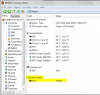
-
540m? shenanigans
wait...thats not an envy is it... -
What is "working resolution"? (For example, 1600x860 working resolution)
-
I also have a 520m, 160gb ssd, completely quiet
-
thats a dv6t.
-
Yo. people with envy14s.
Check on this for me.
Disable The Fn + Function Key Combination on Certain Models HP Envy 17-1003xx Notebook PC - HP technical support (Italy - English) -
Right now it's barely audible; I really have to put my ear close to the laptop to hear it and even then I can barely hear it. Earlier today it was louder and I could hear it from my chair if I listened for it.
-
Can anyone post/has anyone posted pics of the 14 with the slice attached, as well as maybe some size comparisons with a few common objects? 14" was never my ideal size, but the system was just too good to buy anything else but I can't help but wonder if I'll be disappointed by the size of it...
-
I agree with the above statement - however, it will just take me a while to get used to the keyboard. I don't really like the touchpad but I won't be using it much so it's a moot point
-
Well, I'll have both the 160GB Intel and 256GB Samsung, so I'll be able to run some side-by-side performance comparisons.
I ordered the Envy 14 with a 320GB HDD when it was first released and purchased an Intel X25-M G2 separately (back when we weren't 100% sure which SSD the 160GB in the Envy was. When the 30% BCB came up, I reordered with the 256GB SSD. Since I'll be returning the first laptop, I'll end up with the 256GB in the Envy 14 and a seperate 160GB X-25M G2 to test against. -
What about it? The BIOS has always had an option to reverse the dedicated function keys back to true function keys, and then you need fn+volume etc.. All the envy's have the same BIOS so it should work fine on the 14 too. (Yes, I have BIOS F 02A also)
-
The touchpad is actually great, you just need to spend some time tweaking all the parameters in the Synaptics control panel to get it working well...
-
just double checking what some people were asking in another post in this forum. (guy was complaining about alt+f4 not working)
-
Im hoping my 450 doesnt have the whine either! Thanks for the feedback
-
Ha s anyone confirmed if the i7 CPU's get throttled on the E14?? I know the i5's do not but have not seen anything about i7's...
-
I haven't experienced any issues with the i7
It appears to be running at full stregnth -
So i'm planning to upgrade my RAM a month or two down the road (maybe 2gb or 4gb single), would any laptop ddr3 memory work okay or are there issues with mix n' match brands?
-
It would only get throttled when on battery. ALL the E 15's get throttled but especially the i7's to an X7 multiplier... It has been confirmed that the i5's do not throttle on the E14 but have not read any reports on the i7's yet...
-
The rule of thumb is to used matched sticks but I have mixed brands on occasion without issue, if you mix them just make sure they are the same speed and latency... If you have to buy new sticks to upgrade I would stick with matching what you get with the machine, there should be very little price difference between brands so it's cheap insurance to pay for the matching brand.
-
Clean install or default bloatware? Wifi?
-
aclbosox: do you hear any whine from that cpu?
-
This is excellent news. This means the i5-520 whine is isolated to a few cases. If I get a whiner I can always keep RMAing until I don't!
(yes ironic) -
Sorry if this has already been discussed, ive been jumping around pages on this forum, but is the switchable graphics automatic, or manual, or both? and how does it exactly work if it is manual?
Envy 14 - expecting tomorrow!! Can't wait, probably going to refresh the Fedex tracker 100 times before its at my front door. -
It's sort of automatic. It will switch to integrated on battery, unless you change the settings.
-
When you plug in or unplug the adapter, this window pops up asking you if you want to switch graphics:
http://i.imgur.com/DiTsS.jpg
Alternatively you can right click on the desktop and switch the graphics in this window: http://i.imgur.com/UgMUR.jpg -
no it's almost silent
all I can hear is the fans... and they're not even that loud -
I have a question about the recovery partition set up initially. Does this perform the same function as the recovery DVD's I created first thing? If so, can I get rid of this partition? I could use the extra 15gigs of space since I went with the 160SSD. Thanks!
-
Can you run prime95 and get temps?
http://mersenne.org/ftp_root/gimps/p64v2511.zip
Fire it up, select just stress testing, pick "in place ffts", type in 8 torture test threads to run just below that, then hit ok. Let it run for ~10 min then report back on cpu temps and if the laptop feels super hot or not?
(you'll also definitely want to plug into the wall for this) -
Good to know! Thanks!
-
Cool, I was curious as to what options you would have. +rep
Maybe those images should be moved to the O.P. under screen or switchable graphics info... (2.0/o) -
After 2 hours on battery (Starting at 100%) with 80% - max brightness, keyboard backlight on, while installing/uninstalling, copying files from USB powered external HDD to my SSD, playing music, WiFi and browsing, and running Civ4 for 15 minutes (on integrated), my battery meter is at 50%. Pretty amazing if you ask me. I think with light use I can easily get 5+.
-
Also acl, when you reported 3:25 with light tasks, did you run the battery all the way to 0 or was this just the estimated time listed?
Was this with wifi on? What sort of light tasks were you doing?
Thanks a bunch, sorry for the 3rd degree but if we can still get good time with discrete only graphics and a quad core cpu then my 540 is getting shipped right back and upgraded... -
Do we know what the 1 dimm 4GB stick is currently in the Envy 14's?
I have mine but Idk how to look that up if I can. -
Question to everyone whos received theirs: Do you feel like the screen tilts back far enough? Can you use it up close in your lap?
-
Stirk used Speccy and found that his ENVY 14 has a Samsung M471B5273CH0-CH9. You can search Google and find this for around $100. You can do the same to see if you have the same exact part number.
-
Down load CPIUD 'CPU - Z' and open the 'SPD' tab and it should give the manufacturer and P/N and latency specs. Link on opening page about halfway down.
-
As long as it's the same type of memory, DDR3-1066 or whatever...you're going to be fine. If you can find the same type of memory from a different make for cheaper, go for it.
Samsung..Micron...Kingston..all made in Taiwan.
-
Agh. I'm annoyed by one thing.
Nothing major, but according to the pics,
the Print Screen (aka ss taking button) is shared with INSERT.
You have to press fn + Insert to get Print Screen.
That's gonna be annoying cuz I use Print Screen a LOT.
And insert, the only times I use it are accidental. That's a bit annoying for me
EDIT:
Oh wait nvm. INSERT is shared with f12..
then what's ins? -
can anyone comment on the size/weight of the AC power brick?
-
Uh.... Micron is made in Idaho USA or China and several other foundries....
-
Samsung M471B5273CH0-CH9 is 1333MHz not 1066
-
Yes the screen tilt is very nice. The only downside of having the screen tilted so far back is it obscures the back exhaust port slightly. But from my use, (which hasn't been that heavy) the right port is more than enough. The only heat I've noticed yet is the upper right was BARELY warm when I was watching some media for a few hours on end. Everything else was cool. -
Hmm, looking at that link for Stirk's system, it appears that Speccy only sees the active graphics adapter, not both.
-
The only power brick I have for comparison right now is my 360's, which is a monster! The size and weight seem perfectly reason, though I don't have the exact specifics. A little bit smaller than two fists put together. (my hands might be smaller than most )
-
Actually when you use it with an i5 CPU it gets downclocked to 1066 as that is the max speed of the mem controller for the i5's, an i7 would run it at full speed. I've got the same series and they read as 1066....
-
so they ship it with 1333 Ram on an i5, intresting
-
So is the AC Power brick bigger than the Dell Studios? The dell studios is awesome, it's fairly long but very slim. It's only about 1cm, I have seen some other ACs from other laptops and they're massive.
*HP ENVY 14 (1XXX series) Owners Lounge, Part 1*
Discussion in 'HP' started by 2.0, Jun 21, 2010.


