 Problems? See this thread at archive.org.
I know over time the screws do get loose due to the vibration (hard drive, typing, carrying around etc) so in a couple years it might need some tightening
-
-
How about E14 owners listing which earbuds they are using that give great sound without the hiss problem. My Envy will be coming in a couple of weeks, and I want to get a set of good buds for the best sound, but I don't want to buy something that will end up having the hiss problem.
-
I meant my X-25V
And processes are less on my desktop. The bootup seems faster on the hp compared to my MSI mobo but going into windows seems to take longer. (I also password secured my laptop so maybe that is why?)
Of course its still very fast just I've heard magical things about the X25M and how it is faster than the Value 25V but I don't really see it.
Gimme a few minutes and i'll shut everything down and have a race between my desktop and laptop to see if it is that much faster. -
Well this was unexpected.
When emulating the gamecube (not getting full speed on windwaker, get 80-90%) I ended up seeing core0 running from 2660Mhz to 2793 Mhz to 2924 Mhz
core1 was a constant 2660 Mhz.
the hell turbo boost? Do you not shut off the other core? And if so, hell yeah
was using cpuid to view the speeds -
hey guys i didnt bother doing a clean install, removing bloatware or updating the drivers because this laptop will be going back soon once my second one arrives anyway but would a clean install, driver updates, etc. fix these issues?
The internet has randomy gone off several times and it wouldnt even let me try to reconnect. The only way to fix this was with a restart. I really doubt it was my internet as i have used my dell laptop in the same location for 4 years and never had this issue.
A few times it wouldnt let me switch the graphics card. I closed everything and kept clicking to switch to the other gpu but it wouldnt budge. Also had to restart to fix this.
Two times i would hit the brightness buttons but it wouldnt register. Had to restart...
One time I would keep trying to use the task manager but it wouldnt respond. Restarted again.
I realize I only had to restart the laptop to fix these issues but it got a bit annoying and I have only had this laptop for 2 days.
Oh and one more personal gripe. I dont seem to get even 3.5hours on power saving mode, lowest brightness and only browsing the internet. -
Why is everyone burning this folder? Can't you simply transfer it to a flash drive or an external HD? -
I use the Razer Moray+ IEM's and they sound incredible with the beats audio from the E14. No hiss, great sound stage and bass reproduction. Plus they have a built in mic for gaming .
-
Well, the cores change speed thousands of times each second. Pretty sure that CPUID doesn't poll the processor enough to show you each and every speed change.
-
true. but I thought it shut off the other core.
*shrugs* maybe not -
OK cold booted both laptop and desktop.
Desktop with 55 processes and the X-25V is about 5 seconds slower than my envy 14 with the X25M and 57 processes.
So I guess there is a difference but posting was the main determining factor as my MSI mobo took forever to post whereas the HP was quick and fast since its so basic. -
you can't, at least not with the drivers that come installedLast edited by a moderator: May 8, 2015 -
why dont they at least make that an option? what exactly is the point of making that area register movement? it is quite annoying
-
why is it annoying? i dont notice it at all
-
i find when changing between differently contrasting windows, the computer readjusts certain brightness settings or something
like if i switch between this site, and say itunes with the dark background...theres like a half second delay and i see the settings change slightly; change back and its the same deal
whats this from? -
Well the HP was about 7 seconds slower than it is now. No one knows what they did on the newest F 02A BIOS, but it cuts 7 sec fron power on boot and 10 sec (for me) on full restart. W/ 48 prcesses loading I get 14 sec boot and 24 sec full resart, both timed to windows welcome 'tune'.
BTW I found that all that HP wireless assistant did was slow down my connection time to wifi, Win 7 does it 6 seconds faster, so thats another process (and bloatware) you can get rid of if you want... -
If you noticed the pad is 16:9 just like the screen, so you can move from corner to corner with one 'swipe'. If you enable 'tap to click' then you really don't need the buttons 95% of the time. Again, if you give it a chance I bet you will love it in a few days with proper settings.
-
alot of displays now use dynamic backlighting. When the image is darker, it lowers the backlight to make the blacks darker and when the image is lighter, it increases the backlighting to make the whites brighter. It is a silly gimmick if you ask me, but whenever you seen Dynamic Contrast Ratio, it refers to this. A black screen having a low backlight vs a white screen with the bright backlight.
-
I thought so. It is probably and app for 'adaptive brightness' which changes the brightness based on a sensor and ambient light conditions. To check, go to more power options (click battery) > change plan setting (the one your using) > change advanced power settings > expand 'display' + > click on the + for 'enable adaptive brightness' > select off for both > apply... If you had the option 'on' then this might change your brightness control adjuatments to be smoother and should stop what you were seeing between screens...
-
I don't see that.
I do see "Selective USB Suspend Settings set to enable when plugged in and pci express Link State Power Management turned on when plugged in.
*turns those off*
wireless is on moderate power savings when on battery, maximum performance when plugged in by default on HP's plan -
it can be annoying for people who usually place their finger on the left click and surf with another hand (like me). old habits die hard, and the only real fix atm is to change the way you navigate.
-
no option exists
-
So my envy was supposed to be here saturday.. but due to more delays (yay for living in florida) i will be getting it on monday.
I consider myself a noob when dealing with clean installs because i have never done one before and people are kinda scaring me saying how they keep messing up. I just want to go step by step really quick to make sure i'm doing this correctly. I dont want to mess up my system and wait another month for a new one to arrive.
Sorry if this is basic to a lot of you, but i'm sure this might help some other people who are at the same skill level as me. So basically:
1. Create recovery discs. Just search for recovery disc creation and pop in the DVD's.
2. Copy SwSetup onto a flash drive or External HDD. (seems a lot easier then burning onto 2 dvds)
3. Go online and download a windows 7 disc. Burn the download to a disc.
4. download the backup program (beta version): http://directedge.us/content/abr-act...up-and-restore
5. save the program and all the files it backs up on an external HDD
6. Pop in the windows 7 disc that we downloaded and have it reinstall onto your computer.
7. Use the directedge program from step 4 to restore OEM activation. (just double click on program and it restores everything for you?)
8. Download an anti-virus like avast.
9. install windows updates.
10. Install drivers from hupport.hp.com and ATI's website Mobility Modder - ATI Version, Install the Latest Drivers on your ATI laptop.
11. install all the software you want like office, etc.
and your done?
Thanks in advance for the nitpicking of my long post. Sorry for my noobieness lol. I just want this baby to run perfectly
-
@m48955
Careful on the ATI driver, I think your stuck with the one you get with the envy due to the switchable graphics. The link you have is not correct, do not use a mobility modded driver from 'driver heaven'....
The ATI driver is available from the envy 14 drivers thread, link on first page. -
Ok thank you. But is that it? everything else is correct?
Also i got mine with an i7. Would that make a difference? -
it might.
also core0 and 1 at 74 C, gpu are 76 C after playing bioshock from the start of the game to the start of the medical pavillion with a house whose AC is kinda messing up (meaning it's like 83 or so Farenheit in here)
Gaming DOES make the back of the computer by the power button warm because the hot air flows up the crack and over there. Oh well. Can't help that due to the design. -
you also dont need to burn the .iso, could get it done quicker by using something like daemon tools to mount it then run the setup
but i dont want to confuse you further -
Hmm good job on HP to get that post time down. Yea I haven't uninstalled the Wireless assistant yet but I use windows to get onto the internet anyways.
And how do you get 14 second boot? from pressing the power button to windows tune it takes me 42 seconds. Heck the HP post was around 10 seconds in itself. -
SIGHHH
I might actually... go to ... the dark side...
I'm considering a MBP with boot camp windows 7.
The Envy 14 models with the minor flaws aren't cutting it.
Yeah I know its stupid flex in the keyboard and minor raises on it aren't important, just, if I'm paying a premium price I'm entitled to a premium opinion. Might as well hop on the MBP 13'' instead.
MBP 13'' is just so pretty, and I could configure it for the same prices :/
The determining factor will be how shiesty the lowered memory in the gfx card is // what it causes.
(256 instead of max 1024? I asked in the graphics section if that will lower the performance and if it does then no way.) -
Haha well i've mounted iso's before for torrented games and such. but doesnt it just make a virtual drive? I didnt know you could mount if the OS wasnt installed...
-
note that touchpad fluidity in bootcamp win7 is nothing like OSX. plus, battery life is not as great since OSX is heavily optimized to get great battery life. not only is graphics card weaker, the processor itself is weaker. c2d is last gen stuff; do you still want to pay a premium for it?
-
question, in the out of the box guide, it says to check out les optimization but that optimization guide is for vista. is it safe to assume that all those wud work for win7?
-
Man, I can't believe I'm even saying this, I'm usually so anti mac.
I'll probably use boot camp just for gaming, minor time killing stuff, mayyybe diablo III, in which case I'll use a mouse...
Sigh. -
well then
mount it, windows install setup.exe or whatever its called will start running, you click Install Now....and you're on your way
thatll save you the time of having to burn the disc at least -
until you eventually find yourself using windows for more and more and then you realize, why didnt you just buy a PC in the first place? OSX is lame
-
I forget how many processes you said you had running but they all take time (and popups . There are also dozens of services you can stop or disable that are unecessary which all cause delays in loading win 7. Also a lot of apps have things that load at startup which are not needed, I have a very 'clean' list of startup programs, see below, and also use system config to go with a selective startup under the general tab.
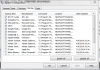
I don't want to post all the services I have disabled because some may be needed by different users, there are lot's of guides available online that give details on what is safe to disable and what is required. Here is one that has some good info: My Computer and Windows 7 Optimization Guide: Reduce Windows 7 Boot Time and Shut Down
Edit: also disabling the user account control saves quite a bit of time (and limits popups ), plus if you don't need security, then get rid of all users and logon and password, I have just an admin 'account' and boot right to the desktop with no input needed, and get rid of that pesky quick web thingy with the timer that pauses booting...
-
I lied, I don't want an MBP (I don't think)
Even if I got the rebate on the free ipod nano and sold the ipod nano, it would still rack up at least an $800 increased price to get the desired specs (160 gb intel ssd etc.)
Expansion on my reasoning (not necessary)
I thought at first I could get the free ipod touch/nano via the apple rebate and then sell it to make up for lost dollars.
Then I realized that I really wanted an SSD because they are cutting edge and cool, so I would have to buy a stock hd with my macbook and then purchase the intell SSD I wanted.
This brought the price back up a significant ammount, I realized I was using the post tax Envy 14 price, and in addition I would need to pay tax on all this mac ****.
When I factored everything, for my incredibly similar specced Envy 14 I would have to pay $800 more for the MBP.
So, I'd pay $800 for more battery life and a sleeker mousepad and design and WAY worse graphics.
Take a look at how much that 256 memory on the 330m will destroy your performance, its no good.
So, overall, NO GO ON MACBOOK PRO! -
everything is slower on the mac, and its twice the price. not even the most expensive mbp 15" is as strong as the envy14. with a mbp13 you would take a performance hit on every single component in the laptop. core2duo, slower video card with less vram, 2GB of ram instead of 4GB... and there are supposed to be problems with running bootcamp, less battery life, etc.
-
Isn't Diablo III gonna be on the Mac too?
-
Most notebooks are this way, at least most I've opened up. CPU/GPU and other guts upside down. This is good if you spill anything on the keyboard
There will be no issues. Gravity doesn't hold a candle to screws, sockets, solder, and good old fashioned glue.
-
Yes htw, but a lot of games mac OSX suffers from ~5-30% reduced fps, specifically in higher resolutions.
With a boot camp macbook pro running SC2 vs. a windows 7 boot camp running SC2, it becomes unplayable in high res on macbook pro and suffers reduced fps either way.
Its something to do with OpenGL sucking and Direct X actually being good.
go figure -
Hi ya, could someone please comment on the above? Reason being, I might ask someone to buy it for me, but there are only a few days between when HP says it will be built on the website, and the travel date.
Also, I am using a camera that uses an xD card, so if the card reader do not support it, and there is no way to switch it out, then I'll need an external one, hogging a USB slot.
Another question, the hard drive easily accessible/swappable? If it is, I'll probably use the 320GB drive with my PS3 and add an SSD of my liking
-
Hello All,
I haven't been watching this thread as actively as I once did. Now that everyone has started to recieve their notebooks, has anyone been able to confirm that you can swap the CPU to something else? Perhaps the i7-620m?
Thank you,
ccie -
Alright, two things:
1. This thread is all kinds of unwieldy. I have read the two new reviews in the first post here, but can I get an up-to-date comment or two on the battery life of this beauty? The last I've seen is a ~4:10 estimate from weeks ago. Apologies if I've overlooked something.
2. No, really, 2, as in you, 2.0. Thanks for keeping that first post nicely edited and updated. -
Hey folks,
Used to be you could order the Envy at costco.com. I just checked and came up empty. Anyone know what's going on?
JGE -
<width='640' height="385"><param name="movie" value="http://www.youtube.com/v/WMiaR2eYwao&hl=en_US&fs=1"></param><param name="allowFullScreen" value="true"></param><param name="allowscriptaccess" value="always"></param><embed src="http://www.youtube.com/v/WMiaR2eYwao&hl=en_US&fs=1" type="application/x-shockwave-flash" allowscriptaccess="always" allowfullscreen="true" width='640' height="385"></embed></object>
Check video at around 1:40 for hdd access. I didn't see any upgrade options for the reader when I ordered mine. Based on what I've been reading, there have been delays for some during the build probably due to shortages of components. Delivery is handled by a courier, and that seemed decent barring any weather or customs issues. No clue on the reader formats.Last edited by a moderator: May 6, 2015 -
- Pull up Task Manager (CTRL -ALT-DEL)
- Under the "File" select "New Task (Run...)_:
- Type "explorer"
This will restart Windows Explorer and you'll get your desktop back - all safe and sound. -
the card reader is SD and MMC.
so yeah...no xD cards I don't think. -
check Amazon for xD-->SD adaptors. under the covers almost all these different formats use the same interface so it's relatively easy to covert a smaller form factor to a larger one.
-
I highly doubt that anyone really cares, but I just established that the E14 with an i5-520m can run Asheron's Call at max settings on the integrated GPU! I guess it's official: the E14 is the perfect system for the retro MMO player on the go!
-
hah.
Go Go i5
*HP ENVY 14 (1XXX series) Owners Lounge, Part 1*
Discussion in 'HP' started by 2.0, Jun 21, 2010.


