Problems? See this thread at archive.org.
Ok it looks like CPU whine is a serious problem. How long til HP fixes this?
-
Damn. I think we should add another poll to see how many people are getting whine. -
I agree. A poll with 4 options for 520m whine and no whine and 450m whine and no whine.
BWs
-mac -
Hmm, mine got a little bit better. I tighten the screws as much as i could (without putting excessive force into it) and then tightened it a half rotation. The cpu whine is there, its not as bad as it was for me though.
-
I would like to know, how does the Envy 14 compare to the Envy 15 second gen? Does the Envy 15 outperform it in all fields (it should seeing it has better hardware).
Trying to decide between the Envy 14 (which I like) or maybe a Envy 15 or dm6 which has better hardware at the expense of slightly less protability I think. I wasn't planning on being all together mega protable with my new laptop, mainly just to uni and whatnot... -
It's a problem for all electronics. Anything can whine, LCD panels, GPU cards, PSU's, you name it.
You also have to remember, people who don't have this problem aren't likely to post about it.
In the poll for quality condition of E14, 85% of respondents have said they have little to no issue's with their new notebook. -
Envy 15 is actually about same weight and thinness. I was starting to look that direction as well, but seems the battery life is only like 1:30 with basic web browsing, ~ 1/3 the life of the Envy 14. Envy 15 has HD 5830 vs 5650 and 15 has no DVD drive.
-
All of you with the CPU whine should make sure and call tech support and get an case file started (with case number to refernce). Unless HP gets a major amount of complaints about a specific problem then it will never be a priority for them to come up with a solution.
So in other words Whining about it here is fine (yes pun intended ) but unless HP is aware of how widespread this problem may be, they have no urgency to take any corrective action on it......
-
I know that but the fact that it could happen to me freaks me out abit.
-
Would've been too easy! I'm RMAing, getting a i5-450.
I'm not very optomistic about the whine. I think this is HPs last chance for me.
I would like to know does ANYONE have an i5-450 or i5-520 and have a perfectly silent laptop when the fans are off? -
If it wasnt for the cpu whine, my laptop would be silent.
-
Yes, i5-520 here with no whining and no problem with fans constantly changing speeds.
-
Actually it's lighter (5.15lbs) and thinner (1.04") and battery life for me averages 2:45, wifi on and 80% brightness. See my 3Dmark06 score link in sig... Also I really don't miss the lack of a DVD, the external matching one work great when i need it...
-
megabytes....it was 8gb of mp3s i tried to copy and paste....said 55 minutes remaining and i flipped out at my post above
-
i just tested out the HDMI to TV....and yeah, its impossible to set it to 1920x1080 resolution
what garbage, i wanted to replace my HTPC with this....oh well -
One thing i really like about the SSD's on my desktop computers. Full virus scan only takes like 2min, instead of 20-30min.
-
guys vote here please and thank you.
http://forum.notebookreview.com/hp-envy-hdx/501749-hp-envy-14-cpu-whine-poll.html -
To give you an idea of SSD speed I just copied and pasted a 5.05GB music folder from my D: drive to my desktop and it took 43 seconds..... That is going from SSD to SSD though....
-
Maybe next year when we have dockable PC Pad's with Intel Wireless Display (WiDi).
Saw a video of the new 12" Asus Eee Pad. Docks in a keypad and folds up like a traditional notebook, but then you un-dock it and its like an iPad. Best idea EVER! Can't wait till all notebooks are like this. -
I thought the E 14 specs said up to 1920 x 1080p on HDMI and 2560 x 1600 on the mini DVI out. I think you need to use CCC display properties after you have an image on your external display for the control options to show up...
-
I wish i never messed with the cpu screws, now its making a sort of static sound long with the high pitched noise...uhg...
-
I'll take that as a challenge. -
Maybe that's why it was so slow for him. If you're going from an SSD to an HDD, then the bottleneck is your HDD and it will go as slow as the HDD. Problem isn't your SSD, its your old HDD.
-
If i was you, i would have just RMA'd it the second i heard it make any noise whatsoever. After a few thousand RMA's for CPU noise, I'm sure HP will fix the problem.
-
When I had mine, I hooked it up to my hdtv via hdmi and it output to 1080p fine.
Try right clicking on the desktop and picking "screen resolution" and you should be able to change it there. -
meh, screw that, my HDTV is bonkers....i guess this was just something i wanted to try
-
The internet problem (not being able to connect for no apparent reason) has happened to me a few times as well, although it didn't require a restart to fix, and any other applications that use the internet [downloads, antivirus] seem to function fine while the internet isn't connecting. I wonder what that is...
 I thought it was my router
-
did it...1600x900 was locked and unadjustable
-
I looked into doing this. I can't pinpoint the noise from anywhere but the cpu itself. Otherwise, I wouldn't mind a bit of varnish or glue on there.
-
Really? That's weird. I changed mine without any problems.
-
@Lvivkse
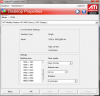
For your external 1080P output you need to find the CCC display control panel that looks like this, you normally have this same panel option for both the notebook display and the one your connected to (only when outputing) and should be able to set the resolutions independant of each other.
-
ill check it out, thans
-
Am I less likely to hear a whine if i go with a i7 processor? Also, how big of a decrease in battery life and increase in temperature am I going to sacrifice?
-
HP has a very poor internal comunication process, the RMA'd units normally don't seem to get logged by the type of problem and the QC guys are clueless about specific issues unless they see actual logged problems from the tech support department, thus my suggestion about calling tech support to log your problems formally....
-
lviv.
got to CCC. Go to desktops and displays. Go right click on the tv icon and pick configure.
go to hdtv support. pick 1080i30 or 1080p60 (if your tv supports it. pick the pal option if you're doing pal.
if your tv can do 1080p24 (HD, 120hz TV) try picking that, not sure how well it'll run
click on it to add support.
hit apply.
scroll down to it in the bottom half and pick it.
tv should display proper HD, over/underscanned automaticall.Attached Files:
-
-
I hear no whine on mine. I have not been able to hit 3.5 hours with mine. Temperatures are fine.
-
is it normal for one of my cores to be 10 degrees higher than the other?
-
Don't forget that the Envy15's multiplier is stuck at 9x on i5 (1.2ghz fixed) and 7x on i7 (*933mhz* fixed) while on battery power.
No one seems to be complaining about the Envy 14 in this regard. I'm guessing it's fine on the 14? Anyone cares to test?
And no, this has nothing to do with Windows' power management - it doesn't matter if you set min and max CPU to 100% on any power profile. There is absolutely nothing you can do about it on the Envy 15 - 1.2ghz on i5 and 933mhz on i7 while running on battery.
Look here http://forum.notebookreview.com/hp-compaq-voodoo-pc/445178-envy-15-fixed-multiplier-x7-battery.html -
first page has your answer to that (no it is not limited like the e15)
-
This is weird. I plugged my Envy into my HDTV and it worked straight away (though I haven't tried since the clean install). I just had to adjust the picture alignment, and zoom very slightly. My TV said it was recieving a 1080p24 signal, but do those adjustments mean it was recieving only a 1600x900 image? Or are adjustments normal?
-
After doing the clean install I am having lag at certain times while playing TF2 whereas before the install I never had any lag whatsoever. Anyone know what this might be attributed to?
I am on a wireless network btw, and I'm pretty sure I installed the proper drivers. -
got my momentus xt today! pretty quick boot times, login after typing in password is instant which is nice.
does anyone know if hp can replace just the whining power brick, since it is bugging the heck out of me. -
Im also looking into getting a Momentus XT. Did you do a clean install on this harddrive? Was it somewhat painless? Also let us know if your battery life is affected by the
-
Is anyone having trouble with the sound? When I play an video or audio file, the sound slows down with a buzzing effect. It's quite annoying...I hope that I don't have to RMA for this..
-
I dunno.
I might be doing it a bit wrong after all since well...it lags a tad bit compared to the screen on my computer.
least when playing a video. it's kinda weird. -
I have the i5-520 and my laptop is perfectly silent - I haven't heard any funny noises - I'm quite pleased. Sorry.
-
yes, i did a clean install. installing the drive was painless, just have to make sure you don't bend the frame that sits around the hard drive cause its thin metal with that black mylar film. i made two ntfs partitions, piece of cake. i'll see if i can do some battery tests later and if i do i'll post them under the battery life thread (though i think the hard drive will have minimal impact during idle).
-
I did a clean install with Windows 7 Ultimate 64 bit and didn't follow any specific order in installing drivers. I went down the alphabetical list in the SwSetup > Drivers folder (backed up the SwSetup folder per directions found on page 1 before flattening the hard drive).
Seems like all is working well so far - granted its only been a couple hours
-
Any whiners in the Boston area? If so, we can meet up and compare.
-
What are your boot up times i5 520 and 500gb HDD? Mine seems slow.
*HP ENVY 14 (1XXX series) Owners Lounge, Part 1*
Discussion in 'HP' started by 2.0, Jun 21, 2010.